Home / Past papers / MAD2 Quiz 1 / this paper
IIT M DIPLOMA AN EXAM QDD3 26 Oct 2025 - 26 Oct 2025

text
```
{{ message }} for interpolation
```
text
```html
v-bind:title="msg"
```
for binding attributes

text
```html
v-on:@click="doSomething"
```
for click event binding

text
```html
<input v-model="inputValue"></input>
```
for two-way binding
- v-if removes elements from DOM when false
- v-show toggle initiates re-render of the Vue component
- v-bind can bind attributes and class dynamically
- Vue 2 templates must use double curly braces for all text interpolation
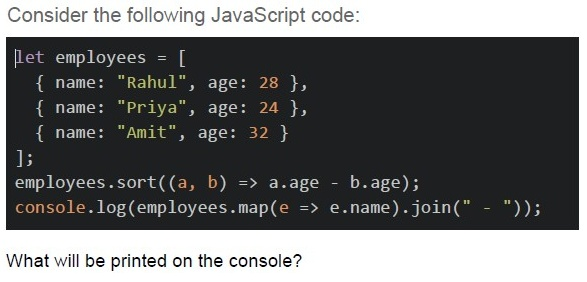
Text of the picture (copyable)
Consider the following JavaScript code:

```javascript
let employees = [
  { name: "Rahul", age: 28 },
  { name: "Priya", age: 24 },
  { name: "Amit", age: 32 }
];
employees.sort((a, b) => a.age - b.age);
console.log(employees.map(e => e.name).join(" - "));
```

What will be printed on the console?- Rahul - Priya - Amit
- Priya - Rahul - Amit
- Amit - Rahul - Priya
- Priya - Amit - Rahul
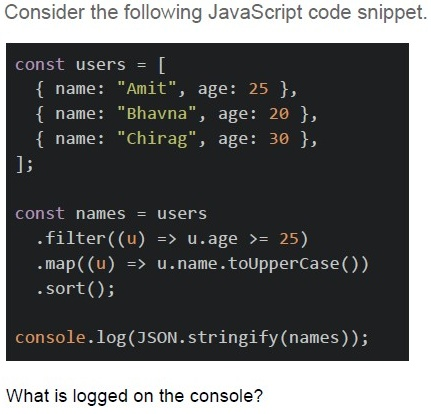
Text of the picture (copyable)
Consider the following JavaScript code snippet.

```javascript
const users = [
  { name: "Amit", age: 25 },
  { name: "Bhavna", age: 20 },
  { name: "Chirag", age: 30 },
];

const names = users
  .filter((u) => u.age >= 25)
  .map((u) => u.name.toUpperCase())
  .sort();

console.log(JSON.stringify(names));
```

What is logged on the console?- ['Amit', 'Chirag']
- ['CHIRAG', 'AMIT']
- ['AMIT', 'CHIRAG']
- ['AMIT', 'Bhavna', 'CHIRAG']
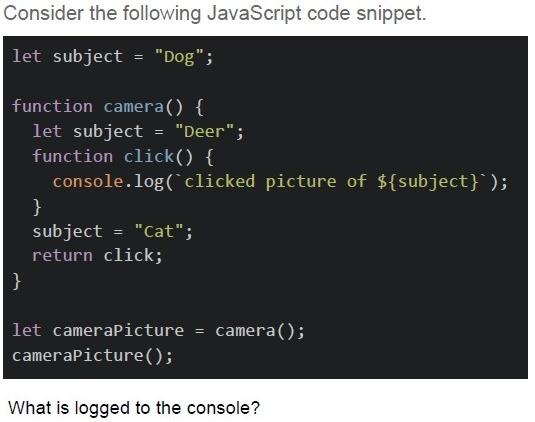
Text of the picture (copyable)
Consider the following JavaScript code snippet.

```javascript
let subject = "Dog";

function camera() {
  let subject = "Deer";
  function click() {
    console.log(`clicked picture of ${subject}`);
  }
  subject = "Cat";
  return click;
}

let cameraPicture = camera();
cameraPicture();
```

What is logged to the console?- clicked picture of Dog
- clicked picture of Deer
- clicked picture of Cat
- clicked picture of undefined
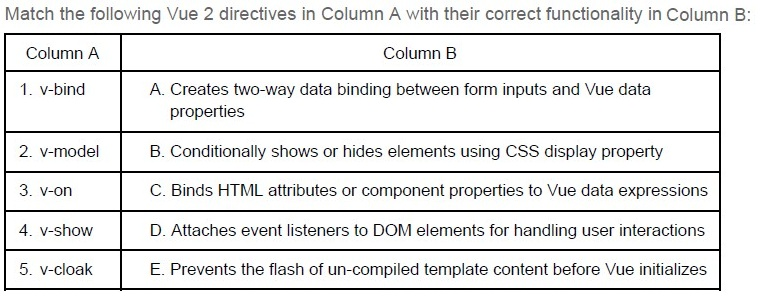
Text of the picture (copyable)
Match the following Vue 2 directives in Column A with their correct functionality in Column B:

| Column A | Column B |
|---|---|
| 1. v-bind | A. Creates two-way data binding between form inputs and Vue data properties |
| 2. v-model | B. Conditionally shows or hides elements using CSS display property |
| 3. v-on | C. Binds HTML attributes or component properties to Vue data expressions |
| 4. v-show | D. Attaches event listeners to DOM elements for handling user interactions |
| 5. v-cloak | E. Prevents the flash of un-compiled template content before Vue initializes |
- 1-C, 2-D, 3-A, 4-E, 5-B
- 1-A, 2-C, 3-B, 4-D, 5-E
- 1-C, 2-A, 3-D, 4-B, 5-E
- 1-E, 2-A, 3-D, 4-C, 5-B
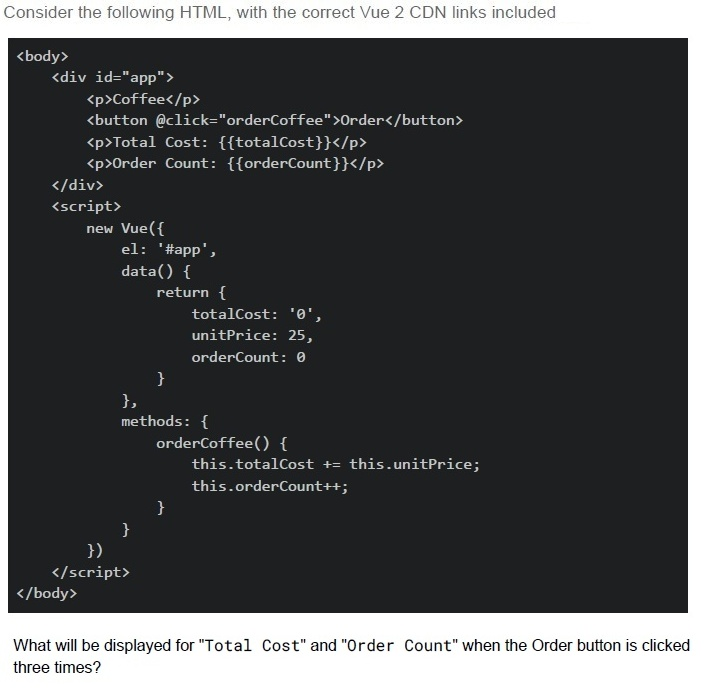
Text of the picture (copyable)
Consider the following HTML, with the correct Vue 2 CDN links included

```html
<body>
  <div id="app">
    <p>Coffee</p>
    <button @click="orderCoffee">Order</button>
    <p>Total Cost: {{totalCost}}</p>
    <p>Order Count: {{orderCount}}</p>
  </div>
  <script>
    new Vue({
      el: '#app',
      data() {
        return {
          totalCost: '0',
          unitPrice: 25,
          orderCount: 0
        }
      },
      methods: {
        orderCoffee() {
          this.totalCost += this.unitPrice;
          this.orderCount++;
        }
      }
    })
  </script>
</body>
```

What will be displayed for "Total Cost" and "Order Count" when the Order button is clicked three times?
text
Total Cost: 75, Order Count: 3

text
Total Cost: 02525, Order Count: 3

text
Total Cost: 252525, Order Count: 3

text
Total Cost: 0252525, Order Count: 3
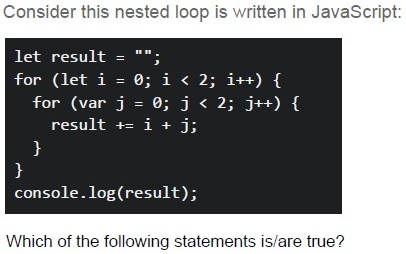
Text of the picture (copyable)
Consider this nested loop is written in JavaScript:

```javascript
let result = "";
for (let i = 0; i < 2; i++) {
  for (var j = 0; j < 2; j++) {
    result += i + j;
  }
}
console.log(result);
```

Which of the following statements is/are true?
text
The output is "0011".

text
The inner loop runs 2 times for each outer loop iteration.

text
The output is "0123"

text
The values are concatenated into a **string**, not added as numbers.
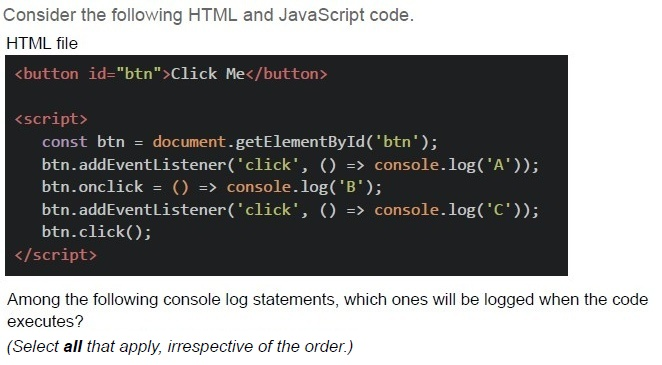
Text of the picture (copyable)
Consider the following HTML and JavaScript code.
HTML file
```html
<button id="btn">Click Me</button>

<script>
    const btn = document.getElementById('btn');
    btn.addEventListener('click', () => console.log('A'));
    btn.onclick = () => console.log('B');
    btn.addEventListener('click', () => console.log('C'));
    btn.click();
</script>
```

Among the following console log statements, which ones will be logged when the code executes?
(Select **all** that apply, irrespective of the order.)- A
- B
- C
- None
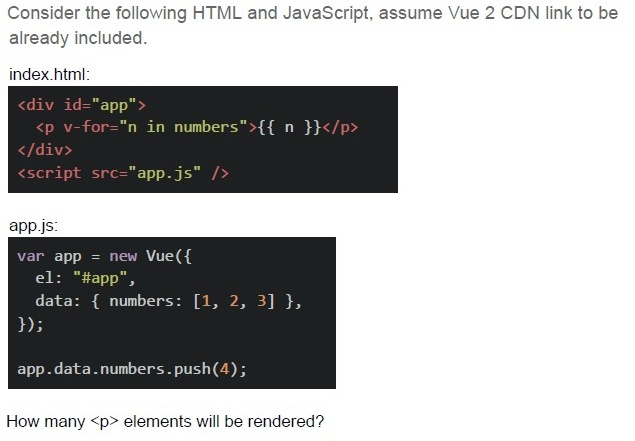
Text of the picture (copyable)
Consider the following HTML and JavaScript, assume Vue 2 CDN link to be already included.

index.html:
```html
<div id="app">
  <p v-for="n in numbers">{{ n }}</p>
</div>
<script src="app.js" ></script>
```

app.js:
```javascript
var app = new Vue({
  el: "#app",
  data: { numbers: [1, 2, 3] },
});

app.data.numbers.push(4);
```

How many `<p>` elements will be rendered?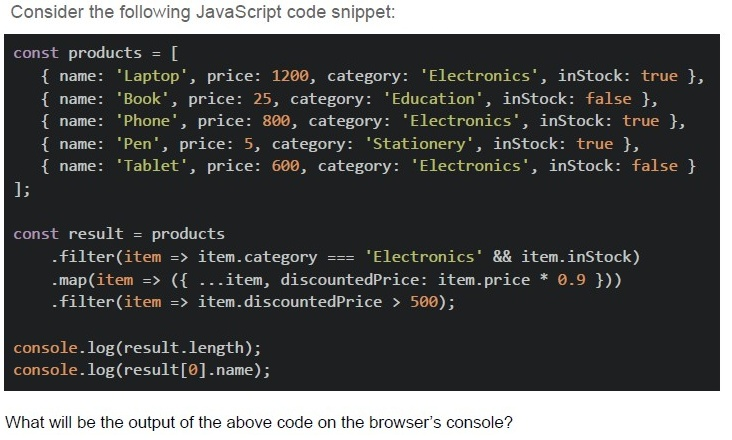
Text of the picture (copyable)
Consider the following JavaScript code snippet:

```javascript
const products = [
  { name: 'Laptop', price: 1200, category: 'Electronics', inStock: true },
  { name: 'Book', price: 25, category: 'Education', inStock: false },
  { name: 'Phone', price: 800, category: 'Electronics', inStock: true },
  { name: 'Pen', price: 5, category: 'Stationery', inStock: true },
  { name: 'Tablet', price: 600, category: 'Electronics', inStock: false }
];

const result = products
  .filter(item => item.category === 'Electronics' && item.inStock)
  .map(item => ({ ...item, discountedPrice: item.price * 0.9 }))
  .filter(item => item.discountedPrice > 500);

console.log(result.length);
console.log(result[0].name);
```

What will be the output of the above code on the browser's console?
text
```
3
Laptop
```
text
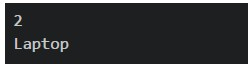
2
Laptop
text
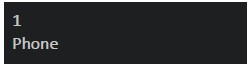
1
Phone
text
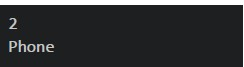
2
Phone
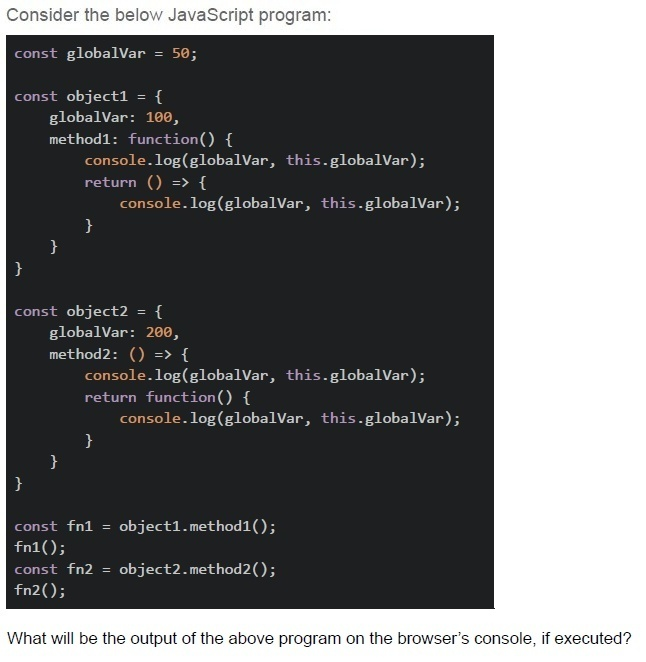
Text of the picture (copyable)
Consider the below JavaScript program:

```javascript
const globalVar = 50;

const object1 = {
  globalVar: 100,
  method1: function() {
    console.log(globalVar, this.globalVar);
    return () => {
      console.log(globalVar, this.globalVar);
    }
  }
}

const object2 = {
  globalVar: 200,
  method2: () => {
    console.log(globalVar, this.globalVar);
    return function() {
      console.log(globalVar, this.globalVar);
    }
  }
}

const fn1 = object1.method1();
fn1();
const fn2 = object2.method2();
fn2();
```

What will be the output of the above program on the browser's console, if executed?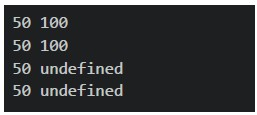
text
```
50 100
50 100
50 undefined
50 undefined
```
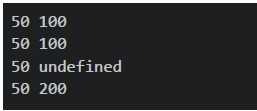
text
```
50 100
50 100
50 undefined
50 200
```
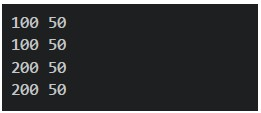
text
```
100 50
100 50
200 50
200 50
```
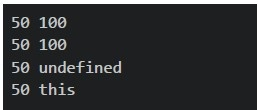
text
```
50 100
50 100
50 undefined
50 this
```
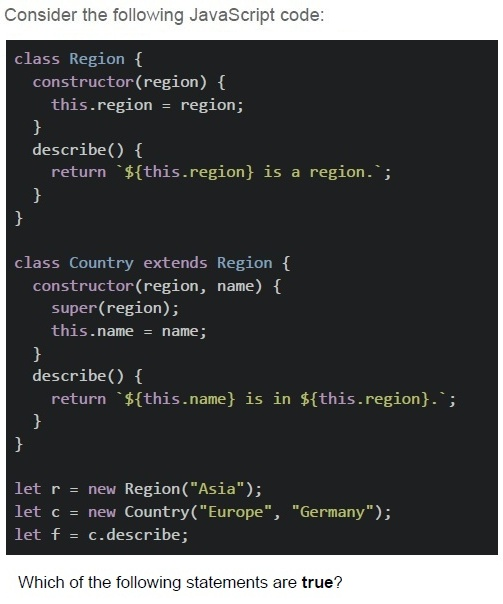
Text of the picture (copyable)
Consider the following JavaScript code:

```javascript
class Region {
  constructor(region) {
    this.region = region;
  }
  describe() {
    return `${this.region} is a region.`;
  }
}

class Country extends Region {
  constructor(region, name) {
    super(region);
    this.name = name;
  }
  describe() {
    return `${this.name} is in ${this.region}.`;
  }
}

let r = new Region("Asia");
let c = new Country("Europe", "Germany");
let f = c.describe;
```

Which of the following statements are **true**?
text
Calling r.describe() prints "Asia is a region."

text
Calling c.describe() prints "Germany is in Europe."

text
Calling f() directly will still print "Germany is in Europe."

text
The Country class overrides both the **constructor** and the **describe()** method from Region.

text
The call to super (region) inside Country's constructor is **not required** to initialize this.region.

Text of the picture (copyable)
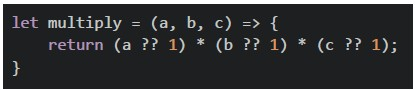
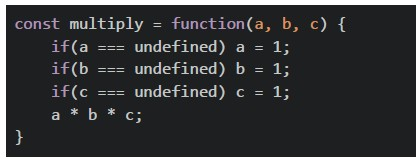
Consider the following JavaScript function definitions. Which of the following will correctly return the product of three numbers and handle the case where any parameter is undefined by treating it as 1?
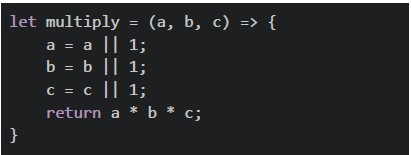
text
```javascript
let multiply = (a, b, c) => {
    a = a || 1;
    b = b || 1;
    c = c || 1;
    return a * b * c;
}
```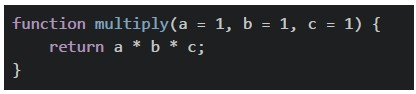
text
```javascript
function multiply(a = 1, b = 1, c = 1) {
  return a * b * c;
}
```
text
```javascript
let multiply = (a, b, c) => {
  return (a ?? 1) * (b ?? 1) * (c ?? 1);
}
```
text
```javascript
const multiply = function(a, b, c) {
    if(a === undefined) a = 1;
    if(b === undefined) b = 1;
    if(c === undefined) c = 1;
    a * b * c;
}
```
Text of the picture (copyable)
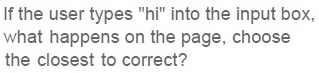
If the user types "hi" into the input box,
what happens on the page, choose
the closest to correct?

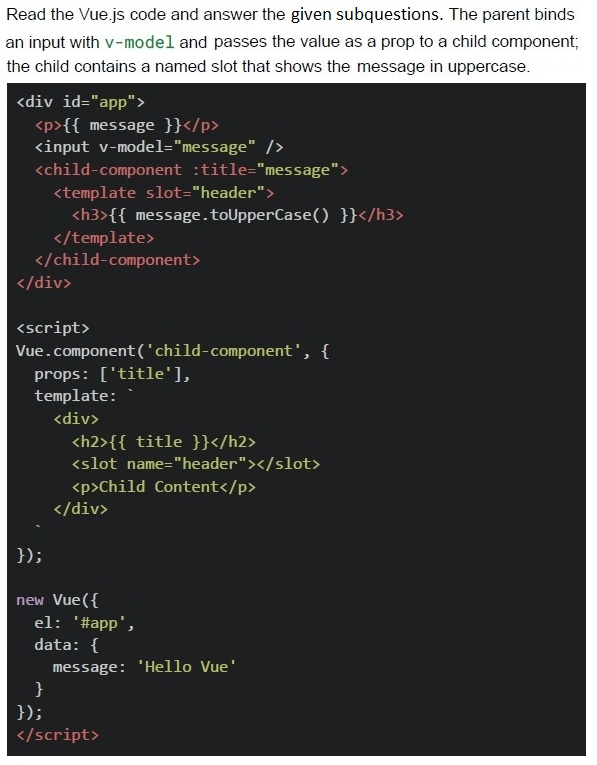
text
Only `<p>` updates to "hi", but `<h2>` remains "Hello Vue".

text
Both `<p>` and `<h2>` update and display "h1".

text
Only `<h3>` changes to "HI", but `<p>` and `<h2>` remain unchanged.

text
Nothing updates at all.

Text of the picture (copyable)
Which Vue.js features are shown in the code?

text
Two-way data binding using v-model.

text
Use of a named `slot` inside a child component.

text
Passing values from parent to child using props.

text
Use of lifecycle hooks.
Answer key
- Q1 (MSQ, 2 marks): A, B, D
- Q2 (MSQ, 2 marks): A, C
- Q3 (MCQ, 3 marks): B
- Q4 (MCQ, 3 marks): C
- Q5 (MCQ, 3 marks): C
- Q6 (MCQ, 3 marks): C
- Q7 (MCQ, 3 marks): D
- Q8 (MSQ, 3 marks): B, D
- Q9 (MSQ, 3 marks): A, B, C
- Q10 (SA, 3 marks): 3
- Q11 (MCQ, 4.5 marks): B
- Q12 (MCQ, 4.5 marks): A
- Q13 (MSQ, 4.5 marks): A, B, D
- Q14 (MSQ, 4.5 marks): B, C
- Q15 (MCQ, 2 marks): B
- Q16 (MSQ, 2 marks): A, B, C
Concepts this paper tests
Auto-generated summary from the source site. Handy as a checklist; the lessons above explain each idea from scratch.
Based on the provided question paper for "Diploma Level: Modern Application Development II", the core topics revolve around Vue.js 2 (a progressive JavaScript framework for building UIs) and JavaScript/ES6 fundamentals. Below is a structured summary of the key concepts, principles, and syntaxes tested in the exam, followed by a Mermaid knowledge graph to visualize relationships.
Core Topics & Concepts
1. Vue.js 2 Fundamentals
##### A. Template Syntax
Text Interpolation:
- Double curly braces
{{ message }}for dynamic text rendering. v-textdirective (alternative to{{ }}).
- Double curly braces
Directives:
Conditional Rendering:
v-if/v-else-if/v-else: Removes/adds elements from/to the DOM (not just hiding).v-show: Togglesdisplay: none(element remains in DOM; no re-render).
Attribute Binding:
v-bind:href="url"or:href="url"(shorthand) for dynamic attributes/classes/styles.- Example:
:class="{ active: isActive }".
List Rendering:
v-for="(item, index) in items"for iterating over arrays/objects.
Event Handling:
v-on:click="handler"or@click="handler"(shorthand).
Two-Way Binding:
v-modelfor form inputs (e.g.,<input v-model="message">).
##### B. Vue Instance & Lifecycle
Data & Methods:
data()must return an object (reactive properties).methodscontain functions for event handlers/computed logic.
Lifecycle Hooks:
created(),mounted(),updated(),destroyed().
##### C. Components
- Props: Pass data to child components (
props: ['title']). - Custom Events: Emit events from child to parent (
this.$emit('event-name', data)).
##### D. Computed Properties vs. Methods
- Computed: Cached; re-evaluates only when dependencies change.
- Methods: Re-runs on every re-render.
2. JavaScript/ES6
##### A. Array Methods
map(): Transforms array elements (returns new array).filter(): Returns elements matching a condition.sort(): Sorts arrays (modifies original; use spread[...arr].sort()to avoid mutation).reduce(): Accumulates values (e.g., sum, group by).Destructuring:
const [a, b] = [1, 2];const { name, age } = person;
##### B. Asynchronous JavaScript
- Promises:
.then()/.catch()orasync/await. - Fetch API:
fetch(url).then(res => res.json()).
##### C. Object Manipulation
- Spread Operator:
const newObj = {...oldObj, key: 'value'}; Object.keys()/Object.values(): Extract keys/values.
##### D. String Methods
toUpperCase()/toLowerCase(): Case conversion.split()/join(): String ↔ Array conversion.
##### E. Event Handling
- DOM Events:
element.addEventListener('click', handler). - Event Object: Access properties like
event.target.
3. Debugging & Output
console.log(): Print variables/objects.Template Debugging:
{{ typeof variable }}to check data types.v-if="debug"for conditional debugging.
Key Equations/Code Snippets (JavaScript)
- Array Sorting (Ascending/Descending): ``
javascript arr.sort((a, b) => a - b); // Ascending arr.sort((a, b) => b - a); // Descending`` - Filtering Arrays: ``
javascript const filtered = arr.filter(item => item.age > 18);`` - Sum with
reduce: ``javascript const sum = arr.reduce((acc, val) => acc + val, 0);`` - Promise Chaining: ``
javascript fetch(url) .then(res => res.json()) .then(data => console.log(data)) .catch(err => console.error(err));`` - Vue 2 Reactive Data: ``
javascript data() { return { message: 'Hello Vue!', items: ['A', 'B', 'C'] }; }``
Exam Preparation Tips
Vue.js 2:
- Focus on directives (
v-ifvs.v-show,v-for,v-bind,v-model). - Understand reactivity (how
data()changes trigger updates). - Practice component communication (props/emits).
- Focus on directives (
JavaScript:
- Master array methods (
map,filter,reduce,sort). - Know asynchronous patterns (Promises,
async/await). - Review object/array destructuring.
- Master array methods (
Debugging:
- Use
console.log()and Vue DevTools for inspection.
- Use
Common Pitfalls:
v-showdoes not re-render;v-ifdoes.sort()mutates the original array (use[...arr].sort()).- Vue 2 templates do not always require
{{ }}(e.g.,v-text).