Home / Past papers / MAD2 End Term / this paper
IIT M FOUNDATION DIPLOMA ENDTERM QPD1 07 Aug 2022 IBA NS - 07 Aug 2022

Text of the picture (copyable)
THIS IS QUESTION PAPER FOR THE SUBJECT "DIPLOMA LEVEL: MODERN APPLICATION DEVELOPMENT 2"

ARE YOU SURE YOU HAVE TO WRITE EXAM FOR THIS SUBJECT?
CROSS CHECK YOUR HALL TICKET TO CONFIRM THE SUBJECTS TO BE WRITTEN.

(IF IT IS NOT THE CORRECT SUBJECT, PLS CHECK THE SECTION AT THE TOP FOR THE SUBJECTS REGISTERED BY YOU)
- Yes
- No
- JavaScript is a low level programming language.
- The “const” keyword can be used to declare objects with block level scope.
- Int, char are some primitive data types in the JavaScript language.
- The JavaScript language supports both the first order and higher orderfunctions.
- A web application must implement token based authentication to make theapplication secure.
- The JAMStack approach separates out the frontend from the backend, andthey both can be updated/modified independently without affecting the other.
- It is recommended to avoid the usage of verbs in the API data URLs.
- The idea behind bringing an API is to implement caching.
- A Celery system can only use Redis as the message broker.
- A Celery system may consist of a number of batch jobs.
- A Celery system needs worker(s) to execute tasks.
- All of these
- A webhook uses HTTP protocol.
- The term “polling” generally refers to short polling.
- Webhooks are used for 1 way communication, unlike web sockets.
- In polling, the connection to the server is kept open, until the data is available.
- Cookies are stored on the server.
- Cookies are stored on the browser.
- Browser sends the cookies to the origin server automatically in general.
- Client has to include cookies manually with the request, in general.
- It is a protocol to allow access to resources, hosted on a different server, onbehalf of a user.
- It is used for authorization.
- It is used for authentication.
- None of these
- Closure is the state of the outer function.
- Closure is the state of a variable.
- Closure is a function along with its lexical environment or surrounding state.
- Closures are created every time a function is created in JavaScript.
 Which of the following shows the correct output if the javascript program written below is executed?
 Text of the picture (copyable)
```javascript
const arr = [1, 2, 3, 4, 5, 6, 7, 8]
const arr1 = arr.map(r => r**3)
const arr2 = arr1.filter(r => ((r % 3 == 2) || (r % 4 == 3)))
console.log(arr2)
```
- [1, 8, 125, 343, 512]
- [8, 27, 64, 343, 512]
- [8, 27, 125, 343, 512]
- None of these
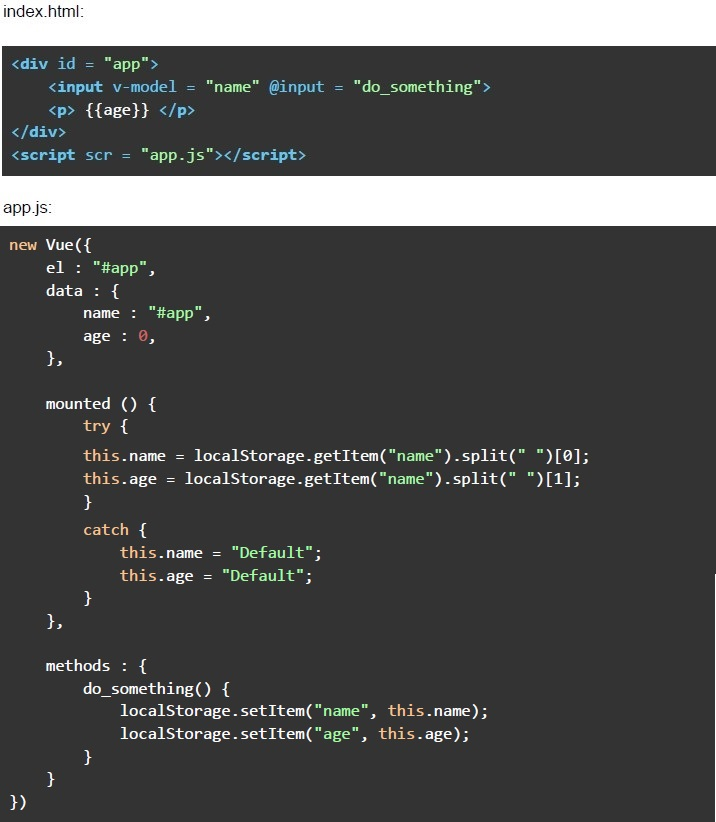 Consider the following Vue application with markup “index.html” and javascript file “app.js”. Suppose you open “index.html” file in a browser, and type the text “IIT Madras” in the text box shown (after removing the previous text, if any), and hard refresh the page twice, without clicking anywhere. What will be the value shown in the text box, and the “age” placeholder, respectively?
Text of the picture (copyable)
index.html:
```html
<div id = "app">
    <input v-model = "name" @input = "do_something">
    <p>{{age}}</p>
</div>
<script scr = "app.js"></script>
```

app.js:
```javascript
new Vue({
    el : "#app",
    data : {
        name : "#app",
        age : 0,
    },

    mounted () {
        try {
            this.name = localStorage.getItem("name").split(" ")[0];
            this.age = localStorage.getItem("name").split(" ")[1];
        }
        catch {
            this.name = "Default";
            this.age = "Default";
        }
    },

    methods : {
        do_something() {
            localStorage.setItem("name", this.name);
            localStorage.setItem("age", this.age);
        }
    }
})
```- The app will show an error in the console
- Default, Default
- IIT, Madras
- None of these
- The flask framework enforces CSRF protection by default.
- The CORS mechanism allows a developer to secure a web application fromexternal origins.
- The CORS headers are generally prefixed with the value “Access-Control-Allow”.
- An anti CSRF token must be sent with the request, if CSRF protection isenabled.
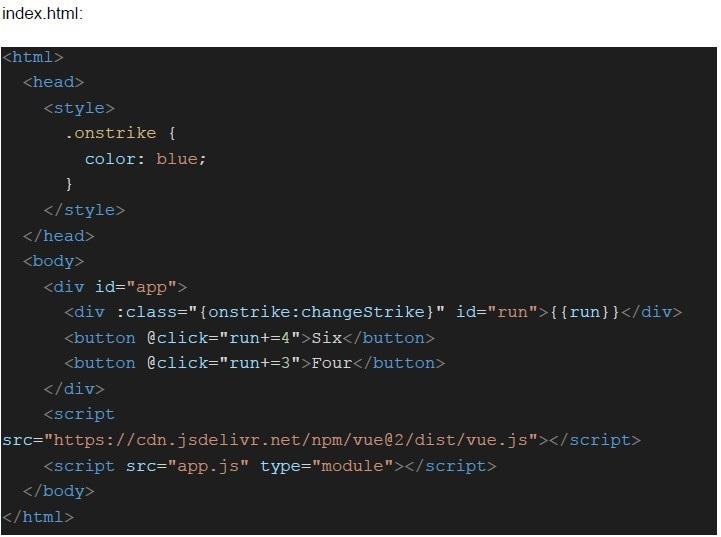 Consider the following Vue application with markup “index.html” and javascript file “app.js”.
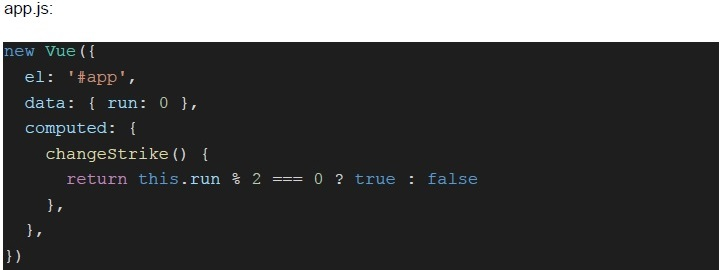 Consider the following Vue application with markup “index.html” and javascript file “app.js”. What will be the color of text rendered inside the div with ID “run”, if the user clicks on the button with text “Six”, 3 times and the button with text “Four”, 4 times?
Text of the picture (copyable)
index.html:

```html
<html>
<head>
    <style>
        .onstrike {
            color: blue;
        }
    </style>
</head>
<body>
    <div id="app">
        <div :class="{onstrike:changeStrike}" id="run">{{ run }}</div>
        <button @click="run+=4">Six</button>
        <button @click="run+=3">Four</button>
    </div>
    <script src="https://cdn.jsdelivr.net/npm/vue@2/dist/vue.js"></script>
    <script src="app.js" type="module"></script>
</body>
</html>
```
app.js:

```javascript
new Vue({
  el: '#app',
  data: { run: 0 },
  computed: {
    changeStrike() {
      return this.run % 2 === 0 ? true : false
    },
  },
})
```- Black
- Blue
- White
- None of these
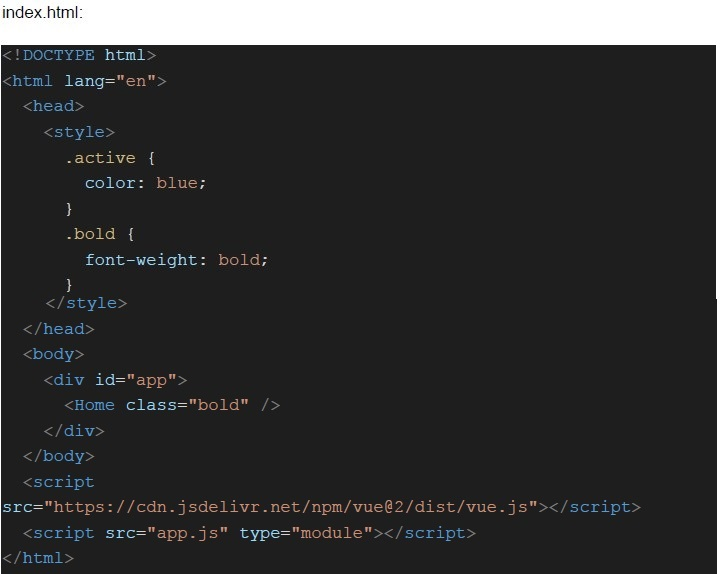 Consider the following Vue application with markup “index.html” and javascript file “app.js”.
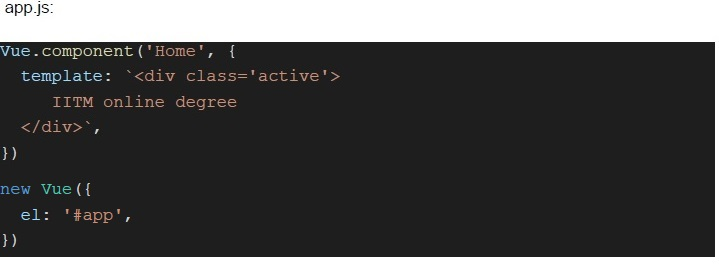 Consider the following Vue application with markup “index.html” and javascript file “app.js”. What will be the color and font-weight of the text “IITM online degree”?
Text of the picture (copyable)
index.html:

```html
<!DOCTYPE html>
<html lang="en">
<head>
    <style>
        .active {
            color: blue;
        }
        .bold {
            font-weight: bold;
        }
    </style>
</head>
<body>
    <div id="app">
        <Home class="bold" />
    </div>
</body>
<script src="https://cdn.jsdelivr.net/npm/vue@2/dist/vue.js"></script>
<script src="app.js" type="module"></script>
</html>
```
app.js:
```javascript
Vue.component('Home', {
    template: `<div class='active'>
        IITM online degree
    </div>`,
})

new Vue({
    el: '#app',
})
```- blue, normal
- black, normal
- blue, bold
- black, bold
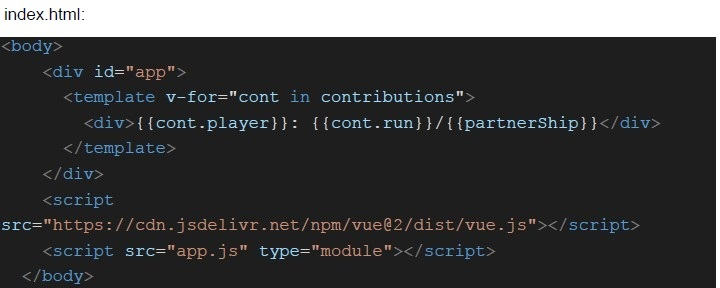 Consider the following Vue application with markup “index.html” and javascript file “app.js”.
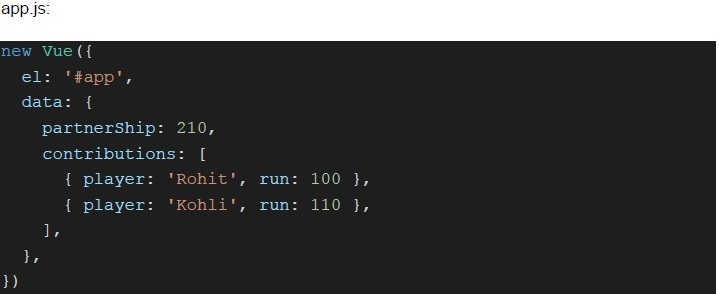 Consider the following Vue application with markup “index.html” and javascript file “app.js”. What will be rendered on the screen?
Text of the picture (copyable)
index.html:

```html
<body>
    <div id="app">
        <template v-for="cont in contributions">
            <div>{{cont.player}}: {{cont.run}}/{{partnerShip}}</div>
        </template>
    </div>
    <script
        src="https://cdn.jsdelivr.net/npm/vue@2/dist/vue.js"></script>
    <script src="app.js" type="module"></script>
</body>
```
app.js:
```javascript
new Vue({
  el: '#app',
  data: {
    partnerShip: 210,
    contributions: [
      { player: 'Rohit', run: 100 },
      { player: 'Kohli', run: 110 },
    ],
  },
})
```- Rohit: 100/210Kohli: 110/210
- Rohit: 0.48Kohli: 0.52
- Rohit: 100Kohli: 110
- None of these
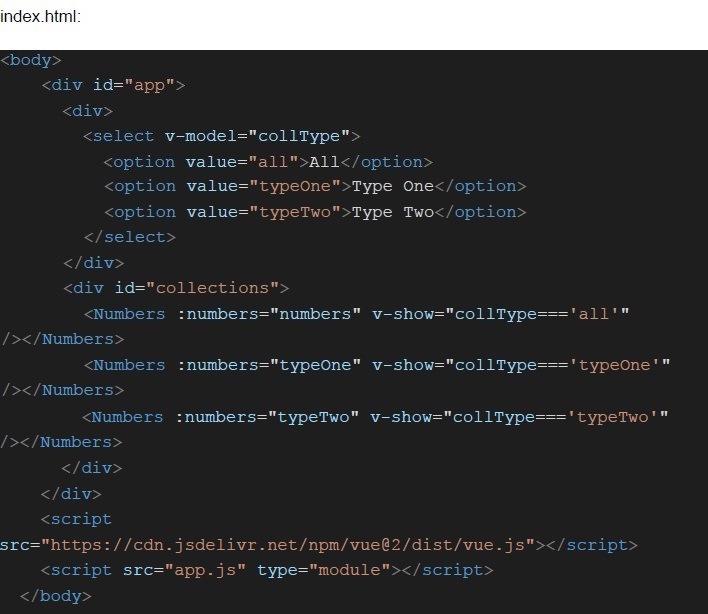 Consider the following Vue application with markup “index.html” and javascript file “app.js”.
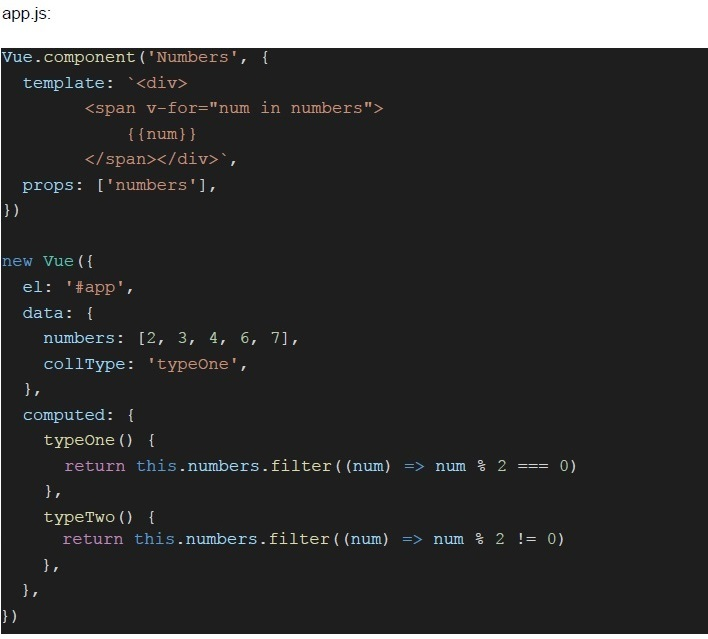 Consider the following Vue application with markup “index.html” and javascript file “app.js”. What will be rendered inside the div with ID “collections”, when the user selects the option “Type Two” ?
Text of the picture (copyable)
```html
index.html:

<body>
    <div id="app">
        <div>
            <select v-model="collType">
                <option value="all">All</option>
                <option value="typeOne">Type One</option>
                <option value="typeTwo">Type Two</option>
            </select>
        </div>
        <div id="collections">
            <Numbers :numbers="numbers" v-show="collType==='all' "
            /></Numbers>
            <Numbers :numbers="typeOne" v-show="collType==='typeOne' "
            /></Numbers>
            <Numbers :numbers="typeTwo" v-show="collType==='typeTwo' "
            /></Numbers>
        </div>
    </div>
    <script src="https://cdn.jsdelivr.net/npm/vue@2/dist/vue.js"></script>
    <script src="app.js" type="module"></script>
</body>
```
app.js:
```javascript
Vue.component('Numbers', {
  template: `<div>
    <span v-for="num in numbers">
      {{num}}
    </span></div>`,
  props: ['numbers'],
})

new Vue({
  el: '#app',
  data: {
    numbers: [2, 3, 4, 6, 7],
    collType: 'typeOne',
  },
  computed: {
    typeOne() {
      return this.numbers.filter((num) => num % 2 === 0)
    },
    typeTwo() {
      return this.numbers.filter((num) => num % 2 !== 0)
    },
  },
})
```- 2 3 4 6 7
- 2 4 6
- 3 7
- None of these
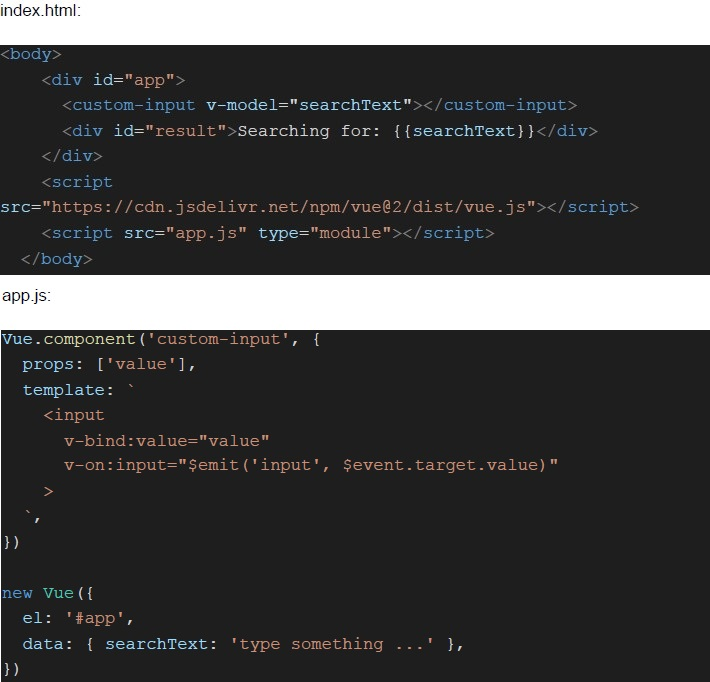 Consider the following Vue application with markup “index.html” and javascript file “app.js”. Suppose the user types “Apple” in the input box (after removing the existing text, if any). What will be rendered inside the div with ID “result”?
Text of the picture (copyable)
index.html:

```html
<body>
    <div id="app">
        <custom-input v-model="searchText"></custom-input>
        <div id="result">Searching for: {{searchText}}</div>
    </div>
    <script
        src="https://cdn.jsdelivr.net/npm/vue@2/dist/vue.js"></script>
    <script src="app.js" type="module"></script>
</body>
```

app.js:

```javascript
Vue.component('custom-input', {
    props: ['value'],
    template: `
        <input
            v-bind:value="value"
            v-on:input="$emit('input', $event.target.value)"
        >
    `
})

new Vue({
    el: '#app',
    data: { searchText: 'type something ...' },
})
```- Searching for:
- Apple
- Searching for: ‘type something …’
- Searching for: Apple
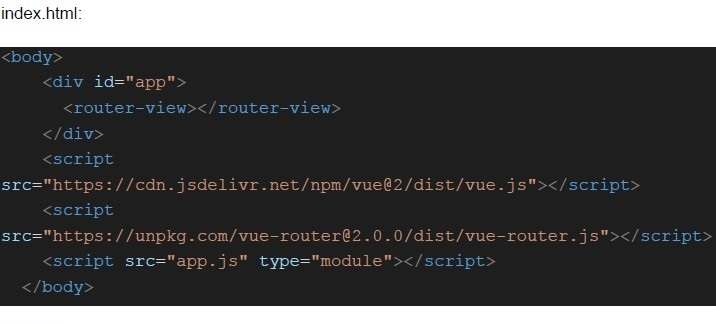 Consider the following Vue application with markup “index.html” and javascript file “app.js”.
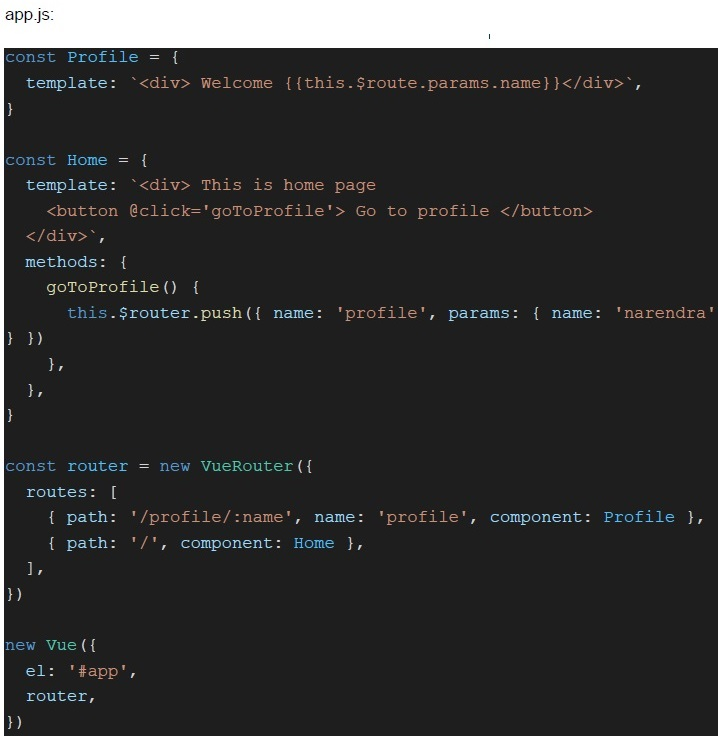 Consider the following Vue application with markup “index.html” and javascript file “app.js”. Suppose the application is running on ‘http://127.0.0.1:8080/’. If the user visits the application for the first time and clicks on the button “Go to profile”, what will be displayed on the screen?
Text of the picture (copyable)
index.html:

```html
<body>
    <div id="app">
        <router-view></router-view>
    </div>
    <script
        src="https://cdn.jsdelivr.net/npm/vue@2/dist/vue.js"></script>
    <script
        src="https://unpkg.com/vue-router@2.0.0/dist/vue-router.js"></script>
    <script src="app.js" type="module"></script>
</body>
```
app.js:

```javascript
const Profile = {
  template: `<div> Welcome {{this.$route.params.name}}</div>`,
}

const Home = {
  template: `<div> This is home page
    <button @click='goToProfile'> Go to profile </button>
  </div>`,
  methods: {
    goToProfile() {
      this.$router.push({ name: 'profile', params: { name: 'narendra' } })
    }
  },
}

const router = new VueRouter({
  routes: [
    { path: '/profile/:name', name: 'profile', component: Profile },
    { path: '/', component: Home },
  ],
})

new Vue({
  el: '#app',
  router,
})
```- Welcome narendra
- Welcome
- narendra
- None of these
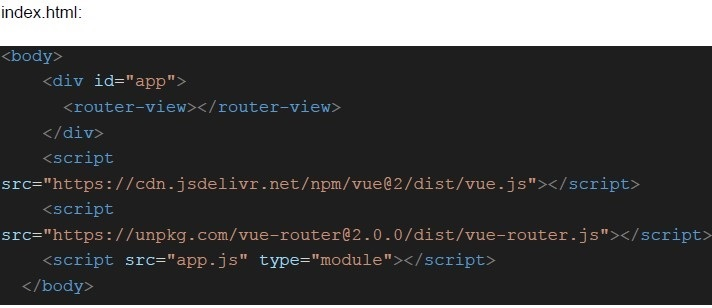 Consider the following Vue application with markup “index.html” and javascript file “app.js”.
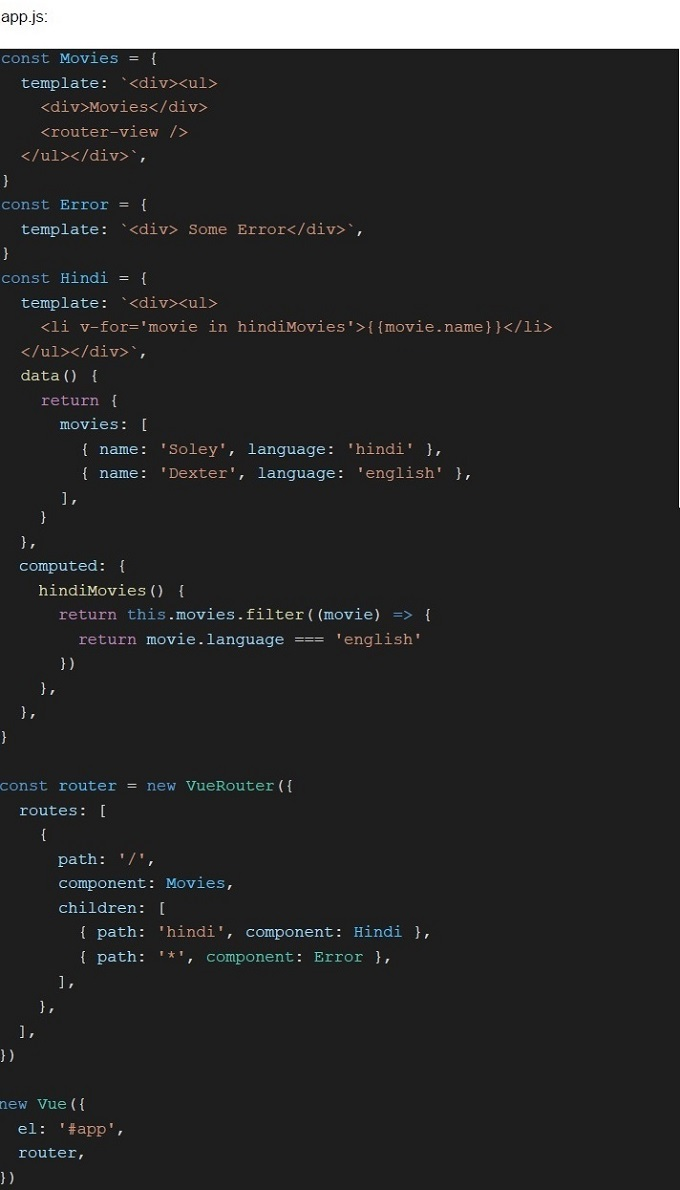 Consider the following Vue application with markup “index.html” and javascript file “app.js”. Suppose the application is running on ‘http://127.0.0.1:8080/’. What will be rendered for the URL “http://127.0.0.1:8080/#/” ?
Text of the picture (copyable)
index.html:

```html
<body>
    <div id="app">
        <router-view></router-view>
    </div>
    <script
        src="https://cdn.jsdelivr.net/npm/vue@2/dist/vue.js"></script>
    <script
        src="https://unpkg.com/vue-router@2.0.0/dist/vue-router.js"></script>
    <script src="app.js" type="module"></script>
</body>
```
```javascript
app.js:
const Movies = {
  template: `<div><ul>
    <div>Movies</div>
    <router-view />
  </ul></div>`,
}
const Error = {
  template: `<div> Some Error</div>`,
}
const Hindi = {
  template: `<div><ul>
    <li v-for='movie in hindiMovies'>{{movie.name}}</li>
  </ul></div>`,
  data() {
    return {
      movies: [
        { name: 'Soley', language: 'hindi' },
        { name: 'Dexter', language: 'english' },
      ],
    }
  },
  computed: {
    hindiMovies() {
      return this.movies.filter((movie) => {
        return movie.language === 'english'
      })
    },
  },
}

const router = new VueRouter({
  routes: [
    {
      path: '/',
      component: Movies,
      children: [
        { path: 'hindi', component: Hindi },
        { path: '*', component: Error },
      ],
    },
  ],
})

new Vue({
  el: '#app',
  router,
})
```- Movies
- MoviesSome Error
- MoviesSoley
- MoviesDexter
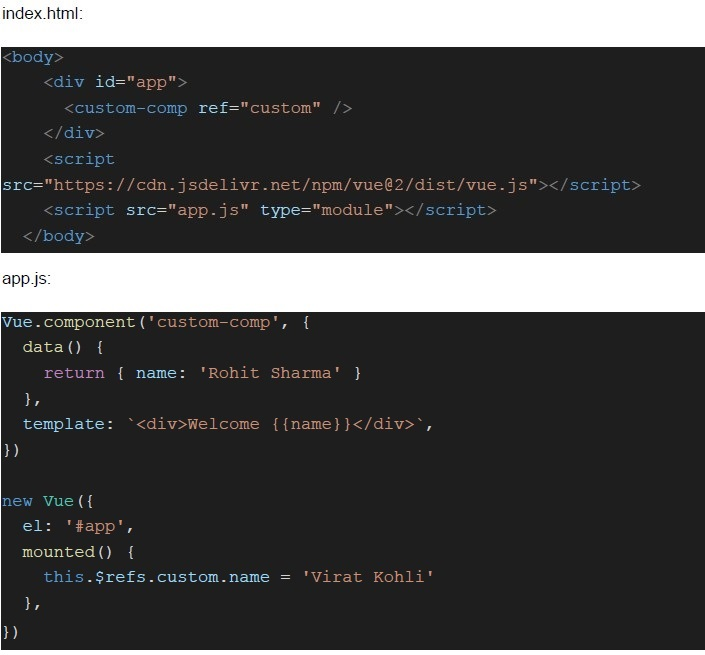 Consider the following Vue application with markup “index.html” and javascript file “app.js”. What will be rendered inside the “custom-comp” component?
Text of the picture (copyable)
index.html:

```html
<body>
    <div id="app">
        <custom-comp ref="custom" />
    </div>
    <script src="https://cdn.jsdelivr.net/npm/vue@2/dist/vue.js"></script>
    <script src="app.js" type="module"></script>
</body>
```

app.js:

```javascript
Vue.component('custom-comp', {
    data() {
        return { name: 'Rohit Sharma' }
    },
    template: `<div>Welcome {{name}}</div>`,
})

new Vue({
    el: '#app',
    mounted() {
        this.$refs.custom.name = 'Virat Kohli'
    },
})
```- Welcome Rohit Sharma
- Welcome Virat Kohli
- Welcome
- None of these
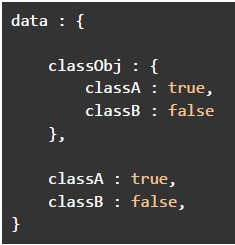 Which of the following is the correct way to do class binding in Vue (to apply ‘classA’ on the div element), if the data object in the Vue constructor is defined as below?
 Text of the picture (copyable)
```
data : {
    classObj : {
        classA : true,
        classB : false
    },

    classA : true,
    classB : false,
}
```
text
```html
<div :class="{classA : classA, classB : classB}"></div>
```
text
```html
<div :class="{classA : 'classA', classB : 'classB'}"></div>
```
text
```html
<div :class = "classObj"></div>
```

text
```html
<div :class="{classObj}"></div>
```
- The server sent events is a mechanism for a server to push events, and it mustrequire service workers on the client to function properly.
- In general, a webhook is meant to pull message(s) from an application.
- The usage of a message broker over “point-to-point” communication makesthe application scalable.
- There is no difference between webhooks and short polling.
- The approach 1 will wait for a user input before dispatching the task to thecelery system.
- The approach 2 will dispatch the task to the celery system after waiting for 10seconds, and start the execution, assuming a worker is available.
- The approach 2 will immediately dispatch the task to the celery system, butstart the execution after waiting for 10 seconds, assuming a worker is available.
- The approach 1 will immediately dispatch the task to the celery system, andstart the execution, assuming a worker is available.
- In general, an application should have separate Vuex stores for all thecomponents.
- A path defined in the routes array in Vue router can consist of a number ofchildren paths.
- The wildcard (*) should be put at the top of the routes array in the Vue router,so that it matches with all the paths, which are not implemented.
- A Vuex store must be used with all Vue applications.
- The credentials property of the Request interface allows the user agent tosend or receive cookies in cross-origin requests.
- The value “omit” of “credentials” will force the browser not to send cookies withthe request.
- The value “include” of “credentials” will allow the browser to send credentialseven in cross-origin requests.
- The value “include” of “credentials” will allow the browser to send credentialsonly for same origin requests.
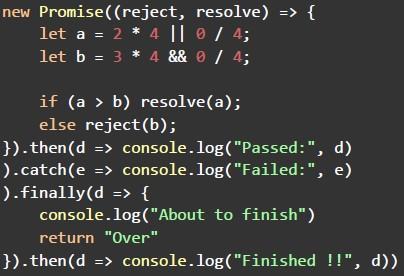 Which of the following shows the correct output, if the javascript program written below is executed?
 Text of the picture (copyable)
```javascript
new Promise((reject, resolve) => {
  let a = 2 * 4 || 0 / 4;
  let b = 3 * 4 && 0 / 4;

  if (a > b) resolve(a);
  else reject(b);
})
  .then((d) => console.log("Passed:", d))
  .catch((e) => console.log("Failed:", e))
  .finally((d) => {
    console.log("About to finish");
    return "Over";
  })
  .then((d) => console.log("Finished !!", d));
```- Failed: 2About to finishFinished !! Over
- Passed: 0About to finishFinished !! undefined
- Passed: 0About to finishFinished !! Over
- Failed: 8About to finishFinished !! undefined
Text of the picture (copyable)
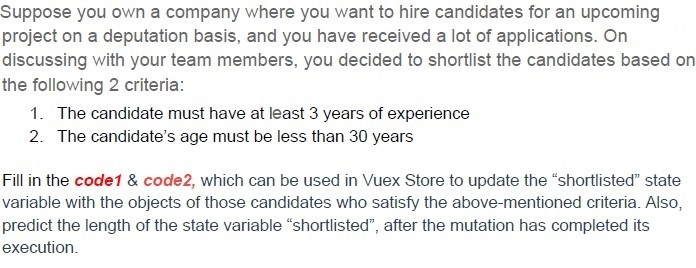
Suppose you own a company where you want to hire candidates for an upcoming project on a deputation basis, and you have received a lot of applications. On discussing with your team members, you decided to shortlist the candidates based on the following 2 criteria:

1. The candidate must have at least 3 years of experience
2. The candidate's age must be less than 30 years

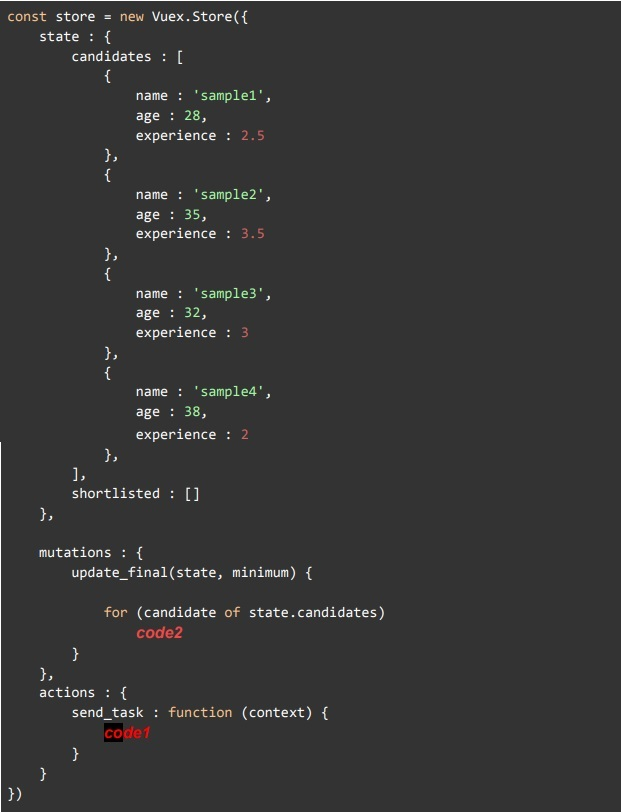
Fill in the `code1` & `code2`, which can be used in Vuex Store to update the "shortlisted" state variable with the objects of those candidates who satisfy the above-mentioned criteria. Also, predict the length of the state variable "shortlisted", after the mutation has completed its execution.
```javascript
const store = new Vuex.Store({
  state : {
    candidates : [
      {
        name : 'sample1',
        age : 28,
        experience : 2.5
      },
      {
        name : 'sample2',
        age : 35,
        experience : 3.5
      },
      {
        name : 'sample3',
        age : 32,
        experience : 3
      },
      {
        name : 'sample4',
        age : 38,
        experience : 2
      },
    ],
    shortlisted : []
  },

  mutations : {
    update_final(state, minimum) {
      for (candidate of state.candidates)
        code2
    },
  },
  actions : {
    send_task : function (context) {
      code1
    }
  }
})
```
text
```
code1: this.$store.commit("update_final", 2);
code2: if (candidate.experience >= minimum && candidate.age < 30)
  state.shortlisted.push(company)
Length: 3
```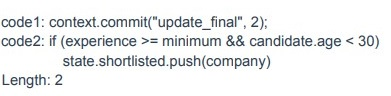
text
```
code1: context.commit("update_final", 2);
code2: if (experience >= minimum && candidate.age < 30)
           state.shortlisted.push(company)
```
Length: 2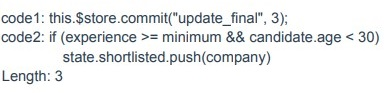
text
```javascript
code1: this.$store.commit("update_final", 3);
code2: if (experience >= minimum && candidate.age < 30)
    state.shortlisted.push(company)
```
Length: 3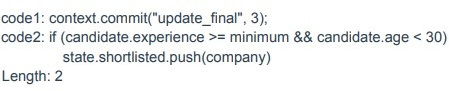
text
```
code1: context.commit("update_final", 3);
code2: if (candidate.experience >= minimum && candidate.age < 30)
    state.shortlisted.push(company)
```
Length: 2
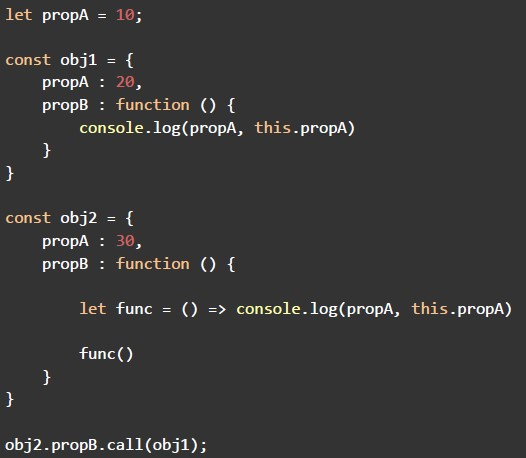 Consider the following javascript program, and predict the output, if executed.
 Text of the picture (copyable)
```javascript
let propA = 10;

const obj1 = {
    propA : 20,
    propB : function () {
        console.log(propA, this.propA)
    }
}

const obj2 = {
    propA : 30,
    propB : function () {

        let func = () => console.log(propA, this.propA)

        func()
    }
}

obj2.propB.call(obj1);
```- 10 30
- 10 20
- 10 undefined
- The program will raise an error
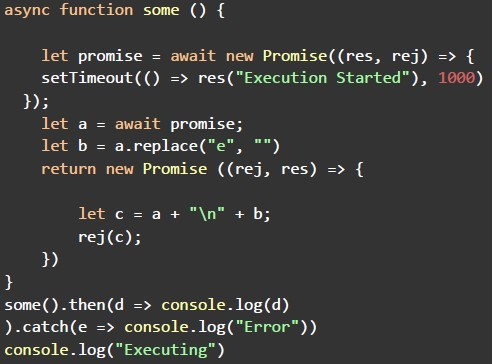 Consider the following javascript program, and predict the output, if executed. Also, predict the minimum time taken (in seconds) to log the value “Executing” on the console.
 Text of the picture (copyable)
```javascript
async function some () {

    let promise = await new Promise((res, rej) => {
        setTimeout(() => res("Execution Started"), 1000)
    });;

    let a = await promise;
    let b = a.replace("e", "")
    return new Promise ((rej, res) => {

        let c = a + "\n" + b;
        rej(c);
    })

}
some().then(d => console.log(d)
).catch(e => console.log("Error"))
console.log("Executing")
```- ExecutingExecution StartedExcution StartedTime: 2 seconds
- Execution StartedExcution StartdExecutingTime: 2 seconds
- ExecutingExecution StartedExcution StartedTime: 0 seconds
- Execution StartedExcution StartedExecutingTime: 0 seconds
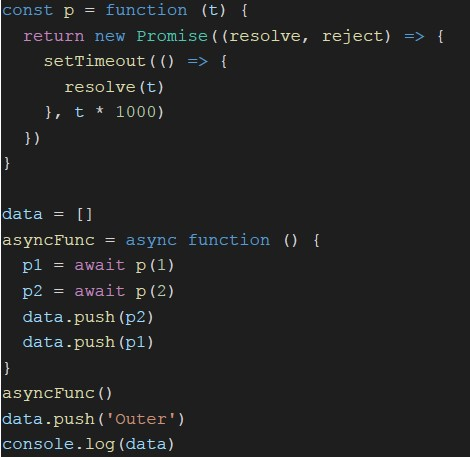 Consider the following JavaScript program. What will be logged on to the console?
Text of the picture (copyable)
```javascript
const p = function (t) {
  return new Promise(((resolve, reject) => {
    setTimeout((() => {
      resolve(t)
    }), t * 1000)
  }))
}

data = []
asyncFunc = async function () {
  p1 = await p(1)
  p2 = await p(2)
  data.push(p2)
  data.push(p1)
}
asyncFunc()
data.push('Outer')
console.log(data)
```- [‘Outer’, 2, 1]
- [‘Outer’, 1, 2]
- [2, 1, ‘Outer’]
- [‘Outer’]
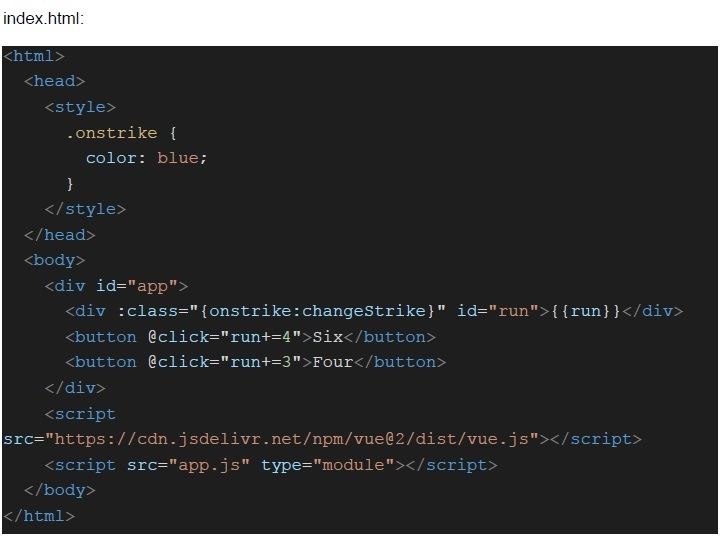 Consider the following Vue application with markup “index.html” and javascript file “app.js”.
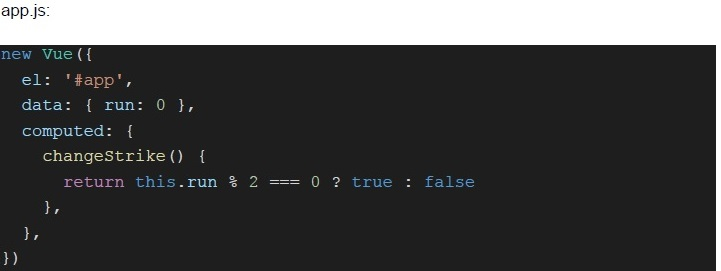 Consider the following Vue application with markup “index.html” and javascript file “app.js”. What will be rendered inside the div for ID “run”, if the user clicks on the button with text “Six”, 3 times and the button with text “Four”, 4 times?
Text of the picture (copyable)
index.html:
```html
<html>
<head>
<style>
.onstrike {
color: blue;
}
</style>
</head>
<body>
<div id="app">
<div :class="{onstrike: changeStrike}" id="run">{{run}}</div>
<button @click="run+=4">Six</button>
<button @click="run+=3">Four</button>
</div>
<script
src="https://cdn.jsdelivr.net/npm/vue@2/dist/vue.js"></script>
<script src="app.js" type="module"></script>
</body>
</html>
```
app.js:
```javascript
new Vue({
  el: '#app',
  data: { run: 0 },
  computed: {
    changeStrike() {
      return this.run % 2 === 0 ? true : false
    },
  },
})
```- 24
- 34
- 48
- None of these
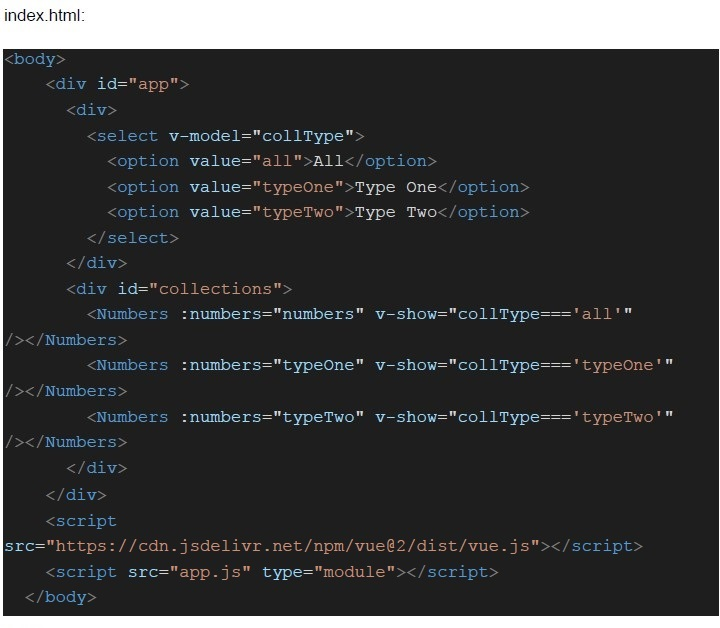 Consider the following Vue application with markup “index.html” and javascript file “app.js”.
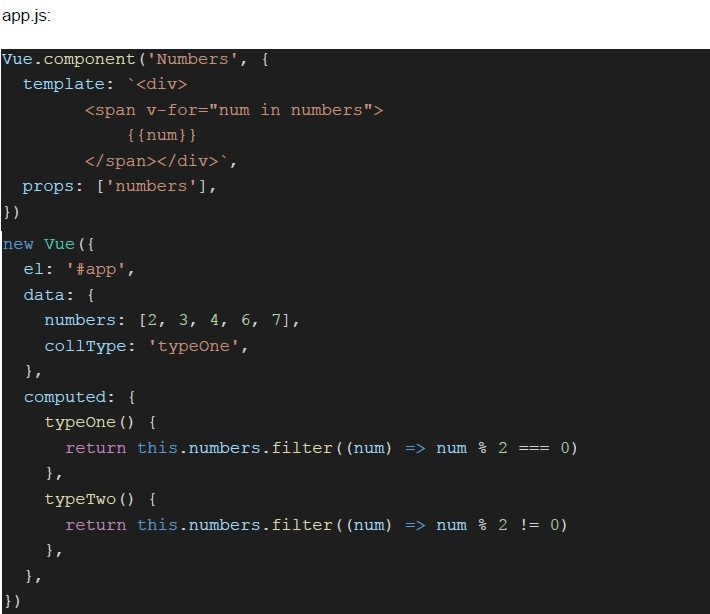 Consider the following Vue application with markup “index.html” and javascript file “app.js”. What will be rendered inside the div with ID “collections”, when the browser loads the application for the first time?
Text of the picture (copyable)
index.html:

```html
<body>
    <div id="app">
        <div>
            <select v-model="collType">
                <option value="all">All</option>
                <option value="typeOne">Type One</option>
                <option value="typeTwo">Type Two</option>
            </select>
        </div>
        <div id="collections">
            <Numbers :numbers="numbers" v-show="collType==='all'"></Numbers>
            <Numbers :numbers="typeOne" v-show="collType==='typeOne'"></Numbers>
            <Numbers :numbers="typeTwo" v-show="collType==='typeTwo'"></Numbers>
        </div>
    </div>
    <script src="https://cdn.jsdelivr.net/npm/vue@2/dist/vue.js"></script>
    <script src="app.js" type="module"></script>
</body>
```
app.js:
```javascript
Vue.component('Numbers', {
    template: `<div>
        <span v-for="num in numbers">
            {{num}}
        </span></div>`,
    props: ['numbers'],
})

new Vue({
    el: '#app',
    data: {
        numbers: [2, 3, 4, 6, 7],
        collType: 'typeOne',
    },
    computed: {
        typeOne() {
            return this.numbers.filter((num) => num % 2 === 0)
        },
        typeTwo() {
            return this.numbers.filter((num) => num % 2 !== 0)
        },
    }
})
```- 2 3 4 6 7
- 2 4 6
- 3 7
- None of these
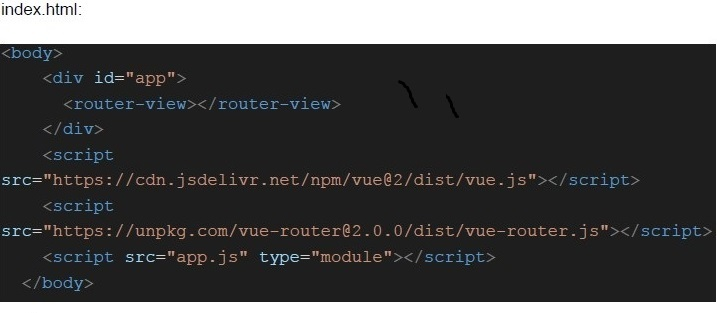 Consider the following Vue application with markup “index.html” and javascript file “app.js”.
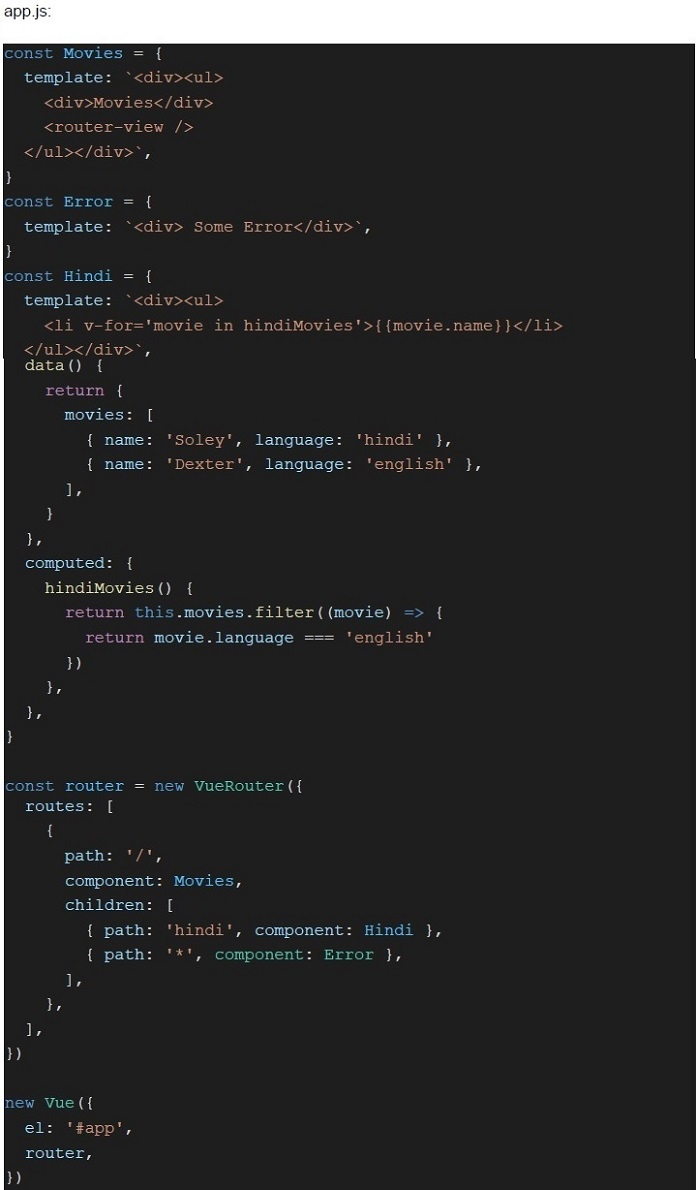 Consider the following Vue application with markup “index.html” and javascript file “app.js”. What will be rendered inside the router-view component of Movies component for the URL “http://127.0.0.1:8080/#/hindi”?
Text of the picture (copyable)
index.html:

```html
<body>
  <div id="app">
    <router-view></router-view>
  </div>
  <script
    src="https://cdn.jsdelivr.net/npm/vue@2/dist/vue.js"
  ></script>
  <script
    src="https://unpkg.com/vue-router@2.0.0/dist/vue-router.js"
  ></script>
  <script src="app.js" type="module"></script>
</body>
```
app.js:
```javascript
const Movies = {
  template: `<div><ul>
    <div>Movies</div>
    <router-view />
  </ul></div>`,
}

const Error = {
  template: `<div> Some Error</div>`,
}

const Hindi = {
  template: `<div><ul>
    <li v-for='movie in hindiMovies'>{{ movie.name }}</li>
  </ul></div>`,
  data() {
    return {
      movies: [
        { name: 'Soley', language: 'hindi' },
        { name: 'Dexter', language: 'english' },
      ],
    }
  },
  computed: {
    hindiMovies() {
      return this.movies.filter((movie) => {
        return movie.language === 'english'
      })
    },
  },
}

const router = new VueRouter({
  routes: [
    {
      path: '/',
      component: Movies,
      children: [
        { path: 'hindi', component: Hindi },
        { path: '*', component: Error },
      ],
    },
  ],
})

new Vue({
  el: '#app',
  router,
})
```- Some Error
- Soley
- Dexter
- None of these
- The local storage is a browser based persistent storage.
- Cookies are preferred over session or local storage, when the data needs to besent with every request.
- The cookies can be set from the server as well as using javascript on the client.
- All of these
Answer key
- Q1 (MCQ, 0 marks): A
- Q2 (MSQ, 2 marks): B, D
- Q3 (MSQ, 2 marks): A, D
- Q4 (MSQ, 2 marks): B, C
- Q5 (MSQ, 2 marks): A, B, C
- Q6 (MSQ, 2 marks): B, C
- Q7 (MSQ, 2 marks): A, B
- Q8 (MSQ, 2 marks): C, D
- Q9 (MCQ, 3 marks): C
- Q10 (MCQ, 3 marks): C
- Q11 (MCQ, 3 marks): A
- Q12 (MCQ, 3 marks): B
- Q13 (MCQ, 3 marks): C
- Q14 (MCQ, 3 marks): A
- Q15 (MCQ, 3 marks): C
- Q16 (MCQ, 3 marks): D
- Q17 (MCQ, 3 marks): A
- Q18 (MCQ, 3 marks): B
- Q19 (MCQ, 3 marks): B
- Q20 (MSQ, 3 marks): A, C
- Q21 (MSQ, 3 marks): B, D
- Q22 (MSQ, 3 marks): C, D
- Q23 (MSQ, 3 marks): A, C, D
- Q24 (MSQ, 3 marks): A, B, C
- Q25 (MCQ, 4.5 marks): D
- Q26 (MCQ, 4.5 marks): D
- Q27 (MCQ, 4.5 marks): B
- Q28 (MCQ, 4.5 marks): C
- Q29 (MCQ, 4.5 marks): D
- Q30 (MCQ, 4.5 marks): A
- Q31 (MCQ, 4.5 marks): B
- Q32 (MCQ, 4.5 marks): C
- Q33 (MCQ, 2 marks): D
Concepts this paper tests
Auto-generated summary from the source site. Handy as a checklist; the lessons above explain each idea from scratch.
Here’s a structured summary of core topics, concepts, principles, and equations for the exam, followed by Mermaid knowledge graphs to visualize relationships.
Core Topics & Concepts
1. JavaScript Fundamentals
Key Concepts:
- Primitive Data Types:
number,string,boolean,null,undefined,symbol,BigInt(Noint/charin JS). constvslet:const: Block-scoped, cannot be reassigned (but objects/arrays can be mutated).let: Block-scoped, can be reassigned.
First-Order vs Higher-Order Functions:
- First-Order: Treated as variables (passed as args, returned from functions).
- Higher-Order: Accepts/returns functions (e.g.,
map,filter).
Closures:
- A function + its lexical environment (surrounding state).
- Created every time a function is defined.
Promises & Async/Await:
.then(): Handles resolved promises..catch(): Handles rejections..finally(): Executes regardless of resolution/rejection.async/await: Syntactic sugar for promises.
Arrow Functions vs Regular Functions:
- Arrow functions inherit
thisfrom the parent scope. - Regular functions have their own
this(dynamic binding).
- Arrow functions inherit
Key Equations/Code Snippets:
// Closure Example
function outer() {
  let x = 10;
  return function inner() { console.log(x); };
}
const closure = outer(); // x is preserved in closure.

// Promise Example
new Promise((resolve, reject) => {
  if (success) resolve("Done");
  else reject("Error");
})
.then(d => console.log(d))
.catch(e => console.log(e));

// Async/Await Example
async function fetchData() {
  const data = await someAsyncTask();
  console.log(data);
}
2. Modern Web Development
Key Concepts:
JAMStack:
- JavaScript, APIs, Markup.
- Decouples frontend (static) from backend (dynamic APIs).
REST API Design:
- Avoid verbs in URLs (use nouns, e.g.,
/usersinstead of/getUsers). - Caching: Not the primary purpose of APIs (but can be implemented via headers).
- Avoid verbs in URLs (use nouns, e.g.,
Authentication/Authorization:
- OAuth: Authorization protocol (delegated access to resources).
- Tokens: JWT/OAuth tokens for stateless auth.
- CSRF Protection: Anti-CSRF tokens in forms (not enforced by default in Flask).
- CORS: Cross-Origin Resource Sharing (headers like
Access-Control-Allow-Origin).
- Cookies vs Local Storage vs Session Storage: | Feature | Cookies | Local Storage | Session Storage | |------------------|-----------------------|---------------------|---------------------| | Persistence | Configurable (expire) | Persistent | Session-only | | Storage Limit| ~4KB | ~5MB | ~5MB | | Access | Sent with every HTTP request | Client-side only | Client-side only | | Use Case | Auth tokens, tracking | Offline data | Temporary data |
Key Equations/Code Snippets:
// CORS Header Example (Server-Side)
response.setHeader("Access-Control-Allow-Origin", "*");

// CSRF Token Example (Flask)
<form>
  <input type="hidden" name="csrf_token" value="{{ csrf_token() }}">
</form>

// Local Storage Example
localStorage.setItem("key", "value");
const data = localStorage.getItem("key");
3. Vue.js
Key Concepts:
Directives:
v-model: Two-way data binding.v-for: Render lists.v-if/v-show: Conditional rendering.v-bind: Dynamic attributes (e.g.,:class).v-on: Event handling (e.g.,@click).
Components:
- Reusable Vue instances with their own templates, data, and methods.
- Props: Pass data from parent to child.
- Slots: Inject content into components.
Computed Properties vs Methods:
- Computed: Cached, reactive (use for derived data).
- Methods: Re-run on every render (use for event handlers).
Vue Router:
- Dynamic routing with
vue-router. router-view: Renders matched components.router-link: Navigation links.- Nested Routes: Children routes under a parent.
- Dynamic routing with
Vuex (State Management):
- State: Single source of truth.
- Mutations: Synchronous state updates.
- Actions: Asynchronous operations (commit mutations).
- Getters: Computed properties for state.
Class/Style Binding:
:class="{ active: isActive }"(object syntax).:class="[classA, classB]"(array syntax).
Lifecycle Hooks:
created,mounted,updated,destroyed.
Key Equations/Code Snippets:
// Vue Component Example
Vue.component('my-component', {
  props: ['message'],
  template: `<div>{{ message }}</div>`
});

// Vuex Store Example
const store = new Vuex.Store({
  state: { count: 0 },
  mutations: {
    increment(state) { state.count++; }
  },
  actions: {
    incrementAsync({ commit }) {
      setTimeout(() => commit('increment'), 1000);
    }
  }
});

// Vue Router Example
const router = new VueRouter({
  routes: [
    { path: '/', component: Home },
    { path: '/about', component: About }
  ]
});
4. Asynchronous Communication
Key Concepts:
- Polling vs Webhooks vs WebSockets: | Method | Description | Direction | Connection | |--------------|--------------------------------------|-----------------|------------------| | Polling | Client repeatedly asks server. | Client → Server | Short-lived | | Webhooks | Server pushes to client via HTTP. | Server → Client | Stateless | | WebSockets | Full-duplex, persistent connection. | Bi-directional | Long-lived |
Server-Sent Events (SSE):
- Server pushes events to client over HTTP (no service workers required).
Message Brokers (Celery + Redis):
- Celery: Distributed task queue.
- Redis: In-memory data store (can act as a message broker).
Tasks:
task.delay(): Immediate execution.task.apply_async(countdown=10): Delayed execution.
Key Equations/Code Snippets:
// Webhook Example (Server-Side)
app.post('/webhook', (req, res) => {
  console.log("Received:", req.body);
  res.status(200).end();
});

// Celery Task Example (Python)
@celery.task
def send_email():
    print("Sending email...")

### Delayed execution
send_email.apply_async(countdown=10)
5. Fetch API & HTTP
Key Concepts:
Credentials in Fetch:
credentials: 'include': Send cookies in cross-origin requests.credentials: 'omit': Exclude cookies.credentials: 'same-origin': Default (send cookies for same origin).
Request Methods:
GET,POST,PUT,DELETE,PATCH.
Headers:
Content-Type:application/json,multipart/form-data.Authorization:Bearer <token>.
Key Equations/Code Snippets:
// Fetch API Example
fetch('https://api.example.com/data', {
  method: 'POST',
  credentials: 'include', // Send cookies
  headers: { 'Content-Type': 'application/json' },
  body: JSON.stringify({ key: 'value' })
})
.then(response => response.json())
.then(data => console.log(data));
6. Security
Key Concepts:
CORS (Cross-Origin Resource Sharing):
- Restricts cross-origin requests unless explicitly allowed.
- Headers:
Access-Control-Allow-Origin,Access-Control-Allow-Methods.
CSRF (Cross-Site Request Forgery):
- Attacker tricks user into submitting a malicious request.
- Mitigation: Anti-CSRF tokens in forms.
OAuth 2.0:
- Authorization (not authentication).
- Roles: Resource Owner, Client, Authorization Server, Resource Server.
JWT (JSON Web Tokens):
- Stateless auth tokens (header.payload.signature).