Home / Past papers / MAD2 Quiz 1 / this paper
IIT M FOUNDATION AN3 EXAM QPF3 16 JULY 2023 - 16 Jul 2023
Elapsed 00:00
Suppose you are given the below HTML.
 Suppose you are given the below HTML. Which of the following code(s) can be used to access the HTML paragraph element at “Statement 1” using JavaScript?
Suppose you are given the below HTML. Which of the following code(s) can be used to access the HTML paragraph element at “Statement 1” using JavaScript?Text of the picture (copyable)
```html
<body>
    <p id = "id1" class = "class1">Content A</p> <!-- Statement 1 -->
    <p id = "id2" class = "class1">Content B</p> <!-- Statement 2 -->
</body>
```- document.getElementById(“id2”)
- document.getElementById(“id1”)
- document.getElementByClassName(“class1”)
- document.getElementByClassName(“class1”)[0]
Which of the following is/are not example(s) of system level state?
- Gmail Inbox of a given user
- User database of LinkedIn
- YouTube Recommendations after signing in
- Countdown timer in a game
Which of the following statements is/are true?
- Lexical scope describes how the parser resolves the variable name in case ofnested functions.
- Inner functions have access to the outer functions variables in JavaScript.
- Inner functions do not have access to the outer functions variables inJavaScript.
- None of these.

Text of the picture (copyable)
Which of the following statements is correct regarding "<noscript>" tag in HTML?
- This tag is used to insert the JavaScript code to be run when the page opens.
- This tag is used to insert HTML, if the browser doesn’t support script or isdisabled.
- This tag, if used in a web page, does not let the browser cache the pagecontents.
- None of these
Consider the below JavaScript program, and predict the output, if executed.
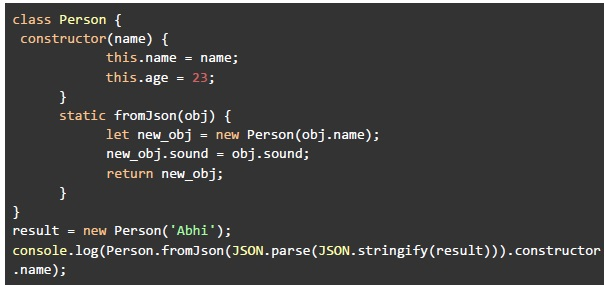 Consider the below JavaScript program, and predict the output, if executed.
Consider the below JavaScript program, and predict the output, if executed. Text of the picture (copyable)
```javascript
class Person {
    constructor(name) {
        this.name = name;
        this.age = 23;
    }

    static fromJson(obj) {
        let new_obj = new Person(obj.name);
        new_obj.sound = obj.sound;
        return new_obj;
    }
}

result = new Person('Abhi');
console.log(Person.fromJson(JSON.parse(JSON.stringify(result))).constructor.name);
```- Person
- Abhi
- constructor
- Reference Error
Consider the below JavaScript program, and predict the output, if executed.
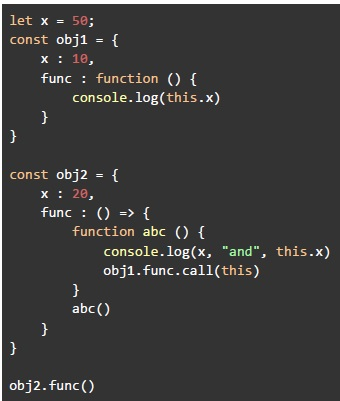 Consider the below JavaScript program, and predict the output, if executed.
Consider the below JavaScript program, and predict the output, if executed. Text of the picture (copyable)
```javascript
let x = 50;
const obj1 = {
    x : 10,
    func : function () {
        console.log(this.x)
    }
}

const obj2 = {
    x : 20,
    func : () => {
        function abc () {
            console.log(x, "and", this.x)
            obj1.func.call(this)
        }
        abc()
    }
}

obj2.func()
```
text
50 and 20
10

text
50 and 20
undefined
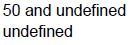
text
50 and undefined
undefined
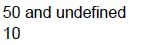
text
50 and undefined
10
Consider the below Vue application with markup file “index.html”, and JavaScript file “app.js”.
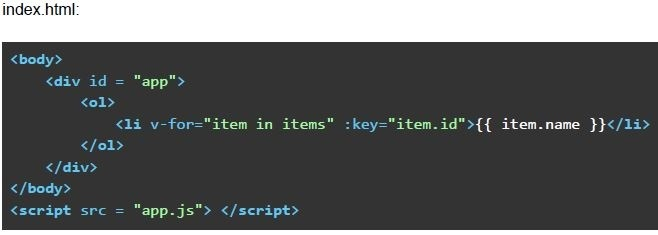 Consider the below Vue application with markup file “index.html”, and JavaScript file “app.js”.
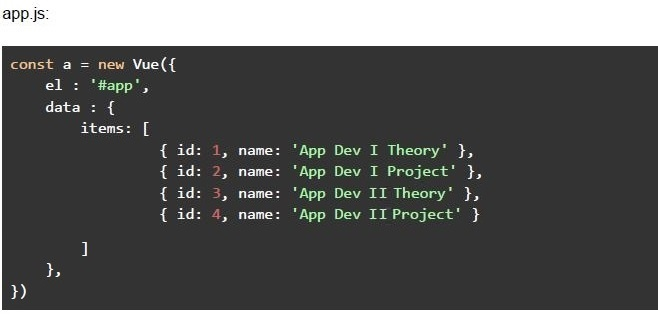 Consider the below Vue application with markup file “index.html”, and JavaScript file “app.js”. Suppose you open the “index.html” file in a browser, what will be rendered by the browser?
Consider the below Vue application with markup file “index.html”, and JavaScript file “app.js”.
Consider the below Vue application with markup file “index.html”, and JavaScript file “app.js”. Suppose you open the “index.html” file in a browser, what will be rendered by the browser?Text of the picture (copyable)
index.html:

```html
<body>
    <div id = "app">
        <ol>
            <li v-for="item in items" :key="item.id">{{ item.name }}</li>
        </ol>
    </div>
</body>
<script src = "app.js"> </script>
```
app.js:

```javascript
const a = new Vue({
    el : '#app',
    data : {
        items: [
            { id: 1, name: 'App Dev I Theory' },
            { id: 2, name: 'App Dev I Project' },
            { id: 3, name: 'App Dev II Theory' },
            { id: 4, name: 'App Dev II Project' }
        ]
    },
})
```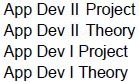
text
App Dev II Project
App Dev II Theory
App Dev I Project
App Dev I Theory
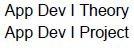
text
App Dev I Theory
App Dev I Project
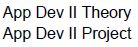
text
App Dev II Theory
App Dev II Project
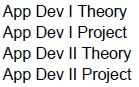
text
App Dev I Theory
App Dev I Project
App Dev II Theory
App Dev II Project
Consider the below Vue application with markup file “index.html”, and javaScript file “app.js”.
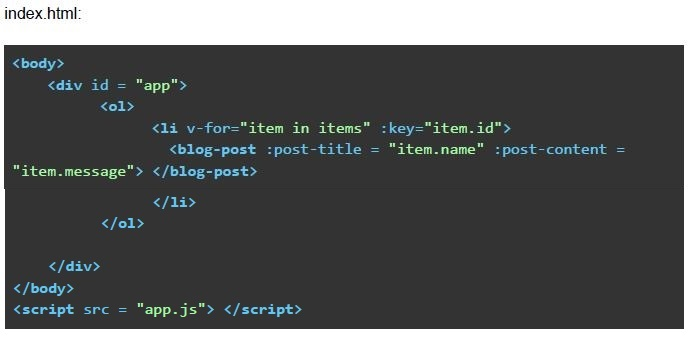 Consider the below Vue application with markup file “index.html”, and javaScript file “app.js”.
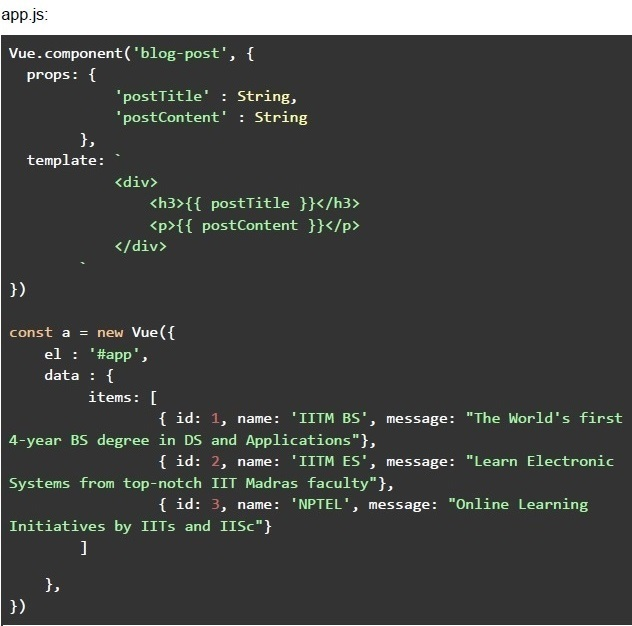 Consider the below Vue application with markup file “index.html”, and javaScript file “app.js”. Suppose you open the “index.html” file in a browser, what will be rendered by the browser?
Consider the below Vue application with markup file “index.html”, and javaScript file “app.js”.
Consider the below Vue application with markup file “index.html”, and javaScript file “app.js”. Suppose you open the “index.html” file in a browser, what will be rendered by the browser?Text of the picture (copyable)
index.html:

```html
<body>
    <div id = "app">
        <ol>
            <li v-for="item in items" :key="item.id">
                <blog-post :post-title = "item.name" :post-content =
"item.message"></blog-post>
            </li>
        </ol>
    </div>
</body>
<script src = "app.js"></script>
```
app.js:

```javascript
Vue.component('blog-post', {
    props: {
        'postTitle' : String,
        'postContent' : String
    },
    template: `
        <div>
            <h3>{{ postTitle }}</h3>
            <p>{{ postContent }}</p>
        </div>
    `
})

const a = new Vue({
    el : '#app',
    data : {
        items: [
            { id: 1, name: 'IITM BS', message: "The World's first
4-year BS degree in DS and Applications"},
            { id: 2, name: 'IITM ES', message: "Learn Electronic
Systems from top-notch IIT Madras faculty"},
            { id: 3, name: 'NPTEL', message: "Online Learning
Initiatives by IITs and IISc"}
        ]
    },
})
```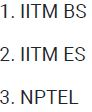
text
1. IITM BS
2. IITM ES
3. NPTEL

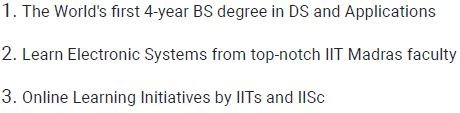
text
1. IITM BS
The World's first 4-year BS degree in DS and Applications

2. IITM ES
Learn Electronic Systems from top-notch IIT Madras faculty

3. NPTEL
Online Learning Initiatives by IITs and IISc
text
1. The World's first 4-year BS degree in DS and Applications
2. Learn Electronic Systems from top-notch IIT Madras faculty
3. Online Learning Initiatives by IITs and IISc

text
A. NPTEL
Online Learning Initiatives by IITs and IISc

B. IITM ES
Learn Electronic Systems from top-notch IIT Madras faculty

C. IITM BS
The World's first 4-year BS degree in DS and Applications
Consider the following JavaScript program.
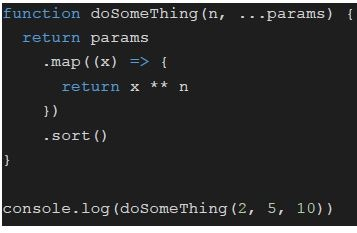 Consider the following JavaScript program. What will be logged on to console?
Consider the following JavaScript program. What will be logged on to console?Text of the picture (copyable)
```javascript
function doSomething(n, ...params) {
  return params
    .map((x) => {
      return x ** n
    })
    .sort()
}

console.log(doSomething(2, 5, 10))
```- [5, 10]
- [25, 100]
- [10, 5]
- [100, 25]
Consider the following JavaScript program.
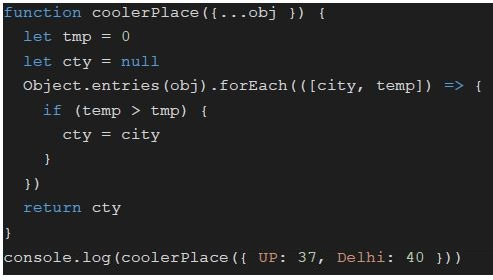 Consider the following JavaScript program. What will be logged on to console?
Consider the following JavaScript program. What will be logged on to console?Text of the picture (copyable)
```javascript
function coolerPlace({ ...obj }) {
  let tmp = 0
  let cty = null
  Object.entries(obj).forEach((([city, temp]) => {
    if (temp > tmp) {
      cty = city
    }
  }))
  return cty
}
console.log(coolerPlace({ UP: 37, Delhi: 40 }))
```- UP
- Delhi
- 37
- 40
Consider the following JavaScript program.
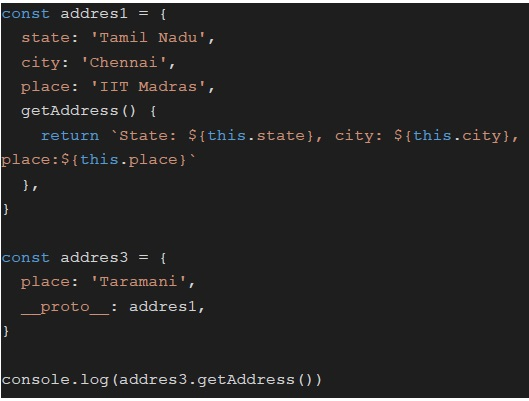 Consider the following JavaScript program. What will be logged on to console?
Consider the following JavaScript program. What will be logged on to console?Text of the picture (copyable)
```javascript
const address1 = {
    state: 'Tamil Nadu',
    city: 'Chennai',
    place: 'IIT Madras',
    getAddress() {
        return `State: ${this.state}, city: ${this.city}, place:${this.place}`
    },
}

const address3 = {
    place: 'Taramani',
    __proto__: address1,
}

console.log(address3.getAddress())
```- State: Tamil Nadu, city: Chennai, place: Taramani
- State: Tamil Nadu, city: Chennai, place: IIT Madras
- State: , city: , place:Taramani
- State: , city: , place:
Consider the following JavaScript program.
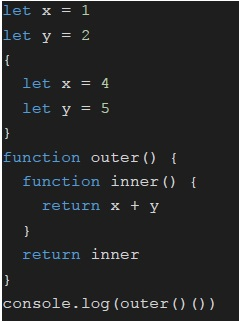 Consider the following JavaScript program. What will be logged on to console?
Consider the following JavaScript program. What will be logged on to console?Text of the picture (copyable)
```javascript
let x = 1
let y = 2
{
    let x = 4
    let y = 5
}
function outer() {
    function inner() {
        return x + y
    }
    return inner
}
console.log(outer() ())
```- 9
- 3
- NaN
- undefined
Consider the below JavaScript program, and predict the output. Also, predict the number of times the while loop will run.
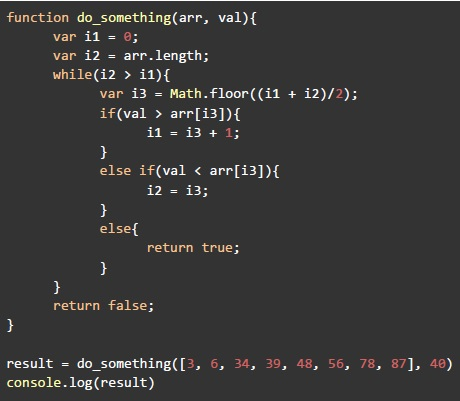 Consider the below JavaScript program, and predict the output. Also, predict the number of times the while loop will run.
Consider the below JavaScript program, and predict the output. Also, predict the number of times the while loop will run. Text of the picture (copyable)
```javascript
function do_something(arr, val){
    var i1 = 0;
    var i2 = arr.length;
    while(i2 > i1){
        var i3 = Math.floor((i1 + i2)/2);
        if(val > arr[i3]){
            i1 = i3 + 1;
        }
        else if(val < arr[i3]){
            i2 = i3;
        }
        else{
            return true;
        }
    }
    return false;
}

result = do_something([3, 6, 34, 39, 48, 56, 78, 87], 40)
console.log(result)
```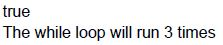
text
true
The while loop will run 3 times
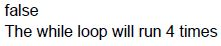
text
false
The while loop will run 4 times

text
false
The while loop will run 3 times
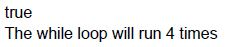
text
true
The while loop will run 4 times
Consider the below Vue application with markup file “index.html”, and JavaScript file “app.js”.
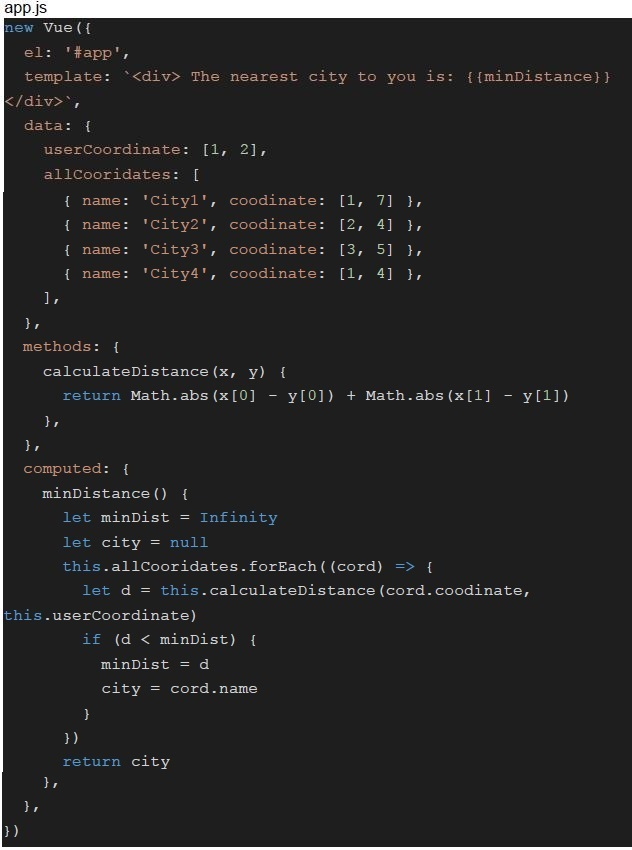 Consider the below Vue application with markup file “index.html”, and JavaScript file “app.js”.
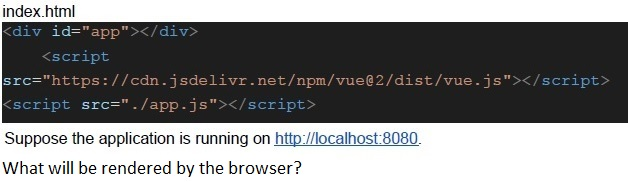 Consider the below Vue application with markup file “index.html”, and JavaScript file “app.js”.
Consider the below Vue application with markup file “index.html”, and JavaScript file “app.js”.
Consider the below Vue application with markup file “index.html”, and JavaScript file “app.js”. Text of the picture (copyable)
```javascript
app.js
new Vue({
  el: '#app',
  template: `<div> The nearest city to you is: {{minDistance}}
</div>`,
  data: {
    userCoordinate: [1, 2],
    allCooridates: [
      { name: 'City1', coodinate: [1, 7] },
      { name: 'City2', coodinate: [2, 4] },
      { name: 'City3', coodinate: [3, 5] },
      { name: 'City4', coodinate: [1, 4] },
    ],
  },
  methods: {
    calculateDistance(x, y) {
      return Math.abs(x[0] - y[0]) + Math.abs(x[1] - y[1])
    },
  },
  computed: {
    minDistance() {
      let minDist = Infinity
      let city = null
      this.allCooridates.forEach((cord) => {
        let d = this.calculateDistance(cord.coodinate,
          this.userCoordinate)
        if (d < minDist) {
          minDist = d
          city = cord.name
        }
      })
      return city
    },
  },
})
```
index.html
```html
<div id="app"></div>
<script
  src="https://cdn.jsdelivr.net/npm/vue@2/dist/vue.js"></script>
<script src="./app.js"></script>
```
Suppose the application is running on http://localhost:8080.
What will be rendered by the browser?- The nearest city to you is: City1
- The nearest city to you is: City2
- The nearest city to you is: City3
- The nearest city to you is: City4
Consider the below Vue application with markup file “index.html”, and JavaScript file “app.js”.
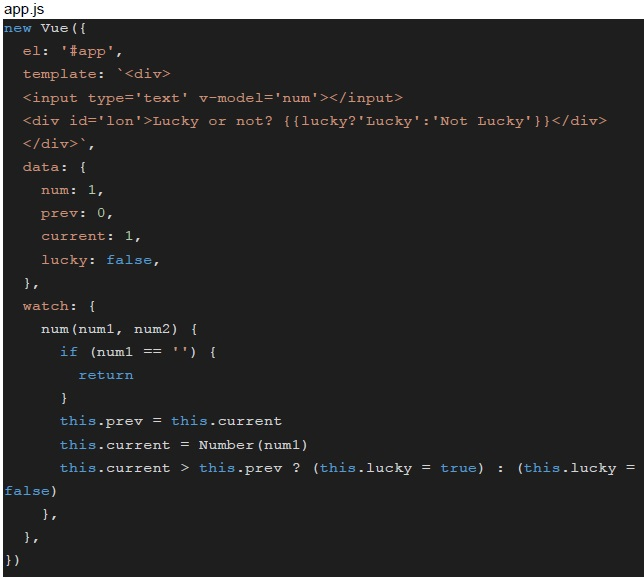 Consider the below Vue application with markup file “index.html”, and JavaScript file “app.js”.
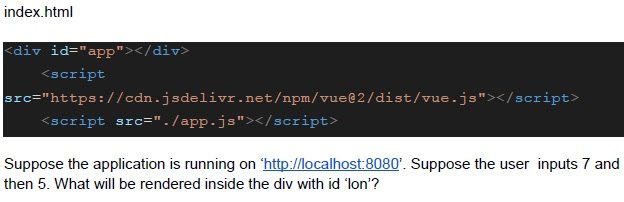 Consider the below Vue application with markup file “index.html”, and JavaScript file “app.js”.
Consider the below Vue application with markup file “index.html”, and JavaScript file “app.js”.
Consider the below Vue application with markup file “index.html”, and JavaScript file “app.js”. Text of the picture (copyable)
```javascript
app.js
new Vue({
  el: '#app',
  template: `<div>
    <input type='text' v-model='num'></input>
    <div id='lon'>Lucky or not? {{lucky?'Lucky':'Not Lucky'}}</div>
  </div>`,
  data: {
    num: 1,
    prev: 0,
    current: 1,
    lucky: false,
  },
  watch: {
    num(num1, num2) {
      if (num1 == '') {
        return
      }
      this.prev = this.current
      this.current = Number(num1)
      this.current > this.prev ? (this.lucky = true) : (this.lucky =
        false)
    },
  },
})
```
index.html

```html
<div id="app"></div>
<script
  src="https://cdn.jsdelivr.net/npm/vue@2/dist/vue.js"></script>
<script src="./app.js"></script>
```

Suppose the application is running on 'http://localhost:8080'. Suppose the user inputs 7 and then 5. What will be rendered inside the div with id 'lon'?- Lucky or not? Lucky
- Lucky or not? Not Lucky
- Lucky or not?
- None of these
Consider the below Vue application with markup file “index.html”, and JavaScript file “app.js”.
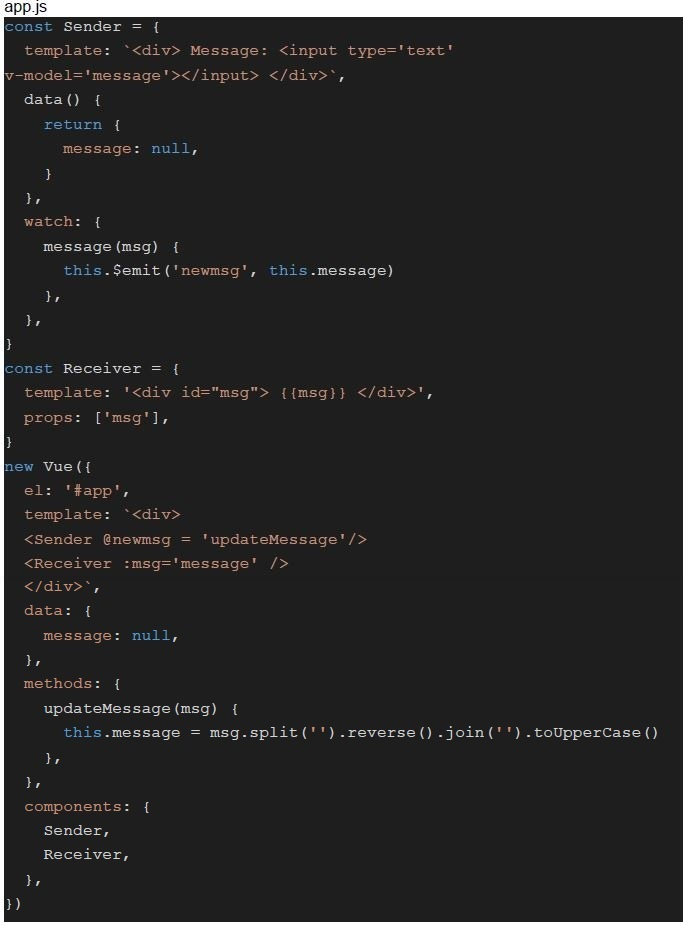 Consider the below Vue application with markup file “index.html”, and JavaScript file “app.js”.
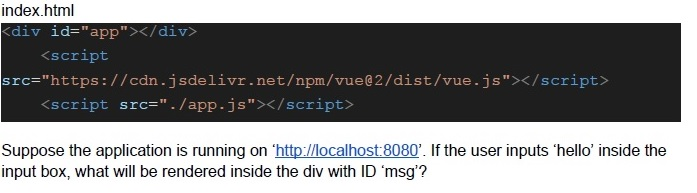 Consider the below Vue application with markup file “index.html”, and JavaScript file “app.js”.
Consider the below Vue application with markup file “index.html”, and JavaScript file “app.js”.
Consider the below Vue application with markup file “index.html”, and JavaScript file “app.js”. Text of the picture (copyable)
```javascript
app.js
const Sender = {
  template: '<div> Message: <input type=\'text\'
  v-model=\'message\'></input> </div>',
  data() {
    return {
      message: null,
    }
  },
  watch: {
    message(msg) {
      this.$emit('newmsg', this.message)
    },
  },
}

const Receiver = {
  template: '<div id="msg"> {{msg}} </div>',
  props: ['msg'],
}

new Vue({
  el: '#app',
  template: '<div>
  <Sender @newmsg = \'updateMessage\'/>
  <Receiver :msg=\'message\' />
  </div>',
  data: {
    message: null,
  },
  methods: {
    updateMessage(msg) {
      this.message = msg.split('').reverse().join('').toUpperCase()
    },
  },
  components: {
    Sender,
    Receiver,
  },
})
```
index.html
```html
<div id="app"></div>
<script
  src="https://cdn.jsdelivr.net/npm/vue@2/dist/vue.js"></script>
<script src="./app.js"></script>
```
Suppose the application is running on 'http://localhost:8080'. If the user inputs 'hello' inside the input box, what will be rendered inside the div with ID 'msg'?
text
hello

text
HELLO

text
OLLEH

text
olleh
Answer key
- Q1 (MSQ, 2 marks): B, D
- Q2 (MSQ, 2 marks): A, C, D
- Q3 (MSQ, 2 marks): A, B
- Q4 (MCQ, 2 marks): B
- Q5 (MCQ, 3 marks): A
- Q6 (MCQ, 3 marks): C
- Q7 (MCQ, 3 marks): D
- Q8 (MCQ, 3 marks): B
- Q9 (MCQ, 3 marks): D
- Q10 (MCQ, 3 marks): B
- Q11 (MCQ, 3 marks): A
- Q12 (MCQ, 3 marks): B
- Q13 (MCQ, 4.5 marks): C
- Q14 (MCQ, 4.5 marks): D
- Q15 (MCQ, 4.5 marks): B
- Q16 (MCQ, 4.5 marks): C
Concepts this paper tests
Auto-generated summary from the source site. Handy as a checklist; the lessons above explain each idea from scratch.
Summary of Core Topics, Concepts, Principles, and Equations
HTML and JavaScript
Accessing HTML Elements with JavaScript
document.getElementById("id")document.getElementsByClassName("class")[index]
<noscript>Tag- Used to provide alternate content when JavaScript is disabled.
- Syntax:
<noscript>Alternate content</noscript>
JavaScript Classes and Objects
- Class definition and usage.
- Static methods and constructors.
Example:
class Person {
    constructor(name) {
        this.name = name;
        this.age = 23;
    }
    static fromJson(obj) {
        let new_obj = new Person(obj.name);
        new_obj.sound = obj.sound;
        return new_obj;
    }
}
JavaScript Scope and
thisKeyword- Lexical scope and variable resolution.
- Arrow functions and their scope.
Example:
let x = 50;
const obj1 = {
  x: 10,
  func: function() {
    console.log(this.x)
  }
}
JavaScript Functions and Closures
- Function definitions and closures.
Example:
function outer() {
    function inner() {
        return x + y
    }
    return inner
}
JavaScript Arrays and Loops
- Array methods like
map,sort, andforEach. - While loops and their usage.
Example:
function do_something(arr, val) {
    var i1 = 0;
    var i2 = arr.length;
    while (i2 > i1) {
        var i3 = Math.floor((i1 + i2) / 2);
        if (val > arr[i3]) {
            i1 = i3 + 1;
        }
        else if (val < arr[i3]) {
            i2 = i3;
        }
        else {
            return true;
        }
    }
    return false;
}
- Array methods like
Vue.js
Vue Instance and Data Binding
- Creating a Vue instance.
- Data binding with
v-modelandv-for. Example:
new Vue({
  el: '#app',
  data: {
    items: [
      { id: 1, name: 'App Dev I Theory' },
      { id: 2, name: 'App Dev I Project' },
      { id: 3, name: 'App Dev II Theory' },
      { id: 4, name: 'App Dev II Project' }
    ]
  }
});
Vue Components
- Defining and using components.
- Props and templates.
Example:
Vue.component('blog-post', {
    props: {
        postTitle: String,
        postContent: String
    },
    template: `
        <div>
            <h3>{{ postTitle }}</h3>
            <p>{{ postContent }}</p>
        </div>
    `
});
Vue Computed Properties and Watchers
- Computed properties and their usage.
- Watchers and their usage.
Example:
new Vue({
  el: '#app',
  data: {
    num: 1,
    prev: 0,
    current: 1,
    lucky: false,
  },
  watch: {
    num(num1, num2) {
      if (num1 === '') {
        return
      }
      this.prev = this.current
      this.current = Number(num1)
      this.current > this.prev ? (this.lucky = true) : (this.lucky = false)
    }
  },
})