Home / Past papers / MAD2 Quiz 1 / this paper
IIT M DIPLOMA AN EXAM QDD3 23 Feb 2025 - 23 Feb 2025
Elapsed 00:00
Which of the following statements is true regarding “v-if” and “v-show” directives in VueJS?
- The “v-if” directive adds/removes elements from the DOM, while v-show onlytoggles visibility using CSS.
- The “v-show” directive adds/removes elements from the DOM, while v-if onlytoggles visibility using CSS.
- Both the “v-if” and “v-show” directives add/remove elements from the DOM.
- Both the “v-if” and “v-show” directives toggle visibility using CSS.
Text of the picture (copyable)
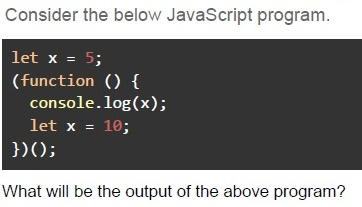
Consider the below JavaScript program.

```javascript
let x = 5;
(function () {
  console.log(x);
  let x = 10;
})();
```

What will be the output of the above program?
text
5

text
10

text
undefined

text
Reference Error

text
null
Text of the picture (copyable)
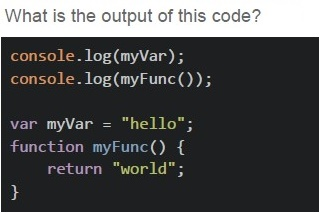
What is the output of this code?

```javascript
console.log(myVar);
console.log(myFunc());

var myVar = "hello";
function myFunc() {
  return "world";
}
```- hello, world
- undefined, world
- ReferenceError
- undefined, undefined
Which of the following statements is true about the let, const, and var keywords in JavaScript?
- var is block-scoped, while let and const are function-scoped.
- const variables must always be initialized at the time of declaration.
- Variables declared with let and const are hoisted and initialized withundefined.
- let, const, and var have identical scoping rules.
Text of the picture (copyable)
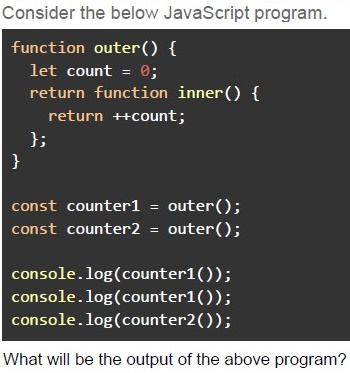
Consider the below JavaScript program.

```javascript
function outer() {
  let count = 0;
  return function inner() {
    return ++count;
  };
}

const counter1 = outer();
const counter2 = outer();

console.log(counter1());
console.log(counter1());
console.log(counter2());
```

What will be the output of the above program- 12 3
- 11 1
- 12 1
- 01 0
- 01 1
Text of the picture (copyable)
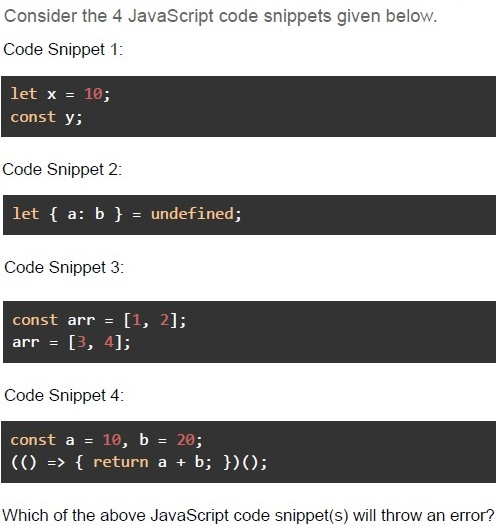
Consider the 4 JavaScript code snippets given below.

Code Snippet 1:

```javascript
let x = 10;
const y;
```

Code Snippet 2:

```javascript
let { a: b } = undefined;
```

Code Snippet 3:

```javascript
const arr = [1, 2];
arr = [3, 4];
```

Code Snippet 4:

```javascript
const a = 10, b = 20;
(() => { return a + b; })();
```

Which of the above JavaScript code snippet(s) will throw an error?- 1 and 2
- 1, 2 and 3
- 2, 3 and 4
- All 4
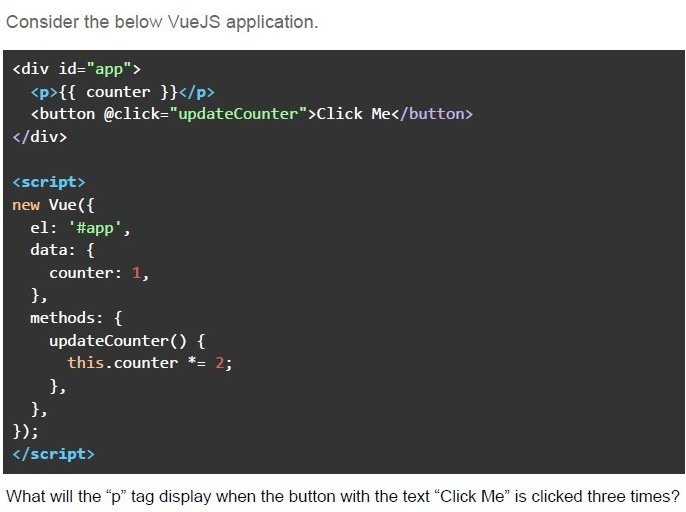
Text of the picture (copyable)
Consider the below VueJS application.

```html
<div id="app">
  <p>{{ counter }}</p>
  <button @click="updateCounter">Click Me</button>
</div>

<script>
  new Vue({
    el: '#app',
    data: {
      counter: 1,
    },
    methods: {
      updateCounter() {
        this.counter *= 2;
      },
    },
  });
</script>
```

What will the “p” tag display when the button with the text “Click Me” is clicked three times?- 1
- 4
- 8
- 16
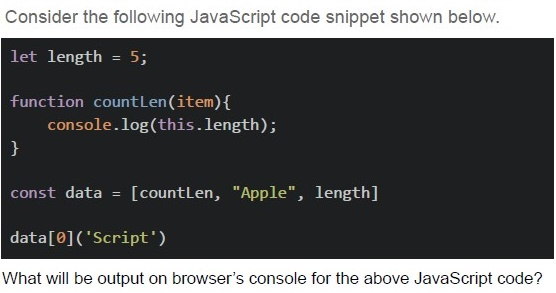
Text of the picture (copyable)
Consider the following JavaScript code snippet shown below.

```javascript
let length = 5;

function countLen(item){
    console.log(this.length);
}

const data = [countLen, "Apple", length]

data[0]('Script')
```

What will be output on browser's console for the above JavaScript code?- 6
- 5
- 4
- 3
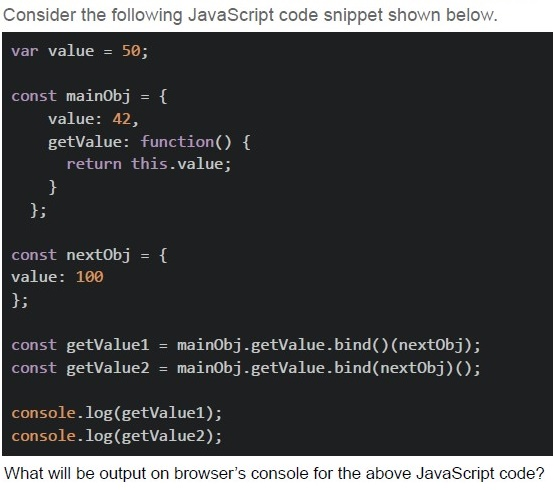
Text of the picture (copyable)
Consider the following JavaScript code snippet shown below.

```javascript
var value = 50;

const mainObj = {
  value: 42,
  getValue: function() {
    return this.value;
  }
};

const nextObj = {
  value: 100
};

const getValue1 = mainObj.getValue.bind() (nextObj);
const getValue2 = mainObj.getValue.bind(nextObj) ();

console.log(getValue1);
console.log(getValue2);
```

What will be output on browser's console for the above JavaScript code?
text
50
100

text
42
50

text
```
100
100
```
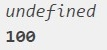
text
undefined
100
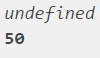
text
undefined
50
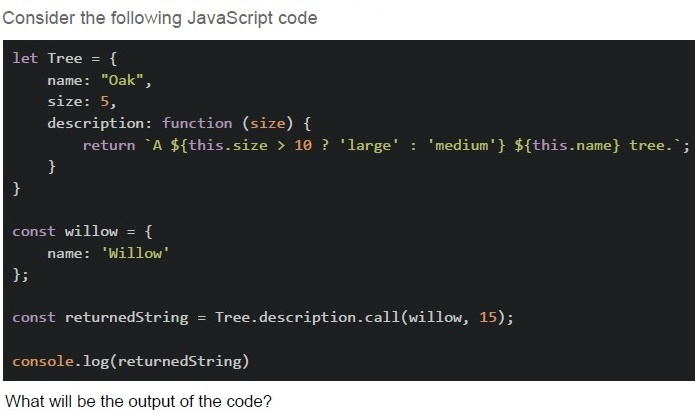
Text of the picture (copyable)
Consider the following JavaScript code

```javascript
let Tree = {
    name: "Oak",
    size: 5,
    description: function (size) {
        return `A ${this.size > 10 ? 'large' : 'medium'} ${this.name} tree.`;
    }
};

const willow = {
    name: 'Willow'
};

const returnedString = Tree.description.call(willow, 15);

console.log(returnedString)
```

What will be the output of the code?- A large Oak tree
- A medium Oak tree
- A large Willow tree
- A medium Willow tree
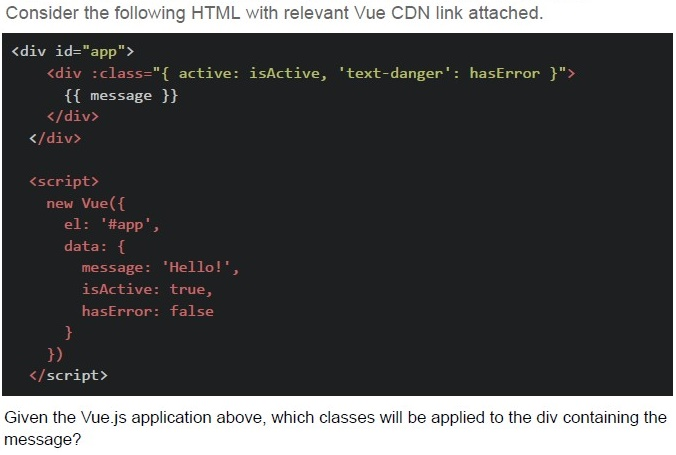
Text of the picture (copyable)
Consider the following HTML with relevant Vue CDN link attached.

```html
<div id="app">
    <div :class="{ active: isActive, 'text-danger': hasError }">
        {{ message }}
    </div>
</div>

<script>
    new Vue({
        el: '#app',
        data: {
            message: 'Hello!',
            isActive: true,
            hasError: false
        }
    })
</script>
```

Given the Vue.js application above, which classes will be applied to the div containing the message?- Only 'active'
- 'text-danger' and 'active'
- No classes
- Only 'text-danger'
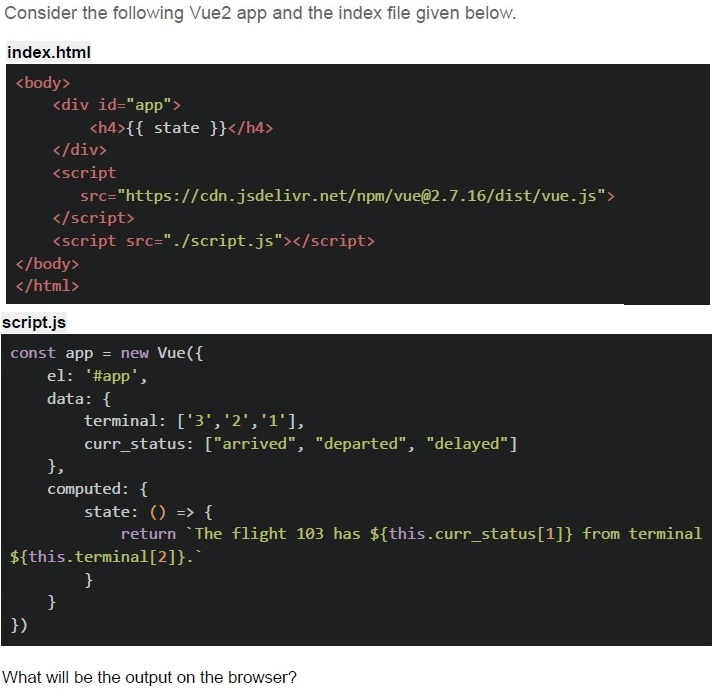
Text of the picture (copyable)
Consider the following Vue2 app and the index file given below.

index.html

```html
<body>
    <div id="app">
        <h4>{{ state }}</h4>
    </div>
    <script
        src="https://cdn.jsdelivr.net/npm/vue@2.7.16/dist/vue.js"
    ></script>
    <script src="./script.js"></script>
</body>
</html>
```

script.js

```javascript
const app = new Vue({
    el: '#app',
    data: {
        terminal: ['3', '2', '1'],
        curr_status: ["arrived", "departed", "delayed"]
    },
    computed: {
        state: () => {
            return `The flight 103 has ${this.curr_status[1]} from terminal ${this.terminal[2]}.`
        }
    }
})
```

What will be the output on the browser?- The flight 103 has departed from terminal 1.
- The flight 103 has arrived from terminal 2.
- The flight 103 has delayed from terminal 3.
- The flight 103 has from terminal.
- ReferenceError
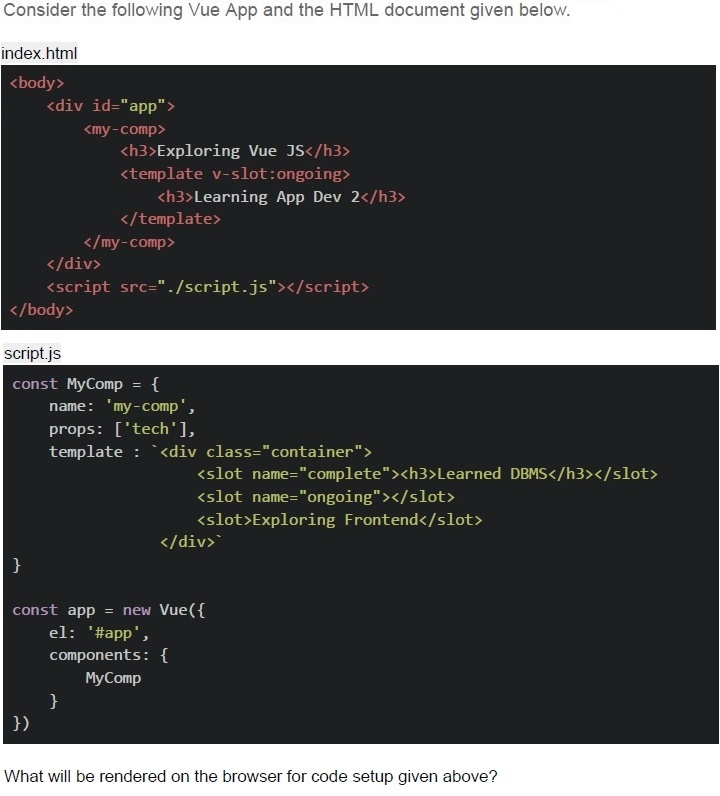
Text of the picture (copyable)
Consider the following Vue App and the HTML document given below.

index.html
```html
<body>
    <div id="app">
        <my-comp>
            <h3>Exploring Vue JS</h3>
            <template v-slot:ongoing>
                <h3>Learning App Dev 2</h3>
            </template>
        </my-comp>
    </div>
    <script src="./script.js"></script>
</body>
```

script.js
```javascript
const MyComp = {
    name: 'my-comp',
    props: ['tech'],
    template: `<div class="container">
        <slot name="complete"><h3>Learned DBMS</h3></slot>
        <slot name="ongoing"></slot>
        <slot>Exploring Frontend</slot>
    </div>`
}

const app = new Vue({
    el: '#app',
    components: {
        MyComp
    }
})
```

What will be rendered on the browser for code setup given above?- Learning App Dev 2Exploring Vue JS
- Learning App Dev 2Exploring Frontend
- Learned DBMSLearning App Dev 2 Exploring Frontend
- Learned DBMSLearning App Dev 2 Exploring Vue JS
Consider the following HTML with relevant Vue CDN link attached.
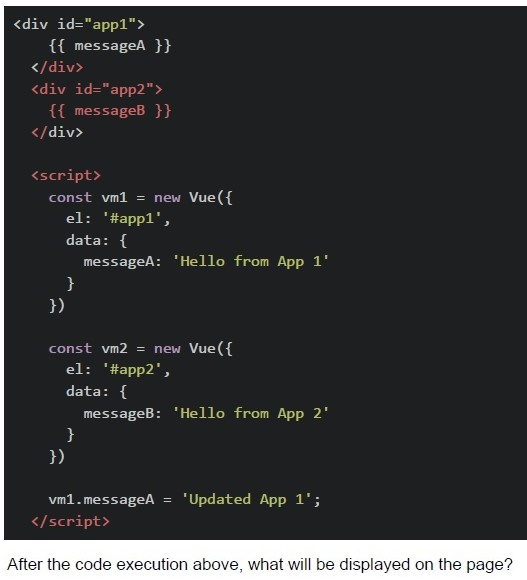 Consider the following HTML with relevant Vue CDN link attached.
Consider the following HTML with relevant Vue CDN link attached.
Text of the picture (copyable)
```html
<div id="app1">
  {{ messageA }}
</div>
<div id="app2">
  {{ messageB }}
</div>

<script>
  const vm1 = new Vue({
    el: '#app1',
    data: {
      messageA: 'Hello from App 1'
    }
  })

  const vm2 = new Vue({
    el: '#app2',
    data: {
      messageB: 'Hello from App 2'
    }
  })

  vm1.messageA = 'Updated App 1';
</script>
```
After the code execution above, what will be displayed on the page?- "Updated App 1" and "Hello from App 2"
- "Hello from App 1" and "Hello from App 2"
- "Updated App 1" and blank second div
- Both divs will be blank
Consider the following HTML with relevant Vue CDN attached.
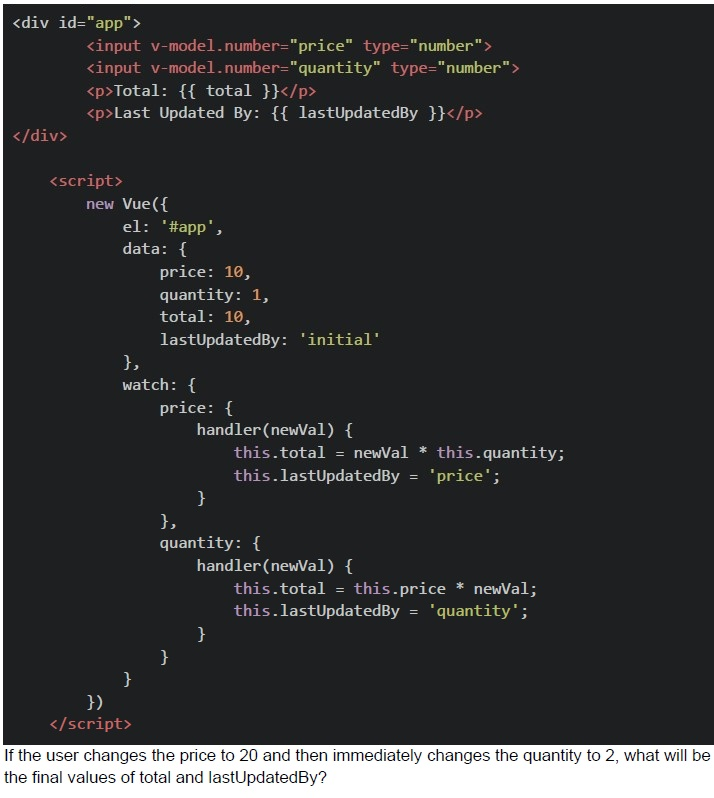 Consider the following HTML with relevant Vue CDN attached.
Consider the following HTML with relevant Vue CDN attached.
Text of the picture (copyable)
```html
<div id="app">
  <input v-model.number="price" type="number">
  <input v-model.number="quantity" type="number">
  <p>Total: {{ total }}</p>
  <p>Last Updated By: {{ lastUpdatedBy }}</p>
</div>

<script>
  new Vue({
    el: '#app',
    data: {
      price: 10,
      quantity: 1,
      total: 10,
      lastUpdatedBy: 'initial'
    },
    watch: {
      price: {
        handler(newVal) {
          this.total = newVal * this.quantity;
          this.lastUpdatedBy = 'price';
        }
      },
      quantity: {
        handler(newVal) {
          this.total = this.price * newVal;
          this.lastUpdatedBy = 'quantity';
        }
      }
    }
  })
</script>
```
If the user changes the price to 20 and then immediately changes the quantity to 2, what will be the final values of total and lastUpdatedBy?- total: 20, lastUpdatedBy: "price"
- total: 40, lastUpdatedBy: "quantity"
- total: 20, lastUpdatedBy: "quantity"
- total: 40, lastUpdatedBy: "price"
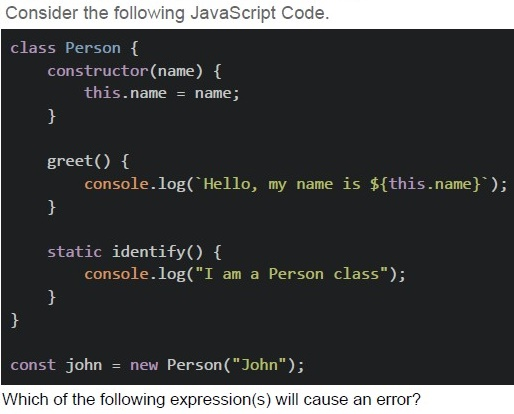
Text of the picture (copyable)
Consider the following JavaScript Code.

```javascript
class Person {
  constructor(name) {
    this.name = name;
  }

  greet() {
    console.log(`Hello, my name is ${this.name}`);
  }

  static identify() {
    console.log("I am a Person class");
  }
}

const john = new Person("John");
```

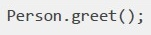
Which of the following expression(s) will cause an error?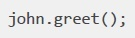
text
```
john.greet();
```
text
```
Person.greet();
```

text
```
john.identify();
```

text
```
Person.identify();
```

text
```javascript
console.log(john.name);
```
Answer key
- Q1 (MCQ, 2 marks): A
- Q2 (MCQ, 2 marks): D
- Q3 (MCQ, 2 marks): B
- Q4 (MCQ, 2 marks): B
- Q5 (MCQ, 3 marks): C
- Q6 (MCQ, 3 marks): B
- Q7 (MCQ, 3 marks): C
- Q8 (MCQ, 3 marks): D
- Q9 (MCQ, 3 marks): D
- Q10 (MCQ, 3 marks): D
- Q11 (MCQ, 3 marks): A
- Q12 (MCQ, 4.5 marks): E
- Q13 (MCQ, 4.5 marks): D
- Q14 (MCQ, 4.5 marks): A
- Q15 (MCQ, 4.5 marks): B
- Q16 (MSQ, 3 marks): B, C
Concepts this paper tests
Auto-generated summary from the source site. Handy as a checklist; the lessons above explain each idea from scratch.
Summary of Core Topics and Concepts
JavaScript
Variable Declarations and Scoping
var,let, andconst- Block-scoping vs. function-scoping
- Hoisting and the Temporal Dead Zone (TDZ)
Functions and Closures
- Immediately Invoked Function Expressions (IIFE)
- Closures and their use in maintaining state
thiskeyword and its context
Object-Oriented Programming in JavaScript
- Classes and static methods
- Object properties and methods
Error Handling
- ReferenceError and other common errors
Vue.js
Directives
v-ifvs.v-showv-modelfor two-way data bindingv-bindfor dynamic class binding
Vue Instance and Components
- Creating a Vue instance
- Components and their lifecycle
- Slots and their usage
Data Binding and Methods
- Interpolation with
{{ }} - Methods and computed properties
- Watchers for reactive data changes
- Interpolation with
Event Handling
@clickand other event directives
Core Equations and Concepts
JavaScript
Hoisting and TDZ
- Variables declared with
letandconstare hoisted but not initialized (TDZ). - Variables declared with
varare hoisted and initialized withundefined.
- Variables declared with
Closures
- Functions have access to their own scope, the outer function’s scope, and global variables.
Example:
function outer() {
    let count = 0;
    return function inner() {
        return ++count;
    };
}
thisContextthisrefers to the object it belongs to.- Can be changed using
bind,call, andapply.
Vue.js
Directives
v-if: Adds/removes elements from the DOM.v-show: Toggles visibility using CSS.v-model: Creates two-way data bindings on form input and textarea elements.
Data Binding
- Interpolation:
{{ message }} - Dynamic class binding:
:class="{ active: isActive }"
- Interpolation:
Watchers
- Watchers allow you to perform asynchronous or expensive operations in response to changing data.
Example:
watch: {
    price: {
        handler(newVal) {
            this.total = newVal * this.quantity;
        }
    }
}
JavaScript Concepts
Vue.js Concepts
These summaries and graphs should help you understand the core topics and their relationships, making it easier to prepare for the exam.