Home / Past papers / MAD2 End Term / this paper
IIT M DIPLOMA ET1 EXAM QPD1 S1 03 Sep - 03 Sep 2023
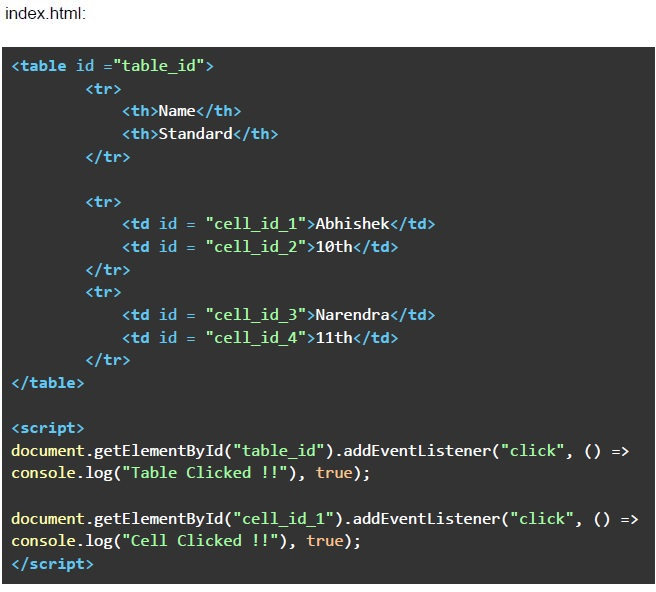 Consider the below HTML document. Suppose you open the “index.html” file in a browser, and click on the table cell with the text “Abhishek”. Which of the following shows the correct sequence of output?
Text of the picture (copyable)
index.html:

```html
<table id ="table_id">
    <tr>
        <th>Name</th>
        <th>Standard</th>
    </tr>
    <tr>
        <td id = "cell_id_1">Abhishek</td>
        <td id = "cell_id_2">10th</td>
    </tr>
    <tr>
        <td id = "cell_id_3">Narendra</td>
        <td id = "cell_id_4">11th</td>
    </tr>
</table>

<script>
    document.getElementById("table_id").addEventListener("click", () =>
    console.log("Table Clicked !!"), true);

    document.getElementById("cell_id_1").addEventListener("click", () =>
    console.log("Cell Clicked !!"), true);
</script>
```
text
Cell Clicked !!
Table Clicked !!

text
Table Clicked !!
Cell Clicked !!

text
Cell Clicked !!

text
Table Clicked !!
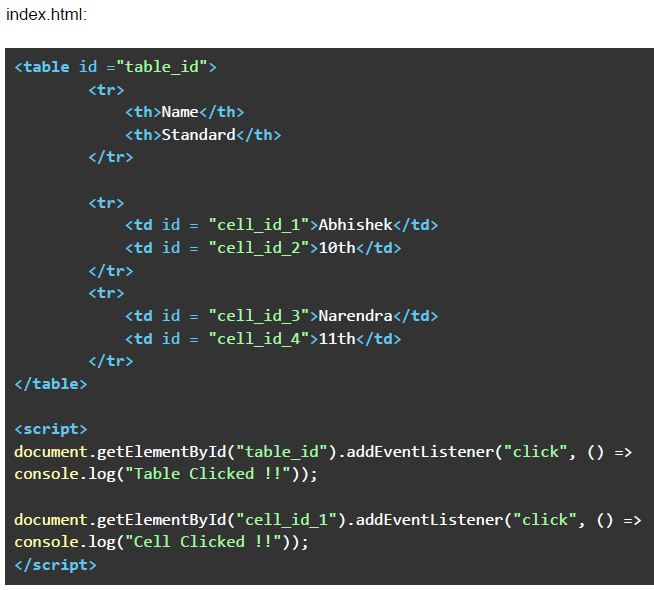 Consider the below HTML document. Suppose you open the “index.html” file in a browser, and click on the table cell with the text “Abhishek”. Which of the following shows the correct sequence of output?
Text of the picture (copyable)
index.html:

```html
<table id = "table_id">
    <tr>
        <th>Name</th>
        <th>Standard</th>
    </tr>
    <tr>
        <td id = "cell_id_1">Abhishek</td>
        <td id = "cell_id_2">10th</td>
    </tr>
    <tr>
        <td id = "cell_id_3">Narendra</td>
        <td id = "cell_id_4">11th</td>
    </tr>
</table>

<script>
document.getElementById("table_id").addEventListener("click", () =>
console.log("Table Clicked !!"));

document.getElementById("cell_id_1").addEventListener("click", () =>
console.log("Cell Clicked !!"));
</script>
```
text
Cell Clicked !!
Table Clicked !!

text
Table Clicked !!
Cell Clicked !!

text
Cell Clicked !!

text
Table Clicked !!
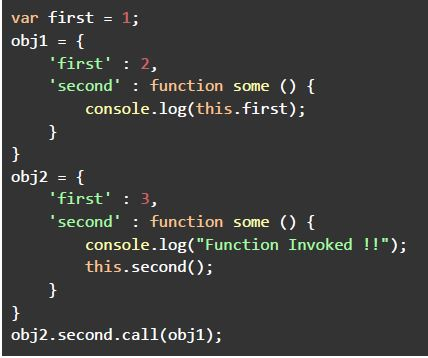 Consider the following JavaScript program, and predict the output if executed.
 Text of the picture (copyable)
```javascript
var first = 1;
obj1 = {
    'first' : 2,
    'second' : function some () {
        console.log(this.first);
    }
}
obj2 = {
    'first' : 3,
    'second' : function some () {
        console.log("Function Invoked !!");
        this.second();
    }
}
obj2.second.call(obj1);
```
text
Function Invoked !!
1

text
Function Invoked !!
2

text
Function Invoked !!
3

text
The program will cause an infinite loop and keep printing the message "Function Invoked !!"
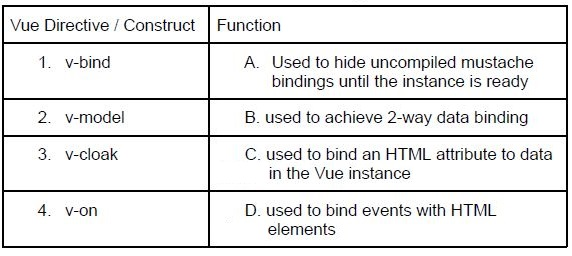 Match the Vue directives / constructs with their function.
 Text of the picture (copyable)
| Vue Directive / Construct | Function                                                              |
| :------------------------ | :-------------------------------------------------------------------- |
| 1. v-bind                 | A. Used to hide uncompiled mustache bindings until the instance is ready |
| 2. v-model                | B. used to achieve 2-way data binding                                 |
| 3. v-cloak                | C. used to bind an HTML attribute to data in the Vue instance        |
| 4. v-on                   | D. used to bind events with HTML elements                             |
- 1-A, 2-B, 3-C, 4-D
- 1-C, 2-B, 3-D, 4-A
- 1-C, 2-D, 3-A, 4-B
- 1-C, 2-B, 3-A, 4-D
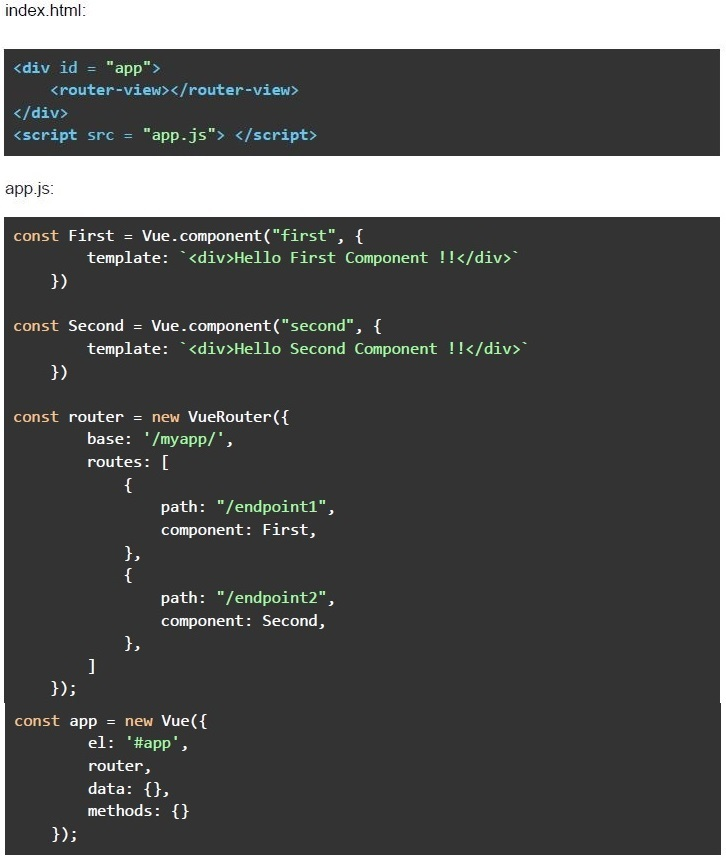 Consider the below Vue application with markup file “index.html” and javascript file “app.js”. Suppose the application is deployed under a subdirectory named “/myapp/” of a domain named “https://appdev2-may2023.com”, and you want to navigate to a page that renders “Hello Second Component !!”. What should be the correct URL to get the desired output?
Text of the picture (copyable)
index.html:

```html
<div id = "app">
    <router-view></router-view>
</div>
<script src = "app.js"></script>
```

app.js:

```javascript
const First = Vue.component("first", {
    template: `<div>Hello First Component !!</div>`
})

const Second = Vue.component("second", {
    template: `<div>Hello Second Component !!</div>`
})

const router = new VueRouter({
    base: '/myapp/',
    routes: [
        {
            path: "/endpoint1",
            component: First,
        },
        {
            path: "/endpoint2",
            component: Second,
        },
    ]
});

const app = new Vue({
    el: '#app',
    router,
    data: {},
    methods: {}
});
```
text
https://appdev2-may2023.com/mvapp/#/

text
https://appdev2-may2023.com/myapp/#/endpoint1

text
https://appdev2-may-2023.com/myapp/#/endpoint2

text
https://appdev2-may2023.com/#/endpoint1
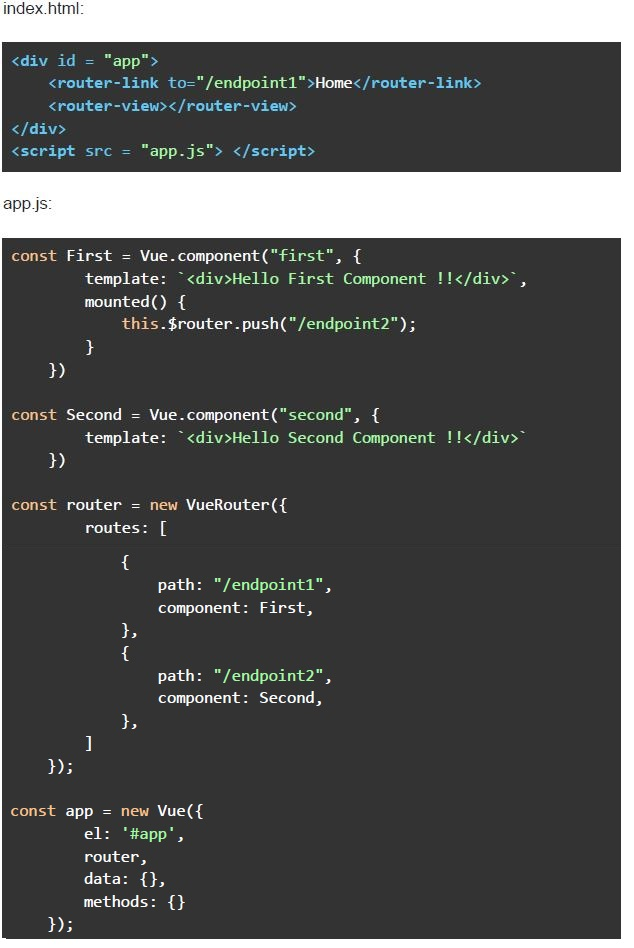 Consider the below Vue application with markup file “index.html” and javascript file “app.js”. Suppose you open the “index.html” file in a browser, and click on the link with the text “Home”. What will be rendered by the browser except the router links in the navigation menu?
Text of the picture (copyable)
index.html:
```html
<div id = "app">
    <router-link to="/endpoint1">Home</router-link>
    <router-view></router-view>
</div>
<script src = "app.js"> </script>
```

app.js:
```javascript
const First = Vue.component("first", {
    template: `<div>Hello First Component !!</div>`,
    mounted() {
        this.$router.push("/endpoint2");
    }
})

const Second = Vue.component("second", {
    template: `<div>Hello Second Component !!</div>`
})

const router = new VueRouter({
    routes: [
        {
            path: "/endpoint1",
            component: First,
        },
        {
            path: "/endpoint2",
            component: Second,
        },
    ]
});

const app = new Vue({
    el: '#app',
    router,
    data: {},
    methods: {}
});
```- Hello First Component !!
- Hello Second Component !!
- 404
- Blank Page
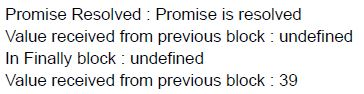
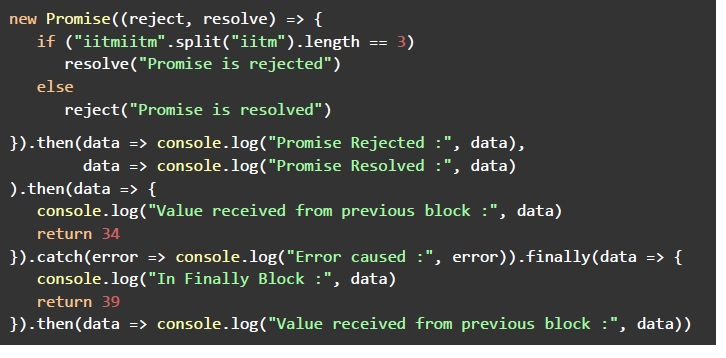 Consider the below javascript program, and predict the output, if executed.
 Text of the picture (copyable)
```javascript
new Promise((reject, resolve) => {
    if ("iitmiitm".split("iitm").length == 3)
        resolve("Promise is rejected")
    else
        reject("Promise is resolved")
}).then(data => console.log("Promise Rejected :", data),
    data => console.log("Promise Resolved :", data)
).then(data => {
    console.log("Value received from previous block :", data)
    return 34
}).catch(error => console.log("Error caused :", error)).finally(data => {
    console.log("In Finally Block :", data)
    return 39
}).then(data => console.log("Value received from previous block :", data))
```
text
Promise Resolved : Promise is resolved
Value received from previous block : undefined
In Finally block : undefined
Value received from previous block : 39
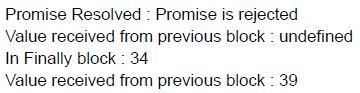
text
Promise Resolved : Promise is rejected
Value received from previous block : undefined
In Finally block : 34
Value received from previous block : 39
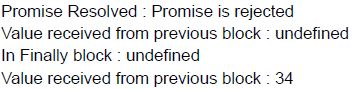
text
Promise Resolved : Promise is rejected
Value received from previous block : undefined
In Finally block : undefined
Value received from previous block : 34
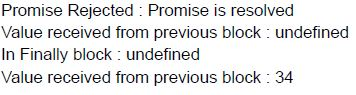
text
Promise Rejected : Promise is resolved
Value received from previous block : undefined
In Finally block : undefined
Value received from previous block : 34
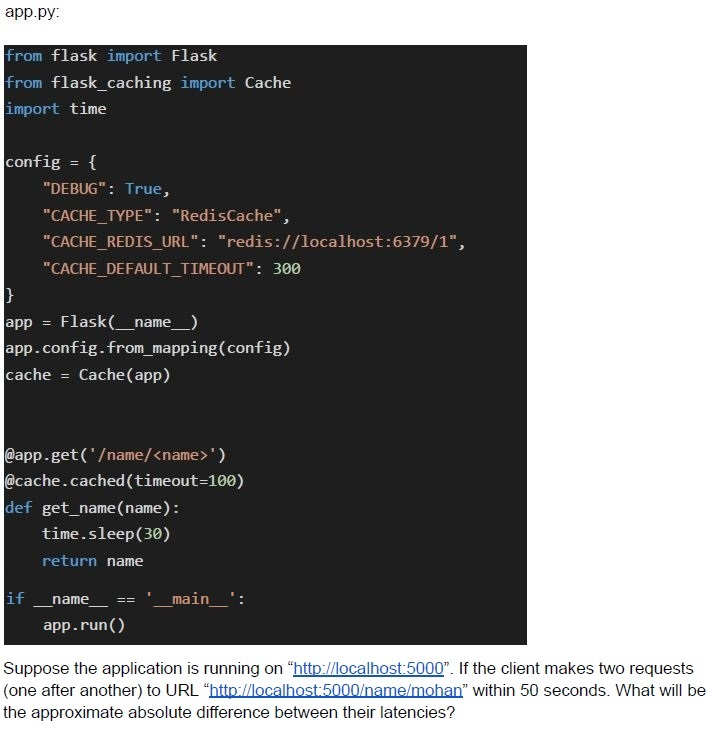 Consider the following flask application.
 Text of the picture (copyable)
app.py:

```python
from flask import Flask
from flask_caching import Cache
import time

config = {
    "DEBUG": True,
    "CACHE_TYPE": "RedisCache",
    "CACHE_REDIS_URL": "redis://localhost:6379/1",
    "CACHE_DEFAULT_TIMEOUT": 300
}

app = Flask(__name__)
app.config.from_mapping(config)
cache = Cache(app)

@app.get('/name/<name>')
@cache.cached(timeout=100)
def get_name(name):
    time.sleep(30)
    return name

if __name__ == '__main__':
    app.run()
```

Suppose the application is running on "http://localhost:5000". If the client makes two requests (one after another) to URL "http://localhost:5000/name/mohan" within 50 seconds. What will be the approximate absolute difference between their latencies?- 30 Seconds
- 40 Seconds
- 0 Seconds
- None of these
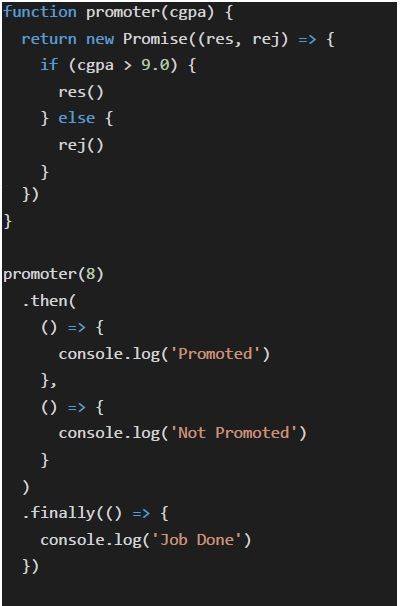 What will be the output of the following javascript code.
 Text of the picture (copyable)
```javascript
function promoter(cgpa) {
  return new Promise((res, rej) => {
    if (cgpa > 9.0) {
      res()
    } else {
      rej()
    }
  })
}

promoter(8)
  .then(
    () => {
      console.log('Promoted')
    },
    () => {
      console.log('Not Promoted')
    }
  )
  .finally(() => {
    console.log('Job Done')
  })
```
text
Not Promoted

text
Promoted

text
Not Promoted
Job Done

text
Promoted
Job Done
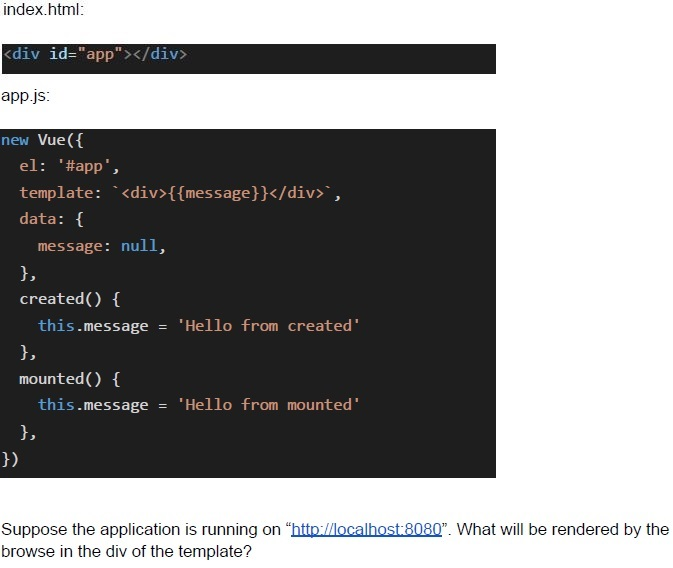 Consider the below Vue application with markup file “index.html” and javascript file “app.js”.
 Text of the picture (copyable)
index.html:
```html
<div id="app"></div>
```
app.js:
```javascript
new Vue({
  el: '#app',
  template: `<div>{{message}}</div>`,
  data: {
    message: null,
  },
  created() {
    this.message = 'Hello from created'
  },
  mounted() {
    this.message = 'Hello from mounted'
  },
})
```
Suppose the application is running on "http://localhost:8080". What will be rendered by the browse in the div of the template?
text
Hello from created

text
Hello from mounted

text
null

text
None of these
 Consider the below Vue application with markup file “index.html” and javascript file “app.js”.
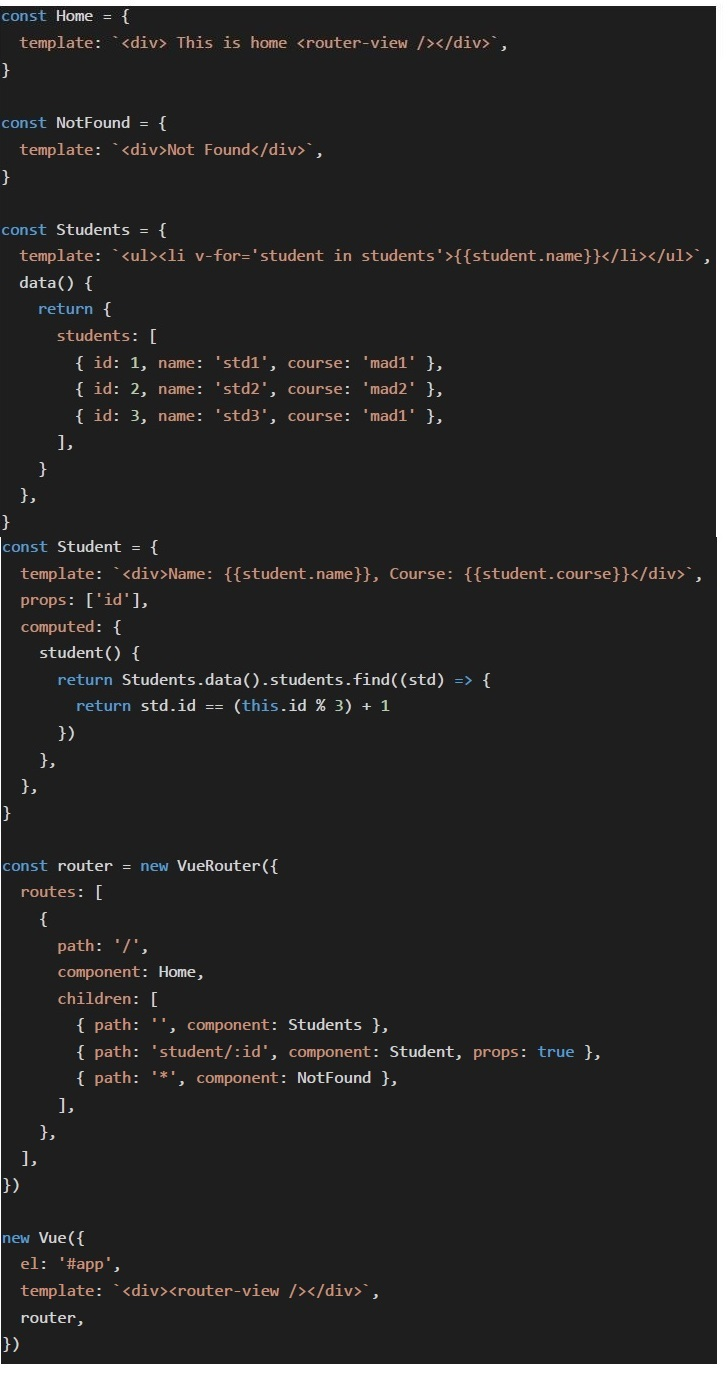 Consider the below Vue application with markup file “index.html” and javascript file “app.js”.
 Consider the below Vue application with markup file “index.html” and javascript file “app.js”.
 Text of the picture (copyable)
index.html:

```html
<div id="app"></div>
```

app.js:
```javascript
const Home = {
  template: `<div> This is home <router-view /></router-view>`,
}

const NotFound = {
  template: `<div>Not Found</div>`,
}

const Students = {
  template: `<ul><li v-for='student in students'>{{student.name}}</li></ul>`,
  data() {
    return {
      students: [{
        id: 1,
        name: 'std1',
        course: 'mad1'
      }, {
        id: 2,
        name: 'std2',
        course: 'mad2'
      }, {
        id: 3,
        name: 'std3',
        course: 'mad1'
      }, ],
    }
  },
}

const Student = {
  template: `<div>Name: {{student.name}}, Course: {{student.course}}</div>`,
  props: ['id'],
  computed: {
    student() {
      return Students.data().students.find((std) => {
        return std.id == (this.id % 3) + 1
      })
    },
  },
}

const router = new VueRouter({
  routes: [{
    path: '/',
    component: Home,
    children: [{
      path: '',
      component: Students
    }, {
      path: 'student/:id',
      component: Student,
      props: true
    }, {
      path: '*',
      component: NotFound
    }, ],
  }, ],
})

new Vue({
  el: '#app',
  template: `<div><router-view /></router-view>`,
  router,
})
```
Suppose the application is running on "http://localhost:8080". What will be rendered by the browser inside the "router-view" component of "Home" Component for the URL "http://localhost:8080/students"?- Name: std1, Course: mad1
- Name: std2, Course: mad2
- Name: std3, Course: mad1
- Not Found
- Currently selected tab/page in a multi page/tab document
- User Preferences
- Loading Icons
- Shopping Cart
- As an application developer, it is not possible to hide javascript from the user.
- “Denial of Service” is an attack that injects malicious client side scripts.
- CORS is a mechanism used to control and manage cross-origin requests in aweb application
- The terms “privacy” and “security” are the same when it comes to webapplications.
- Global execution context is created when the script starts to run.
- Function execution context is created when the script starts to run.
- A function execution context is created when the function is called.
- All of these.
- Every object in JavaScript has a prototype.
- Prototype of an object can be null.
- Prototype of an object cannot be null.
- None of these.
- Memoization term is used for a special kind of caching where the return valueof a function is cached based on its parameters value.
- Redis database can be used to cache data.
- Caching can only be done at the browser level.
- All of these
- Celery is a task queue.
- Celery typically runs the tasks asynchronously.
- Celery typically runs the tasks synchronously.
- None of these.
- The “await” can only be used inside an async function, except browser console.
- The “await” keyword is typically used to wait for a promise and get itsfulfilment value.
- The “await” keyword pauses the execution of code of the async function till thepromise is in pending state, and executes the code outside the function, in the meantime.
- All of these
- A fetch call is capable of sending image data.
- The “Accept” HTTP header is used by HTTP clients to tell the server which typeof content they expect/prefer as response.
- A fetch call allows a developer to add custom headers in the request.
- All of these
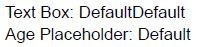
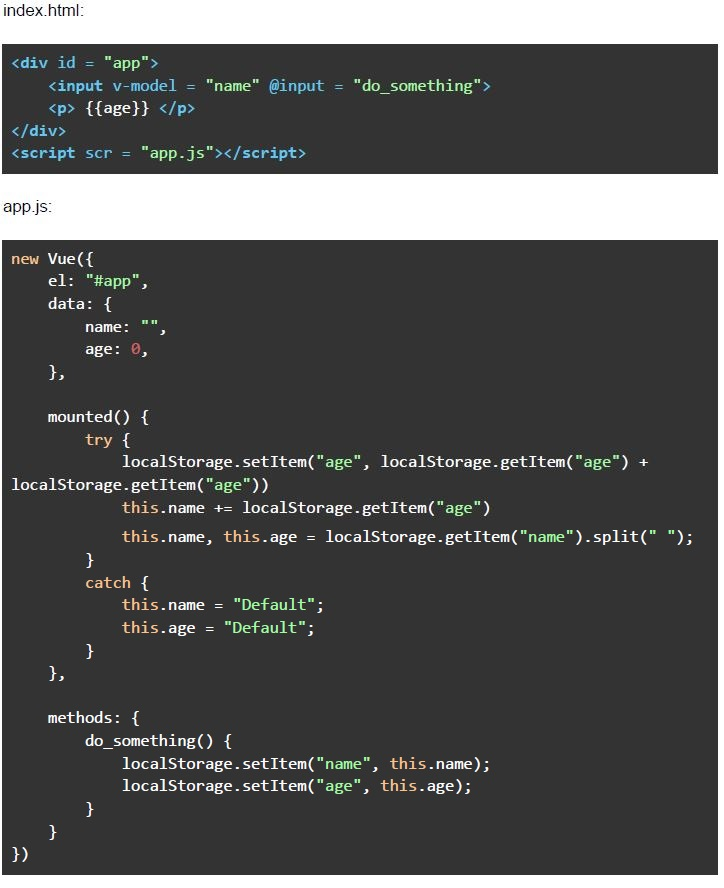 Consider the following Vue application with markup “index.html” and javascript file “app.js”. Suppose you open “index.html” file in a browser, and type the text “App Dev II” in the text box shown (after removing the previous text, if any), and hard refresh the page twice, without clicking anywhere. What will be the value shown in the text box, and the “age” placeholder, respectively?
Text of the picture (copyable)
index.html:

```html
<div id = "app">
    <input v-model = "name" @input = "do_something">
    <p> {{age}} </p>
</div>
<script scr = "app.js"></script>
```

app.js:

```javascript
new Vue({
    el: "#app",
    data: {
        name: "",
        age: 0,
    },

    mounted() {
        try {
            localStorage.setItem("age", localStorage.getItem("age") +
            localStorage.getItem("age"))
            this.name += localStorage.getItem("age")
            this.name, this.age = localStorage.getItem("name").split(" ");
        }
        catch {
            this.name = "Default";
            this.age = "Default";
        }
    },

    methods: {
        do_something() {
            localStorage.setItem("name", this.name);
            localStorage.setItem("age", this.age);
        }
    }
})
```
text
Text Box: DefaultDefault
Age Placeholder: Default

text
Text Box: DefaultDefaultDefaultDefault
Age Placeholder: Default

text
Text Box: DefaultDefaultDefaultDefault
Age Placeholder: [ "App", "Dev", "II" ]

text
Text Box: DefaultDefault
Age Placeholder: ["App", "Dev", "II"]
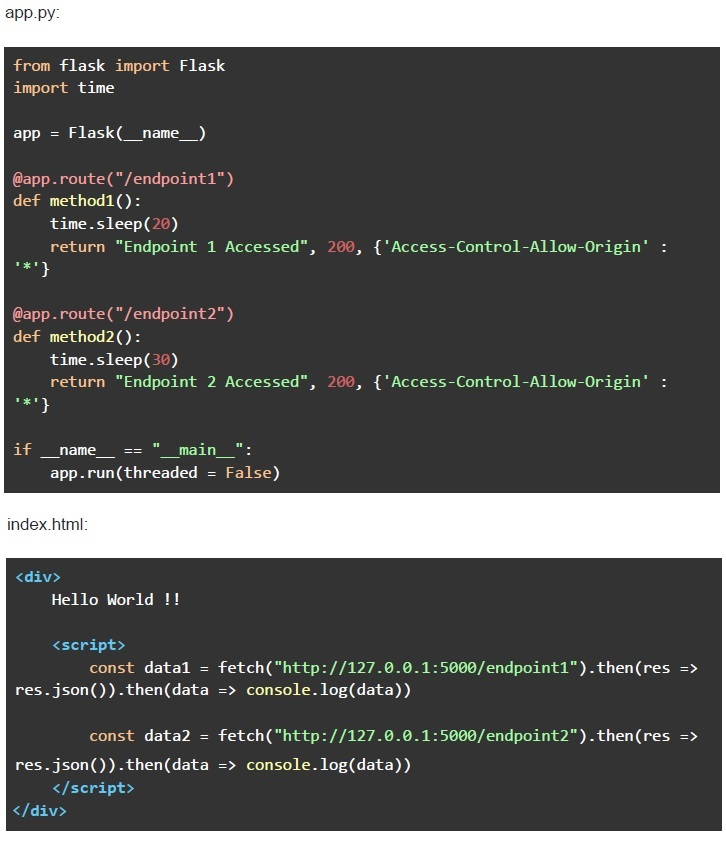 Consider the below flask app, and an HTML file named “index.html”. Suppose you open the “index.html” in a browser. What will be the approximate time taken by the second fetch call (i.e., "http://127.0.0.1:5000/endpoint2") to complete and log the data on the console?
Text of the picture (copyable)
app.py:

```python
from flask import Flask
import time

app = Flask(__name__)

@app.route("/endpoint1")
def method1():
    time.sleep(20)
    return "Endpoint 1 Accessed", 200, {'Access-Control-Allow-Origin' :
                                         '*'}

@app.route("/endpoint2")
def method2():
    time.sleep(30)
    return "Endpoint 2 Accessed", 200, {'Access-Control-Allow-Origin' :
                                         '*'}

if __name__ == "__main__":
    app.run(threaded = False)
```

index.html:

```html
<div>
    Hello World !!

    <script>
        const data1 = fetch("http://127.0.0.1:5000/endpoint1").then(res =>
            res.json()).then(data => console.log(data))

        const data2 = fetch("http://127.0.0.1:5000/endpoint2").then(res =>
            res.json()).then(data => console.log(data))
    </script>
</div>
```- 20 seconds
- 30 seconds
- 10 seconds
- 50 seconds
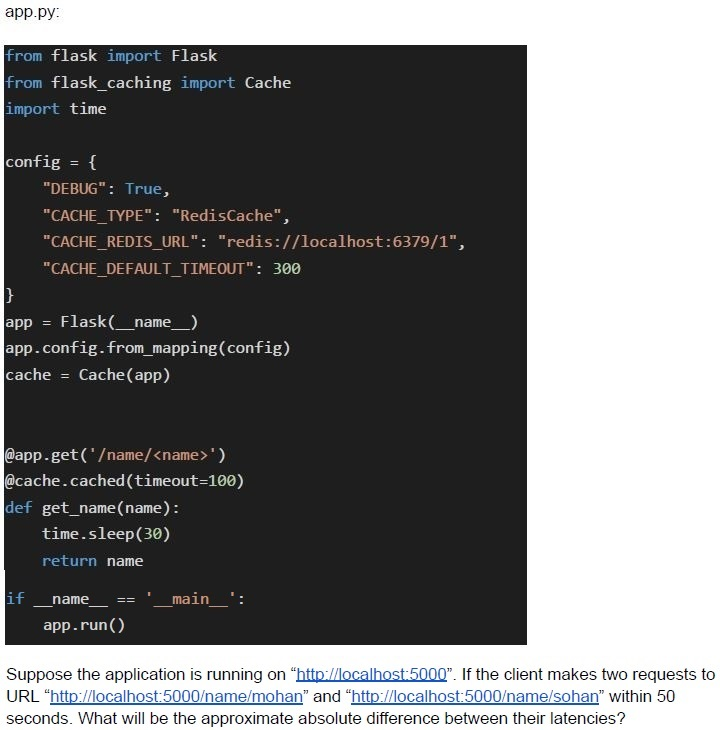 Consider the following flask application.
 Text of the picture (copyable)
app.py:

```python
from flask import Flask
from flask_caching import Cache
import time

config = {
    "DEBUG": True,
    "CACHE_TYPE": "RedisCache",
    "CACHE_REDIS_URL": "redis://localhost:6379/1",
    "CACHE_DEFAULT_TIMEOUT": 300
}
app = Flask(__name__)
app.config.from_mapping(config)
cache = Cache(app)

@app.get('/name/<name>')
@cache.cached(timeout=100)
def get_name(name):
    time.sleep(30)
    return name

if __name__ == '__main__':
    app.run()
```

Suppose the application is running on "http://localhost:5000". If the client makes two requests to URL "http://localhost:5000/name/mohan" and "http://localhost:5000/name/sohan" within 50 seconds. What will be the approximate absolute difference between their latencies?- 30 Seconds
- 40 Seconds
- 0 Seconds
- None of these
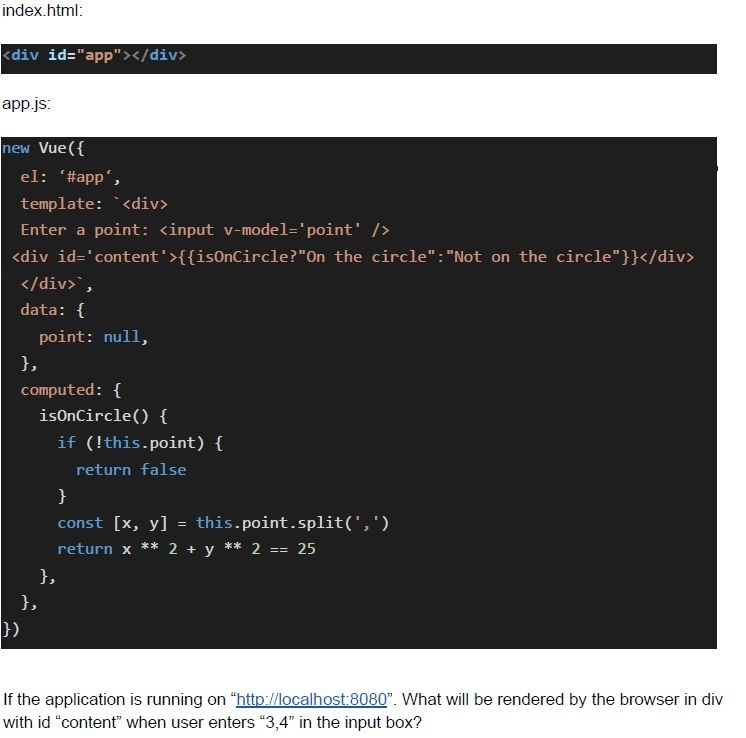 Consider the below Vue application with markup file “index.html” and javascript file “app.js”.
 Text of the picture (copyable)
index.html:
```html
<div id="app"></div>
```

app.js:
```javascript
new Vue({
  el: '#app',
  template: `<div>
    Enter a point: <input v-model='point' />
    <div id='content'>{{isOnCircle?"On the circle":"Not on the circle"}}</div>
  </div>`,
  data: {
    point: null,
  },
  computed: {
    isOnCircle() {
      if (!this.point) {
        return false
      }
      const [x, y] = this.point.split(',')
      return x ** 2 + y ** 2 == 25
    },
  },
})
```

If the application is running on "http://localhost:8080". What will be rendered by the browser in div with id "content" when user enters "3,4" in the input box?- On the circle
- Not on the circle
- true
- False
Consider the below Vue application with markup file “index.html” and javascript file “app.js”.
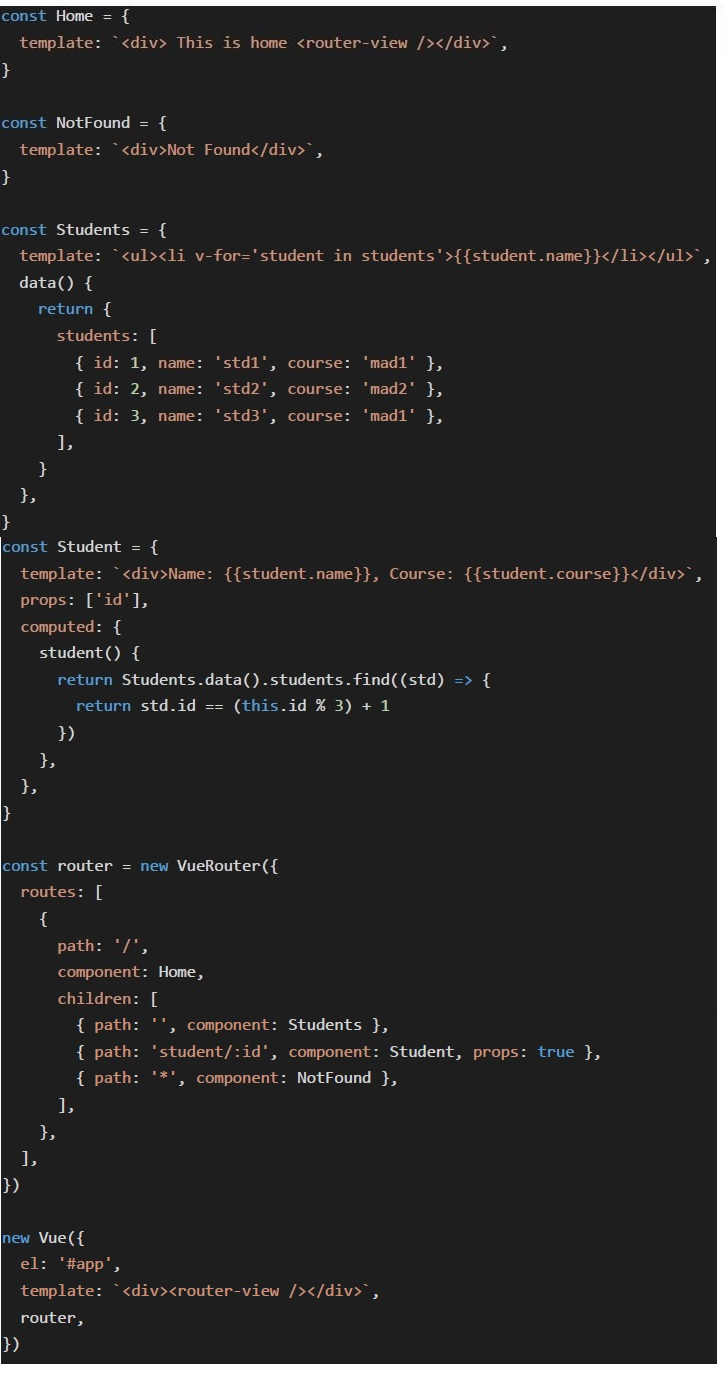 Consider the below Vue application with markup file “index.html” and javascript file “app.js”.
 Consider the below Vue application with markup file “index.html” and javascript file “app.js”.
 Text of the picture (copyable)
index.html:

```html
<div id="app"></div>
```

app.js:
```javascript
const Home = {
  template: `<div> This is home <router-view /></router-view>`,
}

const NotFound = {
  template: `<div>Not Found</div>`,
}

const Students = {
  template: `<ul><li v-for='student in students'>{{student.name}}</li></ul>`,
  data() {
    return {
      students: [{
        id: 1,
        name: 'std1',
        course: 'mad1'
      }, {
        id: 2,
        name: 'std2',
        course: 'mad2'
      }, {
        id: 3,
        name: 'std3',
        course: 'mad1'
      }, ],
    }
  },
}

const Student = {
  template: `<div>Name: {{student.name}}, Course: {{student.course}}</div>`,
  props: ['id'],
  computed: {
    student() {
      return Students.data().students.find((std) => {
        return std.id == (this.id % 3) + 1
      })
    },
  },
}

const router = new VueRouter({
  routes: [{
    path: '/',
    component: Home,
    children: [{
      path: '',
      component: Students
    }, {
      path: 'student/:id',
      component: Student,
      props: true
    }, {
      path: '*',
      component: NotFound
    }, ],
  }, ],
})

new Vue({
  el: '#app',
  template: `<div><router-view /></router-view>`,
  router,
})
```
Suppose the application is running on "http://localhost:8080". What will be rendered by the browser inside the "router-view" component of "Home" Component for the URL "http://localhost:8080/"?
text
Name: std1, Course: mad1

text
Name: std2, Course: mad2

text
Name: std3, Course: mad1

text
std1
std2
std3
Consider the below Vue application with markup file “index.html” and javascript file “app.js”.
Consider the below Vue application with markup file “index.html” and javascript file “app.js”.
 Consider the below Vue application with markup file “index.html” and javascript file “app.js”.
 Text of the picture (copyable)
index.html:

```html
<div id="app"></div>
```

app.js:
```javascript
const Home = {
  template: `<div> This is home <router-view /></router-view>`,
}

const NotFound = {
  template: `<div>Not Found</div>`,
}

const Students = {
  template: `<ul><li v-for='student in students'>{{student.name}}</li></ul>`,
  data() {
    return {
      students: [{
        id: 1,
        name: 'std1',
        course: 'mad1'
      }, {
        id: 2,
        name: 'std2',
        course: 'mad2'
      }, {
        id: 3,
        name: 'std3',
        course: 'mad1'
      }, ],
    }
  },
}

const Student = {
  template: `<div>Name: {{student.name}}, Course: {{student.course}}</div>`,
  props: ['id'],
  computed: {
    student() {
      return Students.data().students.find((std) => {
        return std.id == (this.id % 3) + 1
      })
    },
  },
}

const router = new VueRouter({
  routes: [{
    path: '/',
    component: Home,
    children: [{
      path: '',
      component: Students
    }, {
      path: 'student/:id',
      component: Student,
      props: true
    }, {
      path: '*',
      component: NotFound
    }, ],
  }, ],
})

new Vue({
  el: '#app',
  template: `<div><router-view /></router-view>`,
  router,
})
```
Suppose the application is running on "http://localhost:8080". What will be rendered by the browser inside the "router-view" of "Home" component for the URL "http://localhost:8080/student/20"?
text
Name: std1, Course: mad1

text
Name: std2; Course: mad2

text
Name: std3, Course: mad1

text
std1
std2
std3
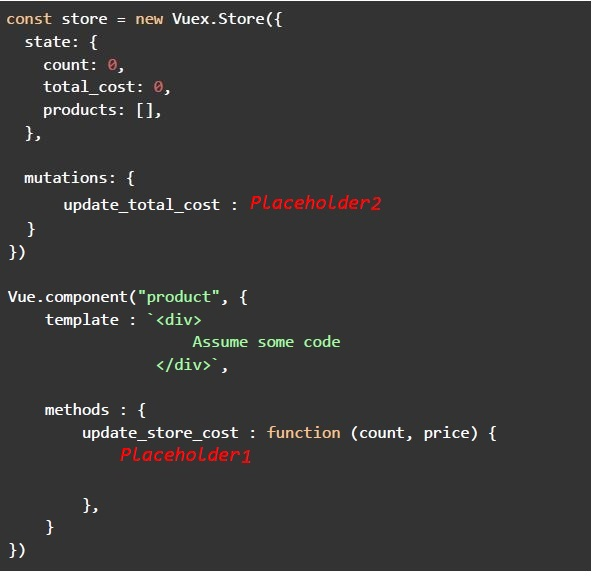 Consider the below Vue component and a Vuex store implementation. You are supposed to invoke the mutation function “update_total_cost” from the method named “update_store_cost” of the Vue component “product”. The “update_total_cost” mutation function should update the store data variable “total_cost” with an appropriate value. The cost is the product of “count” and “price” parameters of the function “update_store_cost”. Assume that both these parameters are of Numeric type, and need not be typecasted. Which of the following is/are the possible replacements for “placeholder1” and “placeholder2”?
Text of the picture (copyable)
```javascript
const store = new Vuex.Store({
  state: {
    count: 0,
    total_cost: 0,
    products: [],
  },

  mutations: {
    update_total_cost: Placeholder2
  }
})

Vue.component("product", {
  template: `<div>
    Assume some code
  </div>`,

  methods: {
    update_store_cost: function (count, price) {
      Placeholder1
    }
  }
})
```
text
```
Placeholder1 : this.$store.commit("update_total_cost", count * price);
Placeholder 2: function (state, total_cost) {
    state.total_cost = total.cost;
}
```
text
```
Placeholder1 : this.$store.commit("update_total_cost", count, price);
Placeholder 2: function (state, count, price) {
    state.total_cost = count * price;
}
```
text
```javascript
Placeholder 1 : this.$store.commit("update_total_cost", {"count" : count, "price" : price});
Placeholder 2: function (state, payload) {
    state.total_cost = payload.count * payload.price;
}
```
text
```
Placeholder1 : this.$store.commit("update_total_cost", count, price);
Placeholder 2: function (count, price) {
    total_cost = count * price;
}
```
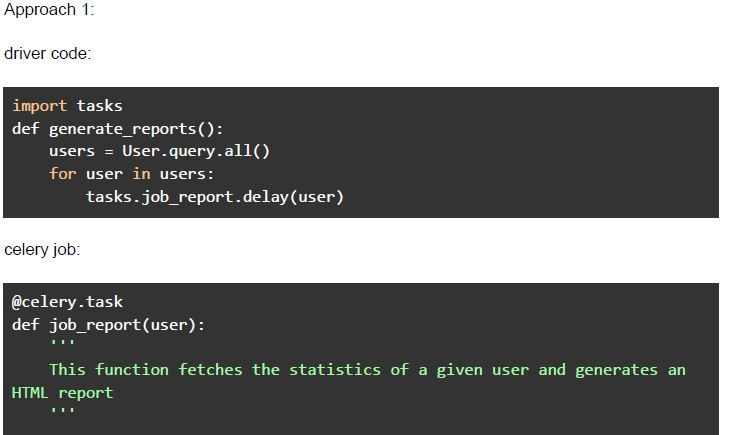 Consider the given 2 implementations.
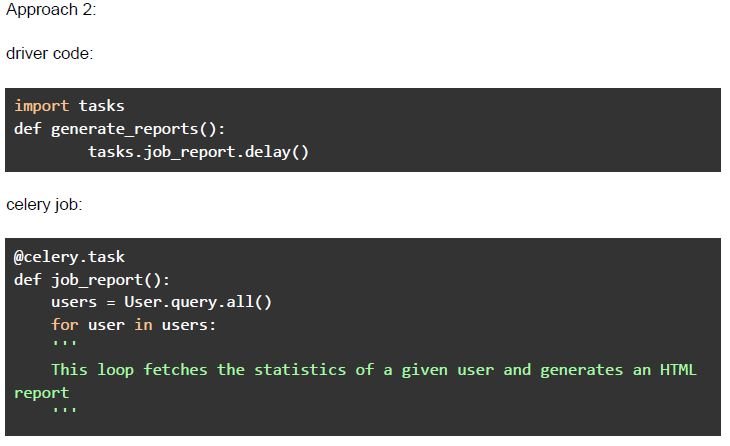 Consider the given 2 implementations. Suppose there are currently 1000 users in the database, and the application is supposed to generate 1000 HTML reports. Which of the following statement(s) is/are false (assuming there are more than 1 worker available in the celery system)?
Text of the picture (copyable)
Approach 1:

driver code:

```python
import tasks
def generate_reports():
    users = User.query.all()
    for user in users:
        tasks.job_report.delay(user)
```

celery job:

```python
@celery.task
def job_report(user):
    """
    This function fetches the statistics of a given user and generates an
    HTML report
    """
```
Approach 2:

driver code:

```python
import tasks
def generate_reports():
    tasks.job_report.delay()
```

celery job:

```python
@celery.task
def job_report():
    users = User.query.all()
    for user in users:
        ...
        # This loop fetches the statistics of a given user and generates an HTML
        # report
        ...
```- Approach 1 will finish the task in less time than approach 2.
- Approach 2 will finish the task in less time than approach 1.
- Both the approaches will be comparable.
- Both the approaches will be comparable if there is only 1 worker available.
- The cache decorator does not include the function parameters in the cachekey.
- The memoize decorator does not include the function parameters in the cachekey.
- The requests without request bodies are generally not cacheable.
- Hard refreshing a web page clears the browser cache for that specific webpage.

text
The CORS mechanism allows a server to indicate which origins can load resources from the server.

text
A server with address http://example.com will always allow scripts loaded from origin http://first.example.com to load resources by default.

text
A server with address http://example.com will always allow scripts loaded from origin http://example.com/first to load resources by default.

text
All of these

Text of the picture (copyable)
Suppose an application stores the scores of all the players in the "scores" table. The "scores" table has 3 columns namely, player_name, player_country and score. Suppose the URL "/scores/countries/<country_name>" returns the total score scored by all the players of a country with name "country_name". Which of the following strategies can be used to improve the performance of application?
- Caching the total score by all players of a country on a backend server.
- Caching the total score by all players of a country in the user's browser.
- Caching will not improve the performance.
- None of these.
- The client repeatedly sends a request to the server after a fixed interval oftime.
- The server sends the response immediately, even if the requested data is notavailable.
- The response from server may be empty.
- The response from the server cannot be empty.
- “First contentful paint” for a webpage is the size of the smallest visible elementon a webpage.
- “First contentful paint” for a webpage is the time the browser takes to paint thefirst visible content on the webpage.
- “Largest contentful paint” for a webpage is the time the browser takes to paintthe largest visible content on the webpage.
- “Largest contentfull paint” for a webpage is the size of the largest visiblecontent on the webpage.
Answer key
- Q1 (MCQ, 3 marks): B
- Q2 (MCQ, 3 marks): A
- Q3 (MCQ, 3 marks): B
- Q4 (MCQ, 3 marks): D
- Q5 (MCQ, 3 marks): C
- Q6 (MCQ, 3 marks): B
- Q7 (MCQ, 3 marks): C
- Q8 (MCQ, 3 marks): A
- Q9 (MCQ, 3 marks): C
- Q10 (MCQ, 3 marks): B
- Q11 (MCQ, 3 marks): D
- Q12 (MSQ, 2 marks): A, C
- Q13 (MSQ, 2 marks): B, D
- Q14 (MSQ, 2 marks): A, C
- Q15 (MSQ, 2 marks): A, B
- Q16 (MSQ, 2 marks): A, B
- Q17 (MSQ, 2 marks): A, B
- Q18 (MCQ, 2 marks): D
- Q19 (MCQ, 2 marks): D
- Q20 (MCQ, 4.5 marks): C
- Q21 (MCQ, 4.5 marks): D
- Q22 (MCQ, 4.5 marks): C
- Q23 (MCQ, 4.5 marks): A
- Q24 (MCQ, 4.5 marks): D
- Q25 (MCQ, 4.5 marks): C
- Q26 (MSQ, 4.5 marks): A, C
- Q27 (MSQ, 4.5 marks): B, C
- Q28 (MSQ, 3 marks): B, C
- Q29 (MSQ, 3 marks): A, C
- Q30 (MSQ, 3 marks): A, B
- Q31 (MSQ, 3 marks): A, B, C
- Q32 (MSQ, 3 marks): B, C
Concepts this paper tests
Auto-generated summary from the source site. Handy as a checklist; the lessons above explain each idea from scratch.
Here’s a structured summary of core topics, concepts, and principles for the "Modern Application Development 2" exam, along with key equations (where applicable) and Mermaid knowledge graphs to visualize relationships.
1. Core Topics & Concepts
A. HTML & DOM Events
Event Propagation: Bubble vs. Capture phases.
- Example: Clicking a table cell (
<td>) triggers both cell and table event listeners. Key Behavior:
- If both
tableandtdhave click listeners, the td listener fires first (bubbling phase). - Use
event.stopPropagation()to prevent bubbling.
- If both
- Example: Clicking a table cell (
Event Listeners:
element.addEventListener("click", () => console.log("Clicked!"));
B. JavaScript Fundamentals
thisBinding:- Depends on how a function is called (not where it’s defined).
- Arrow functions inherit
thisfrom the surrounding scope. Example (from Q4):
obj2.second.call(obj1); // `this` inside `some()` refers to `obj1`.
Promises & Async/Await:
- Promise States: Pending → Fulfilled/Rejected.
.then()Chaining: Returns a new promise..catch(): Handles rejections..finally(): Executes regardless of resolution/rejection.Example (from Q8):
new Promise((res, rej) => rej("Error")) .catch(e => console.log(e)) // "Error" .finally(() => console.log("Done")); // "Done"Async/Await:
awaitpauses execution until the promise settles.- Always returns a promise.
Execution Context:
- Global Context: Created when the script starts.
- Function Context: Created when a function is called (not defined).
- Hoisting: Variables and functions are moved to the top of their scope.
Prototypes:
- Every object has a prototype (except
Object.prototype). - Prototype Chain: Used for inheritance.
Example:
let obj = {};
console.log(obj.__proto__ === Object.prototype); // true
- Every object has a prototype (except
C. Vue.js
- Directives: | Directive | Purpose | |-----------|------------------------------------------| |
v-bind| Bind HTML attributes to Vue data. | |v-model| Two-way data binding (e.g.,<input>). | |v-cloak| Hide uncompiled mustache tags. | |v-on| Bind event listeners (e.g.,@click). |
Lifecycle Hooks:
created: After instance creation (data reactive, but not mounted).mounted: After DOM insertion.Example (from Q11):
mounted() { this.message = "Hello from mounted"; } // Overrides `created`.
Vue Router:
- Dynamic Routing: Use
:idin paths. - Nested Routes:
<router-view>inside parent components. - Navigation Guards: Redirect or cancel navigation.
Example (from Q6):
routes: [ { path: "/endpoint1", component: First }, { path: "/endpoint2", component: Second } ]- URL:
http://localhost:8080/#/endpoint2→ RendersSecond.
- URL:
- Dynamic Routing: Use
Vuex (State Management):
- State: Single source of truth.
Mutations: Synchronous state updates.
this.$store.commit("update_total_cost", payload);- Actions: Asynchronous operations.
Computed Properties:
- Cached based on reactive dependencies.
Example (from Q24):
computed: {
  isOnCircle() { return x**2 + y**2 === 25; } // Recomputes only if `x` or `y` changes.
}
D. Flask & Backend Concepts
Caching:
flask_caching: Decorators like@cache.cached(timeout=100).- Cache Keys: Include function arguments by default (unless
memoizeis used). - Redis: In-memory cache store.
Example (from Q9):
@app.get('/name/<name>') @cache.cached(timeout=100) # Caches responses for 100 seconds. def get_name(name): time.sleep(30) return name- First request: 30s latency (uncached).
- Second request (within 100s): 0s latency (cached).
Celery (Task Queue):
- Asynchronous Tasks: Offload long-running tasks.
- Workers: Parallel task execution.
Example (from Q28):
# Approach 1 (Faster): Parallel tasks for each user.
for user in users:
    tasks.job_report.delay(user)  # Each task runs in parallel.
# Approach 2 (Slower): Sequential processing. @celery.task def job_report(): for user in User.query.all(): # Blocks until all users are processed. generate_report(user) ```
CORS (Cross-Origin Resource Sharing):
- Same-Origin Policy: Restricts requests to the same origin (protocol + domain + port).
Headers:
Access-Control-Allow-Origin: Specifies allowed origins.Accept: Client tells server the expected response type.
Example:
@app.route("/data")
def data():
    return {"data": "example"}, 200, {"Access-Control-Allow-Origin": "*"}
Performance Optimization:
Indexing: Speed up database queries.
CREATE INDEX idx_player_country ON scores(player_country);Caching Strategies:
- Backend Caching (Redis/Memcached).
- Frontend Caching (Browser
localStorage).
Short Polling:
- Client polls server at fixed intervals.
- Server may return empty responses.
E. Web Security
Common Attacks:
- Denial of Service (DoS): Overloads server (not script injection).
- Cross-Site Scripting (XSS): Injects malicious scripts.
- CSRF: Forces users to execute unwanted actions.
Privacy vs. Security:
- Privacy: Protects user data.
- Security: Protects systems from attacks.
Ephemeral State:
- Temporary UI state (e.g., loading spinners, selected tabs).
- Not persistent (unlike user preferences or shopping carts).
F. HTTP & Fetch API
Headers:
Accept: Tells server the expected response format (e.g.,application/json).Content-Type: Specifies request body format.
Fetch API:
- Supports custom headers, POST data (including images).
Example:
fetch("https://api.example.com", {
  method: "POST",
  headers: { "Content-Type": "image/png" },
  body: imageBlob
});
G. Performance Metrics (Lighthouse)
- First Contentful Paint (FCP): Time to render the first DOM content.
- Largest Contentful Paint (LCP): Time to render the largest visible element.
2. Key Equations (Mathematics/Logic)
A. Promise Resolution
Rejection/Resolution Flow:
new Promise((res, rej) => rej("Error"))
  .catch(e => console.log(e))  // Logs "Error"
  .finally(() => console.log("Done"));  // Logs "Done"
B. Circle Equation (Vue Computed Property)
Check if a point
(x, y)lies on a circle with radius5:computed: { isOnCircle() { const [x, y] = this.point.split(','); return x**2 + y**2 === 25; // 3² + 4² = 25 → true } }
C. Cache Latency Calculation
- First Request:
T = processing_time(e.g., 30s). - Subsequent Requests (Cached):
T ≈ 0s. - Latency Difference:
ΔT = T_first - T_cached = 30s.
D. Celery Parallelism
Approach 1 (Parallel):
- Time ≈
max(time_per_task)(e.g., 1s per user → 1s total for 1000 users).
- Time ≈
Approach 2 (Sequential):
- Time ≈
N * time_per_task(e.g., 1000 * 1s = 1000s).
- Time ≈
Graph 2: Vue.js Ecosystem
Graph 3: Backend & Performance
Graph 4: Web Security & HTTP
Graph 5: Performance Metrics
4. Exam Tips
JavaScript:
- Understand
thisbinding in different contexts (global, function, arrow functions). - Master promise chaining (
.then,.catch,.finally) andasync/await. - Know the event propagation phases (capturing → target → bubbling).
- Understand
Vue.js:
- Differentiate between
v-bind,v-model, andv-on. - Remember lifecycle hooks order:
created→mounted→updated. - Vue Router: Nested routes use
<router-view>inside parent components.
- Differentiate between
Flask/Celery:
- Caching reduces latency for repeated requests.
- Celery parallelizes tasks; sequential processing is slower.
- CORS headers are critical for cross-origin requests.
Security:
- DoS ≠ XSS. DoS floods the server; XSS injects scripts.
- Privacy ≠ Security. Privacy protects data; security protects systems.
Performance:
- Short polling: Client initiates requests at fixed intervals.
- Lighthouse metrics: FCP/LCP measure rendering speed.