Home / Past papers / MAD2 Quiz 1 / this paper
2024 July07: IIT M AN EXAM QDF2 - 07 Jul 2024
Elapsed 00:00

Text of the picture (copyable)
Which of the following methods is not a valid DOM method in JavaScript?

text
```
getElementById()
```

text
```
getElementByPropertyName()
```

text
```
getElementsByTagName()
```

text
```
getElementByClassName()
```
Text of the picture (copyable)
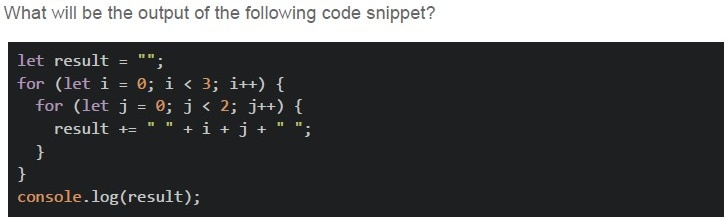
What will be the output of the following code snippet?

```javascript
let result = "";
for (let i = 0; i < 3; i++) {
  for (let j = 0; j < 2; j++) {
    result += "" + i + j + "";
  }
}
console.log(result);
```
text
0 1 1 2 2 3

text
0 1 1 2 2 3 3 4

text
0 1 2 3 4 5

text
00 01 10 11 20 21
Which of the following statements best describes the ephemeral state?
- Data that persists across browser sessions.
- Data that is stored in a server-side database.
- Temporary data that is not preserved across re-renders.
- Data that is cached in the client's browser.
What is the difference between v-bind and v-model directives in Vue.js?
- “v-bind” is used for one-way data binding, while “v-model” is used for two-waydata binding.
- “v-bind” is used for two-way data binding, while “v-model” is used for one-waydata binding.
- Both “v-bind” and “v-model” are used for one-way data binding.
- Both “v-bind” and “v-model” are used for two-way data binding.
Text of the picture (copyable)
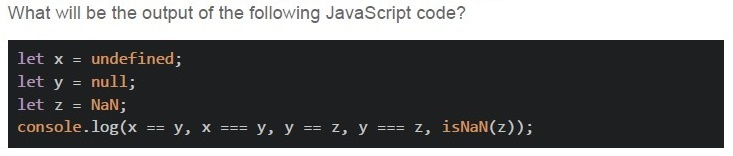
What will be the output of the following JavaScript code?

```javascript
let x = undefined;
let y = null;
let z = NaN;
console.log(x == y, x === y, y == z, y === z, isNaN(z));
```

text
true false false true false

text
false false false false true

text
true false false false true

text
false true true false false
Text of the picture (copyable)
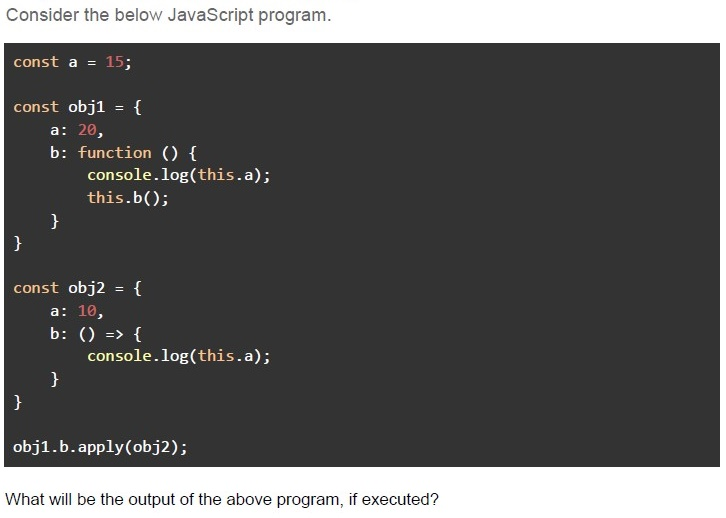
Consider the below JavaScript program.

```javascript
const a = 15;

const obj1 = {
    a: 20,
    b: function () {
        console.log(this.a);
        this.b();
    }
}

const obj2 = {
    a: 10,
    b: () => {
        console.log(this.a);
    }
}

obj1.b.apply(obj2);
```

What will be the output of the above program, if executed?
text
20
20

text
20
undefined

text
undefined
undefined

text
10
undefined

text
The program will crash due to maximum call stack size exceeded error.
Text of the picture (copyable)
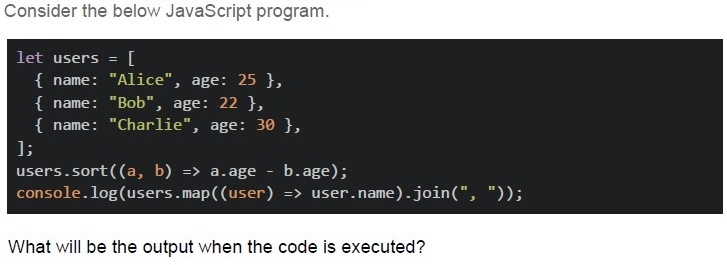
Consider the below JavaScript program.

```javascript
let users = [
  { name: "Alice", age: 25 },
  { name: "Bob", age: 22 },
  { name: "Charlie", age: 30 },
];
users.sort((a, b) => a.age - b.age);
console.log(users.map((user) => user.name).join(", "));
```

What will be the output when the code is executed?
text
Alice, Bob, Charlie

text
Bob, Alice, Charlie

text
Charlie, Alice, Bob

text
Charlie, Bob, Alice
Text of the picture (copyable)
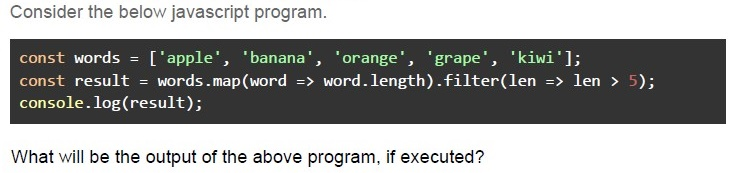
Consider the below javascript program.

```javascript
const words = ['apple', 'banana', 'orange', 'grape', 'kiwi'];
const result = words.map(word => word.length).filter(len => len > 5);
console.log(result);
```

What will be the output of the above program, if executed?

text
```
['apple', 'banana', 'orange', 'grape', 'kiwi']
```
text
```
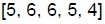
[5, 6, 6, 5, 4]
```

text
```
['banana', 'orange']
```

text
[6, 6]

text
[5, 5]

text
```
[true, true]
```
What is state management in the context of a web application?
- Organizing and storing data on the server-side database.
- Handling and updating the state of client-side components and data.
- Managing user session data using browser cookies.
- Coordinating the state of HTTP requests and responses between client andserver.
Text of the picture (copyable)
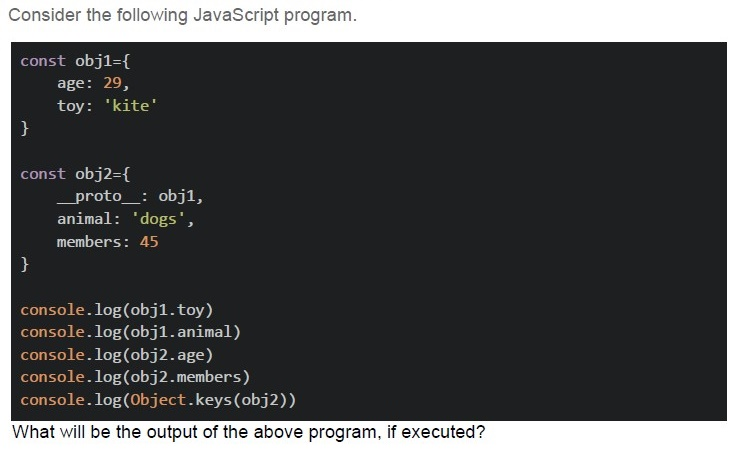
Consider the following JavaScript program.

```javascript
const obj1={
    age: 29,
    toy: 'kite'
}

const obj2={
    __proto__: obj1,
    animal: 'dogs',
    members: 45
}

console.log(obj1.toy)
console.log(obj1.animal)
console.log(obj2.age)
console.log(obj2.members)
console.log(Object.keys(obj2))
```
What will be the output of the above program, if executed?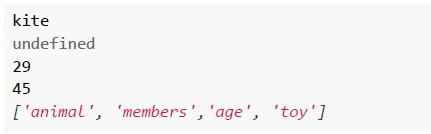
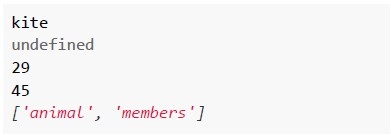
text
```
kite
undefined
29
45
['animal', 'members', 'age', 'toy']
```
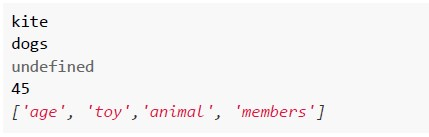
text
```
kite
dogs
undefined
45
['age', 'toy', 'animal', 'members']
```
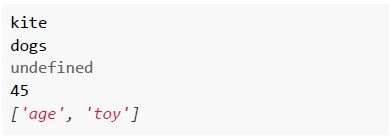
text
```
kite
dogs
undefined
45
['age', 'toy']
```
text
```
kite
undefined
29
45
['animal', 'members']
```
Text of the picture (copyable)
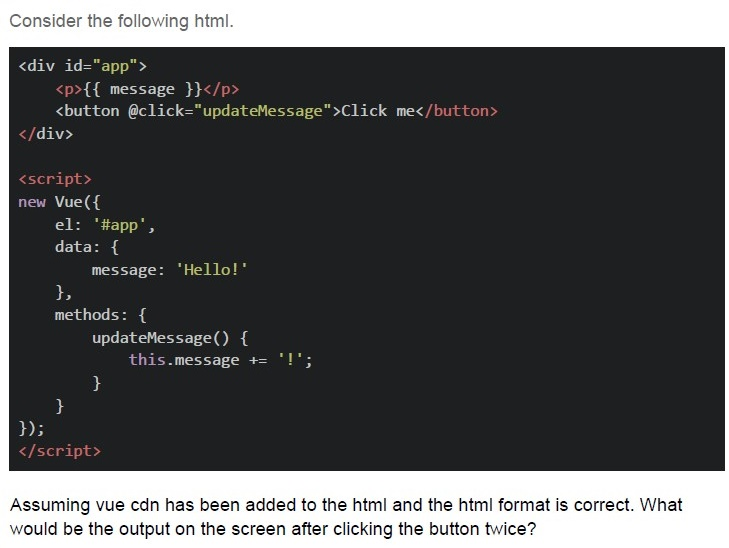
Consider the following html.

```html
<div id="app">
    <p>{{ message }}</p>
    <button @click="updateMessage">Click me</button>
</div>

<script>
    new Vue({
        el: '#app',
        data: {
            message: 'Hello!'
        },
        methods: {
            updateMessage() {
                this.message += '!';
            }
        }
    });
</script>
```

Assuming vue cdn has been added to the html and the html format is correct. What would be the output on the screen after clicking the button twice?
text
Hello

text
Hello!

text
Hello!!

text
Hello!!!
Which of the following is/are correct definition(s) of an arrow function that accepts a number and returns its square?

text
```javascript
let func = (num) => return num1*num1;
```

text
```javascript
let func = (num) => { num1*num1; }
```
text
```javascript
let func = (num) => num1*num1;
```

text
```javascript
let func = (num) => { return num1*num1; }
```
Text of the picture (copyable)
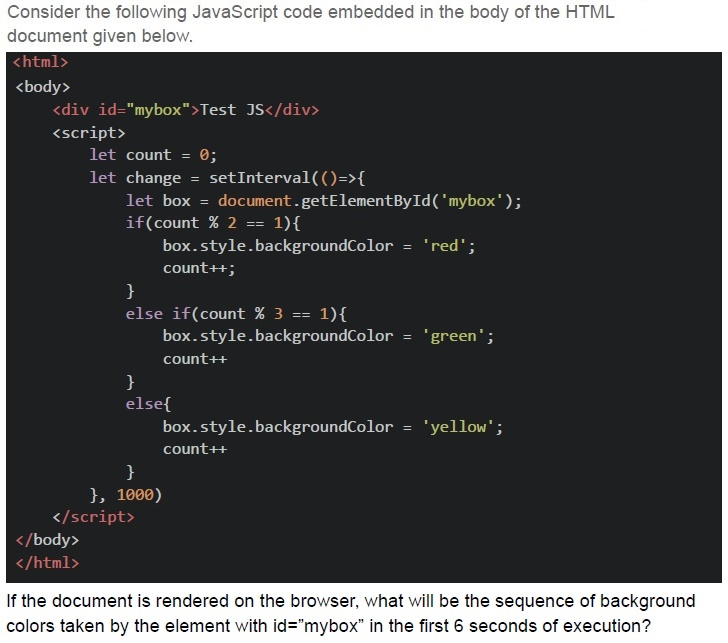
Consider the following JavaScript code embedded in the body of the HTML document given below.

```html
<html>
<body>
    <div id="mybox">Test JS</div>
    <script>
        let count = 0;
        let change = setInterval(()=>{
            let box = document.getElementById('mybox');
            if(count % 2 == 1){
                box.style.backgroundColor = 'red';
                count++;
            }
            else if(count % 3 == 1){
                box.style.backgroundColor = 'green';
                count++;
            }
            else{
                box.style.backgroundColor = 'yellow';
                count++;
            }
        }, 1000)
    </script>
</body>
</html>
```

If the document is rendered on the browser, what will be the sequence of background colors taken by the element with id="mybox" in the first 6 seconds of execution?
text
Red → Green → Yellow → Red → Green → Yellow

text
Red → Green → Red → Yellow → Red → Yellow

text
Yellow → Green → Yellow → Green → Yellow → Green

text
Yellow → Red → Yellow → Red → Green → Red
Text of the picture (copyable)
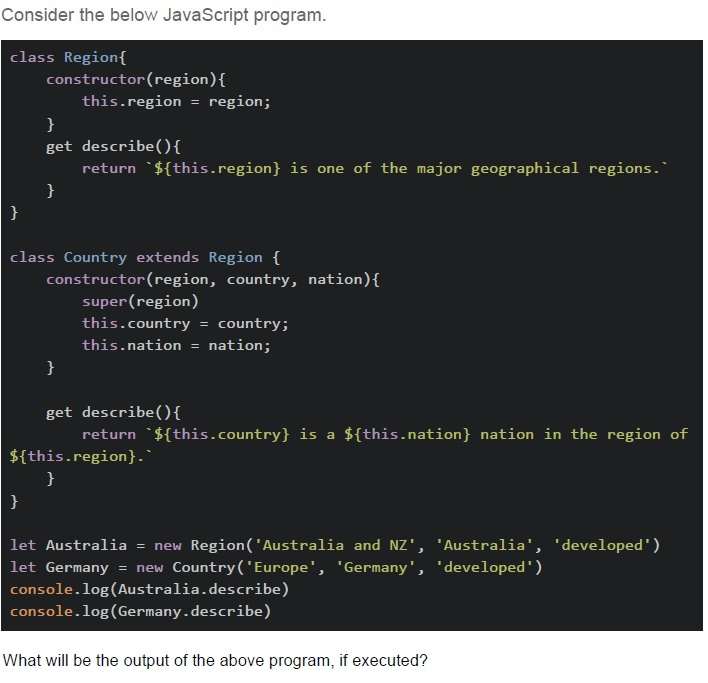
Consider the below JavaScript program.

```javascript
class Region{
    constructor(region){
        this.region = region;
    }
    get describe(){
        return `${this.region} is one of the major geographical regions.`
    }
}

class Country extends Region {
    constructor(region, country, nation){
        super(region)
        this.country = country;
        this.nation = nation;
    }
    get describe(){
        return `${this.country} is a ${this.nation} nation in the region of ${this.region}.`
    }
}

let Australia = new Region('Australia and NZ', 'Australia', 'developed')
let Germany = new Country('Europe', 'Germany', 'developed')
console.log(Australia.describe)
console.log(Germany.describe)
```

What will be the output of the above program, if executed?
text
```
Australia is a developed nation in the region of Australia and NZ.
Germany is a developed nation in the region of Europe.
```

text
Australia and NZ is one of the major geographical regions.
Germany is one of the major geographical regions.

text
```
Australia is a developed nation in the region of Australia and NZ.
Germany is one of the major geographical regions.
```

text
Australia and NZ is one of the major geographical regions.
Germany is a developed nation in the region of Europe.
Text of the picture (copyable)
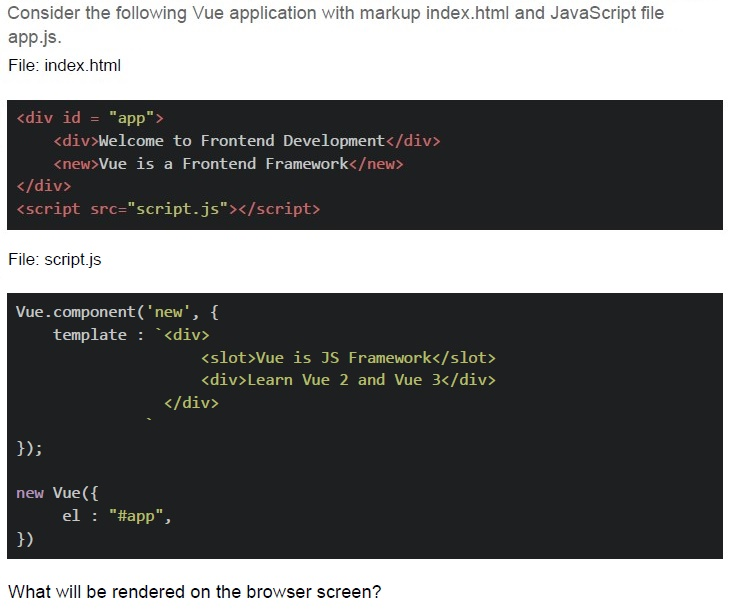
Consider the following Vue application with markup index.html and JavaScript file app.js.
File: index.html

```html
<div id = "app">
    <div>Welcome to Frontend Development</div>
    <new>Vue is a Frontend Framework</new>
</div>
<script src="script.js"></script>
```

File: script.js

```javascript
Vue.component('new', {
    template : `<div>
        <slot>Vue is JS Framework</slot>
        <div>Learn Vue 2 and Vue 3</div>
    </div>`
});

new Vue({
    el : "#app",
})
```

What will be rendered on the browser screen?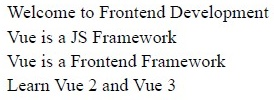
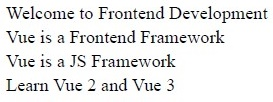
text
Welcome to Frontend Development
Vue is a JS Framework
Vue is a Frontend Framework
Learn Vue 2 and Vue 3
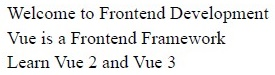
text
Welcome to Frontend Development
Vue is a Frontend Framework
Vue is a JS Framework
Learn Vue 2 and Vue 3
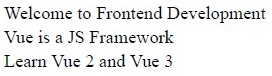
text
Welcome to Frontend Development
Vue is a Frontend Framework
Learn Vue 2 and Vue 3
text
Welcome to Frontend Development
Vue is a JS Framework
Learn Vue 2 and Vue 3
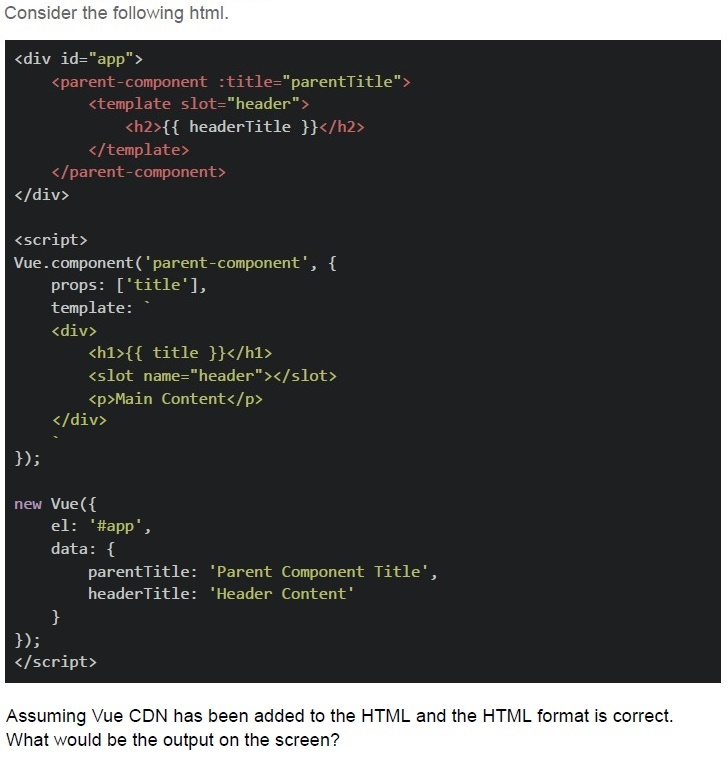
Text of the picture (copyable)
Consider the following html.

```html
<div id="app">
    <parent-component :title="parentTitle">
        <template slot="header">
            <h2>{{ headerTitle }}</h2>
        </template>
    </parent-component>
</div>

<script>
Vue.component('parent-component', {
    props: ['title'],
    template: `
        <div>
            <h1>{{ title }}</h1>
            <slot name="header"></slot>
            <p>Main Content</p>
        </div>
    `
});

new Vue({
    el: '#app',
    data: {
        parentTitle: 'Parent Component Title',
        headerTitle: 'Header Content'
    }
});
</script>
```

Assuming Vue CDN has been added to the HTML and the HTML format is correct.
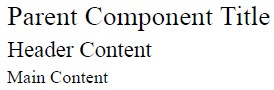
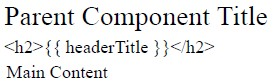
What would be the output on the screen?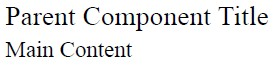
text
Parent Component Title
Main Content
text
Parent Component Title
Header Content
Main Content
text
Parent Component Title
```html
<h2>{{ headerTitle }}</h2>
```
Main Content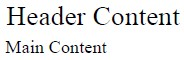
text
Header Content
Main Content
Answer key
- Q1 (MCQ, 2 marks): B
- Q2 (MCQ, 2 marks): D
- Q3 (MCQ, 2 marks): C
- Q4 (MCQ, 2 marks): A
- Q5 (MCQ, 3 marks): C
- Q6 (MCQ, 3 marks): D
- Q7 (MCQ, 3 marks): B
- Q8 (MCQ, 3 marks): D
- Q9 (MCQ, 3 marks): B
- Q10 (MCQ, 3 marks): D
- Q11 (MCQ, 3 marks): D
- Q12 (MSQ, 3 marks): C, D
- Q13 (MCQ, 4.5 marks): D
- Q14 (MCQ, 4.5 marks): D
- Q15 (MCQ, 4.5 marks): C
- Q16 (MCQ, 4.5 marks): B
Concepts this paper tests
Auto-generated summary from the source site. Handy as a checklist; the lessons above explain each idea from scratch.
Summary of Core Topics, Concepts, Principles, and Equations
JavaScript and DOM Manipulation
DOM Methods:
getElementById()getElementsByTagName()getElementsByClassName()getElementByPropertyName()(Not a valid DOM method)
JavaScript Loops and String Manipulation:
- Nested loops and string concatenation.
Example:
let result = "";
for (let i = 0; i < 3; i++) {
    for (let j = 0; j < 2; j++) {
        result += " " + i + j + " ";
    }
}
console.log(result); // Output: " 00 01 10 11 20 21 "
JavaScript Data Types and Comparisons:
undefined,null,NaN- Comparison operators:
===,isNaN() Example:
let x = undefined;
let y = null;
let z = NaN;
console.log(x === y, x === y, y === z, y === z, isNaN(z)); // Output: false false false false true
JavaScript Functions and Context:
apply()method andthiscontext.- Arrow functions and their context.
Example:
const obj1 = {
    a: 20,
    b: function () {
        console.log(this.a);
        this.b();
    }
};
const obj2 = {
    a: 10,
    b: () => {
        console.log(this.a);
    }
};
obj1.b.apply(obj2); // Output: 10 undefined
JavaScript Array Methods:
sort(),map(),filter(),join()Example:
let users = [
    { name: "Alice", age: 25 },
    { name: "Bob", age: 22 },
    { name: "Charlie", age: 30 },
];
users.sort((a, b) => a.age - b.age);
console.log(users.map((user) => user.name).join(", ")); // Output: "Bob, Alice, Charlie"
JavaScript Object Prototypes and Inheritance:
__proto__and object inheritance.Object.keys()Example:
const obj1 = {
    age: 29,
    toy: 'kite'
};
const obj2 = {
    __proto__: obj1,
    animal: 'dogs',
    members: 45
};
console.log(Object.keys(obj2)); // Output: ['animal', 'members']
Vue.js
Vue.js Directives:
v-bindfor one-way data binding.v-modelfor two-way data binding.Example:
<div id="app">
  <p>{{ message }}</p>
  <button @click="updateMessage">Click me</button>
</div>
<script>
new Vue({
  el: '#app',
  data: {
    message: 'Hello!'
  },
  methods: {
    updateMessage() {
      this.message += '!';
    }
  }
});
</script>
Vue.js Components and Slots:
- Component definition and usage.
- Named slots and slot content.
Example:
<div id="app">
  <parent-component :title="parentTitle">
    <template slot="header">
      <h2>{{ headerTitle }}</h2>
    </template>
  </parent-component>
</div>
<script>
Vue.component('parent-component', {
  props: ['title'],
  template: `
    <div>
      <h1>{{ title }}</h1>
      <slot name="header"></slot>
      <p>Main Content</p>
    </div>
  `
});
new Vue({
  el: '#app',
  data: {
    parentTitle: 'Parent Component Title',
    headerTitle: 'Header Content'
  }
});
</script>
Vue.js State Management:
- Handling and updating the state of client-side components and data.
Example:
new Vue({
  el: '#app',
  data: {
    message: 'Hello!'
  },
  methods: {
    updateMessage() {
      this.message += '!';
    }
  }
});
HTML and CSS
HTML Structure and Rendering:
- Basic HTML structure and rendering.
Example:
<div id="app">
  <div>Welcome to Frontend Development</div>
  <div>Vue is a Frontend Framework</div>
</div>
CSS Styling:
- Changing styles dynamically using JavaScript.
Example:
let count = 0;
let change = setInterval(() => {
  let box = document.getElementById('mybox');
  if (count % 2 == 1) {
    box.style.backgroundColor = 'red';
    count++;
  }
  else if (count % 3 == 1) {
    box.style.backgroundColor = 'green';
    count++;
  }
  else {
    box.style.backgroundColor = 'yellow';
    count++;
  }
}, 1000);
Object-Oriented Programming in JavaScript
Classes and Inheritance:
- Class definition and inheritance.
Example:
class Region {
    constructor(region) {
        this.region = region;
    }
    get describe() {
        return `${this.region} is one of the major geographical regions.`
    }
}
class Country extends Region {
    constructor(region, country, nation) {
        super(region);
        this.country = country;
        this.nation = nation;
    }
    get describe() {
        return `${this.country} is a ${this.nation} nation in the region of ${this.region}.`
    }
}
let Australia = new Region('Australia and NZ', 'Australia', 'developed');
let Germany = new Country('Europe', 'Germany', 'developed');
console.log(Australia.describe);
console.log(Germany.describe);