Home / Past papers / MAD2 Quiz 2 / this paper
IIT M DIPLOMA QUIZ2 EXAM QPF1 10 July 2022 - 10 Jul 2022
Elapsed 00:00

Text of the picture (copyable)
THIS IS QUESTION PAPER FOR THE SUBJECT "MODERN APPLICATION DEVELOPMENT 2"

ARE YOU SURE YOU HAVE TO WRITE EXAM FOR THIS SUBJECT?
CROSS CHECK YOUR HALL TICKET TO CONFIRM THE SUBJECTS TO BE WRITTEN.

(IF IT IS NOT THE CORRECT SUBJECT, PLS CHECK THE SECTION AT THE TOP FOR THE SUBJECTS REGISTERED BY YOU)
- Yes
- No
Consider the following Vue application with markup “index.html” and javascript file “app.js”. index.html:
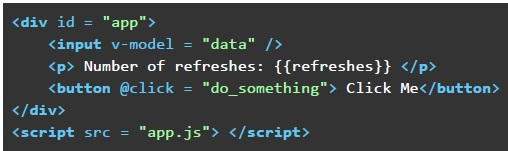 Consider the following Vue application with markup “index.html” and javascript file “app.js”. index.html: app.js:
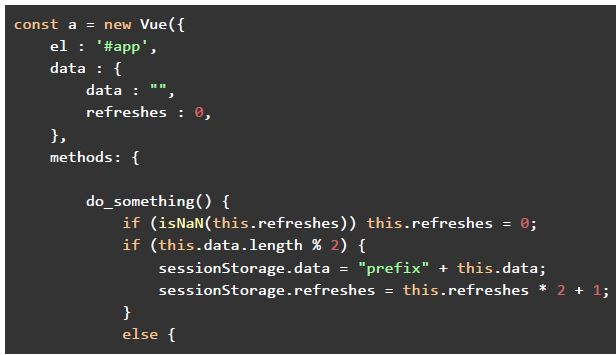 Consider the following Vue application with markup “index.html” and javascript file “app.js”. index.html: app.js:
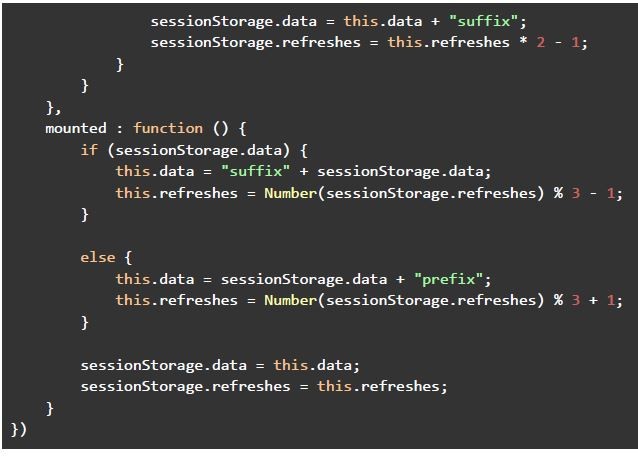 Consider the following Vue application with markup “index.html” and javascript file “app.js”. index.html: app.js: Say you open the file “index.html” in the browser, and enter the text “iitm” in the text box shown (after removing the existing text from the input box), and click on the button with the text “Click Me”. After that, you refresh the page twice. What will be the text shown in the text input box, and the value of the “refreshes” placeholder, respectively?
Consider the following Vue application with markup “index.html” and javascript file “app.js”. index.html: app.js:
Consider the following Vue application with markup “index.html” and javascript file “app.js”. index.html: app.js:
Consider the following Vue application with markup “index.html” and javascript file “app.js”. index.html: app.js: Say you open the file “index.html” in the browser, and enter the text “iitm” in the text box shown (after removing the existing text from the input box), and click on the button with the text “Click Me”. After that, you refresh the page twice. What will be the text shown in the text input box, and the value of the “refreshes” placeholder, respectively?Text of the picture (copyable)
```html
<div id = "app">
    <input v-model = "data" />
    <p> Number of refreshes: {{ refreshes }} </p>
    <button @click = "do_something"> Click Me</button>
</div>
<script src = "app.js"></script>
```
```javascript
const a = new Vue({
    el : '#app',
    data : {
        data : "",
        refreshes : 0,
    },
    methods: {
        do_something() {
            if (isNaN(this.refreshes)) this.refreshes = 0;
            if (this.data.length % 2) {
                sessionStorage.data = "prefix" + this.data;
                sessionStorage.refreshes = this.refreshes * 2 + 1;
            }
            else {
```
```javascript
sessionStorage.data = this.data + "suffix";
sessionStorage.refresh = this.refreshes * 2 - 1;
},
},
mounted: function () {
if (sessionStorage.data) {
this.data = "suffix" + sessionStorage.data;
this.refreshes = Number(sessionStorage.refreshes) % 3 - 1;
}
else {
this.data = sessionStorage.data + "prefix";
this.refreshes = Number(sessionStorage.refreshes) % 3 + 1;
}
sessionStorage.data = this.data;
sessionStorage.refreshes = this.refreshes;
}
})
```- suffixiitmsuffix, -2
- suffixsuffixiitmsuffix, -2
- suffixsuffixiitmsuffix, -3
- suffixiitmsuffix, -3
Suppose you are organizing a ceremony to award the startup companies who have progressed considerably well in the past few years. You have received a lot of registrations. The committee has decided to shortlist the companies based on the following 2 criteria: 1. The company must have a website 2. The company must have a capital of more than 40000 Fill in the code1 & code2, which can be used in Vuex Store to update the “awardees” state variable with the objects of those companies who satisfy the above-mentioned criteria.
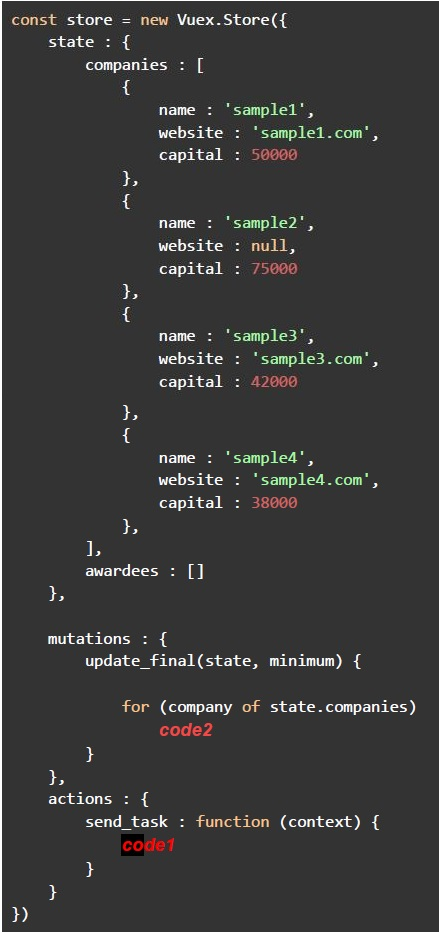 Suppose you are organizing a ceremony to award the startup companies who have progressed considerably well in the past few years. You have received a lot of registrations. The committee has decided to shortlist the companies based on the following 2 criteria: 1. The company must have a website 2. The company must have a capital of more than 40000 Fill in the code1 & code2, which can be used in Vuex Store to update the “awardees” state variable with the objects of those companies who satisfy the above-mentioned criteria.
Suppose you are organizing a ceremony to award the startup companies who have progressed considerably well in the past few years. You have received a lot of registrations. The committee has decided to shortlist the companies based on the following 2 criteria: 1. The company must have a website 2. The company must have a capital of more than 40000 Fill in the code1 & code2, which can be used in Vuex Store to update the “awardees” state variable with the objects of those companies who satisfy the above-mentioned criteria. Text of the picture (copyable)
```javascript
const store = new Vuex.Store({
  state: {
    companies: [{
      name: 'sample1',
      website: 'sample1.com',
      capital: 50000
    }, {
      name: 'sample2',
      website: null,
      capital: 75000
    }, {
      name: 'sample3',
      website: 'sample3.com',
      capital: 42000
    }, {
      name: 'sample4',
      website: 'sample4.com',
      capital: 38000
    }, ],
    awardees: []
  },

  mutations: {
    update_final(state, minimum) {

      for (company of state.companies) {
        code2
      }
    }
  },
  actions: {
    send_task: function(context) {
      code1
    }
  }
})
```
text
```
code1: this.$store.commit("update_final", 40000);
code2: if (company.website != null && company.capital > minimum)
           state.awardees.push(company)
```
text
```
code1: context.commit("update_final", 40000);
code2: if (company.website != null && capital > minimum)
           awardees.push(company)
```
text
```
code1: this.$store.commit("update_final", 40000);
code2: if (company.website != null && capital > minimum)
    awardees.push(company)
```
text
```
code1: context.commit("update_final", 40000);
code2: if (company.website != null && company.capital > minimum)
           state.awardees.push(company)
```
Consider the following JavaScript program running in a browser environment.
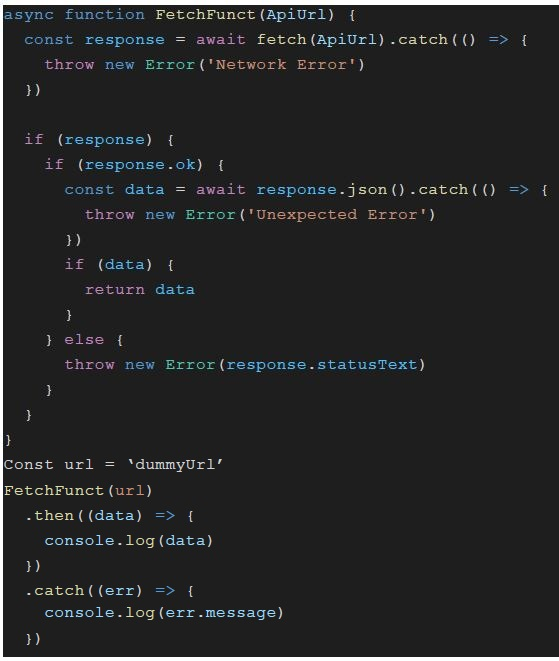 Consider the following JavaScript program running in a browser environment. Consider the ‘dummyUrl’ returns the HTML as payload. What will be logged on to the console?
Consider the following JavaScript program running in a browser environment. Consider the ‘dummyUrl’ returns the HTML as payload. What will be logged on to the console?Text of the picture (copyable)
```javascript
async function FetchFunct (ApiUrl) {
  const response = await fetch(ApiUrl).catch(() => {
    throw new Error('Network Error')
  })

  if (response) {
    if (response.ok) {
      const data = await response.json().catch(() => {
        throw new Error('Unexpected Error')
      })
      if (data) {
        return data
      }
    } else {
      throw new Error(response.statusText)
    }
  }
}

Const url = 'dummyUrl'
FetchFunct (url)
  .then((data) => {
    console.log(data)
  })
  .catch((err) => {
    console.log(err.message)
  })
```- Network Error
- Unexpected Error
- Not Found
- None of these
Consider the following Vue application with markup “index.html” and javascript file “app.js”. index.html:
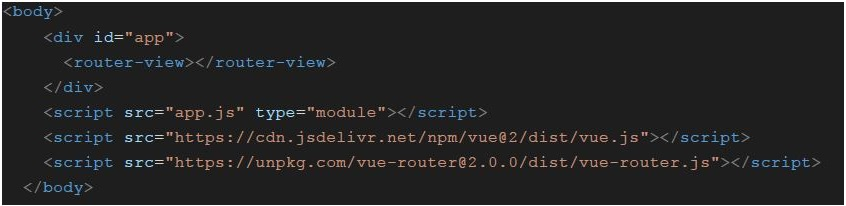 Consider the following Vue application with markup “index.html” and javascript file “app.js”. index.html: app.js:
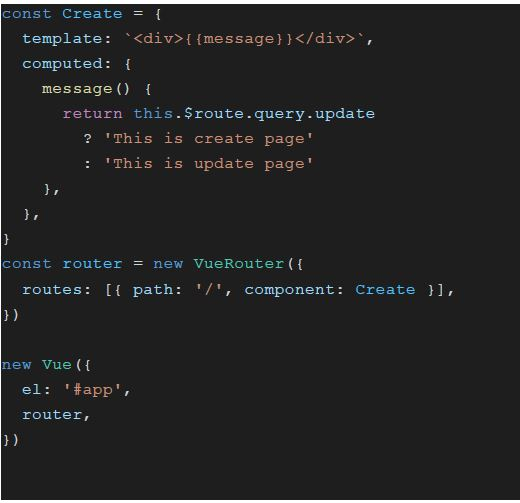 Consider the following Vue application with markup “index.html” and javascript file “app.js”. index.html: app.js: Suppose the application is running on “http://127.0.0.1:8080”. What will be the value of message property of Create component for “http://127.0.0.1:8080/#/?update=true” ?
Consider the following Vue application with markup “index.html” and javascript file “app.js”. index.html: app.js:
Consider the following Vue application with markup “index.html” and javascript file “app.js”. index.html: app.js: Suppose the application is running on “http://127.0.0.1:8080”. What will be the value of message property of Create component for “http://127.0.0.1:8080/#/?update=true” ?Text of the picture (copyable)
```html
<body>
    <div id="app">
        <router-view></router-view>
    </div>
    <script src="app.js" type="module"></script>
    <script src="https://cdn.jsdelivr.net/npm/vue@2/dist/vue.js"></script>
    <script src="https://unpkg.com/vue-router@2.0.0/dist/vue-router.js"></script>
</body>
```
```javascript
const Create = {
  template: `<div>{{ message }}</div>`,
  computed: {
    message() {
      return this.$route.query.update
        ? 'This is create page'
        : 'This is update page'
    }
  }
}

const router = new VueRouter({
  routes: [{ path: '/', component: Create }],
})

new Vue({
  el: '#app',
  router,
})
```
text
This is create page

text
This is update page

text
null

text
None of these
Consider the following Vue application with markup “index.html” and javascript file “app.js”. index.html:
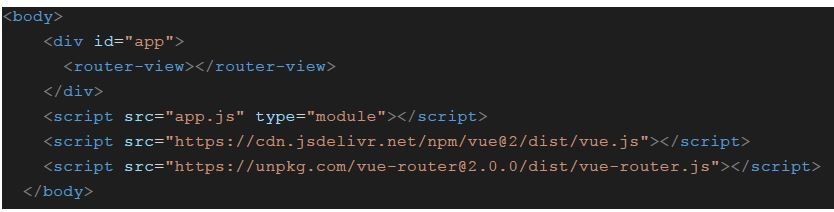 Consider the following Vue application with markup “index.html” and javascript file “app.js”. index.html: app.js:
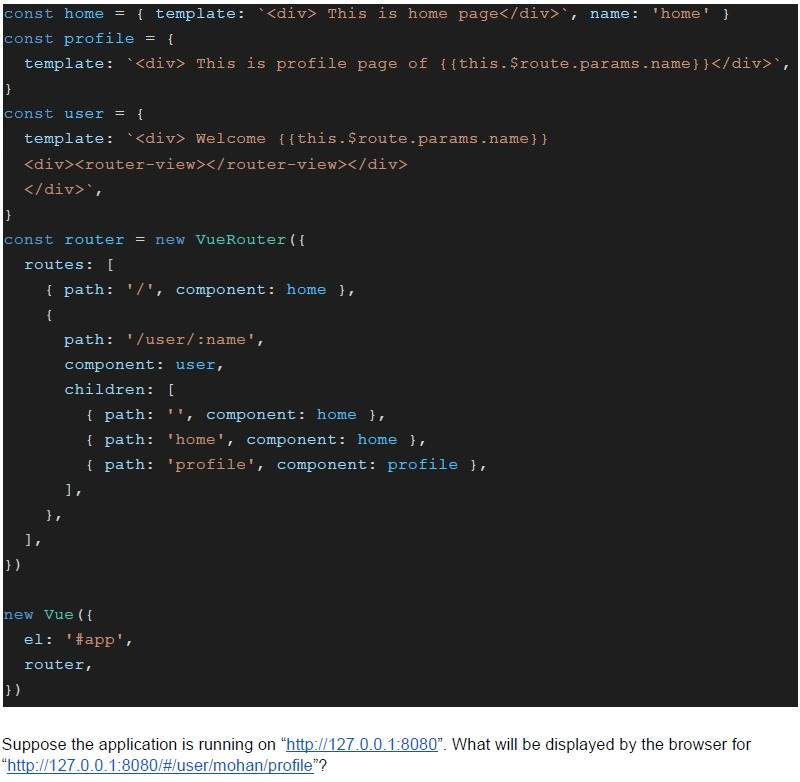 Consider the following Vue application with markup “index.html” and javascript file “app.js”. index.html: app.js:
Consider the following Vue application with markup “index.html” and javascript file “app.js”. index.html: app.js:
Consider the following Vue application with markup “index.html” and javascript file “app.js”. index.html: app.js: Text of the picture (copyable)
```html
<body>
  <div id="app">
    <router-view></router-view>
  </div>
  <script src="app.js" type="module"></script>
  <script src="https://cdn.jsdelivr.net/npm/vue@2/dist/vue.js"></script>
  <script src="https://unpkg.com/vue-router@2.0.0/dist/vue-router.js"></script>
</body>
```
```javascript
const home = { template: `<div> This is home page</div>`, name: 'home' }
const profile = {
  template: `<div> This is profile page of {{this.$route.params.name}}</div>`,
}
const user = {
  template: `<div> Welcome {{this.$route.params.name}}
<div><router-view></router-view></div>
</div>`,
}
const router = new VueRouter({
  routes: [
    { path: '/', component: home },
    {
      path: '/user/:name',
      component: user,
      children: [
        { path: '', component: home },
        { path: 'home', component: home },
        { path: 'profile', component: profile },
      ],
    },
  ],
})

new Vue({
  el: '#app',
  router,
})
```
Suppose the application is running on "http://127.0.0.1:8080". What will be displayed by the browser for "http://127.0.0.1:8080/#/user/mohan/profile"?- Welcome mohanThis is profile page of mohan
- WelcomeThis is profile page of mohan
- Welcome mohanThis is profile page of
- Welcome mohan
Consider the following Vue application with markup “index.html” and javascript file “app.js”.
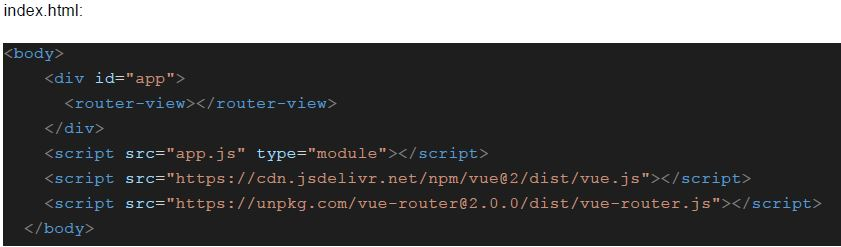 Consider the following Vue application with markup “index.html” and javascript file “app.js”.
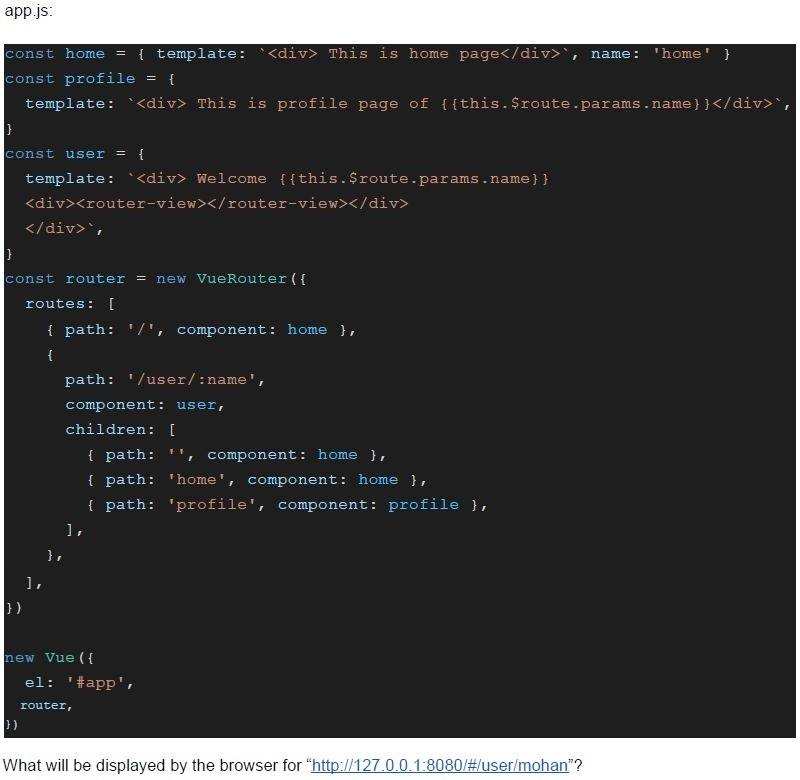 Consider the following Vue application with markup “index.html” and javascript file “app.js”.
Consider the following Vue application with markup “index.html” and javascript file “app.js”.
Consider the following Vue application with markup “index.html” and javascript file “app.js”. Text of the picture (copyable)
index.html:

```html
<body>
    <div id="app">
        <router-view></router-view>
    </div>
    <script src="app.js" type="module"></script>
    <script src="https://cdn.jsdelivr.net/npm/vue@2/dist/vue.js"></script>
    <script src="https://unpkg.com/vue-router@2.0.0/dist/vue-router.js"></script>
</body>
```
app.js:

```javascript
const home = { template: `<div> This is home page</div>`, name: 'home' }
const profile = {
  template: `<div> This is profile page of {{this.$route.params.name}}</div>`,
}
const user = {
  template: `<div> Welcome {{this.$route.params.name}}
<div><router-view></router-view></div>
</div>`,
}

const router = new VueRouter({
  routes: [
    { path: '/', component: home },
    {
      path: '/user/:name',
      component: user,
      children: [
        { path: '', component: home },
        { path: 'home', component: home },
        { path: 'profile', component: profile },
      ],
    },
  ],
})

new Vue({
  el: '#app',
  router,
})
```

What will be displayed by the browser for "http://127.0.0.1:8080/#/user/mohan"?- Welcome mohanThis is home page of mohan
- Welcome mohanThis is home page
- WelcomeThis is home page
- WelcomeThis is home page of mohan
Consider the following javascript program, and predict the output, if executed.
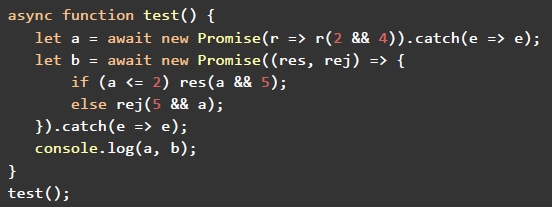 Consider the following javascript program, and predict the output, if executed.
Consider the following javascript program, and predict the output, if executed. Text of the picture (copyable)
```javascript
async function test() {
    let a = await new Promise(r => r(2 && 4))).catch(e => e);
    let b = await new Promise((res, rej) => {
        if (a <= 2) res(a && 5);
        else rej(5 && a);
    })).catch(e => e);
    console.log(a, b);
}
test();
```- 1 1
- 4 4
- 2 5
- 4 5
Consider the following javascript program, and predict the output, if executed.
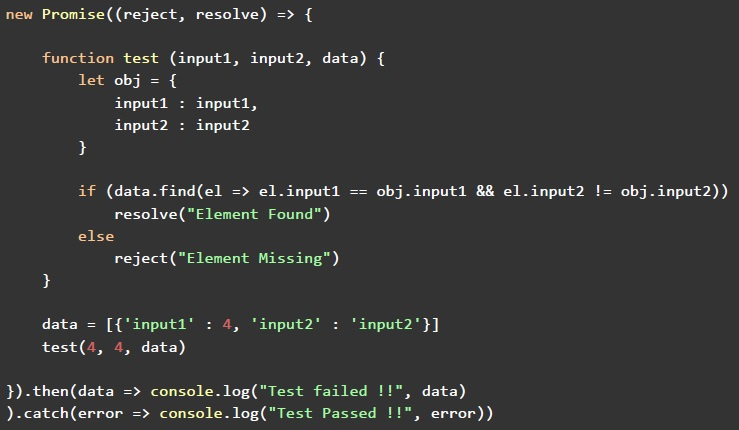 Consider the following javascript program, and predict the output, if executed.
Consider the following javascript program, and predict the output, if executed. Text of the picture (copyable)
```javascript
new Promise((reject, resolve) => {

  function test(input1, input2, data) {
    let obj = {
      input1: input1,
      input2: input2
    }

    if (data.find(el => el.input1 == obj.input1 && el.input2 != obj.input2))
      resolve("Element Found")
    else
      reject("Element Missing")
  }

  data = [{
    'input1': 4,
    'input2': 'input2'
  }]
  test(4, 4, data)

}).then(data => console.log("Test failed !!", data))
  .catch(error => console.log("Test Passed !!", error))
```- Test Passed !! Element Missing
- Test Failed !! Element Found
- Test Failed !! Element Missing
- Test Passed !! Element Found
Consider the following Vue application with markup “index.html” and javascript file “app.js”. index.html:
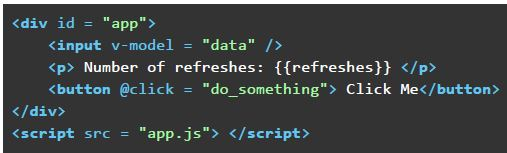 Consider the following Vue application with markup “index.html” and javascript file “app.js”. index.html: app.js:
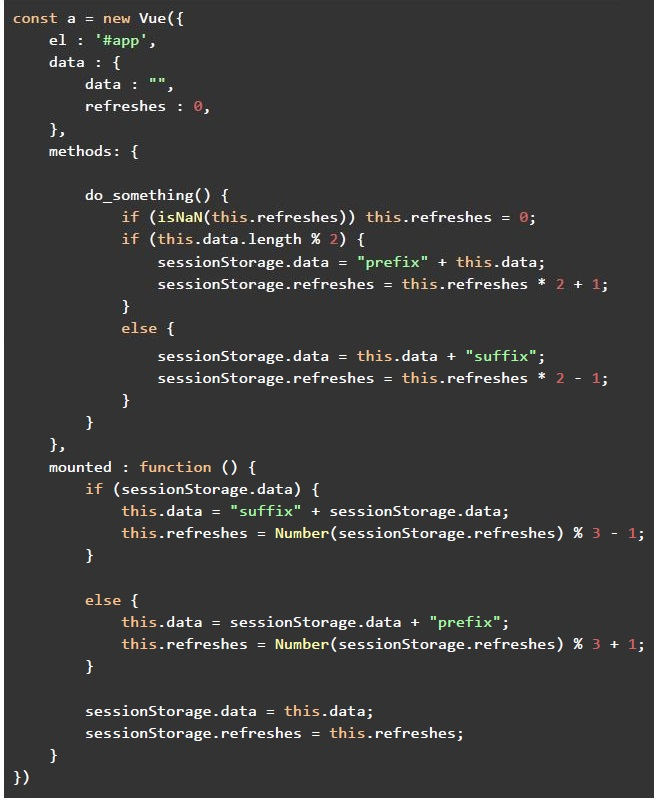 Consider the following Vue application with markup “index.html” and javascript file “app.js”. index.html: app.js: Say you open the file “index.html” in the browser, and enter the text “nptel” in the text box shown (after removing the existing text from the input box). After that, you refresh the page thrice. What be the text shown in the text input box, and the value of the “refreshes” placeholder, respectively?
Consider the following Vue application with markup “index.html” and javascript file “app.js”. index.html: app.js:
Consider the following Vue application with markup “index.html” and javascript file “app.js”. index.html: app.js: Say you open the file “index.html” in the browser, and enter the text “nptel” in the text box shown (after removing the existing text from the input box). After that, you refresh the page thrice. What be the text shown in the text input box, and the value of the “refreshes” placeholder, respectively?Text of the picture (copyable)
```html
<div id = "app">
    <input v-model = "data" />
    <p> Number of refreshes: {{refreshes}} </p>
    <button @click = "do_something"> Click Me</button>
</div>
<script src = "app.js"></script>
```
```javascript
const a = new Vue({
  el: '#app',
  data: {
    data: "",
    refreshes: 0,
  },
  methods: {
    do_something() {
      if (isNaN(this.refreshes)) this.refreshes = 0;
      if (this.data.length % 2) {
        sessionStorage.data = "prefix" + this.data;
        sessionStorage.refreshes = this.refreshes * 2 + 1;
      } else {
        sessionStorage.data = this.data + "suffix";
        sessionStorage.refreshes = this.refreshes * 2 - 1;
      }
    },
  },
  mounted: function() {
    if (sessionStorage.data) {
      this.data = "suffix" + sessionStorage.data;
      this.refreshes = Number(sessionStorage.refreshes) % 3 - 1;
    } else {
      this.data = sessionStorage.data + "prefix";
      this.refreshes = Number(sessionStorage.refreshes) % 3 + 1;
    }
    sessionStorage.data = this.data;
    sessionStorage.refreshes = this.refreshes;
  }
})
```- suffixsuffixsuffixundefinedprefix, NaN
- suffixsuffixsuffixundefinedprefix, -3
- suffixsuffixundefinedprefix, NaN
- suffixsuffixundefinedprefix, -3
Consider the following javascript program running in a browser environment.
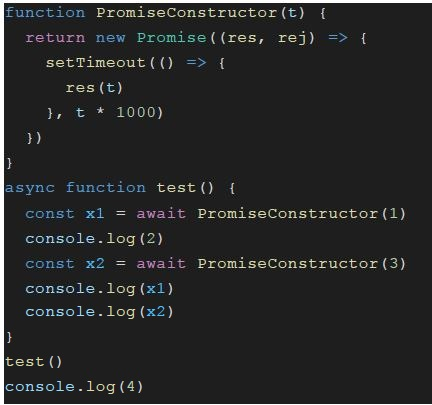 Consider the following javascript program running in a browser environment. What will be logged on to the console in (value, t) format, where “t” represents the approximate time in seconds (from the start of the execution of the program), and “value” represents the output value logged on to the console. For example: If 2 is logged on to console after 5 seconds, answer is (2, 5).
Consider the following javascript program running in a browser environment. What will be logged on to the console in (value, t) format, where “t” represents the approximate time in seconds (from the start of the execution of the program), and “value” represents the output value logged on to the console. For example: If 2 is logged on to console after 5 seconds, answer is (2, 5).Text of the picture (copyable)
```javascript
function PromiseConstructor(t) {
  return new Promise((res, rej) => {
    setTimeout(() => {
      res(t)
    }, t * 1000)
  })
}

async function test() {
  const x1 = await PromiseConstructor(1)
  console.log(2)
  const x2 = await PromiseConstructor(3)
  console.log(x1)
  console.log(x2)
}

test()
console.log(4)
```
text
(4, 0)
(2, 0)
(1, 0)
(3, 0)

text
(4, 0)
(2, 1)
(1, 1)
(3, 3)

text
(4, 0)
(2, 1)
(1, 3)
(3, 3)

text
(4, 0)
(2, 1)
(1, 4)
(3, 4)
Which of the following statement(s) is/are true regarding GraphQL and REST API?
- GraphQL is always better than an API, irrespective of the nature, scale andfunction of an application.
- GraphQL can be used with every programming language, which is capable ofmaking HTTP requests.
- It is possible to cache the responses of REST API endpoints.
- All of these
Which of the following statement(s) is/are correct regarding Vuex?
- Vuex provides a common solution to the parent component to the childcomponent communication and vice-versa.
- The usage of global variables over Vuex makes it easier to track the statechanges.
- Vuex is preferred in cases where multiple views depend on the same state.
- Only the direct child components (not the descendants) have access to theVuex store.
Which of the following is correct regarding JWT?
- It is used as an access token to share information between two parties.
- It contains encoded JSON data.
- It contains encoded XML data.
- Only payload, encoded in base64 format, is contained in JWT web token.
Which of the following is true regarding CORS?
- It allows servers to indicate which origins can load the resource from theserver.
- It allows the client to indicate from which server it can load resource.
- Enabling CORS is not required for same origin request.
- All of these
Which of the following statement(s) is/are false regarding PWA and SPA?
- The idea of an SPA is to improve the SEO aspects of the web application.
- A web application manifest provides the information required for a web app tobe downloaded and presented to the user in a native like experience.
- It is the service worker that helps a PWA serve cached contents of a page,when offline.
- Both gmail.com and amazon.in are examples of SPA.
Which of the following statement(s) is/are false regarding token based authentication?
- The token generated generally expires after a certain time period, and thistime period can also be customized according to the application requirements.
- The client must send the token with the first request to authenticate, and neednot send the token in the subsequent requests.
- The fetch calls to a flask API will fail due to the CORS error by default.
- If using flask-security for achieving token based authentication, all the APIendpoints are protected by default.
Answer key
- Q1 (MCQ, 0 marks): A
- Q2 (MCQ, 3 marks): C
- Q3 (MCQ, 3 marks): D
- Q4 (MCQ, 3 marks): B
- Q5 (MCQ, 3 marks): A
- Q6 (MCQ, 3 marks): A
- Q7 (MCQ, 3 marks): B
- Q8 (MCQ, 4.5 marks): B
- Q9 (MCQ, 4.5 marks): D
- Q10 (MCQ, 4.5 marks): A
- Q11 (MCQ, 4.5 marks): D
- Q12 (MSQ, 2 marks): B, C
- Q13 (MSQ, 2 marks): A, C
- Q14 (MSQ, 2 marks): A, B
- Q15 (MSQ, 2 marks): A, C
- Q16 (MSQ, 3 marks): A, D
- Q17 (MSQ, 3 marks): B, D