Home / Past papers / MAD2 End Term / this paper
IIT M DIPLOMA AN EXAM QDD3 31 Aug - 31 Aug 2025
- Messages will be dropped
- Messages will accumulate in the queue
- The consumer will speed up automatically
- The producer will block until the consumer is ready
- The component will reload when data changes
- All function calls become asynchronous
- It disables direct access to state
- The DOM updates automatically when the underlying reactive data changes
- It stores output in session storage
- It enables token authentication
- It sends compressed response headers
- It skips route execution for repeated inputs
- To encrypt data between client and server
- To compress HTTP responses
- To authenticate users across applications
- To control which domains can access resources
- Storing keys only in environment variables
- Version pinning
- Using only packages with over 1000 stars on GitHub
- Reduce Dependencies
- The number of CSS selectors in the stylesheet
- Use of semantic HTML tags
- Number of HTTP requests made
- File size of resources (like images, JS)
- A message broker makes the network scalable for adding more servers to thenetwork.
- A message broker allows two servers in a network to directly communicatewith each other, without an intermediary.
- A message broker is not suited in case of traffic spikes, as messages areretained in the queue until processed.
- A message broker can be used for batch processing of messages.
- They enable real-time data delivery
- They use HTTP POST requests typically
- They're designed for server-to-server communication
- They require polling from the client
- Webhooks are not suitable for this use case because they require the e-commerce platform to continuously poll each third-party service to check if they're ready to receive data, which would create unnecessary network overhead.
- Webhooks should be avoided in this scenario because they operatesynchronously, meaning the customer's order placement would be delayed until all third-party services have successfully processed their notifications.
- Webhooks provide an ideal solution as they allow the e-commerce platform topush real-time notifications to all subscribed third-party services immediately when an order is placed, eliminating the need for these services to repeatedly poll for updates.
- Webhooks are primarily designed for read-only operations and cannot handlecomplex data payloads like order information, making them unsuitable for e-commerce transaction notifications.
- It eliminates the need for client-side rendering
- It reduces server load by reusing responses for repeated requests
- It encrypts data transmission between server and client
- It avoids the need for database interactions completely
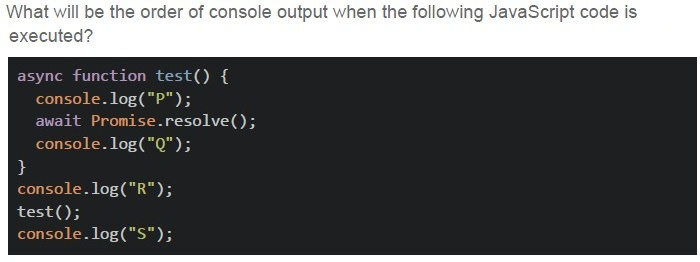
Text of the picture (copyable)
What will be the order of console output when the following JavaScript code is executed?

```javascript
async function test() {
  console.log("P");
  await Promise.resolve();
  console.log("Q");
}
console.log("R");
test();
console.log("S");
```- R P Q S
- P R S Q
- R S P Q
- R P S Q
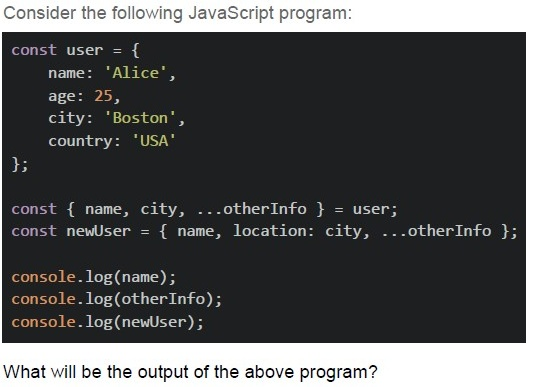
Text of the picture (copyable)
Consider the following JavaScript program:

```javascript
const user = {
    name: 'Alice',
    age: 25,
    city: 'Boston',
    country: 'USA'
};

const { name, city, ...otherInfo } = user;
const newUser = { name, location: city, ...otherInfo };

console.log(name);
console.log(otherInfo);
console.log(newUser);
```

What will be the output of the above program?
text
```
Alice
{ city: 'Boston', age: 25, country: 'USA' }
{ name: 'Alice', location: 'Boston', city: 'Boston', age: 25,
country: 'USA' }
```
text
```
Alice
{ age: 25, country: 'USA' }
{ name: 'Alice', location: 'Boston', city: 'Boston', age: 25,
country: 'USA' }
```
text
```
Alice
{ age: 25, country: 'USA' }
{ name: 'Alice', location: 'Boston', age: 25, country: 'USA' }
```
text
```
undefined
{ name: 'Alice', city: 'Boston', age: 25, country: 'USA' }
{ name: 'Alice', location: 'Boston' }
```
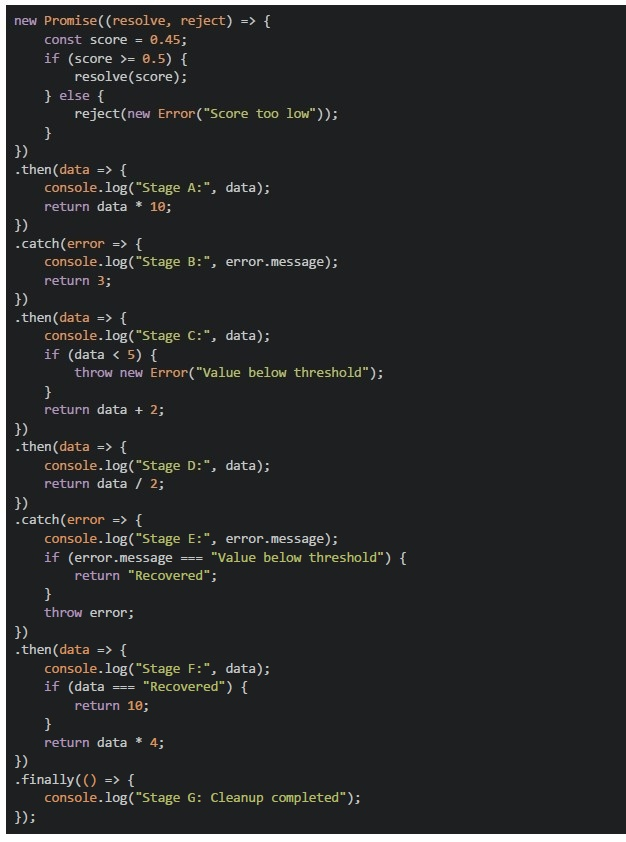 Consider the following javascript program.
What will be the output of the above program on the browser’s console?
Consider the following javascript program.
What will be the output of the above program on the browser’s console?Text of the picture (copyable)
```javascript
new Promise((resolve, reject) => {
  const score = 0.45;
  if (score >= 0.5) {
    resolve(score);
  } else {
    reject(new Error("Score too low"));
  }
})
  .then(data => {
    console.log("Stage A:", data);
    return data * 10;
  })
  .catch(error => {
    console.log("Stage B:", error.message);
    return 3;
  })
  .then(data => {
    console.log("Stage C:", data);
    if (data < 5) {
      throw new Error("Value below threshold");
    }
    return data + 2;
  })
  .then(data => {
    console.log("Stage D:", data);
    return data / 2;
  })
  .catch(error => {
    console.log("Stage E:", error.message);
    if (error.message === "Value below threshold") {
      return "Recovered";
    }
    throw error;
  })
  .then(data => {
    console.log("Stage F:", data);
    if (data === "Recovered") {
      return 10;
    }
    return data * 4;
  })
  .finally(() => {
    console.log("Stage G: Cleanup completed");
  });
```
text
```text
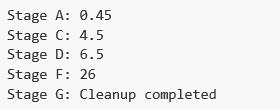
Stage A: 0.45
Stage C: 4.5
Stage D: 6.5
Stage F: 26
Stage G: Cleanup completed
```
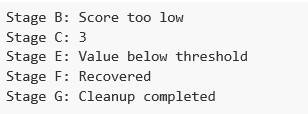
text
```text
Stage B: Score too low
Stage C: 3
Stage E: Value below threshold
Stage F: Recovered
Stage G: Cleanup completed
```
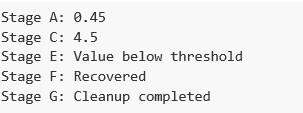
text
Stage A: 0.45
Stage C: 4.5
Stage E: Value below threshold
Stage F: Recovered
Stage G: Cleanup completed
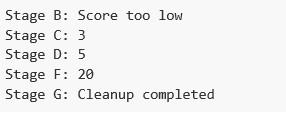
text
```
Stage B: Score too low
Stage C: 3
Stage D: 5
Stage F: 20
Stage G: Cleanup completed
```
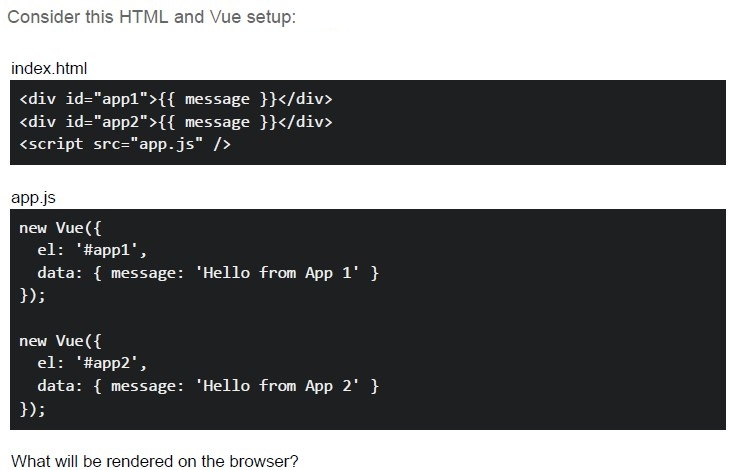
Text of the picture (copyable)
Consider this HTML and Vue setup:

index.html
```html
<div id="app1">{{ message }}</div>
<div id="app2">{{ message }}</div>
<script src="app.js" ></script>
```

app.js
```javascript
new Vue({
  el: '#app1',
  data: { message: 'Hello from App 1' }
});

new Vue({
  el: '#app2',
  data: { message: 'Hello from App 2' }
});
```

What will be rendered on the browser?- App 1 only shows data
- Both show “Hello from App 2”
- Both show “Hello from App 1”
- Each renders its own message independently
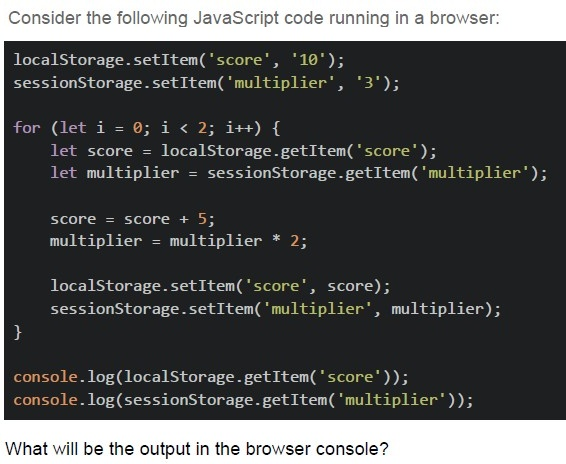
Text of the picture (copyable)
Consider the following JavaScript code running in a browser:

```javascript
localStorage.setItem('score', '10');
sessionStorage.setItem('multiplier', '3');

for (let i = 0; i < 2; i++) {
    let score = localStorage.getItem('score');
    let multiplier = sessionStorage.getItem('multiplier');

    score = score + 5;
    multiplier = multiplier * 2;

    localStorage.setItem('score', score);
    sessionStorage.setItem('multiplier', multiplier);
}

console.log(localStorage.getItem('score'));
console.log(sessionStorage.getItem('multiplier'));
```

What will be the output in the browser console?
text
20
12

text
20
NaN

text
NaN
12

text
None of these
- First Contentful Paint (FCP)
- Time to Interactive (TTI)
- Layout Shift
- HTTPS usage
- Using time.sleep() blocks the event loop and is recommended for async tasks
- Celery allows long-running tasks to be executed asynchronously
- Polling is a strategy to check task status periodically
- Flask + Celery + Redis is a common stack for async task management
- Actions can be asynchronous
- Only actions can call APIs through fetch call
- Mutations should modify state directly
- Mutations can be asynchronous

Text of the picture (copyable)
Consider the below Vue class binding and select the most appropriate option(s):

```html
<div v-bind:class="{ active: isActive, 'text-bold': hasBoldText, disabled: !isEnabled }"></div>
```- The class "active" will only be applied to the div element if the variable"isActive" evaluates to true.
- The class "disabled" will be applied to the div element when the variable"isEnabled" evaluates to false.
- The class "text-bold" will always be applied to the div element regardless ofthe "hasBoldText" variable value.
- All three classes ("active", "text-bold", "disabled") will always be applied to thediv element.
- If "isEnabled" is undefined, the "disabled" class will not be applied to the divelement.
- The class "text-bold" will only be applied if the variable "hasBoldText" existsand evaluates to a truthy value.
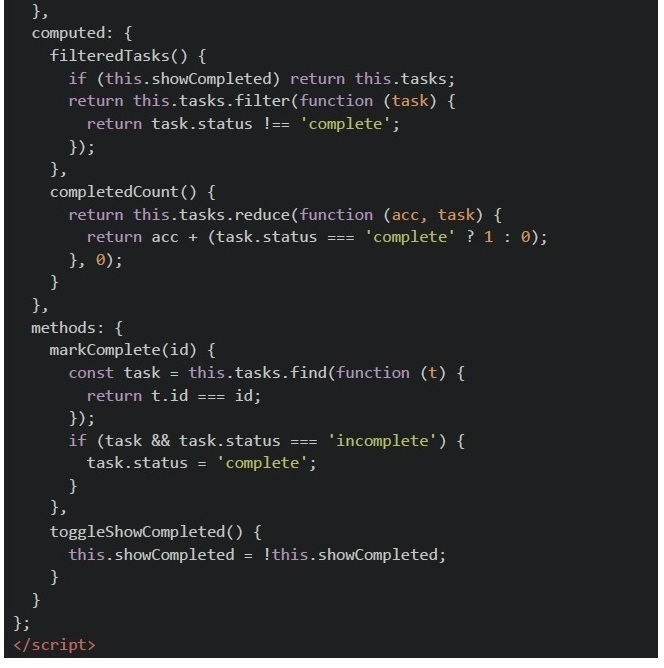
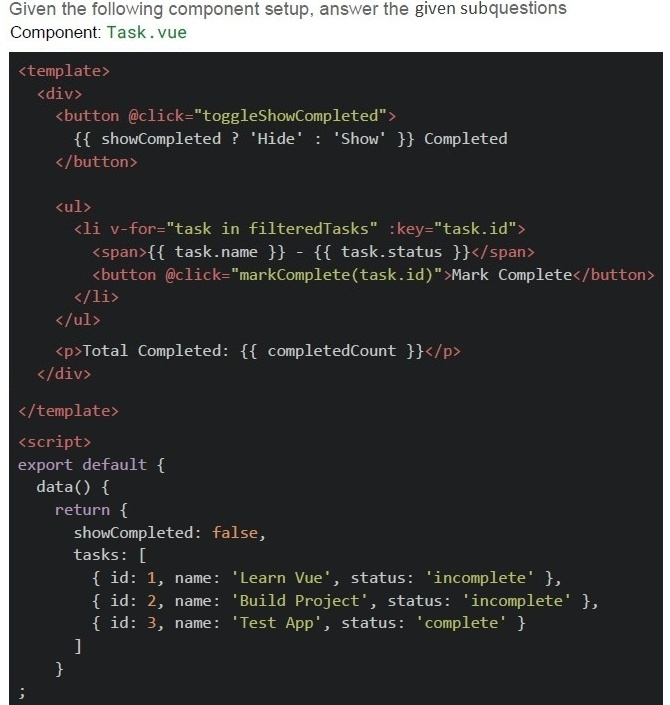 Scenario
1. The component is loaded. 2. User clicks "Mark Complete" for the task named Build Project.
3. User clicks "Show Completed" button again.
Scenario
1. The component is loaded. 2. User clicks "Mark Complete" for the task named Build Project.
3. User clicks "Show Completed" button again.
- Learn Vue
- Learn Vue, Build Project, Test App
- Test App only
- None
- 1
- 2
- 3
- 0

text
The `filteredTasks` logic won't work properly if we used arrow functions for the `filter` method.

text
Using non-arrow functions in computed properties allows correct this access to Vue instance.

text
```
filteredTasks and completedCount will both update reactively when a task's
status is changed.
```

text
The `@click='markComplete(task.id)'` usage correctly preserves reactivity.
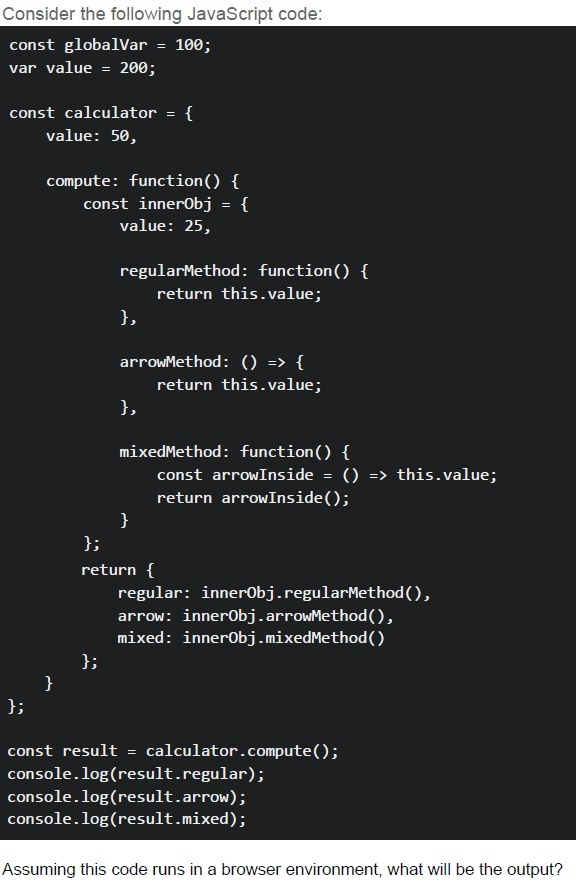
Text of the picture (copyable)
Consider the following JavaScript code:

```javascript
const globalVar = 100;
var value = 200;

const calculator = {
  value: 50,

  compute: function() {
    const innerObj = {
      value: 25,

      regularMethod: function() {
        return this.value;
      },

      arrowMethod: () => {
        return this.value;
      },

      mixedMethod: function() {
        const arrowInside = () => this.value;
        return arrowInside();
      }
    };
    return {
      regular: innerObj.regularMethod(),
      arrow: innerObj.arrowMethod(),
      mixed: innerObj.mixedMethod()
    };
  }
};

const result = calculator.compute();
console.log(result.regular);
console.log(result.arrow);
console.log(result.mixed);
```

Assuming this code runs in a browser environment, what will be the output?
text
25
200
50

text
25
50
25

text
50
200
50

text
25
200
25
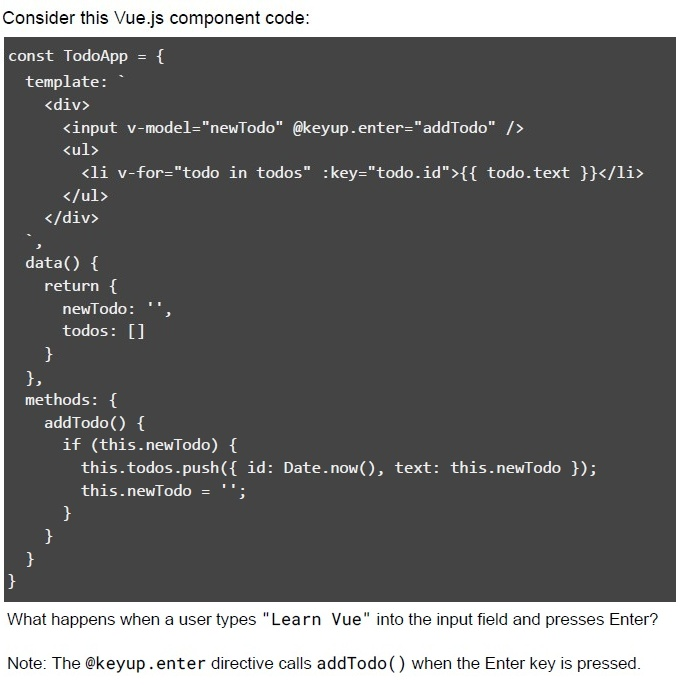
Text of the picture (copyable)
Consider this Vue.js component code:

```javascript
const TodoApp = {
  template: `
    <div>
      <input v-model="newTodo" @keyup.enter="addTodo" />
      <ul>
        <li v-for="todo in todos" :key="todo.id">{{ todo.text }}</li>
      </ul>
    </div>
  `,
  data() {
    return {
      newTodo: '',
      todos: []
    }
  },
  methods: {
    addTodo() {
      if (this.newTodo) {
        this.todos.push({ id: Date.now(), text: this.newTodo });
        this.newTodo = '';
      }
    }
  }
}
```

What happens when a user types "Learn Vue" into the input field and presses Enter?

Note: The `@keyup.enter` directive calls `addTodo()` when the Enter key is pressed.
text
An error occurs because the todos array is empty

text
The input is cleared, and Learn Vue appears in the list

text
Only the input is cleared, no todo is added

text
The page refreshes
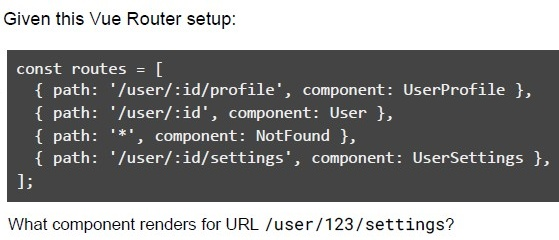
Text of the picture (copyable)
Given this Vue Router setup:

```javascript
const routes = [
  { path: '/user/:id/profile', component: UserProfile },
  { path: '/user/:id', component: User },
  { path: '*', component: NotFound },
  { path: '/user/:id/settings', component: UserSettings },
];
```

What component renders for URL /user/123/settings?- UserProfile
- User
- NotFound
- UserSettings
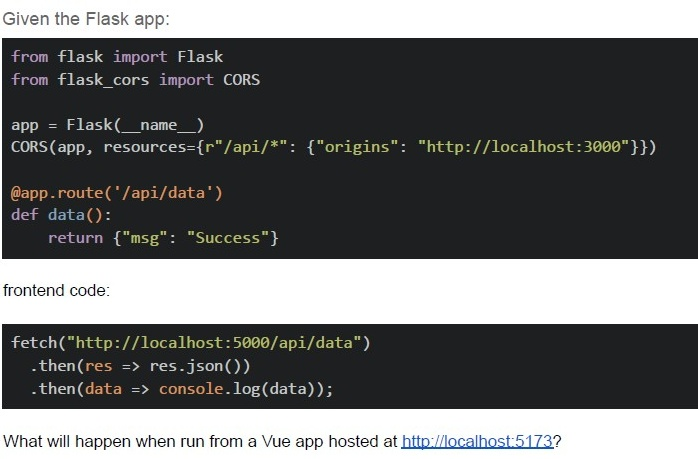
Text of the picture (copyable)
Given the Flask app:

```python
from flask import Flask
from flask_cors import CORS

app = Flask(__name__)
CORS(app, resources={r"/api/*": {"origins": "http://localhost:3000"}})

@app.route('/api/data')
def data():
    return {"msg": "Success"}
```

frontend code:

```javascript
fetch("http://localhost:5000/api/data")
    .then(res => res.json())
    .then(data => console.log(data));
```

What will happen when run from a Vue app hosted at http://localhost:5173?- Request succeeds
- CORS error occurs
- 404 error
- The server crashes
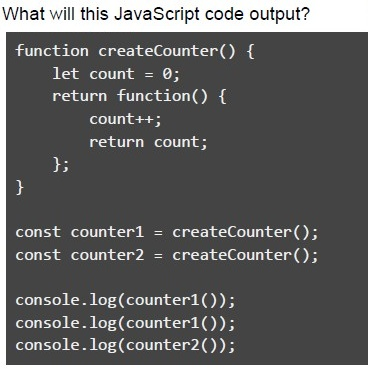
Text of the picture (copyable)
What will this JavaScript code output?

```javascript
function createCounter() {
  let count = 0;
  return function() {
    count++;
    return count;
  };
}

const counter1 = createCounter();
const counter2 = createCounter();

console.log(counter1());
console.log(counter1());
console.log(counter2());
```
text
1
2
3

text
1
2
1

text
```
1
1
1
```

text
```
undefined
undefined
undefined
```
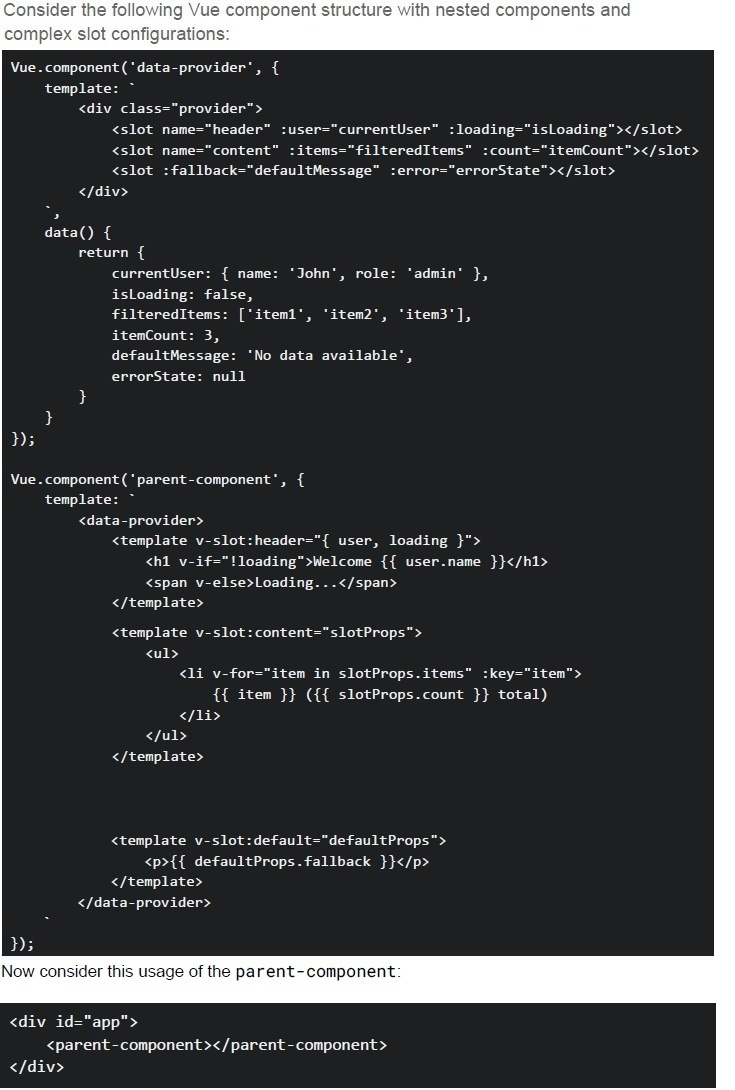
Text of the picture (copyable)
Consider the following Vue component structure with nested components and
complex slot configurations:

```javascript
Vue.component('data-provider', {
  template: `
    <div class="provider">
      <slot name="header" :user="currentUser" :loading="isLoading"></slot>
      <slot name="content" :items="filteredItems" :count="itemCount"></slot>
      <slot :fallback="defaultMessage" :error="errorState"></slot>
    </div>
  `,
  data() {
    return {
      currentUser: { name: 'John', role: 'admin' },
      isLoading: false,
      filteredItems: ['item1', 'item2', 'item3'],
      itemCount: 3,
      defaultMessage: 'No data available',
      errorState: null
    }
  }
});

Vue.component('parent-component', {
  template: `
    <data-provider>
      <template v-slot:header="{ user, loading }">
        <h1 v-if="!loading">Welcome {{ user.name }}</h1>
        <span v-else>Loading...</span>
      </template>

      <template v-slot:content="slotProps">
        <ul>
          <li v-for="item in slotProps.items" :key="item">
            {{ item }} ({{ slotProps.count }} total)
          </li>
        </ul>
      </template>

      <template v-slot:default="defaultProps">
        <p>{{ defaultProps.fallback }}</p>
      </template>
    </data-provider>
  `
});
```

Now consider this usage of the parent-component:

```html
<div id="app">
  <parent-component></parent-component>
</div>
```- The header slot will display "Welcome John" when loading is true
- The content slot will render 3 list items with "item1 (3 total)", "item2 (3 total)","item3 (3 total)"
- The default slot will display "No data available" from the fallback prop
- If we change isLoading: true in data-provider, the header will show"Loading..."
- Changing v-slot:default to just v-slot in parent-component would break thefunctionality
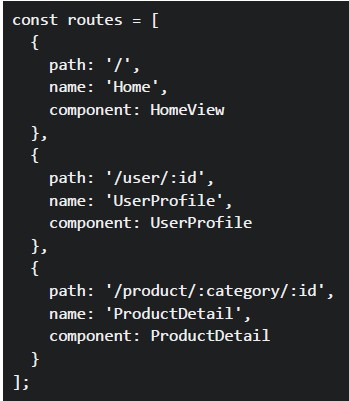 Consider the following Vue Router configuration in a Vue 2 application:
In a Vue component, you have these navigation methods:
Consider the following Vue Router configuration in a Vue 2 application:
In a Vue component, you have these navigation methods:
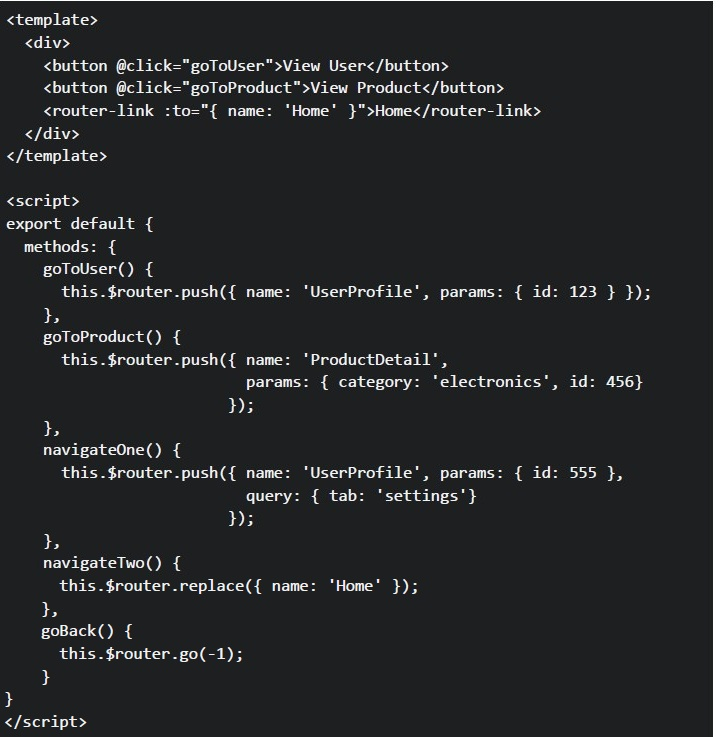 Consider the following Vue Router configuration in a Vue 2 application:
In a Vue component, you have these navigation methods: What URLs will be generated when the user clicks each navigation element?
Consider the following Vue Router configuration in a Vue 2 application:
In a Vue component, you have these navigation methods: What URLs will be generated when the user clicks each navigation element?Text of the picture (copyable)
```javascript
const routes = [
  {
    path: '/',
    name: 'Home',
    component: HomeView
  },
  {
    path: '/user/:id',
    name: 'UserProfile',
    component: UserProfile
  },
  {
    path: '/product/:category/:id',
    name: 'ProductDetail',
    component: ProductDetail
  }
];
```
```html
<template>
  <div>
    <button @click="goToUser">View User</button>
    <button @click="goToProduct">View Product</button>
    <router-link :to="{ name: 'Home' }">Home</router-link>
  </div>
</template>

<script>
export default {
  methods: {
    goToUser() {
      this.$router.push({ name: 'UserProfile', params: { id: 123 } });
    },
    goToProduct() {
      this.$router.push({ name: 'ProductDetail',
                           params: { category: 'electronics', id: 456}
                         });
    },
    navigateOne() {
      this.$router.push({ name: 'UserProfile', params: { id: 555 },
                           query: { tab: 'settings'}
                         });
    },
    navigateTwo() {
      this.$router.replace({ name: 'Home' });
    },
    goBack() {
      this.$router.go(-1);
    }
  }
}
</script>
```- User button: /user,Product button: /product, Home link: /home
- User button: /user/123,Product button: /product/electronics/456, Home link: /
- User button: /UserProfile/123,Product button: /ProductDetail/electronics/456, Home link: /Home
- User button: /user?id=123,Product button: /product?category=electronics&id=456, Home link: /
- The "View User" link will navigate to /user/789 and match the UserProfile route
- The navigateOne() method will create URL /user/555?tab=settings
- The $router.replace() method adds a new entry to the browser history
- The $router.go(-1) method navigates to the previous page in browser history
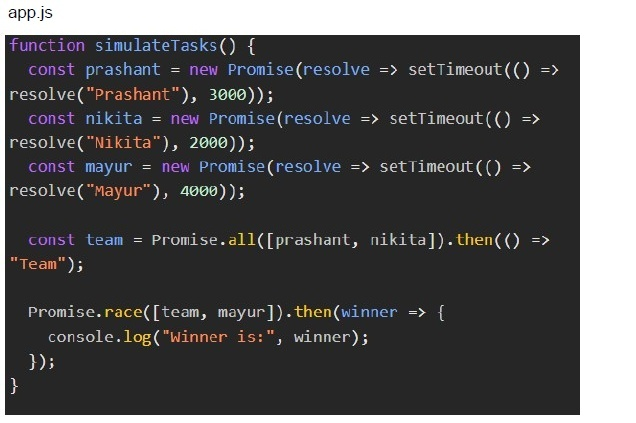 Prashant and Nikita are creating a quiz question paper collaboratively. They are each working on different sections — and complete their tasks in parallel. Meanwhile, Mayur is enjoying a single-player game that finishes when the game loop ends.
To compare productivity:
● If Prashant and Nikita (together) finish faster than Mayur, the winner is "Team". ● If Mayur finishes faster, he wins. ● If both take the same time, Mayur wins by default.
You are simulating this scenario in the browser.Prashant and Nikita are represented using parallel Promises. Mayur is represented using a single Promise. The frontend must calculate who finishes first using asynchronous logic, and display the result.
Based on the above data, answer the given subquestions.
Prashant and Nikita are creating a quiz question paper collaboratively. They are each working on different sections — and complete their tasks in parallel. Meanwhile, Mayur is enjoying a single-player game that finishes when the game loop ends.
To compare productivity:
● If Prashant and Nikita (together) finish faster than Mayur, the winner is "Team". ● If Mayur finishes faster, he wins. ● If both take the same time, Mayur wins by default.
You are simulating this scenario in the browser.Prashant and Nikita are represented using parallel Promises. Mayur is represented using a single Promise. The frontend must calculate who finishes first using asynchronous logic, and display the result.
Based on the above data, answer the given subquestions. - Mayur
- Team
- Nikita
- Race condition prevents output
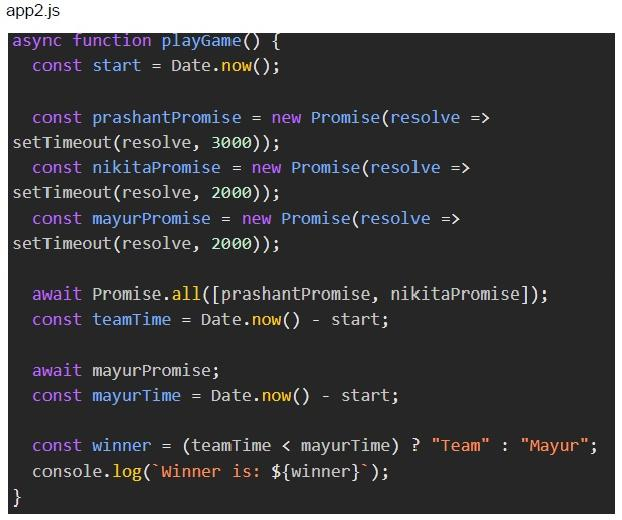
Text of the picture (copyable)
app2.js
```javascript
async function playGame() {
  const start = Date.now();

  const prashantPromise = new Promise(resolve =>
    setTimeout(resolve, 3000));
  const nikitaPromise = new Promise(resolve =>
    setTimeout(resolve, 2000));
  const mayurPromise = new Promise(resolve =>
    setTimeout(resolve, 2000));

  await Promise.all([prashantPromise, nikitaPromise]);
  const teamTime = Date.now() - start;

  await mayurPromise;
  const mayurTime = Date.now() - start;

  const winner = (teamTime < mayurTime) ? "Team" : "Mayur";
  console.log(`Winner is: ${winner}`);
}
```- Mayur
- Team
- Nikita
- Error due to async logic
Answer key
- Q1 (MCQ, 2 marks): B
- Q2 (MCQ, 2 marks): D
- Q3 (MCQ, 2 marks): D
- Q4 (MCQ, 2 marks): D
- Q5 (MSQ, 2 marks): B, D
- Q6 (MSQ, 2 marks): C, D
- Q7 (MSQ, 2 marks): A, D
- Q8 (MSQ, 2 marks): A, B, C
- Q9 (MCQ, 3 marks): C
- Q10 (MCQ, 3 marks): B
- Q11 (MCQ, 3 marks): D
- Q12 (MCQ, 3 marks): C
- Q13 (MCQ, 3 marks): B
- Q14 (MCQ, 3 marks): D
- Q15 (MCQ, 3 marks): D
- Q16 (MSQ, 3 marks): A, B, C
- Q17 (MSQ, 3 marks): B, C, D
- Q18 (MSQ, 3 marks): A, B, C
- Q19 (MSQ, 3 marks): A, B, F
- Q20 (MCQ, 3 marks): A
- Q21 (MCQ, 3 marks): B
- Q22 (MSQ, 3 marks): C, D
- Q23 (MCQ, 4.5 marks): B
- Q24 (MCQ, 4.5 marks): B
- Q25 (MCQ, 4.5 marks): C
- Q26 (MCQ, 4.5 marks): B
- Q27 (MCQ, 4.5 marks): B
- Q28 (MSQ, 4.5 marks): B, C, D
- Q29 (MCQ, 4.5 marks): B
- Q30 (MSQ, 4.5 marks): B, D
- Q31 (MCQ, 3 marks): B
- Q32 (MCQ, 3 marks): A
Concepts this paper tests
Auto-generated summary from the source site. Handy as a checklist; the lessons above explain each idea from scratch.
Here’s a structured summary of the core topics, concepts, principles, and equations (where applicable) for the "Diploma Level: Modern Application Development II" exam, along with Mermaid knowledge graphs to visualize relationships.
Core Topics & Concepts Summary
1. Asynchronous JavaScript & Promises
Key Concepts:
async/await,Promise.all(),Promise.race(),.then(),.catch(),.finally().- Event Loop: How asynchronous operations (e.g.,
setTimeout,fetch) are handled. - Closures: Functions retaining access to their lexical scope (e.g., counters).
Critical Code Snippets:
// Promise chaining
new Promise((resolve, reject) => { /* ... */ })
  .then(data => { /* ... */ })
  .catch(error => { /* ... */ })
  .finally(() => { /* ... */ });
// Promise.all (waits for all promises) Promise.all([promise1, promise2]).then(values => { /* ... */ });
// Promise.race (resolves/rejects when the first promise settles) Promise.race([promise1, promise2]).then(value => { /* ... */ }); ```
Example Outputs:
- If
Promise.race([teamPromise, mayurPromise])resolves, the fastest determines the winner. Promise.allwaits for all promises (e.g., Prashant and Nikita working in parallel).
- If
2. Vue.js Fundamentals
Key Concepts:
- Reactivity: DOM updates automatically when data changes (e.g.,
data(),computed). Directives:
v-model(two-way binding),v-for(loops),v-if/v-show(conditional rendering).@click,@keyup.enter(event handlers).
Components & Slots:
- Named slots (
<slot name="header">), scoped slots (v-slot:header="slotProps").
- Named slots (
Vuex:
- Actions (async, can call APIs) vs. Mutations (sync, modify state directly).
- State management pattern:
state→getters→actions→mutations.
Vue Router:
- Dynamic routes (
/user/:id), named routes,router.push()vs.router.replace(). router-linkfor declarative navigation.
- Dynamic routes (
- Reactivity: DOM updates automatically when data changes (e.g.,
Critical Code Snippets:
// Vuex Store Structure
const store = new Vuex.Store({
  state: { count: 0 },
  mutations: {
    increment(state) { state.count++; }
  },
  actions: {
    async fetchData({ commit }) {
      const response = await fetch('api/data');
      commit('updateData', response.data);
    }
  }
});
// Vue Router Configuration const routes = [ { path: '/user/:id', name: 'UserProfile', component: UserProfile }, { path: '/product/:category/:id', component: ProductDetail } ]; ```
3. Frontend Performance Optimization
Key Concepts:
Lighthouse Metrics:
- First Contentful Paint (FCP): Time until first DOM content is rendered.
- Time to Interactive (TTI): Time until page is fully interactive.
- Cumulative Layout Shift (CLS): Visual stability (avoid layout shifts).
Optimization Techniques:
- Reduce HTTP requests (bundle JS/CSS, use sprites).
- Minimize resource file sizes (compress images, minify JS/CSS).
- Caching: Reuse responses for repeated requests (e.g., Flask
@cache.cached()).
Critical Tools:
- Webpack: Bundling and minification.
- Lazy Loading: Load resources on demand (e.g., images, components).
4. Backend & API Development (Flask)
Key Concepts:
CORS (Cross-Origin Resource Sharing):
- Controls which domains can access resources (e.g.,
flask_cors). - Example:
CORS(app, resources={r"/api/*": {"origins": "http://localhost:3000"}}).
- Controls which domains can access resources (e.g.,
Caching:
@cache.cached()skips route execution for repeated inputs (reduces server load).
Asynchronous Tasks:
- Celery + Redis: Offload long-running tasks (e.g., sending emails).
- Avoid blocking the event loop (e.g., don’t use
time.sleep()in Flask routes).
Critical Code Snippets:
from flask import Flask
from flask_cors import CORS
from flask_caching import Cache
app = Flask(_name_) CORS(app) # Allow all origins (or restrict with resources) cache = Cache(app, config={'CACHE_TYPE': 'simple'})
@app.route('/api/data') @cache.cached(timeout=50) # Cache for 50 seconds def get_data(): return {"data": "cached_response"} ```
5. Message Queues & Brokers
Key Concepts:
Message Queue: Buffer for asynchronous communication (e.g., RabbitMQ, Kafka).
- If consumer is slower than producer, messages accumulate in the queue.
Use Cases:
- Decoupling services (e.g., e-commerce order notifications).
- Batch processing (e.g., analytics).
- Scalability (add more consumers to handle load).
Webhooks:
- Server-to-server communication via HTTP POST (real-time, no polling).
- Example: Stripe sends a webhook when a payment succeeds.
Critical Scenarios:
E-commerce Notifications:
- Use webhooks to push order updates to inventory/email/analytics services in real-time.
6. Security Best Practices
Key Concepts:
Supply Chain Attacks:
- Mitigate by version pinning (lock dependency versions) and reducing dependencies.
- CORS: Restrict origins to prevent unauthorized access.
- Environment Variables: Store secrets (e.g., API keys) securely (never hardcode).
Critical Tools:
npm audit: Check for vulnerable dependencies..npmrc: Enforce version pinning.
7. State Management in Vue (Vuex)
Key Concepts:
- State: Single source of truth (reactive data).
- Getters: Computed properties for state.
- Mutations: Synchronous state updates.
- Actions: Asynchronous operations (e.g., API calls).
Critical Rules:
- Mutations must be synchronous (use actions for async).
- Actions can commit mutations but cannot modify state directly.
Example Flow:
UI → Dispatch Action → Commit Mutation → Update State → Re-render UI
8. JavaScript ES6+ Features
Key Concepts:
Destructuring:
const { name, city, ...rest } = user; // rest = { age: 25, country: 'USA' }- Arrow Functions: Lexical
thisbinding (no ownthis). - Closures: Functions remember their lexical scope.
localStoragevs.sessionStorage:localStorage: Persists across sessions.sessionStorage: Cleared when the tab closes.- Note: Both store strings (use
JSON.parse/stringify` for objects).
9. HTTP & REST APIs
Key Concepts:
- HTTP Methods:
GET,POST,PUT,DELETE. Status Codes:
200 OK,404 Not Found,500 Server Error.
CORS Headers:
Access-Control-Allow-Origin: Specifies allowed domains.
- HTTP Methods:
Critical Tools:
Fetch API:
fetch('http://api.example.com/data', {
  method: 'POST',
  headers: { 'Content-Type': 'application/json' },
  body: JSON.stringify({ key: 'value' })
})
.then(res => res.json())
.then(data => console.log(data));
10. Testing & Debugging
Key Concepts:
- Console Logs: Debug async code execution order.
- Vue DevTools: Inspect component state and events.
- Network Tab: Check API requests/responses (CORS errors, payloads).
Graph 2: Vue.js Core Concepts
Graph 3: Backend & API Development
Graph 4: Message Queues & Webhooks
Graph 5: Frontend Performance
Graph 6: Vuex State Management
Graph 7: Security Best Practices
Key Equations (Mathematics/Performance)
While this exam is primarily conceptual, here are performance-related formulas to remember:
- Page Load Time: ``
Total Load Time = DNS Lookup + TCP Handshake + Request/Response Time + Rendering Time`` - Lighthouse Score Weighting (approximate): ``
Performance Score = 0.3*FCP + 0.3*TTI + 0.2*CLS + 0.2*Other Metrics`` Promise Race/All Time:
Promise.race: Resolves inmin(T1, T2, ..., Tn).Promise.all: Resolves inmax(T1, T2, ..., Tn).
Exam Tips
Vue.js:
- Reactivity is automatic (DOM updates when data changes).
v-slotsyntax is critical for scoped slots.- Vuex mutations must be synchronous.
JavaScript:
Promise.racevs.Promise.all: Know which resolves first vs. waits for all.- Closures: Inner functions remember their outer scope.
Flask:
@cache.cachedskips route execution for repeated inputs.- CORS errors occur if the frontend domain isn’t whitelisted.
Message Queues:
- If the consumer is slow, messages accumulate (don’t drop unless the queue has a limit).
Performance:
- FCP/TTI/CLS are core Lighthouse metrics.
- Reduce HTTP requests and file sizes for faster loads.
Security:
- Version pinning and fewer dependencies mitigate supply chain attacks.
Final Notes
Focus on:
- Vue.js reactivity and component lifecycle.
- Asynchronous JavaScript (Promises, async/await).
- Flask caching and CORS.
- Message queues and webhooks for real-time systems.
Avoid:
- Blocking the event loop (e.g.,
time.sleep()in Flask). - Direct state mutations in Vuex (use actions → mutations).
- Blocking the event loop (e.g.,