Home / Past papers / MAD2 Quiz 1 / this paper
2024 Oct27: - 27 Oct 2024
Elapsed 00:00
Text of the picture (copyable)
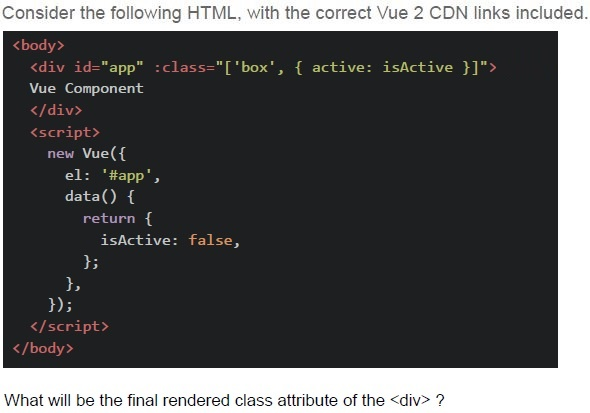
Consider the following HTML, with the correct Vue 2 CDN links included.

```html
<body>
    <div id="app" :class="['box', { active: isActive }]">
        Vue Component
    </div>
    <script>
        new Vue({
            el: '#app',
            data() {
                return {
                    isActive: false,
                };
            },
        });
    </script>
</body>
```

What will be the final rendered class attribute of the `<div>` ?- box
- active
- box active
- box inactive
Which of the following is an example of ephemeral state in a web application?
- A user's authentication token stored in local storage
- A form input value that changes as the user types
- The list of favorite items saved in a user's profile
- A shopping cart saved between sessions
Text of the picture (copyable)
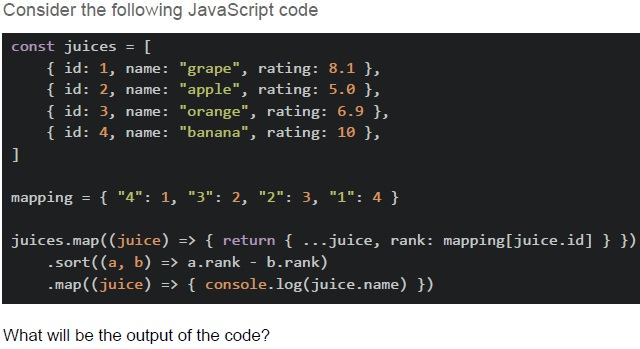
Consider the following JavaScript code

```javascript
const juices = [
  { id: 1, name: "grape", rating: 8.1 },
  { id: 2, name: "apple", rating: 5.0 },
  { id: 3, name: "orange", rating: 6.9 },
  { id: 4, name: "banana", rating: 10 },
]

mapping = { "4": 1, "3": 2, "2": 3, "1": 4 }

juices.map((juice) => { return { ...juice, rank: mapping[juice.id] } })
  .sort(((a, b) => a.rank - b.rank)
  .map((juice) => { console.log(juice.name) }))
```

What will be the output of the code?
text
apple
orange
grape
banana

text
banana
grape
orange
apple

text
banana
orange
apple
grape

text
undefined
Text of the picture (copyable)
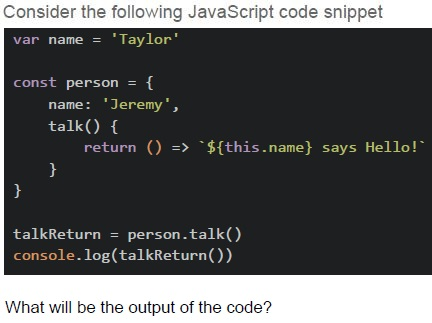
Consider the following JavaScript code snippet

```javascript
var name = 'Taylor'

const person = {
    name: 'Jeremy',
    talk() {
        return () => `${this.name} says Hello!`
    }
}

talkReturn = person.talk()
console.log(talkReturn())
```

What will be the output of the code?- undefined says Hello!
- Jeremy says Hello!
- Taylor says Hello!
- ReferenceError
Text of the picture (copyable)
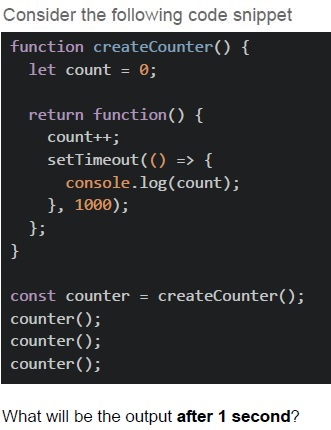
Consider the following code snippet

```javascript
function createCounter() {
  let count = 0;

  return function() {
    count++;
    setTimeout(() => {
      console.log(count);
    }, 1000);
  };
}

const counter = createCounter();
counter();
counter();
counter();
```

What will be the output after 1 second?
text
1

text
1
1
1

text
1
2
3

text
3
3
3
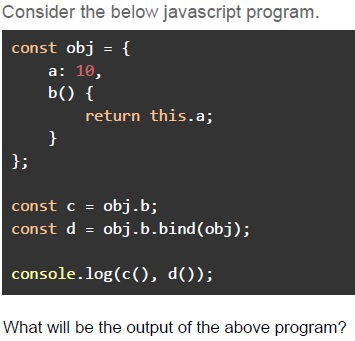
Text of the picture (copyable)
Consider the below javascript program.

```javascript
const obj = {
  a: 10,
  b() {
    return this.a;
  }
};

const c = obj.b;
const d = obj.b.bind(obj);

console.log(c(), d());
```

What will be the output of the above program?- 10 10
- undefined 10
- 10 undefined
- undefined undefined
- Error
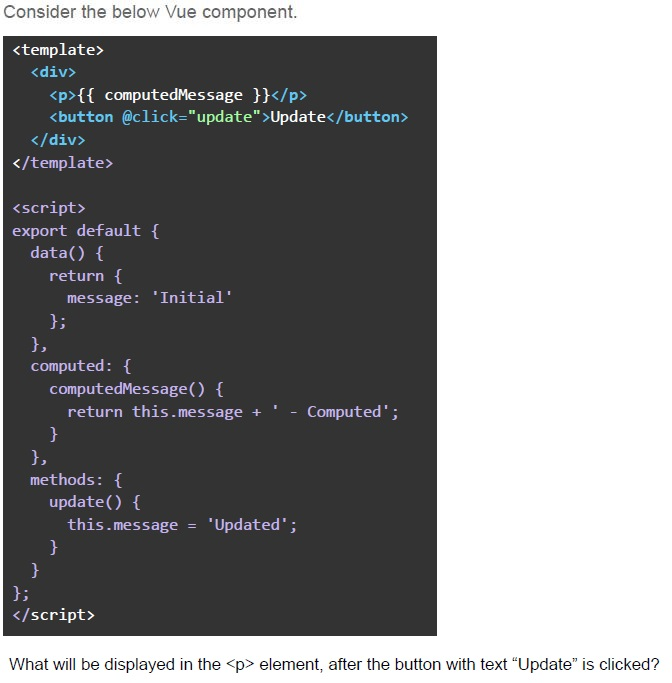
Text of the picture (copyable)
Consider the below Vue component.

```html
<template>
  <div>
    <p>{{ computedMessage }}</p>
    <button @click="update">Update</button>
  </div>
</template>

<script>
  export default {
    data() {
      return {
        message: 'Initial'
      };
    },
    computed: {
      computedMessage() {
        return this.message + ' - Computed';
      }
    },
    methods: {
      update() {
        this.message = 'Updated';
      }
    }
  };
</script>
```

What will be displayed in the `<p>` element, after the button with text "Update" is clicked?- "Initial - Computed"
- "Updated - Computed"
- "Initial - Computed Updated"
- "Updated"
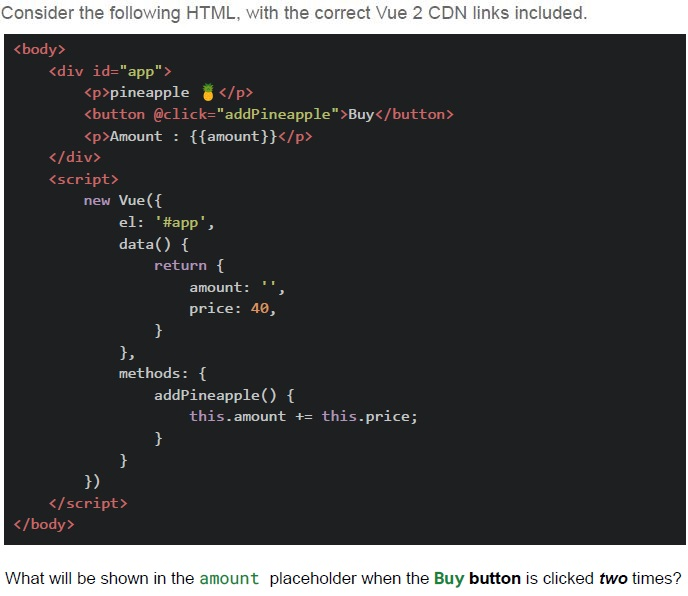
Text of the picture (copyable)
Consider the following HTML, with the correct Vue 2 CDN links included.

```html
<body>
    <div id="app">
        <p>pineapple 🍍</p>
        <button @click="addPineapple">Buy</button>
        <p>Amount : {{amount}}</p>
    </div>
    <script>
        new Vue({
            el: '#app',
            data() {
                return {
                    amount: '',
                    price: 40,
                }
            },
            methods: {
                addPineapple() {
                    this.amount += this.price;
                }
            }
        })
    </script>
</body>
```

What will be shown in the amount placeholder when the Buy button is clicked two times?- 40
- 80
- 4040
- undefined
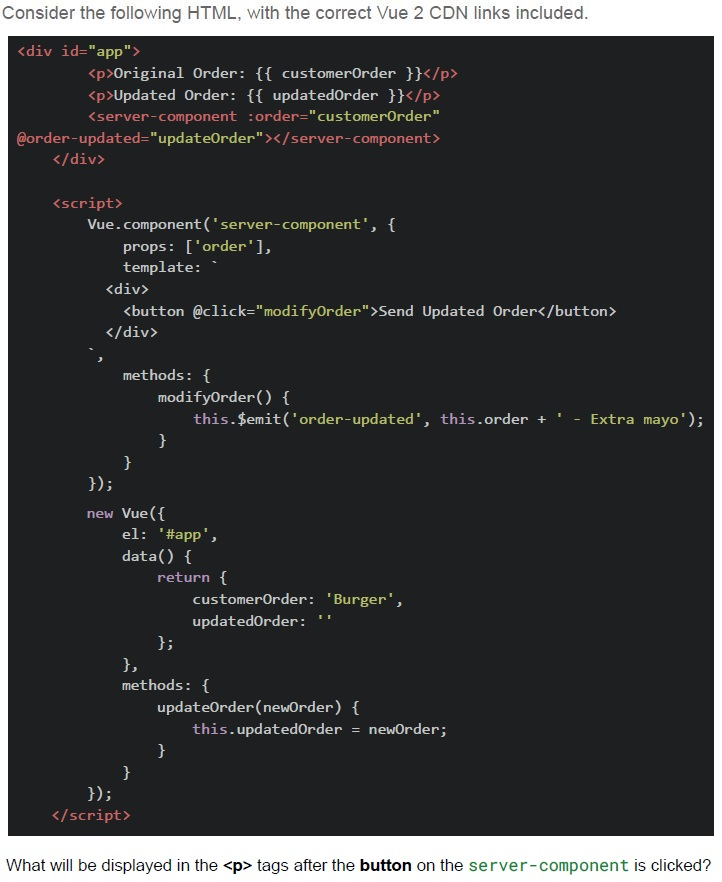
Text of the picture (copyable)
Consider the following HTML, with the correct Vue 2 CDN links included.

```html
<div id="app">
    <p>Original Order: {{ customerOrder }}</p>
    <p>Updated Order: {{ updatedOrder }}</p>
    <server-component :order="customerOrder"
    @order-updated="updateOrder"></server-component>
</div>

<script>
    Vue.component('server-component', {
        props: ['order'],
        template: `
            <div>
                <button @click="modifyOrder">Send Updated Order</button>
            </div>
        `,
        methods: {
            modifyOrder() {
                this.$emit('order-updated', this.order + ' - Extra mayo');
            }
        }
    });

    new Vue({
        el: '#app',
        data() {
            return {
                customerOrder: 'Burger',
                updatedOrder: ''
            }
        },
        methods: {
            updateOrder(newOrder) {
                this.updatedOrder = newOrder;
            }
        }
    });
</script>
```

What will be displayed in the `<p>` tags after the button on the `server-component` is clicked?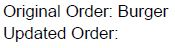
text
Original Order: Burger
Updated Order:
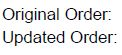
text
Original Order:
Updated Order:
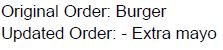
text
Original Order: Burger
Updated Order: - Extra mayo
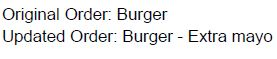
text
Original Order: Burger
Updated Order: Burger - Extra mayo
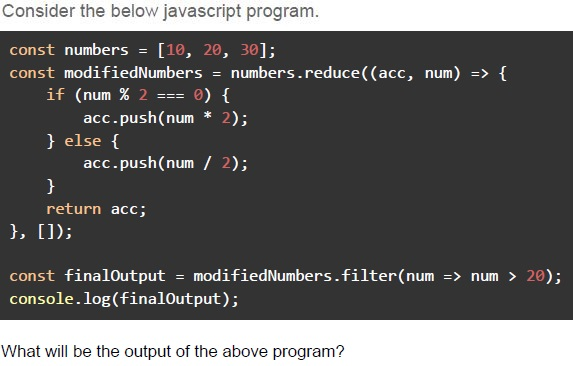
Text of the picture (copyable)
Consider the below javascript program.

```javascript
const numbers = [10, 20, 30];
const modifiedNumbers = numbers.reduce((acc, num) => {
    if (num % 2 === 0) {
        acc.push(num * 2);
    } else {
        acc.push(num / 2);
    }
    return acc;
}, []);

const finalOutput = modifiedNumbers.filter(num => num > 20);
console.log(finalOutput);
```

What will be the output of the above program?- []
- [10, 20, 30]
- [20, 40, 60]
- [40, 60]
- [40]
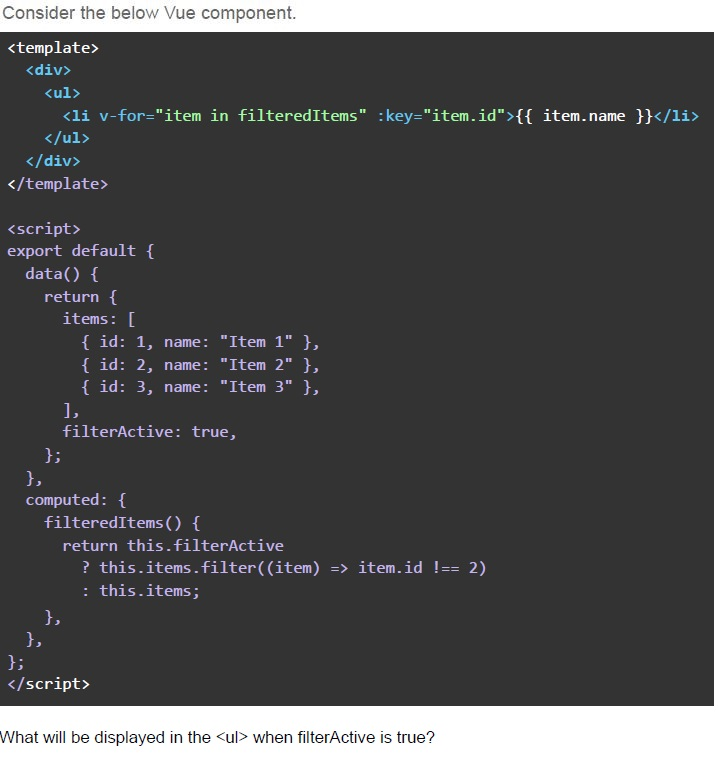
Text of the picture (copyable)
Consider the below Vue component.

```html
<template>
  <div>
    <ul>
      <li v-for="item in filteredItems" :key="item.id">{{ item.name }}</li>
    </ul>
  </div>
</template>

<script>
export default {
  data() {
    return {
      items: [
        { id: 1, name: "Item 1" },
        { id: 2, name: "Item 2" },
        { id: 3, name: "Item 3" },
      ],
      filterActive: true,
    };
  },
  computed: {
    filteredItems() {
      return this.filterActive
        ? this.items.filter((item) => item.id !== 2)
        : this.items;
    },
  },
};
</script>
```

What will be displayed in the `<ul>` when filterActive is true?- Item 1, Item 3
- Item 2
- Item 1, Item 2, Item 3
- The list will be empty.
Which of the following statements is/are true about JavaScript’s “this” keyword behavior in different contexts?
- In a regular function call, “this” refers to the global object in non-strict modeand “undefined” in strict mode.
- In an arrow function, “this” is lexically inherited from the enclosing executioncontext.
- Inside a method of an object, “this” always refers to the object itself,regardless of how the method is called.
- The value of “this” can be explicitly set using “call()”, apply(), or “bind()”methods, inside a method of an object.
Considering the differences between “var”, “let”, and “const” in terms of scope, hoisting, and reassignment, which of the following statements is/are true?
- “var” is function-scoped, hoisted, and allows reassignments.
- “let” is block-scoped, hoisted, and allows reassignments.
- “const” is block-scoped, hoisted, does not allow reassignments, and its valuemust be assigned at the time of declaration.
- “let” and “const” behave identically except that const variables cannot beredeclared, while let variables can be redeclared in the same block.
Which of the following statements is/are true ?
- call() and apply() immediately invoke the function, while bind() returns a newfunction that can be called later.
- call() accepts arguments as a comma-separated list, whereas apply() accepts asingle array of arguments.
- bind() permanently sets the “this” context for a function, but the resultingfunction must still be explicitly called to execute.
- All three methods are used to permanently change the “this” context offunctions.
Which of the following scenario(s) represent ephemeral state(s) in a web application?
- The user's current scroll position on a webpage.
- The user's authentication token, saved in localStorage.
- The temporary state of a dropdown menu.
- All of these
What are the differences between Vue's computed properties and methods?
- Computed properties are cached based on their reactive dependencies,whereas methods are recalculated every time they are called.
- Methods can be used to perform operations that do not need to be cached.
- Computed properties can be used as methods if they require parameters.
- Methods are always reactive and update automatically when theirdependencies change.
Answer key
- Q1 (MCQ, 2 marks): A
- Q2 (MCQ, 2 marks): B
- Q3 (MCQ, 3 marks): C
- Q4 (MCQ, 3 marks): B
- Q5 (MCQ, 3 marks): D
- Q6 (MCQ, 3 marks): B
- Q7 (MCQ, 3 marks): B
- Q8 (MCQ, 4.5 marks): C
- Q9 (MCQ, 4.5 marks): D
- Q10 (MCQ, 4.5 marks): D
- Q11 (MCQ, 4.5 marks): A
- Q12 (MSQ, 3 marks): A, B, D
- Q13 (MSQ, 3 marks): A, B, C
- Q14 (MSQ, 3 marks): A, B, C
- Q15 (MSQ, 2 marks): A, C
- Q16 (MSQ, 2 marks): A, B
Concepts this paper tests
Auto-generated summary from the source site. Handy as a checklist; the lessons above explain each idea from scratch.
Summary of Core Topics, Concepts, Principles, and Equations
JavaScript
thisKeyword Behavior- Regular Function Call:
thisrefers to the global object in non-strict mode andundefinedin strict mode. - Arrow Function:
thisis lexically inherited from the enclosing execution context. - Object Method:
thisrefers to the object itself, but this can be overridden by how the method is called. - Explicit Setting: The value of
thiscan be explicitly set usingcall(),apply(), orbind()methods.
- Regular Function Call:
Variable Declarations
var: Function-scoped, hoisted, allows reassignments.let: Block-scoped, hoisted, allows reassignments.const: Block-scoped, hoisted, does not allow reassignments, must be assigned at the time of declaration.
Function Methods
call()andapply(): Immediately invoke the function.call()accepts arguments as a comma-separated list, whereasapply()accepts a single array of arguments.bind(): Returns a new function that can be called later, permanently setting thethiscontext.
Asynchronous Operations
setTimeout: Executes a function after a specified delay.- Closures: Functions that have access to their own scope, the outer function’s scope, and the global scope.
Array Methods
map(): Creates a new array with the results of calling a provided function on every element in the array.filter(): Creates a new array with all elements that pass the test implemented by the provided function.reduce(): Executes a reducer function on each element of the array, resulting in a single output value.sort(): Sorts the elements of an array in place and returns the array.
Vue.js
Dynamic Class Binding
- Syntax:
:class="['box', { active: isActive }]" - The
boxclass is always applied, while theactiveclass is conditionally applied based on the value ofisActive.
- Syntax:
Computed Properties vs Methods
- Computed Properties: Cached based on their reactive dependencies, only recalculated when dependencies change.
- Methods: Recalculated every time they are called, used for operations that do not need to be cached.
Event Handling
- Syntax:
@click="methodName" - Used to handle user interactions like clicks.
- Syntax:
Component Communication
- Props: Used to pass data from parent to child components.
- Events: Used to emit events from child to parent components.
Lifecycle Hooks
created: Called synchronously after the instance is created.mounted: Called after the instance has been mounted.
Web Development Concepts
Ephemeral State
- Examples: User's current scroll position, temporary state of a dropdown menu.
- Non-examples: User's authentication token, saved shopping cart.
State Management
- Managing state within components and across the application.