Home / Past papers / MAD1 End Term / this paper
IIT M FOUNDATION FN EXAM QDF1 13 Apr - 13 Apr 2025

Text of the picture (copyable)
In a Flask application, we have a base template (`base.html`) that includes a `{% block content %}` section. A child template (`home.html`) extends this base template and uses `{{ super() }}` inside `{% block content %}`.

What will be the effect of using `{{ super() }}` inside the block in the child template?
text
It will result in an error because `super()` is not valid in Jinja2.

text
It will completely replace the content of {% block content %} in the base template.
text
It will include the content from the base template's {% block content %} along
with the overridden content in the child template.
text
It will ignore the base template's content and only render the child template's content.
Text of the picture (copyable)
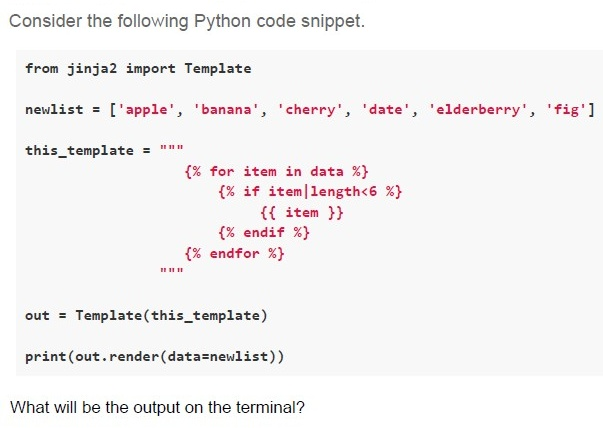
Consider the following Python code snippet.

```python
from jinja2 import Template

newlist = ['apple', 'banana', 'cherry', 'date', 'elderberry', 'fig']

this_template = """
{% for item in data %}
    {% if item|length<6 %}
        {{ item }}
    {% endif %}
{% endfor %}
"""

out = Template(this_template)

print(out.render(data=newlist))
```

What will be the output on the terminal?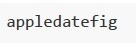
text
```
appledatefig
```
text
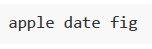
apple date fig

text
banana cherry elderberry

text
bananacherryelderberry
Text of the picture (copyable)
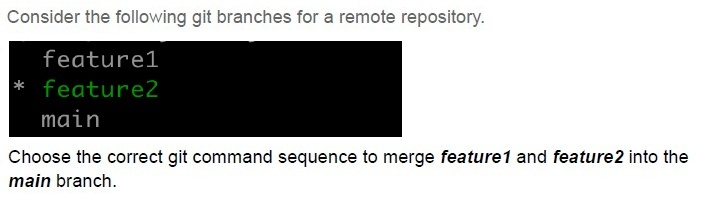
Consider the following git branches for a remote repository.

```
feature1
* feature2
main
```

Choose the correct git command sequence to merge *feature1* and *feature2* into the *main* branch.
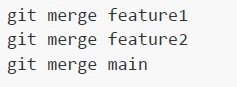
text
```
git merge feature1
git merge feature2
git merge main
```
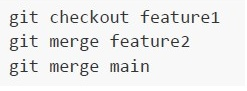
text
```
git checkout feature1
git merge feature2
git merge main
```
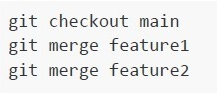
text
```
git checkout main
git merge feature1
git merge feature2
```
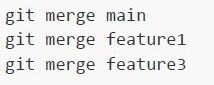
text
```
git merge main
git merge feature1
git merge feature3
```
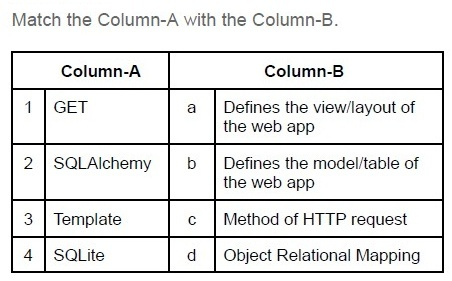
Text of the picture (copyable)
Match the Column-A with the Column-B.

| | Column-A | | Column-B |
|---|---|---|---|
| 1 | GET | a | Defines the view/layout of the web app |
| 2 | SQLAlchemy | b | Defines the model/table of the web app |
| 3 | Template | c | Method of HTTP request |
| 4 | SQLite | d | Object Relational Mapping |
- 1-c, 2-a, 3-d, 4-b
- 1-d, 2-c, 3-a, 4-b
- 1-c, 2-d, 3-b, 4-a
- 1-c, 2-d, 3-a, 4-b
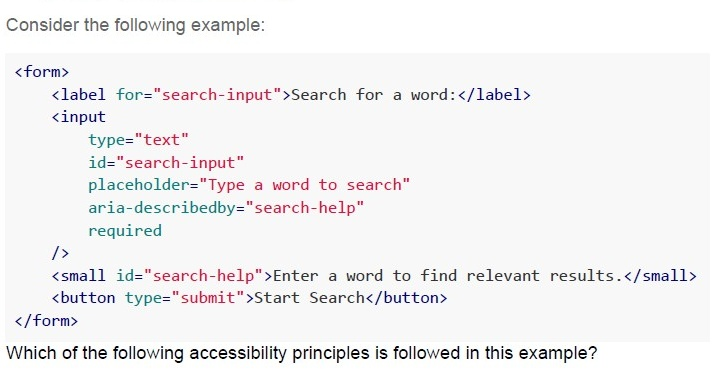
Text of the picture (copyable)
Consider the following example:

```html
<form>
    <label for="search-input">Search for a word:</label>
    <input
        type="text"
        id="search-input"
        placeholder="Type a word to search"
        aria-describedby="search-help"
        required
    />
    <small id="search-help">Enter a word to find relevant results.</small>
    <button type="submit">Start Search</button>
</form>
```

Which of the following accessibility principles is followed in this example?- Perceivable
- Operable
- Understandable
- Robust
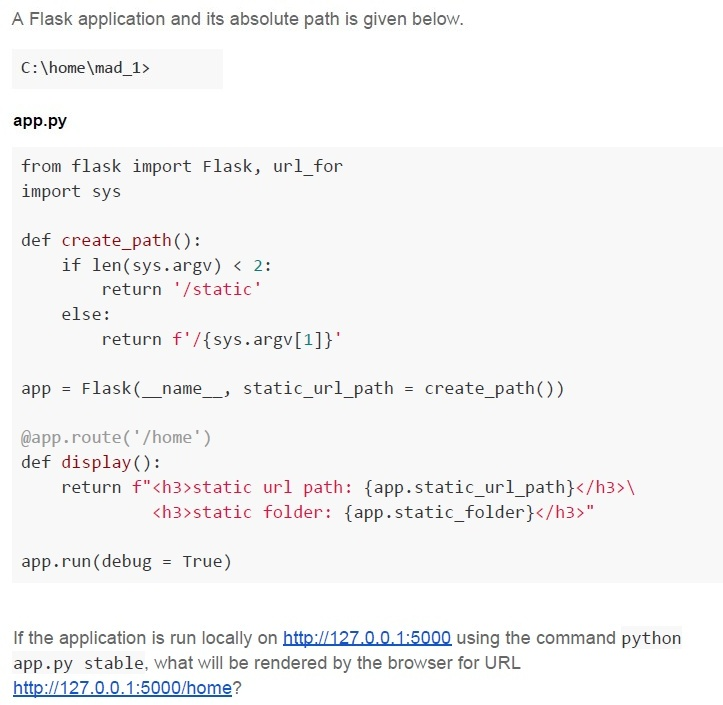
Text of the picture (copyable)
A Flask application and its absolute path is given below.

C:\home\mad_1>

**app.py**

```python
from flask import Flask, url_for
import sys

def create_path():
    if len(sys.argv) < 2:
        return '/static'
    else:
        return f'/{sys.argv[1]}'

app = Flask(__name__, static_url_path = create_path())

@app.route('/home')
def display():
    return f"<h3>static url path: {app.static_url_path}</h3>\
           <h3>static folder: {app.static_folder}</h3>"

app.run(debug = True)
```

If the application is run locally on http://127.0.0.1:5000 using the command python app.py stable, what will be rendered by the browser for URL http://127.0.0.1:5000/home?
text
static url path: C:\home\mad_1\static
static folder: /static

text
static url path: /static
static folder: C:\home\mad_1\static
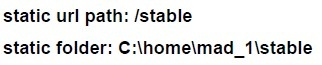
text
static url path: /stable
static folder: C:\home\mad_1\stable
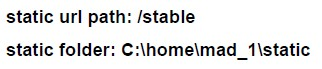
text
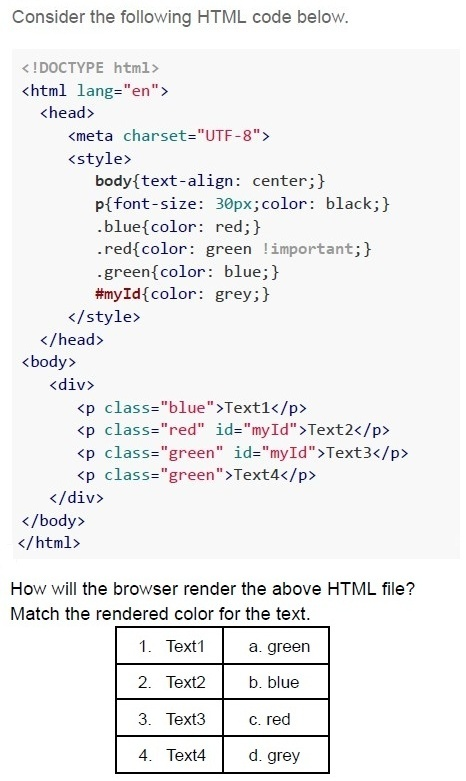
static url path: /stable
static folder: C:\home\mad_1\static
Text of the picture (copyable)
Consider the following HTML code below.

```html
<!DOCTYPE html>
<html lang="en">
<head>
    <meta charset="UTF-8">
    <style>
        body{text-align: center;}
        p{font-size: 30px;color: black;}
        .blue{color: red;}
        .red{color: green !important;}
        .green{color: blue;}
        #myId{color: grey;}
    </style>
</head>
<body>
    <div>
        <p class="blue">Text1</p>
        <p class="red" id="myId">Text2</p>
        <p class="green" id="myId">Text3</p>
        <p class="green">Text4</p>
    </div>
</body>
</html>
```

How will the browser render the above HTML file?
Match the rendered color for the text.

| 1. Text1 | a. green |
|---|---|
| 2. Text2 | b. blue |
| 3. Text3 | c. red |
| 4. Text4 | d. grey |- 1- b, 2 - a, 3- d, 4 - c
- 1- c, 2 - d, 3- d, 4 - b
- 1- c, 2 - a, 3- d, 4 - b
- 1- a, 2 - c, 3- b, 4 - d
text
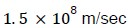
1.5 x 10^8 m/sec
text
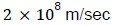
2 × 10⁸ m/sec

text
2.7 × 10⁸ m/sec

text
3 × 10⁸ m/sec
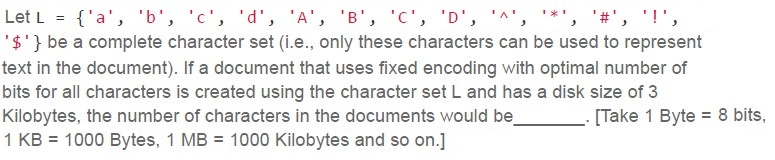
Text of the picture (copyable)
Let L = { 'a', 'b', 'c', 'd', 'A', 'B', 'C', 'D', '^', '*', '#', '!', '$' } be a complete character set (i.e., only these characters can be used to represent text in the document). If a document that uses fixed encoding with optimal number of bits for all characters is created using the character set L and has a disk size of 3 Kilobytes, the number of characters in the documents would be _____. [Take 1 Byte = 8 bits, 1 KB = 1000 Bytes, 1 MB = 1000 Kilobytes and so on.]- 3000
- 6000
- 9000
- 12000

Text of the picture (copyable)
A mobile server and a client initially 1000 km apart are moving towards each other
in a straight line with the speeds of 180 kmph and 70 kmph respectively. The network
bandwidth is set constant to 3 Mbps. Determine how much data (in Gigabytes) is used
by the client before the client and the server collide. [speed of light in vacuum: 3 x 10⁸
m/sec, 1 MB = 1000 KB and so on.]
- 64.8
- 18
- 5.4
- 22.5
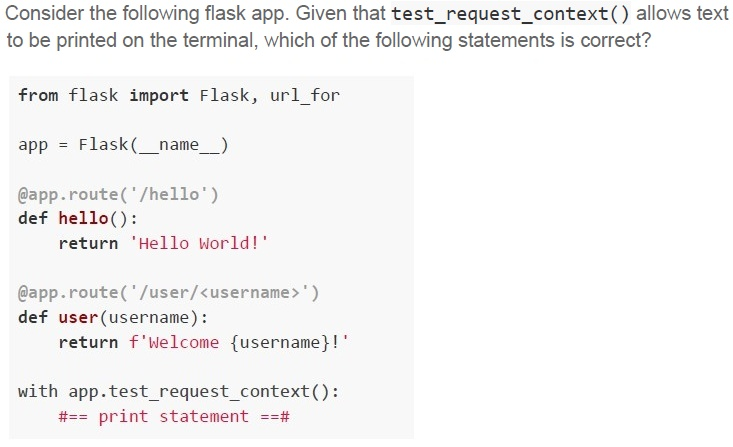
Text of the picture (copyable)
Consider the following flask app. Given that **test_request_context()** allows text
to be printed on the terminal, which of the following statements is correct?

```python
from flask import Flask, url_for

app = Flask(__name__)

@app.route('/hello')
def hello():
    return 'Hello World!'

@app.route('/user/<username>')
def user(username):
    return f'Welcome {username}!'

with app.test_request_context():
    #== print statement ==#
```
text
If `print statement` is replaced by `print(url_for('user', username='John'))`, the output on the terminal will be `/user?username=John`
text
If `print statement` is replaced by `print(url_for('user', username='John', id='101'))`, the output on the terminal will be
`/user/John/101`
text
If `print statement` is replaced by `print(url_for('hello', username='John'))`, the output on the terminal will be Hello World!
text
If `#== print statement ==#` is replaced by `print(url_for('hello', username='John'))`,
the output on the terminal will be `/hello?username=John`.
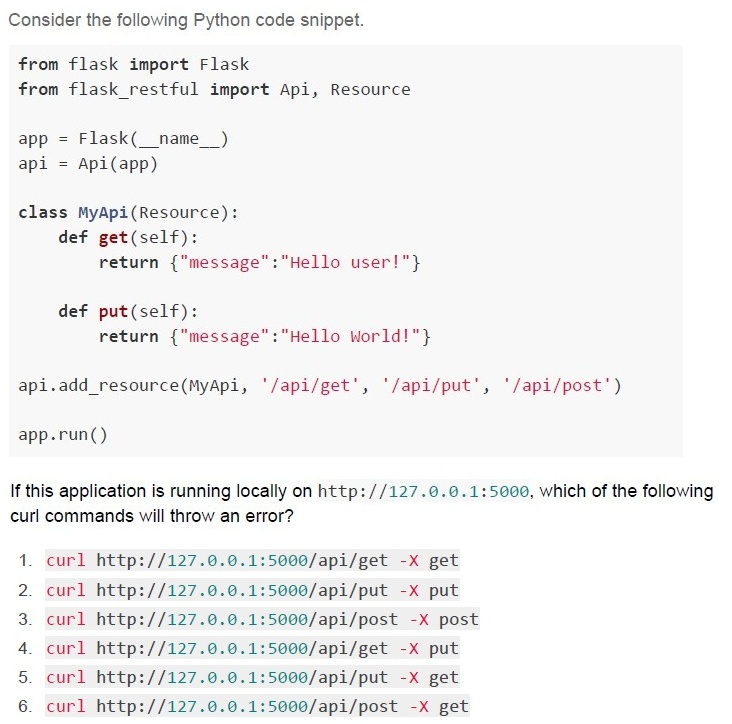
Text of the picture (copyable)
Consider the following Python code snippet.

```python
from flask import Flask
from flask_restful import Api, Resource

app = Flask(__name__)
api = Api(app)

class MyApi(Resource):
    def get(self):
        return {"message":"Hello user!"}

    def put(self):
        return {"message":"Hello World!"}

api.add_resource(MyApi, '/api/get', '/api/put', '/api/post')

app.run()
```

If this application is running locally on http://127.0.0.1:5000, which of the following curl commands will throw an error?

1. `curl http://127.0.0.1:5000/api/get -X get`
2. `curl http://127.0.0.1:5000/api/put -X put`
3. `curl http://127.0.0.1:5000/api/post -X post`
4. `curl http://127.0.0.1:5000/api/get -X put`
5. `curl http://127.0.0.1:5000/api/put -X get`
6. `curl http://127.0.0.1:5000/api/post -X get`- Only 3
- Only 3 and 4
- Only 5 and 6
- Only 3, 4, 5 and 6
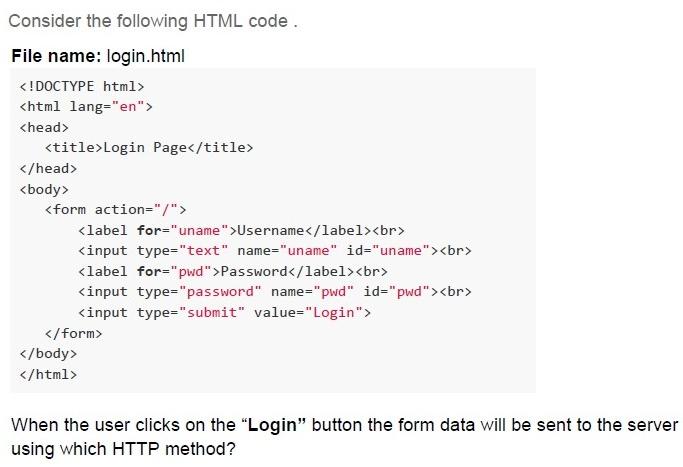
Text of the picture (copyable)
Consider the following HTML code.

**File name: login.html**
```html
<!DOCTYPE html>
<html lang="en">
<head>
    <title>Login Page</title>
</head>
<body>
    <form action="/">
        <label for="uname">Username</label><br>
        <input type="text" name="uname" id="uname"><br>
        <label for="pwd">Password</label><br>
        <input type="password" name="pwd" id="pwd"><br>
        <input type="submit" value="Login">
    </form>
</body>
</html>
```

When the user clicks on the "Login" button the form data will be sent to the server using which HTTP method?- GET
- POST
- PUT
- DELETE
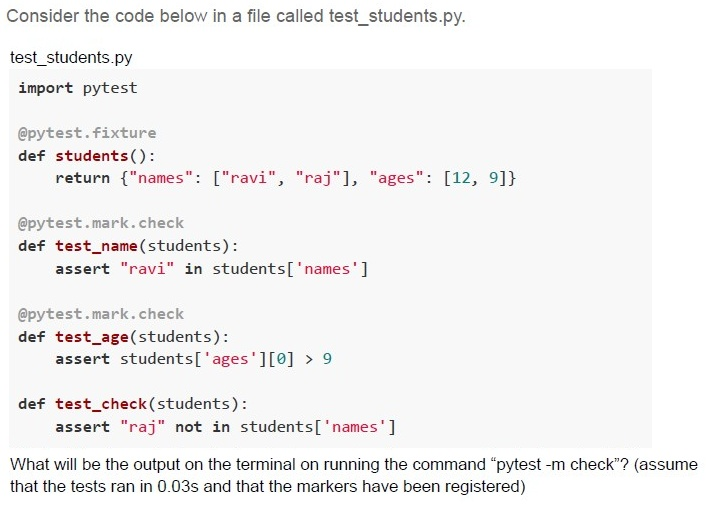
Text of the picture (copyable)
Consider the code below in a file called test_students.py.

test_students.py
```python
import pytest

@pytest.fixture
def students():
    return {"names": ["ravi", "raj"], "ages": [12, 9]}

@pytest.mark.check
def test_name(students):
    assert "ravi" in students['names']

@pytest.mark.check
def test_age(students):
    assert students['ages'][0] > 9

def test_check(students):
    assert "raj" not in students['names']
```

What will be the output on the terminal on running the command "pytest -m check"? (assume that the tests ran in 0.03s and that the markers have been registered)
text
```
======== 2 passed, 1 deselected in 0.03s ========
```

text
```
======== 2 passed in 0.03s========
```

text
```text
======== 1 passed, 1 failed in 0.03s ========
```

text
```
========2 passed, 1 failed in 0.03s========
```
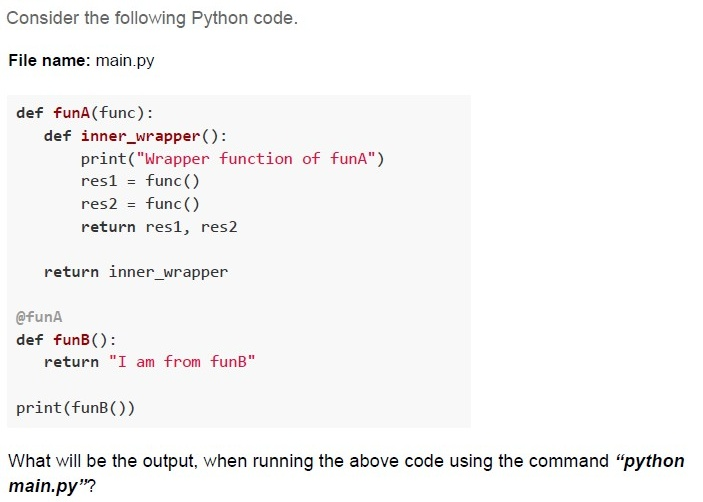
Text of the picture (copyable)
Consider the following Python code.

File name: main.py

```python
def funA(func):
    def inner_wrapper():
        print("Wrapper function of funA")
        res1 = func()
        res2 = func()
        return res1, res2

    return inner_wrapper

@funA
def funB():
    return "I am from funB"

print(funB())
```

What will be the output, when running the above code using the command "python main.py"?
text
```
('I am from funB', 'I am from funB')
Wrapper function of funA
```
text
```
Wrapper function of funA
('I am from funB', 'I am from funB')
```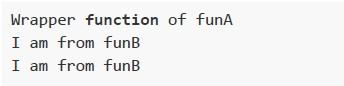
text
Wrapper **function** of funA
I am from funB
I am from funB
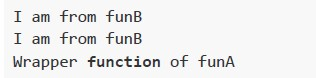
text
I am from funB
I am from funB
Wrapper **function** of funA
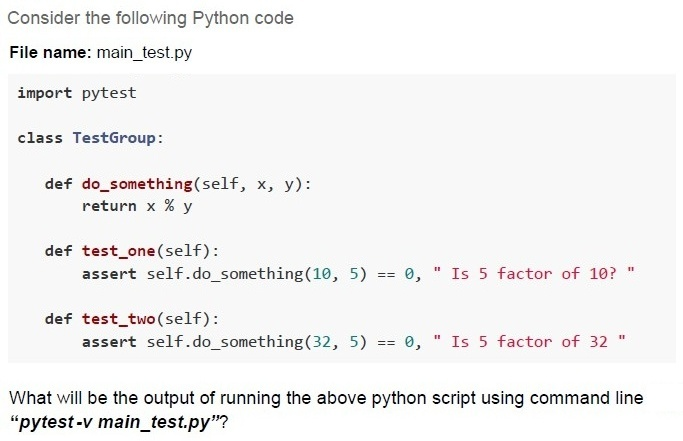
Text of the picture (copyable)
Consider the following Python code

File name: main_test.py

```python
import pytest

class TestGroup:

    def do_something(self, x, y):
        return x % y

    def test_one(self):
        assert self.do_something(10, 5) == 0, " Is 5 factor of 10? "

    def test_two(self):
        assert self.do_something(32, 5) == 0, " Is 5 factor of 32 "
```

What will be the output of running the above python script using command line
“pytest -v main_test.py”?
text
```
=========================== short test summary info ===========================
FAILED main_test.py::TestGroup::test_two - AssertionError: Is 5
factor of 32
========== 1 failed, 1 passed in 0.12s ========================================
```
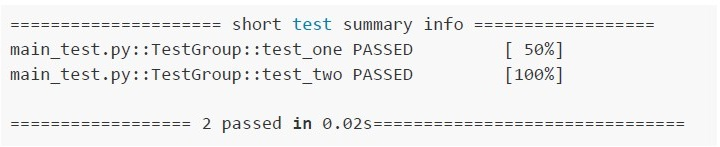
text
```text
======================== short test summary info ========================
main_test.py::TestGroup::test_one PASSED                               [ 50%]
main_test.py::TestGroup::test_two PASSED                              [100%]

====================== 2 passed in 0.02s================================
```
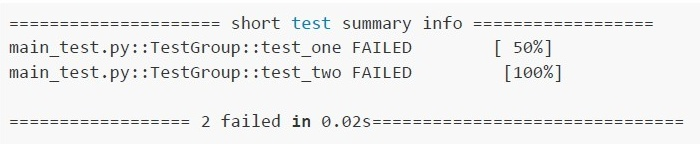
text
```text
==================== short test summary info ====================
main_test.py::TestGroup::test_one FAILED                  [ 50%]
main_test.py::TestGroup::test_two FAILED                 [100%]

==================== 2 failed in 0.02s====================
```
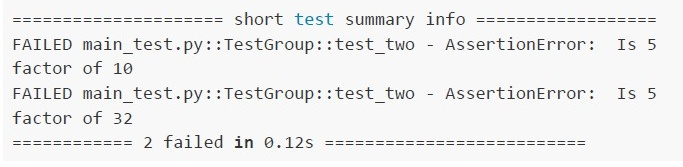
text
```text
========== short test summary info ==========
FAILED main_test.py::TestGroup::test_two - AssertionError: Is 5
factor of 10
FAILED main_test.py::TestGroup::test_two - AssertionError: Is 5
factor of 32
========== 2 failed in 0.12s ==========
```
Text of the picture (copyable)
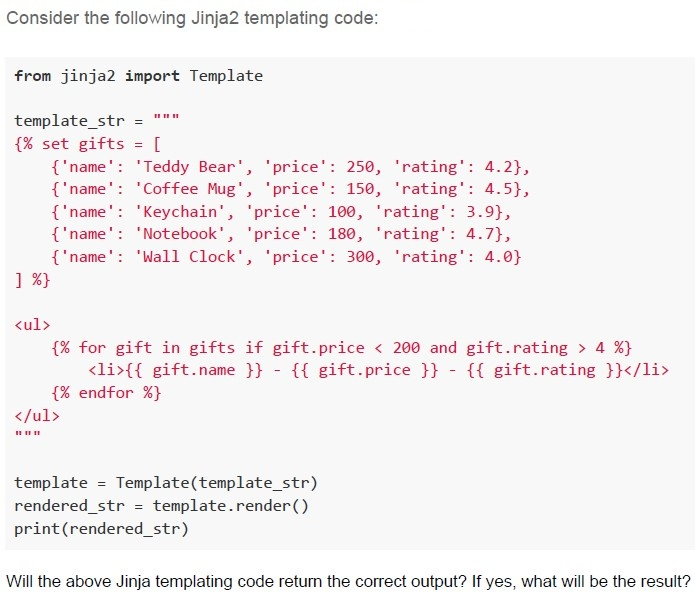
Consider the following Jinja2 templating code:

```python
from jinja2 import Template

template_str = """
{% set gifts = [
    {'name': 'Teddy Bear', 'price': 250, 'rating': 4.2},
    {'name': 'Coffee Mug', 'price': 150, 'rating': 4.5},
    {'name': 'Keychain', 'price': 100, 'rating': 3.9},
    {'name': 'Notebook', 'price': 180, 'rating': 4.7},
    {'name': 'Wall Clock', 'price': 300, 'rating': 4.0}
] %}

<ul>
{% for gift in gifts if gift.price < 200 and gift.rating > 4 %}
    <li>{{ gift.name }} - {{ gift.price }} - {{ gift.rating }}</li>
{% endfor %}
</ul>
"""

template = Template(template_str)
rendered_str = template.render()
print(rendered_str)
```

Will the above Jinja templating code return the correct output? If yes, what will be the result?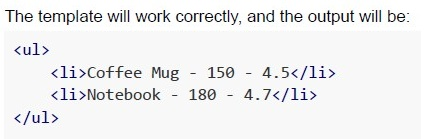
text
The template will work correctly, and the output will be:

```html
<ul>
  <li>Coffee Mug - 150 - 4.5</li>
  <li>Notebook - 180 - 4.7</li>
</ul>
```

text
The template will not work correctly because the **for** loop condition (if `gift.price < 200` and `gift.rating > 4`) is invalid in Jinja2 syntax. This will raise a `TemplateSyntaxError`.

text
The template will work correctly, but the output will include all gifts, not filtering by price and rating, as the condition inside the for loop will be ignored.
text
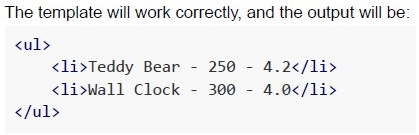
The template will work correctly, and the output will be:
```html
<ul>
    <li>Teddy Bear - 250 - 4.2</li>
    <li>Wall Clock - 300 - 4.0</li>
</ul>
```
Text of the picture (copyable)
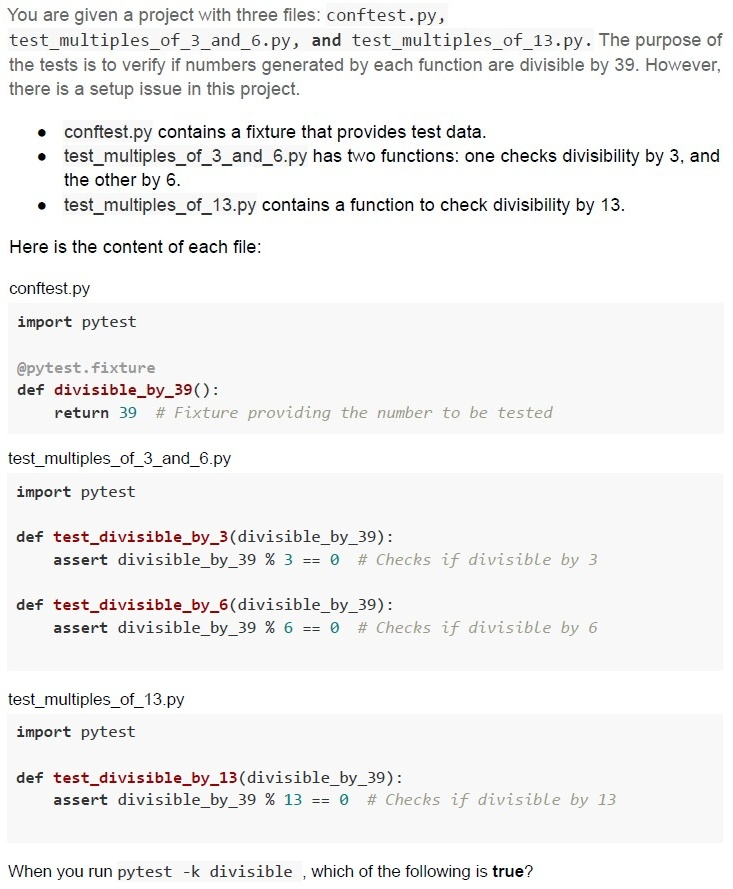
You are given a project with three files: `conftest.py`, `test_multiples_of_3_and_6.py`, and `test_multiples_of_13.py`. The purpose of the tests is to verify if numbers generated by each function are divisible by 39. However, there is a setup issue in this project.

* `conftest.py` contains a fixture that provides test data.
* `test_multiples_of_3_and_6.py` has two functions: one checks divisibility by 3, and the other by 6.
* `test_multiples_of_13.py` contains a function to check divisibility by 13.

Here is the content of each file:

`conftest.py`
```python
import pytest

@pytest.fixture
def divisible_by_39():
    return 39 # Fixture providing the number to be tested
```

`test_multiples_of_3_and_6.py`
```python
import pytest

def test_divisible_by_3(divisible_by_39):
    assert divisible_by_39 % 3 == 0 # Checks if divisible by 3

def test_divisible_by_6(divisible_by_39):
    assert divisible_by_39 % 6 == 0 # Checks if divisible by 6
```

`test_multiples_of_13.py`
```python
import pytest

def test_divisible_by_13(divisible_by_39):
    assert divisible_by_39 % 13 == 0 # Checks if divisible by 13
```

When you run `pytest -k divisible`, which of the following is **true**?
text
```
========== 1 passed in 0.02s ==========
```

text
```
========== 3 passed in 0.02s ==========
```

text
```
========== 1 failed, 2 passed in 0.06s ==========
```

text
```
========== 3 errors in 0.02s ==========
```
Text of the picture (copyable)
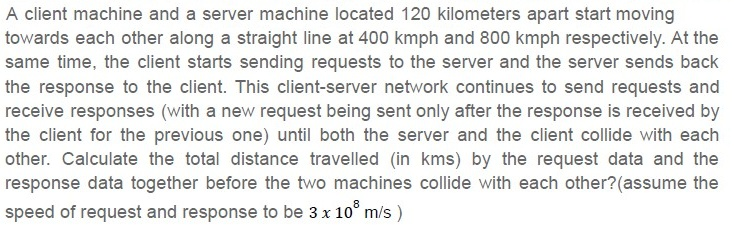
A client machine and a server machine located 120 kilometers apart start moving towards each other along a straight line at 400 kmph and 800 kmph respectively. At the same time, the client starts sending requests to the server and the server sends back the response to the client. This client-server network continues to send requests and receive responses (with a new request being sent only after the response is received by the client for the previous one) until both the server and the client collide with each other. Calculate the total distance travelled (in kms) by the request data and the response data together before the two machines collide with each other?(assume the speed of request and response to be 3 x 10⁸ m/s )

text
54 x 10⁶

text
216 x 10⁶

text
108 x 10⁶

text
90 x 10^6
Text of the picture (copyable)
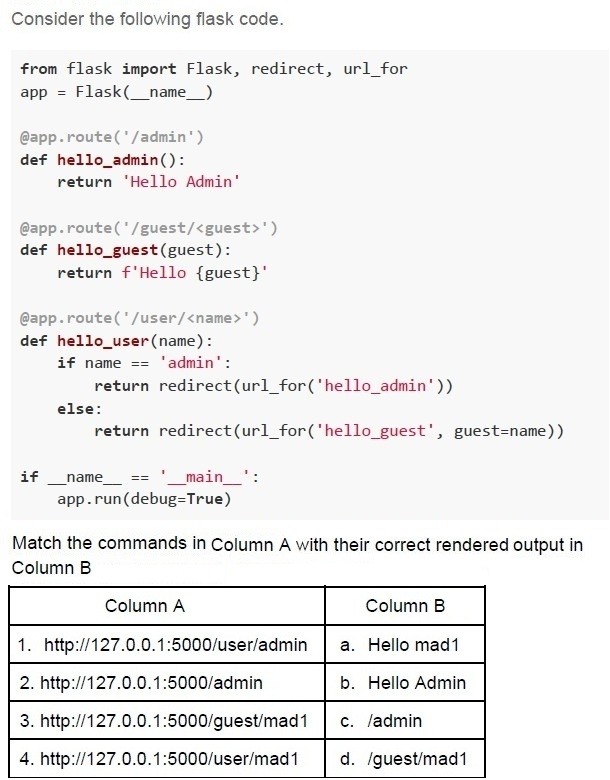
Consider the following flask code.

```python
from flask import Flask, redirect, url_for
app = Flask(__name__)

@app.route('/admin')
def hello_admin():
    return 'Hello Admin'

@app.route('/guest/<guest>')
def hello_guest(guest):
    return f'Hello {guest}'

@app.route('/user/<name>')
def hello_user(name):
    if name == 'admin':
        return redirect(url_for('hello_admin'))
    else:
        return redirect(url_for('hello_guest', guest=name))

if __name__ == '__main__':
    app.run(debug=True)
```

Match the commands in Column A with their correct rendered output in Column B

| Column A | Column B |
|---|---|
| 1. http://127.0.0.1:5000/user/admin | a. Hello mad1 |
| 2. http://127.0.0.1:5000/admin | b. Hello Admin |
| 3. http://127.0.0.1:5000/guest/mad1 | c. /admin |
| 4. http://127.0.0.1:5000/user/mad1 | d. /guest/mad1 |- 1-c, 2-b, 3-a, 4-d
- 1-c, 2-d, 3-a, 4-b
- 1-b, 2-a, 3-b, 4-d
- 1-b, 2-b, 3-a, 4-a
Text of the picture (copyable)
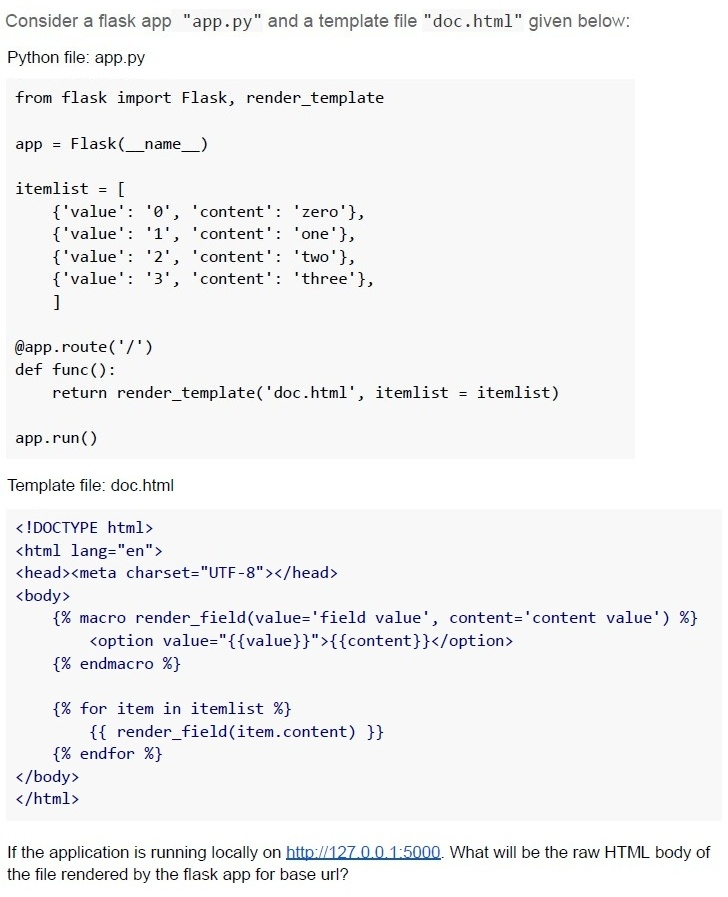
Consider a flask app "app.py" and a template file "doc.html" given below:

Python file: app.py

```python
from flask import Flask, render_template

app = Flask(__name__)

itemlist = [
    {'value': '0', 'content': 'zero'},
    {'value': '1', 'content': 'one'},
    {'value': '2', 'content': 'two'},
    {'value': '3', 'content': 'three'},
]

@app.route('/')
def func():
    return render_template('doc.html', itemlist = itemlist)

app.run()
```

Template file: doc.html

```html
<!DOCTYPE html>
<html lang="en">
<head><meta charset="UTF-8"></head>
<body>
    {% macro render_field(value='field value', content='content value') %}
        <option value="{{value}}">{{content}}</option>
    {% endmacro %}

    {% for item in itemlist %}
        {{ render_field(item.content) }}
    {% endfor %}
</body>
</html>
```

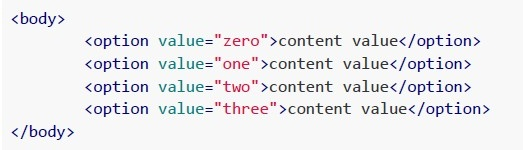
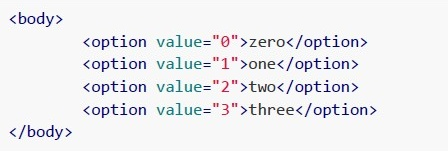
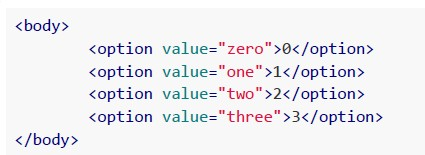
If the application is running locally on http://127.0.0.1:5000. What will be the raw HTML body of the file rendered by the flask app for base url?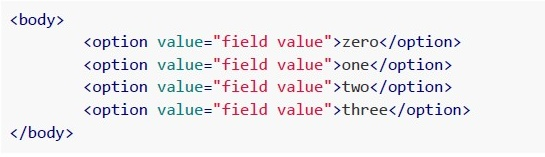
text
```html
<body>

    <option value="field value">zero</option>
    <option value="field value">one</option>
    <option value="field value">two</option>
    <option value="field value">three</option>

</body>
```
text
```html
<body>
    <option value="zero">content value</option>
    <option value="one">content value</option>
    <option value="two">content value</option>
    <option value="three">content value</option>
</body>
```
text
```html
<body>
    <option value="0">zero</option>
    <option value="1">one</option>
    <option value="2">two</option>
    <option value="3">three</option>
</body>
```
text
```html
<body>

    <option value="zero">0</option>
    <option value="one">1</option>
    <option value="two">2</option>
    <option value="three">3</option>

</body>
```
- TCP is a connection-oriented protocol that ensures reliable data delivery.
- UDP is a connectionless protocol that is faster but less reliable than TCP.
- Proxy servers facilitate direct peer-to-peer connections between devices.
- Broadcast sends a message to all devices in the network.
- Unicast is a one-to-many communication model.
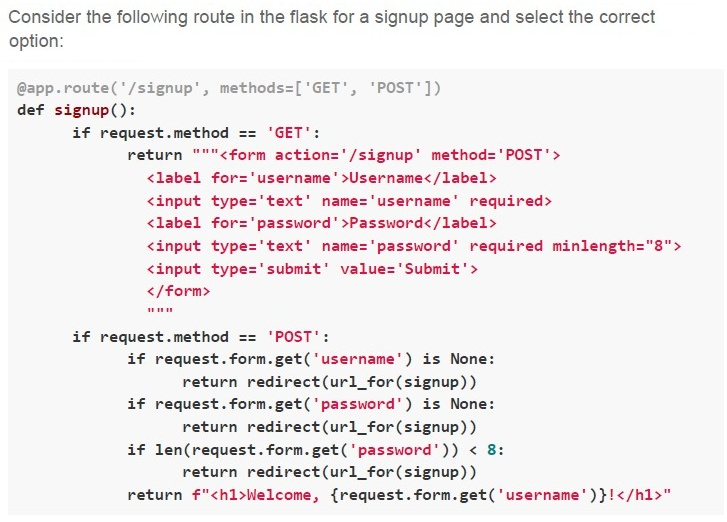
Text of the picture (copyable)
Consider the following route in the flask for a signup page and select the correct option:

```python
@app.route('/signup', methods=['GET', 'POST'])
def signup():
    if request.method == 'GET':
        return """<form action='/signup' method='POST'>
            <label for='username'>Username</label>
            <input type='text' name='username' required>
            <label for='password'>Password</label>
            <input type='text' name='password' required minlength="8">
            <input type='submit' value='Submit'>
        </form>
        """
    if request.method == 'POST':
        if request.form.get('username') is None:
            return redirect(url_for(signup))
        if request.form.get('password') is None:
            return redirect(url_for(signup))
        if len(request.form.get('password')) < 8:
            return redirect(url_for(signup))
        return f"<h1>Welcome, {request.form.get('username')}!</h1>"
```- The signup page is dynamically generated.
- The signup page uses server-side rendering.
- The signup page uses frontend validation.
- The signup page uses backend validation.
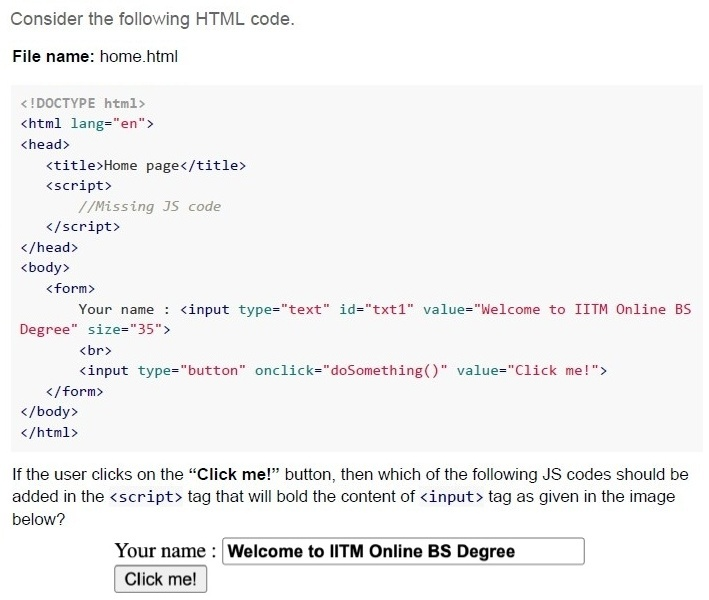
Text of the picture (copyable)
Consider the following HTML code.

File name: home.html

```html
<!DOCTYPE html>
<html lang="en">
<head>
    <title>Home page</title>
    <script>
        //Missing JS code
    </script>
</head>
<body>
    <form>
        Your name : <input type="text" id="txt1" value="Welcome to IITM Online BS Degree" size="35">
        <br>
        <input type="button" onclick="doSomething()" value="Click me!">
    </form>
</body>
</html>
```

If the user clicks on the “Click me!” button, then which of the following JS codes should be added in the `<script>` tag that will bold the content of `<input>` tag as given in the image below?

Your name : **Welcome to IITM Online BS Degree**
Click me!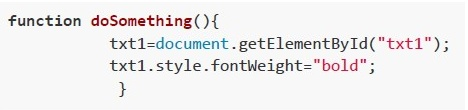
text
```javascript
function doSomething(){
    txt1=document.getElementById("txt1");
    txt1.style.fontWeight="bold";
}
```
text
```javascript
function doSomething(){
    document.getElementById("txt1").style.fontWeight="bold";
}
```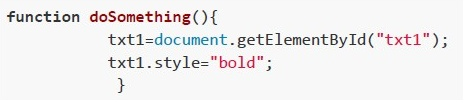
text
```javascript
function doSomething(){
    txt1=document.getElementById("txt1");
    txt1.style="bold";
}
```
text
```javascript
function doSomething(){
    document.getElementById("txt1").style="bold";
}
```
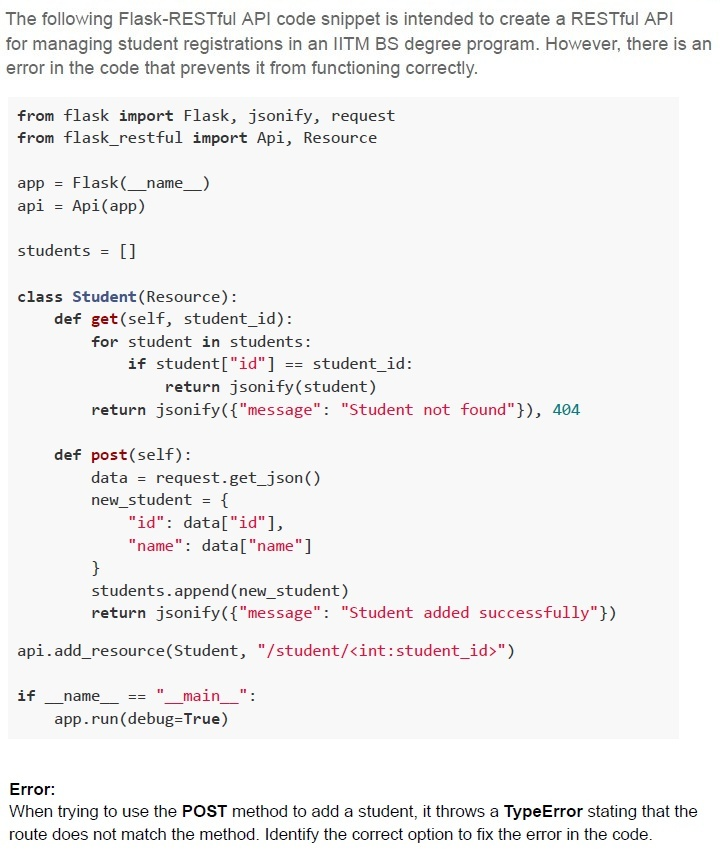
Text of the picture (copyable)
The following Flask-RESTful API code snippet is intended to create a RESTful API for managing student registrations in an IITM BS degree program. However, there is an error in the code that prevents it from functioning correctly.

```python
from flask import Flask, jsonify, request
from flask_restful import Api, Resource

app = Flask(__name__)
api = Api(app)

students = []

class Student(Resource):
    def get(self, student_id):
        for student in students:
            if student["id"] == student_id:
                return jsonify(student)
        return jsonify({"message": "Student not found"}), 404

    def post(self):
        data = request.get_json()
        new_student = {
            "id": data["id"],
            "name": data["name"]
        }
        students.append(new_student)
        return jsonify({"message": "Student added successfully"})

api.add_resource(Student, "/student/<int:student_id>")

if __name__ == "__main__":
    app.run(debug=True)
```

**Error:**
When trying to use the **POST** method to add a student, it throws a **TypeError** stating that the route does not match the method. Identify the correct option to fix the error in the code.
text
Change the api.add_resource(Student, "/student/<int:student_id>") to:
```
api.add_resource(Student, "/student", "/student/<int:student_id>")
```

text
Add the student_id parameter to the **post** method in the Student class as **def**
```
post(self, student_id):
```
text
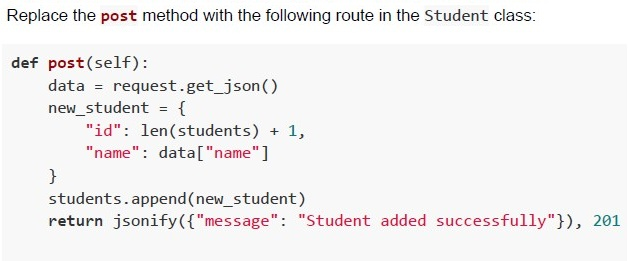
Replace the **post** method with the following route in the Student class:

```python
def post(self):
    data = request.get_json()
    new_student = {
        "id": len(students) + 1,
        "name": data["name"]
    }
    students.append(new_student)
    return jsonify({"message": "Student added successfully"}), 201
```
text
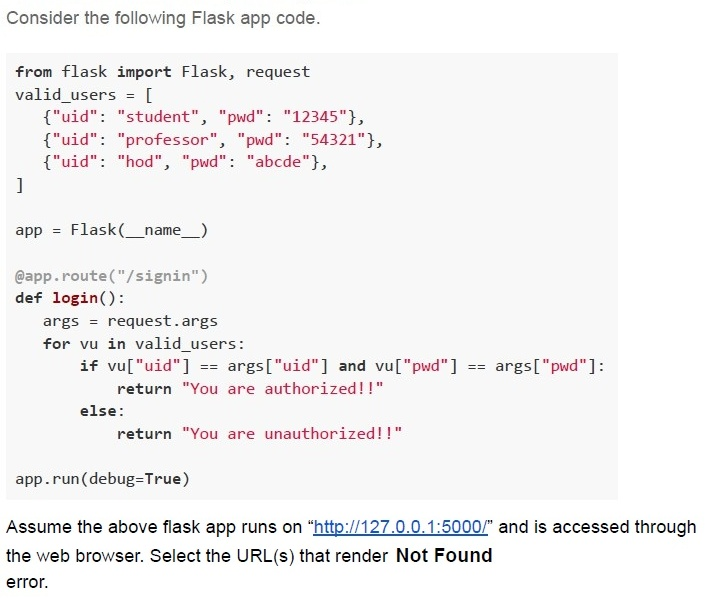
Change the api.add_resource(Student, "/student/<int:student_id>") to:
api.add_resource(Student, "/students")
Text of the picture (copyable)
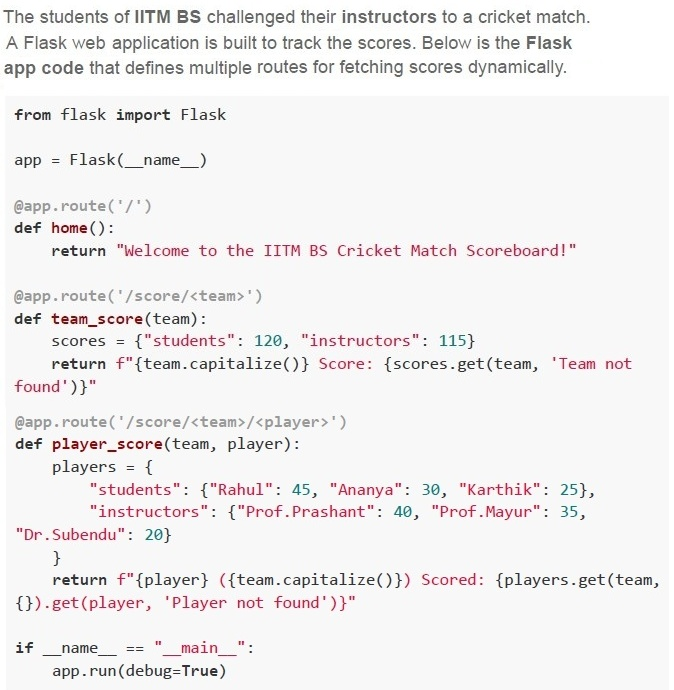
Consider the following Flask app code.

```python
from flask import Flask, request
valid_users = [
    {"uid": "student", "pwd": "12345"},
    {"uid": "professor", "pwd": "54321"},
    {"uid": "hod", "pwd": "abcde"},
]

app = Flask(__name__)

@app.route("/signin")
def login():
    args = request.args
    for vu in valid_users:
        if vu["uid"] == args["uid"] and vu["pwd"] == args["pwd"]:
            return "You are authorized!!"
    else:
        return "You are unauthorized!!"

app.run(debug=True)
```

Assume the above flask app runs on "http://127.0.0.1:5000/" and is accessed through the web browser. Select the URL(s) that render **Not Found** error.
text
http://127.0.0.1:5000/signin?uid=professor&pwd=54321

text
```
http://127.0.0.1:5000/login?uid=professor&pwd=54321
```

text
http://127.0.0.1:5000/signin?uid=student&pwd=12345

text
http://127.0.0.1:5000/login?uid=student&pwd=12345

text
http://127.0.0.1:5000/signin?uid=hod&pwd=12345
Text of the picture (copyable)
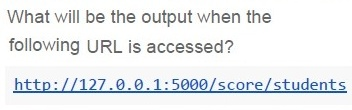
What will be the output when the
following URL is accessed?

http://127.0.0.1:5000/score/students
- Students Score: 120
- students Score : 120
- Team not found
- Score: students
Text of the picture (copyable)
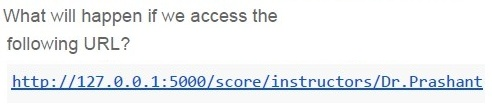
What will happen if we access the
following URL?

http://127.0.0.1:5000/score/instructors/Dr.Prashant
- Dr.Prashant (Instructors) Scored: 40
- Dr.Prashant (Instructors) Scored: Player not found
- Player not found
- Internal Server Error
- Hard Disk Drive (HDD)
- Solid State Drive (SSD)
- Static RAM (SRAM)
- Registers
- Registers
- SRAM
- DRAM
- Hard Disk Drive (HDD)
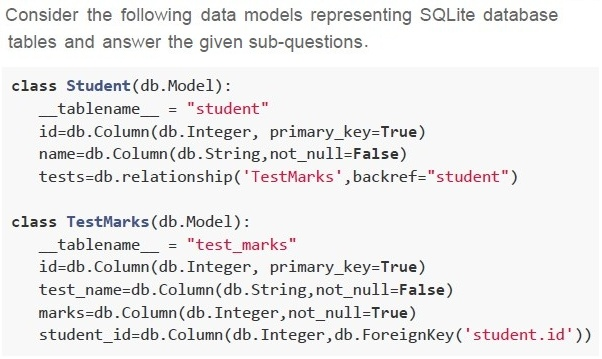
text
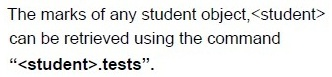
The marks of any student object, <student>
can be retrieved using the command
"<student>.tests".
text
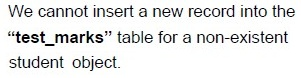
We cannot insert a new record into the
"**test_marks**" table for a non-existent
student object.
text
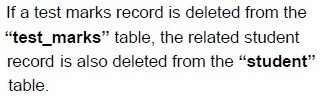
If a test marks record is deleted from the
“**test_marks**” table, the related student
record is also deleted from the “**student**”
table.

text
We can insert a new record in the “**student**”
table for a non-existent “**test_marks**” object.
text
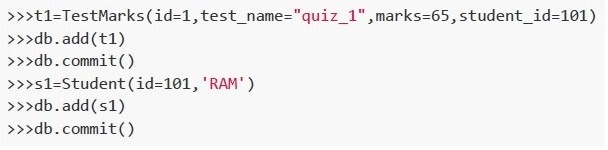
```python
>>>t1=TestMarks(id=1, test_name="quiz_1",marks=65, student_id=101)
>>>db.add(t1)
>>>db.commit()
>>>s1=Student(id=101, 'RAM')
>>>db.add(s1)
>>>db.commit()
```
text
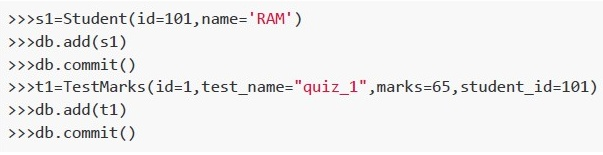
```python
>>>s1=Student(id=101,name='RAM')
>>>db.add(s1)
>>>db.commit()
>>>t1=TestMarks(id=1,test_name="quiz_1",marks=65,student_id=101)
>>>db.add(t1)
>>>db.commit()
```
text
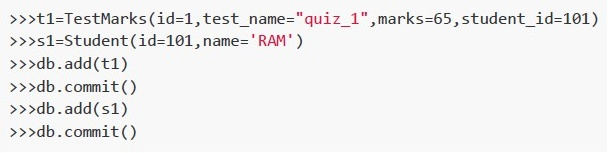
```python
>>>t1=TestMarks(id=1,test_name="quiz_1",marks=65,student_id=101)
>>>s1=Student(id=101,name='RAM')
>>>db.add(t1)
>>>db.commit()
>>>db.add(s1)
>>>db.commit()
```
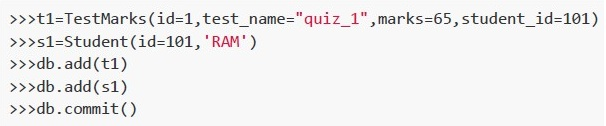
text
```python
>>>t1=TestMarks(id=1,test_name="quiz_1",marks=65,student_id=101)
>>>s1=Student(id=101,'RAM')
>>>db.add(t1)
>>>db.add(s1)
>>>db.commit()
```
Answer key
- Q1 (MCQ, 2 marks): C
- Q2 (MCQ, 2 marks): B
- Q3 (MCQ, 2 marks): C
- Q4 (MCQ, 2 marks): D
- Q5 (MCQ, 3 marks): C
- Q6 (MCQ, 3 marks): D
- Q7 (MCQ, 3 marks): C
- Q8 (MCQ, 3 marks): D
- Q9 (MCQ, 3 marks): B
- Q10 (MCQ, 3 marks): C
- Q11 (MCQ, 3 marks): D
- Q12 (MCQ, 3 marks): A
- Q13 (MCQ, 3 marks): A
- Q14 (MCQ, 3 marks): A
- Q15 (MCQ, 3 marks): B
- Q16 (MCQ, 3 marks): A
- Q17 (MCQ, 4.5 marks): A
- Q18 (MCQ, 4.5 marks): C
- Q19 (MCQ, 4.5 marks): C
- Q20 (MCQ, 4.5 marks): D
- Q21 (MCQ, 4.5 marks): B
- Q22 (MSQ, 3 marks): A, B, D
- Q23 (MSQ, 3 marks): A, B, C, D
- Q24 (MSQ, 3 marks): A, B
- Q25 (MSQ, 4.5 marks): A, B
- Q26 (MSQ, 4.5 marks): B, D
- Q27 (MCQ, 2 marks): A
- Q28 (MCQ, 4.5 marks): B
- Q29 (MCQ, 2 marks): C
- Q30 (MCQ, 2 marks): D
- Q31 (MSQ, 3 marks): A, B, D
- Q32 (MCQ, 2 marks): B
Concepts this paper tests
Auto-generated summary from the source site. Handy as a checklist; the lessons above explain each idea from scratch.
Here’s a structured summary of the core topics, concepts, principles, and equations essential for the "Modern Application Development I" exam, along with Mermaid knowledge graphs to visualize relationships.
1. Core Topics & Concepts
A. Web Development with Flask
Key Concepts:
Flask Basics
- Routing (
@app.route), templates (render_template), and context (request,url_for). Jinja2 Templating:
- Inheritance (
{% extends %},{% block %}),{{ super() }}(includes parent block content). - Loops (
{% for %}), conditionals ({% if %}), filters (|length,|upper).
- Inheritance (
Example:
{% block content %}{{ super() }}{% endblock %} // Includes parent block content
- Routing (
Flask-RESTful
- Resource-based routing (
api.add_resource). - HTTP methods (
GET,POST,PUT,DELETE). - Error Handling: Return HTTP status codes (e.g.,
404for "Not Found").
- Resource-based routing (
Flask Forms & Requests
- Handling
GET/POSTrequests (request.method,request.form,request.args). - Redirects (
redirect,url_for). Example:
if request.method == 'POST':
    username = request.form.get('username')
- Handling
Static Files & URLs
static_url_path,static_folder.- Dynamic paths using
sys.argv.
Flask Test Client
test_request_context()for testing routes.Example:
with app.test_request_context():
    print(url_for('hello'))  # Outputs: "/hello"
Key Equations/Code Snippets:
| Concept | Code Snippet |
|---|---|
| Basic Route | @app.route('/hello') |
| Dynamic URL | @app.route('/user/<username>') |
| Jinja2 Loop | {% for item in data %}{{ item }}{% endfor %} |
| Conditional Rendering | {% if user %}<p>Welcome!</p>{% endif %} |
| URL Generation | url_for('user', username='John') → /user/John |
| Redirect | return redirect(url_for('login')) |
| Static Files | app = Flask(__name__, static_url_path='/static') |
| RESTful API | api.add_resource(Student, '/student/<int:id>', '/students') |
| Form Handling | request.form.get('username') (POST) or request.args.get('id') (GET) |
B. Git & Version Control
Key Concepts:
Branching & Merging
git checkout <branch>,git merge <branch>.- Merge Conflict Resolution: Manual editing or tools like
git mergetool.
Commands:
git add,git commit -m "message",git push,git pull.git branch(list branches),git checkout -b <new-branch>(create + switch).
Key Workflow:
git checkout main
git merge feature1
git merge feature2
C. HTML/CSS & Accessibility
Key Concepts:
Semantic HTML
<label for="id">,<input id="id">,aria-describedby.
CSS Specificity
!important> Inline > ID (#id) > Class (.class) > Element (p).
Accessibility Principles (WCAG):
- Perceivable: Alt text, labels.
- Operable: Keyboard navigation,
requiredfields. - Understandable: Clear instructions (
aria-describedby). - Robust: Valid HTML, ARIA roles.
Example:
<label for="search">Search:</label>
<input id="search" aria-describedby="help-text">
<small id="help-text">Enter a keyword</small>
D. Testing with Pytest
Key Concepts:
Fixtures
- Reusable test data (
@pytest.fixture). Example:
@pytest.fixture
def users():
    return ["Alice", "Bob"]
- Reusable test data (
Markers
- Tag tests (
@pytest.mark.slow). - Run marked tests:
pytest -m slow.
- Tag tests (
Assertions
assert x == y,assert "item" in list.
Parametrize
- Run same test with different inputs (
@pytest.mark.parametrize).
- Run same test with different inputs (
Key Commands:
| Command | Purpose |
|---|---|
pytest | Run all tests. |
pytest -v | Verbose output. |
pytest -m mark_name | Run tests with a specific marker. |
pytest::test_file.py::test_func | Run a specific test. |
E. Networking & Performance
Key Concepts:
Latency vs. Bandwidth
- Latency: Time for data to travel (affected by distance/speed of light).
- Bandwidth: Data transfer rate (Mbps/Gbps).
HTTP Methods
GET(retrieve),POST(create),PUT(update),DELETE(remove).
Data Transfer Calculations
Time to Collision:
- Relative speed =
v1 + v2. - Time =
distance / relative_speed.
- Relative speed =
Data Transferred:
Bandwidth × Time.
Key Equations:
| Scenario | Equation |
|---|---|
| Time until collision | \( t = \frac{d}{v_1 + v_2} \) (where \(d\) = distance, \(v\) = speed) |
| Data transferred | \( \text{Data} = \text{Bandwidth} \times t \) |
| Speed of medium (M2) | \( v_2 = \frac{d_2}{t} \) (if \( t = \frac{d_1}{v_1} \)) |
| Optimal bits for encoding | \( \text{Bits} = \log_2(\text{Character Set Size}) \) |
| Total characters in a file | \( \text{Characters} = \frac{\text{File Size (bits)}}{\text{Bits/Char}} \) |
F. Databases (SQLite & SQLAlchemy)
Key Concepts:
SQLAlchemy ORM
- Models: Python classes → DB tables.
- Relationships:
db.relationship(one-to-many, many-to-many). - Foreign Keys:
db.ForeignKey('table.column').
CRUD Operations
- Create:
db.session.add(obj),db.session.commit(). - Read:
User.query.filter_by(name='Alice').first(). - Update:
user.name = 'Bob',db.session.commit(). - Delete:
db.session.delete(user),db.session.commit().
- Create:
Constraints
primary_key=True,nullable=False,unique=True.
Example Model:
class Student(db.Model):
    id = db.Column(db.Integer, primary_key=True)
    name = db.Column(db.String(50))
    tests = db.relationship('TestMarks', backref='student')

class TestMarks(db.Model):
    id = db.Column(db.Integer, primary_key=True)
    marks = db.Column(db.Integer)
    student_id = db.Column(db.Integer, db.ForeignKey('student.id'))
G. Storage Systems
Key Concepts:
| Storage Type | Latency | Use Case | Example |
|---|---|---|---|
| Registers | ~1 ns | CPU operations | ALU Registers |
| SRAM | ~10 ns | Cache (L1/L2), fast access | CPU Cache |
| DRAM | ~100 ns | Main memory (RAM) | DDR4 |
| SSD | ~100 µs | Fast storage (OS, databases) | NVMe SSD |
| HDD | ~10 ms | Archival, bulk storage | SATA HDD |
| Optical/Tape | ~100 ms | Long-term backup | Blu-ray, LTO |
Selection Criteria:
- Frequently Accessed Data → SRAM/DRAM (low latency).
- Archival Data → HDD/Tape (high density, low cost).
- Temporary Session Data → DRAM (fast read/write).
H. JavaScript & DOM Manipulation
Key Concepts:
Event Handling
onclick,addEventListener.
DOM Updates
document.getElementById(),.style,.innerHTML.
- Example (Bold Text): ``
javascript function doSomething() { document.getElementById("txt1").style.fontWeight = "bold"; }``
Graph 2: Git Workflow
Graph 3: Testing with Pytest
Graph 4: Networking & Data Transfer
Graph 5: Storage Hierarchy
Graph 6: HTML/CSS/Accessibility
Graph 7: SQLAlchemy ORM
3. Summary of Key Equations
| Topic | Equation | Example |
|---|---|---|
| Time to Collision | \( t = \frac{d}{v_1 + v_2} \) | \( t = \frac{1000 \text{ km}}{180 + 70 \text{ km/h}} \) |
| Data Transferred | \( \text{Data} = \text{Bandwidth} \times t \) | \( 3 \text{ Mbps} \times 2 \text{ hrs} \) |
| Optimal Bits | \( \text{Bits} = \log_2(\text{Character Set Size}) \) | \( \log_2(13) \approx 4 \text{ bits} \) |
| File Size Calculation | \( \text{Characters} = \frac{\text{File Size (bits)}}{\text{Bits/Char}} \) | \( \frac{3000 \times 8}{4} = 6000 \) |
| Speed of Medium (M2) | \( v_2 = \frac{d_2}{t} \) (where \( t = \frac{d_1}{v_1} \)) | \( v_2 = \frac{3000 \text{ km}}{t} \) |
4. Exam Tips
Flask:
- Remember
{{ super() }}includes parent block content. url_forgenerates URLs dynamically.- RESTful APIs require separate resources for
GET/POSTif URLs differ.
- Remember
Git:
- Always
checkoutthe target branch before merging. git merge feature1; git merge feature2(not the other way around).
- Always
HTML/CSS:
- IDs override classes in specificity.
aria-describedbylinks inputs to help text.
Networking:
- Latency depends on distance and speed of light.
- Bandwidth × Time = Data Transferred.
Testing:
pytest -m mark_nameruns marked tests.- Fixtures provide reusable test data.
Databases:
- Foreign keys enforce referential integrity.
db.relationshipdefines ORM relationships.
Storage:
- SRAM for speed, HDD for archival.
Good luck! Master these concepts, and you’ll ace the exam. 🚀