Home / Past papers / MAD1 Quiz 2 / this paper
IIT M DIPLOMA AN EXAM QDD3 24 Mar 2024 - 24 Mar 2024
Elapsed 00:00
Text of the picture (copyable)
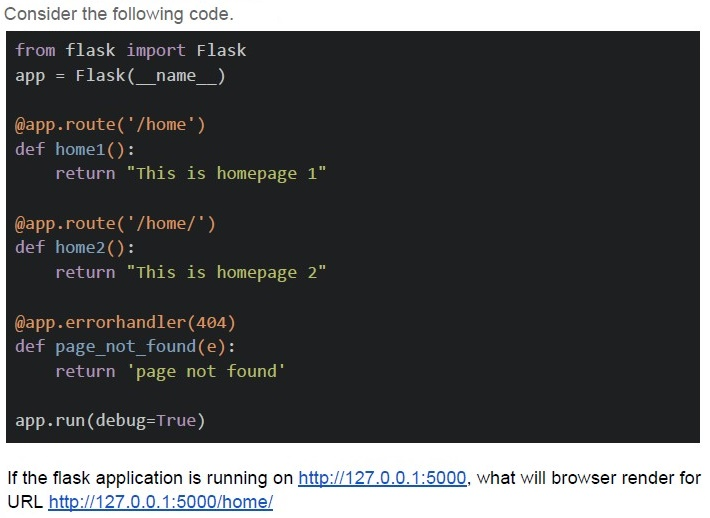
Consider the following code.

```python
from flask import Flask
app = Flask(__name__)

@app.route('/home')
def home1():
    return "This is homepage 1"

@app.route('/home/')
def home2():
    return "This is homepage 2"

@app.errorhandler(404)
def page_not_found(e):
    return 'page not found'

app.run(debug=True)
```

If the flask application is running on http://127.0.0.1:5000, what will browser render for URL http://127.0.0.1:5000/home/- Page not found
- This is homepage 1
- This is homepage 2
- Code will throw error
Text of the picture (copyable)
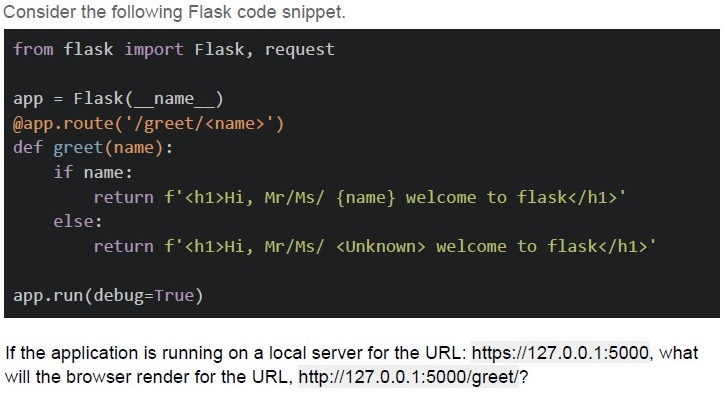
Consider the following Flask code snippet.

```python
from flask import Flask, request

app = Flask(__name__)

@app.route('/greet/<name>')
def greet(name):
    if name:
        return f'<h1>Hi, Mr/Ms/ {name} welcome to flask</h1>'
    else:
        return f'<h1>Hi, Mr/Ms/ <Unknown> welcome to flask</h1>'

app.run(debug=True)
```

If the application is running on a local server for the URL: https://127.0.0.1:5000, what will the browser render for the URL, http://127.0.0.1:5000/greet/?
text
Hi, Mr/Ms/ None welcome to flask

text
Hi, Mr/Ms/ welcome to flask

text
Bad request, Invalid name provided

text
Not Found
Consider the below statements about Cookies: Statement 1: Cookies enable the web app to recognize the users Statement 2: Cookies can include information about location, login data, and language etc., Which of the below is the correct option?
- Statement 1 is correct and Statement 2 is incorrect
- Statement 1 is incorrect and Statement 2 is correct
- Both Statement 1 and Statement 2 are correct
- Both Statement 1 and Statement 2 are incorrect
Text of the picture (copyable)
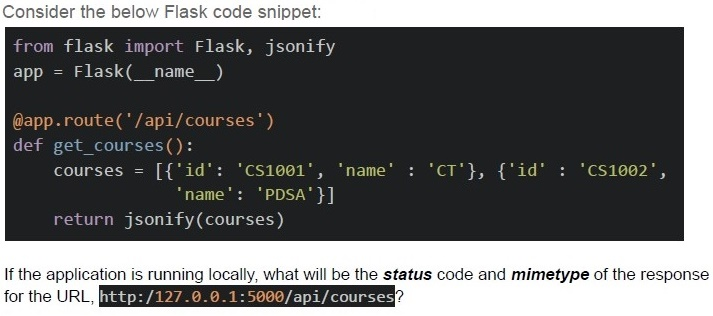
Consider the below Flask code snippet:

```python
from flask import Flask, jsonify

app = Flask(__name__)

@app.route('/api/courses')
def get_courses():
    courses = [{'id': 'CS1001', 'name': 'CT'}, {'id': 'CS1002',
               'name': 'PDSA'}]

    return jsonify(courses)
```

If the application is running locally, what will be the **status** code and **mimetype** of the response for the URL, `http://127.0.0.1:5000/api/courses`?
text
```
status=404 and mimetype='application/json'
```

text
```
status=200 and mimetype='application/json'
```

text
```
status=200 and mimetype='text/javascript'
```

text
```
status=404 and mimetype='text/javascript'
```
Consider a character set M, which consists of only those characters used in the statement, "sphinx of black quartz judge my vow" If this statement is to be saved in a document with minimum encoding, what will be the size of the document given that no other information or context is to be saved?
- 145 bits
- 245 bits
- 175 bits
- 256 bits
Text of the picture (copyable)
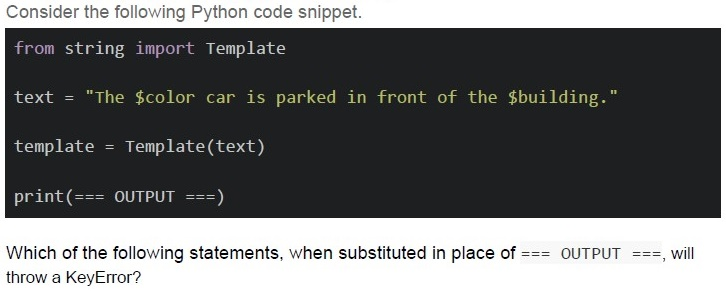
Consider the following Python code snippet.

```python
from string import Template

text = "The $color car is parked in front of the $building."

template = Template(text)

print(=== OUTPUT ===)
```

Which of the following statements, when substituted in place of === OUTPUT ===, will throw a KeyError?

text
```python
template.substitute({'color': 'red'})
```
text
```python
template.substitute({'color':'blue','building':'office',
'place':'Chennai'})
```
text
```python
template.safe_substitute({'color':'green'})
```
text
```python
template.safe_substitute({'color':'yellow', 'building':'apartment', 'place':'Chennai'})
```
Text of the picture (copyable)
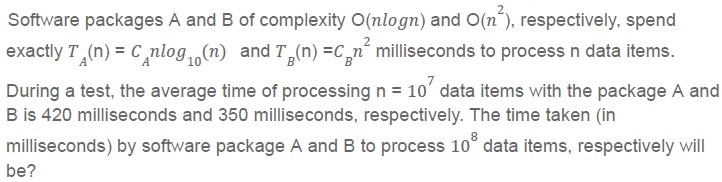
Software packages A and B of complexity O(nlogn) and O(n^2), respectively, spend exactly T_A(n) = C_A nlog_10(n) and T_B(n) = C_B n^2 milliseconds to process n data items.

During a test, the average time of processing n = 10^7 data items with the package A and B is 420 milliseconds and 350 milliseconds, respectively. The time taken (in milliseconds) by software package A and B to process 10^8 data items, respectively will be?
- 48 and 35
- 480 and 350
- 480 and 35000
- 48000 and 35000
Text of the picture (copyable)
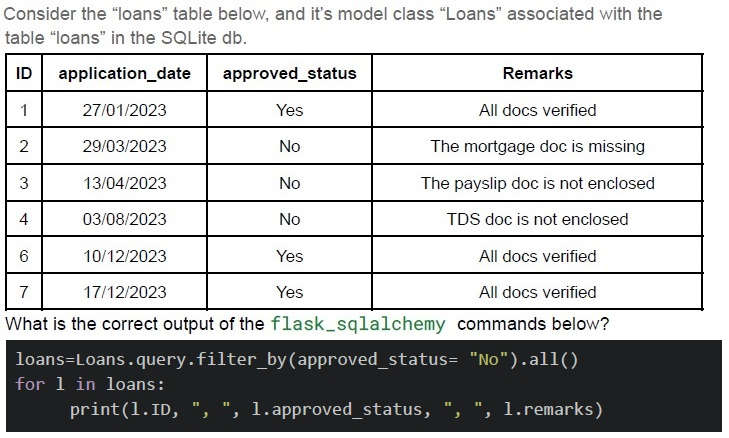
Consider the "loans" table below, and it's model class "Loans" associated with the table "loans" in the SQLite db.

| ID | application_date | approved_status | Remarks |
|---|---|---|---|
| 1 | 27/01/2023 | Yes | All docs verified |
| 2 | 29/03/2023 | No | The mortgage doc is missing |
| 3 | 13/04/2023 | No | The payslip doc is not enclosed |
| 4 | 03/08/2023 | No | TDS doc is not enclosed |
| 6 | 10/12/2023 | Yes | All docs verified |
| 7 | 17/12/2023 | Yes | All docs verified |

What is the correct output of the `flask_sqlalchemy` commands below?

```python
loans=Loans.query.filter_by(approved_status= "No").all()
for l in loans:
    print(l.ID, ",", l.approved_status, ",", l.remarks)
```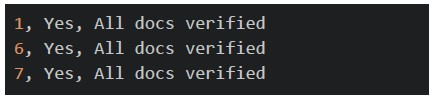
text
```
1, Yes, All docs verified
6, Yes, All docs verified
7, Yes, All docs verified
```
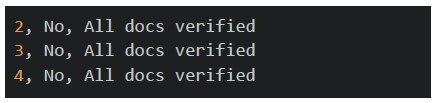
text
```
2, No, All docs verified
3, No, All docs verified
4, No, All docs verified
```
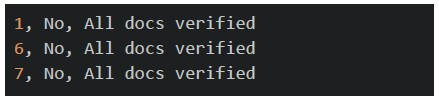
text
```
1, No, All docs verified
6, No, All docs verified
7, No, All docs verified
```
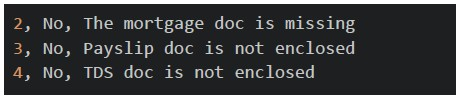
text
```
2, No, The mortgage doc is missing
3, No, Payslip doc is not enclosed
4, No, TDS doc is not enclosed
```
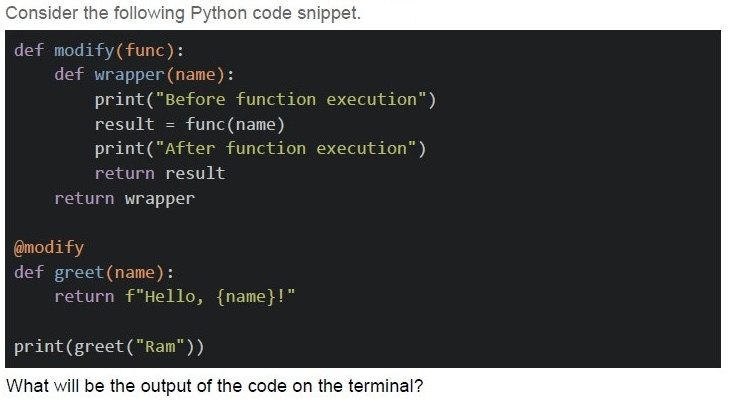
Text of the picture (copyable)
Consider the following Python code snippet.

```python
def modify(func):
    def wrapper(name):
        print("Before function execution")
        result = func(name)
        print("After function execution")
        return result
    return wrapper

@modify
def greet(name):
    return f"Hello, {name}!"

print(greet("Ram"))
```

What will be the output of the code on the terminal?
text
```text
Before function execution
After function execution
Hello, Ram!
```

text
```
Hello, Ram!
Before function execution
After function execution
```

text
```text
Before function execution
Hello, Ram!
After function execution
```

text
```
Hello, Ram!
```
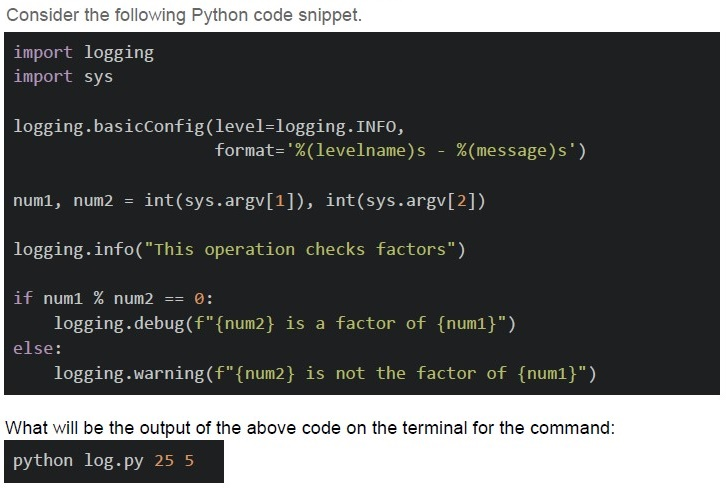
Text of the picture (copyable)
Consider the following Python code snippet.

```python
import logging
import sys

logging.basicConfig(level=logging.INFO,
                    format='%(levelname)s - %(message)s')

num1, num2 = int(sys.argv[1]), int(sys.argv[2])

logging.info("This operation checks factors")

if num1 % num2 == 0:
    logging.debug(f"{num2} is a factor of {num1}")
else:
    logging.warning(f"{num2} is not the factor of {num1}")
```

What will be the output of the above code on the terminal for the command:
`python log.py 25 5`
text
```
INFO - This operation checks factors
WARNING - 5 is not the factor of 25
```

text
```
INFO - This operation checks factors
DEBUG - 5 is a factor of 25
```

text
```
INFO - This operation checks factors
```

text
```
DEBUG - 5 is a factor of 25
```
Text of the picture (copyable)
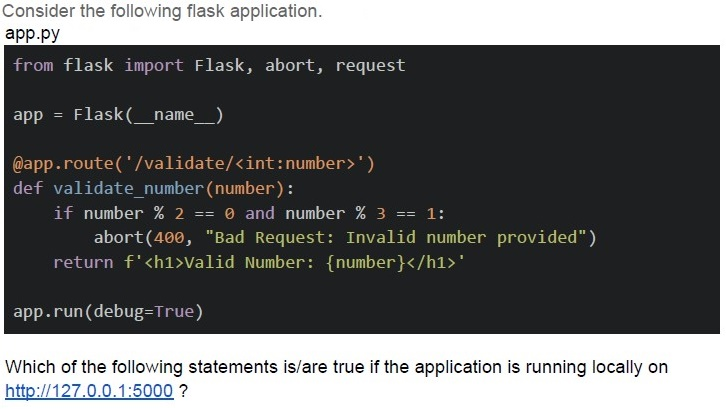
Consider the following flask application.
app.py

```python
from flask import Flask, abort, request

app = Flask(__name__)

@app.route('/validate/<int:number>')
def validate_number(number):
    if number % 2 == 0 and number % 3 == 1:
        abort(400, "Bad Request: Invalid number provided")
    return f'<h1>Valid Number: {number}</h1>'

app.run(debug=True)
```

Which of the following statements is/are true if the application is running locally on
http://127.0.0.1:5000 ?
text
For URL http://127.0.0.1:5000/validate/4 the browser will render
**Valid Number: 4**

text
For URL http://127.0.0.1:5000/validate?number=5 the browser will render
Bad Request: Invalid number provided

text
For URL http://127.0.0.1:5000/validate/4 the browser will render
Bad Request: Invalid number provided

text
For URL http://127.0.0.1:5000/validate/5 the browser will render
**Valid Number: 5**
Text of the picture (copyable)
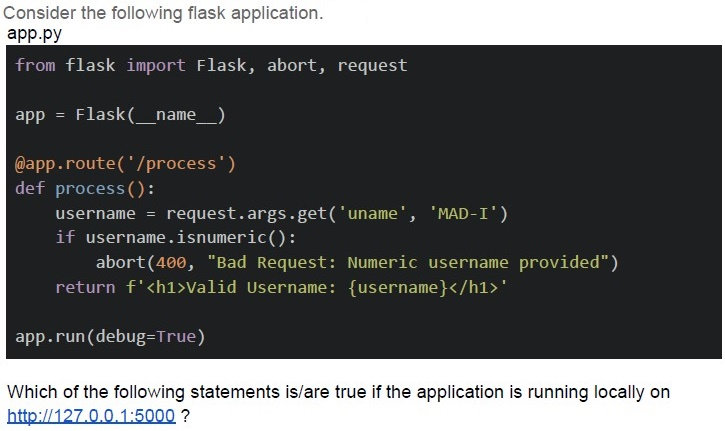
Consider the following flask application.
app.py

```python
from flask import Flask, abort, request

app = Flask(__name__)

@app.route('/process')
def process():
    username = request.args.get('uname', 'MAD-I')
    if username.isnumeric():
        abort(400, "Bad Request: Numeric username provided")
    return f'<h1>Valid Username: {username}</h1>'

app.run(debug=True)
```

Which of the following statements is/are true if the application is running locally on
http://127.0.0.1:5000 ?
text
For URL http://127.0.0.1:5000?uname=MAD-II the browser will render
**Valid Username: MAD-II**

text
For URL http://127.0.0.1:5000/process the browser will render
**Valid Username: MAD-I**

text
For URL http://127.0.0.1:5000/process?uname the browser will render
**Valid Username:**

text
For URL `http://127.0.0.1:5000/process?uname=101MU` the browser will
render Bad Request: Numeric username provided
Text of the picture (copyable)
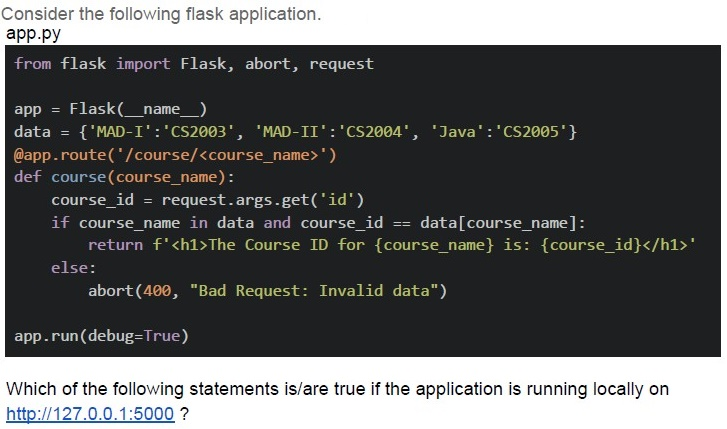
Consider the following flask application.
app.py

```python
from flask import Flask, abort, request

app = Flask(__name__)
data = {'MAD-I':'CS2003', 'MAD-II':'CS2004', 'Java':'CS2005'}

@app.route('/course/<course_name>')
def course(course_name):
    course_id = request.args.get('id')
    if course_name in data and course_id == data[course_name]:
        return f'<h1>The Course ID for {course_name} is: {course_id}</h1>'
    else:
        abort(400, "Bad Request: Invalid data")

app.run(debug=True)
```

Which of the following statements is/are true if the application is running locally on
http://127.0.0.1:5000 ?
text
For URL http://127.0.0.1:5000/MAD-I?id=CS2003 the browser will render:
**The Course ID for MAD-I is: CS2003**

text
For URL http://127.0.0.1:5000/course/Java?id=CS2005 the browser will render;
**The Course ID for Java is: CS2005**

text
For URL http://127.0.0.1:5000/course?course_name=MAD-II&id=CS2004
the browser will render;
**The Course ID for MAD-II is: CS2004**

text
For URL http://127.0.0.1:5000/course/MAD-II?id=CS2003 the browser will
render;
Bad Request: Invalid data
Text of the picture (copyable)
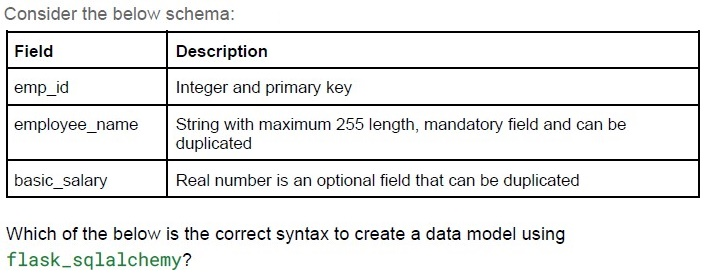
Consider the below schema:

| Field           | Description                                                               |
| :-------------- | :------------------------------------------------------------------------ |
| emp_id          | Integer and primary key                                                   |
| employee_name   | String with maximum 255 length, mandatory field and can be duplicated     |
| basic_salary    | Real number is an optional field that can be duplicated                   |

Which of the below is the correct syntax to create a data model using
`flask_sqlalchemy`?

text
```python
class Employee(db.Model):
    emp_id=db.Column(db.Integer, unique=True)
    employee_name=db.Column(db.String, nullable=False)
    basic_salary=db.Column(db.Float, nullable=True)
```
text
```python
class Employee(db.Model):
    emp_id=db.Column(db.Integer, primary_key=True)
    employee_name=db.Column(db.String, nullable=True)
    basic_salary=db.Column(db.Float, nullable=False)
```
text
```python
class Employee(db.Model):
    emp_id=db.Column(db.Integer, primary_key=True)
    employee_name=db.Column(db.String, nullable=False)
    basic_salary=db.Column(db.Float)
```
text
```python
class Employee(db.Model):
    emp_id=db.Column(db.Integer, primary_key=True)
    employee_name=db.Column(db.String, nullable=False)
    basic_salary=db.Column(db.Float, nullable=True)
```
Text of the picture (copyable)
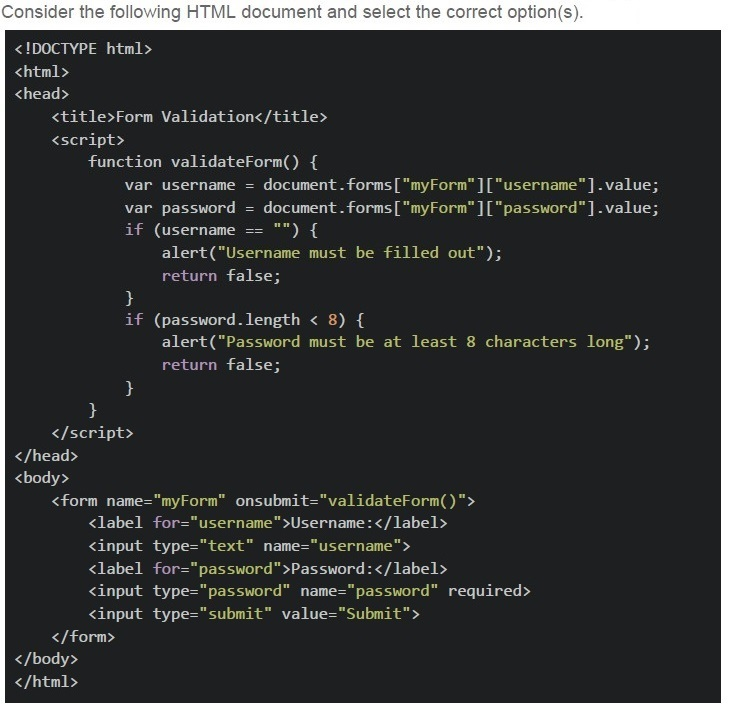
Consider the following HTML document and select the correct option(s).

```html
<!DOCTYPE html>
<html>
<head>
    <title>Form Validation</title>
    <script>
        function validateForm() {
            var username = document.forms["myForm"]["username"].value;
            var password = document.forms["myForm"]["password"].value;
            if (username == "") {
                alert("Username must be filled out");
                return false;
            }
            if (password.length < 8) {
                alert("Password must be at least 8 characters long");
                return false;
            }
        }
    </script>
</head>
<body>
    <form name="myForm" onsubmit="validateForm()">
        <label for="username">Username:</label>
        <input type="text" name="username">
        <label for="password">Password:</label>
        <input type="password" name="password" required>
        <input type="submit" value="Submit">
    </form>
</body>
</html>
```
text
The JavaScript function, `validateForm` performs the backend processing of form data.

text
The JavaScript function, `validateForm` carries out the client side validation of form data.

text
If the password field is left empty, on submission, the user will get a prompt
"Please fill out this field." near the password field.

text
If the password field is left empty, on submission, the user will get a prompt
"Password must be at least 8 characters long" from the browser.
Text of the picture (copyable)
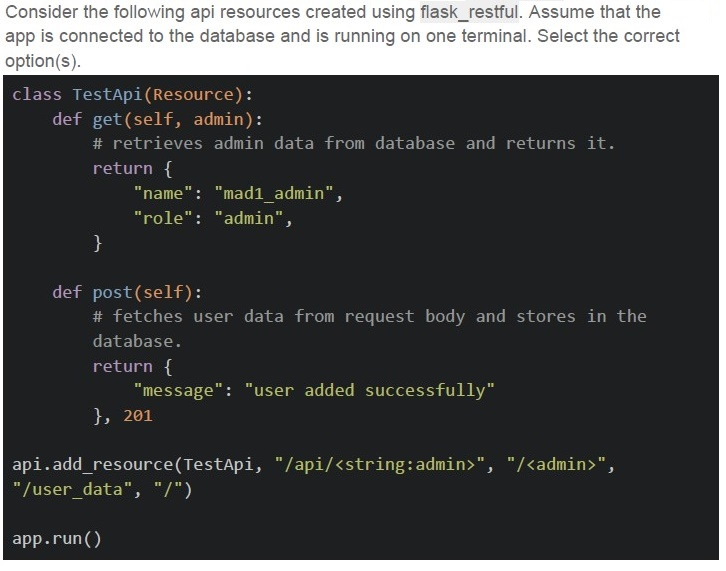
Consider the following api resources created using flask_restful. Assume that the app is connected to the database and is running on one terminal. Select the correct option(s).

```python
class TestApi(Resource):
    def get(self, admin):
        # retrieves admin data from database and returns it.
        return {
            "name": "mad1_admin",
            "role": "admin",
        }

    def post(self):
        # fetches user data from request body and stores in the
        # database.
        return {
            "message": "user added successfully"
        }, 201

api.add_resource(TestApi, "/api/<string:admin>", "/<admin>",
                 "/user_data", "/")

app.run()
```
text
The base URL for the app is mapped with GET HTTP method.
text
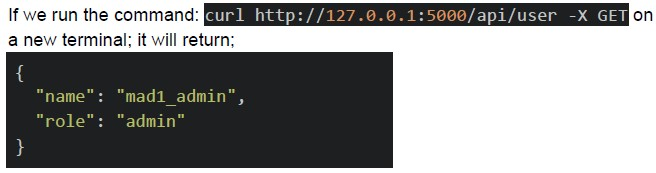
If we run the command: `curl http://127.0.0.1:5000/api/user -X GET` on a new terminal; it will return;

```json
{
  "name": "mad1_admin",
  "role": "admin"
}
```
text
The endpoint, `/admin` is mapped with GET HTTP method.
text
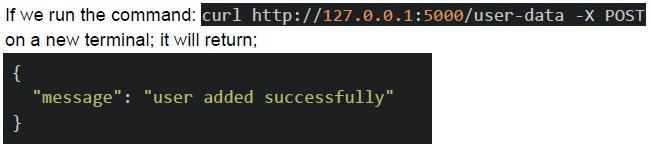
If we run the command: `curl http://127.0.0.1:5000/user-data -X POST`
on a new terminal; it will return;

```json
{
  "message": "user added successfully"
}
```
Answer key
- Q1 (MCQ, 2 marks): C
- Q2 (MCQ, 2 marks): D
- Q3 (MCQ, 2 marks): C
- Q4 (MCQ, 2 marks): B
- Q5 (MCQ, 3 marks): C
- Q6 (MCQ, 3 marks): A
- Q7 (MCQ, 3 marks): C
- Q8 (MCQ, 3 marks): D
- Q9 (MCQ, 3 marks): A
- Q10 (MCQ, 4.5 marks): C
- Q11 (MSQ, 3 marks): C, D
- Q12 (MSQ, 3 marks): B, C
- Q13 (MSQ, 3 marks): B, D
- Q14 (MSQ, 4.5 marks): C, D
- Q15 (MSQ, 4.5 marks): B, C
- Q16 (MSQ, 4.5 marks): B, C, D