Home / Past papers / MAD1 Quiz 1 / this paper
2024 Oct27: - 27 Oct 2024
- He should buy the earphones which have high latency as much possible.
- It all depends on Internet Speed, so we can’t determine anything.
- He should buy the earphones which have low latency as much possible.
- He should buy the earphones which have as low Bluetooth version as possible.

Text of the picture (copyable)
Consider the below URL:

https://www.google.com/search?q=physics+books

Select the correct answer that identifies the different components of the given URL.
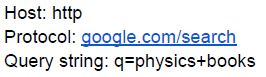
text
Host: http
Protocol: google.com/search
Query string: q=physics+books
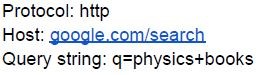
text
Protocol: http
Host: google.com/search
Query string: q=physics+books
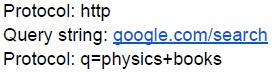
text
Protocol: http
Query string: google.com/search
Protocol: q=physics+books
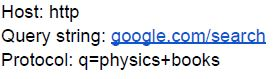
text
Host: http
Query string: google.com/search
Protocol: q=physics+books
Text of the picture (copyable)
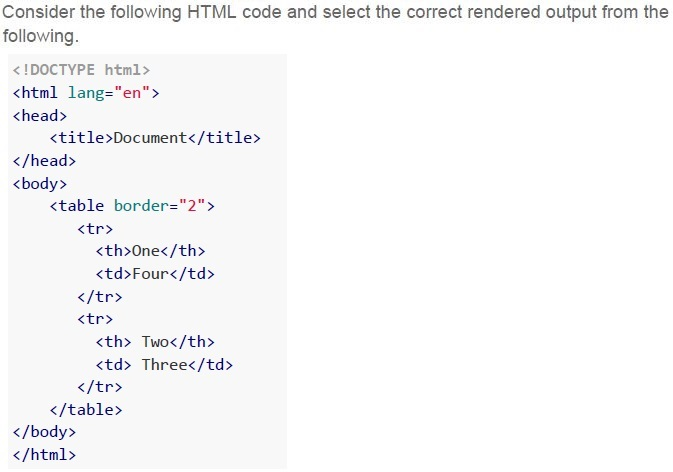
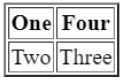
Consider the following HTML code and select the correct rendered output from the following.

```html
<!DOCTYPE html>
<html lang="en">
<head>
    <title>Document</title>
</head>
<body>
    <table border="2">
        <tr>
            <th>One</th>
            <td>Four</td>
        </tr>
        <tr>
            <th>Two</th>
            <td>Three</td>
        </tr>
    </table>
</body>
</html>
```
text
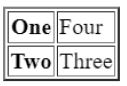
This is a diagram of a table with two rows and two columns.

| One | Four |
|---|---|
| Two | Three |
text
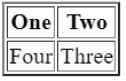
| One | Two |
|---|---|
| Four | Three |
text
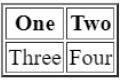
This is a 2x2 table.

| One | Two |
|---|---|
| Three | Four |
text
This is a 2x2 grid with text in each cell.

| One | Four |
|---|---|
| Two | Three |
Text of the picture (copyable)
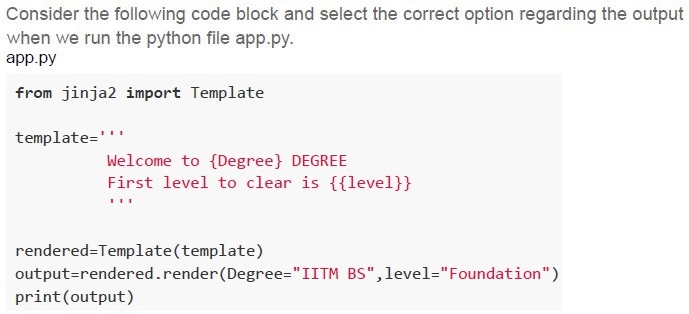
Consider the following code block and select the correct option regarding the output
when we run the python file app.py.

```python
from jinja2 import Template

template='''
Welcome to {{Degree}} DEGREE
First level to clear is {{level}}
...
'''

rendered=Template(template)
output=rendered.render(Degree="IITM BS",level="Foundation")
print(output)
```
text
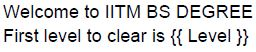
Welcome to IITM BS DEGREE
First level to clear is {{ Level }}
text
Welcome to {Degree} DEGREE
First level to clear is
text
Welcome to IITM BS DEGREE
First level to clear is Foundation
text
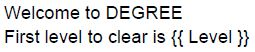
Welcome to DEGREE
First level to clear is {{ Level }}
Text of the picture (copyable)
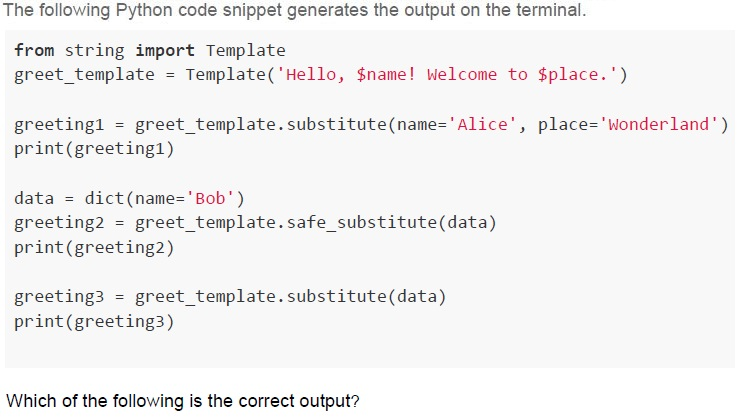
The following Python code snippet generates the output on the terminal.

```python
from string import Template
greet_template = Template('Hello, $name! Welcome to $place.')

greeting1 = greet_template.substitute(name='Alice', place='Wonderland')
print(greeting1)

data = dict(name='Bob')
greeting2 = greet_template.safe_substitute(data)
print(greeting2)

greeting3 = greet_template.substitute(data)
print(greeting3)
```

Which of the following is the correct output?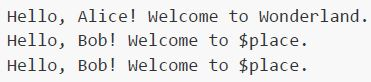
text
```
Hello, Alice! Welcome to Wonderland.
Hello, Bob! Welcome to $place.
Hello, Bob! Welcome to $place.
```
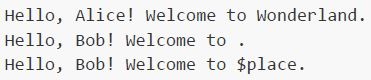
text
```
Hello, Alice! Welcome to Wonderland.
Hello, Bob! Welcome to .
Hello, Bob! Welcome to $place.
```
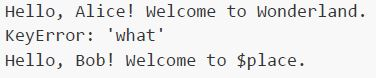
text
```
Hello, Alice! Welcome to Wonderland.
KeyError: 'what'
Hello, Bob! Welcome to $place.
```
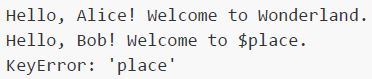
text
```
Hello, Alice! Welcome to Wonderland.
Hello, Bob! Welcome to $place.
KeyError: 'place'
```
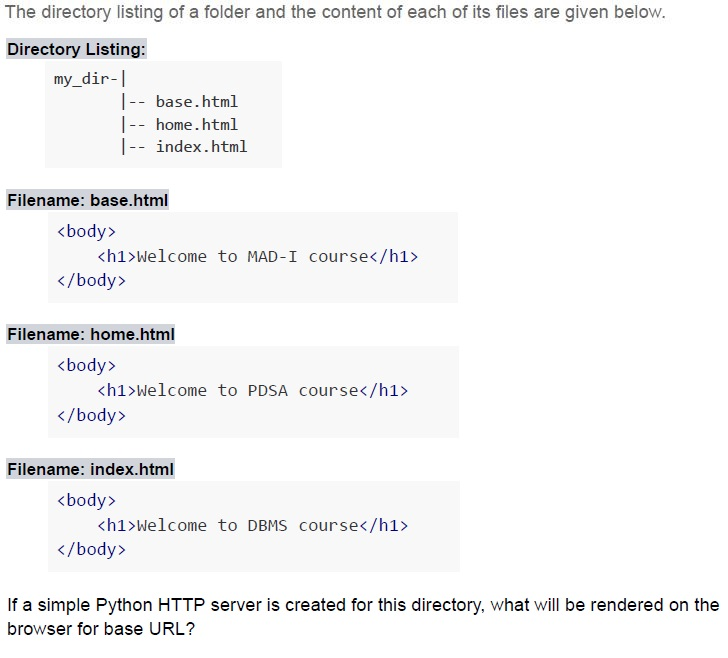
Text of the picture (copyable)
The directory listing of a folder and the content of each of its files are given below.

**Directory Listing:**
```
my_dir-|
       |-- base.html
       |-- home.html
       |-- index.html
```

**Filename: base.html**
```html
<body>
    <h1>Welcome to MAD-I course</h1>
</body>
```

**Filename: home.html**
```html
<body>
    <h1>Welcome to PDSA course</h1>
</body>
```

**Filename: index.html**
```html
<body>
    <h1>Welcome to DBMS course</h1>
</body>
```

If a simple Python HTTP server is created for this directory, what will be rendered on the browser for base URL?
text
Welcome to PDSA course

text
Welcome to DBMS course

text
Welcome to MAD-I course

text
Directory listing for /
Text of the picture (copyable)
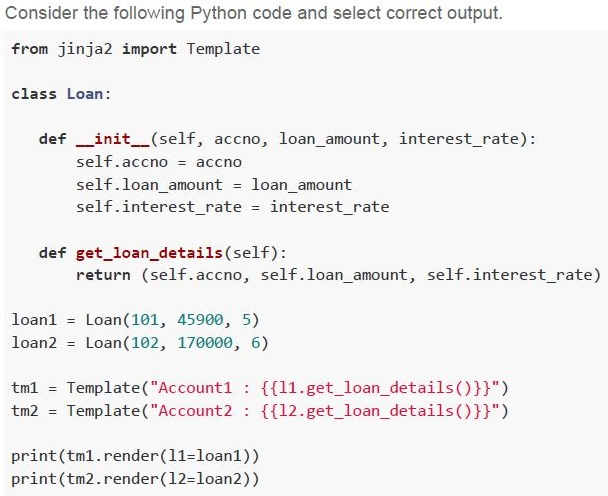
Consider the following Python code and select correct output.

```python
from jinja2 import Template

class Loan:

    def __init__(self, accno, loan_amount, interest_rate):
        self.accno = accno
        self.loan_amount = loan_amount
        self.interest_rate = interest_rate

    def get_loan_details(self):
        return (self.accno, self.loan_amount, self.interest_rate)

loan1 = Loan(101, 45900, 5)
loan2 = Loan(102, 170000, 6)

tm1 = Template("Account1 : {{ l1.get_loan_details() }}")
tm2 = Template("Account2 : {{ l2.get_loan_details() }}")

print(tm1.render(l1=loan1))
print(tm2.render(l2=loan2))
```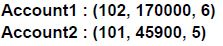
text
Account1 : (102, 170000, 6)
Account2 : (101, 45900, 5)

text
Account2 : (102, 170000, 6)

text
Account1 : (101, 45900, 5)
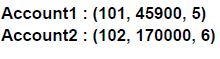
text
Account1 : (101, 45900, 5)
Account2 : (102, 170000, 6)

Text of the picture (copyable)
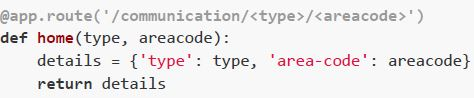
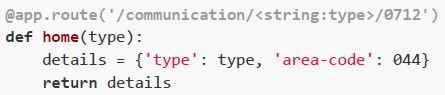
Which of the following flask view functions will return a 404 error for the URL:
http://127.0.0.1:5000/communication/landline/0712 ?
text
```python
@app.route('/communication/<type>/<areacode>')
def home(type, areacode):
    details = {'type': type, 'area-code': areacode}
    return details
```
text
```python
@app.route('/communication/<string:type>/<int:areacode>')
def home(type, areacode):
    details = {'type': type, 'area-code': areacode}
    return details
```
text
```python
@app.route('/communication/<string:type>/0712')
def home(type):
    details = {'type': type, 'area-code': 044}
    return details
```
text
```python
@app.route('/communication/online/<string:type>/<areacode>')
def home(type, areacode):
    details = {'type': type, 'area-code': 044}
    return details
```
- 18 Mbps
- 16 Mbps
- 26 Mbps
- 36 Mbps
Text of the picture (copyable)
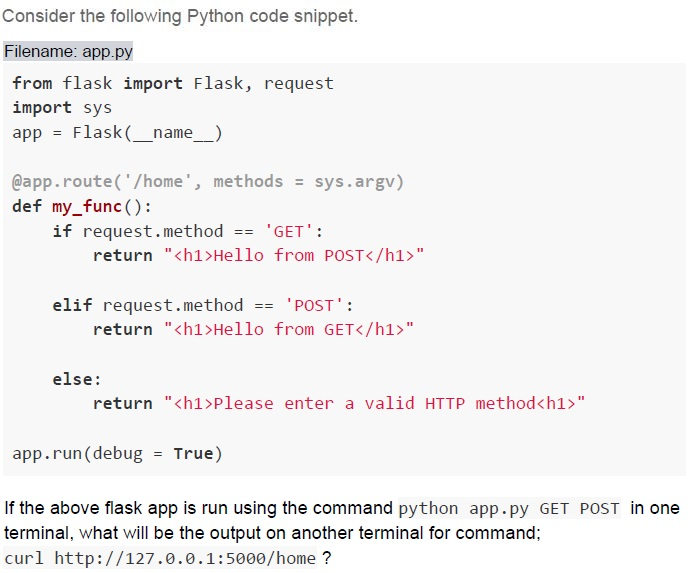
Consider the following Python code snippet.
Filename: app.py

```python
from flask import Flask, request
import sys
app = Flask(__name__)

@app.route('/home', methods = sys.argv)
def my_func():
    if request.method == 'GET':
        return "<h1>Hello from POST</h1>"

    elif request.method == 'POST':
        return "<h1>Hello from GET</h1>"

    else:
        return "<h1>Please enter a valid HTTP method</h1>"

app.run(debug = True)
```

If the above flask app is run using the command `python app.py GET POST` in one terminal, what will be the output on another terminal for command;
`curl http://127.0.0.1:5000/home ?`
text
```html
<h1>Hello from GET</h1>
```

text
```html
<h1>Hello from POST</h1>
```

text
```html
<h1>Please enter a valid HTTP method</h1>
```

text
```html
<h1>Method not Allowed</h1>
```
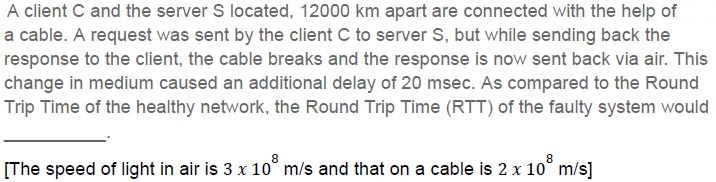
Text of the picture (copyable)
A client C and the server S located, 12000 km apart are connected with the help of
a cable. A request was sent by the client C to server S, but while sending back the
response to the client, the cable breaks and the response is now sent back via air. This
change in medium caused an additional delay of 20 msec. As compared to the Round
Trip Time of the healthy network, the Round Trip Time (RTT) of the faulty system would
________.

[The speed of light in air is 3 x 10⁸ m/s and that on a cable is 2 x 10⁸ m/s]
- Increase
- Decrease
- Remain Same
- Insufficient Information
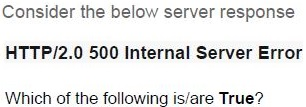
Text of the picture (copyable)
Consider the below server response

**HTTP/2.0 500 Internal Server Error**

Which of the following is/are **True**?
- HTTP/2.0 is the protocol and version respectively
- 500 is the port number
- “Internal Server Error” is the status message
- 500 is the status code
- HTTP/2.0 is the server failure
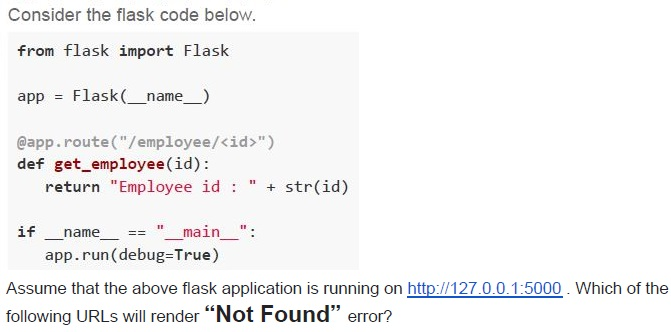
Text of the picture (copyable)
Consider the flask code below.

```python
from flask import Flask

app = Flask(__name__)

@app.route("/employee/<id>")
def get_employee(id):
    return "Employee id : " + str(id)

if __name__ == "__main__":
    app.run(debug=True)
```

Assume that the above flask application is running on http://127.0.0.1:5000 . Which of the following URLs will render "Not Found" error?
text
http://127.0.0.1:5000/employee/102

text
http://127.0.0.1:5000/employee/id=102

text
http://127.0.0.1:5000/id=102

text
http://127.0.0.1:5000/102
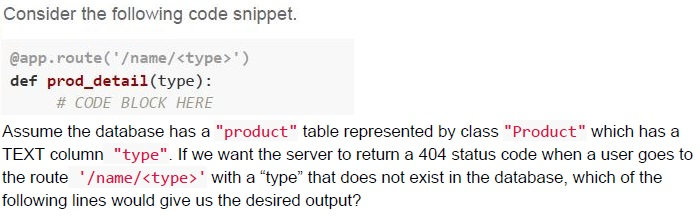
Text of the picture (copyable)
Consider the following code snippet.

```python
@app.route('/name/<type>')
def prod_detail(type):
    # CODE BLOCK HERE
```

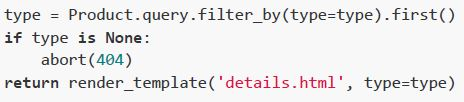
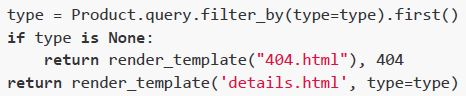
Assume the database has a "product" table represented by class "Product" which has a TEXT column "type". If we want the server to return a 404 status code when a user goes to the route '/name/<type>' with a "type" that does not exist in the database, which of the following lines would give us the desired output?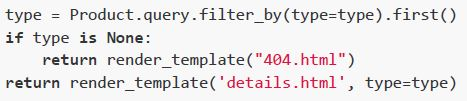
text
```python
type = Product.query.filter_by(type=type).first()
if type is None:
    return render_template("404.html")
return render_template('details.html', type=type)
```
text
```python
type = Product.query.filter_by(type=type).first()
if type is None:
    abort(404)
return render_template('details.html', type=type)
```
text
```python
type = Product.query.filter_by(type=type).first_or_404()
return render_template('details.html', type=type)
```
text
```python
type = Product.query.filter_by(type=type).first()
if type is None:
    return render_template("404.html"), 404
return render_template('details.html', type=type)
```
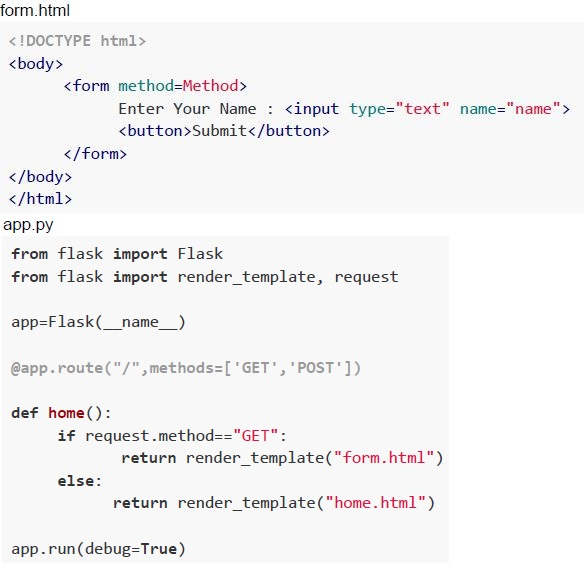 Consider the following code and answer the given subquestions.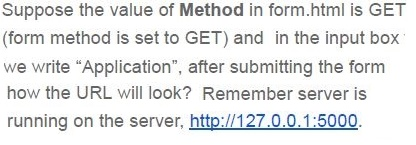
Text of the picture (copyable)
Suppose the value of **Method** in form.html is GET
(form method is set to GET) and in the input box
we write "Application", after submitting the form
how the URL will look? Remember server is
running on the server, http://127.0.0.1:5000.

text
http://127.0.0.1:5000/?name=Application

text
http://127.0.0.1:5000/name=Application

text
http://127.0.0.1:5000/?name

text
http://127.0.0.1:5000/
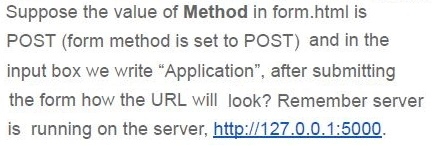
Text of the picture (copyable)
Suppose the value of **Method** in form.html is
POST (form method is set to POST) and in the
input box we write "Application", after submitting
the form how the URL will look? Remember server
is running on the server, http://127.0.0.1:5000.

text
http://127.0.0.1:5000/?name:Application

text
http://127.0.0.1:5000/?Application

text
http://127.0.0.1:5000/?name

text
http://127.0.0.1:5000/
Answer key
- Q1 (MCQ, 2 marks): C
- Q2 (MCQ, 2 marks): B
- Q3 (MCQ, 3 marks): A
- Q4 (MCQ, 3 marks): B
- Q5 (MCQ, 3 marks): D
- Q6 (MCQ, 3 marks): B
- Q7 (MCQ, 3 marks): D
- Q8 (MCQ, 3 marks): D
- Q9 (MCQ, 4.5 marks): C
- Q10 (MCQ, 4.5 marks): B
- Q11 (MCQ, 4.5 marks): C
- Q12 (MSQ, 2 marks): A, C, D
- Q13 (MSQ, 2 marks): C, D
- Q14 (MSQ, 4.5 marks): B, C, D
- Q15 (MCQ, 3 marks): A
- Q16 (MCQ, 3 marks): D
Concepts this paper tests
Auto-generated summary from the source site. Handy as a checklist; the lessons above explain each idea from scratch.
Summary of Core Topics, Concepts, Principles, and Equations
1. Web Development and HTTP
URL Structure: Understanding the components of a URL (Protocol, Domain, Path, Query Parameter).
Example:
https://www.google.com/search?q=physics+books- Protocol:
https - Domain:
www.google.com - Path:
/search - Query Parameter:
q=physics+books
- Protocol:
HTTP Methods: GET and POST methods in HTTP requests.
- GET: Requests data from a specified resource.
- POST: Submits data to be processed to a specified resource.
HTTP Status Codes: Understanding different HTTP status codes.
- 200 OK: The request was successful.
- 404 Not Found: The server cannot find the requested resource.
- 500 Internal Server Error: A generic error message returned when an unexpected condition was encountered.
Flask Framework: Basics of Flask, a micro web framework for Python.
- Routing: Defining routes in Flask using the
@app.routedecorator. - Request Methods: Handling different HTTP methods in Flask.
- Templates: Using Jinja2 templates in Flask.
- Routing: Defining routes in Flask using the
2. HTML and Forms
HTML Tables: Structure and rendering of HTML tables.
Example:
<table border="2">
    <tr>
        <th>One</th>
        <td>Four</td>
    </tr>
    <tr>
        <th>Two</th>
        <td>Three</td>
    </tr>
</table>
HTML Forms: Creating and handling forms in HTML.
Example:
<form method="POST">
    Enter Your Name: <input type="text" name="name">
    <button>Submit</button>
</form>
3. Networking Concepts
Bandwidth and Latency: Understanding the concepts of bandwidth and latency in networking.
- Bandwidth: The maximum rate of data transfer across a given path.
- Latency: The time it takes for a packet of data to travel from one point to another.
Round Trip Time (RTT): The time it takes for a signal to be sent plus the time it takes for an acknowledgment of that signal to be received.
- Calculation: RTT = Time to send a request + Time to receive a response.
4. Python and Flask
Flask Routes: Defining and handling routes in Flask.
Example:
from flask import Flask
app = Flask(__name__)
@app.route('/') def home(): return "Hello, World!"
if _name_ == '_main_': app.run(debug=True) ```
Flask Request Handling: Handling different types of HTTP requests in Flask.
Example:
from flask import Flask, request
app = Flask(_name_)
@app.route('/', methods=['GET', 'POST']) def home(): if request.method == 'GET': return "GET request" elif request.method == 'POST': return "POST request"
if _name_ == '_main_': app.run(debug=True) ```
5. Jinja2 Templates
Template Rendering: Using Jinja2 templates to render dynamic content.
Example:
from flask import Flask, render_template
from jinja2 import Template
app = Flask(_name_)
@app.route('/') def home(): template = Template('Hello, {{ name }}!') return template.render(name='World')
if _name_ == '_main_': app.run(debug=True) ```