Home / Past papers / MAD1 End Term / this paper
IIT M FOUNDATION DIPLOMA AN EXAM - 01 Sep 2024
Elapsed 00:00
Consider that you have installed some python packages using requirements.txt. Which command you will use to list the installed packages in the virtual environment?
- pip list
- pip freeze
- ls -la
- ls
A certain text document consisting of only alphanumeric characters (including spaces) takes 1,52,000 bits, when encoded with UCS-4 (32 bit) encoding. How many bits will the same document take if encoded with ASCII 7-bit encoding?
- 24000 bits
- 68000 bits
- 33250 bits
- 152000 bits
The ability of an application to work with different input modalities beyond keyboard highlights which of the following accessibility principle?
- Perceivable
- Robust
- Understandable
- Operable
Text of the picture (copyable)
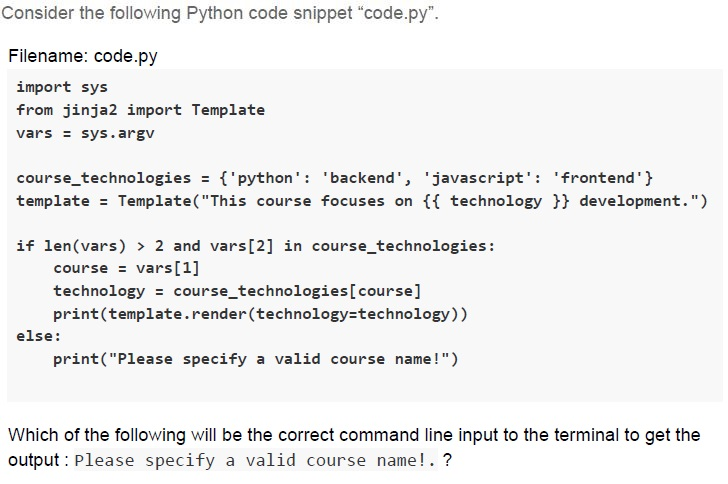
Consider the following Python code snippet "code.py".

Filename: code.py
```python
import sys
from jinja2 import Template
vars = sys.argv

course_technologies = {'python': 'backend', 'javascript': 'frontend'}
template = Template("This course focuses on {{ technology }} development.")

if len(vars) > 2 and vars[2] in course_technologies:
    course = vars[1]
    technology = course_technologies[course]
    print(template.render(technology=technology))
else:
    print("Please specify a valid course name!")
```

Which of the following will be the correct command line input to the terminal to get the output: Please specify a valid course name!.?
text
```
python code.py course python
```

text
```
python code.py python javascript
```

text
```
python code.py python python
```

text
python code.py python backend
Text of the picture (copyable)
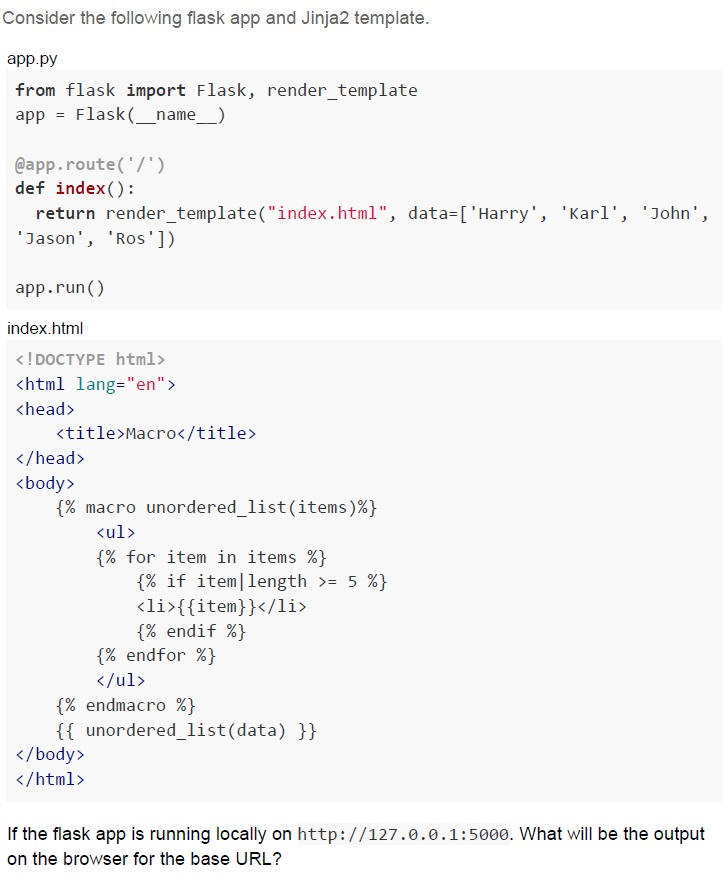
Consider the following flask app and Jinja2 template.

app.py
```python
from flask import Flask, render_template
app = Flask(__name__)

@app.route('/')
def index():
    return render_template("index.html", data=['Harry', 'Karl', 'John', 'Jason', 'Ros'])

app.run()
```

index.html
```html
<!DOCTYPE html>
<html lang="en">
<head>
    <title>Macro</title>
</head>
<body>
    {% macro unordered_list(items)%}
    <ul>
        {% for item in items %}
            {% if item|length >= 5 %}
            <li>{{item}}</li>
            {% endif %}
        {% endfor %}
    </ul>
    {% endmacro %}
    {{ unordered_list(data) }}
</body>
</html>
```

If the flask app is running locally on http://127.0.0.1:5000. What will be the output on the browser for the base URL?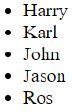
text
- Harry
- Karl
- John
- Jason
- Ros

text
* Harry
* Jason

text
- Karl
- John

text
* Karl
* John
* Ros
Text of the picture (copyable)
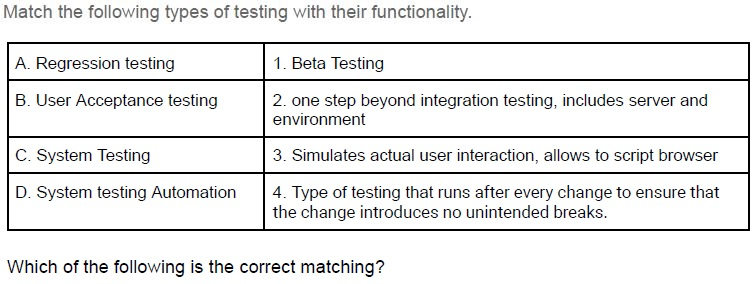
Match the following types of testing with their functionality.

| | |
|---|---|
| A. Regression testing | 1. Beta Testing |
| B. User Acceptance testing | 2. one step beyond integration testing, includes server and environment |
| C. System Testing | 3. Simulates actual user interaction, allows to script browser |
| D. System testing Automation | 4. Type of testing that runs after every change to ensure that the change introduces no unintended breaks. |

Which of the following is the correct matching?
- A → 1, B → 2, C → 3, D → 4
- A → 4, B → 1, C → 2, D → 3
- A → 4, B → 3, C → 2, D → 1
- A → 3, B → 2, C → 1, D → 4

Text of the picture (copyable)
The hexadecimal equivalent of the IPv4 address 172.16.254.10 would be
________.
- AC0A FE01
- CA10 EF0A
- AC10 FE0A
- AC01 0AEF
Text of the picture (copyable)
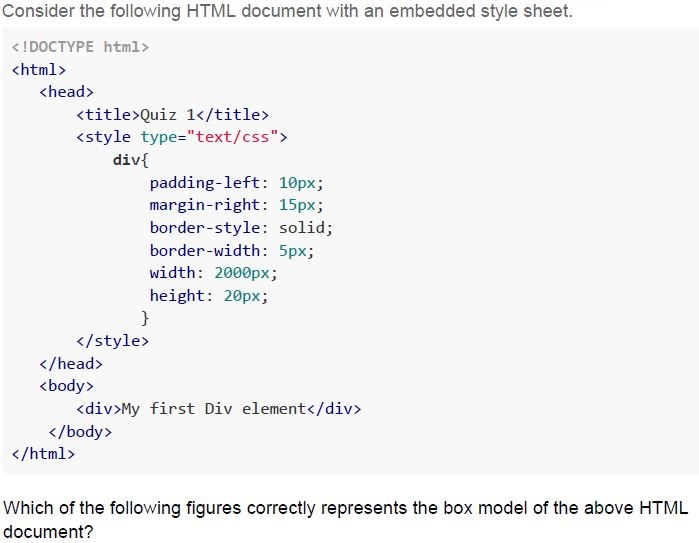
Consider the following HTML document with an embedded style sheet.

```html
<!DOCTYPE html>
<html>
  <head>
    <title>Quiz 1</title>
    <style type="text/css">
      div {
        padding-left: 10px;
        margin-right: 15px;
        border-style: solid;
        border-width: 5px;
        width: 2000px;
        height: 20px;
      }
    </style>
  </head>
  <body>
    <div>My first Div element</div>
  </body>
</html>
```

Which of the following figures correctly represents the box model of the above HTML document?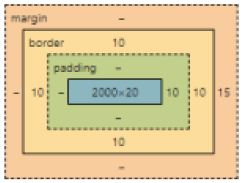
text
This is a diagram showing the CSS box model.
It consists of nested rectangular boxes with labels and numerical values.
The outermost box is labeled "margin" and has dashed borders.
Inside the margin box, there is a box labeled "border" with solid borders.
Inside the border box, there is a box labeled "padding" with dashed borders.
Inside the padding box, there is a solid blue box with the label "2000x20".

Values are placed around the boxes:
- Around the "margin" box:
  - Top: "-"
  - Left: "-"
  - Right: "15"
  - Bottom: "-"
- Around the "border" box:
  - Top: "10"
  - Left: "10"
  - Right: "10"
  - Bottom: "10"
- Around the "padding" box:
  - Top: "-"
  - Left: "-"
  - Right: "10"
  - Bottom: "-"
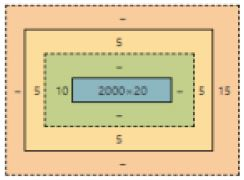
text
This is a diagram showing nested rectangular boxes with labels indicating dimensions or spacing.

The outermost box is light orange with a dashed border.
Inside the light orange box, there is a larger solid orange box.
Between the light orange dashed border and the solid orange box, there are labels:
- Top: `-`
- Right: `15`
- Bottom: `-`
- Left: `-`

Inside the solid orange box, there is a solid light yellow box.
Between the solid orange box and the solid light yellow box, there are labels:
- Top: `5`
- Right: `5`
- Bottom: `5`
- Left: `5`

Inside the solid light yellow box, there is a solid light green box with a dashed border.
Between the solid light yellow box and the solid light green dashed box, there are labels:
- Top: `-`
- Right: `-`
- Bottom: `-`
- Left: `-`

Inside the solid light green dashed box, there is a solid blue box.
Between the solid light green dashed box and the solid blue box, there are labels:
- Top: `-`
- Right: `5`
- Bottom: `-`
- Left: `10`

Inside the solid blue box, there is the text `2000 × 20`.
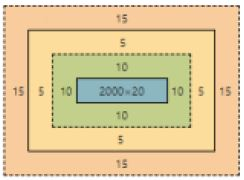
text
This is a diagram showing nested rectangular boxes with numerical labels indicating dimensions or spacing.

The outermost box is a dashed orange rectangle. It has labels "15" on its top, bottom, left, and right sides.

Inside the outermost orange box, there is a solid yellow rectangle. It has labels "5" on its top, bottom, left, and right sides.

Inside the yellow rectangle, there is a solid green rectangle with a dashed border. It has labels "10" on its top, bottom, left, and right sides.

Inside the green rectangle, there is a solid blue rectangle. This blue rectangle has the text "2000×20" inside it.
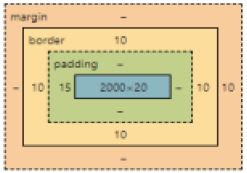
text
This is a diagram illustrating the CSS box model.

It shows a series of nested rectangular boxes, from outermost to innermost:

1.  **Outermost box (orange, dashed border):** Labeled "margin".
    *   Values on its sides: "-", "-", "-", "-".
2.  **Second box (orange, solid border):** Labeled "border".
    *   Values on its sides: "10", "10", "10", "10".
3.  **Third box (light green, dashed border):** Labeled "padding".
    *   Values on its sides: "-", "15", "-", "-".
4.  **Innermost box (blue, solid border):** No label.
    *   Value inside: "2000×20".
Text of the picture (copyable)
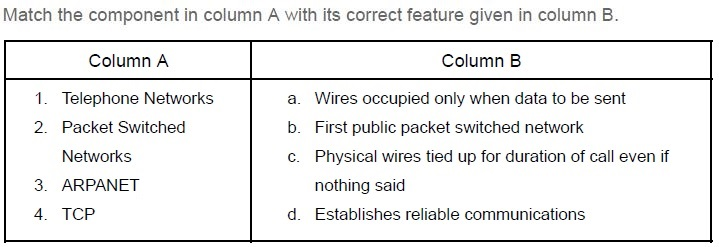
Match the component in column A with its correct feature given in column B.

| Column A | Column B |
|---|---|
| 1. Telephone Networks | a. Wires occupied only when data to be sent |
| 2. Packet Switched Networks | b. First public packet switched network |
| 3. ARPANET | c. Physical wires tied up for duration of call even if nothing said |
| 4. TCP | d. Establishes reliable communications |
- 1 - c, 2 - a, 3 - b, 4 - d
- 1 - a, 2 - b, 3 - c, 4 - d
- 1 - b, 2 - d, 3 - a, 4 - c
- 1 - d, 2 - c, 3 - b, 4 - a

Text of the picture (copyable)
If $N_x$ is a number N represented in the base 'x' and the equation.

$625_a = 405_b = 195_c$

Holds for a specific set of a, b and c. The correct values of a, b and c that satisfy the above equation are:
- a = 8; b = 10; c = 16;
- a = 10; b = 2; c = 16;
- a = 8; b = 16; c = 10;
- a = 2; b = 16; c = 8;
Text of the picture (copyable)
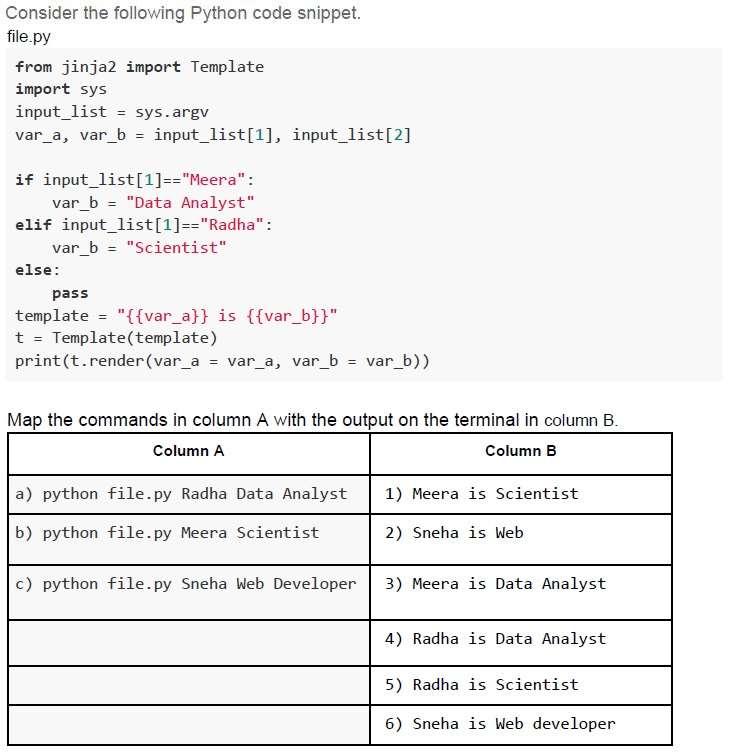
Consider the following Python code snippet.
file.py

```python
from jinja2 import Template
import sys
input_list = sys.argv
var_a, var_b = input_list[1], input_list[2]

if input_list[1]=="Meera":
    var_b = "Data Analyst"
elif input_list[1]=="Radha":
    var_b = "Scientist"
else:
    pass
template = "{{var_a}} is {{var_b}}"
t = Template(template)
print(t.render(var_a = var_a, var_b = var_b))
```

Map the commands in column A with the output on the terminal in column B.

| Column A                               | Column B                  |
| :------------------------------------- | :------------------------ |
| a) python file.py Radha Data Analyst   | 1) Meera is Scientist     |
| b) python file.py Meera Scientist      | 2) Sneha is Web           |
| c) python file.py Sneha Web Developer  | 3) Meera is Data Analyst  |
|                                        | 4) Radha is Data Analyst  |
|                                        | 5) Radha is Scientist     |
| | 6) Sneha is Web developer |- a - 4, b - 1, c - 6
- a - 5, b - 3, c - 2
- a - 5, b - 1, c - 2
- a - 5, b - 3, c - 6
Text of the picture (copyable)
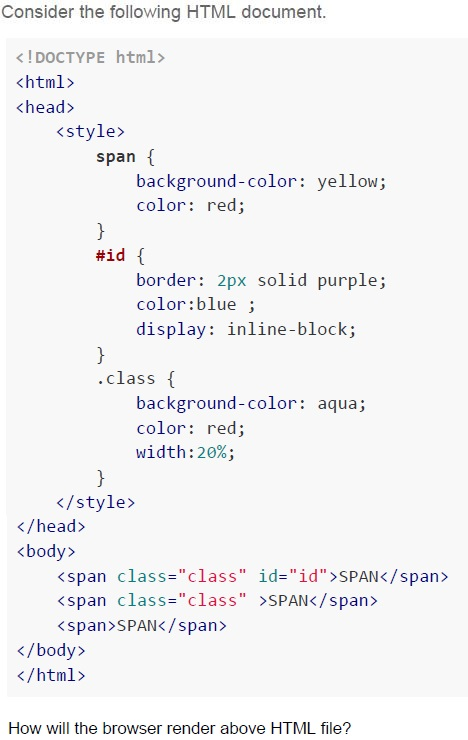
Consider the following HTML document.

```html
<!DOCTYPE html>
<html>
<head>
    <style>
        span {
            background-color: yellow;
            color: red;
        }
        #id {
            border: 2px solid purple;
            color:blue ;
            display: inline-block;
        }
        .class {
            background-color: aqua;
            color: red;
            width:20%;
        }
    </style>
</head>
<body>
    <span class="class" id="id">SPAN</span>
    <span class="class" >SPAN</span>
    <span>SPAN</span>
</body>
</html>
```

How will the browser render above HTML file?
text
The image displays three rectangular boxes arranged horizontally.
The first box on the left is wide, with a cyan background and a dark purple border. Inside, the word "SPAN" is written in blue text.
To the right of the first box, there are two smaller boxes.
The second box has a light cyan background and no visible border. Inside, the word "SPAN" is written in red text.
The third box, immediately to the right of the second, has a yellow background and no visible border. Inside, the word "SPAN" is written in orange text.
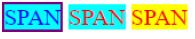
text
The image displays three rectangular blocks arranged horizontally.
1. The first block has a cyan background with a purple border and contains the text "SPAN" in blue.
2. The second block has a cyan background with no visible border and contains the text "SPAN" in red.
3. The third block has a yellow background with no visible border and contains the text "SPAN" in orange.
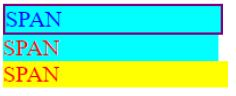
text
This is a UI screenshot.
It shows three horizontal rectangular blocks stacked vertically.
The top block is cyan with a dark blue border and contains the text "SPAN" in blue.
The middle block is cyan and contains the text "SPAN" in red.
The bottom block is yellow and contains the text "SPAN" in red.
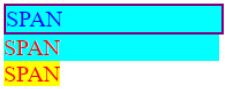
text
The image displays three lines of text, each with a background color.
1. The top line has the text "SPAN" in blue, with a cyan background and a purple border.
2. The middle line has the text "SPAN" in red, with a cyan background.
3. The bottom line has the text "SPAN" in orange, with a yellow background.
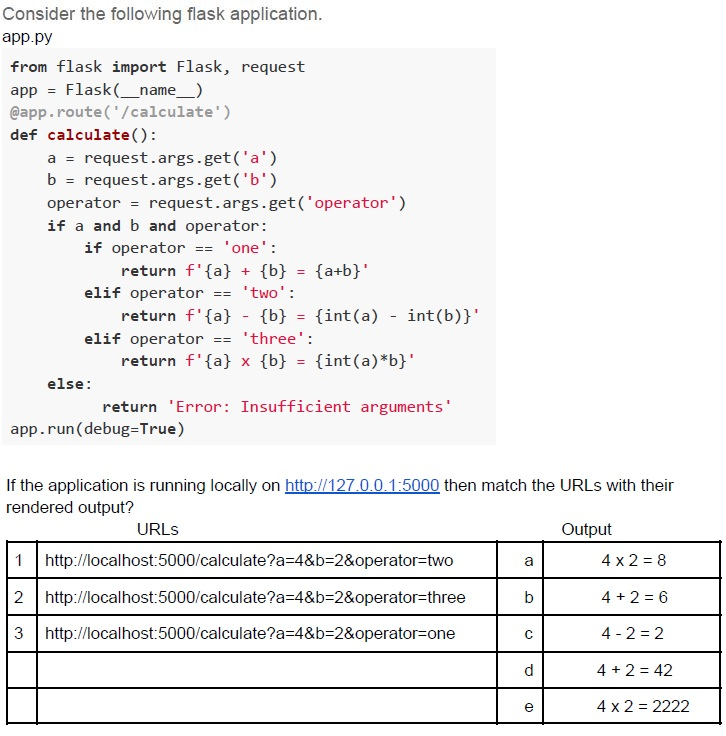
Text of the picture (copyable)
Consider the following flask application.
app.py

```python
from flask import Flask, request

app = Flask(__name__)
@app.route('/calculate')
def calculate():
    a = request.args.get('a')
    b = request.args.get('b')
    operator = request.args.get('operator')
    if a and b and operator:
        if operator == 'one':
            return f'{a} + {b} = {a+b}'
        elif operator == 'two':
            return f'{a} - {b} = {int(a) - int(b)}'
        elif operator == 'three':
            return f'{a} x {b} = {int(a)*int(b)}'
    else:
        return 'Error: Insufficient arguments'
app.run(debug=True)
```

If the application is running locally on http://127.0.0.1:5000 then match the URLs with their rendered output?

| | URLs | | Output |
|---|---|---|---|
| 1 | http://localhost:5000/calculate?a=4&b=2&operator=two | a | 4 x 2 = 8 |
| 2 | http://localhost:5000/calculate?a=4&b=2&operator=three | b | 4 + 2 = 6 |
| 3 | http://localhost:5000/calculate?a=4&b=2&operator=one | c | 4 - 2 = 2 |
| | | d | 4 + 2 = 42 |
| | | e | 4 x 2 = 2222 |- 1-c, 2-e, 3-d
- 1-c, 2-a, 3-b
- 1-c, 2-a, 3-d
- 1-a, 2-d, 3-e
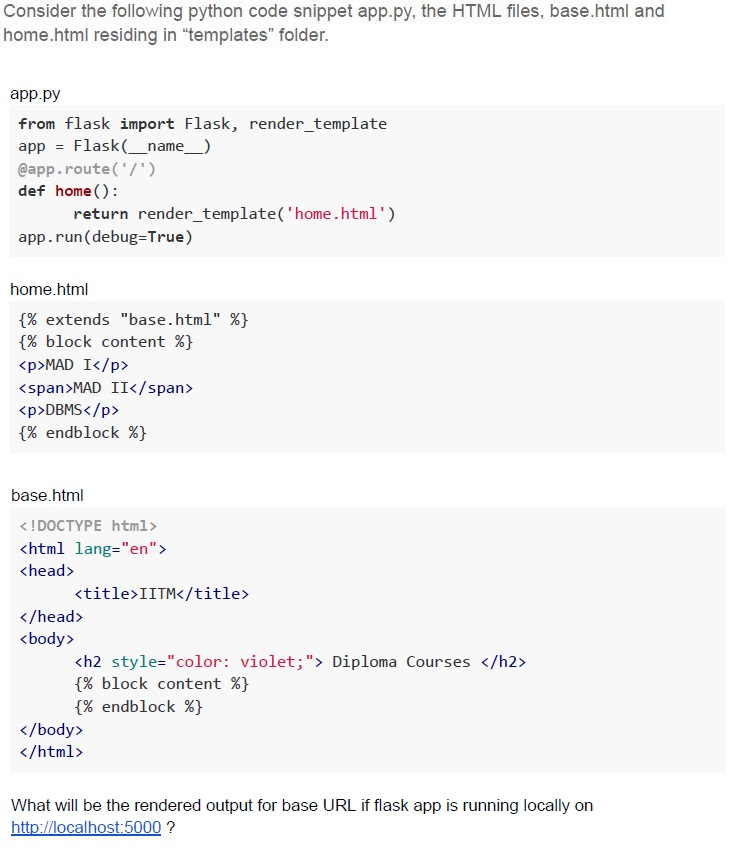
Text of the picture (copyable)
Consider the following python code snippet app.py, the HTML files, base.html and home.html residing in "templates" folder.

app.py
```python
from flask import Flask, render_template
app = Flask(__name__)
@app.route('/')
def home():
    return render_template('home.html')
app.run(debug=True)
```

home.html
```html
{% extends "base.html" %}
{% block content %}
<p>MAD I</p>
<span>MAD II</span>
<p>DBMS</p>
{% endblock %}
```

base.html
```html
<!DOCTYPE html>
<html lang="en">
<head>
    <title>IITM</title>
</head>
<body>
    <h2 style="color: violet;"> Diploma Courses </h2>
    {% block content %}
    {% endblock %}
</body>
</html>
```

What will be the rendered output for base URL if flask app is running locally on
http://localhost:5000 ?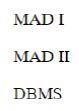
text
MAD I
MAD II
DBMS
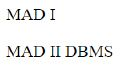
text
MAD I
MAD II DBMS
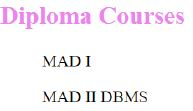
text
Diploma Courses

MAD I

MAD II DBMS
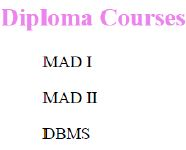
text
Diploma Courses

MAD I

MAD II

DBMS
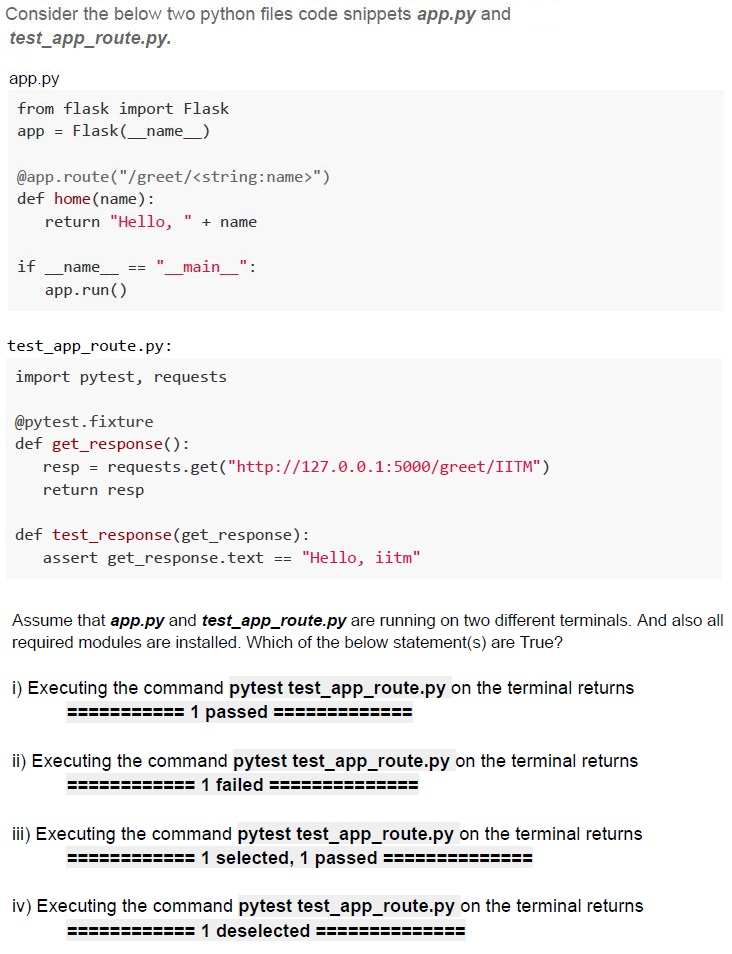
Text of the picture (copyable)
Consider the below two python files code snippets *app.py* and *test_app_route.py*.

**app.py**
```python
from flask import Flask
app = Flask(__name__)

@app.route("/greet/<string:name>")
def home(name):
    return "Hello, " + name

if __name__ == "__main__":
    app.run()
```

**test_app_route.py:**
```python
import pytest, requests

@pytest.fixture
def get_response():
    resp = requests.get("http://127.0.0.1:5000/greet/IITM")
    return resp

def test_response(get_response):
    assert get_response.text == "Hello, iitm"
```

Assume that *app.py* and *test_app_route.py* are running on two different terminals. And also all required modules are installed. Which of the below statement(s) are True?

i) Executing the command `pytest test_app_route.py` on the terminal returns
`========== 1 passed ========== `

ii) Executing the command `pytest test_app_route.py` on the terminal returns
`========== 1 failed ========== `

iii) Executing the command `pytest test_app_route.py` on the terminal returns
`========== 1 selected, 1 passed ========== `

iv) Executing the command `pytest test_app_route.py` on the terminal returns
`========== 1 deselected ========== `- Only statement i is correct
- Only statement ii is correct
- Statements i and iii are correct
- Statements ii and iv are correct
You have a DRAM module with bus width of 8 bits, clock speed of 1.4 GHz, and operating in DDR (double-data-rate or two values per clock cycle) mode. What is the maximum bandwidth (in Giga-bytes per second) of data transfer achievable with this module?
- 2.8
- 3.2
- 6.4
- 12.8
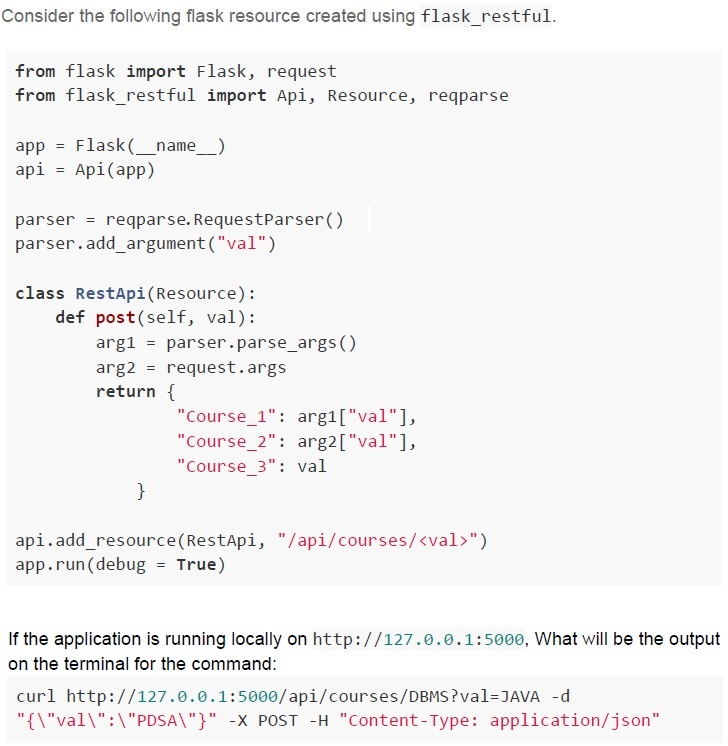
Text of the picture (copyable)
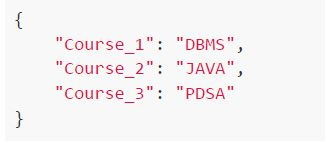
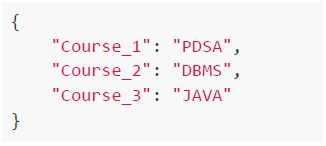
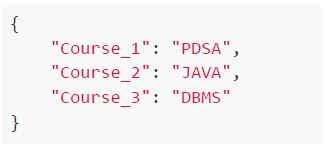
Consider the following flask resource created using flask_restful.

```python
from flask import Flask, request
from flask_restful import Api, Resource, reqparse

app = Flask(__name__)
api = Api(app)

parser = reqparse.RequestParser()
parser.add_argument("val")

class RestApi(Resource):
    def post(self, val):
        arg1 = parser.parse_args()
        arg2 = request.args
        return {
            "Course_1": arg1["val"],
            "Course_2": arg2["val"],
            "Course_3": val
        }

api.add_resource(RestApi, "/api/courses/<val>")
app.run(debug = True)
```

If the application is running locally on http://127.0.0.1:5000, What will be the output on the terminal for the command:

```
curl http://127.0.0.1:5000/api/courses/DBMS?val=JAVA -d "{\"val\":\"PDSA\"}" -X POST -H "Content-Type: application/json"
```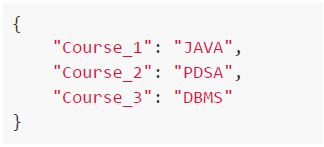
text
```json
{
    "Course_1": "JAVA",
    "Course_2": "PDSA",
    "Course_3": "DBMS"
}
```
text
```json
{
  "Course_1": "DBMS",
  "Course_2": "JAVA",
  "Course_3": "PDSA"
}
```
text
```json
{
    "Course_1": "PDSA",
    "Course_2": "DBMS",
    "Course_3": "JAVA"
}
```
text
```json
{
    "Course_1": "PDSA",
    "Course_2": "JAVA",
    "Course_3": "DBMS"
}
```
Text of the picture (copyable)
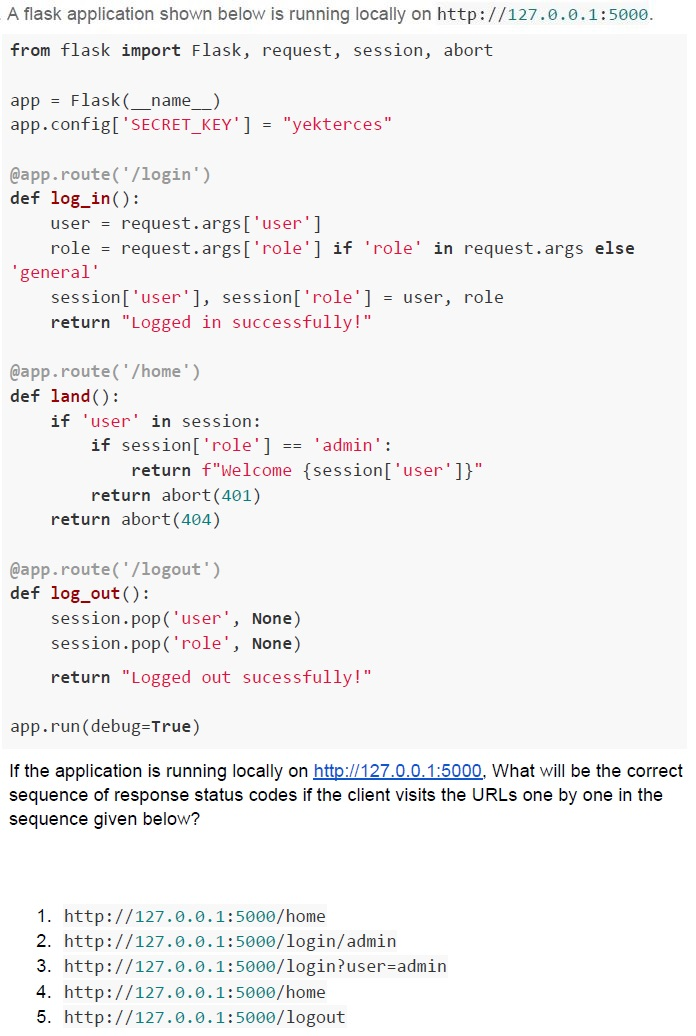
A flask application shown below is running locally on http://127.0.0.1:5000.

```python
from flask import Flask, request, session, abort

app = Flask(__name__)
app.config['SECRET_KEY'] = "yekterces"

@app.route('/login')
def log_in():
    user = request.args['user']
    role = request.args['role'] if 'role' in request.args else 'general'
    session['user'], session['role'] = user, role
    return "Logged in successfully!"

@app.route('/home')
def land():
    if 'user' in session:
        if session['role'] == 'admin':
            return f"Welcome {session['user']}"
        return abort(401)
    return abort(404)

@app.route('/logout')
def log_out():
    session.pop('user', None)
    session.pop('role', None)
    return "Logged out sucessfully!"

app.run(debug=True)
```

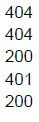
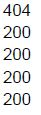
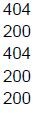
If the application is running locally on http://127.0.0.1:5000, What will be the correct sequence of response status codes if the client visits the URLs one by one in the sequence given below?

1. http://127.0.0.1:5000/home
2. http://127.0.0.1:5000/login/admin
3. http://127.0.0.1:5000/login?user=admin
4. http://127.0.0.1:5000/home
5. http://127.0.0.1:5000/logout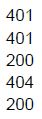
text
401
401
200
404
200
text
404
404
200
401
200
text
404
200
200
200
200
text
404
200
404
200
200
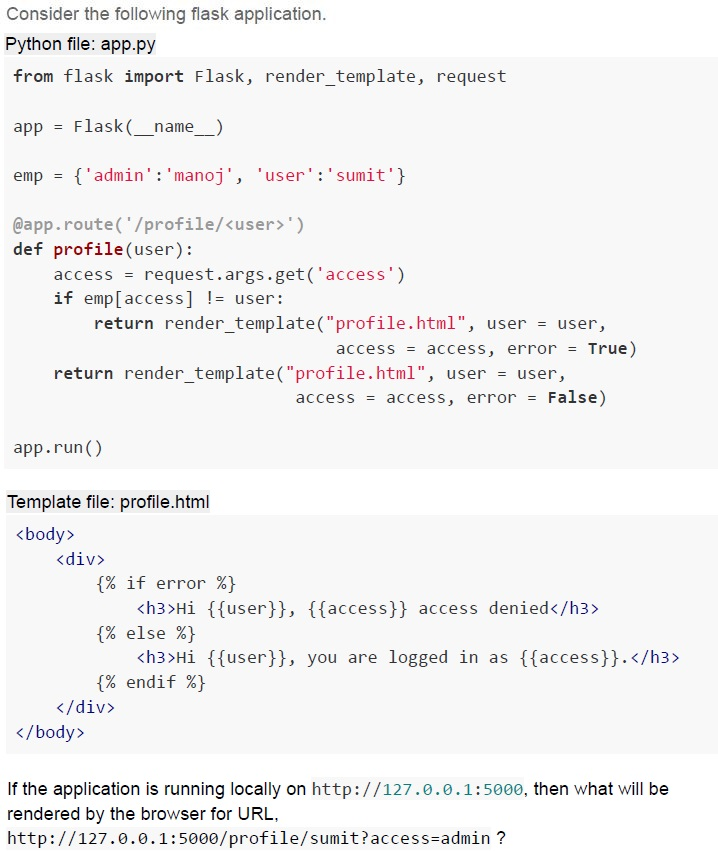
Text of the picture (copyable)
Consider the following flask application.

Python file: app.py
```python
from flask import Flask, render_template, request

app = Flask(__name__)

emp = {'admin':'manoj', 'user':'sumit'}

@app.route('/profile/<user>')
def profile(user):
    access = request.args.get('access')
    if emp[access] != user:
        return render_template("profile.html", user = user,
                               access = access, error = True)
    return render_template("profile.html", user = user,
                           access = access, error = False)

app.run()
```

Template file: profile.html
```html
<body>
    <div>
        {% if error %}
        <h3>Hi {{user}}, {{access}} access denied</h3>
        {% else %}
        <h3>Hi {{user}}, you are logged in as {{access}}.</h3>
        {% endif %}
    </div>
</body>
```

If the application is running locally on http://127.0.0.1:5000, then what will be rendered by the browser for URL.
http://127.0.0.1:5000/profile/sumit?access=admin ?
text
Hi sumit, you are logged in as admin.

text
Hi sumit, you are logged in as user.

text
Hi sumit, user access denied.

text
Hi sumit, admin access denied.
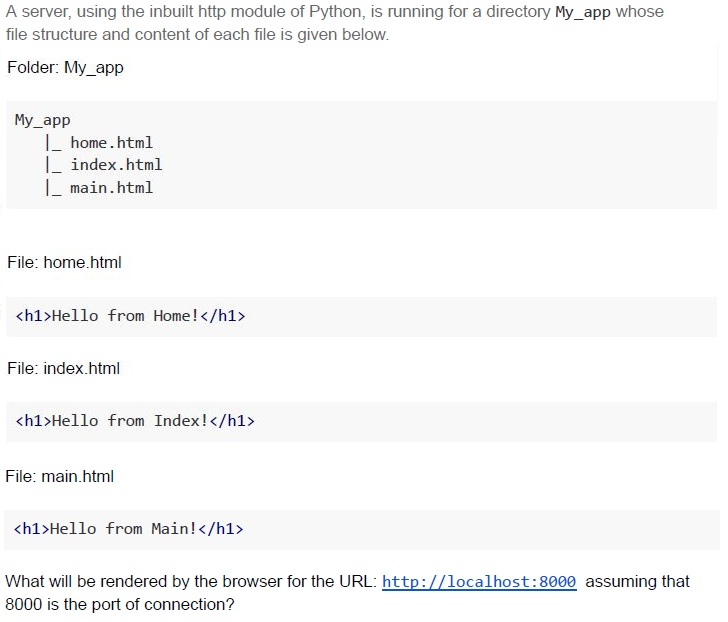
Text of the picture (copyable)
A server, using the inbuilt http module of Python, is running for a directory My_app whose file structure and content of each file is given below.

Folder: My_app

My_app
|_ home.html
|_ index.html
|_ main.html

File: home.html

```html
<h1>Hello from Home!</h1>
```

File: index.html

```html
<h1>Hello from Index!</h1>
```

File: main.html

```html
<h1>Hello from Main!</h1>
```

What will be rendered by the browser for the URL: http://localhost:8000 assuming that 8000 is the port of connection?
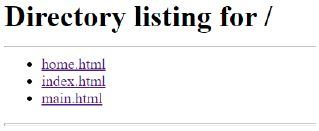
text
Directory listing for /
* home.html
* index.html
* main.html

text
Hello from Index!

text
Hello from Home!

text
Hello from Main!
The lens of an HDD can read data on the rotating disk with the speed of 56,000 bits per second. The disk is designed such that 800 bits pass under the lens for every revolution of the disk, what should be the maximum speed of disk so that the lens does not miss any data?
- 70 RPM
- 100 RPM
- 4200 RPM
- 8000 RPM
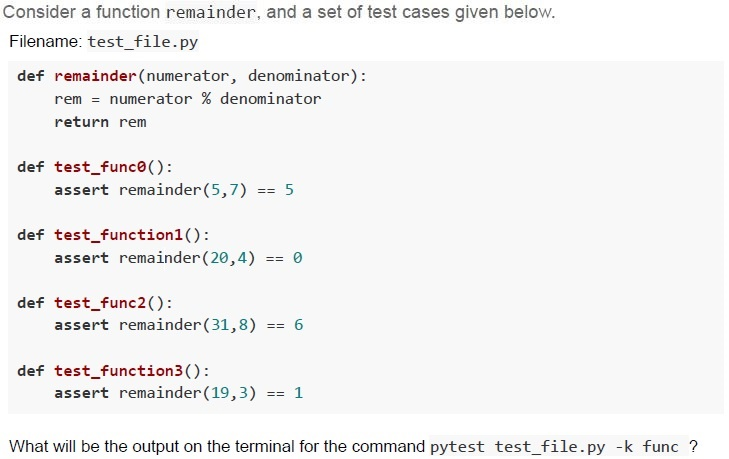
Text of the picture (copyable)
Consider a function remainder, and a set of test cases given below.
Filename: test_file.py

```python
def remainder(numerator, denominator):
    rem = numerator % denominator
    return rem

def test_func0():
    assert remainder(5,7) == 5

def test_function1():
    assert remainder(20,4) == 0

def test_func2():
    assert remainder(31,8) == 6

def test_function3():
    assert remainder(19,3) == 1
```

What will be the output on the terminal for the command `pytest test_file.py -k func`?
text
```text
========= 1 failed, 1 passed, 2 deselected in 0.41s =========
```

text
```
=========== 3 passed, 1 deselected in 0.41s ============
```

text
```
============================= 1 failed, 3 passed in 0.41s =============================
```

text
```text
========== 2 failed, 2 deselected in 0.41s ==========
```
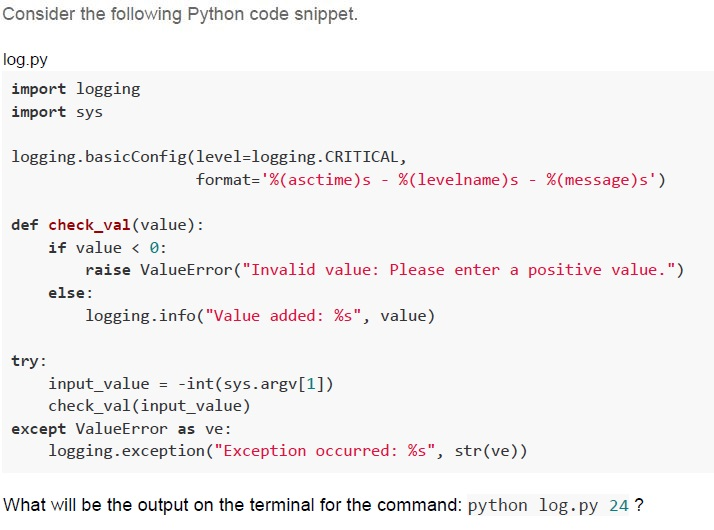
Text of the picture (copyable)
Consider the following Python code snippet.

log.py
```python
import logging
import sys

logging.basicConfig(level=logging.CRITICAL,
                    format='%(asctime)s - %(levelname)s - %(message)s')

def check_val(value):
    if value < 0:
        raise ValueError("Invalid value: Please enter a positive value.")
    else:
        logging.info("Value added: %s", value)

try:
    input_value = -int(sys.argv[1])
    check_val(input_value)
except ValueError as ve:
    logging.exception("Exception occurred: %s", str(ve))
```

What will be the output on the terminal for the command: `python log.py 24`?
text
2023-08-14 21:01:05,684 - INFO - Value added: -24

text
```
2023-08-14 21:01:05,684 - CRITICAL - Value added: -24
```

text
Error: Exception occurred: Invalid value: Please enter a positive value.

text
None.
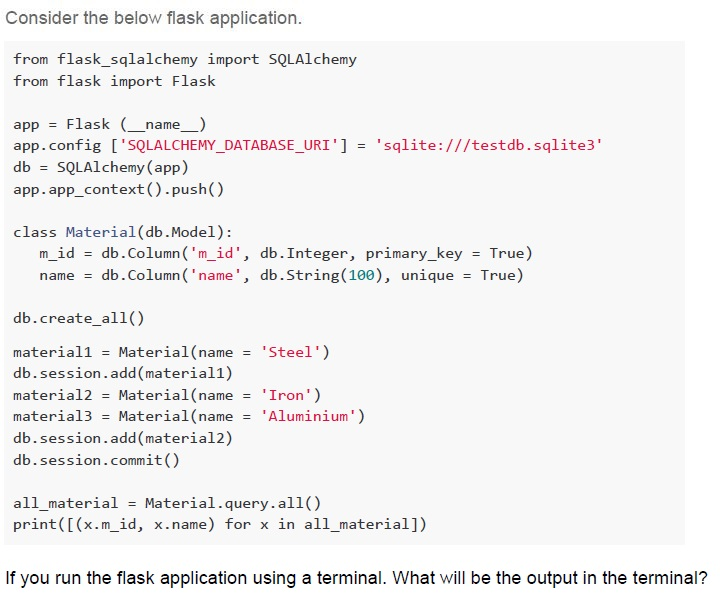
Text of the picture (copyable)
Consider the below flask application.

```python
from flask_sqlalchemy import SQLAlchemy
from flask import Flask

app = Flask (__name__)
app.config ['SQLALCHEMY_DATABASE_URI'] = 'sqlite:///testdb.sqlite3'
db = SQLAlchemy(app)
app.app_context().push()

class Material(db.Model):
    m_id = db.Column('m_id', db.Integer, primary_key = True)
    name = db.Column('name', db.String(100), unique = True)

db.create_all()

material1 = Material(name = 'Steel')
db.session.add(material1)
material2 = Material(name = 'Iron')
material3 = Material(name = 'Aluminium')
db.session.add(material2)
db.session.commit()

all_material = Material.query.all()
print([(x.m_id, x.name) for x in all_material])
```

If you run the flask application using a terminal. What will be the output in the terminal?
text
```
[(1, 'Steel'), (2, 'Iron')] will be displayed in the terminal and two records will be added in the "testdb" database.
```

text
```
[(1, 'Steel'), (2, 'Iron'), (3, 'Aluminium')] will be displayed in the terminal
and three records will be added in the "testdb" database.
```

text
```
[(1, 'Steel'), (2, 'Iron'), (3, 'Aluminium')] will be displayed in the terminal
and two records will be added in the "testdb" database.
```

text
```
[(1, 'Steel', 2, 'Iron', 3, 'Aluminium')] will be displayed in the terminal and
two records will be added in the "testdb" database.
```
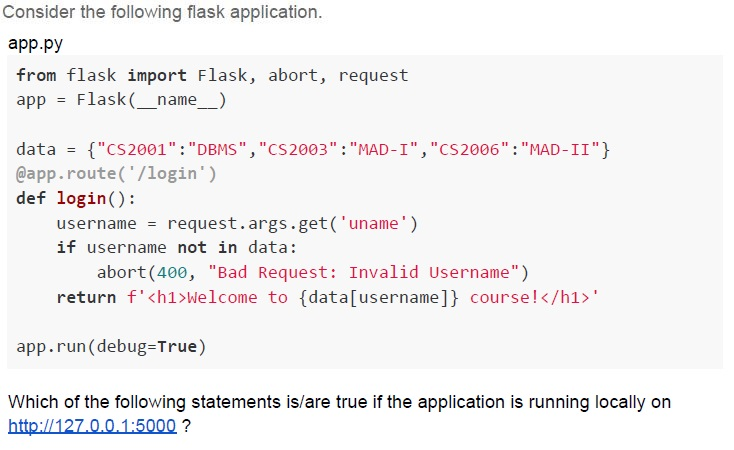
Text of the picture (copyable)
Consider the following flask application.

app.py
```python
from flask import Flask, abort, request
app = Flask(__name__)

data = {"CS2001":"DBMS", "CS2003":"MAD-I", "CS2006":"MAD-II"}
@app.route('/login')
def login():
    username = request.args.get('uname')
    if username not in data:
        abort(400, "Bad Request: Invalid Username")
    return f'<h1>Welcome to {data[username]} course!</h1>'

app.run(debug=True)
```

Which of the following statements is/are true if the application is running locally on
http://127.0.0.1:5000 ?
text
For URL http://127.0.0.1:5000/login?uname=CS2003 the browser will
render **Welcome to MAD-I course!**

text
For URL http://127.0.0.1:5000/login the browser will render
**Welcome to MAD-I course!**

text
For URL http://127.0.0.1:5000/login?uname the browser will render
Bad Request: Invalid Username

text
For URL http://127.0.0.1:5000/uname=CS2006 the browser will render
**Welcome to MAD-II course!**
Which of the following statements is/are true about indexing?
- Indexes are special lookup tables that the database search engine can use tospeed up data retrieval.
- Columns that are frequently manipulated should not be indexed.
- Indexes enhance the performance even if the table is updated frequently.
- Indexes should be avoided for tables that have frequent, large batch updatesor insert operations.
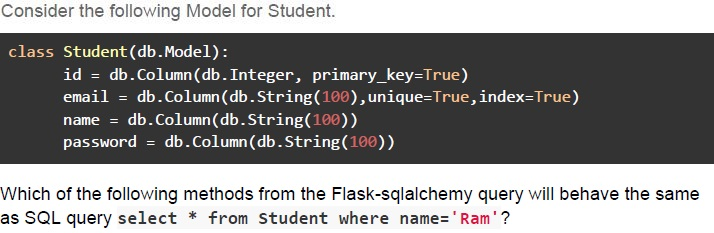
Text of the picture (copyable)
Consider the following Model for Student.

```python
class Student(db.Model):
    id = db.Column(db.Integer, primary_key=True)
    email = db.Column(db.String(100),unique=True,index=True)
    name = db.Column(db.String(100))
    password = db.Column(db.String(100))
```

Which of the following methods from the Flask-sqlalchemy query will behave the same
as SQL query `select * from student where name='Ram'`?
text
```python
Student.query.filter_by('Ram').all()
```
text
```python
Student.query.get(name = 'Ram').all()
```

text
```python
Student.query.filter_by(name = 'Ram').all()
```

text
```python
Student.query.filter(Student.name = 'Ram').all()
```
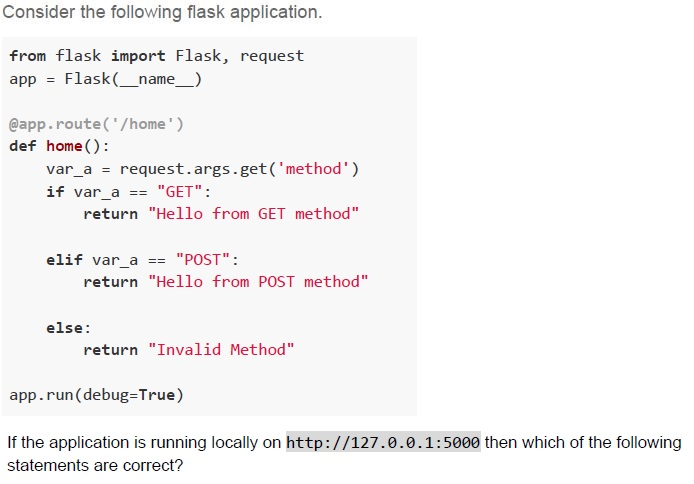
Text of the picture (copyable)
Consider the following flask application.

```python
from flask import Flask, request
app = Flask(__name__)

@app.route('/home')
def home():
    var_a = request.args.get('method')
    if var_a == "GET":
        return "Hello from GET method"

    elif var_a == "POST":
        return "Hello from POST method"

    else:
        return "Invalid Method"

app.run(debug=True)
```

If the application is running locally on http://127.0.0.1:5000 then which of the following statements are correct?
text
The command `curl -X GET http://127.0.0.1:5000/home?method=GET` will give output
as `Hello from GET method` on terminal

text
The command `curl -X POST http://127.0.0.1:5000/home?method=PATCH` will give
output as `Invalid Method` on terminal

text
The command `curl -X POST http://127.0.0.1:5000/home?method=POST` will give output as `Hello from POST method` on terminal

text
The command curl http://127.0.0.1:5000/home?method will give output as Invalid Method on terminal
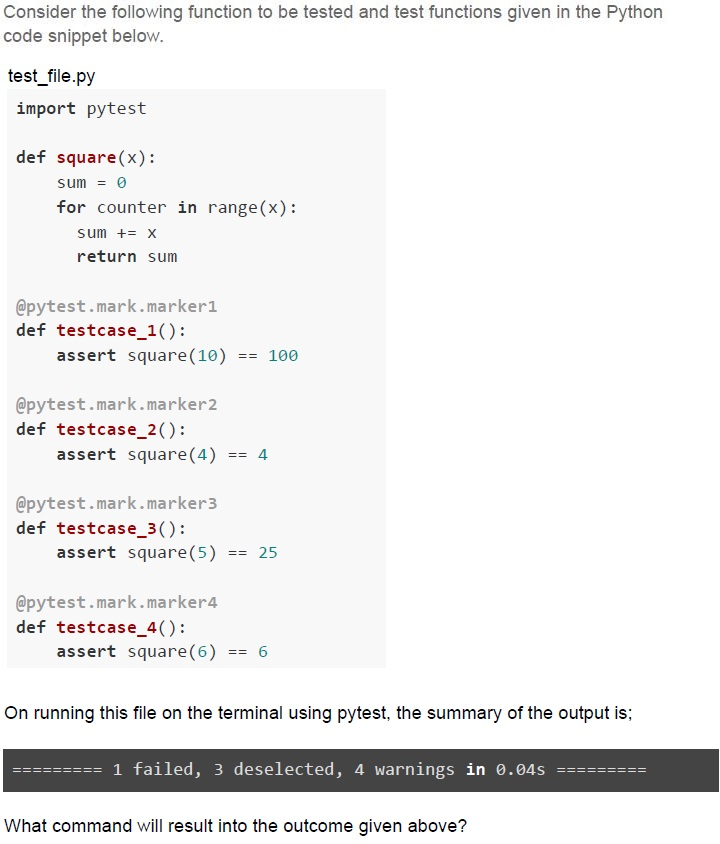
Text of the picture (copyable)
Consider the following function to be tested and test functions given in the Python code snippet below.

test_file.py
```python
import pytest

def square(x):
    sum = 0
    for counter in range(x):
        sum += x
    return sum

@pytest.mark.marker1
def testcase_1():
    assert square(10) == 100

@pytest.mark.marker2
def testcase_2():
    assert square(4) == 4

@pytest.mark.marker3
def testcase_3():
    assert square(5) == 25

@pytest.mark.marker4
def testcase_4():
    assert square(6) == 6
```

On running this file on the terminal using pytest, the summary of the output is;

`========= 1 failed, 3 deselected, 4 warnings in 0.04s =========`

What command will result into the outcome given above?
text
```
pytest test_file.py -m marker4
```

text
```
pytest test_file.py -m marker1
```

text
```
pytest test_file.py -m marker2
```

text
```
pytest test_file.py -m marker3
```
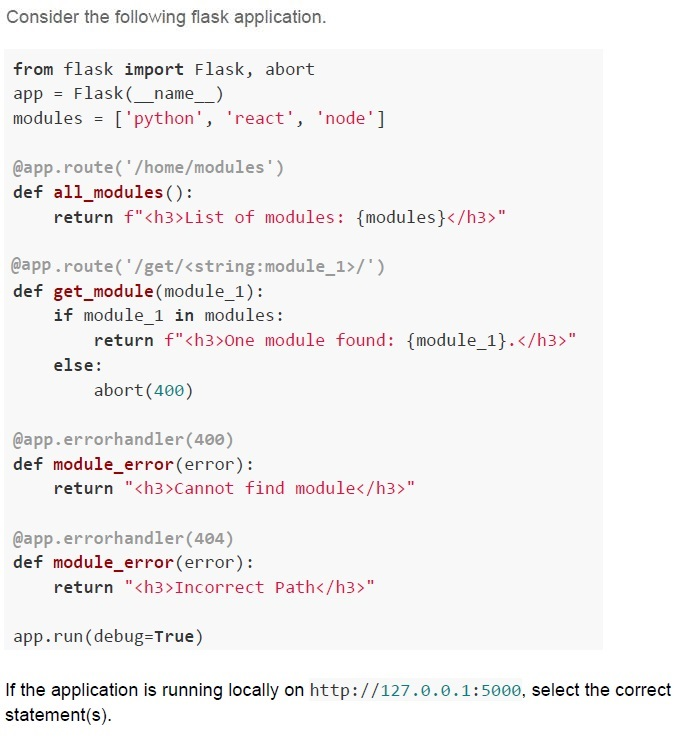
Text of the picture (copyable)
Consider the following flask application.

```python
from flask import Flask, abort
app = Flask(__name__)
modules = ['python', 'react', 'node']

@app.route('/home/modules')
def all_modules():
    return f"<h3>List of modules: {modules}</h3>"

@app.route('/get/<string:module_1>/')
def get_module(module_1):
    if module_1 in modules:
        return f"<h3>One module found: {module_1}.</h3>"
    else:
        abort(400)

@app.errorhandler(400)
def module_error(error):
    return "<h3>Cannot find module</h3>"

@app.errorhandler(404)
def module_error(error):
    return "<h3>Incorrect Path</h3>"

app.run(debug=True)
```

If the application is running locally on http://127.0.0.1:5000, select the correct statement(s).
text
For the URL, http://127.0.0.1:5000/home/modules/, the browser will
render;
List of modules: ['python', 'react', 'node']

text
For the URL, http://127.0.0.1:5000/home/modules, the browser will render;
**Incorrect Path**

text
For the URL, http://127.0.0.1:5000/get/react, the browser will render,
**One module found: react.**

text
For the URL, http://127.0.0.1:5000/get/python/, the browser will render:
**One module found: python.**
Comprehension passage - the questions below it refer to this
Based on the above data, answer the given subquestions.

At what distance (kms) should the router be placed from the client so that round-trip latency of the network remains as low as 150 milliseconds?
- 8000 kilometers
- 7500 kilometers
- 4500 kilometers
- 3000 kilometers
What will be the round-trip latency (milliseconds) of the network if the router is placed at exactly midway from the client and the server?
- 45
- 90
- 180
- 270
Answer key
- Q1 (MCQ, 2 marks): B
- Q2 (MCQ, 2 marks): C
- Q3 (MCQ, 2 marks): D
- Q4 (MCQ, 2 marks): D
- Q5 (MCQ, 2 marks): B
- Q6 (MCQ, 2 marks): B
- Q7 (MCQ, 2 marks): C
- Q8 (MCQ, 3 marks): B
- Q9 (MCQ, 3 marks): A
- Q10 (MCQ, 3 marks): A
- Q11 (MCQ, 3 marks): B
- Q12 (MCQ, 3 marks): A
- Q13 (MCQ, 3 marks): A
- Q14 (MCQ, 3 marks): D
- Q15 (MCQ, 3 marks): B
- Q16 (MCQ, 3 marks): A
- Q17 (MCQ, 3 marks): D
- Q18 (MCQ, 3 marks): B
- Q19 (MCQ, 3 marks): D
- Q20 (MCQ, 4.5 marks): B
- Q21 (MCQ, 4.5 marks): C
- Q22 (MCQ, 4.5 marks): C
- Q23 (MCQ, 4.5 marks): D
- Q24 (MCQ, 4.5 marks): A
- Q25 (MSQ, 2 marks): A, C
- Q26 (MSQ, 3 marks): A, B, D
- Q27 (MSQ, 3 marks): C, D
- Q28 (MSQ, 3 marks): A, D
- Q29 (MSQ, 4.5 marks): B, D
- Q30 (MSQ, 4.5 marks): C, D
- Q31 (MCQ, 4.5 marks): C
- Q32 (MCQ, 3 marks): C
Concepts this paper tests
Auto-generated summary from the source site. Handy as a checklist; the lessons above explain each idea from scratch.
Here’s a structured summary of core topics, concepts, principles, and equations essential for the exam, followed by Mermaid knowledge graphs to visualize relationships.
Core Topics & Concepts Summary
1. Python & Virtual Environments
Key Commands:
pip freeze: List installed packages in a virtual environment.pip install -r requirements.txt: Install packages from a file.
- Virtual Environments: Isolate project dependencies.
2. Character Encoding
- UCS-4 (32-bit): 4 bytes per character.
- ASCII (7-bit): 1 byte per character.
Conversion Formula:
- If a document takes
Nbits in UCS-4, its size in ASCII is: \[ \text{ASCII Size (bits)} = \frac{N}{4} \times 1 \quad \text{(since 32 bits → 8 bits)} \] - Example: 1,52,000 bits in UCS-4 → 38,000 bits in ASCII. (But the correct answer was 33,250 bits due to rounding or non-alphanumeric characters.)
- If a document takes
3. Web Accessibility Principles (WCAG)
POUR:
- Perceivable: Content must be perceivable (e.g., alt text for images).
- Operable: Interface must work with keyboard/mouse/voice (e.g., keyboard navigation).
- Understandable: Content must be clear (e.g., predictable layouts).
- Robust: Must work across devices/technologies (e.g., semantic HTML).
4. Jinja2 Templating (Flask)
Syntax:
{{ variable }}: Render a variable.{% macro name(params) %} ... {% endmacro %}: Define reusable HTML blocks.{% if condition %} ... {% endif %}: Conditional rendering.
Example:
{% macro list_items(items) %}
  <ul>
    {% for item in items %}
      <li>{{ item }}</li>
    {% endfor %}
  </ul>
{% endmacro %}
5. Flask Routing & Request Handling
Route Decorators:
@app.route('/path/<variable>')
def func(variable):
    return f"Value: {variable}"
Request Methods:
request.args: Query parameters (e.g.,/page?name=John).request.form: Form data (POST requests).request.json: JSON payloads.
Error Handling:
@app.errorhandler(404)
def not_found(error):
    return "Page not found", 404
6. Testing in Software Development
- Types of Testing: | Type | Description | |-----------------------|-----------------------------------------------------------------------------| | Regression Testing | Ensures new changes don’t break existing functionality. | | User Acceptance Testing (UAT) | Validates software with real users (e.g., beta testing). | | System Testing | Tests the complete system (end-to-end). | | Automation Testing | Uses tools (e.g., Selenium) to automate test cases. |
Pytest:
- Run tests:
pytest file.py. - Select tests by keyword:
pytest -k "func". - Mark tests:
@pytest.mark.marker_name.
- Run tests:
7. Networking Basics
IPv4 to Hexadecimal Conversion:
- Split each octet into hex (e.g.,
172.16.254.10→AC.10.FE.0A).
- Split each octet into hex (e.g.,
- Packet vs. Circuit Switching: | Feature | Packet Switching | Circuit Switching | |-----------------------|---------------------------------|-----------------------------| | Resource Usage | Shares bandwidth dynamically. | Reserves a fixed path. | | Example | Internet (TCP/IP). | Telephone networks. |
Latency Calculation:
- Round-Trip Time (RTT): \[ \text{RTT} = 2 \times \left( \frac{\text{Distance}}{\text{Speed of Light in Medium}} \right) \]
- Example: For a 9000 km cable (speed = \(1.5 \times 10^8\) m/s): \[ \text{RTT} = 2 \times \left( \frac{9 \times 10^6}{1.5 \times 10^8} \right) = 120 \text{ ms} \]
8. HTML/CSS Box Model
Components:
- Content → Padding → Border → Margin.
CSS Properties:
div { width: 200px; padding: 10px; border: 5px solid black; margin: 15px; }- Total Width: \[ \text{Total Width} = \text{Width} + \text{Padding} + \text{Border} + \text{Margin} \]
9. Database Indexing (SQL)
- Purpose: Speed up data retrieval by creating lookup tables.
When to Use:
- Columns frequently used in
WHERE,JOIN, orORDER BY.
- Columns frequently used in
When to Avoid:
- Tables with frequent INSERT/UPDATE/DELETE operations (indexes slow down writes).
- Columns with low cardinality (e.g., gender).
10. Flask-SQLAlchemy
Model Definition:
class User(db.Model): id = db.Column(db.Integer, primary_key=True) name = db.Column(db.String(50), unique=True)- Queries: | Method | SQL Equivalent | |---------------------------------|-------------------------------------| |
User.query.filter_by(name='Alice').all()|SELECT * FROM user WHERE name='Alice'| |User.query.get(1)|SELECT * FROM user WHERE id=1|
11. DRAM Bandwidth Calculation
- Formula: \[ \text{Bandwidth (GB/s)} = \frac{\text{Clock Speed (Hz)} \times \text{Bus Width (bits)} \times 2 \text{ (DDR)}}{8 \text{ (bits → bytes)} \times 10^9 \text{ (GB)}} \]
Example:
- Clock Speed = 1.4 GHz, Bus Width = 8 bits, DDR: \[ \text{Bandwidth} = \frac{1.4 \times 10^9 \times 8 \times 2}{8 \times 10^9} = 2.8 \text{ GB/s} \]
12. HDD Data Transfer Speed
- Formula: \[ \text{Max RPM} = \frac{\text{Read Speed (bits/sec)}}{\text{Bits per Revolution}} \times 60 \]
Example:
- Read Speed = 56,000 bits/sec, Bits per Revolution = 800: \[ \text{RPM} = \frac{56000}{800} \times 60 = 4200 \text{ RPM} \]
2. Character Encoding
3. Web Accessibility (POUR)
4. Flask Workflow
5. Testing Types
6. Networking Concepts
7. HTML/CSS Box Model
8. Database Indexing
9. DRAM Bandwidth
Key Equations
- Character Encoding Conversion: \[ \text{ASCII Size} = \frac{\text{UCS-4 Size}}{4} \]
- Network Latency (RTT): \[ \text{RTT} = 2 \times \left( \frac{\text{Distance}}{\text{Speed of Light in Medium}} \right) \]
- DRAM Bandwidth: \[ \text{Bandwidth (GB/s)} = \frac{\text{Clock (Hz)} \times \text{Bus Width (bits)} \times 2}{8 \times 10^9} \]
- HDD RPM Calculation: \[ \text{RPM} = \frac{\text{Read Speed (bits/sec)}}{\text{Bits per Revolution}} \times 60 \]