Home / Past papers / MAD1 Quiz 1 / this paper
IIT M IMPROVEMENT AN EXAM QIM2 26 Oct - 26 Oct 2025

text
```
{{ courses | len }}
```
text
```jinja
{{ courses | length }}
```
text
```html
{{ len(courses) }}
```
text
None of these
Text of the picture (copyable)
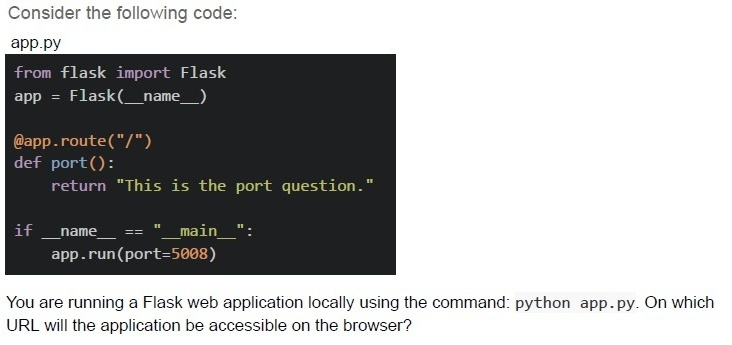
Consider the following code:
app.py

```python
from flask import Flask
app = Flask(__name__)

@app.route("/")
def port():
    return "This is the port question."

if __name__ == "__main__":
    app.run(port=5008)
```

You are running a Flask web application locally using the command: python app.py. On which URL will the application be accessible on the browser?
text
http://127.0.0.1:5000/

text
http://localhost:0000/

text
http://0.0.0.0:5000/

text
http://localhost:5008/
Text of the picture (copyable)
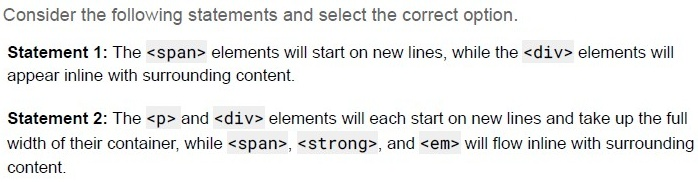
Consider the following statements and select the correct option.

Statement 1: The `<span>` elements will start on new lines, while the `<div>` elements will appear inline with surrounding content.

Statement 2: The `<p>` and `<div>` elements will each start on new lines and take up the full width of their container, while `<span>`, `<strong>`, and `<em>` will flow inline with surrounding content.
- Statement 1 is correct, but statement 2 is incorrect.
- Statement 2 is correct, but statement 1 is incorrect.
- Both statements 1 and 2 are correct
- Both statements 1 and 2 are incorrect

Text of the picture (copyable)
Which of the following Flask view functions will return a 404 error for the URL:
```
http://127.0.0.1:5000/profile/user123/active/2024?
```

text
```python
@app.route('/profile/<username>/<status>/<int:year>')
def profile(username, status, year):
    info = {'username': username, 'status': status, 'year': year}
    return info
```
text
```python
@app.route('/profile/<string:username>/<string:status>/<string:year>')
def profile(username, status, year):
    info = {'username': username, 'status': status, 'year': year}
    return info
```
text
```python
@app.route('/profile/<username>/<status>/<year>')
def profile(username, status, year):
    info = {'username': username, 'status': status, 'year': year}
    return info
```
text
```python
@app.route('/profile/user/<username>/<status>/<year>')
def profile(username, status, year):
    info = {'username': username, 'status': status, 'year': year}
    return info
```
Text of the picture (copyable)
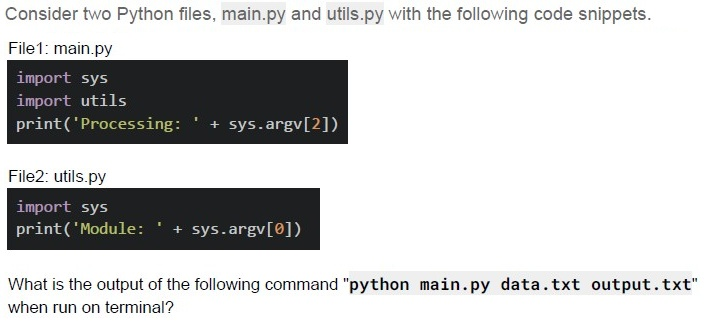
Consider two Python files, main.py and utils.py with the following code snippets.

File1: main.py
```python
import sys
import utils
print('Processing: ' + sys.argv[2])
```

File2: utils.py
```python
import sys
print('Module: ' + sys.argv[0])
```

What is the output of the following command "python main.py data.txt output.txt" when run on terminal?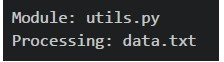
text
```
Module: utils.py
Processing: data.txt
```
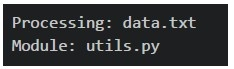
text
```
Processing: data.txt
Module: utils.py
```
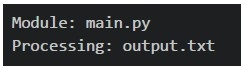
text
```
Module: main.py
Processing: output.txt
```
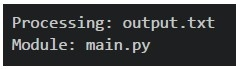
text
```
Processing: output.txt
Module: main.py
```
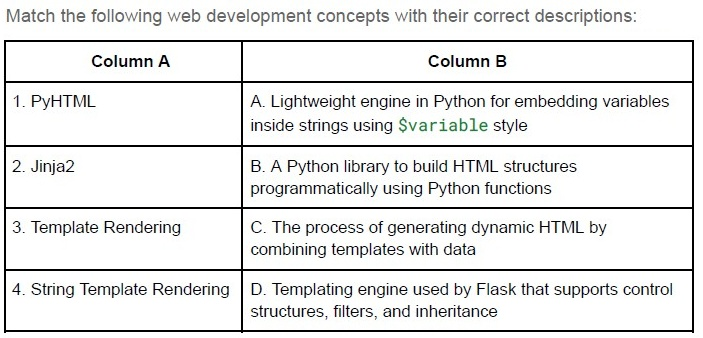
Text of the picture (copyable)
Match the following web development concepts with their correct descriptions:

| Column A | Column B |
|---|---|
| 1. PyHTML | A. Lightweight engine in Python for embedding variables inside strings using `$variable` style |
| 2. Jinja2 | B. A Python library to build HTML structures programmatically using Python functions |
| 3. Template Rendering | C. The process of generating dynamic HTML by combining templates with data |
| 4. String Template Rendering | D. Templating engine used by Flask that supports control structures, filters, and inheritance |
- 1 → B, 2 → C, 3 → D, 4 → A
- 1 → A, 2 → B, 3 → C, 4 → D
- 1 → B, 2 → D, 3 → C, 4 → A
- 1 → C, 2 → D, 3 → A, 4 → B
Text of the picture (copyable)
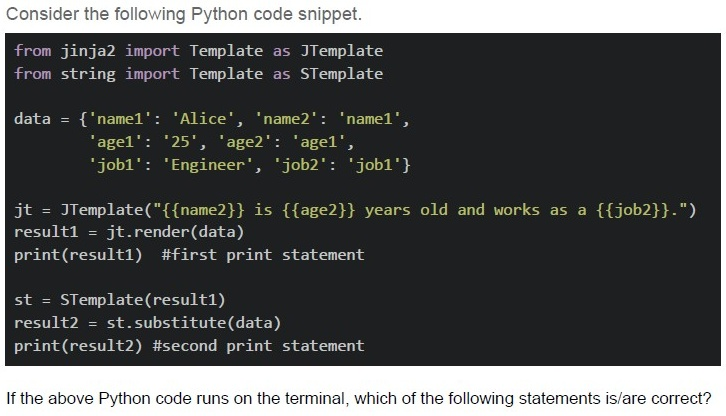
Consider the following Python code snippet.

```python
from jinja2 import Template as JTemplate
from string import Template as STemplate

data = {'name1': 'Alice', 'name2': 'name1',
        'age1': '25', 'age2': 'age1',
        'job1': 'Engineer', 'job2': 'job1'}

jt = JTemplate("{{name2}} is {{age2}} years old and works as a {{job2}}.")
result1 = jt.render(data)
print(result1) #first print statement

st = STemplate(result1)
result2 = st.substitute(data)
print(result2) #second print statement
```

If the above Python code runs on the terminal, which of the following statements is/are correct?
text
The first print statement will output: "name1 is age1 years old and works as a job1."

text
The second print statement will output: "Alice is 25 years old and works as a Engineer."

text
Jinja2 templates use double curly braces {{}} for variable substitution
text
String templates use dollar signs $ for variable substitution in the substitute() method

text
The code will raise a KeyError exception during execution

Text of the picture (copyable)
Which of the following Flask view functions will NOT throw any error for the URL:
`http://127.0.0.1:5000/user?username=mad1&role=admin?`
text
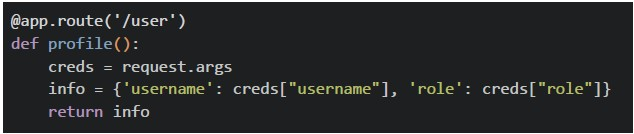
```python
@app.route('/user')
def profile():
    creds = request.args
    info = {'username': creds["username"], 'role': creds["role"]}
    return info
```
text
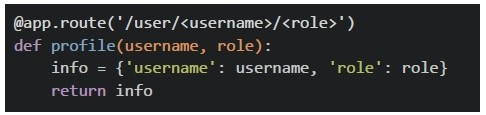
```python
@app.route('/user/<username>/<role>')
def profile(username, role):
    info = {'username': username, 'role': role}
    return info
```
text
```python
@app.route('/user')
def profile():
    return {'message': 'data retrieved successfully'}
```
text
All of these
Text of the picture (copyable)
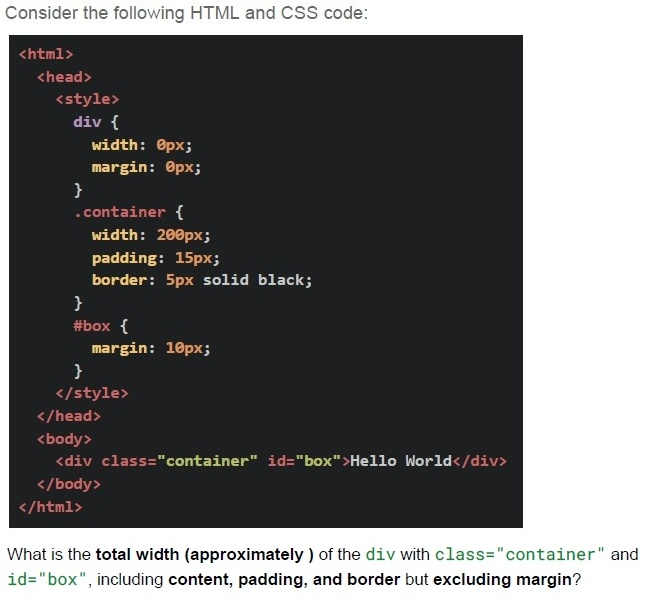
Consider the following HTML and CSS code:

```html
<html>
  <head>
    <style>
      div {
        width: 0px;
        margin: 0px;
      }
      .container {
        width: 200px;
        padding: 15px;
        border: 5px solid black;
      }
      #box {
        margin: 10px;
      }
    </style>
  </head>
  <body>
    <div class="container" id="box">Hello World</div>
  </body>
</html>
```

What is the **total width (approximately)** of the `div` with `class="container"` and `id="box"`, including **content, padding, and border** but excluding margin?- 200 px
- 230 px
- 240 px
- 250 px
Text of the picture (copyable)
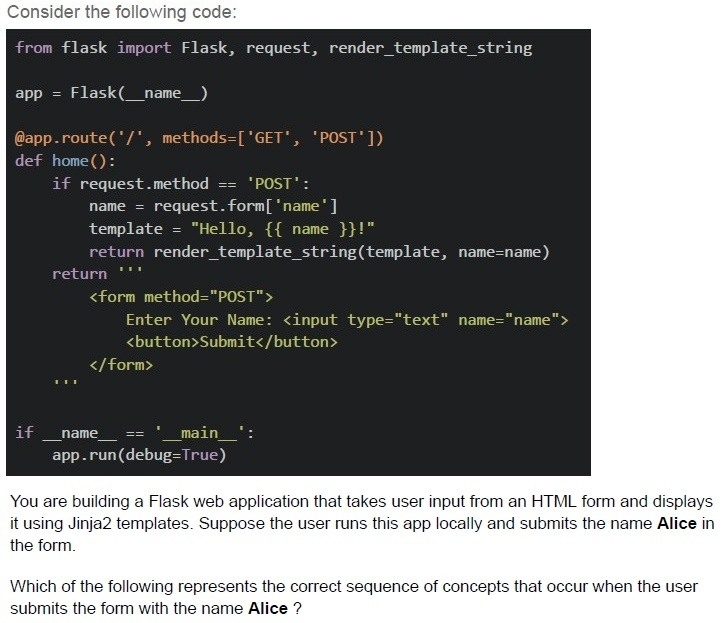
Consider the following code:

```python
from flask import Flask, request, render_template_string

app = Flask(__name__)

@app.route('/', methods=['GET', 'POST'])
def home():
    if request.method == 'POST':
        name = request.form['name']
        template = "Hello, {{ name }}!"
        return render_template_string(template, name=name)
    return '''
        <form method="POST">
            Enter Your Name: <input type="text" name="name">
            <button>Submit</button>
        </form>
    '''

if __name__ == '__main__':
    app.run(debug=True)
```

You are building a Flask web application that takes user input from an HTML form and displays it using Jinja2 templates. Suppose the user runs this app locally and submits the name **Alice** in the form.

Which of the following represents the correct sequence of concepts that occur when the user submits the form with the name **Alice** ?
text
HTML Form Rendering → HTTP 404 Not Found Error → User Submits Form → Flask Routing → Template Rendering

text
User Submits Form (HTTP POST) → Check URL Structure → Network Transfer (Bandwidth & Latency) → Flask Routing

text
User Accesses URL (Form at "/") → User Submits Form (HTTP POST) → Flask Request
Handling (request.form) → Jinja2 Template Rendering

text
Flask Request Handling → Network Round Trip (RTT) → HTML Table Rendering → Jinja2 Template Rendering
Text of the picture (copyable)
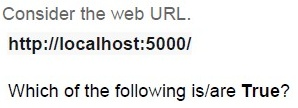
Consider the web URL.
http://localhost:5000/

Which of the following is/are **True**?

text
http is the protocol.

text
5000 is the port number.

text
The trailing / represents the base URL.

text
5000 is the status code.
Text of the picture (copyable)
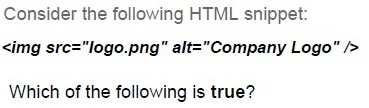
Consider the following HTML snippet:

```html
<img src="logo.png" alt="Company Logo" />
```

Which of the following is true?

text
If logo.png fails to load, the text "Company Logo" will be shown.

text
If the image file is missing, browsers display it as a broken image.

text
The alt attribute is mandatory in HTML5.

text
Logo.png fails to load because the `<img>` tag only allows "jpeg/jpg" files.
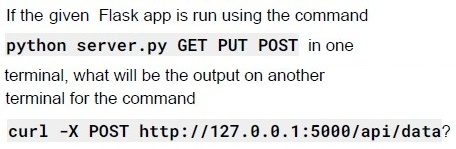
Text of the picture (copyable)
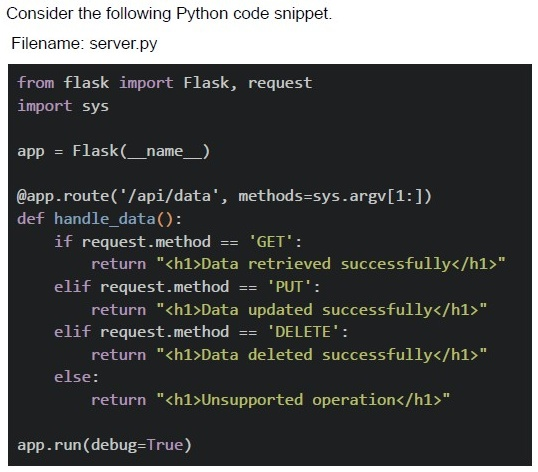
If the given Flask app is run using the command
```
python server.py GET PUT POST
```
in one terminal, what will be the output on another terminal for the command
```
curl -X POST http://127.0.0.1:5000/api/data?
```

text
```html
<h1>Data added successfully</h1>
```

text
```html
<h1>Unsupported operation</h1>
```

text
```html
<h1>Method not Allowed</h1>
```

text
```html
<h1>404 Not Found</h1>
```
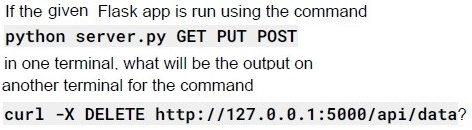
Text of the picture (copyable)
If the given Flask app is run using the command
```
python server.py GET PUT POST
```
in one terminal, what will be the output on
another terminal for the command
```
curl -X DELETE http://127.0.0.1:5000/api/data?
```

text
```html
<h1>Data deleted successfully</h1>
```

text
```html
<h1>Unsupported operation</h1>
```

text
```html
<h1>Method not Allowed</h1>
```

text
```html
<h1>404 Not Found</h1>
```
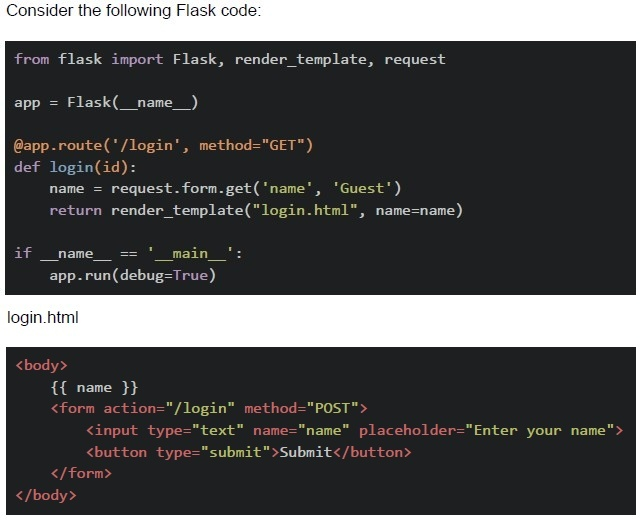

text
method="GET" is not correct, it should be methods=["GET"]

text
```python
def login(id)
```
can throw error because no id is passed in, /login url

text
name will throw error because no name will be written in the starting of app

text
There is no error, Flask application will run correctly.
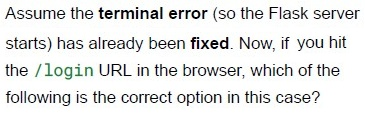
Text of the picture (copyable)
Assume the **terminal error** (so the Flask server
starts) has already been **fixed**. Now, if you hit
the `/login` URL in the browser, which of the
following is the correct option in this case?

text
method="GET" is not correct, it should be methods=["GET"]

text
```python
def login(id) can throw error because no id is passed in /login url
```

text
name will throw error because no name will be written in the starting of app

text
There is no error, Flask application will run correctly.
Answer key
- Q1 (MCQ, 2 marks): B
- Q2 (MCQ, 2 marks): D
- Q3 (MCQ, 3 marks): B
- Q4 (MCQ, 3 marks): D
- Q5 (MCQ, 3 marks): C
- Q6 (MCQ, 3 marks): C
- Q7 (MSQ, 3 marks): A, C, D
- Q8 (MSQ, 3 marks): A, C
- Q9 (MCQ, 4.5 marks): C
- Q10 (MCQ, 4.5 marks): C
- Q11 (MSQ, 2 marks): A, B, C
- Q12 (MSQ, 2 marks): A, B
- Q13 (MCQ, 4.5 marks): B
- Q14 (MCQ, 3 marks): C
- Q15 (MCQ, 4.5 marks): A
- Q16 (MCQ, 3 marks): B
Concepts this paper tests
Auto-generated summary from the source site. Handy as a checklist; the lessons above explain each idea from scratch.
Here’s a structured summary of the core topics, concepts, principles, and key takeaways from the exam questions, followed by Mermaid knowledge graphs to visualize relationships.
Core Topics & Concepts
1. Web Development Fundamentals
Key Concepts:
- HTTP/HTTPS Protocol: Understand the role of
http://in URLs. URL Structure:
http://localhost:5000/→http(protocol),localhost(host),5000(port),/(path).- Port Numbers: Default ports (e.g.,
5000for Flask), custom ports (e.g.,app.run(port=5008)).
HTTP Methods:
GET,POST,PUT,DELETE(Flask route handling).- 404 Errors: Occur when a URL pattern doesn’t match any route.
- 405 Errors: "Method Not Allowed" (e.g.,
POSTto aGET-only route).
Equations/Code Snippets:
Flask route with methods:
@app.route('/api/data', methods=['GET', 'PUT', 'DELETE'])404 Trigger Example:
@app.route('/profile/<username>/active') # Missing `/<year>` → 404 for `/profile/user123/active/2024`
2. Flask Framework
Key Concepts:
Routing:
- Static routes (
@app.route('/path')). - Dynamic routes (
@app.route('/user/<username>')). - Query parameters (
?key=valueaccessed viarequest.args).
- Static routes (
Request Handling:
request.method: Check ifGET,POST, etc.request.form: Access form data (forPOST).request.args: Access URL query parameters.
Template Rendering:
render_template(): Render HTML templates (Jinja2).render_template_string(): Render a template from a string.
Running the App:
app.run(port=5008, debug=True): Start the server on a custom port.
Equations/Code Snippets:
Query Parameters:
@app.route('/user')
def profile():
    username = request.args.get('username')  # Access ?username=mad1
Form Handling:
@app.route('/', methods=['GET', 'POST'])
def home():
    if request.method == 'POST':
        name = request.form['name']  # From <input name="name">
Template Rendering:
return render_template_string("Hello, {{ name }}", name=name)
3. Jinja2 Templating
Key Concepts:
Syntax:
- Variables:
{{ variable }}. - Filters:
{{ list|length }}(notlen()). - Control structures:
{% if %},{% for %}.
- Variables:
String vs. Jinja2 Templates:
- Jinja2: Uses
{{ }}for variables. - String.Template: Uses
$varor${var}.
- Jinja2: Uses
Equations/Code Snippets:
Jinja2 Filter:
{{ courses | length }} # Correct (not `len` or `len()`)String Template:
from string import Template
t = Template("Hello, $name")
t.substitute(name="Alice")
4. HTML/CSS Basics
Key Concepts:
Block vs. Inline Elements:
- Block:
<div>,<p>(new line, full width). - Inline:
<span>,<strong>,<em>(flow with text).
- Block:
Box Model:
- Total Width =
width+padding+border(excludemargin). Example:
div {
    width: 200px;
    padding: 15px;
    border: 5px solid black;
}
→ Total width =
200 + (15*2) + (5*2) = 240px.
- Total Width =
Equations/Code Snippets:
Box Model Calculation:
Total Width = width + (padding × 2) + (border × 2)
5. Python & Command-Line Arguments
Key Concepts:
sys.argv:sys.argv[0]: Script name.sys.argv[1:]: Command-line arguments.
Module Imports:
- Importing a module executes its code (e.g.,
utils.pyprints when imported).
- Importing a module executes its code (e.g.,
Equations/Code Snippets:
Command-Line Args:
# python main.py data.txt output.txt
print(sys.argv[0])  # "main.py"
print(sys.argv[1])  # "data.txt"
print(sys.argv[2])  # "output.txt"
6. Debugging & Common Errors
Key Concepts:
Flask Errors:
method='GET'→ Should bemethods=['GET'].- Missing route parameters (e.g.,
/user/<id>but noidpassed).
Template Errors:
- Undefined variables in Jinja2.
- Incorrect filter usage (e.g.,
len()vs.|length).
Equations/Code Snippets:
Correct Route Syntax:
@app.route('/login', methods=['GET']) # Not `method='GET'`
Graph 2: Flask Request Flow
Graph 3: Jinja2 vs String Templates
Graph 4: HTML Box Model
Graph 5: Flask Error Handling
Exam Preparation Checklist
Flask:
- Route syntax (
@app.route, dynamic routes). requestobject (args,form,method).- Template rendering (
render_template,render_template_string). - Common errors (404, 405,
methods=vsmethod=).
- Route syntax (
Jinja2:
- Syntax (
{{ }},{% %}, filters like|length). - Comparison with
string.Template.
- Syntax (
HTML/CSS:
- Block vs inline elements.
- Box model calculations.
Python:
sys.argvfor command-line args.- Module imports and execution order.
HTTP:
- URL structure (protocol, host, port, path, query).
- HTTP methods (
GET,POST, etc.).