Home / Past papers / MAD1 Quiz 1 / this paper
2024 July07: IIT M AN EXAM QDF4 - 07 Jul 2024
Elapsed 00:00
Which of the following is not a correct perceivable accessibility principle?
- Provide text alternatives for non-text content.
- Provide captions and other alternatives for multimedia.
- Make it easier for users to see and hear content.
- Give users enough time to read and use content.
Which of the below HTTP status codes represents the client error?
- 500-599
- 400-499
- 300-399
- 200-299
- 100-199
What will be the output of the following Python code?
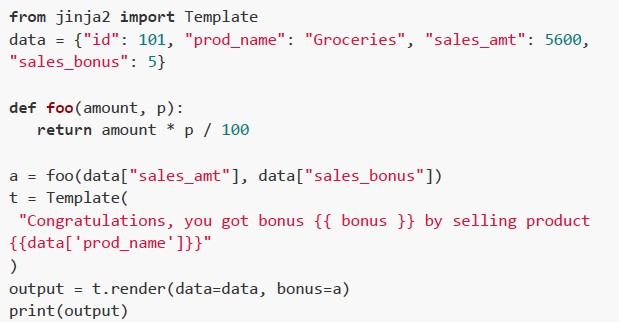 What will be the output of the following Python code?
What will be the output of the following Python code? Text of the picture (copyable)
```python
from jinja2 import Template
data = {"id": 101, "prod_name": "Groceries", "sales_amt": 5600,
"sales_bonus": 5}

def foo(amount, p):
    return amount * p / 100

a = foo(data["sales_amt"], data["sales_bonus"])
t = Template(
"Congratulations, you got bonus {{ bonus }} by selling product
{{data['prod_name']}}"
)
output = t.render(data=data, bonus=a)
print(output)
```
text
Congratulations, you got bonus 70.0 by selling product Groceries

text
Congratulations, you got bonus 140.0 by selling product Groceries

text
```
Congratulations, you got bonus 280.0 by selling product Groceries
```

text
Congratulations, you got bonus 560.0 by selling product Groceries
Consider the below table.
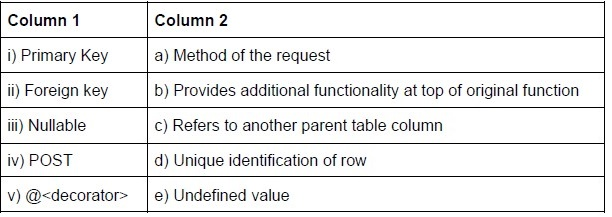 Consider the below table. Use the above table. Which of the below match is correct?
Consider the below table. Use the above table. Which of the below match is correct?Text of the picture (copyable)
| Column 1 | Column 2 |
|---|---|
| i) Primary Key | a) Method of the request |
| ii) Foreign key | b) Provides additional functionality at top of original function |
| iii) Nullable | c) Refers to another parent table column |
| iv) POST | d) Unique identification of row |
| v) @<decorator> | e) Undefined value |
- i - d, ii - b, iii - a, iv - e, v - c
- i - d, ii - c, iii - e, iv - a, v - b
- i - c, ii - d, iv - e, iii - a, v - b
- i - c, ii - d, iv - e, iii - b, v - a
A certain movie with advertisements is being streamed by the client on the internet with a bandwidth of 5 Mbps. If the total data consumed only in the advertisements is 340 MB and the advertisements comprises 17% of the total duration of the streamed movie, what can be the size of the entire movie (in Megabytes) including the advertisements?
- 20
- 640
- 2000
- 1660

Text of the picture (copyable)
Consider a document of 1000 characters written using only the characters of the character set L1 = {'a', 'b', 'c', 'd', 'e', 'f', 'g', 'h', 'i', 'j'}. If the character set L1 is to be upgraded by adding all the characters of character set L2 = {'0', '1', '2', '3', '4', '5', '6'} in it, By how many bits will the size of the original document increase?- 0 bits
- 1000 bits
- 4000 bits
- 5000 bits
The following Python code snippet generates the output on the terminal.
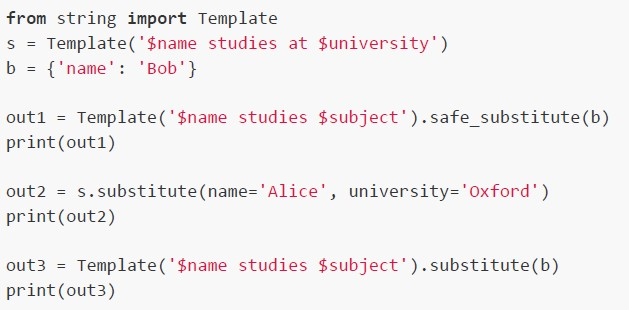 The following Python code snippet generates the output on the terminal. Which of the following is the correct output?
The following Python code snippet generates the output on the terminal. Which of the following is the correct output?Text of the picture (copyable)
```python
from string import Template

s = Template('$name studies at $university')
b = {'name': 'Bob'}

out1 = Template('$name studies $subject').safe_substitute(b)
print(out1)

out2 = s.substitute(name='Alice', university='Oxford')
print(out2)

out3 = Template('$name studies $subject').substitute(b)
print(out3)
```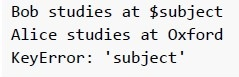
text
```
Bob studies at $subject
Alice studies at Oxford
KeyError: 'subject'
```
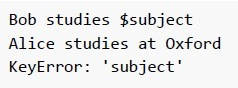
text
```
Bob studies $subject
Alice studies at Oxford
KeyError: 'subject'
```
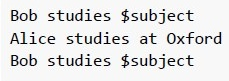
text
```
Bob studies $subject
Alice studies at Oxford
Bob studies $subject
```
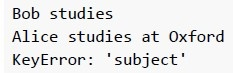
text
```
Bob studies
Alice studies at Oxford
KeyError: 'subject'
```
Consider the following HTML document.
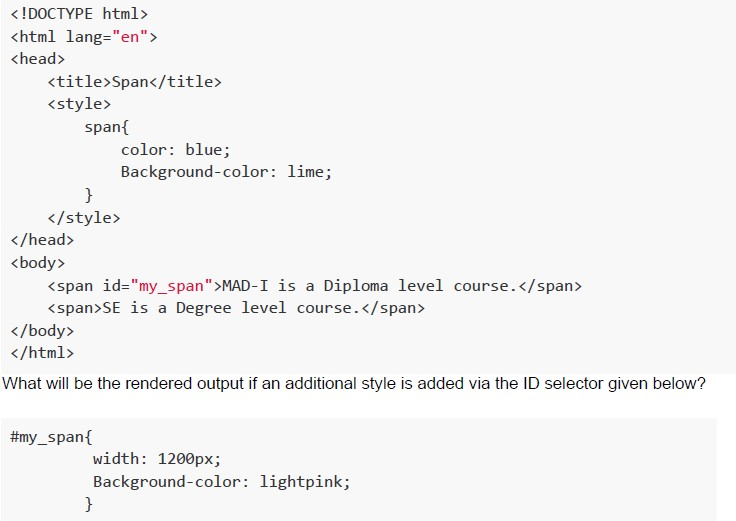 Consider the following HTML document.
Consider the following HTML document. Text of the picture (copyable)
```html
<!DOCTYPE html>
<html lang="en">
<head>
    <title>Span</title>
    <style>
        span{
            color: blue;
            Background-color: lime;
        }
    </style>
</head>
<body>
    <span id="my_span">MAD-I is a Diploma level course.</span>
    <span>SE is a Degree level course.</span>
</body>
</html>
```
What will be the rendered output if an additional style is added via the ID selector given below?

```css
#my_span{
    width: 1200px;
    Background-color: lightpink;
}
```
text
MAD-I is a Diploma level course. SE is a Degree level course.

text
MAD-I is a Diploma level course. SE is a Degree level course.

text
MAD-I is a Diploma level course. SE is a Degree level course.

text
MAD-I is a Diploma level course. SE is a Degree level course
Consider the following Python code snippet.
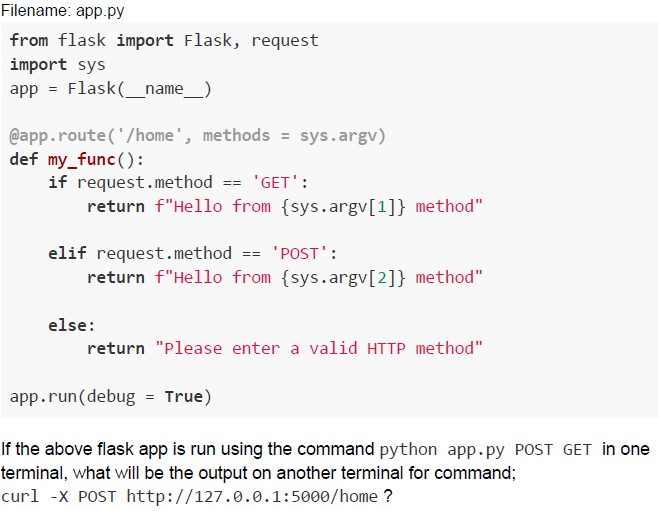 Consider the following Python code snippet.
Consider the following Python code snippet. Text of the picture (copyable)
Filename: app.py
```python
from flask import Flask, request
import sys
app = Flask(__name__)

@app.route('/home', methods = sys.argv)
def my_func():
    if request.method == 'GET':
        return f"Hello from {sys.argv[1]} method"

    elif request.method == 'POST':
        return f"Hello from {sys.argv[2]} method"

    else:
        return "Please enter a valid HTTP method"

app.run(debug = True)
```

If the above flask app is run using the command `python app.py POST GET` in one terminal, what will be the output on another terminal for command;
`curl -X POST http://127.0.0.1:5000/home ?`
text
Hello from POST method

text
Hello from GET method

text
Please enter a valid HTTP method

text
Method not Allowed
Consider the following Python code snippet.
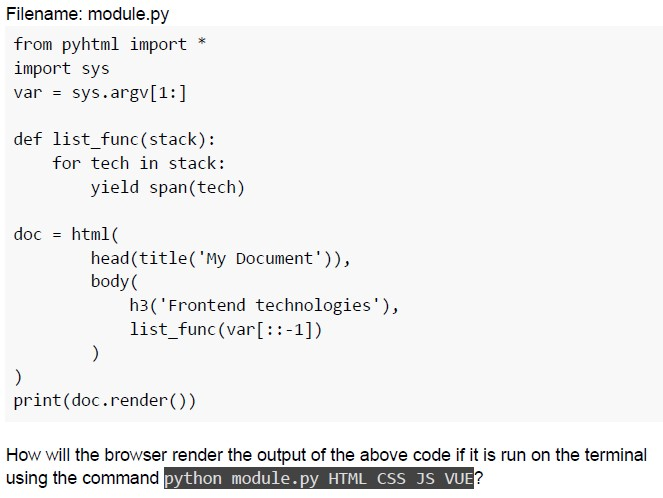 Consider the following Python code snippet.
Consider the following Python code snippet. Text of the picture (copyable)
Filename: module.py

```python
from pyhtml import *
import sys
var = sys.argv[1:]

def list_func(stack):
    for tech in stack:
        yield span(tech)

doc = html(
    head(title('My Document')),
    body(
        h3('Frontend technologies'),
        list_func(var[::-1])
    )
)

print(doc.render())
```

How will the browser render the output of the above code if it is run on the terminal using the command `python module.py HTML CSS JS VUE`?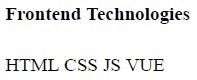
text
Frontend Technologies
HTML CSS JS VUE
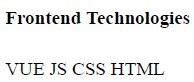
text
Frontend Technologies
VUE JS CSS HTML
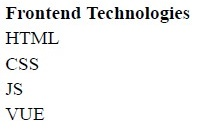
text
Frontend Technologies
HTML
CSS
JS
VUE
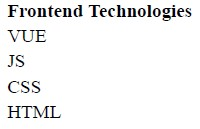
text
Frontend Technologies
VUE
JS
CSS
HTML
Consider the following HTML document.
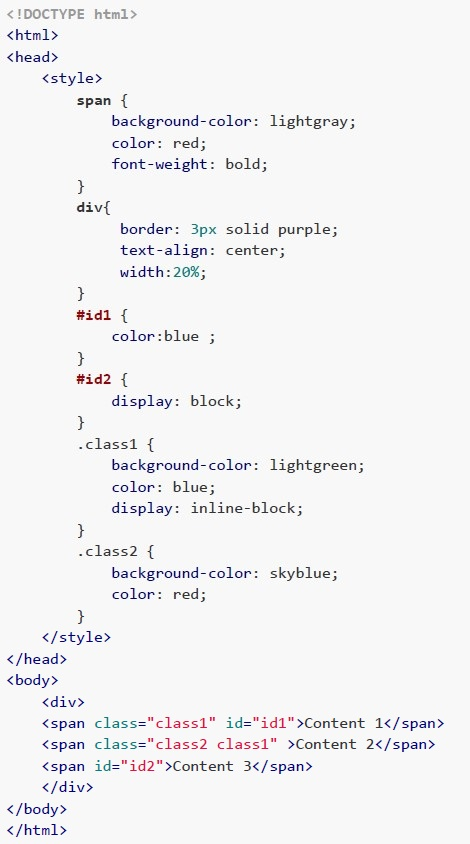 Consider the following HTML document. How will the browser render above HTML file?
Consider the following HTML document. How will the browser render above HTML file?Text of the picture (copyable)
```html
<!DOCTYPE html>
<html>
<head>
    <style>
        span {
            background-color: lightgray;
            color: red;
            font-weight: bold;
        }
        div {
            border: 3px solid purple;
            text-align: center;
            width:20%;
        }
        #id1 {
            color:blue ;
        }
        #id2 {
            display: block;
        }
        .class1 {
            background-color: lightgreen;
            color: blue;
            display: inline-block;
        }
        .class2 {
            background-color: skyblue;
            color: red;
        }
    </style>
</head>
<body>
    <div>
        <span class="class1" id="id1">Content 1</span>
        <span class="class2 class1" >Content 2</span>
        <span id="id2">Content 3</span>
    </div>
</body>
</html>
```
text
A horizontal rectangular box with a purple border. Inside, from left to right, there are three colored sections:
1. A green section with the text "Content 1" in blue.
2. A light blue section with the text "Content 2" in red.
3. A light gray section with the text "Content 3" in red.

text
The image displays a rectangular area with a purple border. Inside, the top half is white, and the bottom half is light gray.

Within the white top half, there are two colored rectangular blocks:
- A green block on the left, containing the text "Content 1" in blue.
- A light blue block on the right, containing the text "Content 2" in blue.

Within the light gray bottom half, there is the text "Content 3" in red, centered horizontally.

text
The image displays a rectangular box with a purple border. Inside, the top section is white, and the bottom section is light gray.

Within the white top section, there are two smaller rectangular boxes:
- The left box is light green and contains the text "Content 1" in blue.
- The right box is light blue and contains the text "Content 2" in red.

Within the light gray bottom section, there is the text "Content 3" in red, centered horizontally.
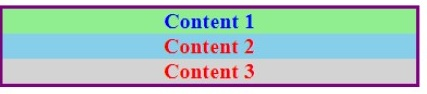
text
This is a diagram of a rectangular box divided horizontally into three sections.
The top section is light green and contains the text "Content 1" in blue.
The middle section is light blue and contains the text "Content 2" in red.
The bottom section is light gray and contains the text "Content 3" in red.
The entire box has a purple border.
Consider a client A that makes a request to server B that fetches the information from Datacenter C which in turn fetches other required information from the Datacenter D. The distance between the client A, server B and datacenters C and D within the network and the speed of information in the medium connecting these nodes is mentioned in the table below.
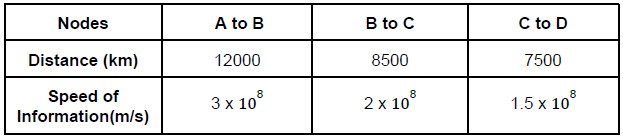 Consider a client A that makes a request to server B that fetches the information from Datacenter C which in turn fetches other required information from the Datacenter D. The distance between the client A, server B and datacenters C and D within the network and the speed of information in the medium connecting these nodes is mentioned in the table below. Calculate the round trip latency (in milliseconds) of the network?
Consider a client A that makes a request to server B that fetches the information from Datacenter C which in turn fetches other required information from the Datacenter D. The distance between the client A, server B and datacenters C and D within the network and the speed of information in the medium connecting these nodes is mentioned in the table below. Calculate the round trip latency (in milliseconds) of the network?Text of the picture (copyable)
| Nodes | A to B | B to C | C to D |
|---|---|---|---|
| Distance (km) | 12000 | 8500 | 7500 |
| Speed of Information(m/s) | 3 x 10⁸ | 2 x 10⁸ | 1.5 x 10⁸ |
- 187
- 132.5
- 265
- 150
Consider the following flask app and the bodies of two index.html files shown in the figure below.
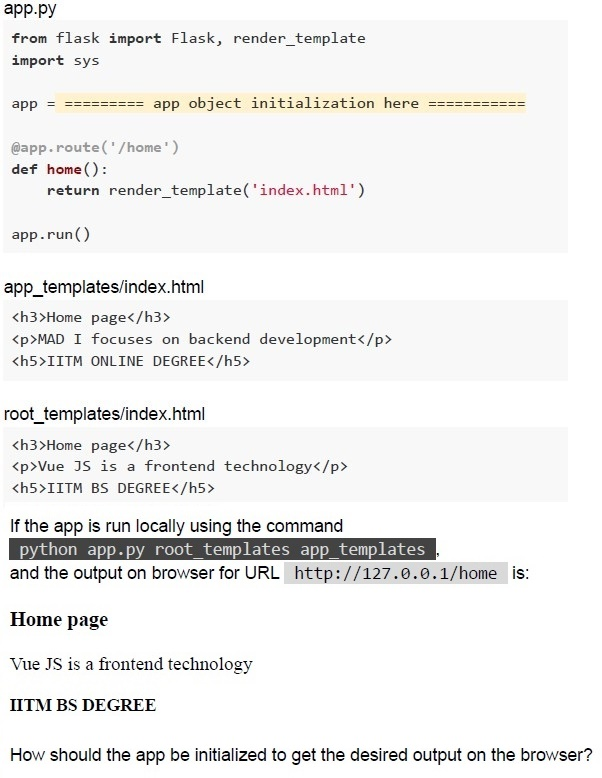 Consider the following flask app and the bodies of two index.html files shown in the figure below.
Consider the following flask app and the bodies of two index.html files shown in the figure below. Text of the picture (copyable)
app.py

```python
from flask import Flask, render_template
import sys

app = ========== app object initialization here ==========

@app.route('/home')
def home():
    return render_template('index.html')

app.run()
```

app_templates/index.html

```html
<h3>Home page</h3>
<p>MAD I focuses on backend development</p>
<h5>IITM ONLINE DEGREE</h5>
```

root_templates/index.html

```html
<h3>Home page</h3>
<p>Vue JS is a frontend technology</p>
<h5>IITM BS DEGREE</h5>
```

If the app is run locally using the command
`python app.py root_templates app_templates`
and the output on browser for URL `http://127.0.0.1/home` is:

Home page

Vue JS is a frontend technology

IITM BS DEGREE

How should the app be initialized to get the desired output on the browser?
text
```python
app = Flask(__name__)
```

text
```python
app = Flask(__name__, templates = sys.argv[1])
```

text
```python
app = Flask(__name__, templates = sys.argv[2])
```

text
```python
app = Flask(__name__, template_folder = sys.argv[1])
```

text
```python
app = Flask(__name__, template_folder = sys.argv[2])
```
What can be inferred from the Entity-Relationship Diagram below:
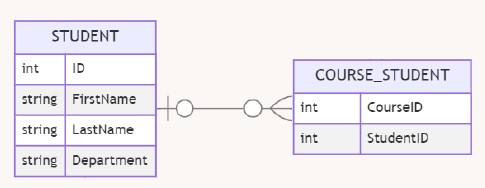 What can be inferred from the Entity-Relationship Diagram below:
What can be inferred from the Entity-Relationship Diagram below: Text of the picture (copyable)
This is an Entity-Relationship (ER) diagram showing two entities and a linking table.

Entity 1: STUDENT
| Type   | Field      |
| :----- | :--------- |
| int    | ID         |
| string | FirstName  |
| string | LastName   |
| string | Department |

Linking Table: COURSE_STUDENT
| Type | Field     |
| :--- | :-------- |
| int  | CourseID  |
| int  | StudentID |

There is a relationship line connecting STUDENT to COURSE_STUDENT.
The relationship from STUDENT to COURSE_STUDENT has a "one-to-many" cardinality, indicated by a vertical line and a circle on the STUDENT side, and a crow's foot and a circle on the COURSE_STUDENT side.
- A student can exist without enrolling to any course
- A student can have more than one courses
- A student needs to have at least one course
- A course must belong to one and only one student
Consider the following Flask code.
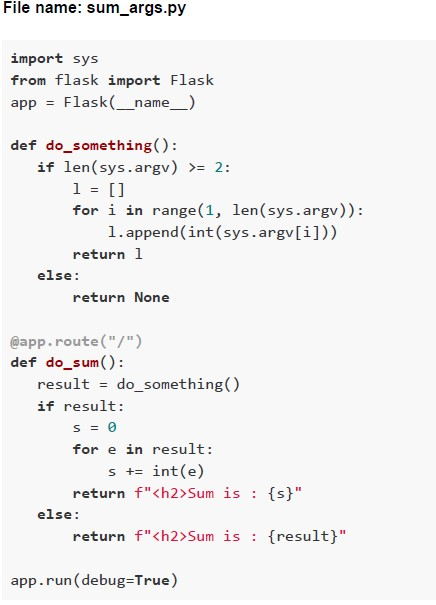 Consider the following Flask code. Select the command(s) to execute the above code without any error.
Consider the following Flask code. Select the command(s) to execute the above code without any error.Text of the picture (copyable)
File name: sum_args.py

```python
import sys
from flask import Flask
app = Flask(__name__)

def do_something():
    if len(sys.argv) >= 2:
        l = []
        for i in range(1, len(sys.argv)):
            l.append(int(sys.argv[i]))
        return l
    else:
        return None

@app.route("/")
def do_sum():
    result = do_something()
    if result:
        s = 0
        for e in result:
            s += int(e)
        return f"<h2>Sum is : {s}</h2>"
    else:
        return f"<h2>Sum is : {result}</h2>"

app.run(debug=True)
```
text
```
python sum_args.py 2 8 9
```

text
```
python sum_args.py 2
```

text
```
python sum_args.py
```

text
```
python sum_args.py IITM
```
Consider the following Python code and HTML document.
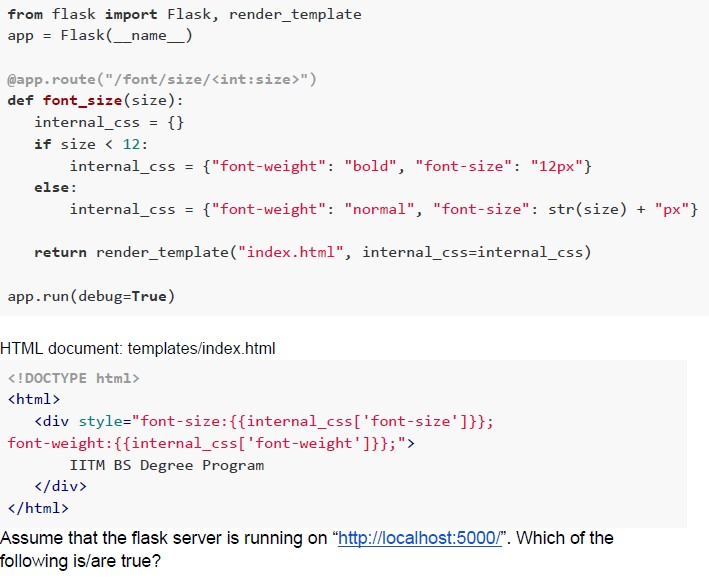 Consider the following Python code and HTML document.
Consider the following Python code and HTML document. Text of the picture (copyable)
```python
from flask import Flask, render_template
app = Flask(__name__)

@app.route("/font/size/<int:size>")
def font_size(size):
    internal_css = {}
    if size < 12:
        internal_css = {"font-weight": "bold", "font-size": "12px"}
    else:
        internal_css = {"font-weight": "normal", "font-size": str(size) + "px"}

    return render_template("index.html", internal_css=internal_css)

app.run(debug=True)
```

HTML document: templates/index.html
```html
<!DOCTYPE html>
<html>
    <div style="font-size:{{internal_css['font-size']}};
    font-weight:{{internal_css['font-weight']}};">
        IITM BS Degree Program
    </div>
</html>
```

Assume that the flask server is running on "http://localhost:5000/". Which of the following is/are true?
text
http://127.0.0.1:5000/font/size/20 will render "IITM BS Degree Program" with font-size=20 and font-weight=normal

text
http://127.0.0.1:5000/font/size/24 will render "IITM BS Degree Program" with
font-size=24 and font-weight=bold

text
http://127.0.0.1:5000/font/size/8 will render "IITM BS Degree Program" with font-size=12 and font-weight=bold

text
http://127.0.0.1:5000/font/size/16 will render "IITM BS Degree Program" with
font-size=16 and font-weight=normal
Answer key
- Q1 (MCQ, 2 marks): D
- Q2 (MCQ, 2 marks): B
- Q3 (MCQ, 2 marks): C
- Q4 (MCQ, 2 marks): B
- Q5 (MCQ, 3 marks): C
- Q6 (MCQ, 3 marks): B
- Q7 (MCQ, 3 marks): B
- Q8 (MCQ, 3 marks): B
- Q9 (MCQ, 3 marks): B
- Q10 (MCQ, 3 marks): B
- Q11 (MCQ, 4.5 marks): C
- Q12 (MCQ, 4.5 marks): C
- Q13 (MCQ, 4.5 marks): D
- Q14 (MSQ, 3 marks): A, B
- Q15 (MSQ, 3 marks): A, B, C
- Q16 (MSQ, 4.5 marks): A, C, D
Concepts this paper tests
Auto-generated summary from the source site. Handy as a checklist; the lessons above explain each idea from scratch.
Summary of Core Topics, Concepts, Principles, and Equations
1. Web Accessibility Principles
- Perceivable: Provide text alternatives for non-text content, captions for multimedia, and make content easy to see and hear.
- Operable: Ensure users have enough time to read and use content.
2. HTTP Status Codes
- 100-199: Informational responses
- 200-299: Successful responses
- 300-399: Redirection messages
- 400-499: Client error responses
- 500-599: Server error responses
3. Python and Jinja2 Templating
- Jinja2 Template Syntax:
{{ variable }}for variable substitution. - Python Functions: Defining and calling functions, using dictionaries, and template rendering.
4. Database Concepts
- Primary Key: Unique identification of a row.
- Foreign Key: Refers to another parent table column.
- Nullable: Allows undefined values.
- HTTP Methods: POST method for sending data to a server.
5. Network Calculations
- Bandwidth and Data Consumption: Calculating total data size based on given percentages and bandwidth.
- Character Encoding: Calculating bits required for character sets and document size.
- Round Trip Latency: Calculating latency based on distance and speed of information.
6. Flask and Web Development
- Flask Routes and Methods: Handling different HTTP methods (GET, POST).
- Template Rendering: Using
render_templateto render HTML templates. - Command-Line Arguments: Using
sys.argvto pass arguments to a Python script.
7. HTML and CSS
- HTML Structure: Basic structure of an HTML document.
- CSS Styling: Using internal and external CSS for styling HTML elements.
- CSS Selectors: Using ID and class selectors to apply styles.
8. Entity-Relationship Diagrams (ERD)
- Relationships: Understanding one-to-many and many-to-many relationships.
- Inferences: Drawing inferences from ER diagrams about data relationships.
Equations
Network Calculations
Round Trip Latency (RTT): \[ \text{RTT} = 2 \times \left( \frac{\text{Distance}}{\text{Speed of Information}} \right) \]
- Convert distance to meters and speed to meters per second.
- Calculate time for each segment and sum them up.
Character Encoding
Bits per Character: \[ \text{Bits per Character} = \log_2(\text{Number of Characters}) \]
- Calculate the number of bits required to represent each character in a set.
- Multiply by the number of characters in the document to find the total bits.
Core Topics and Relationships
Detailed Concepts in Web Development
These graphs and summaries should help you understand the core topics and their relationships, making it easier to prepare for the exam.