Home / Past papers / MAD1 Quiz 1 / this paper
IIT M FOUNDATION AN4 EXAM QPF4 16 JULY 2023 - 16 Jul 2023
Elapsed 00:00
Which of the following statements is/are true?
- HTTP headers (for example “Content-Type”) are case-sensitive
- The body/payload in an HTTP request is mandatory
- The “Content-Length” header indicates the size of the request body in bytes
- All of these
Text of the picture (copyable)
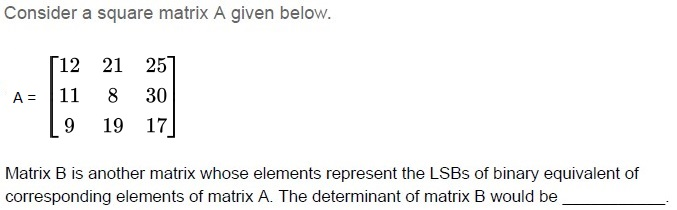
Consider a square matrix A given below.

A =
```
⎡ 12  21  25 ⎤
⎢ 11   8  30 ⎥
⎣  9  19  17 ⎦
```

Matrix B is another matrix whose elements represent the LSBs of binary equivalent of corresponding elements of matrix A. The determinant of matrix B would be __________.
- 0
- 1
- 2
- 3
Text of the picture (copyable)
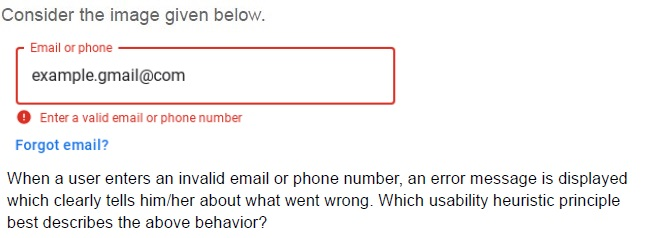
Consider the image given below.

Email or phone
example.gmail@com

! Enter a valid email or phone number

Forgot email?

When a user enters an invalid email or phone number, an error message is displayed which clearly tells him/her about what went wrong. Which usability heuristic principle best describes the above behavior?
- Aesthetic and minimalist design
- User control and freedom
- User diagnosis and recovery from errors
- Flexibility and ease of use
Text of the picture (copyable)
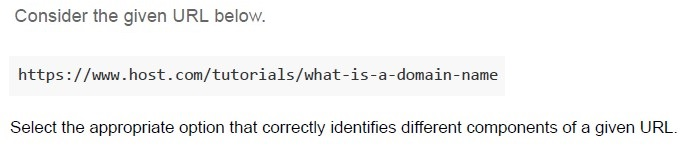
Consider the given URL below.

```
https://www.host.com/tutorials/what-is-a-domain-name
```

Select the appropriate option that correctly identifies different components of a given URL.
text
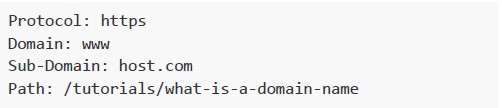
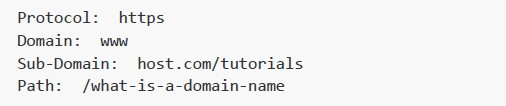
Protocol: https
Domain: www
Sub-Domain: host.com
Path: /tutorials/what-is-a-domain-name
text
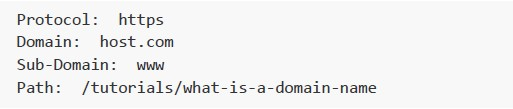
Protocol: https
Domain: www
Sub-Domain: host.com/tutorials
Path: /what-is-a-domain-name
text
```
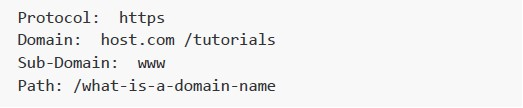
Protocol: https
Domain: host.com
Sub-Domain: www
Path: /tutorials/what-is-a-domain-name
```
text
```
Protocol: https
Domain: host.com /tutorials
Sub-Domain: www
Path: /what-is-a-domain-name
```
Text of the picture (copyable)
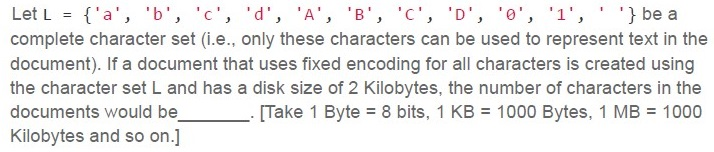
Let L = { 'a', 'b', 'c', 'd', 'A', 'B', 'C', 'D', '0', '1', ' ', ' '} be a complete character set (i.e., only these characters can be used to represent text in the document). If a document that uses fixed encoding for all characters is created using the character set L and has a disk size of 2 Kilobytes, the number of characters in the documents would be ______. [Take 1 Byte = 8 bits, 1 KB = 1000 Bytes, 1 MB = 1000 Kilobytes and so on.]- 2000
- 4000
- 8000
- 16000
A mobile client starts from and is cruising away continuously at 60 kmph from the network tower whose network range is 40 km and bandwidth is 120 Mbps. How much data (in Gigabytes) will be consumed by the client who is continuously using the entire bandwidth before completely moving out of the network? [Take 1 Byte = 8 bits, 1 KB = 1000 Bytes, 1 MB = 1000 Kilobytes and so on.] [Consider the speed of light in air to be 3 x 10⁸ m/sec.]
- 24
- 28.8
- 36
- 288
What will be the output of the following Python code snippet on the terminal.
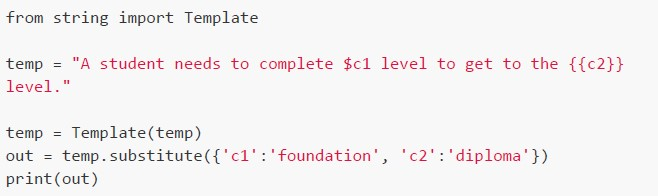 What will be the output of the following Python code snippet on the terminal.
What will be the output of the following Python code snippet on the terminal. Text of the picture (copyable)
```python
from string import Template

temp = "A student needs to complete $c1 level to get to the {{c2}} level."

temp = Template(temp)
out = temp.substitute({'c1':'foundation', 'c2':'diploma'})
print(out)
```
text
A student needs to complete $c1 level to get to the diploma level.

text
A student needs to complete foundation level to get to the
{{c2}} level.
text
A student needs to complete foundation level to get to the diploma level.
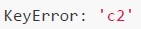
text
```
KeyError: 'c2'
```
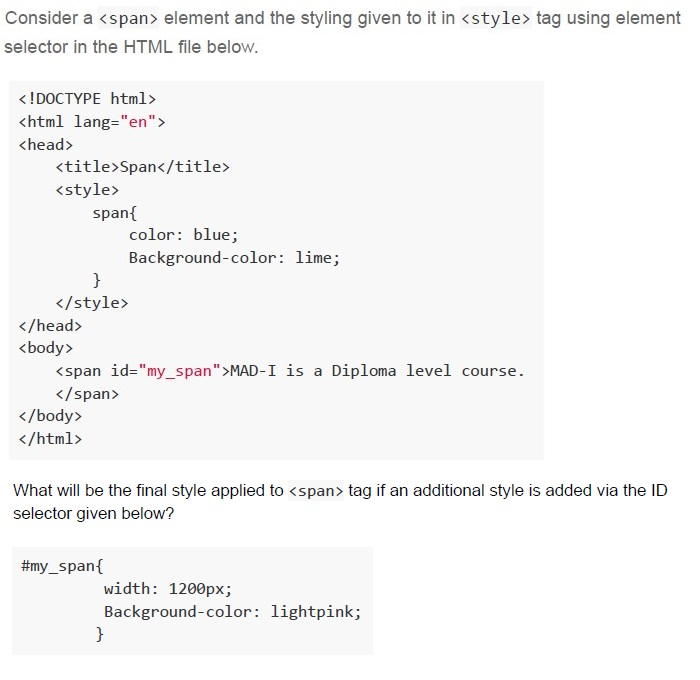
Text of the picture (copyable)
Consider a `<span>` element and the styling given to it in `<style>` tag using element selector in the HTML file below.

```html
<!DOCTYPE html>
<html lang="en">
<head>
    <title>Span</title>
    <style>
        span{
            color: blue;
            Background-color: lime;
        }
    </style>
</head>
<body>
    <span id="my_span">MAD-I is a Diploma level course.</span>
</body>
</html>
```

What will be the final style applied to `<span>` tag if an additional style is added via the ID selector given below?

```css
#my_span{
    width: 1200px;
    Background-color: lightpink;
}
```
text
```css
color: blue;
Background-color: lightpink;
```
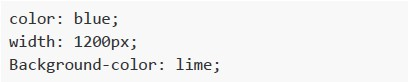
text
```css
color: blue;
width: 1200px;
Background-color: lime;
```

text
```css
color: blue;
width: 1200px;
Background-color: lightpink;
```

text
```css
width: 1200px;
Background-color: lightpink;
```
What is the correct sequence of working of Client-Server Architecture. a. The client asks for the IP address for the particular server from the Domain Name system. b. To that IP address, the client sends the request to the particular server with that port number that is specified to the particular application and then server responds c. The DNS server responds with the IP address. d. The response message is received by the client and based on that port number, the response packet is consumed by the application to which it belongs.
- c → a → b → d
- a → b → c → d
- a → c → b → d
- None
Consider the following HTML document.
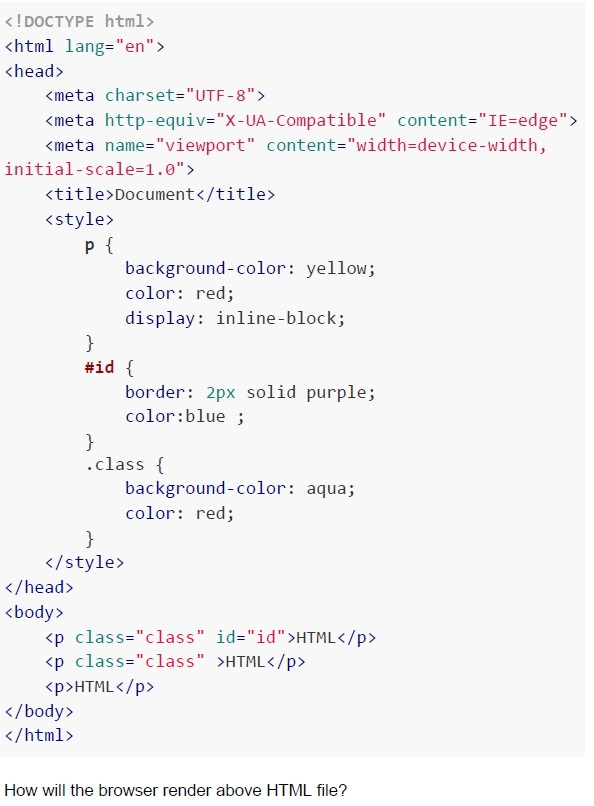 Consider the following HTML document.
Consider the following HTML document. Text of the picture (copyable)
```html
<!DOCTYPE html>
<html lang="en">
<head>
    <meta charset="UTF-8">
    <meta http-equiv="X-UA-Compatible" content="IE=edge">
    <meta name="viewport" content="width=device-width, initial-scale=1.0">
    <title>Document</title>
    <style>
        p {
            background-color: yellow;
            color: red;
            display: inline-block;
        }
        #id {
            border: 2px solid purple;
            color:blue ;
        }
        .class {
            background-color: aqua;
            color: red;
        }
    </style>
</head>
<body>
    <p class="class" id="id">HTML</p>
    <p class="class" >HTML</p>
    <p>HTML</p>
</body>
</html>
```
How will the browser render above HTML file?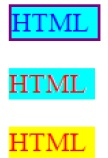
text
The image displays three rectangular boxes stacked vertically, each containing the text "HTML".

1.  **Top box:** Cyan background, blue text, purple border.
2.  **Middle box:** Cyan background, red text, no visible border.
3.  **Bottom box:** Yellow background, red text, no visible border.

text
The image displays three rectangular boxes, each containing the text "HTML".

1.  **Left Box:** A light blue rectangle with the text "HTML" in red. The text appears slightly blurred.
2.  **Middle Box:** A light blue rectangle with a purple border. The text "HTML" is in blue.
3.  **Right Box:** A yellow rectangle with the text "HTML" in red, with a gradient effect making it appear orange/yellow in some parts. The text also appears slightly blurred.

text
The image displays three rectangular blocks, each containing the text "HTML".

1.  **Left Block:** A cyan rectangle with a purple border. The text "HTML" is in blue.
2.  **Middle Block:** A cyan rectangle with no border. The text "HTML" is in red.
3.  **Right Block:** A yellow rectangle with no border. The text "HTML" is in red.

text
The image displays three rectangular blocks, each containing the text "HTML".

1.  **Left block:** A cyan-colored rectangle with the text "HTML" in red. The text has a slight shadow effect.
2.  **Middle block:** A yellow-colored rectangle with the text "HTML" in red. The text also has a slight shadow effect.
3.  **Right block:** A cyan-colored rectangle with a purple border. The text "HTML" is in blue and has a slight shadow effect.
Consider the following Python code snippet.
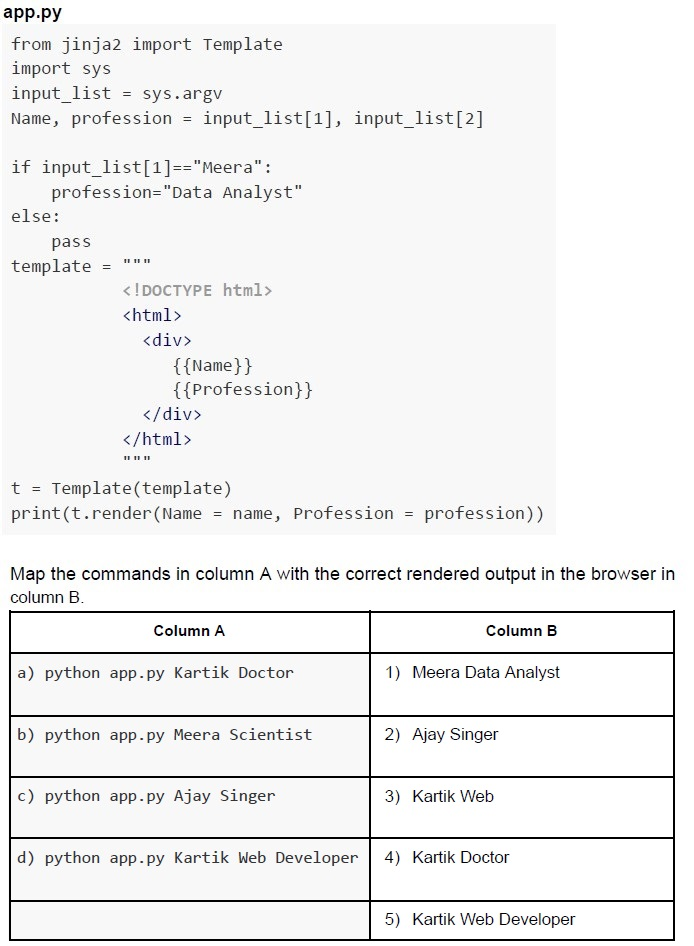 Consider the following Python code snippet.
Consider the following Python code snippet. Text of the picture (copyable)
app.py

```python
from jinja2 import Template
import sys
input_list = sys.argv
Name, profession = input_list[1], input_list[2]

if input_list[1]=="Meera":
    profession="Data Analyst"
else:
    pass
template = """
<!DOCTYPE html>
<html>
<div>
    {{Name}}
    {{Profession}}
</div>
</html>
"""

t = Template(template)
print(t.render(Name = name, Profession = profession))
```

Map the commands in column A with the correct rendered output in the browser in column B.

| Column A | Column B |
|---|---|
| a) python app.py Kartik Doctor | 1) Meera Data Analyst |
| b) python app.py Meera Scientist | 2) Ajay Singer |
| c) python app.py Ajay Singer | 3) Kartik Web |
| d) python app.py Kartik Web Developer | 4) Kartik Doctor |
| | 5) Kartik Web Developer |- a - 4, b - 1, c - 2, d - 5
- a - 3, b - 2, c - 1, d - 4
- a - 4, b - 1, c - 2, d - 3
- a - 5, b - 1, c - 3, d - 2
Consider the following Python code snippet:
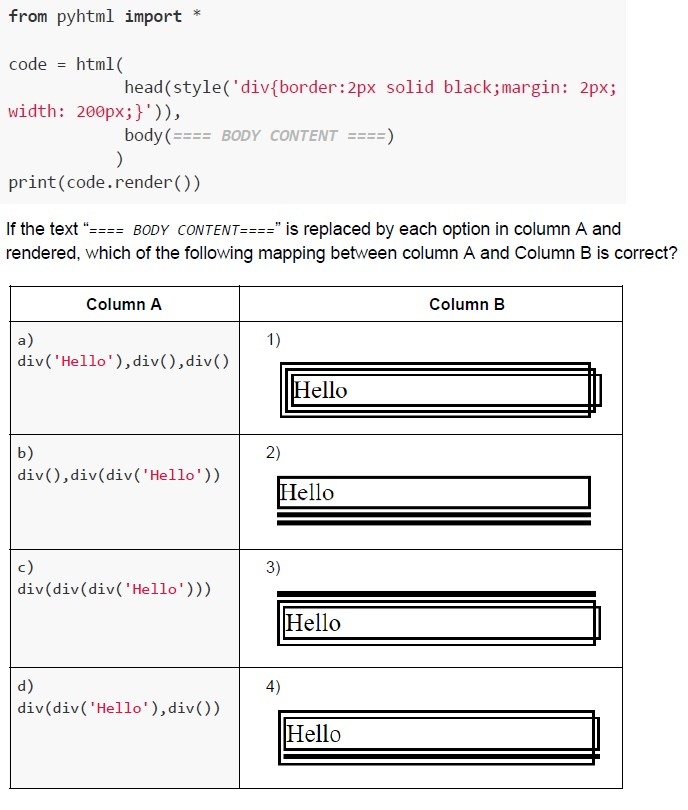 Consider the following Python code snippet:
Consider the following Python code snippet: Text of the picture (copyable)
```python
from pyhtml import *

code = html(
    head(style('div{border:2px solid black;margin: 2px; width: 200px;}')),
    body(==== BODY CONTENT ====)
)
print(code.render())
```
If the text "==== BODY CONTENT ====" is replaced by each option in column A and rendered, which of the following mapping between column A and Column B is correct?

| Column A | Column B |
|---|---|
| a) div('Hello'),div(),div() | 1) Hello (three overlapping rectangles around "Hello") |
| b) div(),div(div('Hello')) | 2) Hello (one rectangle around "Hello", with three horizontal lines below it) |
| c) div(div(div('Hello'))) | 3) Hello (three concentric rectangles around "Hello") |
| d) div(div('Hello'),div()) | 4) Hello (two overlapping rectangles around "Hello") |- a - 1, b - 3, c - 4, d - 2
- a - 2, b - 3, c - 1, d - 4
- a - 3, b - 1, c - 2, d - 4
- a - 4, b - 2, c - 1, d - 3
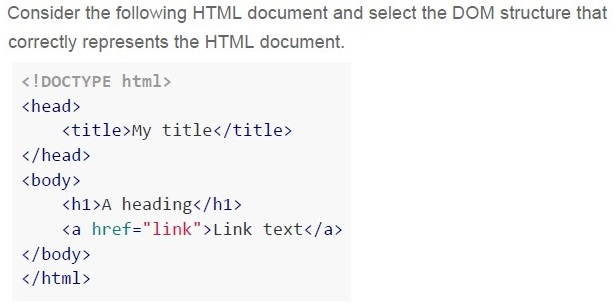
Text of the picture (copyable)
Consider the following HTML document and select the DOM structure that
correctly represents the HTML document.

```html
<!DOCTYPE html>
<head>
    <title>My title</title>
</head>
<body>
    <h1>A heading</h1>
    <a href="link">Link text</a>
</body>
</html>
```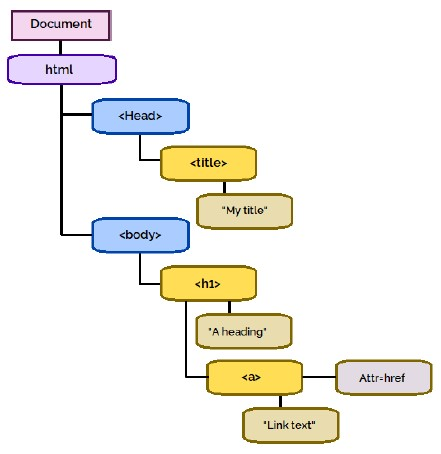
text
This is a diagram representing a hierarchical structure, likely a Document Object Model (DOM) tree for an HTML document.

The diagram consists of several rounded rectangular nodes connected by lines, indicating parent-child relationships.

- **Document** (pink node) is at the top.
  - It connects to **html** (purple node).
    - **html** connects to two blue nodes: **<Head>** and **<body>**.
      - **<Head>** connects to **<title>** (yellow node).
        - **<title>** connects to **"My title"** (brown node).
      - **<body>** connects to **<h1>** (yellow node).
        - **<h1>** connects to **'A heading'** (brown node).
        - **<h1>** also connects to **<a>** (yellow node).
          - **<a>** connects to **"Link text"** (brown node).
          - **<a>** also connects to **Attr=href** (purple node) via a horizontal line.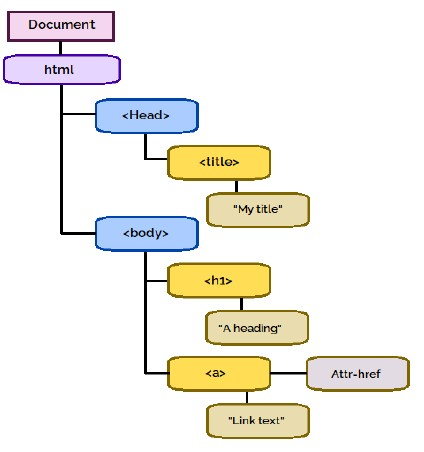
text
This is a tree diagram representing the structure of an HTML document.

The root node is a pink rectangle labeled "Document".
An arrow points from "Document" to a purple rounded rectangle labeled "html".

From "html", two arrows point to:
1. A blue rounded rectangle labeled "<Head>"
2. A blue rounded rectangle labeled "<body>"

From "<Head>", an arrow points to a yellow rounded rectangle labeled "<title>".
From "<title>", an arrow points to a beige rounded rectangle labeled "\"My title\"".

From "<body>", two arrows point to:
1. A yellow rounded rectangle labeled "<h1>"
2. A yellow rounded rectangle labeled "<a>"

From "<h1>", an arrow points to a beige rounded rectangle labeled "\"A heading\"".

From "<a>", two arrows point to:
1. A beige rounded rectangle labeled "\"Link text\""
2. A light purple rounded rectangle labeled "Attr-href"
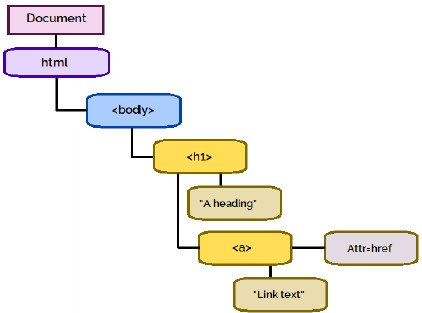
text
This is a diagram representing a hierarchical structure, likely an HTML DOM tree.

The diagram shows the following elements and their relationships:
- A pink rounded rectangle labeled "Document" at the top.
- A black line connects "Document" to a purple rounded rectangle labeled "html".
- A black line connects "html" to a blue rounded rectangle labeled "<body>".
- A black line connects "<body>" to a yellow rounded rectangle labeled "<h1>".
- A black line connects "<h1>" to a yellow rounded rectangle labeled ""A heading"".
- A black line connects "<h1>" to another yellow rounded rectangle labeled "<a>".
- A black line connects "<a>" to a yellow rounded rectangle labeled ""Link text"".
- A black line connects "<a>" to a light purple rounded rectangle labeled "Attr=href".
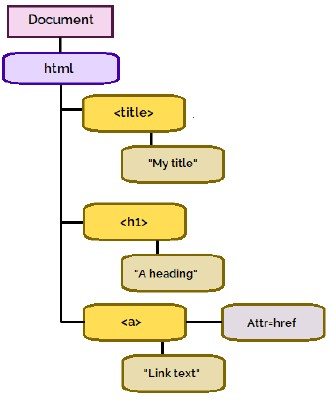
text
This is a diagram representing a Document Object Model (DOM) tree.

The root node is "Document" (pink rectangle).
An arrow points from "Document" to "html" (purple rounded rectangle).
From "html", there are three branches:
1. An arrow points to "<title>" (yellow rounded rectangle).
   An arrow points from "<title>" to "\"My title\"" (brown rounded rectangle).
2. An arrow points to "<h1>" (yellow rounded rectangle).
   An arrow points from "<h1>" to "\"A heading\"" (brown rounded rectangle).
3. An arrow points to "<a>" (yellow rounded rectangle).
   From "<a>", there are two branches:
   a. An arrow points to "\"Link text\"" (brown rounded rectangle).
   b. An arrow points to "Attr=href" (purple rounded rectangle).
Consider the following Python code snippet.
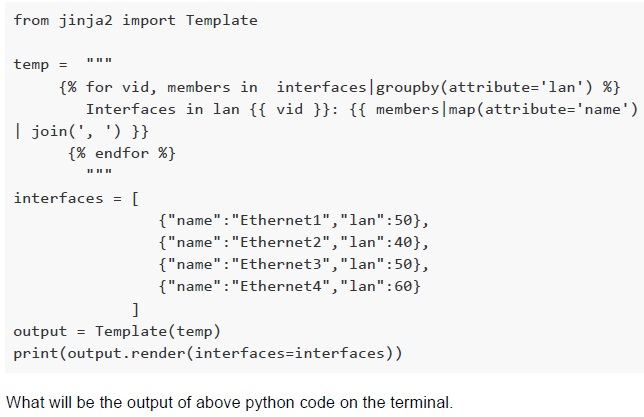 Consider the following Python code snippet.
Consider the following Python code snippet. Text of the picture (copyable)
```python
from jinja2 import Template

temp = """
{% for vid, members in interfaces|groupby(attribute='lan') %}
    Interfaces in lan {{ vid }}: {{ members|map(attribute='name')
    | join(', ') }}
{% endfor %}
"""

interfaces = [
    {"name":"Ethernet1","lan":50},
    {"name":"Ethernet2","lan":40},
    {"name":"Ethernet3","lan":50},
    {"name":"Ethernet4","lan":60}
]

output = Template(temp)
print(output.render(interfaces=interfaces))
```

What will be the output of above python code on the terminal.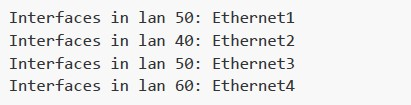
text
Interfaces in lan 50: Ethernet1
Interfaces in lan 40: Ethernet2
Interfaces in lan 50: Ethernet3
Interfaces in lan 60: Ethernet4

text
Interfaces in lan 40: Ethernet1, Ethernet3
Interfaces in lan 50: Ethernet2
Interfaces in lan 60: Ethernet4

text
Interfaces in lan 40: Ethernet2
Interfaces in lan 50: Ethernet1, Ethernet4
Interfaces in lan 60: Ethernet3

text
Interfaces in lan 40: Ethernet2
Interfaces in lan 50: Ethernet1, Ethernet3
Interfaces in lan 60: Ethernet4
Comprehension passage - the questions below it refer to this
A Flask application and its absolute path is given below.
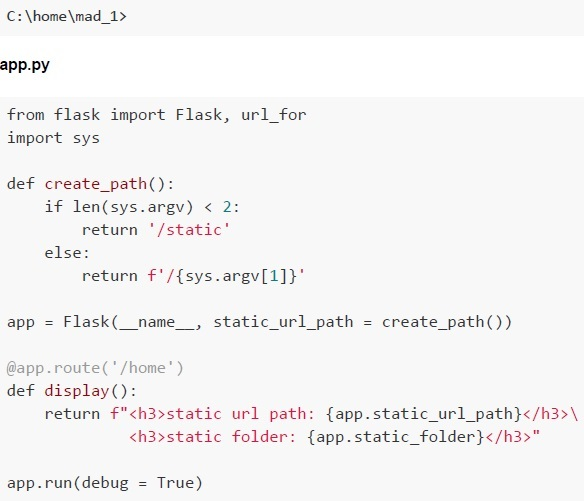 A Flask application and its absolute path is given below. Based on the above data, answer the given subquestions.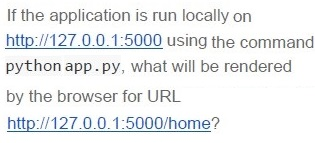
Text of the picture (copyable)
If the application is run locally on
http://127.0.0.1:5000 using the command
python app.py, what will be rendered
by the browser for URL
http://127.0.0.1:5000/home?

text
static url path: C:\home\mad_1\static
static folder: /static
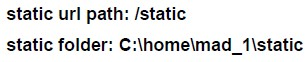
text
static url path: /static
static folder: C:\home\mad_1\static

text
static url path: /stable
static folder: C:\home\mad_1\stable
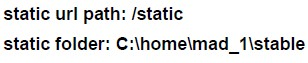
text
static url path: /static
static folder: C:\home\mad_1\stable
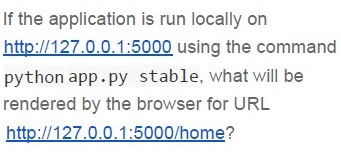
Text of the picture (copyable)
If the application is run locally on
http://127.0.0.1:5000 using the command
python app.py stable, what will be
rendered by the browser for URL
http://127.0.0.1:5000/home?

text
static url path: /static
static folder: C:\home\mad_1\static

text
static url path: /stable
static folder: C:\home\mad_1\stable

text
static url path: C:\home\mad_1\stable
static folder: /stable

text
static url path: /stable
static folder: C:\home\mad_1\static
Answer key
- Q1 (MCQ, 2 marks): C
- Q2 (MCQ, 2 marks): A
- Q3 (MCQ, 2 marks): C
- Q4 (MCQ, 2 marks): C
- Q5 (MCQ, 3 marks): B
- Q6 (MCQ, 3 marks): C
- Q7 (MCQ, 3 marks): B
- Q8 (MCQ, 3 marks): A
- Q9 (MCQ, 3 marks): C
- Q10 (MCQ, 3 marks): C
- Q11 (MCQ, 3 marks): C
- Q12 (MCQ, 4.5 marks): B
- Q13 (MCQ, 4.5 marks): B
- Q14 (MCQ, 4.5 marks): D
- Q15 (MCQ, 3 marks): B
- Q16 (MCQ, 4.5 marks): D
Concepts this paper tests
Auto-generated summary from the source site. Handy as a checklist; the lessons above explain each idea from scratch.
Summary of Core Topics and Concepts
1. HTTP Protocol
- Concepts: HTTP headers, request body, Content-Type, Content-Length.
- Principles: HTTP headers are case-insensitive, the request body is not always mandatory.
- Equations: None.
2. Usability Heuristics
- Concepts: Error prevention, visibility of system status, user control and freedom, user diagnosis and recovery from errors.
- Principles: Inform users about errors and system status clearly.
- Equations: None.
3. URL Structure
- Concepts: Components of a URL (protocol, domain, path, query parameters).
- Principles: Understanding the structure and components of URLs.
- Equations: None.
4. Character Encoding and Disk Size
- Concepts: Character sets, fixed encoding, disk size calculation.
- Principles: Calculate the number of characters based on disk size and encoding.
- Equations: \[ \text{Number of characters} = \frac{\text{Disk size in bytes}}{\text{Bytes per character}} \]
5. Network Bandwidth and Data Consumption
- Concepts: Bandwidth, network range, data consumption.
- Principles: Calculate data consumption based on bandwidth and time within network range.
- Equations: \[ \text{Time in network range} = \frac{\text{Network range}}{\text{Speed}} \] \[ \text{Data consumed} = \text{Bandwidth} \times \text{Time in network range} \]
6. Python String Template
- Concepts: String templating, substitution.
- Principles: Use templates to substitute variables in strings.
- Equations: None.
7. CSS Specificity
- Concepts: CSS selectors, specificity, ID selectors, element selectors.
- Principles: ID selectors have higher specificity than element selectors.
- Equations: None.
8. Client-Server Architecture
- Concepts: DNS, IP addresses, client-server communication.
- Principles: Sequence of steps in client-server communication.
- Equations: None.
9. HTML and CSS Rendering
- Concepts: HTML elements, CSS properties, rendering.
- Principles: How browsers render HTML and CSS.
- Equations: None.
10. Jinja2 Templating
- Concepts: Template rendering, variable substitution.
- Principles: Use Jinja2 to render templates with dynamic content.
- Equations: None.
11. Flask Application
- Concepts: Flask routes, static files, URL paths.
- Principles: Configure and run a Flask application.
- Equations: None.