Home / Past papers / MAD1 Quiz 2 / this paper
IIT M DIPLOMA AN4 EXAM QDD4 03 Dec 2023 - 03 Dec 2023
Elapsed 00:00
Text of the picture (copyable)
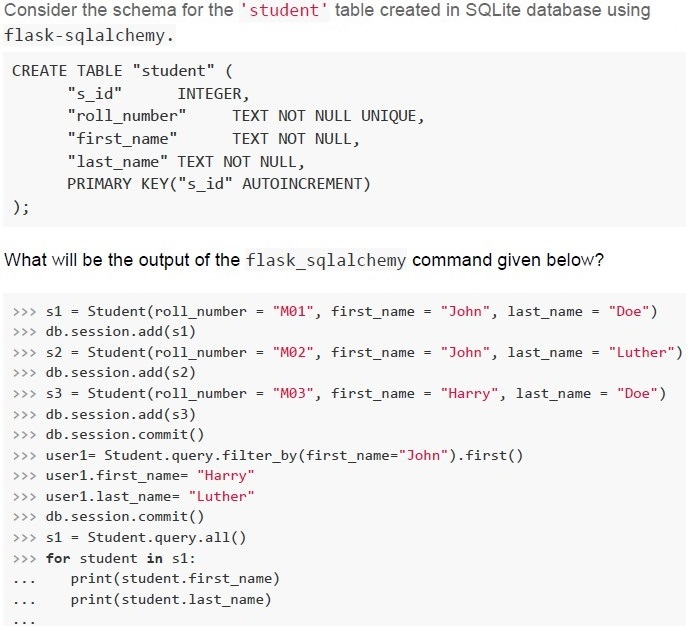
Consider the schema for the 'student' table created in SQLite database using
flask-sqlalchemy.

```sql
CREATE TABLE "student" (
    "s_id"          INTEGER,
    "roll_number"   TEXT NOT NULL UNIQUE,
    "first_name"    TEXT NOT NULL,
    "last_name" TEXT NOT NULL,
    PRIMARY KEY("s_id" AUTOINCREMENT)
);
```

What will be the output of the flask_sqlalchemy command given below?

```python
>>> s1 = Student(roll_number = "M01", first_name = "John", last_name = "Doe")
>>> db.session.add(s1)
>>> s2 = Student(roll_number = "M02", first_name = "John", last_name = "Luther")
>>> db.session.add(s2)
>>> s3 = Student(roll_number = "M03", first_name = "Harry", last_name = "Doe")
>>> db.session.add(s3)
>>> db.session.commit()
>>> user1= Student.query.filter_by(first_name="John").first()
>>> user1.first_name= "Harry"
>>> user1.last_name= "Luther"
>>> db.session.commit()
>>> s1 = Student.query.all()
>>> for student in s1:
...     print(student.first_name)
...     print(student.last_name)
```
text
Harry
Luther
Harry
Luther
Harry
Doe
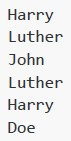
text
Harry
Luther
John
Luther
Harry
Doe

text
Harry
Luther
Harry
Doe
Harry
Doe
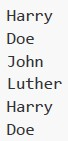
text
Harry
Doe
John
Luther
Harry
Doe
Consider the following flask application.
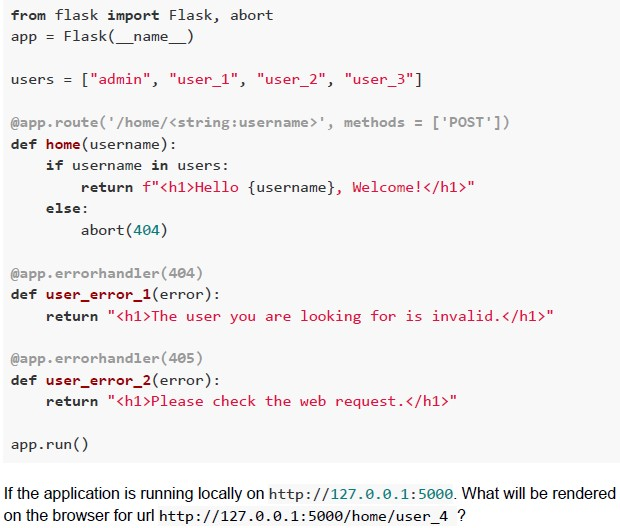 Consider the following flask application.
Consider the following flask application. Text of the picture (copyable)
```python
from flask import Flask, abort
app = Flask(__name__)

users = ["admin", "user_1", "user_2", "user_3"]

@app.route('/home/<string:username>', methods = ['POST'])
def home(username):
    if username in users:
        return f"<h1>Hello {username}, Welcome!</h1>"
    else:
        abort(404)

@app.errorhandler(404)
def user_error_1(error):
    return "<h1>The user you are looking for is invalid.</h1>"

@app.errorhandler(405)
def user_error_2(error):
    return "<h1>Please check the web request.</h1>"

app.run()
```

If the application is running locally on http://127.0.0.1:5000. What will be rendered on the browser for url http://127.0.0.1:5000/home/user_4 ?
text
Hello user_4, Welcome!

text
The user you are looking for is invalid.
text
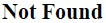
Not Found

text
Please check the web request
Text of the picture (copyable)
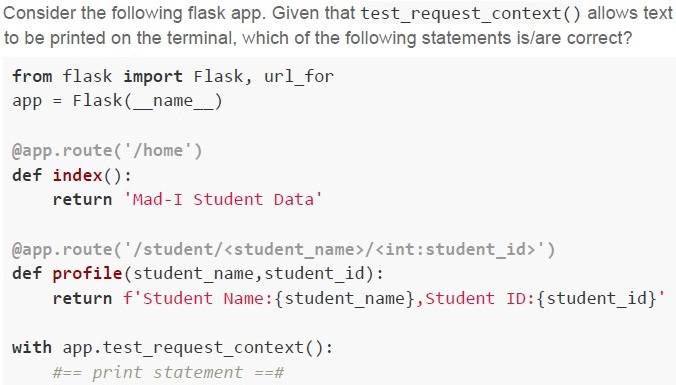
Consider the following flask app. Given that test_request_context() allows text to be printed on the terminal, which of the following statements is/are correct?

```python
from flask import Flask, url_for
app = Flask(__name__)

@app.route('/home')
def index():
    return 'Mad-I Student Data'

@app.route('/student/<student_name>/<int:student_id>')
def profile(student_name,student_id):
    return f'Student Name:{student_name},Student ID:{student_id}'

with app.test_request_context():
    #== print statement ==#
```
text
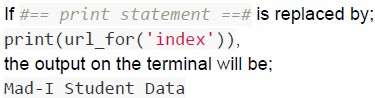
If `print statement` is replaced by:
```python
print(url_for('index')),
```
the output on the terminal will be:
Mad-I Student Data
text
If #=== print statement ===# is replaced by;
```python
print(url_for('profile', student_name='John', student_id=101)),
```
the output on the terminal will be;
/student?student_name=John&student_id=101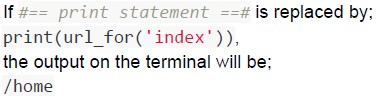
text
If #== print statement ==# is replaced by;
```python
print(url_for('index')),
```
the output on the terminal will be;
/home
text
If #== print statement ==# is replaced by;
```python
print(url_for('profile',student_name='John',student_id=101))
```
the output on the terminal will be;
/student/John/101
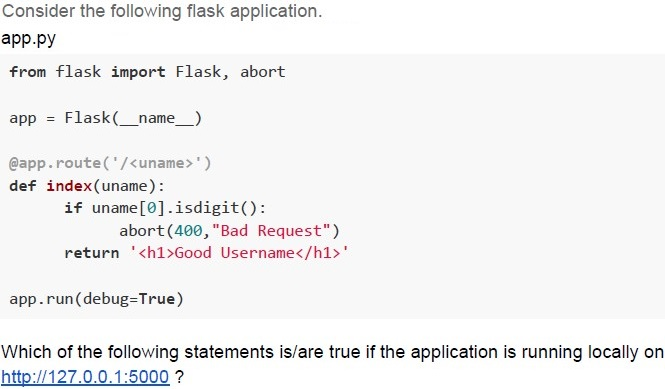
Text of the picture (copyable)
Consider the following flask application.
app.py

```python
from flask import Flask, abort

app = Flask(__name__)

@app.route('/<uname>')
def index(uname):
    if uname[0].isdigit():
        abort(400, "Bad Request")
    return '<h1>Good Username</h1>'

app.run(debug=True)
```

Which of the following statements is/are true if the application is running locally on
http://127.0.0.1:5000 ?
text
For URL http://127.0.0.1:5000/MAD1?uname=102 the browser will render
Bad Request.

text
For URL http://127.0.0.1:5000/MAD1?uname=102 the browser will render
Good Username.

text
For URL http://127.0.0.1:5000/102?uname=MAD1 the browser will render
Bad Request.

text
For URL http://127.0.0.1:5000/102?uname=MAD1 the browser will render
Good Username.
In the context of in-memory databases, what is the primary function of an index?
- To encrypt sensitive data
- To optimize query performance by speeding up data retrieval
- To manage data replication
- To store metadata about the database structure
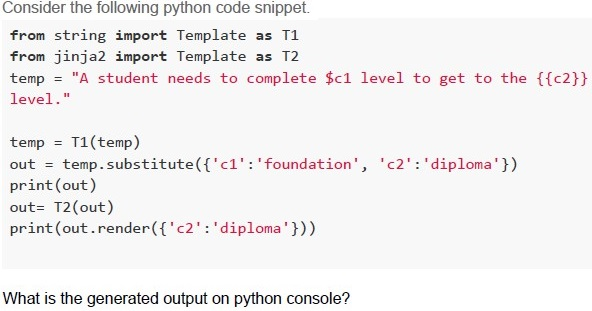
Text of the picture (copyable)
Consider the following python code snippet.

```python
from string import Template as T1
from jinja2 import Template as T2
temp = "A student needs to complete $c1 level to get to the {{c2}} level."

temp = T1(temp)
out = temp.substitute({'c1':'foundation', 'c2':'diploma'})
print(out)
out= T2(out)
print(out.render({'c2':'diploma'}))
```

What is the generated output on python console?- A student needs to complete foundation level to get to the diploma level.A student needs to complete foundation level to get to the diploma level.
- A student needs to complete $c1 level to get to the {{c2}} level.A student needs to complete foundation level to get to the diploma level.
- A student needs to complete foundation level to get to the {{c2}} level.A student needs to complete foundation level to get to the diploma level.
- A student needs to complete foundation level to get to the {{diploma}} level.A student needs to complete foundation level to get to the diploma level.
In the context of API documentation, what is typically provided to describe the available endpoints, request parameters and response formats?
- API documentation or API reference
- API key
- Software source code
- OAuth tokens
Comprehension passage - the questions below it refer to this
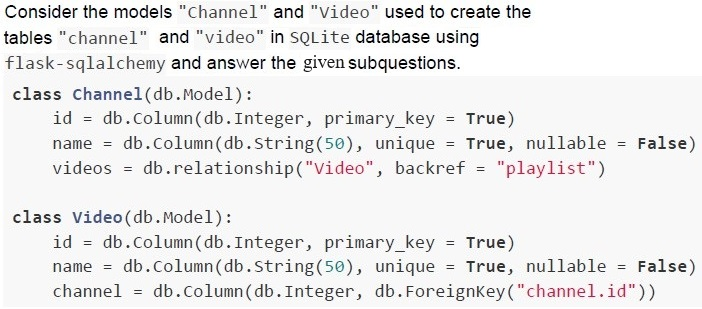

Text of the picture (copyable)
What relationship do the tables
"channel" and "video" share.
- One-to-one
- One-to-many
- Many-to-one
- Many-to-many
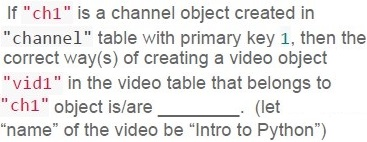
Text of the picture (copyable)
If "ch1" is a channel object created in
"channel" table with primary key 1, then the
correct way(s) of creating a video object
"vid1" in the video table that belongs to
"ch1" object is/are ______. (let
"name" of the video be "Intro to Python")

text
```python
>>> vid1 = Video(name = "Intro to Python", channel = ch1)
>>> db.session.add(vid1)
>>> db.session.commit()
```

text
```python
>>> vid1 = Video(name = "Intro to Python", channel = 1)
>>> db.session.add(vid1)
>>> db.session.commit()
```

text
```python
>>> vid1 = Video(name = "Intro to Python", playlist = ch1)
>>> db.session.add(vid1)
>>> db.session.commit()
```

text
```python
>>> vid1 = Video(name = "Intro to Python", playlist = 1)
>>> db.session.add(vid1)
>>> db.session.commit()
```
Comprehension passage - the questions below it refer to this
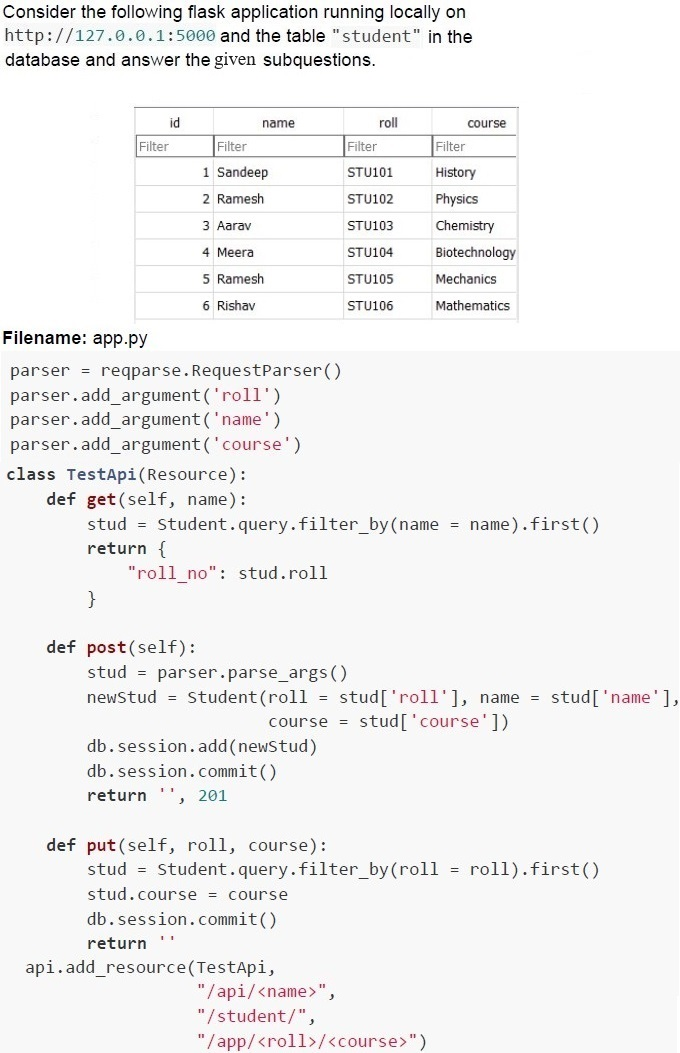
Text of the picture (copyable)
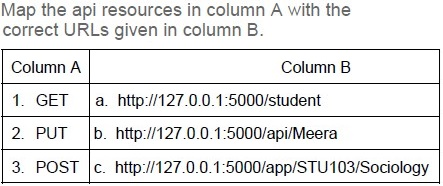
Map the api resources in column A with the correct URLs given in column B.

| Column A | Column B |
|---|---|
| 1. GET | a. http://127.0.0.1:5000/student |
| 2. PUT | b. http://127.0.0.1:5000/api/Meera |
| 3. POST | c. http://127.0.0.1:5000/app/STU103/Sociology |

text
1 → c, 2 → a, 3 → b

text
1 → a, 2 → b, 3 → c

text
1 → b, 2 → a, 3 → c

text
1 → b, 2 → c, 3 → a
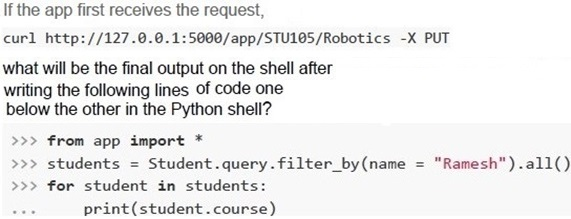
Text of the picture (copyable)
If the app first receives the request,
```
curl http://127.0.0.1:5000/app/STU105/Robotics -X PUT
```
what will be the final output on the shell after
writing the following lines of code one
below the other in the Python shell?
```python
>>> from app import *
>>> students = Student.query.filter_by(name = "Ramesh").all()
>>> for student in students:
...     print(student.course)
```

text
Physics
Physics

text
Robotics
Robotics

text
Physics
Robotics

text
Robotics
Physics
Consider a client which is located 3000 km from the server makes a request through the cable. Suddenly after the request reaches the server, the cable breaks and the response is now to be sent to the client via air. This change of medium caused an additional delay of 30 ms at the server end. How long will the client have to wait for receiving the response? (speed on cable = 2e8 m/s and in air 3e8 m/s)
- 55 milliseconds
- 50 milliseconds
- 80 milliseconds
- 60 milliseconds
The throughput of a Solid State Device (SSD) is 180 MB/sec. If it is to be replaced by a standard HDD whose lens can read data with the rate of 4.8 Megabits/revolution. What should be the speed of rotation (in RPM) of HDD to get a throughput equal to that of the SDD?
- 300
- 900
- 12000
- 18000
What will be the output of the following Python code snippet?
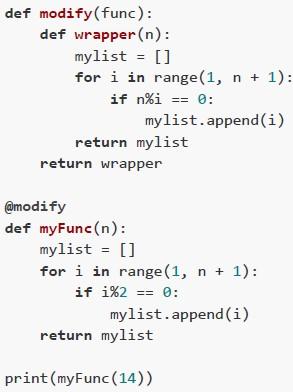 What will be the output of the following Python code snippet?
What will be the output of the following Python code snippet? Text of the picture (copyable)
```python
def modify(func):
    def wrapper(n):
        mylist = []
        for i in range(1, n + 1):
            if n % i == 0:
                mylist.append(i)
        return mylist
    return wrapper

@modify
def myFunc(n):
    mylist = []
    for i in range(1, n + 1):
        if i % 2 == 0:
            mylist.append(i)
    return mylist

print(myFunc(14))
```
text
```
[1, 3, 5, 7, 9, 11, 13]
```

text
```
[2, 4, 6, 8, 10, 12, 14]
```

text
```
[1, 2, 7, 14]
```

text
```
[1, 3, 5, 7, 11, 13]
```
Consider the following flask view function defined to add a product and select correct statement(s).
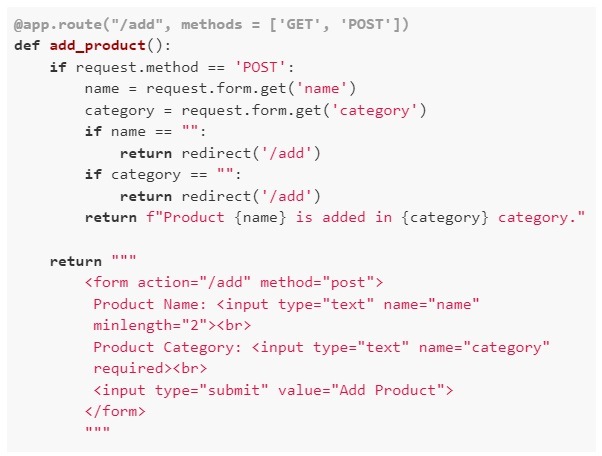 Consider the following flask view function defined to add a product and select correct statement(s).
Consider the following flask view function defined to add a product and select correct statement(s). Text of the picture (copyable)
```python
@app.route("/add", methods = ['GET', 'POST'])
def add_product():
    if request.method == 'POST':
        name = request.form.get('name')
        category = request.form.get('category')
        if name == "":
            return redirect('/add')
        if category == "":
            return redirect('/add')
        return f"Product {name} is added in {category} category."

    return """
    <form action="/add" method="post">
        Product Name: <input type="text" name="name"
        minlength="2"><br>
        Product Category: <input type="text" name="category"
        required><br>
        <input type="submit" value="Add Product">
    </form>
    """
```
text
The form to add the product is statically generated.

text
The form to add the product is dynamically generated.

text
The form rendered for `/add` endpoint has frontend validation.

text
The form rendered for `/add` endpoint has backend validation.
Consider the following Python code snippet.
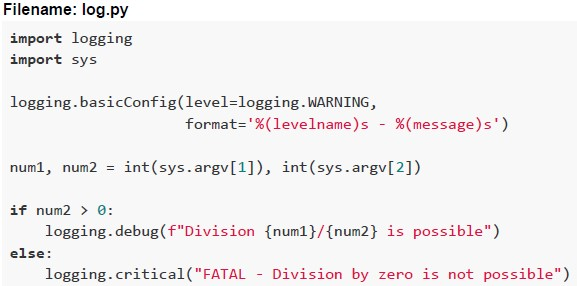 Consider the following Python code snippet. Which of the following statements is/are correct?
Consider the following Python code snippet. Which of the following statements is/are correct?Text of the picture (copyable)
Filename: log.py
```python
import logging
import sys

logging.basicConfig(level=logging.WARNING,
                    format='%(levelname)s - %(message)s')

num1, num2 = int(sys.argv[1]), int(sys.argv[2])

if num2 > 0:
    logging.debug(f"Division {num1}/{num2} is possible")
else:
    logging.critical("FATAL - Division by zero is not possible")
```
text
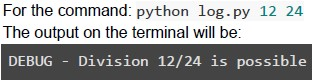
For the command: `python log.py 12 24`
The output on the terminal will be:
```
DEBUG - Division 12/24 is possible
```
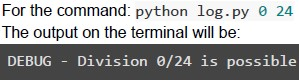
text
For the command: `python log.py 0 24`
The output on the terminal will be:
`DEBUG - Division 0/24 is possible`

text
For the command: `python log.py 15 0`
The output on the terminal will be:
`CRITICAL - FATAL - Division by zero is not possible`

text
For the command: python log.py 0 0
The output on the terminal will be:
CRITICAL - FATAL - Division by zero is not possible
Answer key
- Q1 (MCQ, 4.5 marks): B
- Q2 (MCQ, 4.5 marks): D
- Q3 (MSQ, 3 marks): C, D
- Q4 (MSQ, 3 marks): B, C
- Q5 (MCQ, 2 marks): B
- Q6 (MCQ, 2 marks): C
- Q7 (MCQ, 2 marks): A
- Q8 (MCQ, 2 marks): B
- Q9 (MSQ, 3 marks): B, C
- Q10 (MCQ, 3 marks): D
- Q11 (MCQ, 3 marks): C
- Q12 (MCQ, 3 marks): A
- Q13 (MCQ, 3 marks): D
- Q14 (MCQ, 3 marks): C
- Q15 (MSQ, 4.5 marks): B, C, D
- Q16 (MSQ, 4.5 marks): C, D