Home / Past papers / MAD1 End Term / this paper
2023 Dec24: IIT M FN EXAM FDD2 - 24 Dec 2023

Text of the picture (copyable)
Consider the given URL below.

```
https://seek.onlinedegree.iitm.ac.in/courses/ns_23t3_cs2003?type=lesson&tab
=courses
```

Select the appropriate option that correctly identifies different components of a given URL.
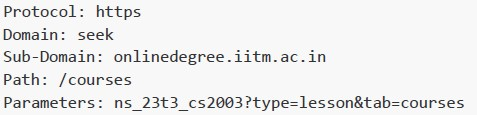
text
```
Protocol: https
Domain: seek
Sub-Domain: onlinedegree.iitm.ac.in
Path: /courses
Parameters: ns_23t3_cs2003?type=lesson&tab=courses
```
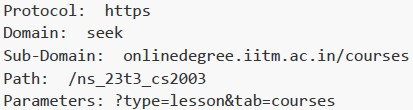
text
```
Protocol: https
Domain: seek
Sub-Domain: onlinedegree.iitm.ac.in/courses
Path: /ns_23t3_cs2003
Parameters: ?type=lesson&tab=courses
```
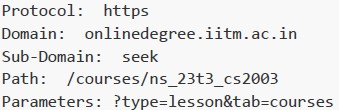
text
```
Protocol: https
Domain: onlinedegree.iitm.ac.in
Sub-Domain: seek
Path: /courses/ns_23t3_cs2003
Parameters: ?type=lesson&tab=courses
```
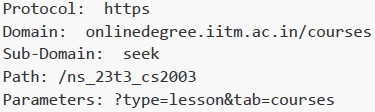
text
```
Protocol: https
Domain: onlinedegree.iitm.ac.in/courses
Sub-Domain: seek
Path: /ns_23t3_cs2003
Parameters: ?type=lesson&tab=courses
```
- Both statements 1 and 2 are correct
- Both statements 1 and 2 are incorrect
- Statement 1 is correct but statement 2 is incorrect
- Statement 2 is correct but statement 1 is incorrect
Text of the picture (copyable)
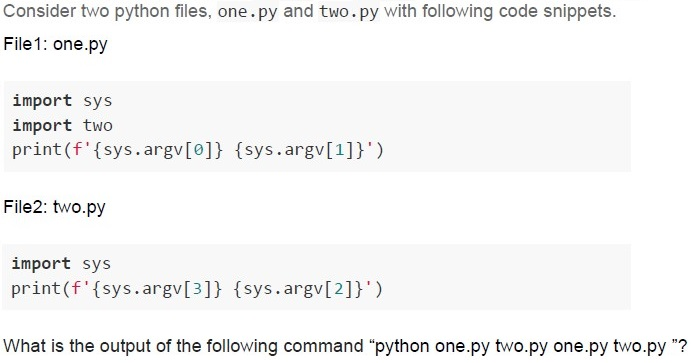
Consider two python files, one.py and two.py with following code snippets.
File1: one.py

```python
import sys
import two
print(f'{sys.argv[0]} {sys.argv[1]}')
```

File2: two.py

```python
import sys
print(f'{sys.argv[3]} {sys.argv[2]}')
```

What is the output of the following command "python one.py two.py one.py two.py "?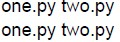
text
one.py two.py
one.py two.py
text
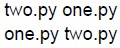
two.py one.py
one.py two.py
text
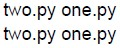
two.py one.py
two.py one.py
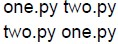
text
one.py two.py
two.py one.py
- Web server configuration
- Making requests to the web server
- Database management
- HTML parsing
- To establish a database connection
- To create a new database table
- To define a base template with a common structure and placeholders that canbe extended by child templates
- To insert CSS styles
- Storing data in volatile cache
- Saving data to temporary files
- Writing data to a database
- Using data stored in RAM
- SVG
- Web Components
- Web API
- None of these
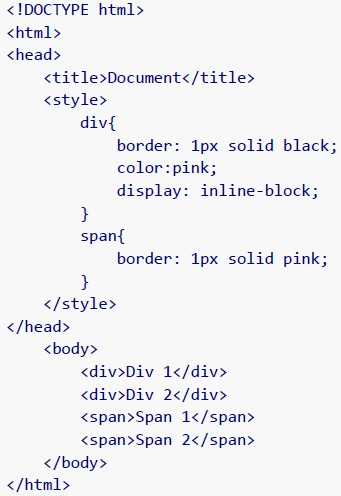 How will the browser render the following HTML document?
 Text of the picture (copyable)
```html
<!DOCTYPE html>
<html>
<head>
    <title>Document</title>
    <style>
        div{
            border: 1px solid black;
            color:pink;
            display: inline-block;
        }
        span{
            border: 1px solid pink;
        }
    </style>
</head>
<body>
    <div>Div 1</div>
    <div>Div 2</div>
    <span>Span 1</span>
    <span>Span 2</span>
</body>
</html>
```
text
The image displays four text elements, arranged horizontally.
The first element is "Div 1 Div 2", enclosed in a black rectangular border. The text "Div 1" is in a light pink color, and "Div 2" is also in a light pink color.
The second element is "Span 1", enclosed in a light pink rectangular border. The text "Span 1" is in black.
The third element is "Span 2", enclosed in a light pink rectangular border. The text "Span 2" is in black.

text
The image displays four text elements, each enclosed in a rectangular border.
From left to right:
1. "Div 1" with a black border and light pink text.
2. "Div 2" with a black border and light pink text.
3. "Span 1" with a light pink border and black text.
4. "Span 2" with a light pink border and black text.

text
The image displays two rectangular boxes side-by-side.
The left box has a black border and contains the text "Div 1 Div 2" in a light pink color.
The right box has a light pink border and contains the text "Span 1 Span 2" in a black color.

text
The image displays three rectangular boxes arranged horizontally.
The first box, on the left, contains the text "Div 1" in light pink color with a black border.
The second box, in the middle, contains the text "Div 2" also in light pink color with a black border.
The third box, on the right, contains the text "Span 1 Span 2" in black color with a light pink border.
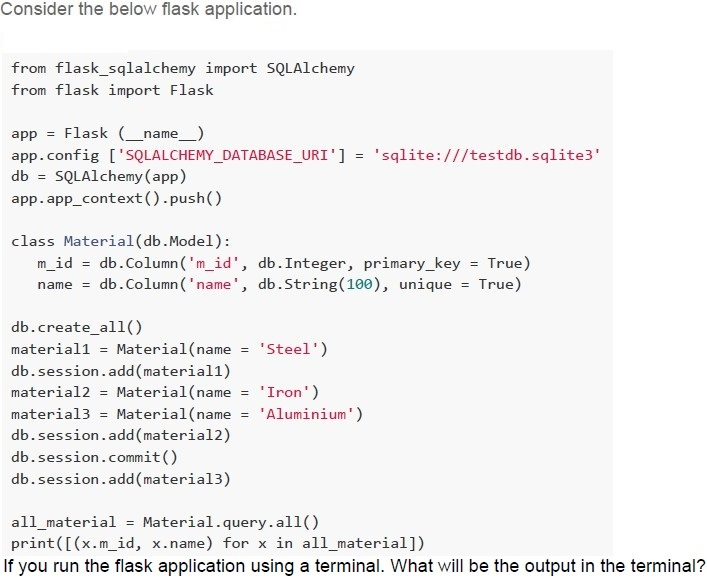
Text of the picture (copyable)
Consider the below flask application.

```python
from flask_sqlalchemy import SQLAlchemy
from flask import Flask

app = Flask(__name__)
app.config['SQLALCHEMY_DATABASE_URI'] = 'sqlite:///testdb.sqlite3'
db = SQLAlchemy(app)
app.app_context().push()

class Material(db.Model):
    m_id = db.Column('m_id', db.Integer, primary_key = True)
    name = db.Column('name', db.String(100), unique = True)

db.create_all()
material1 = Material(name = 'Steel')
db.session.add(material1)
material2 = Material(name = 'Iron')
material3 = Material(name = 'Aluminium')
db.session.add(material2)
db.session.commit()
db.session.add(material3)

all_material = Material.query.all()
print([(x.m_id, x.name) for x in all_material])
```
If you run the flask application using a terminal. What will be the output in the terminal?
text
```
[(1, 'Steel'), (2, 'Iron')] will be displayed in the terminal and two records will be added in the "testdb" database.
```

text
```
[(1, 'Steel'), (2, 'Iron'), (3, 'Aluminium')] will be displayed in the terminal
and three records will be added in the "testdb" database.
```

text
```
[(1, 'Steel'), (2, 'Iron'), (3, 'Aluminium')] will be displayed in the terminal
and two records will be added in the "testdb" database.
```

text
```
[(1, 'Steel', 2, 'Iron', 3, 'Aluminium')] will be displayed in the terminal and
two records will be added in the "testdb" database.
```
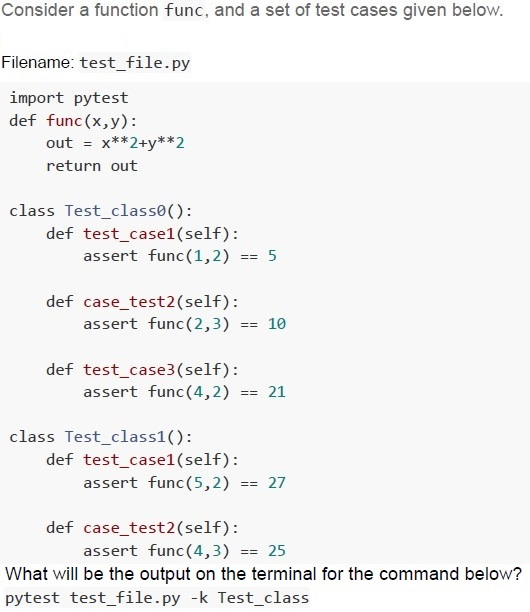
Text of the picture (copyable)
Consider a function func, and a set of test cases given below.

Filename: test_file.py

```python
import pytest
def func(x,y):
    out = x**2+y**2
    return out

class Test_class0():
    def test_case1(self):
        assert func(1,2) == 5

    def case_test2(self):
        assert func(2,3) == 10

    def test_case3(self):
        assert func(4,2) == 21

class Test_class1():
    def test_case1(self):
        assert func(5,2) == 27

    def case_test2(self):
        assert func(4,3) == 25
```
What will be the output on the terminal for the command below?
pytest test_file.py -k Test_class
text
```
== 3 failed, 2 passed in 0.17s ===
```

text
```
== 2 failed, 1 passed, 2 deselected in 0.04s ===
```

text
```
=== 1 failed, 1 passed, 1 deselected in 0.04s ===
```

text
```
== 2 failed, 1 passed in 0.17s ===
```
- Both statement 1 and 2 are correct.
- Both statement 1 and 2 are incorrect.
- Statement 1 is correct but, statement 2 is incorrect.
- Statement 2 is correct but, statement 1 is incorrect.
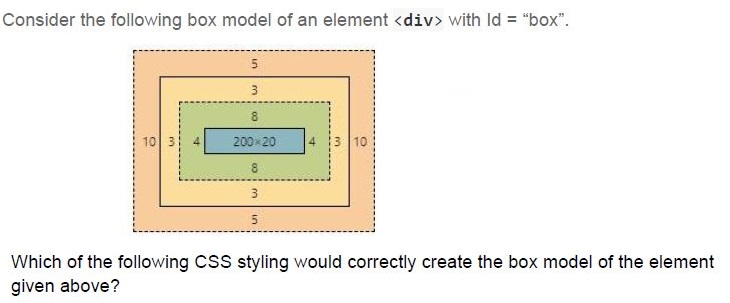
Text of the picture (copyable)
Consider the following box model of an element `<div>` with Id = "box".

Diagram: Box Model
- Outermost layer (light orange, dashed border): Margin. Values: Top 5, Right 10, Bottom 5, Left 10.
- Second layer (yellow, solid border): Border. Values: Top 3, Right 3, Bottom 3, Left 3.
- Third layer (green, dashed border): Padding. Values: Top 8, Right 4, Bottom 8, Left 4.
- Innermost layer (blue, solid border): Content. Values: 200x20.

Which of the following CSS styling would correctly create the box model of the element given above?
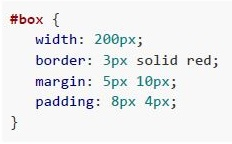
text
```css
#box {
  width: 200px;
  border: 3px solid red;
  margin: 5px 10px;
  padding: 8px 4px;
}
```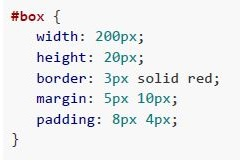
text
```css
#box {
    width: 200px;
    height: 20px;
    border: 3px solid red;
    margin: 5px 10px;
    padding: 8px 4px;
}
```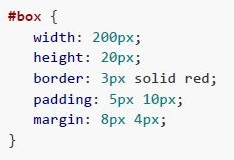
text
```css
#box {
    width: 200px;
    height: 20px;
    border: 3px solid red;
    padding: 5px 10px;
    margin: 8px 4px;
}
```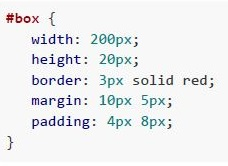
text
```css
#box {
    width: 200px;
    height: 20px;
    border: 3px solid red;
    margin: 10px 5px;
    padding: 4px 8px;
}
```
Text of the picture (copyable)
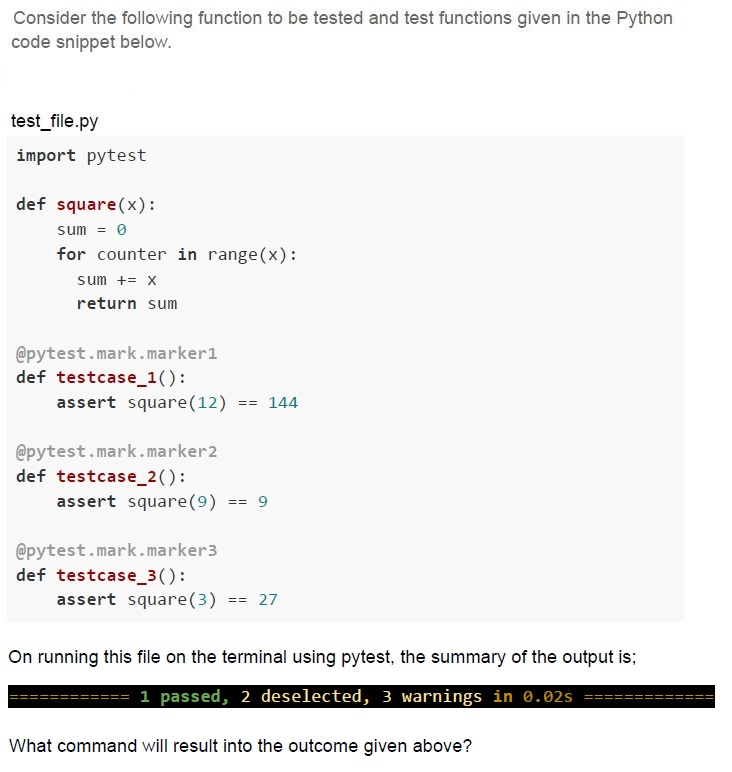
Consider the following function to be tested and test functions given in the Python code snippet below.

test_file.py
```python
import pytest

def square(x):
    sum = 0
    for counter in range(x):
        sum += x
    return sum

@pytest.mark.marker1
def testcase_1():
    assert square(12) == 144

@pytest.mark.marker2
def testcase_2():
    assert square(9) == 9

@pytest.mark.marker3
def testcase_3():
    assert square(3) == 27
```

On running this file on the terminal using pytest, the summary of the output is:
`========== 1 passed, 2 deselected, 3 warnings in 0.02s ==========`

What command will result into the outcome given above?
text
```
pytest test_file.py -k marker1
```

text
```
pytest test_file.py -m marker3
```

text
```
pytest test_file.py -m marker2
```

text
```
pytest test_file.py -m marker1
```

Text of the picture (copyable)
The hexadecimal equivalent of the IPv4 address 172.16.254.10 would be
___________
- AC0A FE01
- CA10 EF0A
- AC01 0AEF
- AC10 FE0A
Text of the picture (copyable)
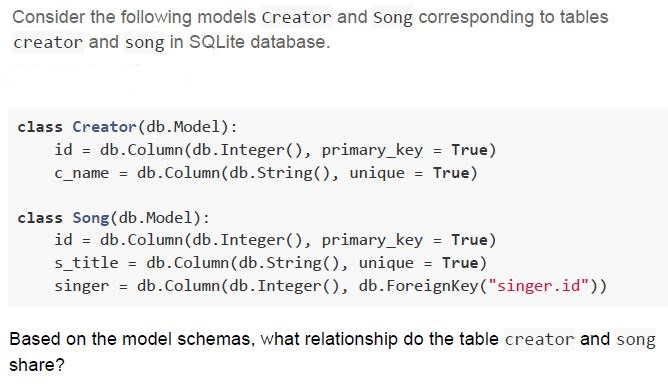
Consider the following models Creator and Song corresponding to tables
creator and song in SQLite database.

```python
class Creator(db.Model):
    id = db.Column(db.Integer(), primary_key = True)
    c_name = db.Column(db.String(), unique = True)

class Song(db.Model):
    id = db.Column(db.Integer(), primary_key = True)
    s_title = db.Column(db.String(), unique = True)
    singer = db.Column(db.Integer(), db.ForeignKey("singer.id"))
```

Based on the model schemas, what relationship do the table creator and song
share?- Many-to-Many
- One-to-Many
- One-to-One
- The tables are not at all related

text
```
git config email <new e-mail>
```

text
```
git config user.email <new e-mail>
```

text
```
git config --global email <new e-mail>
```

text
```
git config --global user.email <new e-mail>
```
Text of the picture (copyable)
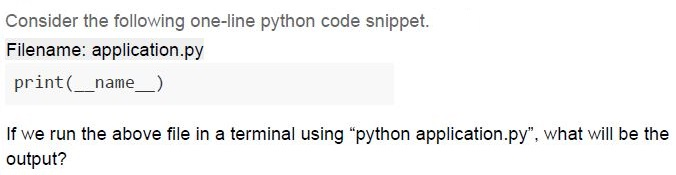
Consider the following one-line python code snippet.
Filename: application.py

```python
print(__name__)
```

If we run the above file in a terminal using "python application.py", what will be the output?
- application
- __application__
- main
- __main__
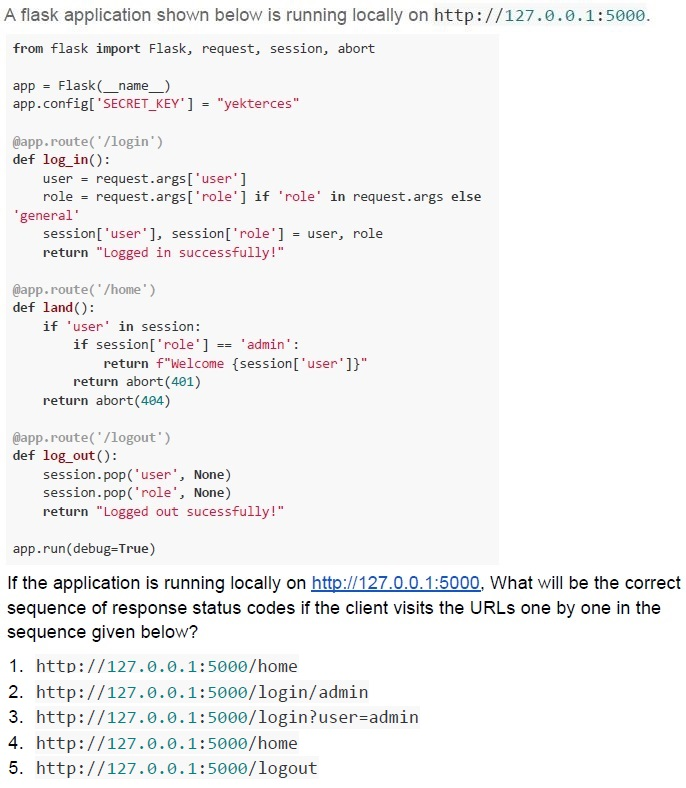
Text of the picture (copyable)
A flask application shown below is running locally on http://127.0.0.1:5000.

```python
from flask import Flask, request, session, abort

app = Flask(__name__)
app.config['SECRET_KEY'] = "yekterces"

@app.route('/login')
def log_in():
    user = request.args['user']
    role = request.args['role'] if 'role' in request.args else \
           'general'
    session['user'], session['role'] = user, role
    return "Logged in successfully!"

@app.route('/home')
def land():
    if 'user' in session:
        if session['role'] == 'admin':
            return f"Welcome {session['user']}"
        return abort(401)
    return abort(404)

@app.route('/logout')
def log_out():
    session.pop('user', None)
    session.pop('role', None)
    return "Logged out sucessfully!"

app.run(debug=True)
```

If the application is running locally on http://127.0.0.1:5000. What will be the correct sequence of response status codes if the client visits the URLs one by one in the sequence given below?

1. http://127.0.0.1:5000/home
2. http://127.0.0.1:5000/login/admin
3. http://127.0.0.1:5000/login?user=admin
4. http://127.0.0.1:5000/home
5. http://127.0.0.1:5000/logout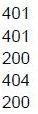
text
```
401
401
200
404
200
```
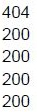
text
404
200
200
200
200
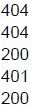
text
404
404
200
401
200
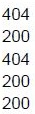
text
404
200
404
200
200
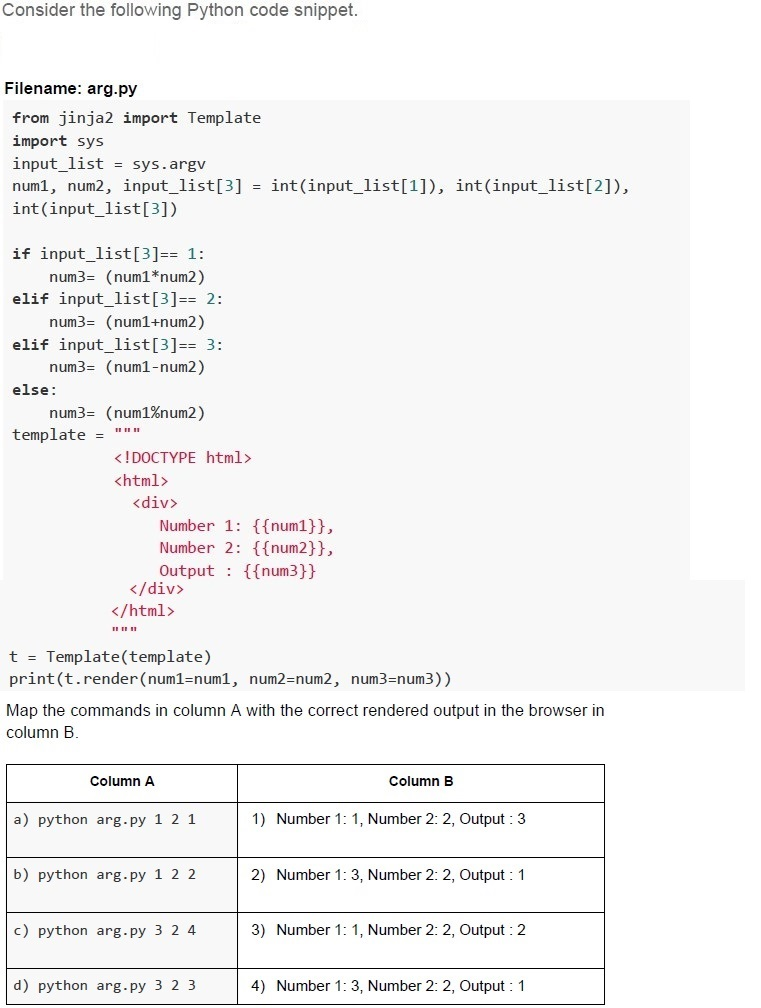
Text of the picture (copyable)
Consider the following Python code snippet.

Filename: arg.py
```python
from jinja2 import Template
import sys
input_list = sys.argv
num1, num2, input_list[3] = int(input_list[1]), int(input_list[2]), \
                            int(input_list[3])

if input_list[3]== 1:
    num3= (num1*num2)
elif input_list[3]== 2:
    num3= (num1+num2)
elif input_list[3]== 3:
    num3= (num1-num2)
else:
    num3= (num1%num2)
template = """
<!DOCTYPE html>
<html>
<div>
    Number 1: {{num1}},
    Number 2: {{num2}},
    Output : {{num3}}
</div>
</html>
"""

t = Template(template)
print(t.render(num1=num1, num2=num2, num3=num3))
```
Map the commands in column A with the correct rendered output in the browser in column B.

| Column A | Column B |
|---|---|
| a) python arg.py 1 2 1 | 1) Number 1: 1, Number 2: 2, Output : 3 |
| b) python arg.py 1 2 2 | 2) Number 1: 3, Number 2: 2, Output : 1 |
| c) python arg.py 3 2 4 | 3) Number 1: 1, Number 2: 2, Output : 2 |
| d) python arg.py 3 2 3 | 4) Number 1: 3, Number 2: 2, Output : 1 |- a - 4, b - 1, c - 2, d - 3
- a - 3, b - 1, c - 4, d - 2
- a - 4, b - 1, c - 3, d - 2
- a - 1, b - 3, c - 2, d - 4
Text of the picture (copyable)
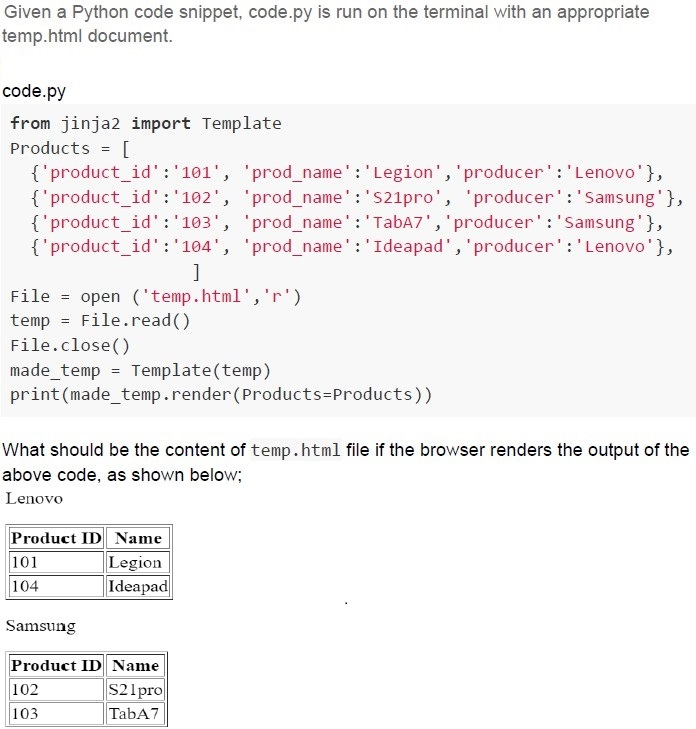
Given a Python code snippet, code.py is run on the terminal with an appropriate temp.html document.

code.py
```python
from jinja2 import Template
Products = [
    {'product_id':'101', 'prod_name':'Legion', 'producer':'Lenovo'},
    {'product_id':'102', 'prod_name':'S21pro', 'producer':'Samsung'},
    {'product_id':'103', 'prod_name':'TabA7', 'producer':'Samsung'},
    {'product_id':'104', 'prod_name':'Ideapad', 'producer':'Lenovo'},
]

file = open ('temp.html','r')
temp = file.read()
file.close()
made_temp = Template(temp)
print(made_temp.render(Products=Products))
```

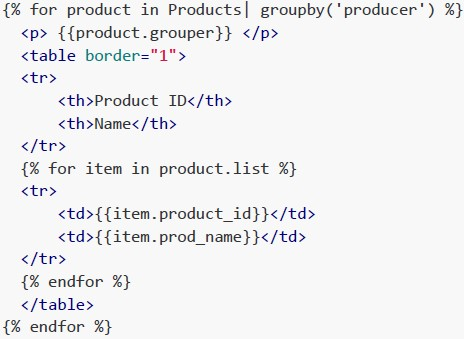
What should be the content of temp.html file if the browser renders the output of the above code, as shown below;
Lenovo

| Product ID | Name    |
|:-----------|:--------|
| 101        | Legion  |
| 104        | Ideapad |

Samsung

| Product ID | Name   |
|:-----------|:-------|
| 102        | S21pro |
| 103        | TabA7  |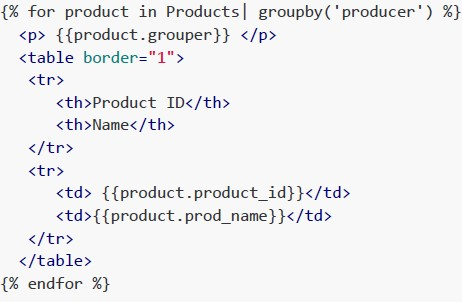
text
```html
{% for product in Products| groupby('producer') %}
<p> {{product.grouper}} </p>
<table border="1">
    <tr>
        <th>Product ID</th>
        <th>Name</th>
    </tr>
    <tr>
        <td>{{product.product_id}}</td>
        <td>{{product.prod_name}}</td>
    </tr>
</table>
{% endfor %}
```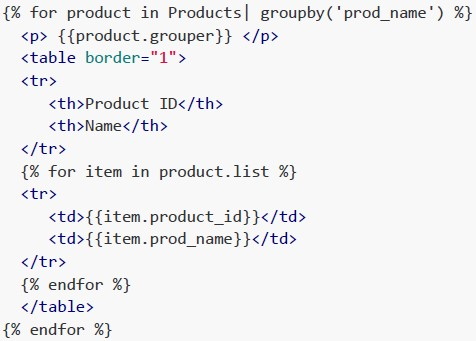
text
```html
{% for product in Products| groupby('prod_name') %}
<p>{{product.grouper}} </p>
<table border="1">
<tr>
<th>Product ID</th>
<th>Name</th>
</tr>
{% for item in product.list %}
<tr>
<td>{{item.product_id}}</td>
<td>{{item.prod_name}}</td>
</tr>
{% endfor %}
</table>
{% endfor %}
```
text
```html
{% for product in Products| groupby('producer') %}
<p> {{product.grouper}} </p>
<table border="1">
<tr>
<th>Product ID</th>
<th>Name</th>
</tr>
{% for item in product.list %}
<tr>
<td>{{item.product_id}}</td>
<td>{{item.prod_name}}</td>
</tr>
{% endfor %}
</table>
{% endfor %}
```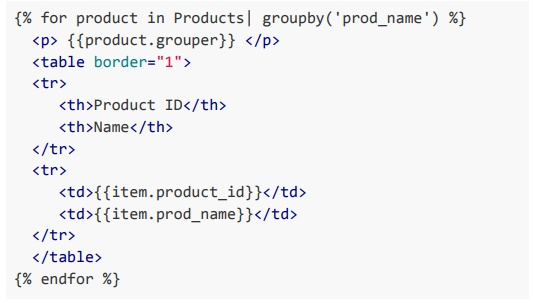
text
```html
{% for product in Products| groupby('prod_name') %}
    <p>{{product.grouper}}</p>
    <table border="1">
        <tr>
            <th>Product ID</th>
            <th>Name</th>
        </tr>
        <tr>
            <td>{{item.product_id}}</td>
            <td>{{item.prod_name}}</td>
        </tr>
    </table>
{% endfor %}
```
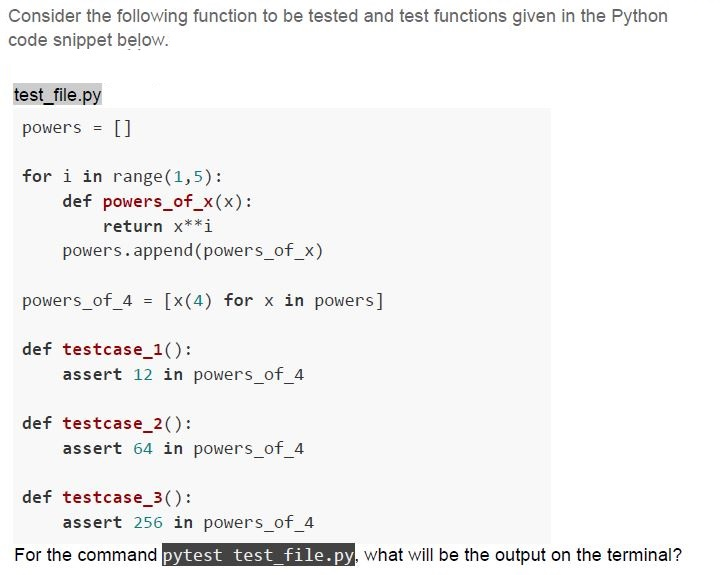
Text of the picture (copyable)
Consider the following function to be tested and test functions given in the Python code snippet below.

```python
# test_file.py
powers = []

for i in range(1,5):
    def powers_of_x(x):
        return x**i
    powers.append(powers_of_x)

powers_of_4 = [x(4) for x in powers]

def testcase_1():
    assert 12 in powers_of_4

def testcase_2():
    assert 64 in powers_of_4

def testcase_3():
    assert 256 in powers_of_4
```

For the command `pytest test_file.py`, what will be the output on the terminal?
text
```
======== 1 failed, 2 passed in 0.02s ========
```

text
======================================== 3 passed in 0.02s ========================================

text
========== 3 Failed in 0.02s ==========

text
```
========================= 2 failed, 1 passed in 0.02s =========================
```
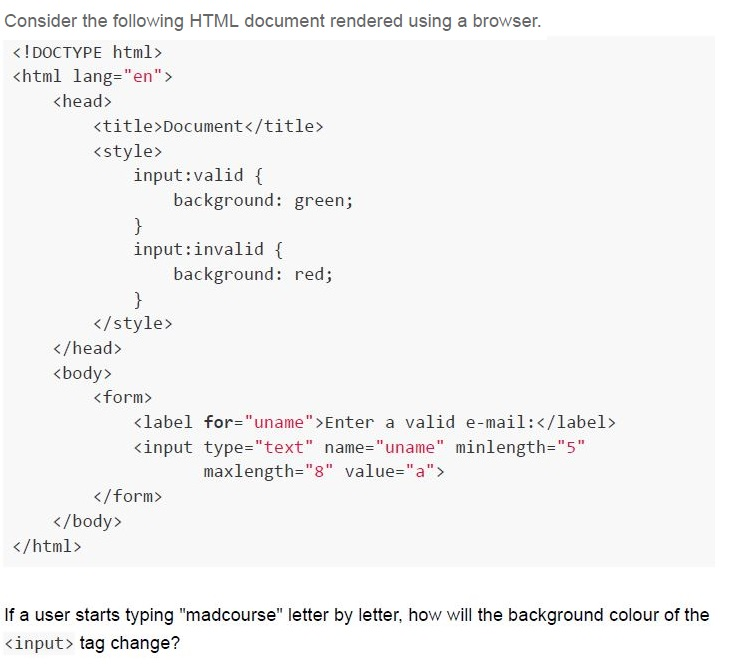
Text of the picture (copyable)
Consider the following HTML document rendered using a browser.

```html
<!DOCTYPE html>
<html lang="en">
<head>
    <title>Document</title>
    <style>
        input:valid {
            background: green;
        }
        input:invalid {
            background: red;
        }
    </style>
</head>
<body>
    <form>
        <label for="uname">Enter a valid e-mail:</label>
        <input type="text" name="uname" minlength="5"
               maxlength="8" value="a">
    </form>
</body>
</html>
```

If a user starts typing "madcourse" letter by letter, how will the background colour of the `<input>` tag change?- Red for first five letters, turns green till 8th letter and turns red back againafter next letter.
- Green for first five letters, turns red till 8th letter and turns green back againafter next letter.
- Red for first five letters, and remain green after that.
- Green for first five letters, and remain red after that.
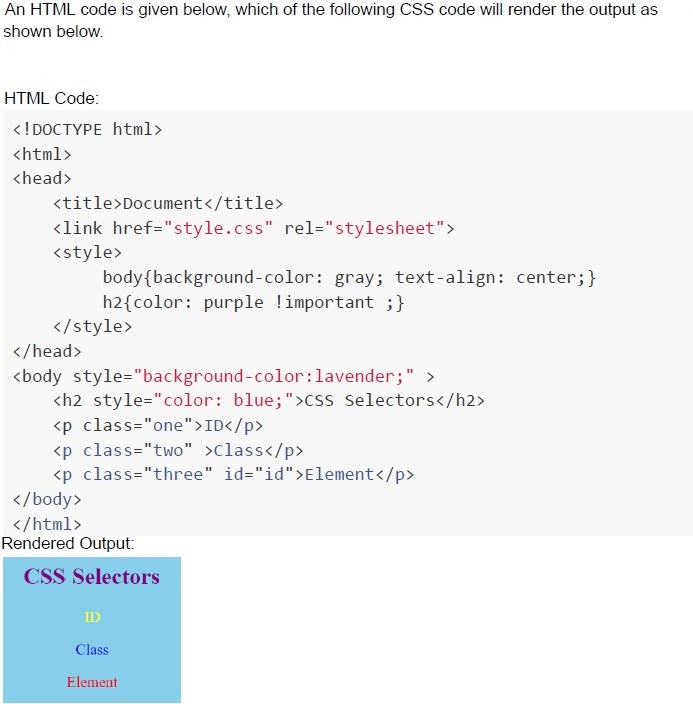
Text of the picture (copyable)
An HTML code is given below, which of the following CSS code will render the output as shown below.

HTML Code:

```html
<!DOCTYPE html>
<html>
<head>
    <title>Document</title>
    <link href="style.css" rel="stylesheet">
    <style>
        body{background-color: gray; text-align: center;}
        h2{color: purple !important ;}
    </style>
</head>
<body style="background-color:lavender;" >
    <h2 style="color: blue;">CSS Selectors</h2>
    <p class="one">ID</p>
    <p class="two">Class</p>
    <p class="three" id="id">Element</p>
</body>
</html>
```

Rendered Output:

UI screenshot: A light blue rectangular box with rounded corners.
Inside the box, the text "CSS Selectors" is displayed in purple, centered.
Below it, the text "ID" is displayed in blue, centered.
Below it, the text "Class" is displayed in blue, centered.
Below it, the text "Element" is displayed in red, centered.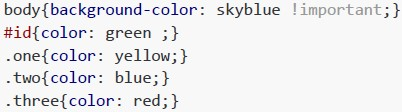
text
```css
body{background-color: skyblue !important;}
#id{color: green ;}
.one{color: yellow;}
.two{color: blue;}
.three{color: red;}
```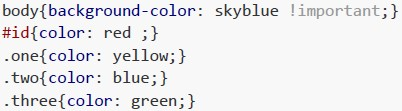
text
```css
body{background-color: skyblue !important;}
#id{color: red ;}
.one{color: yellow;}
.two{color: blue;}
.three{color: green;}
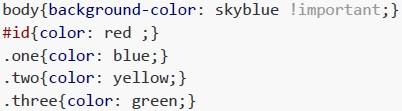
```
text
```css
body{background-color: skyblue !important;}
#id{color: red ;}
.one{color: blue;}
.two{color: yellow;}
.three{color: green;}
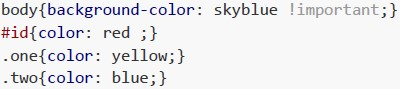
```
text
```css
body{background-color: skyblue !important;}
#id{color: red ;}
.one{color: yellow;}
.two{color: blue;}
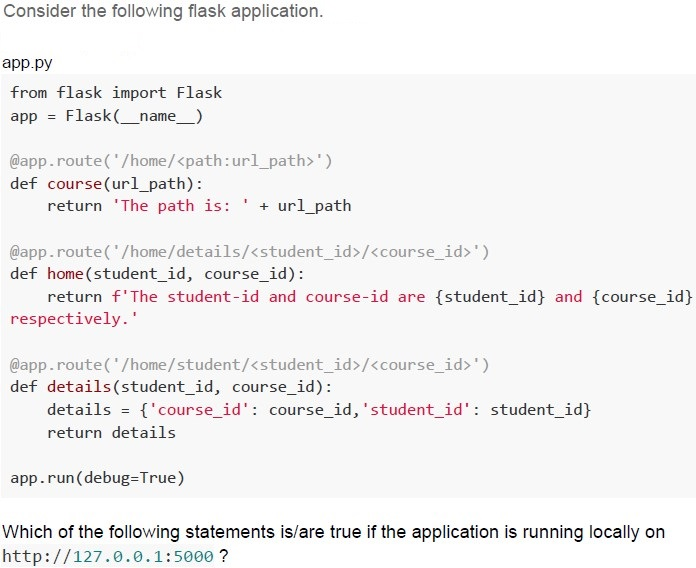
```
Text of the picture (copyable)
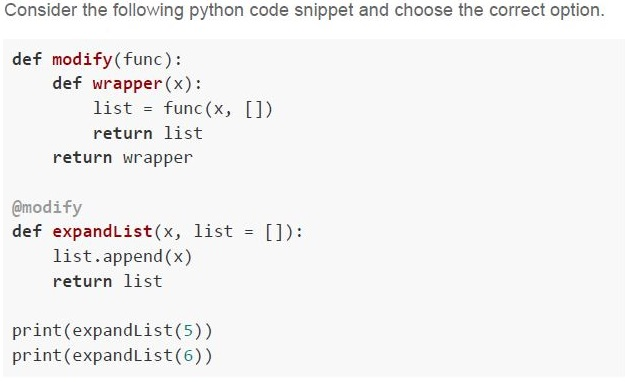
Consider the following flask application.

app.py
```python
from flask import Flask
app = Flask(__name__)

@app.route('/home/<path:url_path>')
def course(url_path):
    return 'The path is: ' + url_path

@app.route('/home/details/<student_id>/<course_id>')
def home(student_id, course_id):
    return f'The student-id and course-id are {student_id} and {course_id} respectively.'

@app.route('/home/student/<student_id>/<course_id>')
def details(student_id, course_id):
    details = {'course_id': course_id, 'student_id': student_id}
    return details

app.run(debug=True)
```

Which of the following statements is/are true if the application is running locally on http://127.0.0.1:5000 ?
text
For URL, http://127.0.0.1:5000/home/M101/CS2003 browser will render;
The student-id and course-id are M101 and CS2003 respectively.

text
For URL, http://127.0.0.1:5000/home/student/M101/CS2003 browser will render

```json
{
  "course_id": "CS2003",
  "student_id": "M101"
}
```
text
For URL http://127.0.0.1:5000/home/details/M101/CS2003 browser will render,
The student-id and course-id are M101 and CS2003 respectively.

text
For URL, http://127.0.0.1:5000/home/M101/CS2003 browser will render;
The path is: M101/CS2003
Text of the picture (copyable)
Consider the following python code snippet and choose the correct option.

```python
def modify(func):
    def wrapper(x):
        list = func(x, [])
        return list
    return wrapper

@modify
def expandList(x, list = []):
    list.append(x)
    return list

print(expandList(5))
print(expandList(6))
```
text
If the code is run on the terminal directly, the output on the terminal will be;
```
[5]
[6]
```

text
If the code is run on the terminal directly, the output on the terminal will be;
```
[5]
[5, 6]
```

text
If `@modify` is commented and the updated code is run on the terminal, the output will be;

```
[5]
[6]
```

text
If `@modify` is commented and the updated code is run on the terminal, the output will be;
```
[5]
[5, 6]
```
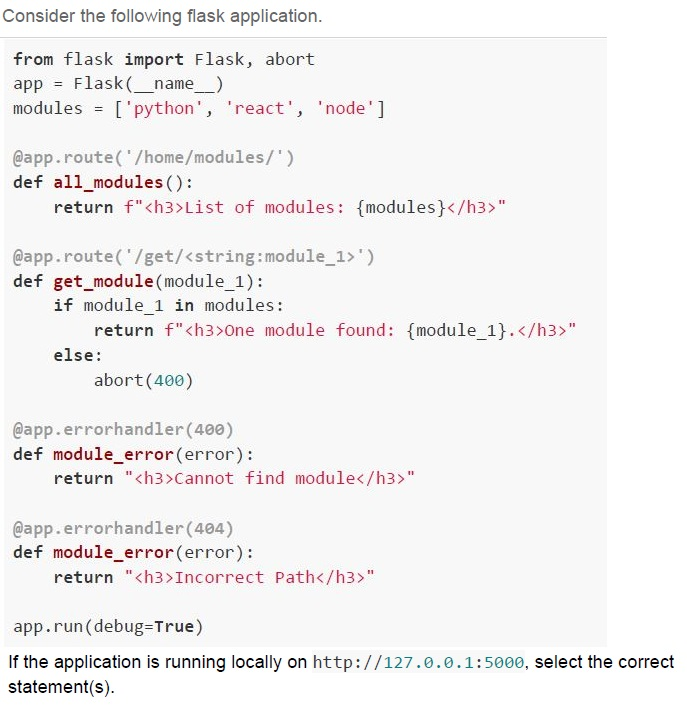
Text of the picture (copyable)
Consider the following flask application.

```python
from flask import Flask, abort
app = Flask(__name__)
modules = ['python', 'react', 'node']

@app.route('/home/modules/')
def all_modules():
    return f"<h3>List of modules: {modules}</h3>"

@app.route('/get/<string:module_1>')
def get_module(module_1):
    if module_1 in modules:
        return f"<h3>One module found: {module_1}.</h3>"
    else:
        abort(400)

@app.errorhandler(400)
def module_error(error):
    return "<h3>Cannot find module</h3>"

@app.errorhandler(404)
def module_error(error):
    return "<h3>Incorrect Path</h3>"

app.run(debug=True)
```

If the application is running locally on http://127.0.0.1:5000, select the correct statement(s).
text
For the URL, http://127.0.0.1:5000/home/modules, the browser will render:
List of modules: ['python', 'react', 'node']

text
For the URL, http://127.0.0.1:5000/home/modules, the browser will render:
**Incorrect Path**

text
For the URL, http://127.0.0.1:5000/get/vuejs, the browser will render;
**Cannot find module**

text
For the URL, http://127.0.0.1:5000/get/react/, the browser will render:
**One module found: react.**
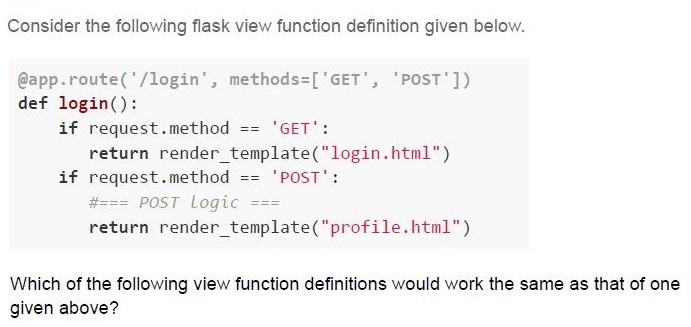
Text of the picture (copyable)
Consider the following flask view function definition given below.

```python
@app.route('/login', methods=['GET', 'POST'])
def login():
    if request.method == 'GET':
        return render_template("login.html")
    if request.method == 'POST':
        #=== POST Logic ===
        return render_template("profile.html")
```

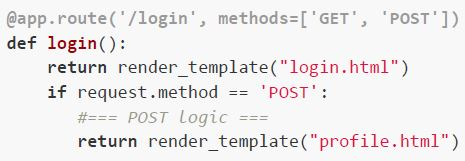
Which of the following view function definitions would work the same as that of one given above?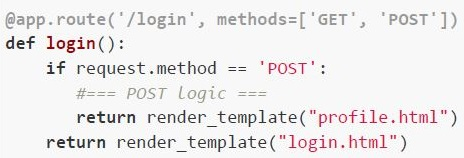
text
```python
@app.route('/login', methods=['GET', 'POST'])
def login():
    if request.method == 'POST':
        #=== POST logic ===
        return render_template("profile.html")
    return render_template("login.html")
```
text
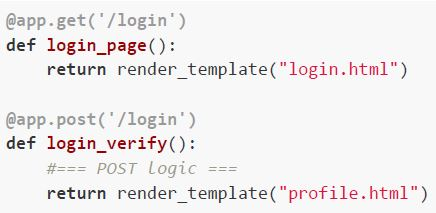
```python
@app.get('/login')
def login_page():
    return render_template("login.html")

@app.post('/login')
def login_verify():
    #=== POST Logic ===
    return render_template("profile.html")
```
text
```python
@app.route('/login', methods=['GET', 'POST'])
def login():
    return render_template("login.html")
    if request.method == 'POST':
        #=== POST logic ===
        return render_template("profile.html")
```
text
None of these
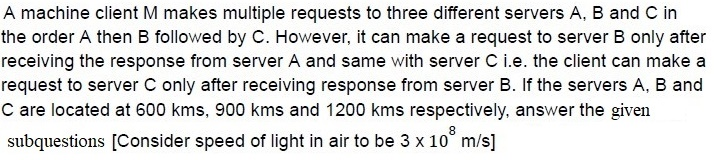
- 166
- 100
- 56
- 111
- 10
- 6
- 18
- 5
Text of the picture (copyable)
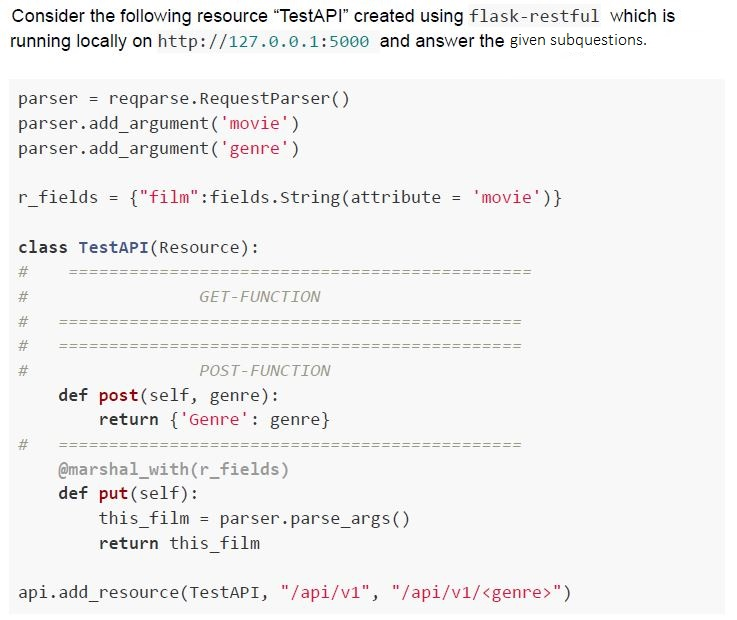
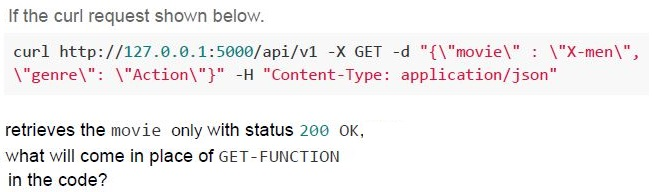
If the curl request shown below.

```
curl http://127.0.0.1:5000/api/v1 -X GET -d "{\"movie\": \"X-men\", \"genre\": \"Action\"}" -H "Content-Type: application/json"
```

retrieves the movie only with status 200 OK,
what will come in place of GET-FUNCTION
in the code?
text
```python
def get(self):
    return {'Movie': movie}
```
text
```python
def get(self, movie):
    return {'Movie': movie}
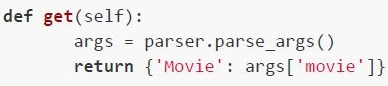
```
text
```python
def get(self):
    args = parser.parse_args()
    return {'Movie': args['movie']}
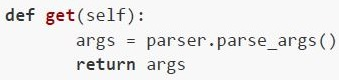
```
text
```python
def get(self):
    args = parser.parse_args()
    return args
```
Text of the picture (copyable)
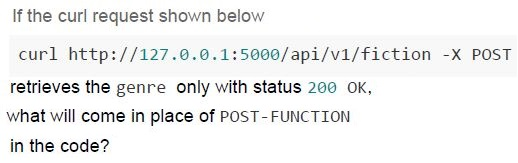
If the curl request shown below

```
curl http://127.0.0.1:5000/api/v1/fiction -X POST
```

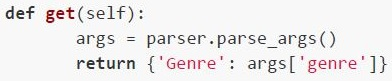
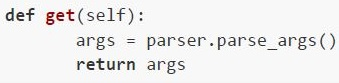
retrieves the genre only with status 200 OK,
what will come in place of POST-FUNCTION
in the code?

text
```python
def get(self):
    return {'Genre': genre}
```
text
```python
def get(self, movie):
    return {'Genre': genre}
```
text
```python
def get(self):
    args = parser.parse_args()
    return {'Genre': args['genre']}
```
text
```python
def get(self):
    args = parser.parse_args()
    return args
```

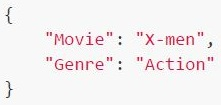
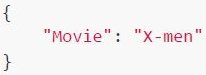
Text of the picture (copyable)
What will be the response from the server for the request:
```
curl http://127.0.0.1:5000/api/v1 -X PUT -d "{\"movie\" : \"X-men\", \"genre\": \"Action\"}" -H "Content-Type: application/json"
```
text
```json
{
  "Movie": "X-men",
  "Genre": "Action"
}
```
text
```json
{
  "Movie": "X-men"
}
```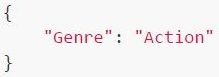
text
```json
{
  "Genre": "Action"
}
```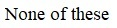
text
None of these
Answer key
- Q1 (MCQ, 2 marks): C
- Q2 (MCQ, 2 marks): B
- Q3 (MCQ, 2 marks): B
- Q4 (MCQ, 2 marks): B
- Q5 (MCQ, 2 marks): C
- Q6 (MCQ, 2 marks): C
- Q7 (MCQ, 2 marks): B
- Q8 (MCQ, 3 marks): B
- Q9 (MCQ, 3 marks): C
- Q10 (MCQ, 3 marks): D
- Q11 (MCQ, 3 marks): B
- Q12 (MCQ, 3 marks): B
- Q13 (MCQ, 3 marks): C
- Q14 (MCQ, 3 marks): D
- Q15 (MCQ, 3 marks): D
- Q16 (MCQ, 3 marks): D
- Q17 (MCQ, 3 marks): D
- Q18 (MCQ, 3 marks): C
- Q19 (MCQ, 4.5 marks): B
- Q20 (MCQ, 4.5 marks): C
- Q21 (MCQ, 4.5 marks): D
- Q22 (MCQ, 4.5 marks): C
- Q23 (MSQ, 4.5 marks): B, D
- Q24 (MSQ, 4.5 marks): B, C, D
- Q25 (MSQ, 4.5 marks): A, D
- Q26 (MSQ, 4.5 marks): A, C
- Q27 (MSQ, 3 marks): A, B
- Q28 (MCQ, 3 marks): C
- Q29 (MCQ, 2 marks): B
- Q30 (MCQ, 3 marks): C
- Q31 (MCQ, 3 marks): B
- Q32 (MCQ, 3 marks): D
Concepts this paper tests
Auto-generated summary from the source site. Handy as a checklist; the lessons above explain each idea from scratch.
Here’s a structured summary of the core topics, concepts, principles, and equations essential for the "Modern Application Development I" exam, along with Mermaid knowledge graphs to visualize relationships.
1. Core Topics & Concepts
A. Web Development Fundamentals
URL Structure
- Components:
Scheme(e.g.,https),Domain(e.g.,example.com),Path(e.g.,/courses),Query Parameters(e.g.,?type=lesson). Example:
https://seek.onlinedegree.iitm.ac.in/courses/ns_23t3_cs2003?type=lesson&tab=courses- Scheme:
https - Domain:
seek.onlinedegree.iitm.ac.in - Path:
/courses/ns_23t3_cs2003 - Query Parameters:
type=lesson,tab=courses
- Scheme:
- Components:
HTTP Methods & Status Codes
- Methods:
GET,POST,PUT,DELETE. Status Codes:
200 OK: Success.400 Bad Request: Client error (e.g., invalid input).401 Unauthorized: Authentication failed.404 Not Found: Resource not found.500 Internal Server Error: Server-side issue.
- Methods:
cURL
- Command-line tool for making HTTP requests.
Example:
curl http://127.0.0.1:5000/api/v1 -X GET -d "{\"movie\": \"X-men\"}" -H "Content-Type: application/json"
CSS Selectors & Specificity
- Specificity Hierarchy:
!important> Inline Styles > IDs > Classes > Elements. Example:
h2 { color: blue; } /* Element selector */ .class { color: green; } /* Class selector */ #id { color: red; } /* ID selector */- Pseudo-classes:
:valid,:invalid(for form validation).
- Specificity Hierarchy:
HTML Forms & Validation
- Attributes:
minlength,maxlength,required. Example:
<input type="text" minlength="5" maxlength="8" required>
- Attributes:
B. Backend Development (Flask & Python)
Flask Basics
- Routes:
@app.route('/path'). - Request Handling:
request.args,request.method. - Sessions:
session['key'] = value. - Error Handling:
@app.errorhandler(404). Example:
from flask import Flask, request, session, abort
app = Flask(__name__)
app.secret_key = "secret"
- Routes:
@app.route('/login', methods=['GET', 'POST']) def login(): if request.method == 'POST': user = request.form['user'] session['user'] = user return f"Logged in as {user}" return "Login Page" ```
Flask-RESTful
- Resources:
class Resource(Resource). - Parsing Arguments:
reqparse.RequestParser(). - Marshaling:
@marshal_with(fields). Example:
from flask_restful import Resource, reqparse, fields, marshal_with
- Resources:
parser = reqparse.RequestParser() parser.add_argument('movie') parser.add_argument('genre')
class TestAPI(Resource): @marshal_with({'film': fields.String}) def put(self): args = parser.parse_args() return {'film': args['movie']} ```
Database Integration (SQLAlchemy)
- Models:
db.Model. - Relationships:
db.ForeignKey,db.relationship. - CRUD Operations:
db.session.add(),db.session.commit(). Example:
from flask_sqlalchemy import SQLAlchemy
db = SQLAlchemy(app)
- Models:
class User(db.Model): id = db.Column(db.Integer, primary_key=True) name = db.Column(db.String(50))
db.create_all() user = User(name="Alice") db.session.add(user) db.session.commit() ```
Jinja2 Templating
- Template Inheritance:
{% extends 'base.html' %}. - Loops/Conditionals:
{% for %},{% if %}. - Filters:
{{ variable|upper }}. Example:
<!-- base.html -->
<html>
<head><title>{% block title %}{% endblock %}</title></head>
<body>{% block content %}{% endblock %}</body>
</html>
- Template Inheritance:
<!-- child.html --> {% extends 'base.html' %} {% block title %}Child Page{% endblock %} {% block content %}<h1>Hello!</h1>{% endblock %} ```
C. Frontend Development
Web Components
- Custom Elements:
class MyElement extends HTMLElement. - Shadow DOM:
this.attachShadow({ mode: 'open' }). Example:
class MyComponent extends HTMLElement {
  connectedCallback() {
    this.innerHTML = `<p>Hello, World!</p>`;
  }
}
customElements.define('my-component', MyComponent);
- Custom Elements:
HTML Tables & Rendering
Basic Structure:
<table>
  <tr><th>Header</th></tr>
  <tr><td>Data</td></tr>
</table>
Dynamic Rendering with Jinja2:
<table>
  {% for item in items %}
    <tr><td>{{ item.name }}</td></tr>
  {% endfor %}
</table>
D. Testing & Debugging
Pytest
- Fixtures:
@pytest.fixture. - Markers:
@pytest.mark.marker_name. - Assertions:
assert func(x) == expected. Example:
import pytest
- Fixtures:
@pytest.mark.parametrize("x, expected", [(2, 4), (3, 9)]) def test_square(x, expected): assert x ** 2 == expected ```
Test Coverage
- Branch Coverage: All branches (e.g.,
if-else) are tested. - Condition Coverage: All conditions (e.g.,
x > 0) are tested. - Statement: 100% branch coverage ≠ 100% condition coverage.
- Branch Coverage: All branches (e.g.,
Debugging Python
sys.argv: Command-line arguments.- Decorators: Modify function behavior.
Example:
import sys
print(sys.argv[1])  # First command-line argument
E. Version Control (Git)
Git Commands
Configure User:
git config --global user.email "email@example.com"Basic Workflow:
git add .
git commit -m "Message"
git push origin main
F. Networking Basics
IPv4 to Hexadecimal
- Convert each octet to hex.
- Example:
172.16.254.10→AC.10.FE.0A.
Round-Trip Time (RTT)
Formula:
RTT = (2 * distance) / speed_of_lightExample: For 900 km,
RTT = (2 * 900,000 m) / (3 * 10^8 m/s) = 6 ms
G. Software Design Principles
DRY (Don’t Repeat Yourself)
- Avoid code duplication (e.g., use functions/classes).
Separation of Concerns
- Frontend (HTML/CSS/JS) vs. Backend (Python/Flask) vs. Database (SQL).
2. Key Equations (Mathematics/Networking)
| Concept | Equation | Example |
|---|---|---|
| Round-Trip Time (RTT) | RTT = (2 * distance) / speed_of_light | distance = 900 km → RTT = 6 ms |
| IPv4 to Hexadecimal | Convert each octet to hex | 172 → AC, 16 → 10, 254 → FE, 10 → 0A |
| CSS Specificity | !important > ID > Class > Element | #id { color: red; } overrides .class |
| Pytest Filtering | pytest -m marker_name | Run tests with @pytest.mark.marker1 |
| Flask Route Parameters | @app.route('/path/<variable>') | /user/<username> → def get_user(username) |
Graph 2: Flask Workflow
Graph 3: Testing Pyramid
Graph 4: Git Workflow
Graph 5: HTTP Status Codes
Graph 6: CSS Specificity Hierarchy
4. Exam Tips
- URL Components: Memorize the structure (scheme, domain, path, query).
- Flask Routes: Practice writing routes with dynamic parameters (e.g.,
/user/<username>). - Jinja2: Focus on loops (
{% for %}), conditionals ({% if %}), and template inheritance. - Testing: Understand
pytestmarkers (-m), filtering (-k), and coverage types. - Networking: Calculate RTT using
distanceandspeed_of_light. - Git: Know basic commands (
config,add,commit,push). - CSS: Remember specificity rules and pseudo-classes (
:valid,:invalid). - Debugging: Pay attention to
sys.argvand decorator behavior.
Good luck! Let me know if you'd like a deeper dive into any topic.