Home / Past papers / MAD1 Quiz 1 / this paper
IIT M DIPLOMA AN EXAM QDD3 26 Oct 2025 - 26 Oct 2025

text
```
{{ courses | len }}
```
text
```jinja
{{ courses | length }}
```
text
```html
{{ len(courses) }}
```
text
None of these
Text of the picture (copyable)
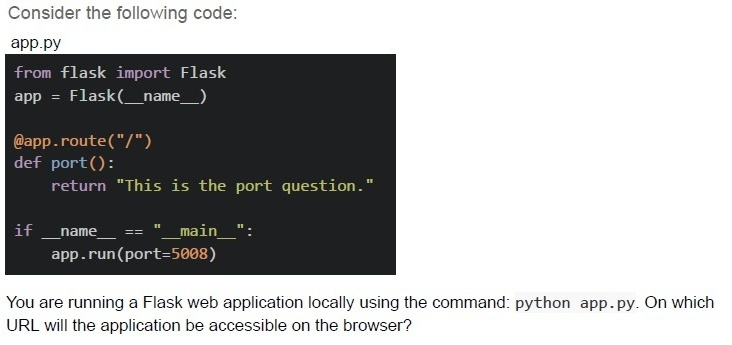
Consider the following code:
app.py

```python
from flask import Flask
app = Flask(__name__)

@app.route("/")
def port():
    return "This is the port question."

if __name__ == "__main__":
    app.run(port=5008)
```

You are running a Flask web application locally using the command: python app.py. On which URL will the application be accessible on the browser?
text
http://127.0.0.1:5000/

text
http://localhost:0000/

text
http://0.0.0.0:5000/

text
http://localhost:5008/
Text of the picture (copyable)
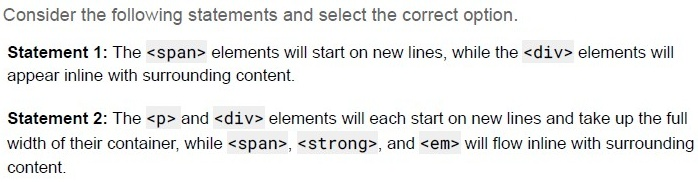
Consider the following statements and select the correct option.

Statement 1: The `<span>` elements will start on new lines, while the `<div>` elements will appear inline with surrounding content.

Statement 2: The `<p>` and `<div>` elements will each start on new lines and take up the full width of their container, while `<span>`, `<strong>`, and `<em>` will flow inline with surrounding content.
- Statement 1 is correct, but statement 2 is incorrect.
- Statement 2 is correct, but statement 1 is incorrect.
- Both statements 1 and 2 are correct
- Both statements 1 and 2 are incorrect

Text of the picture (copyable)
Which of the following Flask view functions will return a 404 error for the URL:
```
http://127.0.0.1:5000/profile/user123/active/2024?
```

text
```python
@app.route('/profile/<username>/<status>/<int:year>')
def profile(username, status, year):
    info = {'username': username, 'status': status, 'year': year}
    return info
```
text
```python
@app.route('/profile/<string:username>/<string:status>/<string:year>')
def profile(username, status, year):
    info = {'username': username, 'status': status, 'year': year}
    return info
```
text
```python
@app.route('/profile/<username>/<status>/<year>')
def profile(username, status, year):
    info = {'username': username, 'status': status, 'year': year}
    return info
```
text
```python
@app.route('/profile/user/<username>/<status>/<year>')
def profile(username, status, year):
    info = {'username': username, 'status': status, 'year': year}
    return info
```
Text of the picture (copyable)
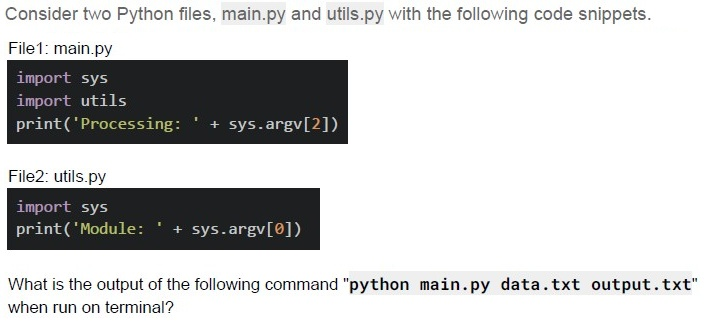
Consider two Python files, main.py and utils.py with the following code snippets.

File1: main.py
```python
import sys
import utils
print('Processing: ' + sys.argv[2])
```

File2: utils.py
```python
import sys
print('Module: ' + sys.argv[0])
```

What is the output of the following command "python main.py data.txt output.txt" when run on terminal?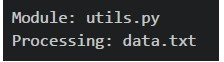
text
```
Module: utils.py
Processing: data.txt
```
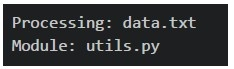
text
```
Processing: data.txt
Module: utils.py
```
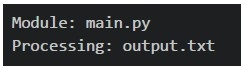
text
```
Module: main.py
Processing: output.txt
```
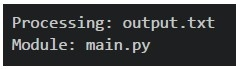
text
```
Processing: output.txt
Module: main.py
```
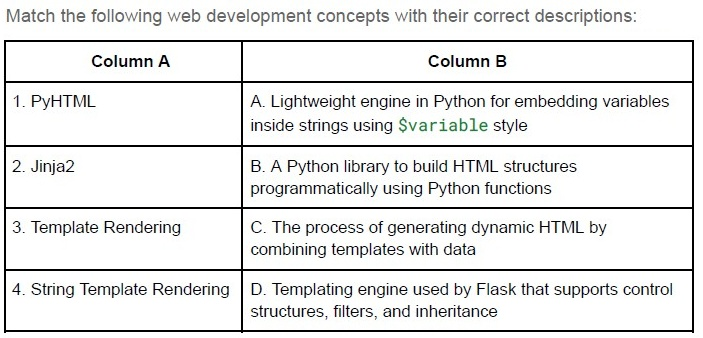
Text of the picture (copyable)
Match the following web development concepts with their correct descriptions:

| Column A | Column B |
|---|---|
| 1. PyHTML | A. Lightweight engine in Python for embedding variables inside strings using `$variable` style |
| 2. Jinja2 | B. A Python library to build HTML structures programmatically using Python functions |
| 3. Template Rendering | C. The process of generating dynamic HTML by combining templates with data |
| 4. String Template Rendering | D. Templating engine used by Flask that supports control structures, filters, and inheritance |
- 1 → B, 2 → C, 3 → D, 4 → A
- 1 → A, 2 → B, 3 → C, 4 → D
- 1 → B, 2 → D, 3 → C, 4 → A
- 1 → C, 2 → D, 3 → A, 4 → B
Text of the picture (copyable)
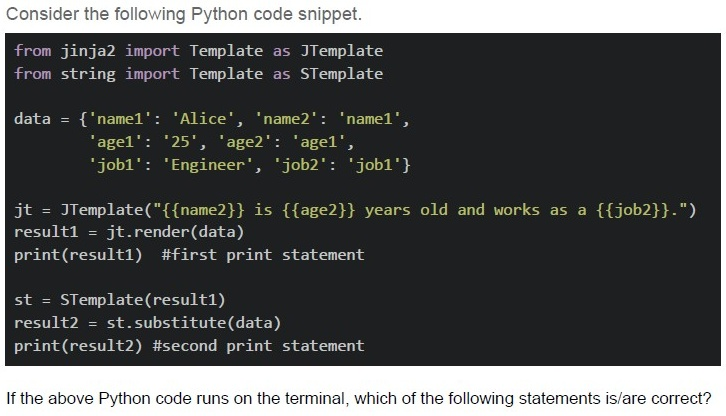
Consider the following Python code snippet.

```python
from jinja2 import Template as JTemplate
from string import Template as STemplate

data = {'name1': 'Alice', 'name2': 'name1',
        'age1': '25', 'age2': 'age1',
        'job1': 'Engineer', 'job2': 'job1'}

jt = JTemplate("{{name2}} is {{age2}} years old and works as a {{job2}}.")
result1 = jt.render(data)
print(result1) #first print statement

st = STemplate(result1)
result2 = st.substitute(data)
print(result2) #second print statement
```

If the above Python code runs on the terminal, which of the following statements is/are correct?
text
The first print statement will output: "name1 is age1 years old and works as a job1."

text
The second print statement will output: "Alice is 25 years old and works as a Engineer."

text
Jinja2 templates use double curly braces {{}} for variable substitution
text
String templates use dollar signs $ for variable substitution in the substitute() method

text
The code will raise a KeyError exception during execution

Text of the picture (copyable)
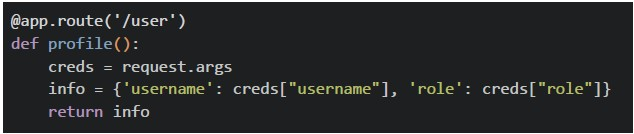
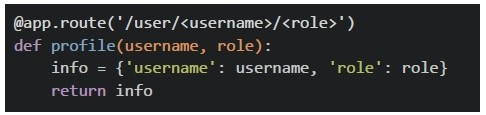
Which of the following Flask view functions will NOT throw any error for the URL:
`http://127.0.0.1:5000/user?username=mad1&role=admin?`
text
```python
@app.route('/user')
def profile():
    creds = request.args
    info = {'username': creds["username"], 'role': creds["role"]}
    return info
```
text
```python
@app.route('/user/<username>/<role>')
def profile(username, role):
    info = {'username': username, 'role': role}
    return info
```
text
```python
@app.route('/user')
def profile():
    return {'message': 'data retrieved successfully'}
```
text
All of these
Text of the picture (copyable)
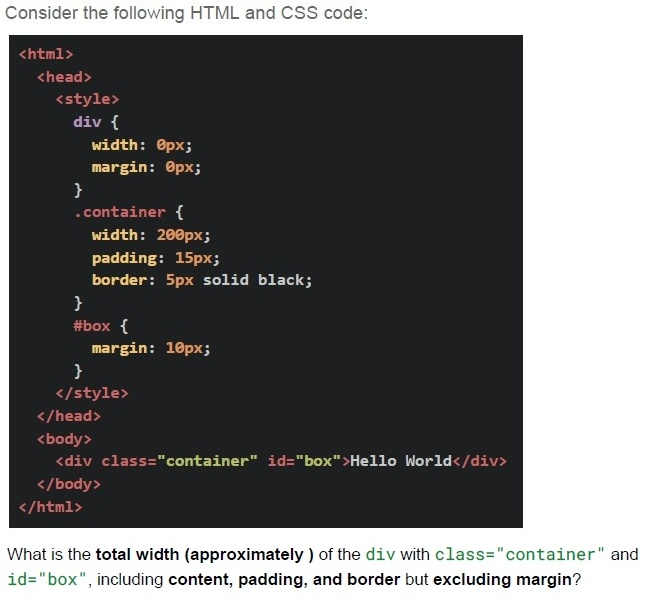
Consider the following HTML and CSS code:

```html
<html>
  <head>
    <style>
      div {
        width: 0px;
        margin: 0px;
      }
      .container {
        width: 200px;
        padding: 15px;
        border: 5px solid black;
      }
      #box {
        margin: 10px;
      }
    </style>
  </head>
  <body>
    <div class="container" id="box">Hello World</div>
  </body>
</html>
```

What is the **total width (approximately)** of the `div` with `class="container"` and `id="box"`, including **content, padding, and border** but excluding margin?- 200 px
- 230 px
- 240 px
- 250 px
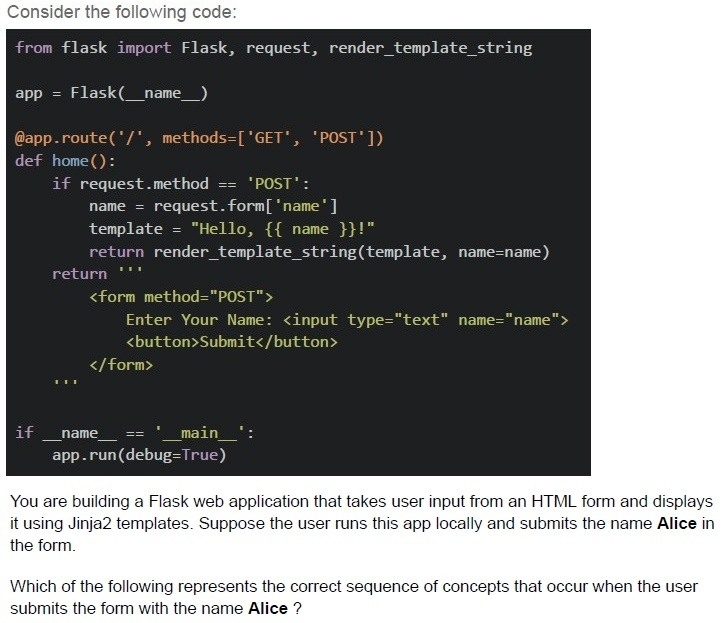
Text of the picture (copyable)
Consider the following code:

```python
from flask import Flask, request, render_template_string

app = Flask(__name__)

@app.route('/', methods=['GET', 'POST'])
def home():
    if request.method == 'POST':
        name = request.form['name']
        template = "Hello, {{ name }}!"
        return render_template_string(template, name=name)
    return '''
        <form method="POST">
            Enter Your Name: <input type="text" name="name">
            <button>Submit</button>
        </form>
    '''

if __name__ == '__main__':
    app.run(debug=True)
```

You are building a Flask web application that takes user input from an HTML form and displays it using Jinja2 templates. Suppose the user runs this app locally and submits the name **Alice** in the form.

Which of the following represents the correct sequence of concepts that occur when the user submits the form with the name **Alice** ?
text
HTML Form Rendering → HTTP 404 Not Found Error → User Submits Form → Flask Routing → Template Rendering

text
User Submits Form (HTTP POST) → Check URL Structure → Network Transfer (Bandwidth & Latency) → Flask Routing

text
User Accesses URL (Form at "/") → User Submits Form (HTTP POST) → Flask Request
Handling (request.form) → Jinja2 Template Rendering

text
Flask Request Handling → Network Round Trip (RTT) → HTML Table Rendering → Jinja2 Template Rendering
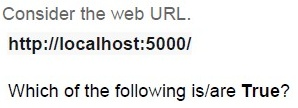
Text of the picture (copyable)
Consider the web URL.
http://localhost:5000/

Which of the following is/are **True**?

text
http is the protocol.

text
5000 is the port number.

text
The trailing / represents the base URL.

text
5000 is the status code.
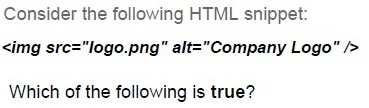
Text of the picture (copyable)
Consider the following HTML snippet:

```html
<img src="logo.png" alt="Company Logo" />
```

Which of the following is true?

text
If logo.png fails to load, the text "Company Logo" will be shown.

text
If the image file is missing, browsers display it as a broken image.

text
The alt attribute is mandatory in HTML5.

text
Logo.png fails to load because the `<img>` tag only allows "jpeg/jpg" files.
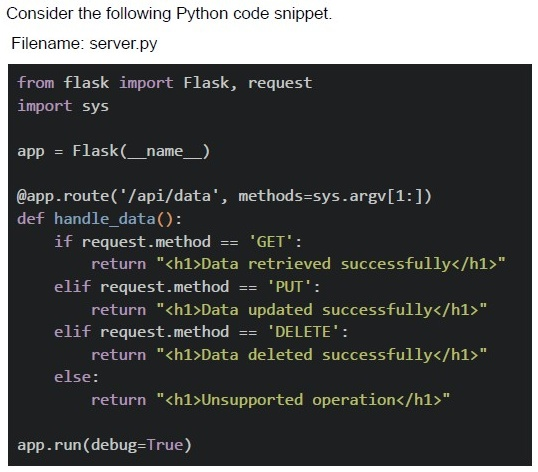
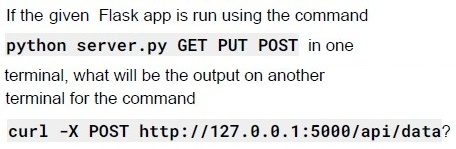
Text of the picture (copyable)
If the given Flask app is run using the command
```
python server.py GET PUT POST
```
in one terminal, what will be the output on another terminal for the command
```
curl -X POST http://127.0.0.1:5000/api/data?
```

text
```html
<h1>Data added successfully</h1>
```

text
```html
<h1>Unsupported operation</h1>
```

text
```html
<h1>Method not Allowed</h1>
```

text
```html
<h1>404 Not Found</h1>
```
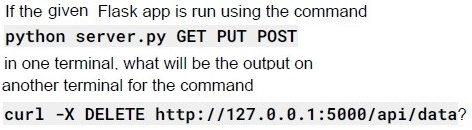
Text of the picture (copyable)
If the given Flask app is run using the command
```
python server.py GET PUT POST
```
in one terminal, what will be the output on
another terminal for the command
```
curl -X DELETE http://127.0.0.1:5000/api/data?
```

text
```html
<h1>Data deleted successfully</h1>
```

text
```html
<h1>Unsupported operation</h1>
```

text
```html
<h1>Method not Allowed</h1>
```

text
```html
<h1>404 Not Found</h1>
```
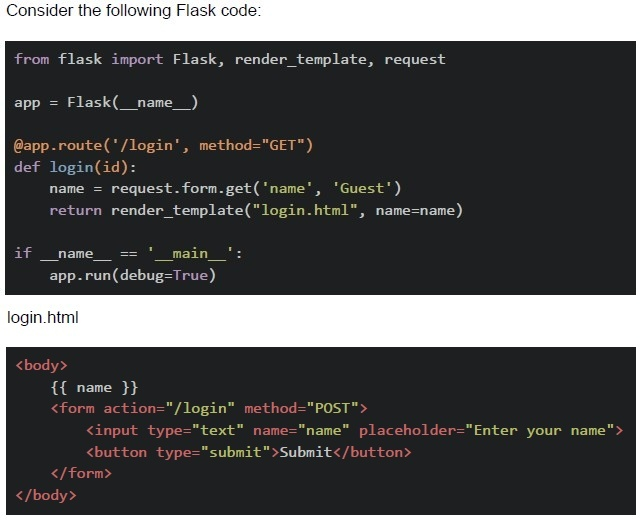

text
method="GET" is not correct, it should be methods=["GET"]

text
```python
def login(id)
```
can throw error because no id is passed in, /login url

text
name will throw error because no name will be written in the starting of app

text
There is no error, Flask application will run correctly.
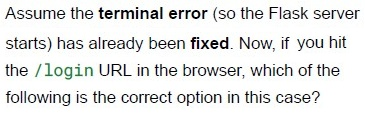
Text of the picture (copyable)
Assume the **terminal error** (so the Flask server
starts) has already been **fixed**. Now, if you hit
the `/login` URL in the browser, which of the
following is the correct option in this case?

text
method="GET" is not correct, it should be methods=["GET"]

text
```python
def login(id) can throw error because no id is passed in /login url
```

text
name will throw error because no name will be written in the starting of app

text
There is no error, Flask application will run correctly.
Answer key
- Q1 (MCQ, 2 marks): B
- Q2 (MCQ, 2 marks): D
- Q3 (MCQ, 3 marks): B
- Q4 (MCQ, 3 marks): D
- Q5 (MCQ, 3 marks): C
- Q6 (MCQ, 3 marks): C
- Q7 (MSQ, 3 marks): A, C, D
- Q8 (MSQ, 3 marks): A, C
- Q9 (MCQ, 4.5 marks): C
- Q10 (MCQ, 4.5 marks): C
- Q11 (MSQ, 2 marks): A, B, C
- Q12 (MSQ, 2 marks): A, B
- Q13 (MCQ, 4.5 marks): B
- Q14 (MCQ, 3 marks): C
- Q15 (MCQ, 4.5 marks): A
- Q16 (MCQ, 3 marks): B
Concepts this paper tests
Auto-generated summary from the source site. Handy as a checklist; the lessons above explain each idea from scratch.
Based on the provided question paper for "Diploma Level: Modern Application Development I", the core topics, concepts, and principles revolve around web development (Flask, Jinja2, HTML/CSS, JavaScript), debugging, and syntax validation. Below is a structured summary of the key areas to focus on for the exam, followed by a Mermaid knowledge graph to visualize relationships.
Core Topics & Concepts
1. Flask (Python Web Framework)
- Routing: Defining routes (
@app.route), handling HTTP methods (GET,POST). Templates (Jinja2):
- Syntax for variables (
{{ variable }}), loops ({% for %}), conditionals ({% if %}). - Displaying data (e.g.,
{{ courses|length }}to show the number of courses). - Template inheritance (
{% extends %},{% block %}).
- Syntax for variables (
Error Handling:
- Common errors (e.g., missing
app.run(), incorrect template paths, undefined variables). - Debugging Flask apps (reading terminal errors, tracebacks).
- Common errors (e.g., missing
- Static Files: Serving CSS/JS files (
url_for('static', filename='style.css')). Request/Response Cycle:
- Accessing form data (
request.form), query parameters (request.args). - Returning responses (
render_template,redirect,jsonify).
- Accessing form data (
2. Jinja2 Templating
Syntax:
- Variables:
{{ variable }} - Filters:
{{ name|upper }} Control structures:
{% if user %} ... {% endif %}
{% for item in items %} ... {% endfor %}
- Variables:
Common Use Cases:
- Dynamic content rendering (e.g., lists, tables).
- Conditional UI elements (e.g., show/hide buttons based on user roles).
3. HTML/CSS
- Box Model: Understanding
width,height,padding,border,margin. - Flexbox/Grid: Basic layout techniques (e.g., centering elements, responsive design).
- CSS Units:
px,%,em,rem,vw/vh. - Specificity: How styles override each other (inline > ID > class > element).
- Media Queries: Responsive design for different screen sizes.
4. JavaScript (Basic Concepts)
DOM Manipulation:
- Selecting elements (
document.getElementById,querySelector). - Event listeners (
addEventListener).
- Selecting elements (
Asynchronous Operations:
fetch()for API calls.- Promises (
then,catch).
ES6 Features:
- Arrow functions,
let/const, template literals.
- Arrow functions,
5. Debugging & Error Analysis
Flask Errors:
TemplateNotFound: Missing template file.NameError: Undefined variable in template.SyntaxError: Incorrect Python/Jinja2 syntax.
Terminal Output:
- Reading stack traces to identify the first error.
- Common pitfalls (e.g., missing
app = Flask(__name__)).
Browser DevTools:
- Inspecting elements, console errors, network requests.
6. Code Snippets & Logic
Matching Code to Output:
- Given a Flask/Jinja2 code snippet, predict the output (e.g., loops, conditionals).
Correcting Syntax:
- Identifying incorrect syntax in routes, templates, or JavaScript.
Algorithmic Thinking:
- Mapping questions (e.g., "Match the following columns") require logical pairing.
Key Equations/Code Snippets (Maths Not Applicable)
Since this is a web development exam, there are no mathematical equations. Instead, focus on code syntax and logical structures:
Flask
from flask import Flask, render_template
app = Flask(__name__)

@app.route("/")
def home():
    courses = ["Math", "Science", "History"]
    return render_template("index.html", courses=courses)

if __name__ == "__main__":
    app.run(debug=True)
Jinja2
<!-- Display number of courses -->
<p>Total courses: {{ courses|length }}</p>

<!-- Loop through courses -->
<ul>
  {% for course in courses %}
    <li>{{ course }}</li>
  {% endfor %}
</ul>
CSS Box Model
.box {
  width: 200px;       /* Content width */
  padding: 20px;      /* Space inside box */
  border: 5px solid black; /* Border around padding */
  margin: 10px;       /* Space outside box */
  /* Total width = 200 + 2*20 + 2*5 + 2*10 = 250px */
}
JavaScript Fetch API
fetch('/api/data')
  .then(response => response.json())
  .then(data => console.log(data))
  .catch(error => console.error(error));
1. Core Topics Relationship
2. Flask Request Flow
Exam Preparation Tips
Flask/Jinja2:
- Practice writing routes, rendering templates, and passing dynamic data.
- Memorize common Jinja2 syntax (
{% %},{{ }}).
Debugging:
- Learn to read Flask error traces (identify the first error in the terminal).
- Know common errors (e.g.,
TemplateNotFound,NameError).
HTML/CSS:
- Calculate box model dimensions (content + padding + border + margin).
- Practice Flexbox/Grid layouts.
JavaScript:
- Focus on DOM manipulation and
fetch()for API calls.
- Focus on DOM manipulation and
Code Snippets:
- For matching questions, map inputs to outputs logically (e.g., loops, conditionals).