Home / Past papers / MAD1 Quiz 2 / this paper
IIT M DIPLOMA QUIZ2 EXAM QPE1 10 July 2022 IBA - 10 Jul 2022
Elapsed 00:00

Text of the picture (copyable)
THIS IS QUESTION PAPER FOR THE SUBJECT "MODERN APPLICATION DEVELOPMENT 1"

ARE YOU SURE YOU HAVE TO WRITE EXAM FOR THIS SUBJECT?
CROSS CHECK YOUR HALL TICKET TO CONFIRM THE SUBJECTS TO BE WRITTEN.

(IF IT IS NOT THE CORRECT SUBJECT, PLS CHECK THE SECTION AT THE TOP FOR THE SUBJECTS REGISTERED BY YOU)
- Yes
- No
Consider the Python file and a template given below. Python file: app.py
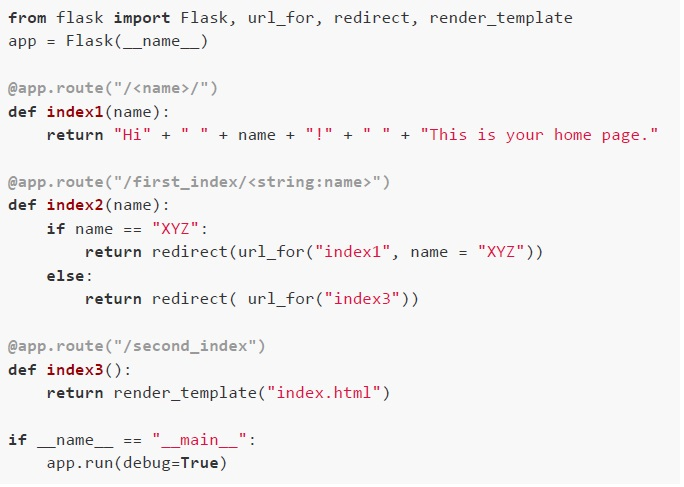 Consider the Python file and a template given below. Python file: app.py Template file: index.html
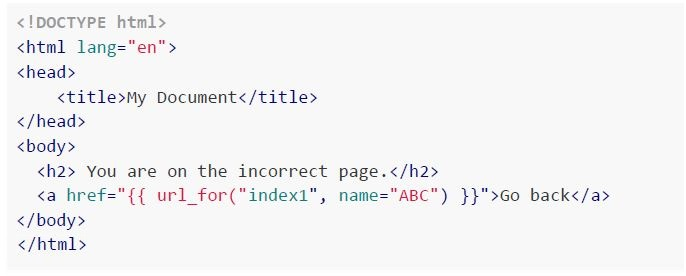 Consider the Python file and a template given below. Python file: app.py Template file: index.html If the above flask application is running locally on the URL ‘http://127.0.0.1:5000’, which of the following statements is/are true about the above code snippet?
Consider the Python file and a template given below. Python file: app.py Template file: index.html
Consider the Python file and a template given below. Python file: app.py Template file: index.html If the above flask application is running locally on the URL ‘http://127.0.0.1:5000’, which of the following statements is/are true about the above code snippet?Text of the picture (copyable)
```python
from flask import Flask, url_for, redirect, render_template
app = Flask(__name__)

@app.route("/<name>/")
def index1(name):
    return "Hi" + " " + name + "!" + " " + "This is your home page."

@app.route("/first_index/<string:name>")
def index2(name):
    if name == "XYZ":
        return redirect(url_for("index1", name = "XYZ"))
    else:
        return redirect( url_for("index3"))

@app.route("/second_index")
def index3():
    return render_template("index.html")

if __name__ == "__main__":
    app.run(debug=True)
```
```html
<!DOCTYPE html>
<html lang="en">
<head>
    <title>My Document</title>
</head>
<body>
    <h2>You are on the incorrect page.</h2>
    <a href="{{ url_for("index1", name="ABC") }}">Go back</a>
</body>
</html>
```
text
For the endpoint '/XYZ', the browser will show 'Not Found' error.

text
On clicking the link "Go back" in "index.html", the browser will render:

Hi ABC! This is your home page.

text
For the endpoint '/first_index/XYZ', the browser will redirect to the URL for the function index3, i.e., '/second_index'.

text
For the endpoint '/first_index/ABC', the browser will redirect to the URL for the
function 'index3' i.e., '/second_index'.
A flask application is given below.
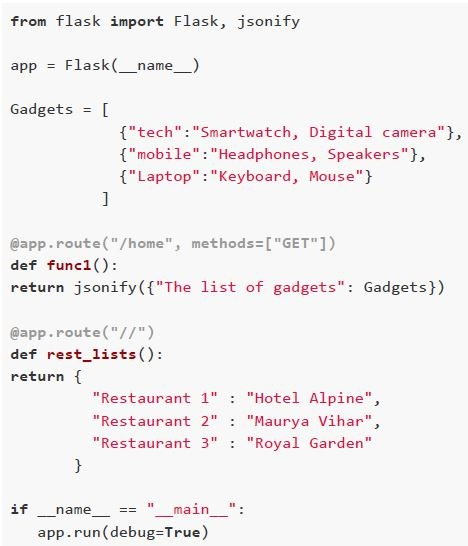 A flask application is given below. If the above flask application is running locally on the URL ‘http://127.0.0.1:5000’, which of the following statement is true about the above flask application?
A flask application is given below. If the above flask application is running locally on the URL ‘http://127.0.0.1:5000’, which of the following statement is true about the above flask application?Text of the picture (copyable)
```python
from flask import Flask, jsonify

app = Flask(__name__)

Gadgets = [
    {"tech":"Smartwatch, Digital camera"},
    {"mobile":"Headphones, Speakers"},
    {"Laptop":"Keyboard, Mouse"}
]

@app.route("/home", methods=["GET"])
def func1():
    return jsonify({"The list of gadgets": Gadgets})

@app.route("/")
def rest_lists():
    return {
        "Restaurant 1" : "Hotel Alpine",
        "Restaurant 2" : "Maurya Vihar",
        "Restaurant 3" : "Royal Garden"
    }

if __name__ == "__main__":
    app.run(debug=True)
```
text
For the endpoint "/", The content type of the response is 'application/json'
text
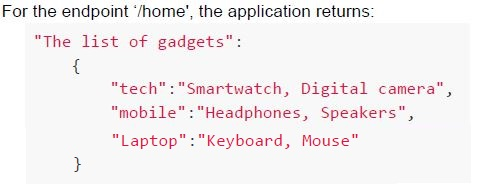
For the endpoint '/home', the application returns:
```json
"The list of gadgets":
{
    "tech":"Smartwatch, Digital camera",
    "mobile":"Headphones, Speakers",
    "Laptop":"Keyboard, Mouse"
}
```
text
None of the endpoints, i.e., '/' or '/home' can be considered as access URIs of an API.
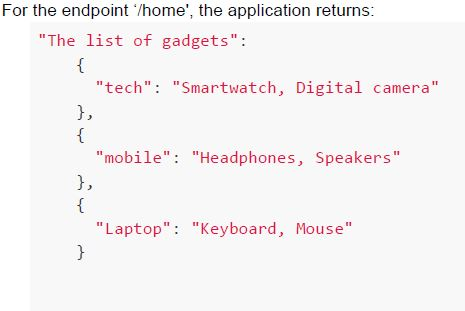
text
For the endpoint '/home', the application returns:
```
"The list of gadgets":
{
    "tech": "Smartwatch, Digital camera"
},
{
    "mobile": "Headphones, Speakers"
},
{
    "Laptop": "Keyboard, Mouse"
}
```
Consider the table “production” in SQLite database given below:
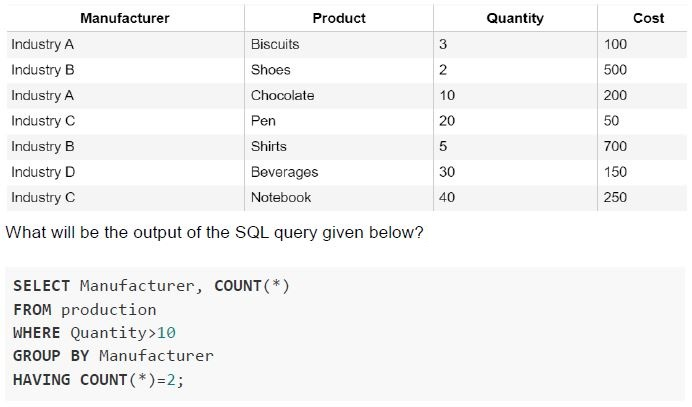 Consider the table “production” in SQLite database given below:
Consider the table “production” in SQLite database given below: Text of the picture (copyable)
| Manufacturer | Product | Quantity | Cost |
|---|---|---|---|
| Industry A | Biscuits | 3 | 100 |
| Industry B | Shoes | 2 | 500 |
| Industry A | Chocolate | 10 | 200 |
| Industry C | Pen | 20 | 50 |
| Industry B | Shirts | 5 | 700 |
| Industry D | Beverages | 30 | 150 |
| Industry C | Notebook | 40 | 250 |

What will be the output of the SQL query given below?

```sql
SELECT Manufacturer, COUNT(*)
FROM production
WHERE Quantity>10
GROUP BY Manufacturer
HAVING COUNT(*)=2;
```

text
```
| Manufacturer | COUNT(*) |
|---|---|
| Industry D | 1 |
```

text
```
Manufacturer|COUNT(*)
Industry C  |2
```

text
```
Manufacturer|COUNT(*)
Industry C  |2
Industry D  |1
```
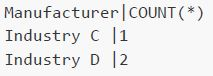
text
```
Manufacturer|COUNT(*)
Industry C  |1
Industry D  |2
```
Consider the table “employee” given below. The model class “Employee” corresponds to table “employee” in the database.
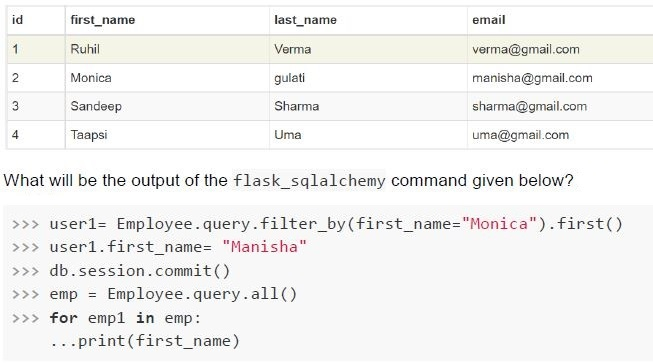 Consider the table “employee” given below. The model class “Employee” corresponds to table “employee” in the database.
Consider the table “employee” given below. The model class “Employee” corresponds to table “employee” in the database. Text of the picture (copyable)
| id | first_name | last_name | email |
|---|---|---|---|
| 1 | Ruhil | Verma | verma@gmail.com |
| 2 | Monica | gulati | manisha@gmail.com |
| 3 | Sandeep | Sharma | sharma@gmail.com |
| 4 | Taapsi | Uma | uma@gmail.com |

What will be the output of the flask_sqlalchemy command given below?

```python
>>> user1= Employee.query.filter_by(first_name="Monica").first()
>>> user1.first_name= "Manisha"
>>> db.session.commit()
>>> emp = Employee.query.all()
>>> for emp1 in emp:
...print(first_name)
```
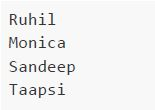
text
Ruhil
Monica
Sandeep
Taapsi

text
Ruhil
Sandeep
Taapsi
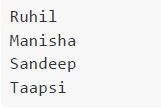
text
Ruhil
Manisha
Sandeep
Taapsi

text
None of these
Which of the following is the correct Python object representation of the given SQL query with declarative_base() class.
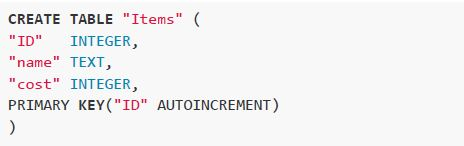 Which of the following is the correct Python object representation of the given SQL query with declarative_base() class.
Which of the following is the correct Python object representation of the given SQL query with declarative_base() class. Text of the picture (copyable)
```sql
CREATE TABLE "Items" (
  "ID" INTEGER,
  "name" TEXT,
  "cost" INTEGER,
  PRIMARY KEY("ID" AUTOINCREMENT)
)
```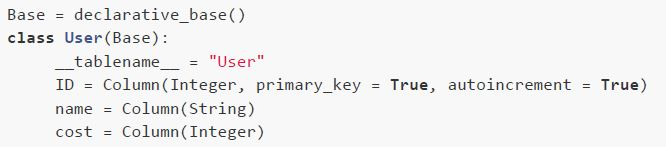
text
```python
Base = declarative_base()
class User(Base):
    __tablename__ = "User"
    ID = Column(Integer, primary_key = True, autoincrement = True)
    name = Column(String)
    cost = Column(Integer)
```
text
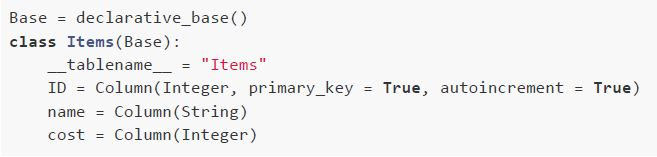
```python
Base = declarative_base()
class Items(Base):
    __tablename__ = "Items"
    ID = Column(Integer, primary_key = True, autoincrement = True)
    name = Column(String)
    cost = Column(Integer)
```
text
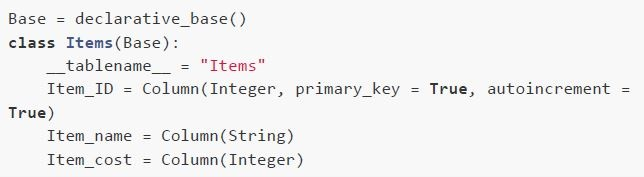
```python
Base = declarative_base()
class Items(Base):
    __tablename__ = "Items"
    Item_ID = Column(Integer, primary_key = True, autoincrement = True)
    Item_name = Column(String)
    Item_cost = Column(Integer)
```
text
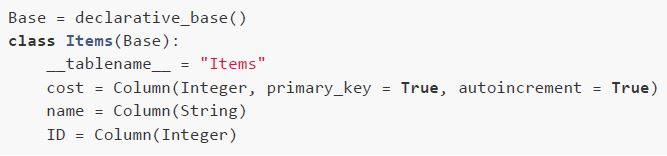
```python
Base = declarative_base()
class Items(Base):
    __tablename__ = "Items"
    cost = Column(Integer, primary_key = True, autoincrement = True)
    name = Column(String)
    ID = Column(Integer)
```
If the below flask application is running locally on the URL: ‘http://127.0.0.1:5000’, what will be rendered by the browser? Python file: main.py
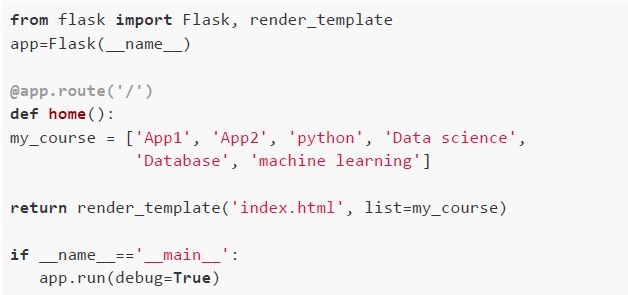 If the below flask application is running locally on the URL: ‘http://127.0.0.1:5000’, what will be rendered by the browser? Python file: main.py Template: index.html
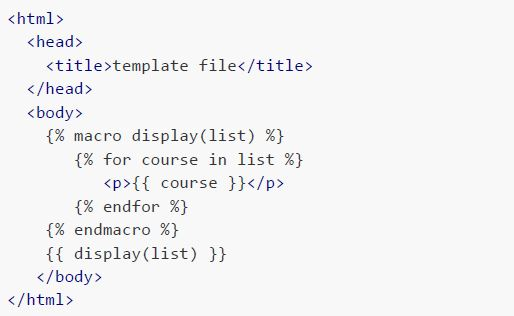 If the below flask application is running locally on the URL: ‘http://127.0.0.1:5000’, what will be rendered by the browser? Python file: main.py Template: index.html
If the below flask application is running locally on the URL: ‘http://127.0.0.1:5000’, what will be rendered by the browser? Python file: main.py Template: index.html
If the below flask application is running locally on the URL: ‘http://127.0.0.1:5000’, what will be rendered by the browser? Python file: main.py Template: index.html Text of the picture (copyable)
```python
from flask import Flask, render_template
app=Flask(__name__)

@app.route('/')
def home():
    my_course = ['App1', 'App2', 'python', 'Data science',
                 'Database', 'machine learning']

    return render_template('index.html', list=my_course)

if __name__ == '__main__':
    app.run(debug=True)
```
```html
<html>
<head>
    <title>template file</title>
</head>
<body>
    {% macro display(list) %}
        {% for course in list %}
            <p>{{ course }}</p>
        {% endfor %}
    {% endmacro %}
    {{ display(list) }}
</body>
</html>
```
text
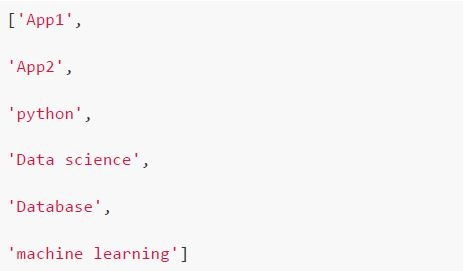
```
['App1',
'App2',
'python',
'Data science',
'Database',
'machine learning']
```

text
```
['App1', 'App2', 'python', 'Data science', 'Database',
'machine learning']
```
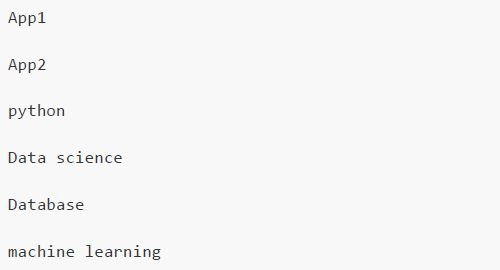
text
App1
App2
python
Data science
Database
machine learning

text
App1 App2 python Data science Database machine learning
Consider the following table “table_A” in SQLite database.
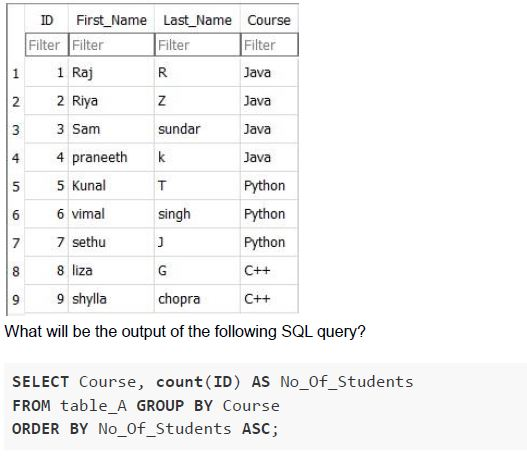 Consider the following table “table_A” in SQLite database.
Consider the following table “table_A” in SQLite database. Text of the picture (copyable)
| | ID | First_Name | Last_Name | Course |
|---|---|---|---|---|
| | Filter | Filter | Filter | Filter |
| 1 | 1 | Raj | R | Java |
| 2 | 2 | Riya | Z | Java |
| 3 | 3 | Sam | sundar | Java |
| 4 | 4 | praneeth | k | Java |
| 5 | 5 | Kunal | T | Python |
| 6 | 6 | vimal | singh | Python |
| 7 | 7 | sethu | J | Python |
| 8 | 8 | liza | G | C++ |
| 9 | 9 | shylla | chopra | C++ |

What will be the output of the following SQL query?

```sql
SELECT Course, count(ID) AS No_Of_Students
FROM table_A GROUP BY Course
ORDER BY No_Of_Students ASC;
```
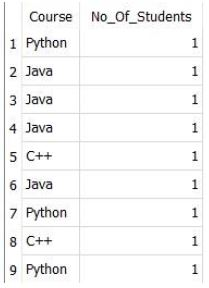
text
| | Course | No_Of_Students |
|---|---|---|
| 1 | Python | 1 |
| 2 | Java | 1 |
| 3 | Java | 1 |
| 4 | Java | 1 |
| 5 | C++ | 1 |
| 6 | Java | 1 |
| 7 | Python | 1 |
| 8 | C++ | 1 |
| 9 | Python | 1 |
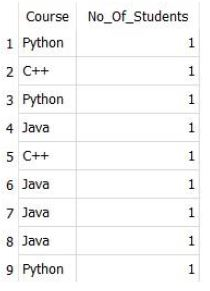
text
```
|   | Course | No_Of_Students |
|---|--------|----------------|
| 1 | Python | 1              |
| 2 | C++    | 1              |
| 3 | Python | 1              |
| 4 | Java   | 1              |
| 5 | C++    | 1              |
| 6 | Java   | 1              |
| 7 | Java   | 1              |
| 8 | Java   | 1              |
| 9 | Python | 1              |
```
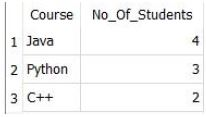
text
| | Course | No_Of_Students |
|---|---|---|
| 1 | Java | 4 |
| 2 | Python | 3 |
| 3 | C++ | 2 |
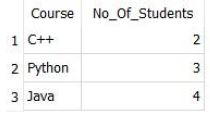
text
| | Course | No_Of_Students |
|---|---|---|
| 1 | C++ | 2 |
| 2 | Python | 3 |
| 3 | Java | 4 |
Consider the following HTML file with embedded JavaScript. Filename: index.html
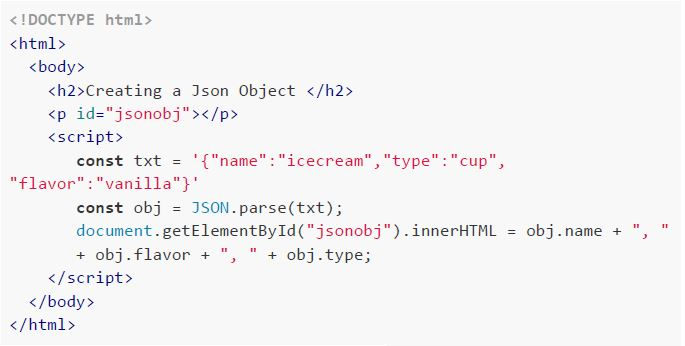 Consider the following HTML file with embedded JavaScript. Filename: index.html How will the browser render the above HTML file?
Consider the following HTML file with embedded JavaScript. Filename: index.html How will the browser render the above HTML file?Text of the picture (copyable)
```html
<!DOCTYPE html>
<html>
<body>

<h2>Creating a Json Object </h2>
<p id="jsonobj"></p>

<script>
const txt = '{"name":"icecream","type":"cup",
"flavor":"vanilla"}'

const obj = JSON.parse(txt);
document.getElementById("jsonobj").innerHTML = obj.name + ", "
+ obj.flavor + ", " + obj.type;
</script>

</body>
</html>
```
text
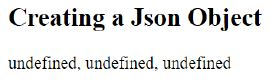
Creating a Json Object
undefined, undefined, undefined
text
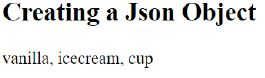
Creating a Json Object

vanilla, icecream, cup
text
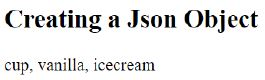
Creating a Json Object

cup, vanilla, icecream
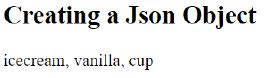
text
Creating a Json Object
icecream, vanilla, cup
Consider the statements given below. Statement 1: APIs usually contain SDKs, but SDKs do not contain APIs. Statement 2: The SDKs contains the group of tools that help developers to use a different product or services. Which of the following is correct in the context of statements given above?
- Both statement 1 and 2 are correct.
- Statement 1 is correct, 2 is incorrect.
- Both statement 1 and 2 are incorrect.
- Statement 1 is incorrect, 2 is correct.
Consider a situation, where a developer wants to create his own customized application and wants to deploy it for the end users. For that, he wants a development environment that consists of some programming language execution environment, an operating system, a web server and a database, such that he can build, compile and run his programs without worrying about the servers, storage, and networking. Which of the following service models he would prefer in order to do so?
- SaaS
- PaaS
- IaaS
- None of these
Consider the following table ‘flowers’ in SQLite database.
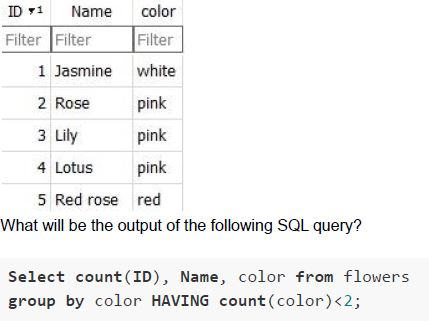 Consider the following table ‘flowers’ in SQLite database.
Consider the following table ‘flowers’ in SQLite database. Text of the picture (copyable)
Here's the transcription of the visible text:

| ID ▼1 | Name | color |
|---|---|---|
| Filter | Filter | Filter |
| 1 | Jasmine | white |
| 2 | Rose | pink |
| 3 | Lily | pink |
| 4 | Lotus | pink |
| 5 | Red rose | red |

What will be the output of the following SQL query?

```sql
Select count(ID), Name, color from flowers
group by color HAVING count(color)<2;
```
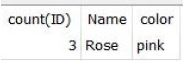
text
| count(ID) | Name | color |
|---|---|---|
| 3 | Rose | pink |
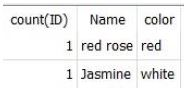
text
| count(ID) | Name      | color |
| :-------- | :-------- | :---- |
| 1         | red rose  | red   |
| 1         | Jasmine   | white |
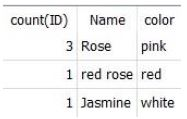
text
| count(ID) | Name      | color |
| :-------- | :-------- | :---- |
| 3         | Rose      | pink  |
| 1         | red rose  | red   |
| 1         | Jasmine   | white |
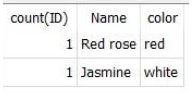
text
| count(ID) | Name      | color |
| :-------- | :-------- | :---- |
| 1         | Red rose  | red   |
| 1         | Jasmine   | white |
Match the following based on the memory hierarchy of computer.
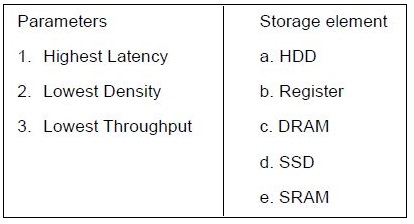 Match the following based on the memory hierarchy of computer.
Match the following based on the memory hierarchy of computer. Text of the picture (copyable)
| Parameters          | Storage element |
| :------------------ | :-------------- |
| 1. Highest Latency  | a. HDD          |
| 2. Lowest Density   | b. Register     |
| 3. Lowest Throughput| c. DRAM         |
|                     | d. SSD          |
|                     | e. SRAM         |
- 1 - e, 2 - b, 3 - d
- 1 - a, 2 - b, 3 - c
- 1 - a, 2 - b, 3 - a
- 1 - b, 2 - c, 3 - d
Consider the HTML document given below:
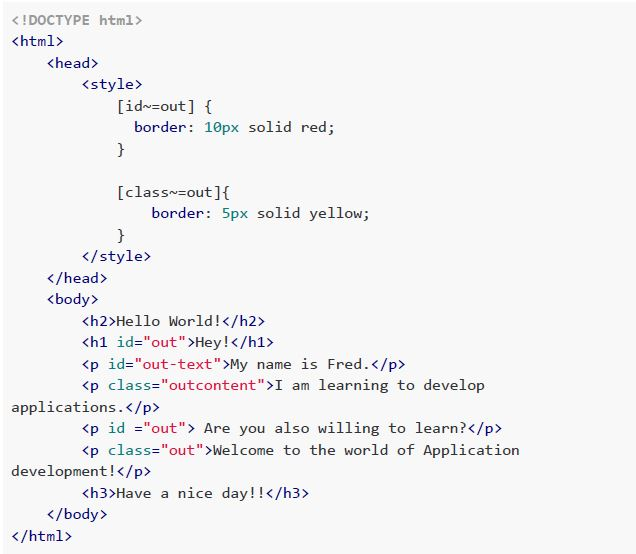 Consider the HTML document given below: Which of the following statements is true for the above HTML document when rendered by the browser?
Consider the HTML document given below: Which of the following statements is true for the above HTML document when rendered by the browser?Text of the picture (copyable)
```html
<!DOCTYPE html>
<html>
<head>
    <style>
        [id~=out] {
            border: 10px solid red;
        }

        [class~=out]{
            border: 5px solid yellow;
        }
    </style>
</head>
<body>
    <h2>Hello World!</h2>
    <h1 id="out">Hey!</h1>
    <p id="out-text">My name is Fred.</p>
    <p class="outcontent">I am learning to develop
applications.</p>
    <p id ="out"> Are you also willing to learn?</p>
    <p class="out">Welcome to the world of Application
development!</p>
    <h3>Have a nice day!!</h3>
</body>
</html>
```- The headings, i.e., ‘Hello World!’ and ‘Hey!’, both will have red border color.
- The paragraph with class=‘out’, will get a yellow color border.
- The paragraph with id=‘out’ will get a yellow color border.
- The two paragraphs with contents, ‘My name is Fred.’ and ‘I am learning todevelop applications.’, will both get a red color border and yellow color border.
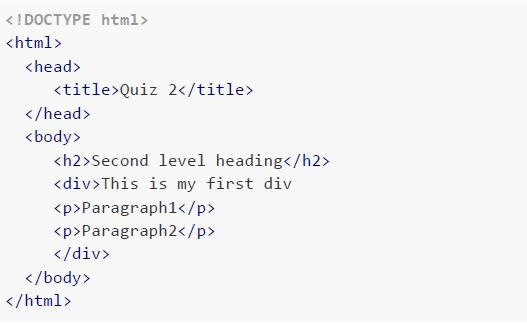
Consider the following PyHTML program. Identify the corresponding HTML file which will be generated on running the PyHTML code.
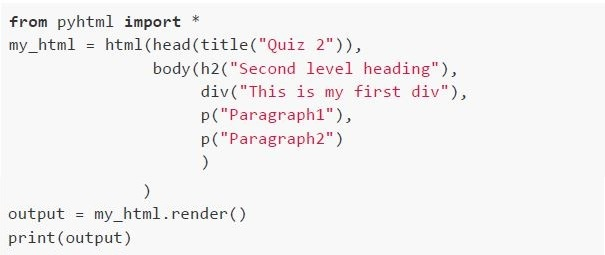 Consider the following PyHTML program. Identify the corresponding HTML file which will be generated on running the PyHTML code.
Consider the following PyHTML program. Identify the corresponding HTML file which will be generated on running the PyHTML code. Text of the picture (copyable)
```python
from pyhtml import *

my_html = html(head(title("Quiz 2")),
               body(h2("Second level heading"),
                    div("This is my first div"),
                    p("Paragraph1"),
                    p("Paragraph2")
                    )
               )

output = my_html.render()
print(output)
```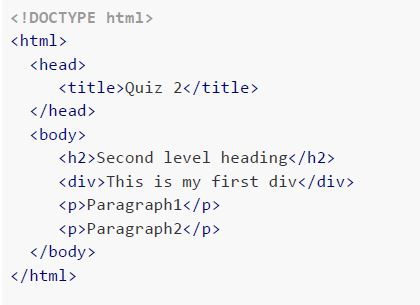
text
```html
<!DOCTYPE html>
<html>
<head>
    <title>Quiz 2</title>
</head>
<body>
    <h2>Second level heading</h2>
    <div>This is my first div</div>
    <p>Paragraph1</p>
    <p>Paragraph2</p>
</body>
</html>
```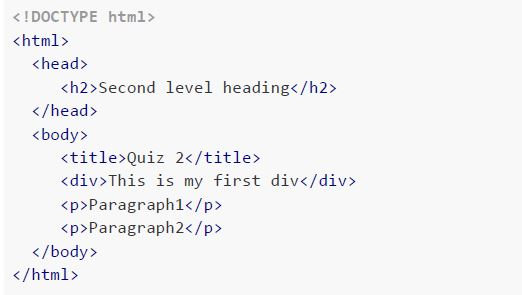
text
```html
<!DOCTYPE html>
<html>
<head>
    <h2>Second level heading</h2>
</head>
<body>
    <title>Quiz 2</title>
    <div>This is my first div</div>
    <p>Paragraph1</p>
    <p>Paragraph2</p>
</body>
</html>
```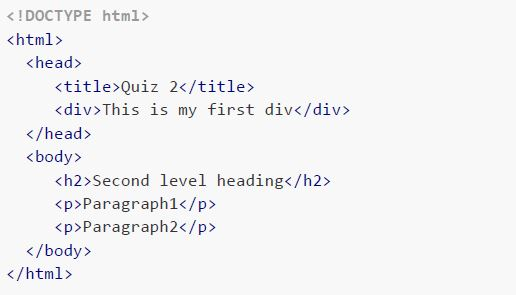
text
```html
<!DOCTYPE html>
<html>
<head>
    <title>Quiz 2</title>
    <div>This is my first div</div>
</head>
<body>
    <h2>Second level heading</h2>
    <p>Paragraph1</p>
    <p>Paragraph2</p>
</body>
</html>
```
text
```html
<!DOCTYPE html>
<html>
<head>
    <title>Quiz 2</title>
</head>
<body>
    <h2>Second level heading</h2>
    <div>This is my first div
        <p>Paragraph1</p>
        <p>Paragraph2</p>
    </div>
</body>
</html>
```

Text of the picture (copyable)
Consider two software packages A and B. The average processing time of the package A is
TA(n) = 0.001n milliseconds and the average processing time of the package B is TB(n) = 500√n
milliseconds, where n is the number of records being processed. Which of the given software
packages A and B should be chosen to process data collections, containing 10⁸ records?
- Package A
- Package B
- Both A and B will take same time
- Both A and B will infinite time to process records
Consider the following Python code snippet:
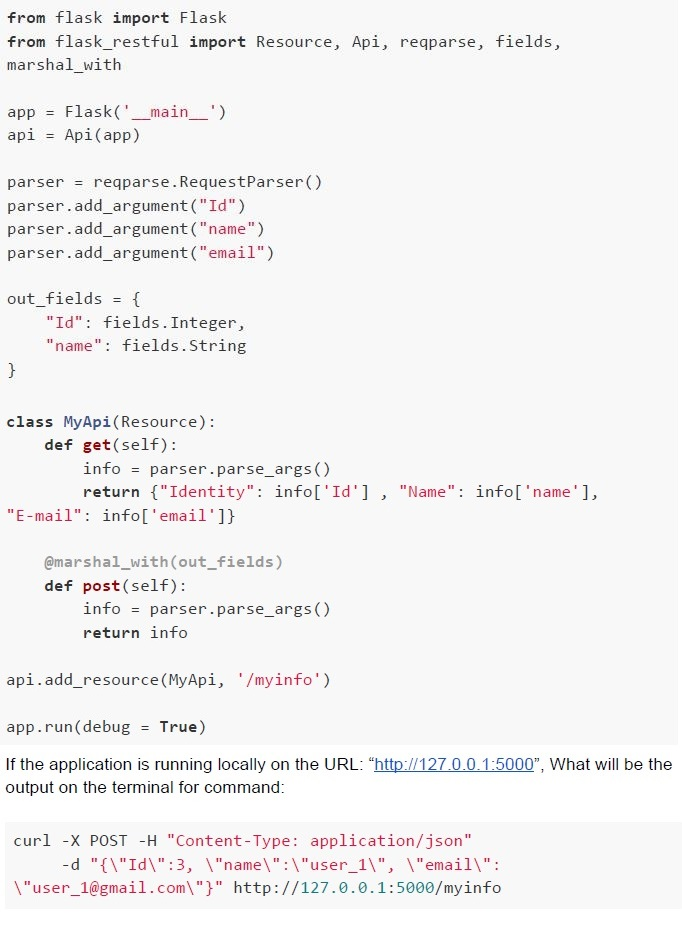 Consider the following Python code snippet:
Consider the following Python code snippet: Text of the picture (copyable)
```python
from flask import Flask
from flask_restful import Resource, Api, reqparse, fields, \
    marshal_with

app = Flask('__main__')
api = Api(app)

parser = reqparse.RequestParser()
parser.add_argument("Id")
parser.add_argument("name")
parser.add_argument("email")

out_fields = {
    "Id": fields.Integer,
    "name": fields.String
}

class MyApi(Resource):
    def get(self):
        info = parser.parse_args()
        return {"Identity": info['Id'] , "Name": info['name'], \
"E-mail": info['email']}

    @marshal_with(out_fields)
    def post(self):
        info = parser.parse_args()
        return info

api.add_resource(MyApi, '/myinfo')

app.run(debug = True)
```
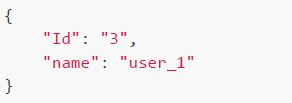
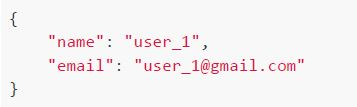
If the application is running locally on the URL: "http://127.0.0.1:5000", What will be the output on the terminal for command:

```bash
curl -X POST -H "Content-Type: application/json" \
    -d "{\"Id\":3, \"name\":\"user_1\", \"email\": \
\"user_1@gmail.com\"}" http://127.0.0.1:5000/myinfo
```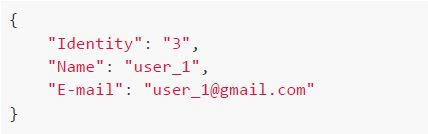
text
```json
{
  "Identity": "3",
  "Name": "user_1",
  "E-mail": "user_1@gmail.com"
}
```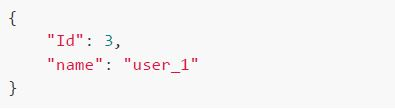
text
```json
{
  "Id": 3,
  "name": "user_1"
}
```
text
```json
{
  "Id": "3",
  "name": "user_1"
}
```
text
```json
{
  "name": "user_1",
  "email": "user_1@gmail.com"
}
```
Answer key
- Q1 (MCQ, 0 marks): A
- Q2 (MSQ, 3 marks): B, C
- Q3 (MCQ, 3 marks): A
- Q4 (MCQ, 3 marks): B
- Q5 (MCQ, 3 marks): D
- Q6 (MCQ, 3 marks): B
- Q7 (MCQ, 3 marks): C
- Q8 (MCQ, 3 marks): D
- Q9 (MCQ, 3 marks): D
- Q10 (MCQ, 2 marks): D
- Q11 (MCQ, 2 marks): B
- Q12 (MCQ, 2 marks): D
- Q13 (MCQ, 2 marks): C
- Q14 (MCQ, 4.5 marks): B
- Q15 (MCQ, 4.5 marks): A
- Q16 (MCQ, 4.5 marks): A
- Q17 (MCQ, 4.5 marks): B