Home / Past papers / MAD1 Quiz 1 / this paper
IIT M DIPLOMA AN EXAM QDD4 23 Feb 2025 - 23 Feb 2025
Elapsed 00:00

Text of the picture (copyable)
Which of the following is the correct way of calling an external CSS file using HTML?

text
```html
<head>
  <link url="stylesheet" type="text/css" href="mystyle.css">
</head>
```

text
```html
<head>
  <link rel="stylesheet" type="text/css" href="mystyle.css">
</head>
```

text
```html
<head>
    <link href="stylesheet" type="text/css" file="mystyle.css">
</head>
```
text
```html
<head>
    <link url="stylesheet" type="text/css" file="mystyle.css">
</head>
```

Text of the picture (copyable)
Which command would you use to get detailed information about the HTTP
request and response, including headers, and to help debug the HTTP request when
using curl?

text
```
curl -i <URL>
```

text
```
curl -v <URL>
```

text
```
curl --headers <URL>
```

text
```
curl -X GET <URL>
```
Read the statements given below carefully and select the correct option.
Statement 1: If an element that belongs to two different classes is styled externally using both the classes, then for the same attribute, it will acquire styling from the latest class in order. Statement 2: If an element having an ID and a class is styled externally using both its ID and the class, then for the same attribute, it will acquire styling from the ID selector.
- Both statements 1 and 2 are correct
- Both statements 1 and 2 are incorrect
- Statement 1 is correct but statement 2 is incorrect
- Statement 2 is correct but statement 1 is incorrect
Which of the following options represents a one-to-one relationship in the Entity-Relationship Diagram?
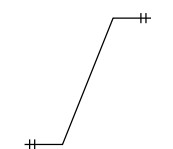
text
This is a diagram of a line segment.
The line starts at the bottom left with a short horizontal segment, then goes diagonally upwards and to the right, and ends with another short horizontal segment at the top right.
Both ends of the line have two short perpendicular hash marks.
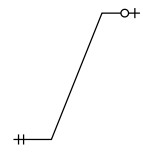
text
This is a diagram. It shows a line segment starting at the bottom left, going diagonally upwards to the right, and then horizontally to the right.
- The bottom left end of the line has two vertical parallel lines.
- The top right end of the line has a small circle with a plus sign inside it, and then a short horizontal line extending to the right.
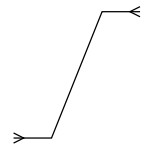
text
This is a diagram showing a single line with two arrows.
The line starts at the bottom left, goes horizontally right for a short segment, then diagonally up and right, then horizontally right for another short segment, ending at the top right.
There is an arrow head at the very beginning of the line, pointing left.
There is an arrow head at the very end of the line, pointing right.
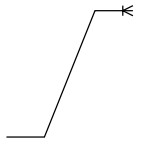
text
This is a diagram of a line graph.
The graph starts at the bottom left with a horizontal line segment.
It then transitions to an upward sloping diagonal line segment.
Finally, it transitions to another horizontal line segment at the top right, which ends with a small asterisk-like symbol.
Text of the picture (copyable)
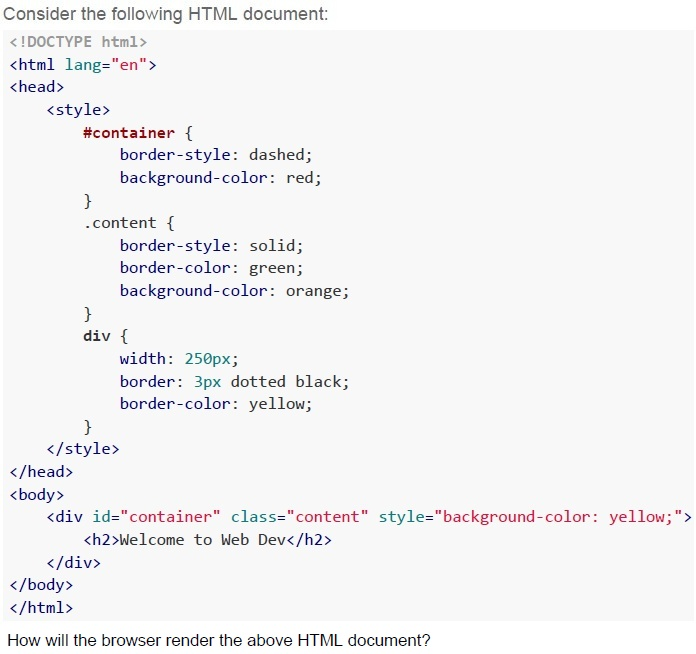
Consider the following HTML document:

```html
<!DOCTYPE html>
<html lang="en">
<head>
    <style>
        #container {
            border-style: dashed;
            background-color: red;
        }
        .content {
            border-style: solid;
            border-color: green;
            background-color: orange;
        }
        div {
            width: 250px;
            border: 3px dotted black;
            border-color: yellow;
        }
    </style>
</head>
<body>
    <div id="container" class="content" style="background-color: yellow;">
        <h2>Welcome to Web Dev</h2>
    </div>
</body>
</html>
```

How will the browser render the above HTML document?
text
Welcome to Web Dev

text
Welcome to Web Dev

text
Welcome to Web Dev

text
This is a screenshot of a web page element. It shows a red rectangular box with a dotted green border. Inside the box, the text "Welcome to Web Dev" is displayed in black, bold font.
Text of the picture (copyable)
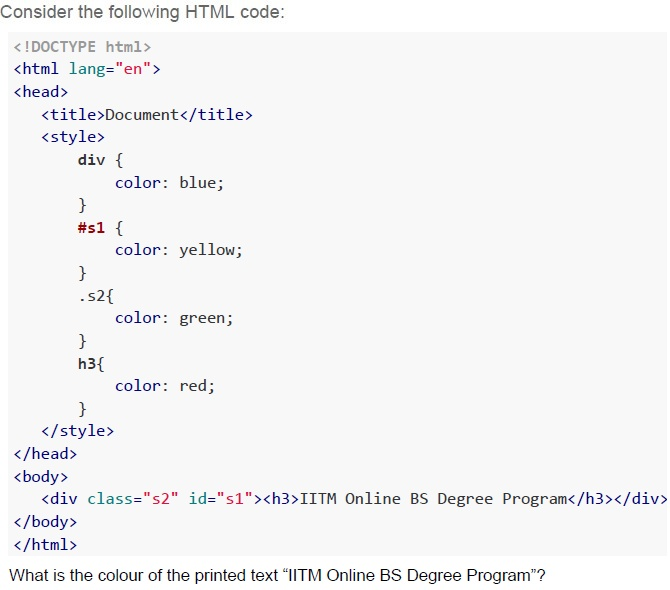
Consider the following HTML code:

```html
<!DOCTYPE html>
<html lang="en">
<head>
    <title>Document</title>
    <style>
        div {
            color: blue;
        }
        #s1 {
            color: yellow;
        }
        .s2 {
            color: green;
        }
        h3 {
            color: red;
        }
    </style>
</head>
<body>
    <div class="s2" id="s1"><h3>IITM Online BS Degree Program</h3></div>
</body>
</html>
```

What is the colour of the printed text "IITM Online BS Degree Program"?- BLUE
- YELLOW
- GREEN
- RED
Text of the picture (copyable)
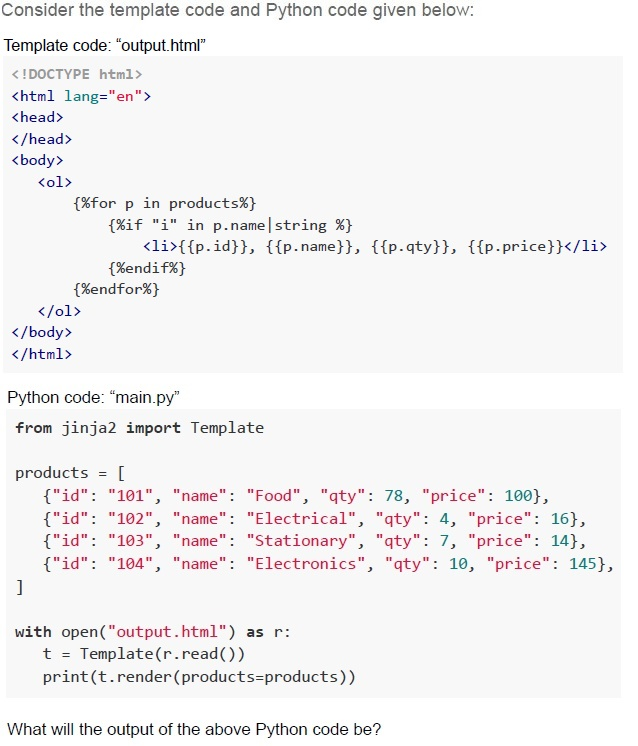
Consider the template code and Python code given below:

Template code: "output.html"

```html
<!DOCTYPE html>
<html lang="en">
<head>
</head>
<body>
    <ol>
        {%for p in products%}
            {%if "i" in p.name|string %}
                <li>{{p.id}}, {{p.name}}, {{p.qty}}, {{p.price}}</li>
            {%endif%}
        {%endfor%}
    </ol>
</body>
</html>
```

Python code: "main.py"

```python
from jinja2 import Template

products = [
    {"id": "101", "name": "Food", "qty": 78, "price": 100},
    {"id": "102", "name": "Electrical", "qty": 4, "price": 16},
    {"id": "103", "name": "Stationary", "qty": 7, "price": 14},
    {"id": "104", "name": "Electronics", "qty": 10, "price": 145},
]

with open("output.html") as r:
    t = Template(r.read())
    print(t.render(products=products))
```

What will the output of the above Python code be?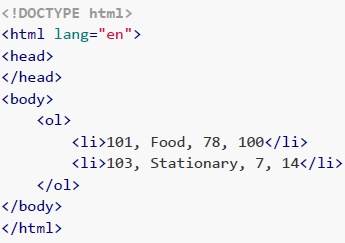
text
```html
<!DOCTYPE html>
<html lang="en">
<head>
</head>
<body>
    <ol>
        <li>101, Food, 78, 100</li>
        <li>103, Stationary, 7, 14</li>
    </ol>
</body>
</html>
```
text
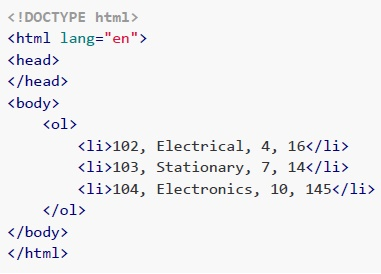
```html
<!DOCTYPE html>
<html lang="en">
<head>
</head>
<body>
    <ol>
        <li>102, Electrical, 4, 16</li>
        <li>103, Stationary, 7, 14</li>
        <li>104, Electronics, 10, 145</li>
    </ol>
</body>
</html>
```
text
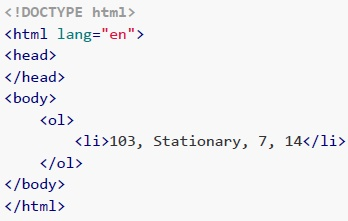
```html
<!DOCTYPE html>
<html lang="en">
<head>
</head>
<body>
    <ol>
        <li>103, Stationary, 7, 14</li>
    </ol>
</body>
</html>
```
text
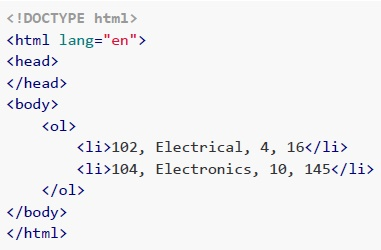
```html
<!DOCTYPE html>
<html lang="en">
<head>
</head>
<body>
    <ol>
        <li>102, Electrical, 4, 16</li>
        <li>104, Electronics, 10, 145</li>
    </ol>
</body>
</html>
```
Text of the picture (copyable)
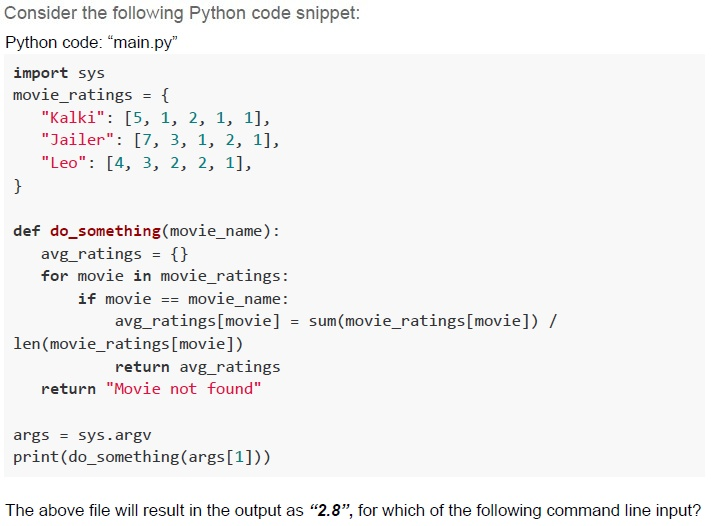
Consider the following Python code snippet:
Python code: "main.py"

```python
import sys

movie_ratings = {
    "Kalki": [5, 1, 2, 1, 1],
    "Jailer": [7, 3, 1, 2, 1],
    "Leo": [4, 3, 2, 2, 1],
}

def do_something(movie_name):
    avg_ratings = {}
    for movie in movie_ratings:
        if movie == movie_name:
            avg_ratings[movie] = sum(movie_ratings[movie]) / \
                                 len(movie_ratings[movie])
            return avg_ratings
    return "Movie not found"

args = sys.argv
print(do_something(args[1]))
```

The above file will result in the output as "2.8", for which of the following command line input?- python main.py Kalki
- python main.py Leo
- python main.py Pushpa2
- python main.py Jailer
Text of the picture (copyable)
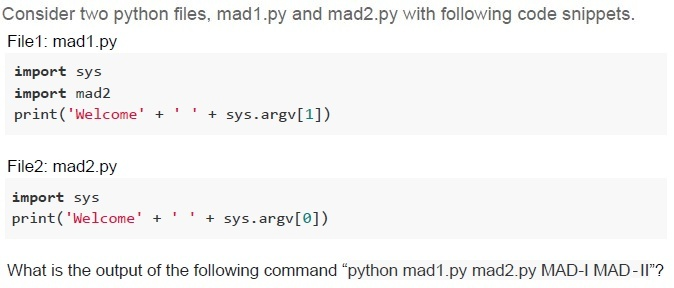
Consider two python files, mad1.py and mad2.py with following code snippets.
File1: mad1.py

```python
import sys
import mad2
print('Welcome' + ' ' + sys.argv[1])
```

File2: mad2.py

```python
import sys
print('Welcome' + ' ' + sys.argv[0])
```

What is the output of the following command "python mad1.py mad2.py MAD-I MAD-II"?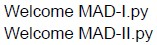
text
Welcome MAD-I.py
Welcome MAD-II.py
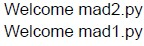
text
Welcome mad2.py
Welcome mad1.py
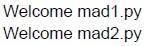
text
Welcome mad1.py
Welcome mad2.py
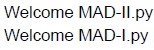
text
Welcome MAD-II.py
Welcome MAD-I.py

Text of the picture (copyable)
Based on the provided latency and response size information, which of the following statements is/are correct?
(Assume the speed of light in cable as 2×10^8 m/s for all the options and ms is a millisecond )

text
The speed of light in a cable is approximately 2×10^8 m/s, resulting in a latency of approximately 5 ms(millisecond) for a 1000 km distance.

text
For a data centre located 2000 km away, a one-way request will take approximately 10 ms, to reach the server, assuming the speed of light in the cable.

text
The round-trip latency for communication with a data centre 2000 km away is approximately 50ms.

text
If a response size is 1 KB, a maximum of 50 requests per second can be handled considering a round-trip latency of 20ms.
Text of the picture (copyable)
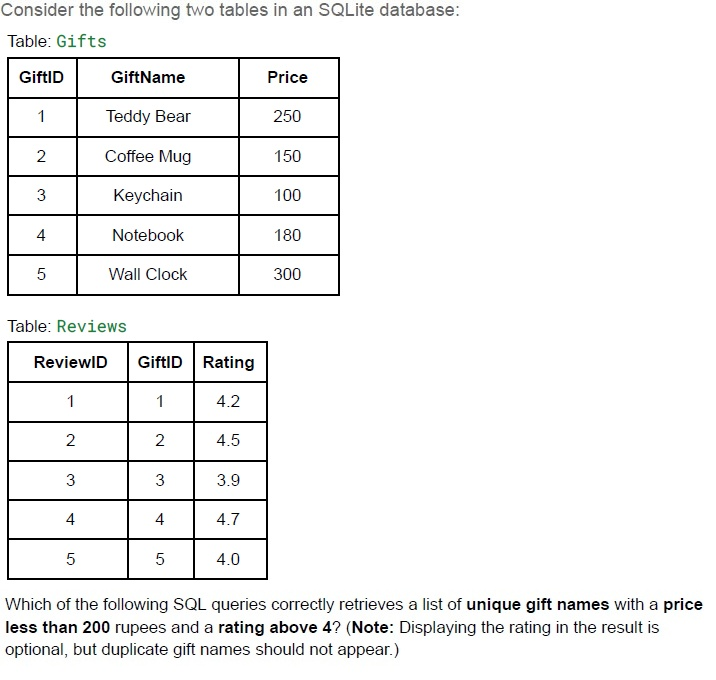
Consider the following two tables in an SQLite database:
Table: Gifts

| GiftID | GiftName | Price |
|---|---|---|
| 1 | Teddy Bear | 250 |
| 2 | Coffee Mug | 150 |
| 3 | Keychain | 100 |
| 4 | Notebook | 180 |
| 5 | Wall Clock | 300 |

Table: Reviews

| ReviewID | GiftID | Rating |
|---|---|---|
| 1 | 1 | 4.2 |
| 2 | 2 | 4.5 |
| 3 | 3 | 3.9 |
| 4 | 4 | 4.7 |
| 5 | 5 | 4.0 |

Which of the following SQL queries correctly retrieves a list of **unique gift names** with a **price less than 200 rupees** and a **rating above 4**? (Note: Displaying the rating in the result is optional, but duplicate gift names should not appear.)
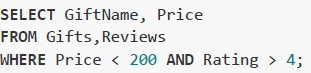
text
```sql
SELECT GiftName, Price
FROM Gifts,Reviews
WHERE Price < 200 AND Rating > 4;
```
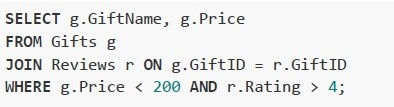
text
```sql
SELECT g.GiftName, g.Price
FROM Gifts g
JOIN Reviews r ON g.GiftID = r.GiftID
WHERE g.Price < 200 AND r.Rating > 4;
```
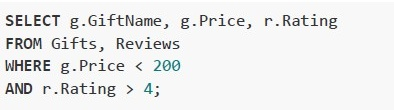
text
```sql
SELECT g.GiftName, g.Price, r.Rating
FROM Gifts, Reviews
WHERE g.Price < 200
AND r.Rating > 4;
```
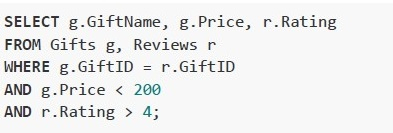
text
```sql
SELECT g.GiftName, g.Price, r.Rating
FROM Gifts g, Reviews r
WHERE g.GiftID = r.GiftID
AND g.Price < 200
AND r.Rating > 4;
```
Text of the picture (copyable)
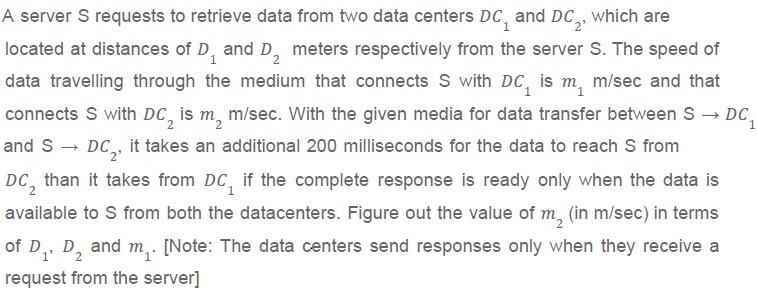
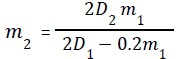
A server S requests to retrieve data from two data centers $DC_1$ and $DC_2$, which are located at distances of $D_1$ and $D_2$ meters respectively from the server S. The speed of data travelling through the medium that connects S with $DC_1$ is $m_1$ m/sec and that connects S with $DC_2$ is $m_2$ m/sec. With the given media for data transfer between $S \rightarrow DC_1$ and $S \rightarrow DC_2$, it takes an additional 200 milliseconds for the data to reach S from $DC_2$ than it takes from $DC_1$ if the complete response is ready only when the data is available to S from both the datacenters. Figure out the value of $m_2$ (in m/sec) in terms of $D_1$, $D_2$ and $m_1$. [Note: The data centers send responses only when they receive a request from the server]
text
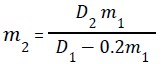
$m_2 = \frac{D_2 m_1}{D_1 - 0.2m_1}$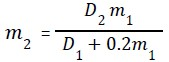
text
m₂ = (D₂m₁) / (D₁ + 0.2m₁)
text
$m_2 = \frac{2D_2 m_1}{2D_1 - 0.2m_1}$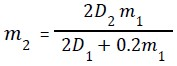
text
m₂ = (2D₂m₁) / (2D₁ + 0.2m₁)
Text of the picture (copyable)
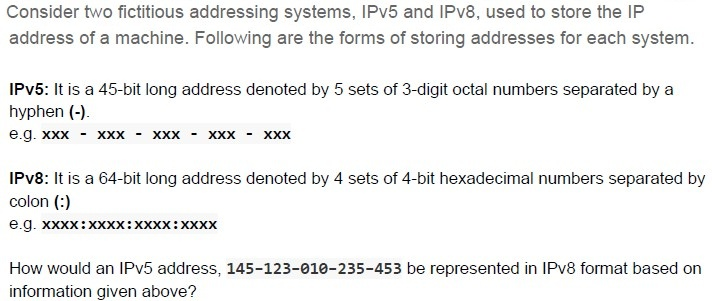
Consider two fictitious addressing systems, IPv5 and IPv8, used to store the IP address of a machine. Following are the forms of storing addresses for each system.

**IPv5**: It is a 45-bit long address denoted by 5 sets of 3-digit octal numbers separated by a hyphen (-).
e.g. xxx - xxx - xxx - xxx - xxx

**IPv8**: It is a 64-bit long address denoted by 4 sets of 4-bit hexadecimal numbers separated by colon (:)
e.g. xxxx:xxxx:xxxx:xxxx

How would an IPv5 address, **145-123-010-235-453** be represented in IPv8 format based on information given above?

text
0000:3B2B:9821:0652

text
3B2B:9821:0652:0000

text
```
0000:0652:9821:3B2B
```

text
0652:9821:3B2B:0000
Text of the picture (copyable)
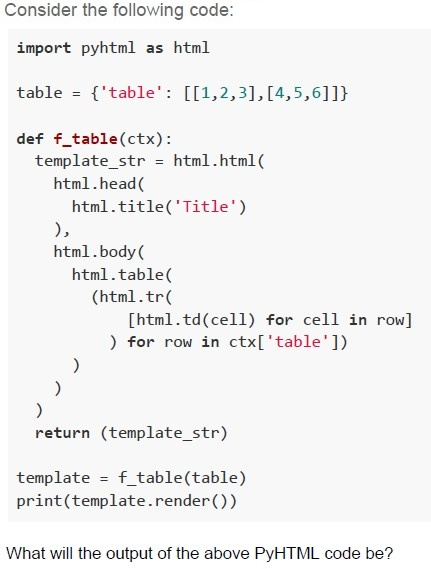
Consider the following code:

```python
import pyhtml as html

table = {'table': [[1,2,3],[4,5,6]]}

def f_table(ctx):
    template_str = html.html(
        html.head(
            html.title('Title')
        ),
        html.body(
            html.table(
                (html.tr(
                    [html.td(cell) for cell in row]
                ) for row in ctx['table'])
            )
        )
    )
    return (template_str)

template = f_table(table)
print(template.render())
```

What will the output of the above PyHTML code be?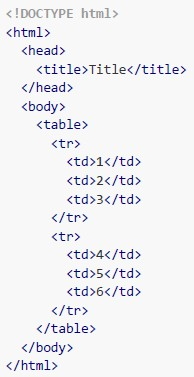
text
```html
<!DOCTYPE html>
<html>
<head>
    <title>Title</title>
</head>
<body>
    <table>
        <tr>
            <td>1</td>
            <td>2</td>
            <td>3</td>
        </tr>
        <tr>
            <td>4</td>
            <td>5</td>
            <td>6</td>
        </tr>
    </table>
</body>
</html>
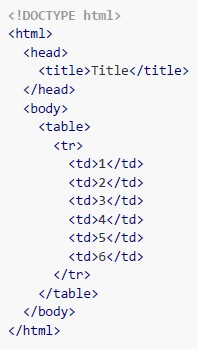
```
text
```html
<!DOCTYPE html>
<html>
<head>
    <title>Title</title>
</head>
<body>
    <table>
        <tr>
            <td>1</td>
            <td>2</td>
            <td>3</td>
            <td>4</td>
            <td>5</td>
            <td>6</td>
        </tr>
    </table>
</body>
</html>
```
text
```
AttributeError: module 'pyhtml' has no attribute 'html'.
```

text
None of these
Comprehension passage - the questions below it refer to this
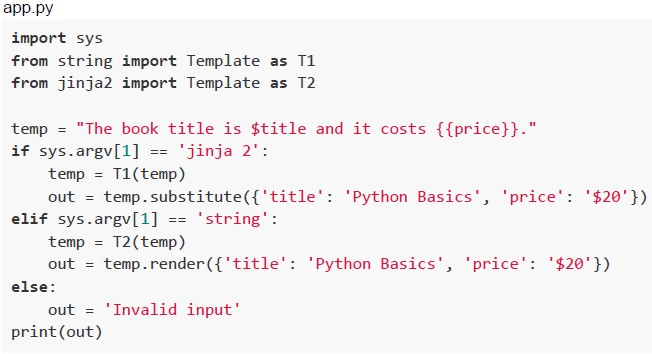
Based on the above program, answer the given subquestions.
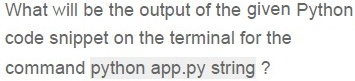
Text of the picture (copyable)
What will be the output of the given Python
code snippet on the terminal for the
command `python app.py string` ?

text
The book title is Python Basics
and it costs $20.

text
The book title is $title and it
costs $20.

text
The book title is Python Basics
and it costs {{price}}.
text
```
The book title is $title and it
costs {{price}}.
```
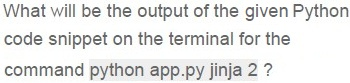
Text of the picture (copyable)
What will be the output of the given Python
code snippet on the terminal for the
command `python app.py jinja 2` ?

text
The book title is Python Basics and
it costs $20.

text
The book title is $title and it
costs $20.

text
The book title is Python Basics and
it costs {{price}}.
text
Invalid input
Answer key
- Q1 (MCQ, 2 marks): B
- Q2 (MCQ, 2 marks): B
- Q3 (MCQ, 2 marks): A
- Q4 (MSQ, 2 marks): A, B
- Q5 (MCQ, 3 marks): A
- Q6 (MCQ, 3 marks): D
- Q7 (MCQ, 3 marks): B
- Q8 (MCQ, 3 marks): D
- Q9 (MCQ, 3 marks): C
- Q10 (MSQ, 3 marks): A, B, D
- Q11 (MSQ, 3 marks): B, D
- Q12 (MCQ, 4.5 marks): D
- Q13 (MCQ, 4.5 marks): C
- Q14 (MCQ, 4.5 marks): A
- Q15 (MCQ, 3 marks): B
- Q16 (MCQ, 4.5 marks): D
Concepts this paper tests
Auto-generated summary from the source site. Handy as a checklist; the lessons above explain each idea from scratch.
Summary of Core Topics, Concepts, Principles, and Equations
1. HTML and CSS
- HTML Structure: Basic structure of HTML documents, including
<!DOCTYPE html>,<html>,<head>, and<body>tags. CSS Integration: Methods to include CSS in HTML, such as inline styles, internal styles, and external stylesheets.
- External CSS:
<link rel="stylesheet" type="text/css" href="styles.css">
- External CSS:
- CSS Specificity: Understanding how styles are applied based on the specificity of selectors (ID, class, element).
- CSS Properties: Common properties like
color,background-color,border,width, etc.
2. HTTP and cURL
- HTTP Requests and Responses: Understanding headers, status codes, and methods.
cURL Commands: Using
curlfor making HTTP requests and debugging.- Verbose Output:
curl -v http://example.com - Trace Output:
curl --trace trace.log http://example.com
- Verbose Output:
3. CSS Specificity and Inheritance
- Specificity Rules: How styles are applied based on the specificity of selectors.
- Inheritance: How styles are inherited from parent elements.
4. Entity-Relationship Diagrams (ERD)
- Relationships: Understanding one-to-one, one-to-many, and many-to-many relationships.
- Symbols: Recognizing symbols used in ERDs to represent different types of relationships.
5. Jinja2 Templating
Template Syntax: Using Jinja2 syntax for templating in HTML.
- Loops:
{% for p in products %} - Conditionals:
{% if "i" in p.name|string %} - Variables:
{{p.id}}, {{p.name}}, {{p.qty}}, {{p.price}}
- Loops:
6. Python and Command-Line Arguments
- Command-Line Arguments: Using
sys.argvto access command-line arguments in Python. - Python Modules: Importing and using modules like
sys,string.Template, andjinja2.Template.
7. Network Latency and Data Transfer
Latency Calculation: Understanding how to calculate latency based on distance and speed of light.
- Speed of Light: \(2 \times 10^8 \, \text{m/s}\)
- Latency Formula: \( \text{Latency} = \frac{\text{Distance}}{\text{Speed}} \)
8. SQL Queries
Joins: Understanding how to join tables in SQL.
- INNER JOIN:
SELECT DISTINCT G.GiftName FROM Gifts G JOIN Reviews R ON G.GiftID = R.GiftID WHERE G.Price < 200 AND R.Rating > 4;
- INNER JOIN:
- Filtering: Using
WHEREclauses to filter data.
9. IP Addressing
IPv5 and IPv8: Understanding different addressing systems and their formats.
- IPv5: 45-bit address, 5 sets of 3-digit octal numbers.
- IPv8: 64-bit address, 4 sets of 4-bit hexadecimal numbers.
10. HTML Generation with Python
HTML Generation: Using Python libraries like
pyhtmlto generate HTML.- HTML Structure: Creating HTML documents with
<html>,<head>,<body>,<table>,<tr>, and<td>tags.
- HTML Structure: Creating HTML documents with