Home / Past papers / MAD1 Quiz 2 / this paper
IIT M DIPLOMA AN EXAM QDD3 03 Aug - 03 Aug 2025
Elapsed 00:00
You manage a datacenter where each server has a 10 Gigabit per second network connection and the facility’s backbone link is also 10 Gbps. Your application is handling 10,000 requests per second, each with a 50 KB response, which translates to about 4 Gbps of required throughput. So, if each request involves minimal CPU processing, and the existing server has sufficient resources to handle the load. Which of the following scaling strategies is most appropriate to meet this demand?
- Scale up on a single server
- Scale out to multiple servers in the datacenter
- Both will produce similar results
- None of these
Which of the following statements BEST describes a key advantage of Jinja2 server-side rendering over JavaScript/JSON-based client-side rendering?
- It guarantees that dynamic updates on user interactions never requireadditional data fetches.
- It provides faster initial page load and improved Search Engine Optimizationwithout requiring client-side template logic.
- It allows the client to handle all template rendering, reducing load on theserver.
- None of these
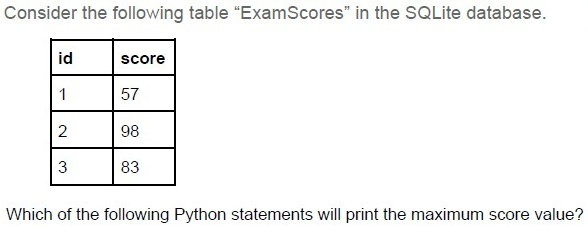
Text of the picture (copyable)
Consider the following table "ExamScores" in the SQLite database.

| id | score |
|----|-------|
| 1  | 57    |
| 2  | 98    |
| 3  | 83    |

Which of the following Python statements will print the maximum score value?

text
```python
>>> print(db.session.query.max(ExamScores.score))
```

text
```python
>>> print(db.session.query(func.max(ExamScores.score)).scalar())
```

text
```python
>>> print(db.session.query(func.max(ExamScores.score)))
```

text
```python
>>> print(db.session.query.max(ExamScores.score).scalar())
```
What is the right syntax to use an external JavaScript file(.js) into the current html file?

text
```html
<script src="jsfile.js"></script>
```

text
```html
<script href="jsfile.js"></script>
```

text
```html
<import src="jsfile.js"></import>
```

text
```html
<import link="jsfile.js"></import>
```
Text of the picture (copyable)
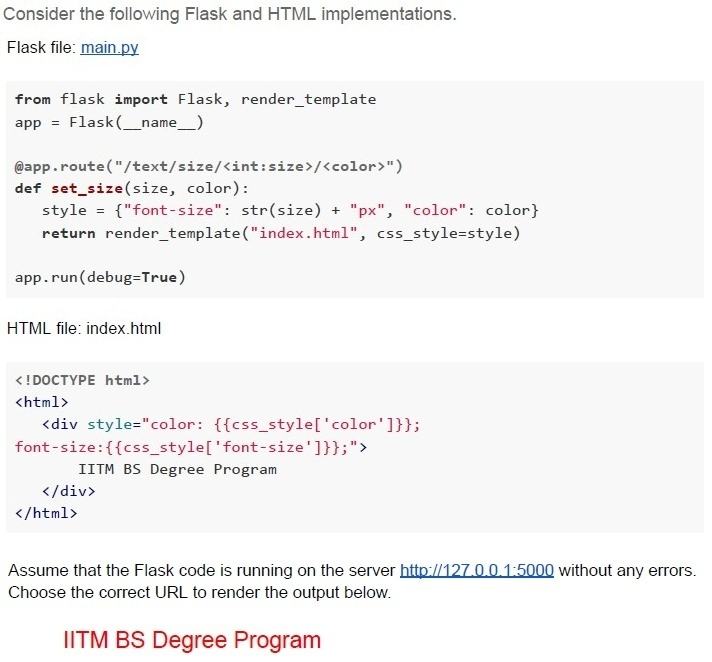
Consider the following Flask and HTML implementations.

Flask file: main.py

```python
from flask import Flask, render_template
app = Flask(__name__)

@app.route("/text/size/<int:size>/<color>")
def set_size(size, color):
    style = {"font-size": str(size) + "px", "color": color}
    return render_template("index.html", css_style=style)

app.run(debug=True)
```

HTML file: index.html

```html
<!DOCTYPE html>
<html>
    <div style="color: {{css_style['color']}};
    font-size:{{css_style['font-size']}};">
        IITM BS Degree Program
    </div>
</html>
```

Assume that the Flask code is running on the server http://127.0.0.1:5000 without any errors.
Choose the correct URL to render the output below.

IITM BS Degree Program
text
http://127.0.0.1:5000?text=red&size=20

text
```
http://127.0.0.1:5000?size=20&text=red
```

text
```
http://127.0.0.1:5000/text/size/red/20
```

text
```
http://127.0.0.1:5000/text/size/20/red
```
Text of the picture (copyable)
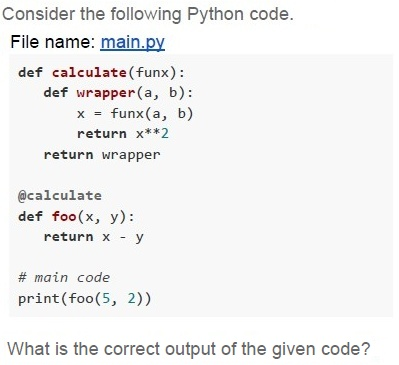
Consider the following Python code.
File name: main.py

```python
def calculate(funx):
    def wrapper(a, b):
        x = funx(a, b)
        return x**2
    return wrapper

@calculate
def foo(x, y):
    return x - y

# main code
print(foo(5, 2))
```

What is the correct output of the given code?- 10
- 9
- 3
- 4
Text of the picture (copyable)
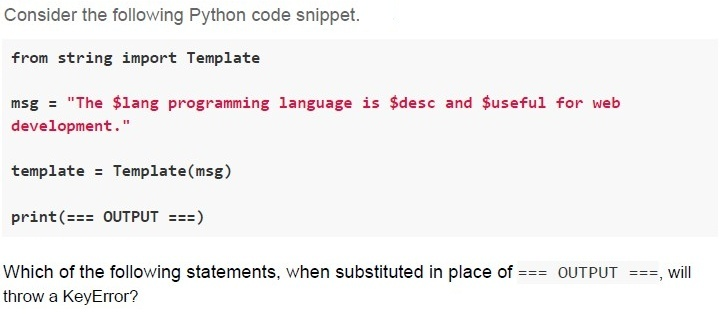
Consider the following Python code snippet.

```python
from string import Template

msg = "The $lang programming language is $desc and $useful for web
development."

template = Template(msg)

print(=== OUTPUT ===)
```

Which of the following statements, when substituted in place of `=== OUTPUT ===`, will throw a KeyError?

text
```python
template.substitute({'lang': 'Python'})
```
text
```python
template.substitute({'lang': 'Python', 'desc': 'popular',
'useful': 'useful'})
```
text
```python
template.safe_substitute({'lang': 'Python'})
```
text
```python
template.safe_substitute({'lang': 'Python', 'desc':
'versatile'})
```
Text of the picture (copyable)
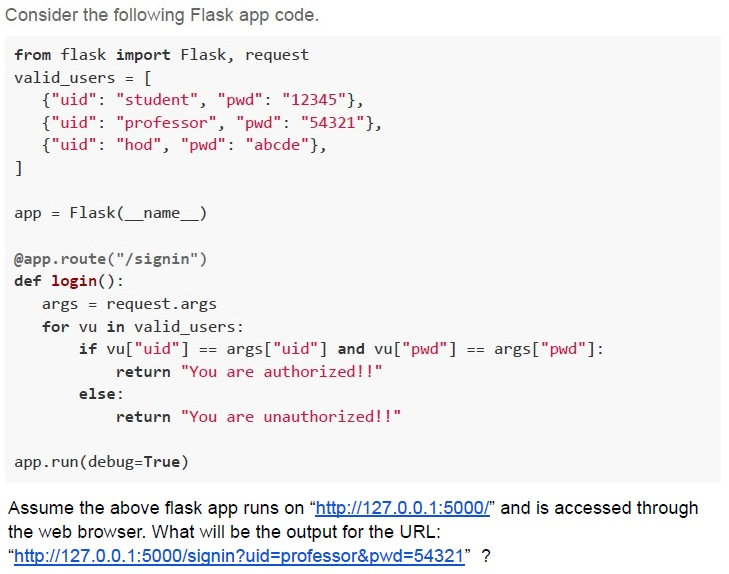
Consider the following Flask app code.

```python
from flask import Flask, request

valid_users = [
    {"uid": "student", "pwd": "12345"},
    {"uid": "professor", "pwd": "54321"},
    {"uid": "hod", "pwd": "abcde"},
]

app = Flask(__name__)

@app.route("/signin")
def login():
    args = request.args
    for vu in valid_users:
        if vu["uid"] == args["uid"] and vu["pwd"] == args["pwd"]:
            return "You are authorized!!"
    else:
        return "You are unauthorized!!"

app.run(debug=True)
```

Assume the above flask app runs on "http://127.0.0.1:5000/" and is accessed through the web browser. What will be the output for the URL: "http://127.0.0.1:5000/signin?uid=professor&pwd=54321" ?- You are authorized!!
- You are unauthorized!!
- Not Found
- Internal Server Error
Text of the picture (copyable)
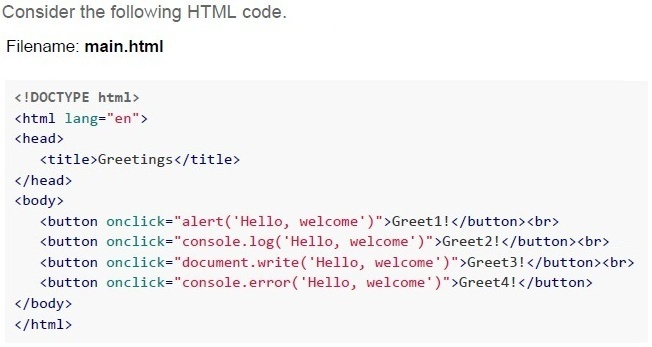
Consider the following HTML code.
Filename: main.html

```html
<!DOCTYPE html>
<html lang="en">
<head>
    <title>Greetings</title>
</head>
<body>

    <button onclick="alert('Hello, welcome')">Greet1!</button><br>
    <button onclick="console.log('Hello, welcome')">Greet2!</button><br>
    <button onclick="document.write('Hello, welcome')">Greet3!</button><br>
    <button onclick="console.error('Hello, welcome')">Greet4!</button>

</body>
</html>
```
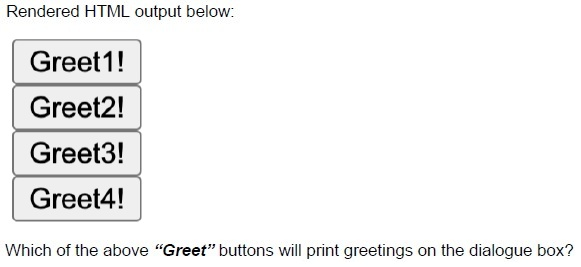
Rendered HTML output below:

[Greet1!] (button)
[Greet2!] (button)
[Greet3!] (button)
[Greet4!] (button)

Which of the above “Greet” buttons will print greetings on the dialogue box?- Greet4
- Greet3
- Greet2
- Greet1
Text of the picture (copyable)
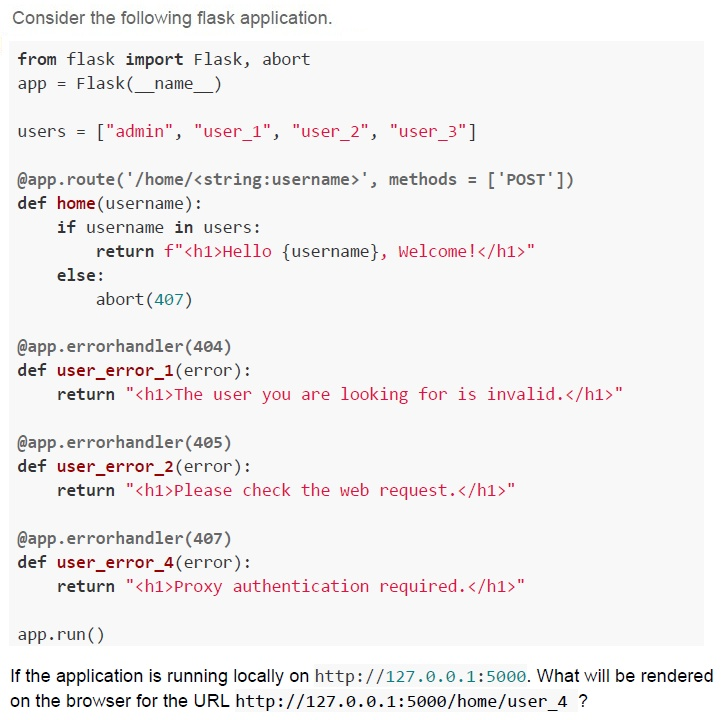
Consider the following flask application.

```python
from flask import Flask, abort
app = Flask(__name__)

users = ["admin", "user_1", "user_2", "user_3"]

@app.route('/home/<string:username>', methods = ['POST'])
def home(username):
    if username in users:
        return f"<h1>Hello {username}, Welcome!</h1>"
    else:
        abort(407)

@app.errorhandler(404)
def user_error_1(error):
    return "<h1>The user you are looking for is invalid.</h1>"

@app.errorhandler(405)
def user_error_2(error):
    return "<h1>Please check the web request.</h1>"

@app.errorhandler(407)
def user_error_4(error):
    return "<h1>Proxy authentication required.</h1>"

app.run()
```

If the application is running locally on `http://127.0.0.1:5000`. What will be rendered on the browser for the URL `http://127.0.0.1:5000/home/user_4` ?
text
Hello user_4, Welcome!

text
The user you are looking for is invalid.

text
Not Found

text
Please check the web request
Which of the following statements is/are false about caching in REST APIs?
- Caching allows storing server responses in a proxy or frontend so that a clientneed not make requests to the server for the same resources repeatedly.
- Caching degrades the overall quality of service and increases load on theservers.
- Browsers treat all GET and POST requests cacheable by default.
- Caching optimizes the network by increasing the latency.
Which of the following is/are correct with respect to storing data in graphs?
- Data on social networks can be stored with the help of graphs.
- Graphs support storing attributes such as node degree, edge weights ,andother metadata.
- Data is stored as a key-value pair.
- In graphs, path finding is not as important as just searching the data.
Text of the picture (copyable)
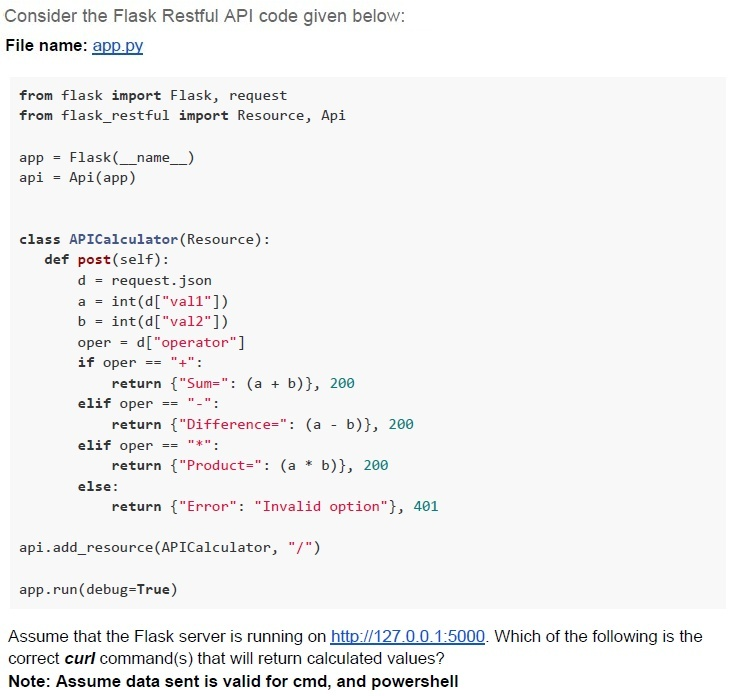
Consider the Flask Restful API code given below:
File name: app.py

```python
from flask import Flask, request
from flask_restful import Resource, Api

app = Flask(__name__)
api = Api(app)

class APICalculator(Resource):
    def post(self):
        d = request.json
        a = int(d["val1"])
        b = int(d["val2"])
        oper = d["operator"]
        if oper == "+":
            return {"Sum": (a + b)}, 200
        elif oper == "-":
            return {"Difference": (a - b)}, 200
        elif oper == "*":
            return {"Product": (a * b)}, 200
        else:
            return {"Error": "Invalid option"}, 401

api.add_resource(APICalculator, "/")

app.run(debug=True)
```

Assume that the Flask server is running on http://127.0.0.1:5000. Which of the following is the correct curl command(s) that will return calculated values?
**Note: Assume data sent is valid for cmd, and powershell**
text
```
curl -X POST "http://127.0.0.1:5000" -H 'Content-Type: application/json' -d '{"val1":27, "val2":3, "operator":"+"}'
```
text
```
curl -X POST "http://127.0.0.1:5000" -H 'Content-Type: application/json' -d
'{"val1":27,"val2":3,"operator":"**"}'
```
text
```
curl -X POST "http://127.0.0.1:5000" -H 'Content-Type: application/json' -d '{"val1":27,"val2":3,"operator":"/"}'
```
text
```
curl -X POST "http://127.0.0.1:5000" -d
'{"val1":27, "val2":3, "operator":"/"}'
```
text
```
curl -X POST "http://127.0.0.1:5000" -H 'Content-Type: application/json' -d '{"val1":27, "val2":3, "operator":"-"}'
```

Text of the picture (copyable)
Consider a document of 2000 characters written using only the characters from the character set L1 = {'x', 'y', 'z', 'w', 'v', 'u', 't', 's'}. If the character set L1 is to be upgraded by adding all the characters from the set L2 = {'1', '2', '3', '4', '5'}, by how many bits will the size of the original document increase?(assume an optimal number of bits are used for representing each character).Comprehension passage - the questions below it refer to this
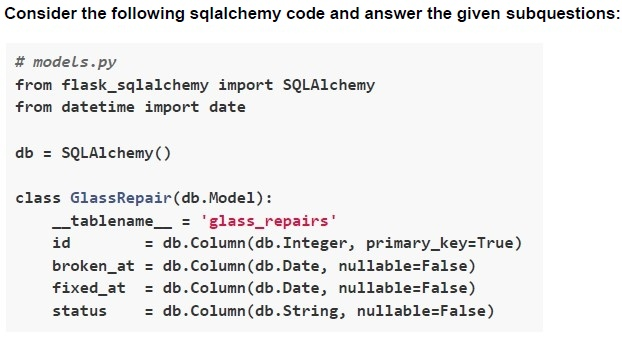
Text of the picture (copyable)
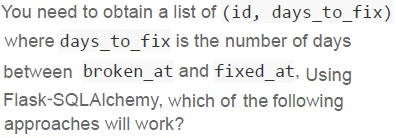
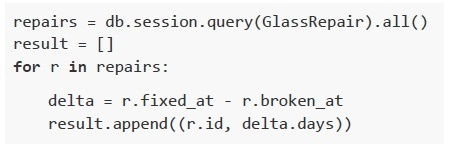
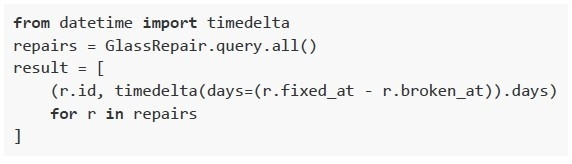
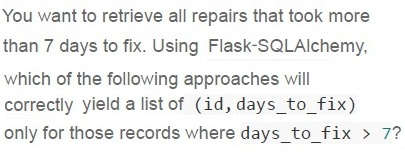
You need to obtain a list of (id, days_to_fix)
where days_to_fix is the number of days
between broken_at and fixed_at. Using
Flask-SQLAlchemy, which of the following
approaches will work?
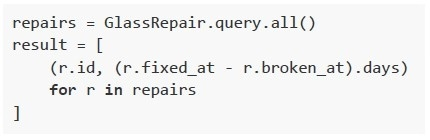
text
```python
repairs = GlassRepair.query.all()
result = [
    (r.id, (r.fixed_at - r.broken_at).days)
    for r in repairs
]
```
text
```python
repairs = db.session.query(GlassRepair).all()
result = []
for r in repairs:
    delta = r.fixed_at - r.broken_at
    result.append((r.id, delta.days))
```
text
```python
repairs = GlassRepair.query(
    GlassRepair.id,
    (GlassRepair.fixed_at - GlassRepair.broken_at).label('days_to_fix')
).all()
```
text
```python
from datetime import timedelta
repairs = GlassRepair.query.all()
result = [
    (r.id, timedelta(days=(r.fixed_at - r.broken_at)).days)
    for r in repairs
]
```
Text of the picture (copyable)
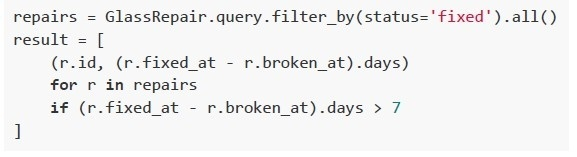
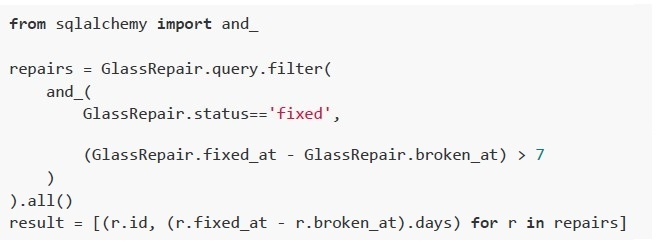
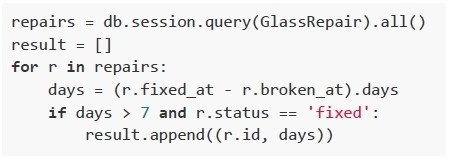
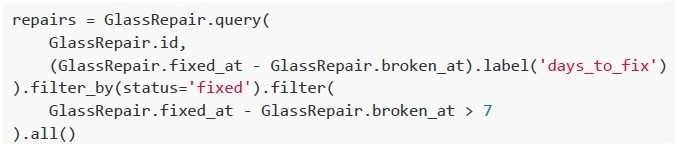
You want to retrieve all repairs that took more
than 7 days to fix. Using Flask-SQLAlchemy,
which of the following approaches will
correctly yield a list of (id, days_to_fix)
only for those records where days_to_fix > 7?
text
```python
repairs = GlassRepair.query.filter_by(status='fixed').all()
result = [
    (r.id, (r.fixed_at - r.broken_at).days)
    for r in repairs
    if (r.fixed_at - r.broken_at).days > 7
]
```
text
```python
from sqlalchemy import and_

repairs = GlassRepair.query.filter(
    and_(
        GlassRepair.status=='fixed',

        (GlassRepair.fixed_at - GlassRepair.broken_at) > 7
    )
).all()
result = [(r.id, (r.fixed_at - r.broken_at).days) for r in repairs]
```
text
```python
repairs = db.session.query(GlassRepair).all()
result = []
for r in repairs:
    days = (r.fixed_at - r.broken_at).days
    if days > 7 and r.status == 'fixed':
        result.append((r.id, days))
```
text
```python
repairs = GlassRepair.query(
    GlassRepair.id,
    (GlassRepair.fixed_at - GlassRepair.broken_at).label('days_to_fix')
).filter_by(status='fixed').filter(
    GlassRepair.fixed_at - GlassRepair.broken_at > 7
).all()
```
Answer key
- Q1 (MCQ, 2 marks): A
- Q2 (MCQ, 2 marks): B
- Q3 (MCQ, 2 marks): B
- Q4 (MCQ, 2 marks): A
- Q5 (MCQ, 3 marks): D
- Q6 (MCQ, 3 marks): B
- Q7 (MCQ, 3 marks): A
- Q8 (MCQ, 3 marks): B
- Q9 (MCQ, 4.5 marks): D
- Q10 (MCQ, 4.5 marks): D
- Q11 (MSQ, 3 marks): B, C, D
- Q12 (MSQ, 3 marks): A, B
- Q13 (MSQ, 4.5 marks): A, B, E
- Q14 (SA, 3 marks): 2000
- Q15 (MSQ, 4.5 marks): A, B
- Q16 (MSQ, 3 marks): A, C
Concepts this paper tests
Auto-generated summary from the source site. Handy as a checklist; the lessons above explain each idea from scratch.
Summary of Core Topics, Concepts, Principles, and Equations
1. Modern Application Development
- Scaling Strategies: Understanding when to scale up (vertical scaling) vs. scale out (horizontal scaling).
- Server-Side Rendering vs. Client-Side Rendering: Advantages of Jinja2 server-side rendering, such as faster initial page load and improved SEO.
2. Database Management
- SQL Queries: Writing and understanding SQL queries, especially for operations like finding the maximum value.
- SQLAlchemy: Using SQLAlchemy for database operations, including querying and filtering data.
3. Web Development
- Flask: Setting up and running a Flask application, handling routes, and rendering templates.
- HTML and JavaScript: Including external JavaScript files in HTML, handling user interactions, and understanding different methods of displaying messages (alert, console.log, document.write).
- REST APIs: Understanding the basics of REST APIs, including handling different HTTP methods (GET, POST), and error handling.
4. Data Structures and Algorithms
- Graphs: Storing data in graphs, including attributes like node degree and edge weights.
- Caching: Understanding the role of caching in REST APIs, including its benefits and misconceptions.
5. Mathematics
- Information Theory: Calculating the number of bits required to represent characters from different sets, and understanding the impact of adding new characters to a set.
6. Python Programming
- Decorators: Using decorators to modify the behavior of functions.
- String Templating: Using the
Templateclass from thestringmodule for string substitution. - Error Handling: Understanding different types of errors and how to handle them in Python.
Equations
Information Theory
Bits Required for Character Representation:
- For a set of \( n \) characters, the number of bits required to represent each character is given by: \[ \text{bits} = \log_2(n) \]
- If the size of the character set increases from \( n \) to \( m \), the increase in bits per character is: \[ \Delta \text{bits} = \log_2(m) - \log_2(n) \]
- For a document of length \( L \), the total increase in bits is: \[ \text{Total Increase} = L \times \Delta \text{bits} \]