Home / Past papers / MAD1 End Term / this paper
IIT M FOUNDATION ET1 EXAM QPF1 S2 03 Sep - 03 Sep 2023
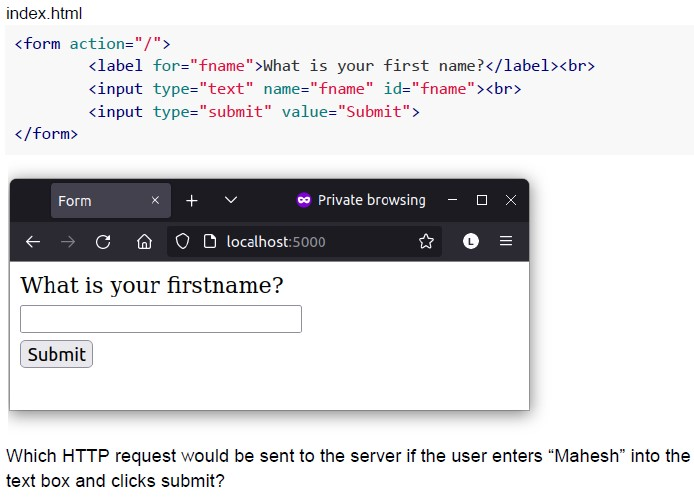 Consider the following snippet of HTML and its output rendered on the browser:
 Text of the picture (copyable)
index.html

```html
<form action="/">
    <label for="fname">What is your first name?</label><br>
    <input type="text" name="fname" id="fname"><br>
    <input type="submit" value="Submit">
</form>
```

A web browser window is displayed.
The title bar shows "Form" on the left and "Private browsing" in the center.
The address bar shows "localhost:5000".
The main content area displays:
"What is your firstname?"
Below this is an empty text input field.
Below the text input field is a button labeled "Submit".

Which HTTP request would be sent to the server if the user enters "Mahesh" into the text box and clicks submit?- GET
- POST
- PUT
- DELETE
- 0.97
- 9.03
- 90.3
- 97
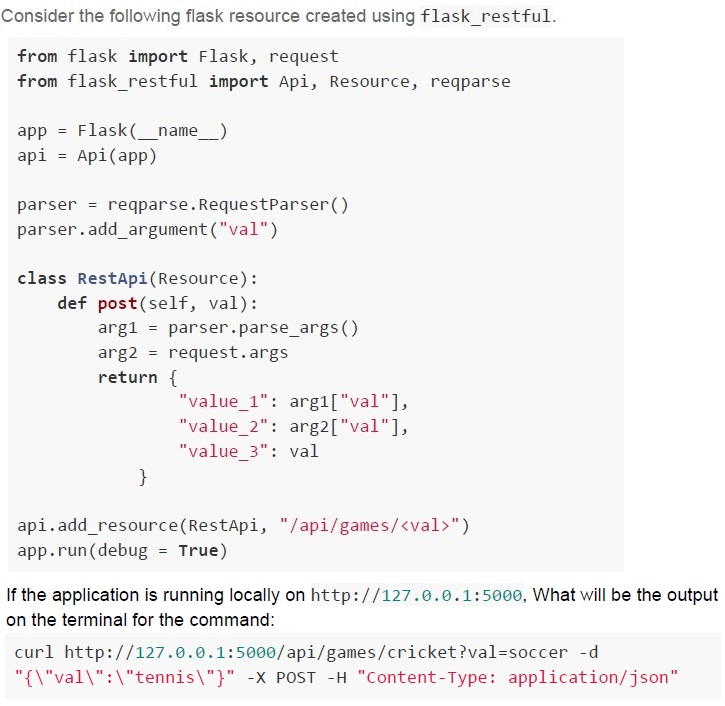
Text of the picture (copyable)
Consider the following flask resource created using flask_restful.

```python
from flask import Flask, request
from flask_restful import Api, Resource, reqparse

app = Flask(__name__)
api = Api(app)

parser = reqparse.RequestParser()
parser.add_argument("val")

class RestApi(Resource):
    def post(self, val):
        arg1 = parser.parse_args()
        arg2 = request.args
        return {
            "value_1": arg1["val"],
            "value_2": arg2["val"],
            "value_3": val
        }

api.add_resource(RestApi, "/api/games/<val>")
app.run(debug = True)
```

If the application is running locally on http://127.0.0.1:5000, What will be the output on the terminal for the command:

`curl http://127.0.0.1:5000/api/games/cricket?val=soccer -d "{\"val\":\"tennis\"}" -X POST -H "Content-Type: application/json"`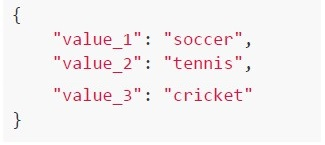
text
```json
{
  "value_1": "soccer",
  "value_2": "tennis",
  "value_3": "cricket"
}
```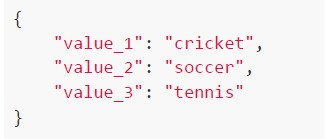
text
```json
{
    "value_1": "cricket",
    "value_2": "soccer",
    "value_3": "tennis"
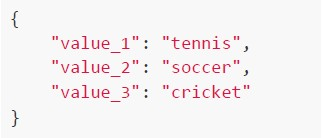
}
```
text
```json
{
    "value_1": "tennis",
    "value_2": "soccer",
    "value_3": "cricket"
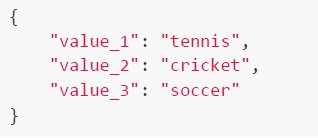
}
```
text
```json
{
    "value_1": "tennis",
    "value_2": "cricket",
    "value_3": "soccer"
}
```
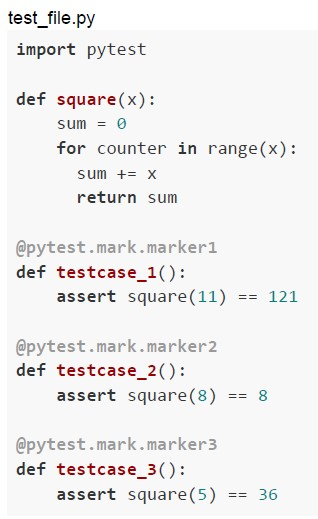 Consider the following function to be tested and test functions given in the Python code snippet below. On running this file on the terminal using pytest, the summary of the output is;
 Consider the following function to be tested and test functions given in the Python code snippet below. On running this file on the terminal using pytest, the summary of the output is; What command will result into the outcome given above?
Text of the picture (copyable)
test_file.py

```python
import pytest

def square(x):
    sum = 0
    for counter in range(x):
        sum += x
    return sum

@pytest.mark.marker1
def testcase_1():
    assert square(11) == 121

@pytest.mark.marker2
def testcase_2():
    assert square(8) == 8

@pytest.mark.marker3
def testcase_3():
    assert square(5) == 36
```
```
======== 1 passed, 2 deselected, 3 warnings in 0.02s ========
```
text
```
pytest test_file.py -k marker1
```

text
```
pytest test_file.py -m marker1
```

text
```
pytest test_file.py -m marker2
```

text
```
pytest test_file.py -m marker3
```

Text of the picture (copyable)
The hexadecimal equivalent of the IPv4 address 192.168.72.101 would be
_________
- C048 A865
- C0A8 4865
- C0A8 6548
- C065 A848
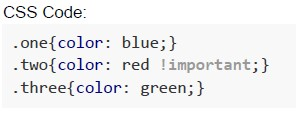 An HTML code and CSS code is given below. Which of the following correctly represents its rendered output?
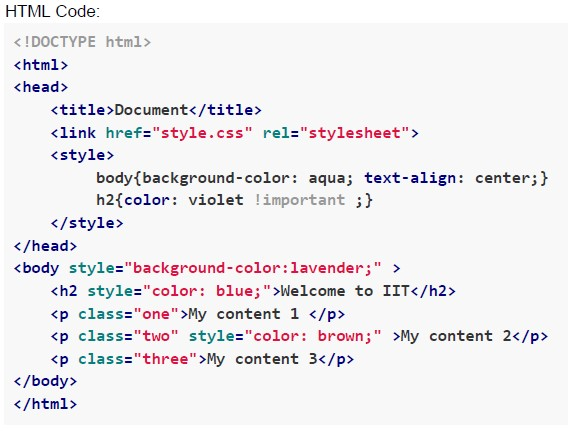 An HTML code and CSS code is given below. Which of the following correctly represents its rendered output?
 Text of the picture (copyable)
CSS Code:

```css
.one{color: blue;}
.two{color: red !important;}
.three{color: green;}
```
HTML Code:

```html
<!DOCTYPE html>
<html>
<head>
    <title>Document</title>
    <link href="style.css" rel="stylesheet">
    <style>
        body{background-color: aqua; text-align: center;}
        h2{color: violet !important ;}
    </style>
</head>
<body style="background-color:lavender;" >
    <h2 style="color: blue;">Welcome to IIT</h2>
    <p class="one">My content 1 </p>
    <p class="two" style="color: brown;">My content 2</p>
    <p class="three">My content 3</p>
</body>
</html>
```
text
Welcome to IIT
My content 1
My content 2
My content 3
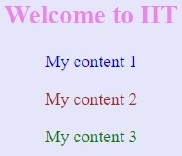
text
Welcome to IIT
My content 1
My content 2
My content 3

text
Welcome to IIT
My content 1
My content 2
My content 3
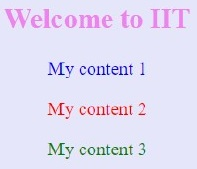
text
Welcome to IIT
My content 1
My content 2
My content 3
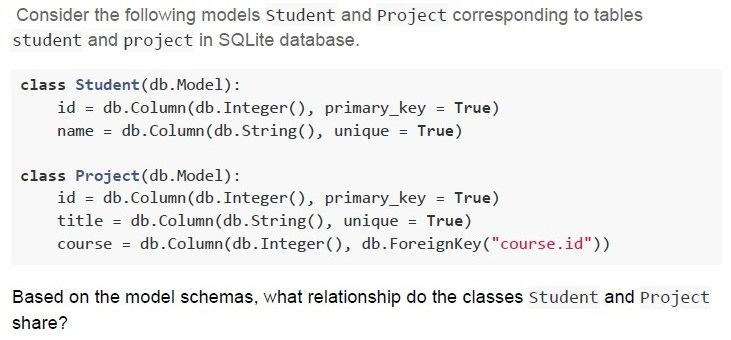
Text of the picture (copyable)
Consider the following models Student and Project corresponding to tables student and project in SQLite database.

```python
class Student(db.Model):
    id = db.Column(db.Integer(), primary_key = True)
    name = db.Column(db.String(), unique = True)

class Project(db.Model):
    id = db.Column(db.Integer(), primary_key = True)
    title = db.Column(db.String(), unique = True)
    course = db.Column(db.Integer(), db.ForeignKey("course.id"))
```

Based on the model schemas, what relationship do the classes Student and Project share?- Many-to-Many
- One-to-Many
- One-to-One
- The tables are not at all related
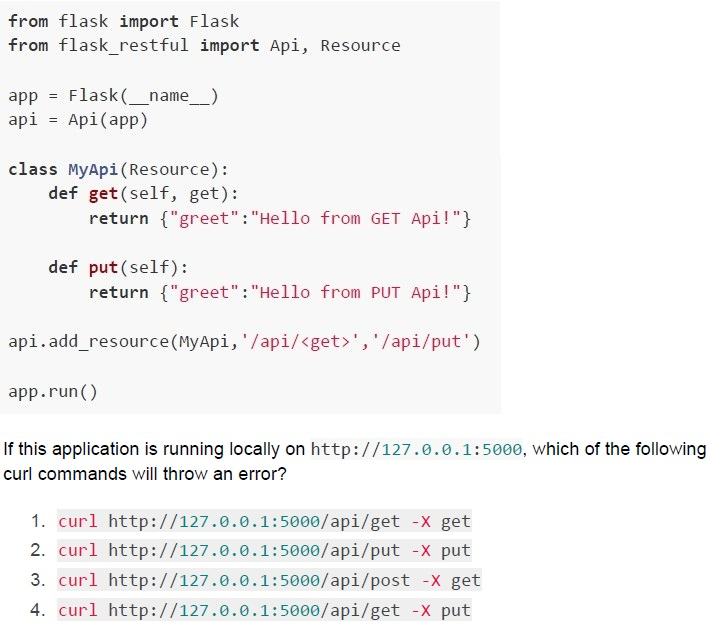 Consider the following Python code snippet.
 Text of the picture (copyable)
```python
from flask import Flask
from flask_restful import Api, Resource

app = Flask(__name__)
api = Api(app)

class MyApi(Resource):
    def get(self, get):
        return {"greet":"Hello from GET Api!"}

    def put(self):
        return {"greet":"Hello from PUT Api!"}

api.add_resource(MyApi, '/api/<get>', '/api/put')

app.run()
```

If this application is running locally on http://127.0.0.1:5000, which of the following curl commands will throw an error?

1. `curl http://127.0.0.1:5000/api/get -X get`
2. `curl http://127.0.0.1:5000/api/put -X put`
3. `curl http://127.0.0.1:5000/api/post -X get`
4. `curl http://127.0.0.1:5000/api/get -X put`- Only 2 and 4
- Only 4
- Only 3 and 4
- Only 3
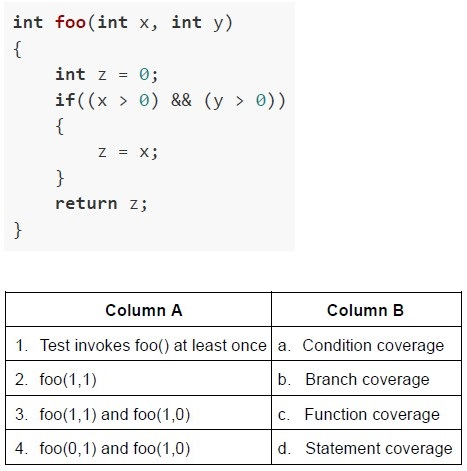 Consider the code below and match the conditions in Column A with respect to the coverage types in Column B.
 Text of the picture (copyable)
```c
int foo(int x, int y)
{
    int z = 0;
    if((x > 0) && (y > 0))
    {
        z = x;
    }
    return z;
}
```

| Column A | Column B |
|---|---|
| 1. Test invokes foo() at least once | a. Condition coverage |
| 2. foo(1,1) | b. Branch coverage |
| 3. foo(1,1) and foo(1,0) | c. Function coverage |
| 4. foo(0,1) and foo(1,0) | d. Statement coverage |- 1-d, 2-a, 3-b, 4-c
- 1-c, 2-d, 3-b, 4-a
- 1-c, 2-d, 3-a, 4-b
- 1-b, 2-d, 3-c, 4-a
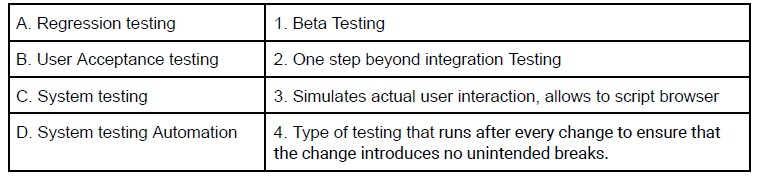 Match the following types of testing with their functionality. Which of the following is the correct matching?
Text of the picture (copyable)
| A. Regression testing | 1. Beta Testing |
|---|---|
| B. User Acceptance testing | 2. One step beyond integration Testing |
| C. System testing | 3. Simulates actual user interaction, allows to script browser |
| D. System testing Automation | 4. Type of testing that runs after every change to ensure that the change introduces no unintended breaks. |
- A → 1, B → 2, C → 3, D → 4
- A → 4, B → 3, C → 2, D → 1
- A → 3, B → 2, C → 1, D → 4
- A → 4, B → 1, C → 2, D → 3
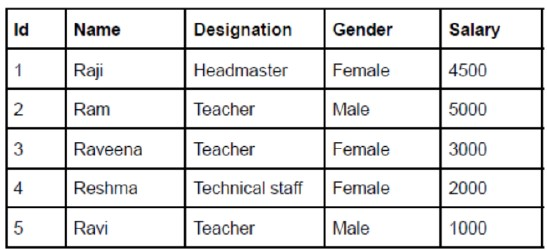 Consider the following table “emp” created in SQLite database corresponding to model class “Employee” using flask_sqlalchemy. Which of the following code snippets will change the designation of male teachers to professor and will increase their salaries to 6000 correctly when typed in the Python console?
Text of the picture (copyable)
| Id | Name | Designation | Gender | Salary |
|---|---|---|---|---|
| 1 | Raji | Headmaster | Female | 4500 |
| 2 | Ram | Teacher | Male | 5000 |
| 3 | Raveena | Teacher | Female | 3000 |
| 4 | Reshma | Technical staff | Female | 2000 |
| 5 | Ravi | Teacher | Male | 1000 |
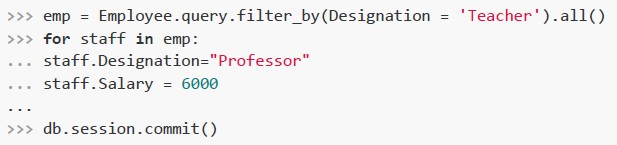
text
```python
>>> emp = Employee.query.filter_by(Designation = 'Teacher').all()
>>> for staff in emp:
...     staff.Designation="Professor"
...     staff.Salary = 6000
...
>>> db.session.commit()
```
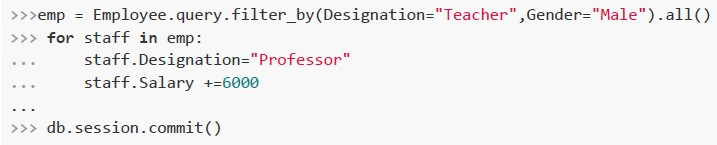
text
```python
>>>emp = Employee.query.filter_by(Designation="Teacher",Gender="Male").all()
>>> for staff in emp:
...     staff.Designation="Professor"
...     staff.Salary +=6000
...
>>> db.session.commit()
```
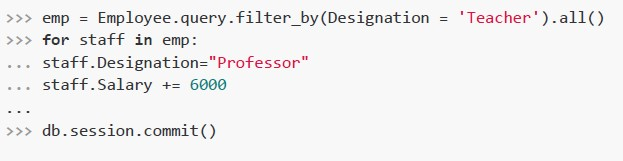
text
```python
>>> emp = Employee.query.filter_by(Designation = 'Teacher').all()
>>> for staff in emp:
...     staff.Designation="Professor"
...     staff.Salary += 6000
...
>>> db.session.commit()
```
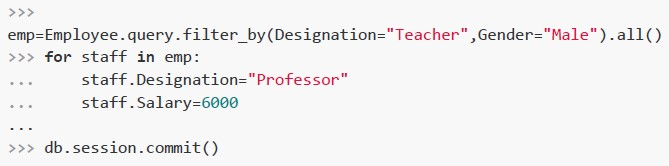
text
```python
>>>
emp=Employee.query.filter_by(Designation="Teacher", Gender="Male").all()
>>> for staff in emp:
...     staff.Designation="Professor"
...     staff.Salary=6000
...
>>> db.session.commit()
```
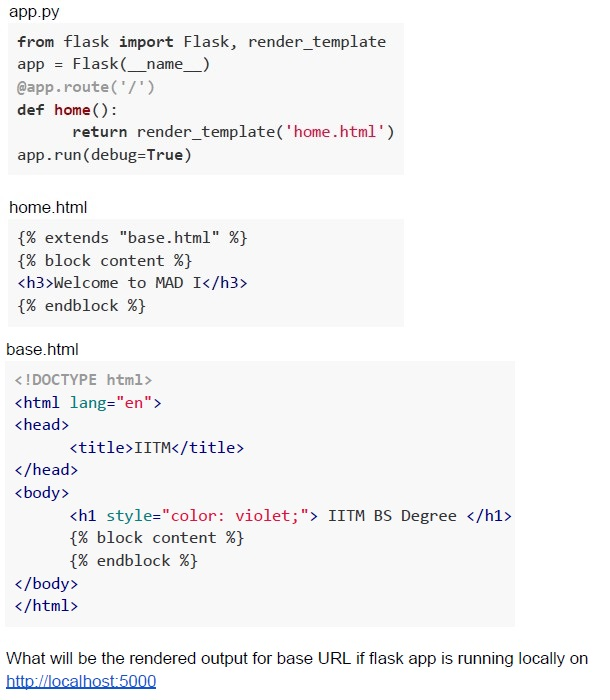 Consider the following python code snippet app.py, the html files, base.html and home.html residing in “templates” folder.
 Text of the picture (copyable)
app.py

```python
from flask import Flask, render_template
app = Flask(__name__)
@app.route('/')
def home():
    return render_template('home.html')
app.run(debug=True)
```

home.html

```html
{% extends "base.html" %}
{% block content %}
<h3>Welcome to MAD I</h3>
{% endblock %}
```

base.html

```html
<!DOCTYPE html>
<html lang="en">
<head>
    <title>IITM</title>
</head>
<body>
    <h1 style="color: violet;"> IITM BS Degree </h1>
    {% block content %}
    {% endblock %}
</body>
</html>
```

What will be the rendered output for base URL if flask app is running locally on
http://localhost:5000
text
Welcome to MAD I
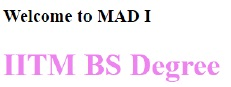
text
Welcome to MAD I
IITM BS Degree
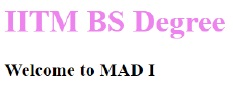
text
IITM BS Degree
Welcome to MAD I

text
Error
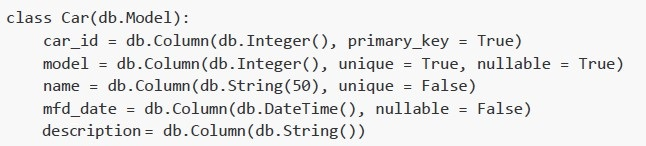
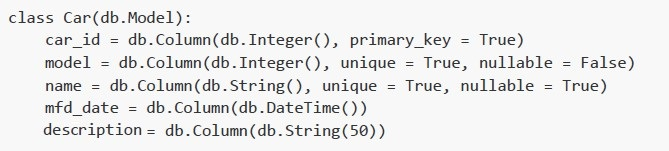
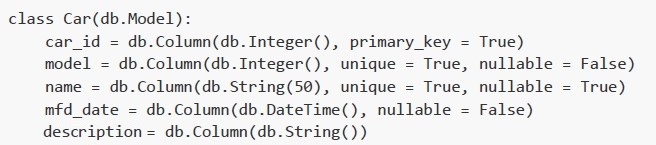
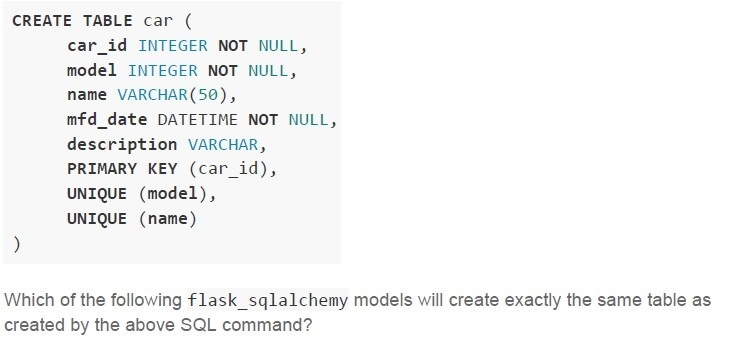 Consider the following SQL create statement.
 Text of the picture (copyable)
```sql
CREATE TABLE car (
    car_id INTEGER NOT NULL,
    model INTEGER NOT NULL,
    name VARCHAR(50),
    mfd_date DATETIME NOT NULL,
    description VARCHAR,
    PRIMARY KEY (car_id),
    UNIQUE (model),
    UNIQUE (name)
)
```

Which of the following flask_sqlalchemy models will create exactly the same table as created by the above SQL command?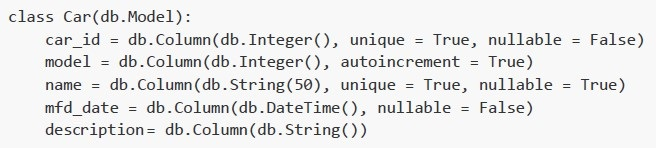
text
```python
class Car(db.Model):
    car_id = db.Column(db.Integer(), unique = True, nullable = False)
    model = db.Column(db.Integer(), autoincrement = True)
    name = db.Column(db.String(50), unique = True, nullable = True)
    mfd_date = db.Column(db.DateTime(), nullable = False)
    description = db.Column(db.String())
```
text
```python
class Car(db.Model):
    car_id = db.Column(db.Integer(), primary_key = True)
    model = db.Column(db.Integer(), unique = True, nullable = True)
    name = db.Column(db.String(50), unique = False)
    mfd_date = db.Column(db.DateTime(), nullable = False)
    description = db.Column(db.String())
```
text
```python
class Car(db.Model):
    car_id = db.Column(db.Integer(), primary_key = True)
    model = db.Column(db.Integer(), unique = True, nullable = False)
    name = db.Column(db.String(), unique = True, nullable = True)
    mfd_date = db.Column(db.DateTime())
    description = db.Column(db.String(50))
```
text
```python
class Car(db.Model):
    car_id = db.Column(db.Integer(), primary_key = True)
    model = db.Column(db.Integer(), unique = True, nullable = False)
    name = db.Column(db.String(50), unique = True, nullable = True)
    mfd_date = db.Column(db.DateTime(), nullable = False)
    description = db.Column(db.String())
```
- Statement 1 is true while statement 2 is false
- Statement 2 is true while statement 1 is false
- Both statements are true
- Both statements are false
- Statement 1 is true, but statement 2 is false
- Statement 2 is true, but statement 1 is false
- Both statements are false
- Both statements are true
- Both statements 1 and 2 are true, and statement 2 is a correct explanation ofstatement 1
- Both statements 1 and 2 are true, but statement 2 is not a correct explanationof statement 1
- Statement 1 is true and statement 2 is false
- Statement 2 is true and statement 1 is false

text
```
git rm <filename>
```

text
```
git del <filename>
```

text
```
git del --cached <filename>
```

text
```
git rm --cached <filename>
```
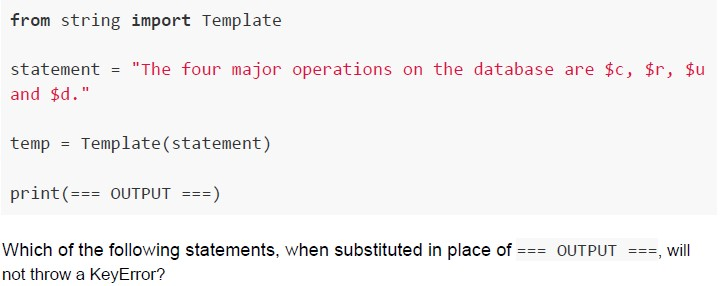 Consider the following python code snippet.
 Text of the picture (copyable)
```python
from string import Template

statement = "The four major operations on the database are $c, $r, $u and $d."

temp = Template(statement)

print(=== OUTPUT ===)
```

Which of the following statements, when substituted in place of === OUTPUT ===, will not throw a KeyError?

text
```python
temp.safe_substitute({"c": "CREATE", "r": "READ", "u": "UPDATE",
"d": "DELETE"})
```
text
```python
temp.safe_substitute({"c": "CREATE", "r": "READ", "u": "UPDATE"})
```
text
```python
temp.safe_substitute({"c":"CREATE", "r":"READ", "u":"UPDATE",
"d":"DELETE", "e":"TRUNCATE"})
```
text
```python
temp.substitute({"c":"CREATE","r":"READ","u":"UPDATE",
"d":"DELETE", "e":"TRUNCATE"})
```
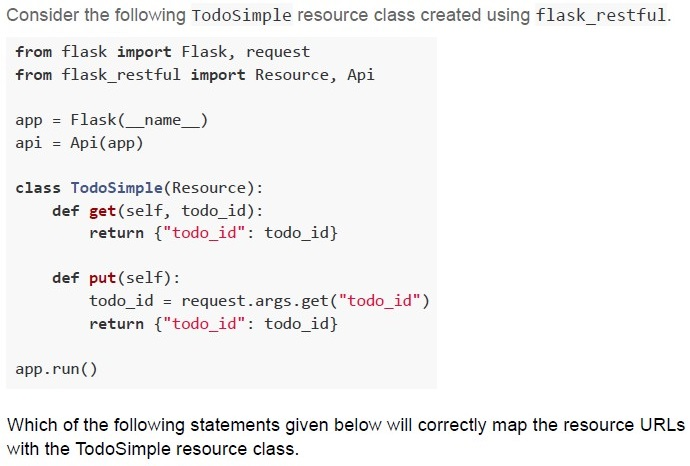
Text of the picture (copyable)
Consider the following TodoSimple resource class created using flask_restful.

```python
from flask import Flask, request
from flask_restful import Resource, Api

app = Flask(__name__)
api = Api(app)

class TodoSimple(Resource):
    def get(self, todo_id):
        return {"todo_id": todo_id}

    def put(self):
        todo_id = request.args.get("todo_id")
        return {"todo_id": todo_id}

app.run()
```

Which of the following statements given below will correctly map the resource URLs with the TodoSimple resource class.
text
```python
api.add_resource(TodoSimple, "/api")
```

text
```python
api.add_resource(TodoSimple, "/api/<int:todo_id>", "/api")
```

text
```python
api.add_resource(TodoSimple, "/api/<int:todo_id>")
```

text
```python
api.add_resource(TodoSimple, "/<int:todo_id>", "/api")
```
- HTML5 is based on SGML
- XHTML is based on XML which in turn is based on SGML
- HTML5 is not backwards compatible with older versions of HTML
- XML is both human and machine-readable

text
```python
import logging
logging.basicConfig(filename='debug.log', level=logging.DEBUG,
                    format=f'%(asctime)s %(levelname)s %(name)s %(threadName)s :
                    %(message)s')
```
text
```python
import logging
logging.basicConfig(filename='debug.log', level=logging.NOTSET,
                    format=f'%(asctime)s %(levelname)s %(name)s %(threadName)s :
%(message)s')
```
text
```python
import logging
logging(filename='debug.log', level=logging.DEBUG)
```

text
```python
import logging
logging.basicConfig(filename='debug.log')
```
- The AI voice
- The body of the device
- The LED light around the device
- None of these
- They have low cost and high durability.
- They have high cost and low durability.
- Latency of retrieval is very low.
- Latency of retrieval is very high.
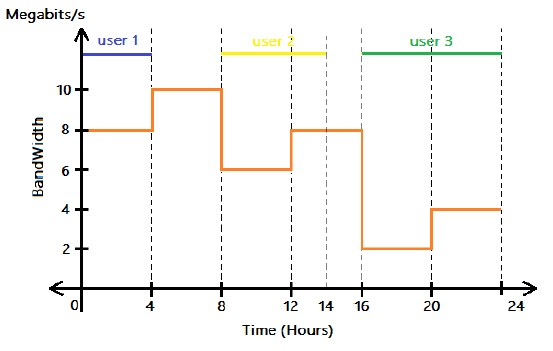 Consider the following graph that represents the variation in bandwidth of a network for an entire day (24 hours). Three users were connected to the network at three different times of the day. Which user has consumed the highest amount of data?
 Text of the picture (copyable)
This is a 2D line graph with a horizontal x-axis labeled "Time (Hours)" and a vertical y-axis labeled "BandWidth Megabits/s".

The x-axis ranges from 0 to 24, with major tick marks at 0, 4, 8, 12, 14, 16, 20, and 24. Vertical dashed lines extend from each of these major tick marks upwards.

The y-axis ranges from 0 to 12, with major tick marks at 0, 2, 4, 6, 8, 10, and 12.

There are three horizontal colored lines at the top of the graph, representing users:
- A blue line labeled "user 1" extends from x=0 to x=4, at y=11.
- A yellow line labeled "user 2" extends from x=8 to x=14, at y=11.
- A green line labeled "user 3" extends from x=16 to x=24, at y=11.

An orange step-function line is plotted across the graph:
- From x=0 to x=4, the line is at y=8.
- From x=4 to x=8, the line is at y=10.
- From x=8 to x=12, the line is at y=6.
- From x=12 to x=16, the line is at y=8.
- From x=16 to x=20, the line is at y=2.
- From x=20 to x=24, the line is at y=4.
- User 1
- User 2
- User 3
- All the three users consumed same amount of data
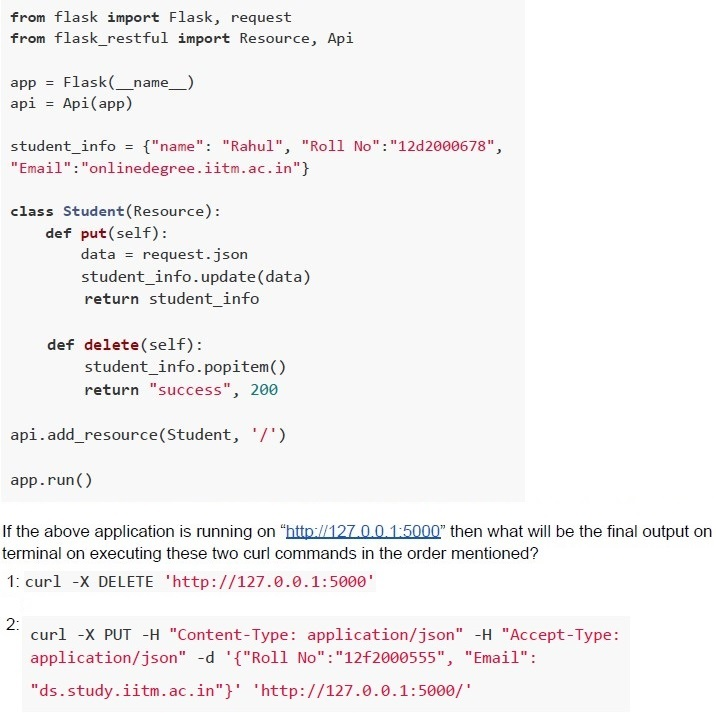 Consider the following restful implementation using flask.
 Text of the picture (copyable)
```python
from flask import Flask, request
from flask_restful import Resource, Api

app = Flask(__name__)
api = Api(app)

student_info = {"name": "Rahul", "Roll No":"12d2000678",
"Email":"onlinedegree.iitm.ac.in"}

class Student(Resource):
    def put(self):
        data = request.json
        student_info.update(data)
        return student_info

    def delete(self):
        student_info.popitem()
        return "success", 200

api.add_resource(Student, '/')

app.run()
```

If the above application is running on "http://127.0.0.1:5000" then what will be the final output on
terminal on executing these two curl commands in the order mentioned?
1: `curl -X DELETE 'http://127.0.0.1:5000'`

2: `curl -X PUT -H "Content-Type: application/json" -H "Accept-Type:
application/json" -d '{"Roll No":"12f2000555", "Email":
"ds.study.iitm.ac.in"}' 'http://127.0.0.1:5000/'`
text
```json
{"name": "Rahul", "Roll No": "12F2000555", "Email": "ds.study.iitm.ac.in"}
```
text
```json
{"name": "Rahul", "Roll No": "12f2000555"}
```
text
```json
{"Roll No":"12f2000555", "Email":"ds.study.iitm.ac.in"}
```
text
None of these
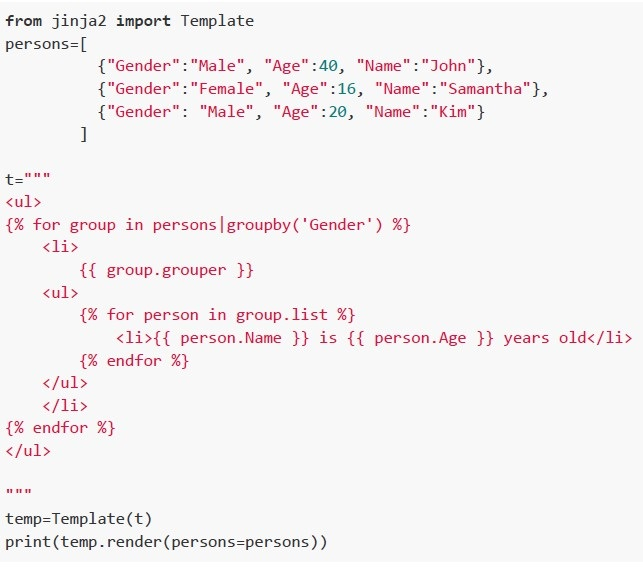 Consider the following python code snippet. What will be the rendered output?
 Text of the picture (copyable)
```python
from jinja2 import Template
persons=[
    {"Gender":"Male", "Age":40, "Name":"John"},
    {"Gender":"Female", "Age":16, "Name":"Samantha"},
    {"Gender":"Male", "Age":20, "Name":"Kim"}
]

t="""
<ul>
{% for group in persons|groupby('Gender') %}
    <li>
        {{ group.grouper }}
        <ul>
        {% for person in group.list %}
            <li>{{ person.Name }} is {{ person.Age }} years old</li>
        {% endfor %}
        </ul>
    </li>
{% endfor %}
</ul>
"""

temp=Template(t)
print(temp.render(persons=persons))
```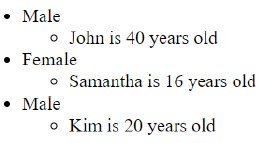
text
- Male
  - John is 40 years old
- Female
  - Samantha is 16 years old
- Male
  - Kim is 20 years old
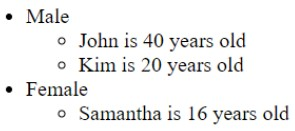
text
- Male
  - John is 40 years old
  - Kim is 20 years old
- Female
  - Samantha is 16 years old
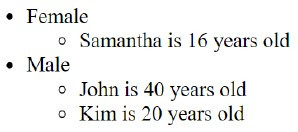
text
- Female
  - Samantha is 16 years old
- Male
  - John is 40 years old
  - Kim is 20 years old
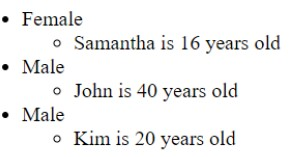
text
- Female
  - Samantha is 16 years old
- Male
  - John is 40 years old
- Male
  - Kim is 20 years old
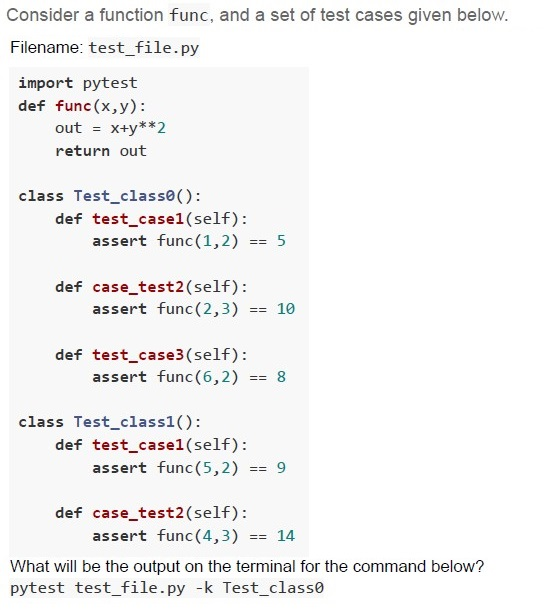
Text of the picture (copyable)
Consider a function func, and a set of test cases given below.
Filename: test_file.py

```python
import pytest
def func(x,y):
    out = x+y**2
    return out

class Test_class0():
    def test_case1(self):
        assert func(1,2) == 5

    def case_test2(self):
        assert func(2,3) == 10

    def test_case3(self):
        assert func(6,2) == 8

class Test_class1():
    def test_case1(self):
        assert func(5,2) == 9

    def case_test2(self):
        assert func(4,3) == 14
```

What will be the output on the terminal for the command below?
pytest test_file.py -k Test_class0
text
```text
== 2 failed, 1 passed in 0.17s ===
```

text
```text
== 2 failed, 1 deselected in 0.17s ====
```

text
```text
== 1 failed, 1 passed, 1 deselected in 0.17s ====
```

text
```
== 1 failed, 2 passed in 0.17s ===
```
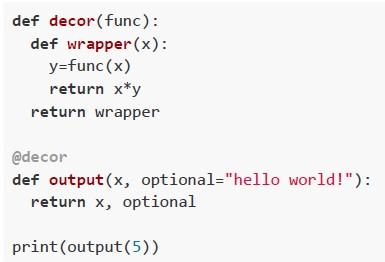 What will be the output of the following Python code snippet?
 Text of the picture (copyable)
```python
def decor(func):
    def wrapper(x):
        y=func(x)
        return x*y
    return wrapper

@decor
def output(x, optional="hello world!"):
    return x, optional

print(output(5))
```
text
```
('hello world!', 'hello world!', 'hello world!', 'hello world!',
'hello world!')
```
text
(5, 5, 5, 5, 5)

text
```
(5, 'hello world!', 5, 'hello world!', 5, 'hello world!', 5,
'hello world!', 5, 'hello world!')
```

text
25
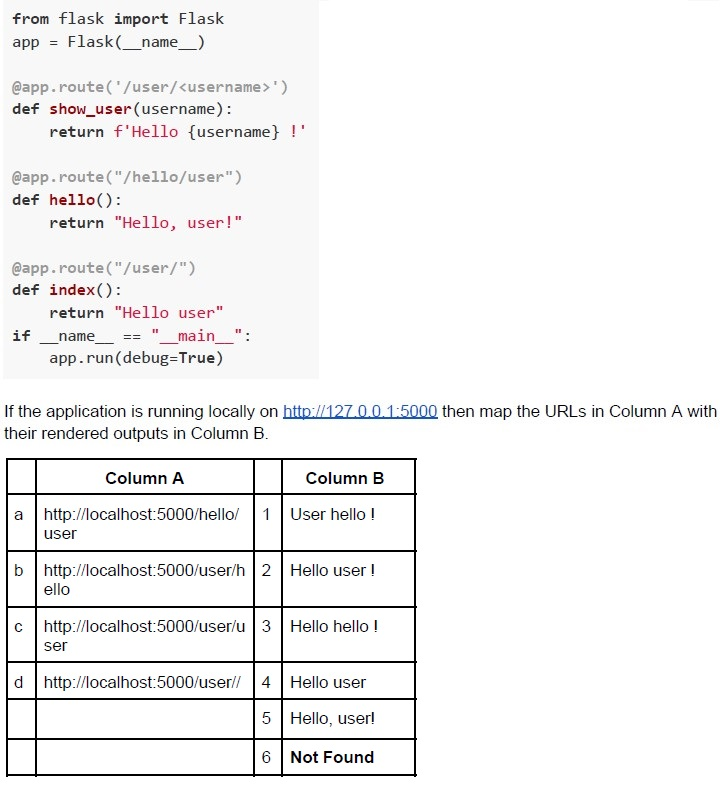 Consider the following flask application.
 Text of the picture (copyable)
```python
from flask import Flask
app = Flask(__name__)

@app.route('/user/<username>')
def show_user(username):
    return f'Hello {username} !'

@app.route("/hello/user")
def hello():
    return "Hello, user!"

@app.route("/user/")
def index():
    return "Hello user"
if __name__ == "__main__":
    app.run(debug=True)
```

If the application is running locally on http://127.0.0.1:5000 then map the URLs in Column A with their rendered outputs in Column B.

| | Column A | | Column B |
|---|---|---|---|
| a | http://localhost:5000/hello/user | 1 | User hello ! |
| b | http://localhost:5000/user/hello | 2 | Hello user ! |
| c | http://localhost:5000/user/user | 3 | Hello hello ! |
| d | http://localhost:5000/user// | 4 | Hello user |
| | | 5 | Hello, user! |
| | | 6 | Not Found |- a-2, b-1, c-5, d-6
- a-5, b-3, c-2, d-4
- a-5, b-1, c-2, d-6
- a-2, b-3, c-4, d-6
- O(N2)
- O(N)
- O(logN)
- O(NlogN)
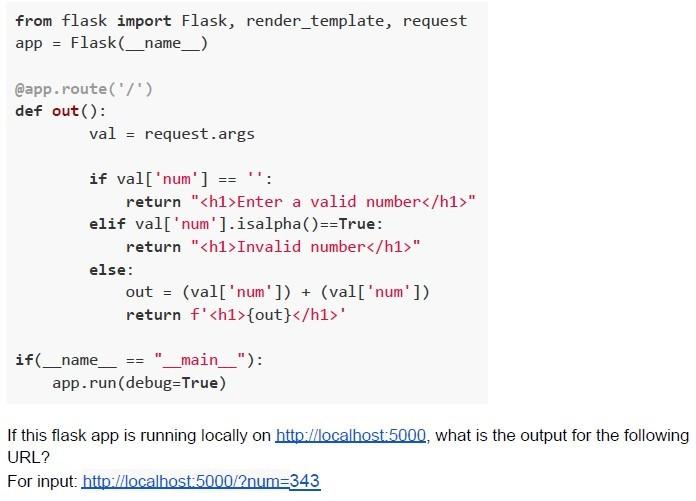 Consider the following flask application.
 Text of the picture (copyable)
```python
from flask import Flask, render_template, request
app = Flask(__name__)

@app.route('/')
def out():
    val = request.args

    if val['num'] == '':
        return "<h1>Enter a valid number</h1>"
    elif val['num'].isalpha()==True:
        return "<h1>Invalid number</h1>"
    else:
        out = (val['num']) + (val['num'])
        return f'<h1>{out}</h1>'

if(__name__ == "__main__"):
    app.run(debug=True)
```
If this flask app is running locally on http://localhost:5000, what is the output for the following URL?
For input: http://localhost:5000/?num=343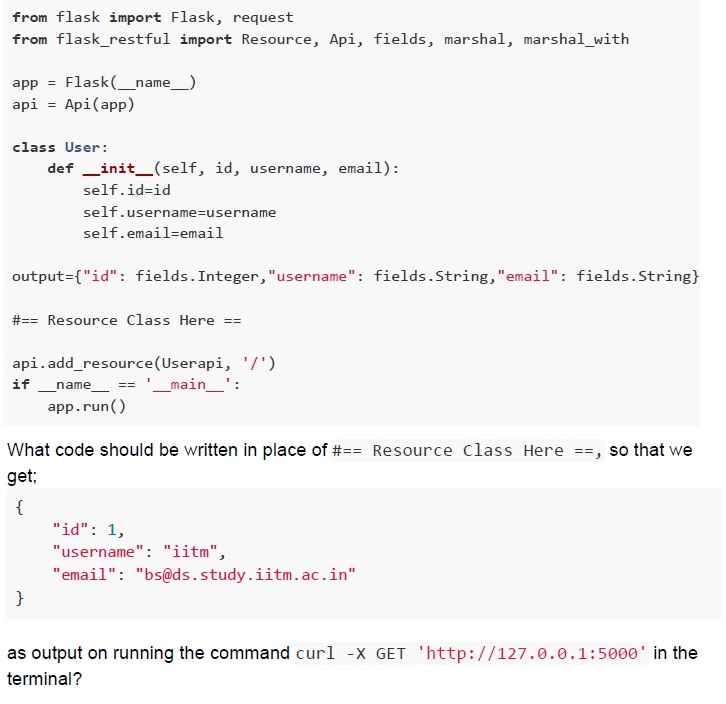 Follow the code given below
 Text of the picture (copyable)
```python
from flask import Flask, request
from flask_restful import Resource, Api, fields, marshal, marshal_with

app = Flask(__name__)
api = Api(app)

class User:
    def __init__(self, id, username, email):
        self.id=id
        self.username=username
        self.email=email

output={"id": fields.Integer,"username": fields.String,"email": fields.String}

## Resource Class Here ==

api.add_resource(Userapi, '/')
if __name__ == '__main__':
    app.run()
```

What code should be written in place of `## Resource Class Here ==`, so that we get;
```json
{
    "id": 1,
    "username": "iitm",
    "email": "bs@ds.study.iitm.ac.in"
}
```
as output on running the command `curl -X GET 'http://127.0.0.1:5000'` in the terminal?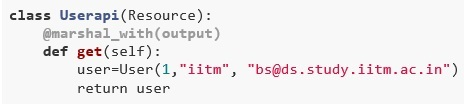
text
```python
class Userapi(Resource):
    @marshal_with(output)
    def get(self):
        user=User(1, "iitm", "bs@ds.study.iitm.ac.in")
        return user
```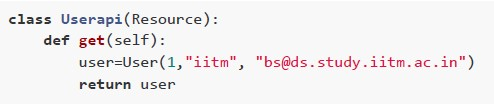
text
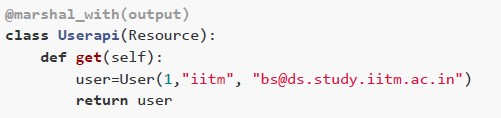
```python
class Userapi(Resource):
    def get(self):
        user=User(1, "iitm", "bs@ds.study.iitm.ac.in")
        return user
```
text
```python
@marshal_with(output)
class Userapi(Resource):
    def get(self):
        user=User(1,"iitm", "bs@ds.study.iitm.ac.in")
        return user
```
text
```python
class Userapi(Resource):
    def get(self):
        user=User(1, "iitm", "bs@ds.study.iitm.ac.in")
        return marshal(user, output)
```
Answer key
- Q1 (MCQ, 3 marks): A
- Q2 (MCQ, 3 marks): B
- Q3 (MCQ, 3 marks): C
- Q4 (MCQ, 3 marks): C
- Q5 (MCQ, 3 marks): B
- Q6 (MCQ, 3 marks): D
- Q7 (MCQ, 3 marks): D
- Q8 (MCQ, 3 marks): B
- Q9 (MCQ, 3 marks): B
- Q10 (MCQ, 3 marks): D
- Q11 (MCQ, 3 marks): D
- Q12 (MCQ, 3 marks): C
- Q13 (MCQ, 3 marks): D
- Q14 (MCQ, 2 marks): B
- Q15 (MCQ, 2 marks): D
- Q16 (MCQ, 2 marks): D
- Q17 (MCQ, 2 marks): D
- Q18 (MSQ, 3 marks): A, B, C, D
- Q19 (MSQ, 3 marks): B, D
- Q20 (MSQ, 2 marks): B, D
- Q21 (MSQ, 2 marks): A, B, C, D
- Q22 (MSQ, 2 marks): A, C
- Q23 (MSQ, 2 marks): A, D
- Q24 (MCQ, 4.5 marks): B
- Q25 (MCQ, 4.5 marks): A
- Q26 (MCQ, 4.5 marks): C
- Q27 (MCQ, 4.5 marks): C
- Q28 (MCQ, 4.5 marks): C
- Q29 (MCQ, 4.5 marks): B
- Q30 (MCQ, 4.5 marks): A
- Q31 (SA, 3 marks): 343343
- Q32 (MSQ, 4.5 marks): A, D
Concepts this paper tests
Auto-generated summary from the source site. Handy as a checklist; the lessons above explain each idea from scratch.
Here’s a structured summary of the core topics, concepts, principles, and equations essential for the "Modern Application Development 1" exam, along with Mermaid knowledge graphs to visualize relationships.
1. Core Topics & Concepts
A. Web Development (HTML, CSS, Flask, REST APIs)
HTML Forms & HTTP Methods
GETvs.POST:GET: Data appended to URL (query string). Used for non-sensitive data (e.g., search queries).POST: Data sent in the request body. Used for sensitive data (e.g., passwords).
Example:
<form action="/submit" method="GET"> <input type="text" name="username"> <input type="submit"> </form>- Submitting
"Mahesh"sends:GET /submit?username=Mahesh.
- Submitting
CSS Specificity & Inheritance
- Order of precedence:
!important> Inline styles > IDs > Classes > Tags. Example:
.two { color: red !important; } /* Highest priority */
<p class="two" style="color: brown;">Text</p> /* Renders as red */
- Order of precedence:
Flask & RESTful APIs
Flask-Restful:
- Define resources with HTTP methods (
GET,POST,PUT,DELETE). Example:
from flask_restful import Resource, Api
class Todo(Resource):
    def get(self, todo_id):
        return {"todo_id": todo_id}
api.add_resource(Todo, "/todo/<int:todo_id>")
- Define resources with HTTP methods (
Request Handling:
request.args: Query parameters (e.g.,?key=value).request.json: Parsed JSON body (forPOST/PUT).request.form: Form data (forPOSTwithContent-Type: multipart/form-data).
Jinja2 Templating
Syntax:
{{ variable }}: Output a variable.{% for item in list %}: Loop.{% extends "base.html" %}: Inheritance.
Example:
<ul>
  {% for user in users %}
    <li>{{ user.name }}</li>
  {% endfor %}
</ul>
SQLAlchemy & Database Models
Define models with
db.Model:class User(db.Model): id = db.Column(db.Integer, primary_key=True) name = db.Column(db.String(50), unique=True)Relationships:
db.ForeignKey: One-to-many.db.relationship: Many-to-many (with association tables).
HTTP Status Codes
200 OK: Success.201 Created: Resource created.400 Bad Request: Client error.404 Not Found: Resource missing.500 Internal Server Error: Server error.
B. Testing (Pytest, Coverage)
Pytest Basics
- Write test functions with
assert. Example:
def test_add():
    assert add(2, 3) == 5
Run tests:
pytest test_file.py -v
- Write test functions with
Test Selection & Markers
-k: Select tests by name (e.g.,pytest -k "test_add").-m: Select tests by marker (e.g.,@pytest.mark.slow).Example:
@pytest.mark.marker1
def test_case1():
    assert square(5) == 25
Run with:
pytest -m marker1.
- Coverage Types | Type | Description | Example Test Cases | |--------------------|----------------------------------------------|-----------------------------| | Function | Every function is called at least once. |
foo()| | Statement | Every line of code is executed. |foo(1, 1)| | Branch | Everyif/elsebranch is tested. |foo(1, 1)andfoo(1, 0)| | Condition | Every sub-condition (e.g.,x > 0 && y > 0) is tested. |foo(0, 1)andfoo(1, 0)|
C. Version Control (Git)
Git Commands
git rm --cached <file>: Remove from staging but keep locally.git commit -m "message": Commit changes.git push: Upload to remote.
Branching & Merging
git branch: List branches.git checkout -b new-branch: Create and switch branches.
D. Cloud Computing (PaaS, IaaS)
Service Models
- IaaS: Infrastructure as a Service (e.g., AWS EC2).
- PaaS: Platform as a Service (e.g., Heroku, Azure App Service).
- SaaS: Software as a Service (e.g., Gmail).
Storage Types
- Hot Storage: Low latency, high cost (e.g., S3).
- Cold Storage: High latency, low cost (e.g., Amazon Glacier).
E. Algorithms & Complexity
Time Complexity
Selection Sort-like Algorithm (Question 31):
Steps:
- Find min element in unsorted array:
O(N). - Repeat
Ntimes:O(N) * N = O(N²).
- Find min element in unsorted array:
- Answer:
O(N²).
F. Networking (IPv4, Bandwidth)
IPv4 to Hexadecimal
Convert each octet to hex:
192→C0,168→A8,72→48,101→65.- Answer:
C0A8 4865.
Disk Latency Calculation
Formula:
Latency (ms) = (Degrees Missed / 360) * (60,000 / RPM)Example (Question 3):
35°missed,6000 RPM:Latency = (35 / 360) * (60,000 / 6000) = 0.097 * 10 ≈ 0.97 ms- Wait for full rotation:
10 ms - 0.97 ms = 9.03 ms. - Answer:
9.03 ms.
Bandwidth vs. Data Consumption
- Data = Bandwidth × Time.
Example (Question 25):
- User 2:
10 Mbps × 8 hours = 80 Mb(highest).
- User 2:
G. Software Testing Types
| Type | Description | Example |
|---|---|---|
| Regression | Ensure new changes don’t break existing functionality. | Re-run all tests after a bug fix. |
| User Acceptance | Validate software with real users. | Beta testing. |
| System | Test the complete system. | End-to-end workflows. |
| Automation | Scripted testing (e.g., Selenium). | Automate login tests. |
2. Key Equations
A. Disk Latency
Latency (ms) = (Degrees Missed / 360) × (60,000 / RPM)B. Data Consumption
Data (Mb) = Bandwidth (Mbps) × Time (hours) × 3600Graph 2: Testing Concepts
Graph 3: Git Workflow
Graph 4: Cloud Service Models
Graph 5: HTTP Request Flow
4. Exam Tips
Flask-Restful:
- Use
@marshal_withfor structured JSON responses. request.args(query params) vs.request.json(body).
- Use
Pytest:
-kfor keyword filtering,-mfor markers.1 passed, 2 deselectedmeans only tests matching the marker ran.
Git:
git rm --cachedremoves from staging but keeps the file locally.
CSS:
!importantoverrides all other styles.
IPv4 Hex Conversion:
- Break into octets and convert each to hex.
Bandwidth Calculation:
- Multiply bandwidth by time to find data consumed.
Cold Storage:
- High latency, low cost (e.g., Amazon Glacier).