Home / Past papers / MAD1 End Term / this paper
IIT M DEGREE AN EXAM QDB3 31 Aug 2025 - 31 Aug 2025
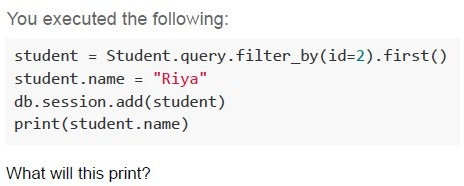
Text of the picture (copyable)
You executed the following:

```python
student = Student.query.filter_by(id=2).first()
student.name = "Riya"
db.session.add(student)
print(student.name)
```

What will this print?
- Riya
- Name stored in database
- None
- Error
- Loads extra content of all the tables
- Returns a query object that can be filtered
- Loads all related records immediately
- Forces join queries at once
- GET encrypts the URL
- Data becomes part of browser history and URL
- It uses a separate request header
- Flask doesn’t support GET by default
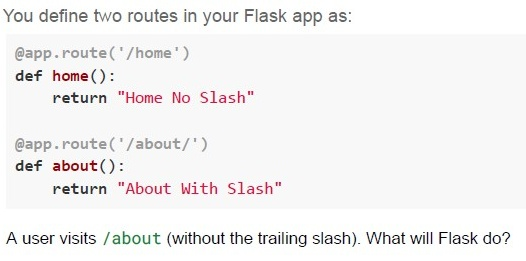
Text of the picture (copyable)
You define two routes in your Flask app as:

```python
@app.route('/home')
def home():
    return "Home No Slash"

@app.route('/about/')
def about():
    return "About With Slash"
```

A user visits /about (without the trailing slash). What will Flask do?
text
Responds with 404 Not Found

text
Automatically redirects to /about/

text
Responds with "About With Slash"

text
Responds with "Home No Slash"
- Aesthetic and minimalist design
- Visibility of system status
- Error prevention
- Recognition rather than recall
- Parsing HTML
- Auto-filling saved form data
- URL routing
- JavaScript execution
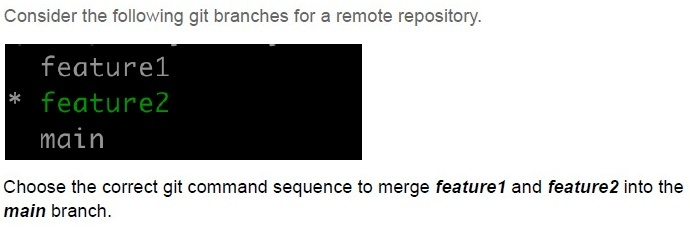
Text of the picture (copyable)
Consider the following git branches for a remote repository.

```
feature1
* feature2
main
```

Choose the correct git command sequence to merge *feature1* and *feature2* into the *main* branch.
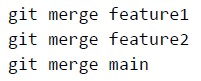
text
```
git merge feature1
git merge feature2
git merge main
```
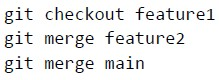
text
```
git checkout feature1
git merge feature2
git merge main
```
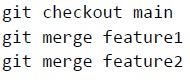
text
```
git checkout main
git merge feature1
git merge feature2
```
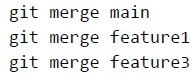
text
```
git merge main
git merge feature1
git merge feature3
```
Text of the picture (copyable)
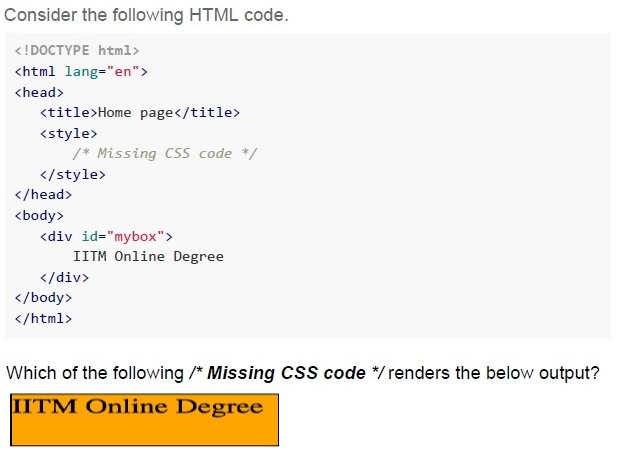
Consider the following HTML code.

```html
<!DOCTYPE html>
<html lang="en">
<head>
    <title>Home page</title>
    <style>
        /* Missing CSS code */
    </style>
</head>
<body>
    <div id="mybox">
        IITM Online Degree
    </div>
</body>
</html>
```

Which of the following /* Missing CSS code */ renders the below output?

A rectangular box with an orange background and a thin dark border, containing the text "IITM Online Degree" in a dark, bold font.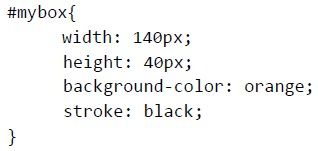
text
```css
#mybox{
    width: 140px;
    height: 40px;
    background-color: orange;
    stroke: black;
}
```
text
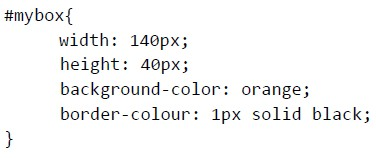
```css
#mybox{
    width: 140px;
    height: 40px;
    background-color: orange;
    border-colour: 1px solid black;
}
```
text
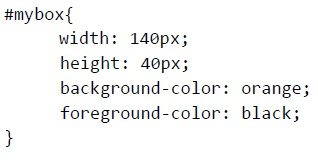
```css
#mybox{
    width: 140px;
    height: 40px;
    background-color: orange;
    foreground-color: black;
}
```
text
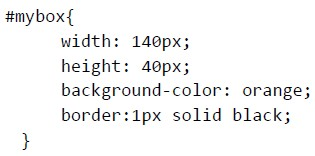
```css
#mybox{
    width: 140px;
    height: 40px;
    background-color: orange;
    border:1px solid black;
}
```
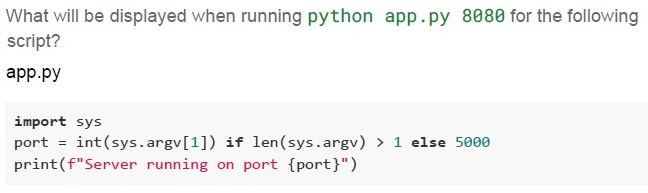
Text of the picture (copyable)
What will be displayed when running `python app.py 8080` for the following script?
app.py

```python
import sys

port = int(sys.argv[1]) if len(sys.argv) > 1 else 5000
print(f"Server running on port {port}")
```
text
Error: sys has no attribute argv

text
Server running on port 8080

text
Server running on port 5000

text
```
IndexError on sys.argv[1]
```
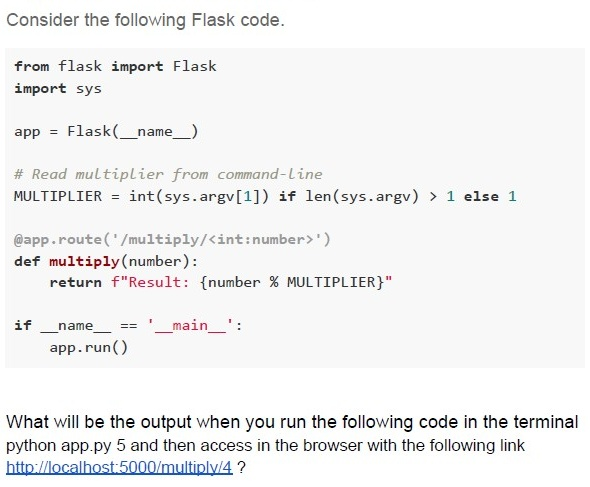
Text of the picture (copyable)
Consider the following Flask code.

```python
from flask import Flask
import sys

app = Flask(__name__)

# Read multiplier from command-line
MULTIPLIER = int(sys.argv[1]) if len(sys.argv) > 1 else 1

@app.route('/multiply/<int:number>')
def multiply(number):
    return f"Result: {number % MULTIPLIER}"

if __name__ == '__main__':
    app.run()
```

What will be the output when you run the following code in the terminal
python app.py 5 and then access in the browser with the following link
http://localhost:5000/multiply/4 ?- Result: 20
- Result: 1
- Result: 5
- Result: 4
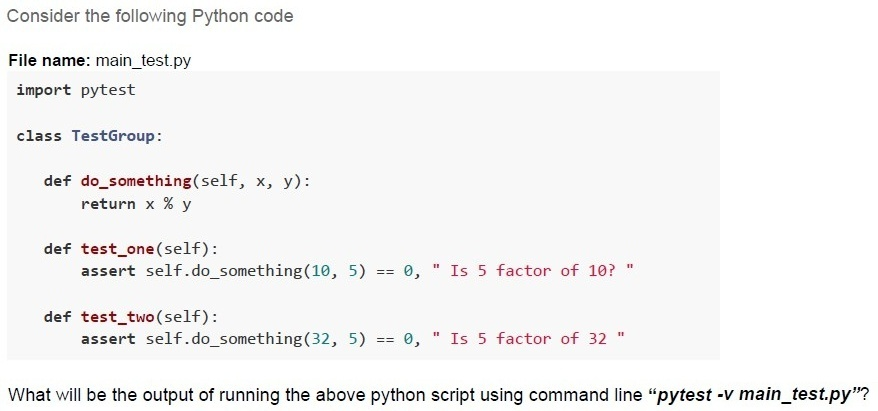
Text of the picture (copyable)
Consider the following Python code

File name: main_test.py
```python
import pytest

class TestGroup:

    def do_something(self, x, y):
        return x % y

    def test_one(self):
        assert self.do_something(10, 5) == 0, " Is 5 factor of 10? "

    def test_two(self):
        assert self.do_something(32, 5) == 0, " Is 5 factor of 32 "
```
What will be the output of running the above python script using command line "pytest -v main_test.py"?
text
```
==================== short test summary info ====================
FAILED test6.py::TestGroup::test_two - AssertionError: Is 5 factor of
32
========== 1 failed, 1 passed in 0.12s ==========================
```
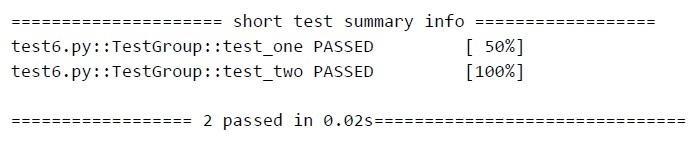
text
```text
==================== short test summary info ====================
test6.py::TestGroup::test_one PASSED                  [ 50%]
test6.py::TestGroup::test_two PASSED                 [100%]

==================== 2 passed in 0.02s====================
```
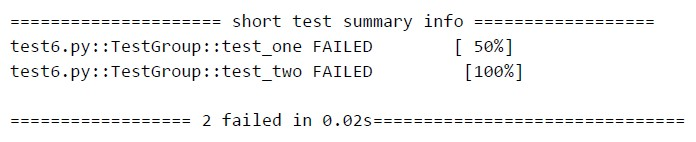
text
```text
==================== short test summary info ====================
test6.py::TestGroup::test_one FAILED           [ 50%]
test6.py::TestGroup::test_two FAILED          [100%]

==================== 2 failed in 0.02s====================
```
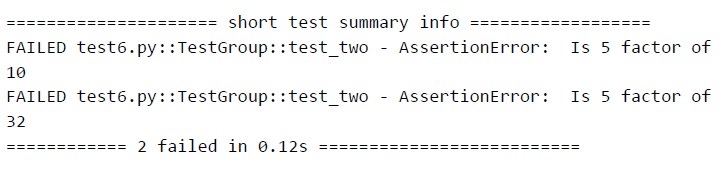
text
```
==================== short test summary info ====================
FAILED test6.py::TestGroup::test_two - AssertionError: Is 5 factor of
10
FAILED test6.py::TestGroup::test_two - AssertionError: Is 5 factor of
32
==================== 2 failed in 0.12s ====================
```
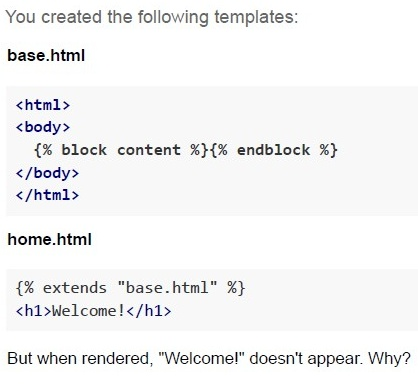
Text of the picture (copyable)
You created the following templates:

**base.html**

```html
<html>
<body>
    {% block content %}{% endblock %}
</body>
</html>
```

**home.html**

```html
{% extends "base.html" %}
<h1>Welcome!</h1>
```

But when rendered, "Welcome!" doesn't appear. Why?
text
extends is incorrectly used

text
base.html has syntax errors

text
Flask template folder is missing

text
```html
<h1> should be inside {% block content %}
```
- 2 seconds
- 10 seconds
- 16 seconds
- 1.6 seconds
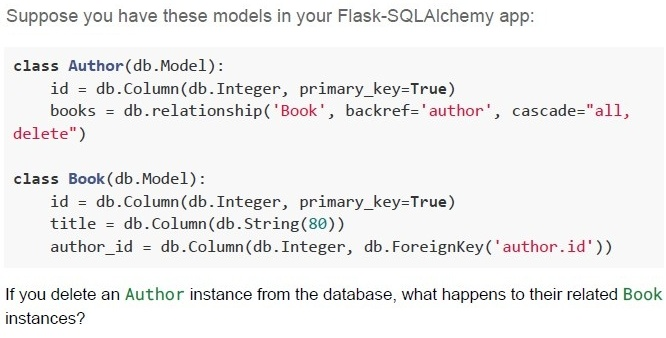
Text of the picture (copyable)
Suppose you have these models in your Flask-SQLAlchemy app:

```python
class Author(db.Model):
    id = db.Column(db.Integer, primary_key=True)
    books = db.relationship('Book', backref='author', cascade="all, delete")

class Book(db.Model):
    id = db.Column(db.Integer, primary_key=True)
    title = db.Column(db.String(80))
    author_id = db.Column(db.Integer, db.ForeignKey('author.id'))
```

If you delete an Author instance from the database, what happens to their related Book instances?
text
The books remain in the database, with author_id set to NULL

text
The books remain, but are marked as "inactive"

text
The books are also deleted from the database

text
An error is raised and the deletion is prevented
Text of the picture (copyable)
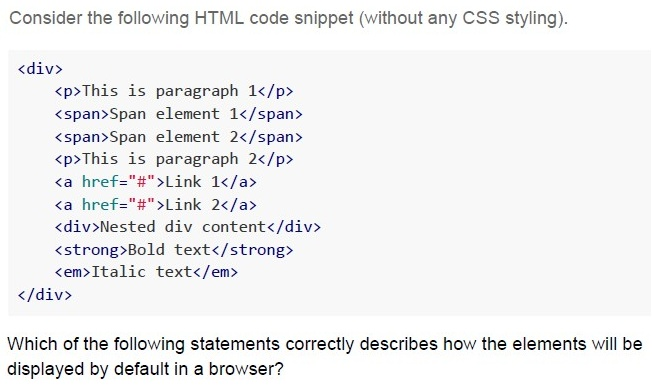
Consider the following HTML code snippet (without any CSS styling).

```html
<div>
    <p>This is paragraph 1</p>
    <span>Span element 1</span>
    <span>Span element 2</span>
    <p>This is paragraph 2</p>
    <a href="#">Link 1</a>
    <a href="#">Link 2</a>
    <div>Nested div content</div>
    <strong>Bold text</strong>
    <em>Italic text</em>
</div>
```

Which of the following statements correctly describes how the elements will be displayed by default in a browser?
text
All elements will appear on the same line since they are nested within a single
`<div>`

text
<p>, <div>, and both <a> elements will start on new lines, while <span>, <strong>, and <em> will flow inline with adjacent content

text
Only `<div>` elements will start on new lines, all other elements will display inline

text
`<p>` and `<div>` elements will start on new lines, while `<span>`, `<a>`, `<strong>`, and `<em>` elements will flow inline with adjacent inline elements
Text of the picture (copyable)
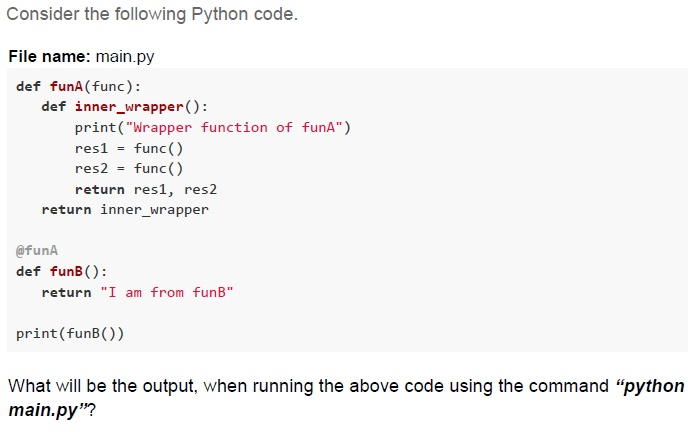
Consider the following Python code.

File name: main.py
```python
def funA(func):
    def inner_wrapper():
        print("Wrapper function of funA")
        res1 = func()
        res2 = func()
        return res1, res2
    return inner_wrapper

@funA
def funB():
    return "I am from funB"

print(funB())
```

What will be the output, when running the above code using the command "python main.py"?
text
```
('I am from funB', 'I am from funB')
Wrapper function of funA
```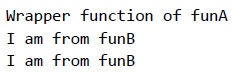
text
Wrapper function of funA
I am from funB
I am from funB

text
```
Wrapper function of funA
('I am from funB', 'I am from funB')
```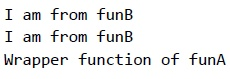
text
```text
I am from funB
I am from funB
Wrapper function of funA
```
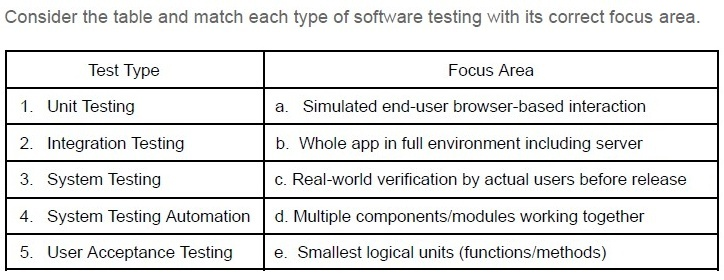
Text of the picture (copyable)
Consider the table and match each type of software testing with its correct focus area.

| Test Type | Focus Area |
|---|---|
| 1. Unit Testing | a. Simulated end-user browser-based interaction |
| 2. Integration Testing | b. Whole app in full environment including server |
| 3. System Testing | c. Real-world verification by actual users before release |
| 4. System Testing Automation | d. Multiple components/modules working together |
| 5. User Acceptance Testing | e. Smallest logical units (functions/methods) |
- 1-a, 2- c, 3-b, 4-d, 5-e
- 1-b, 2- c, 3-a, 4-e, 5-d
- 1-e, 2- d, 3-c, 4-a, 5-b
- 1-e, 2- d, 3-b, 4-a, 5-c
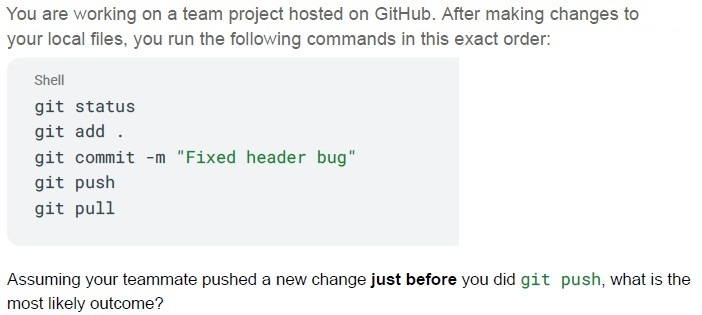
Text of the picture (copyable)
You are working on a team project hosted on GitHub. After making changes to your local files, you run the following commands in this exact order:

```shell
git status
git add .
git commit -m "Fixed header bug"
git push
git pull
```

Assuming your teammate pushed a new change **just before** you did `git push`, what is the most likely outcome?

text
Your commit will be rejected because the remote branch is ahead of your local branch.

text
The `git pull` should have been run **before** `git push` to avoid possible conflicts.

text
The `git push` will automatically merge your changes with the remote and succeed.

text
The `git status` will show the conflict before `git push` is run.
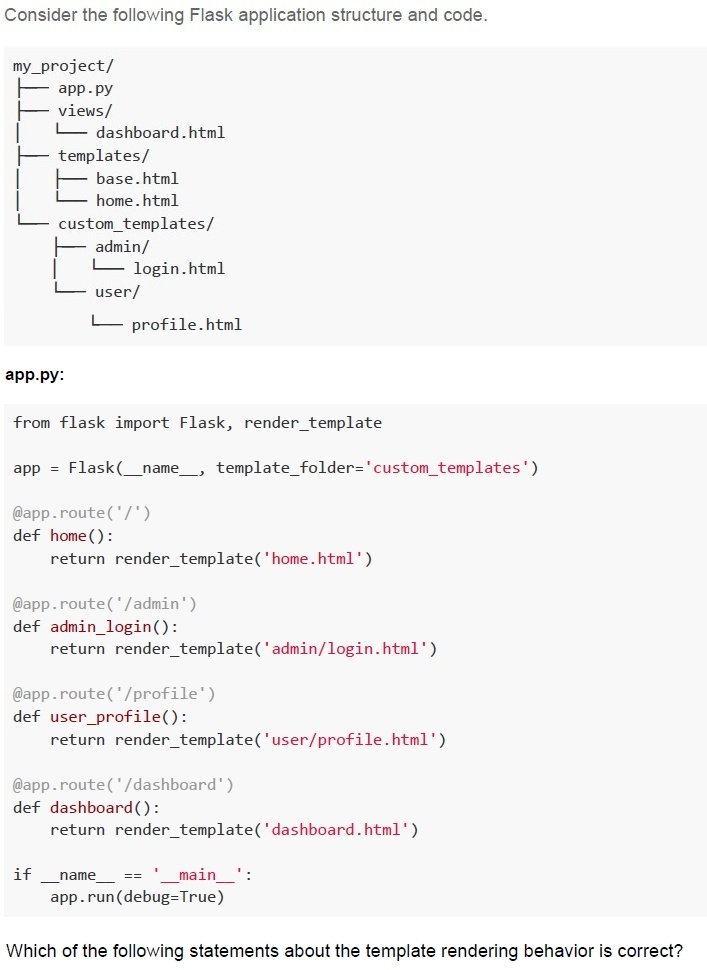
Text of the picture (copyable)
Consider the following Flask application structure and code.

```
my_project/
├── app.py
├── views/
│   └── dashboard.html
├── templates/
│   ├── base.html
│   └── home.html
└── custom_templates/
    ├── admin/
    │   └── login.html
    └── user/
        └── profile.html
```

**app.py:**

```python
from flask import Flask, render_template

app = Flask(__name__, template_folder='custom_templates')

@app.route('/')
def home():
    return render_template('home.html')

@app.route('/admin')
def admin_login():
    return render_template('admin/login.html')

@app.route('/profile')
def user_profile():
    return render_template('user/profile.html')

@app.route('/dashboard')
def dashboard():
    return render_template('dashboard.html')

if __name__ == '__main__':
    app.run(debug=True)
```

Which of the following statements about the template rendering behavior is correct?
text
All routes will work correctly as Flask will automatically search in both
templates/ and custom_templates/ folders

text
Only the /admin and /profile routes will work correctly, while / and /dashboard routes will fail with TemplateNotFound error

text
The / and /dashboard routes will fail with TemplateNotFound error, while
/admin and /profile routes will work correctly

text
All routes will fail because Flask requires the template folder to be named exactly
templates
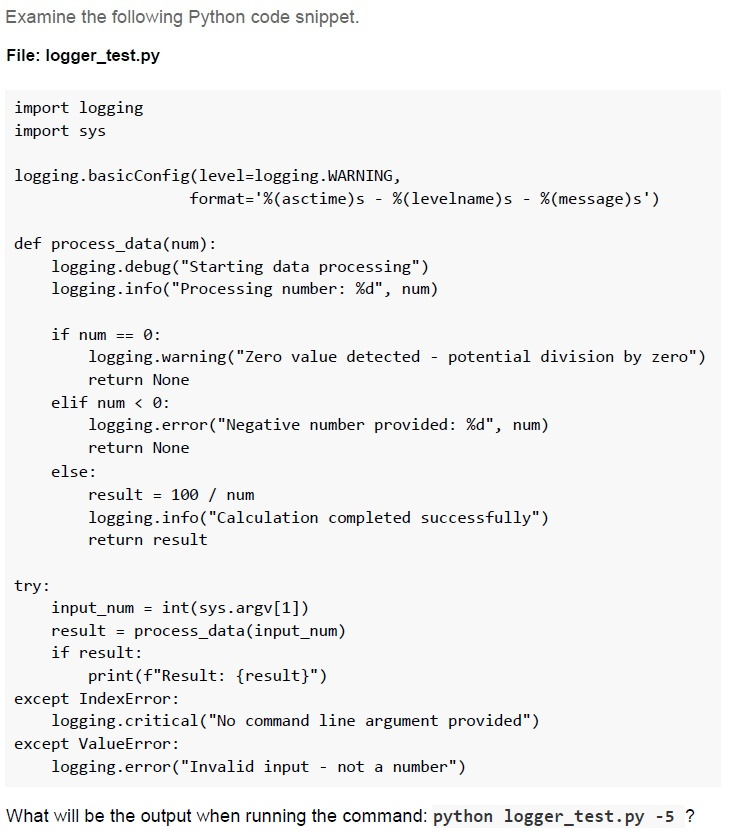
Text of the picture (copyable)
Examine the following Python code snippet.

File: logger_test.py

```python
import logging
import sys

logging.basicConfig(level=logging.WARNING,
                    format='%(asctime)s - %(levelname)s - %(message)s')

def process_data(num):
    logging.debug("Starting data processing")
    logging.info("Processing number: %d", num)

    if num == 0:
        logging.warning("Zero value detected - potential division by zero")
        return None
    elif num < 0:
        logging.error("Negative number provided: %d", num)
        return None
    else:
        result = 100 / num
        logging.info("Calculation completed successfully")
        return result

try:
    input_num = int(sys.argv[1])
    result = process_data(input_num)
    if result:
        print(f"Result: {result}")
except IndexError:
    logging.critical("No command line argument provided")
except ValueError:
    logging.error("Invalid input - not a number")
```

What will be the output when running the command: python logger_test.py -5 ?
text
```
2024-07-29 10:15:32,123 - DEBUG - Starting data processing 2024-07-29
10:15:32,124 - INFO - Processing number: -5
2024-07-29 10:15:32,125 - ERROR - Negative number provided: -5
```

text
```
2024-07-29 10:15:32,124 - WARNING - Zero value detected - potential
division by zero
2024-07-29 10:15:32,125 - ERROR - Negative number provided: -5
```

text
```
2024-07-29 10:15:32,125 - ERROR - Negative number provided: -5
```

text
```
2024-07-29 10:15:32,124 - INFO - Processing number: -5
2024-07-29 10:15:32,125 - ERROR - Negative number provided: -5
2024-07-29 10:15:32,126 - INFO - Calculation completed successfully
```
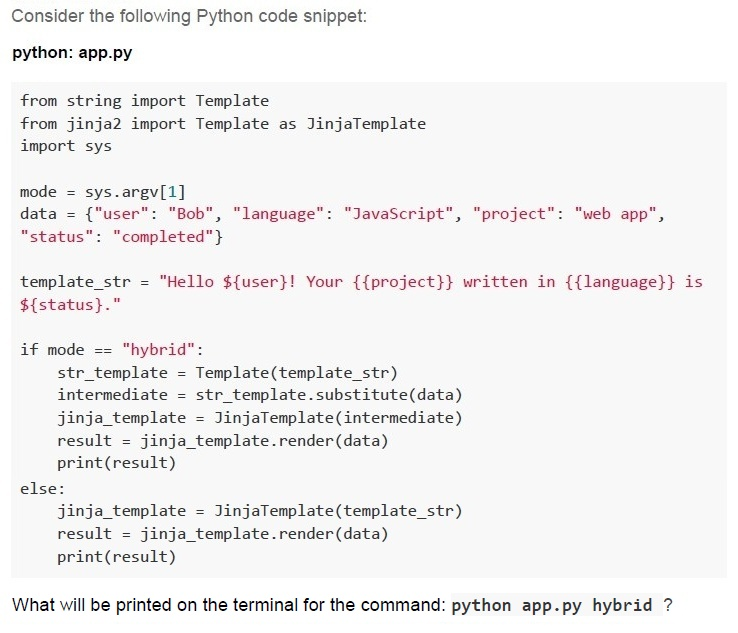
Text of the picture (copyable)
Consider the following Python code snippet:

**python: app.py**

```python
from string import Template
from jinja2 import Template as JinjaTemplate
import sys

mode = sys.argv[1]
data = {"user": "Bob", "language": "JavaScript", "project": "web app",
        "status": "completed"}

template_str = "Hello ${user}! Your {{project}} written in {{language}} is ${status}."

if mode == "hybrid":
    str_template = Template(template_str)
    intermediate = str_template.substitute(data)
    jinja_template = JinjaTemplate(intermediate)
    result = jinja_template.render(data)
    print(result)
else:
    jinja_template = JinjaTemplate(template_str)
    result = jinja_template.render(data)
    print(result)
```

What will be printed on the terminal for the command: `python app.py hybrid` ?
text
```
Hello ${user}! Your {{project}} written in {{language}} is
${status}.
```
text
```
Hello Bob! Your {{project}} written in {{language}} is completed.
```
text
Hello Bob! Your web app written in JavaScript is completed.

text
```
Hello ${user}! Your web app written in JavaScript is ${status}.
```
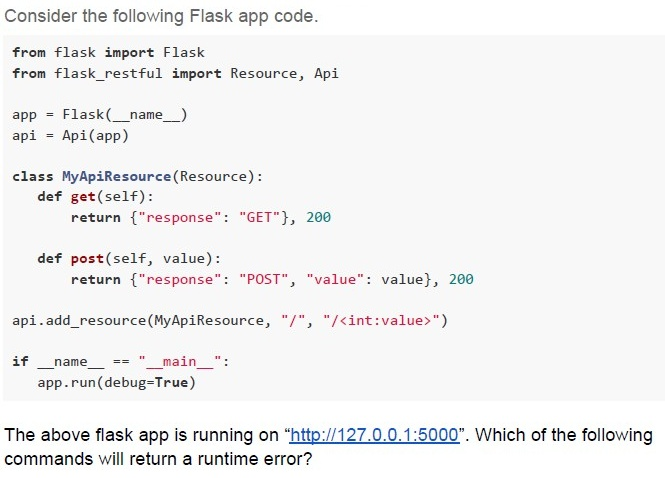
Text of the picture (copyable)
Consider the following Flask app code.

```python
from flask import Flask
from flask_restful import Resource, Api

app = Flask(__name__)
api = Api(app)

class MyApiResource(Resource):
    def get(self):
        return {"response": "GET"}, 200

    def post(self, value):
        return {"response": "POST", "value": value}, 200

api.add_resource(MyApiResource, "/", "/<int:value>")

if __name__ == "__main__":
    app.run(debug=True)
```

The above flask app is running on "http://127.0.0.1:5000". Which of the following commands will return a runtime error?
text
```
curl http://127.0.0.1:5000/1025 -X GET
```

text
```
curl http://127.0.0.1:5000/1025 -X POST
```

text
```
curl http://127.0.0.1:5000/ -X POST
```

text
```
curl http://127.0.0.1:5000/ -x GET
```

Text of the picture (copyable)
Which of these are true about unit tests in Flask using pytest?

text
Tests must start with test_ prefix

text
You must import `FlaskClient` from `flask.testing`

text
You cannot test routes using `client.get()`

text
Fixtures help simulate isolated environments
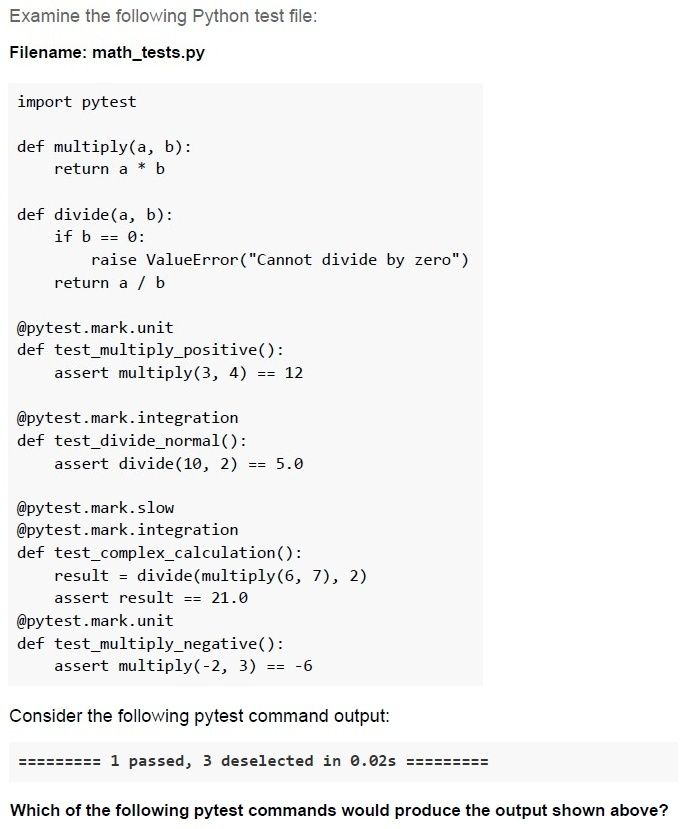
Text of the picture (copyable)
Examine the following Python test file:

Filename: math_tests.py

```python
import pytest

def multiply(a, b):
    return a * b

def divide(a, b):
    if b == 0:
        raise ValueError("Cannot divide by zero")
    return a / b

@pytest.mark.unit
def test_multiply_positive():
    assert multiply(3, 4) == 12

@pytest.mark.integration
def test_divide_normal():
    assert divide(10, 2) == 5.0

@pytest.mark.slow
@pytest.mark.integration
def test_complex_calculation():
    result = divide(multiply(6, 7), 2)
    assert result == 21.0

@pytest.mark.unit
def test_multiply_negative():
    assert multiply(-2, 3) == -6
```

Consider the following pytest command output:

========= 1 passed, 3 deselected in 0.02s =========

Which of the following pytest commands would produce the output shown above?
text
```
pytest math_tests.py -m unit
```

text
```
pytest math_tests.py -m integration
```

text
```
pytest math_tests.py -m "not sLow"
```

text
```
pytest math_tests.py -m "slow and integration"
```

text
None of these
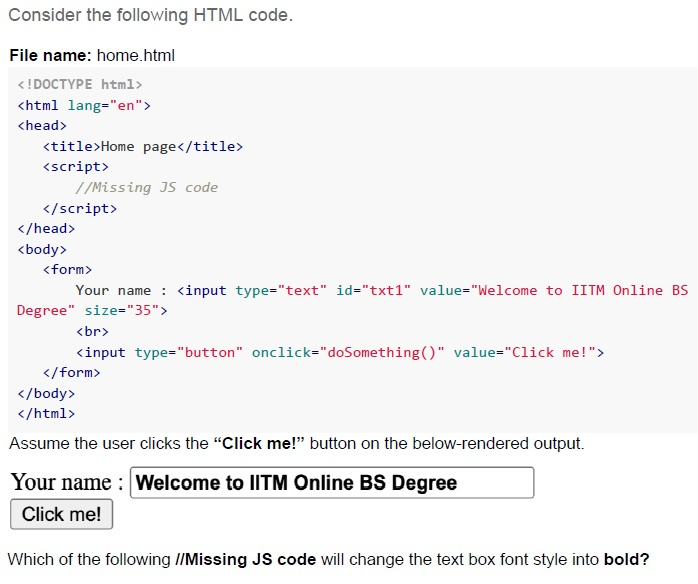
Text of the picture (copyable)
Consider the following HTML code.

**File name: home.html**

```html
<!DOCTYPE html>
<html lang="en">
<head>
    <title>Home page</title>
    <script>
        //Missing JS code
    </script>
</head>
<body>
    <form>
        Your name : <input type="text" id="txt1" value="Welcome to IITM Online BS Degree" size="35">
        <br>
        <input type="button" onclick="doSomething()" value="Click me!">
    </form>
</body>
</html>
```

Assume the user clicks the “**Click me!**” button on the below-rendered output.

Your name : [text input field with value "Welcome to IITM Online BS Degree"]
[button with text "Click me!"]

Which of the following //Missing JS code will change the text box font style into **bold**?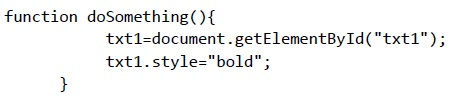
text
```javascript
function doSomething(){
    txt1=document.getElementById("txt1");
    txt1.style="bold";
}
```
text
```javascript
function doSomething(){
    document.getElementById("txt1").style="bold";
}
```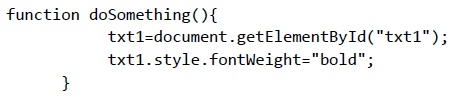
text
```javascript
function doSomething(){
    txt1=document.getElementById("txt1");
    txt1.style.fontWeight="bold";
}
```
text
```javascript
function doSomething(){
    document.getElementById("txt1").style.fontWeight="bold";
}
```
Text of the picture (copyable)
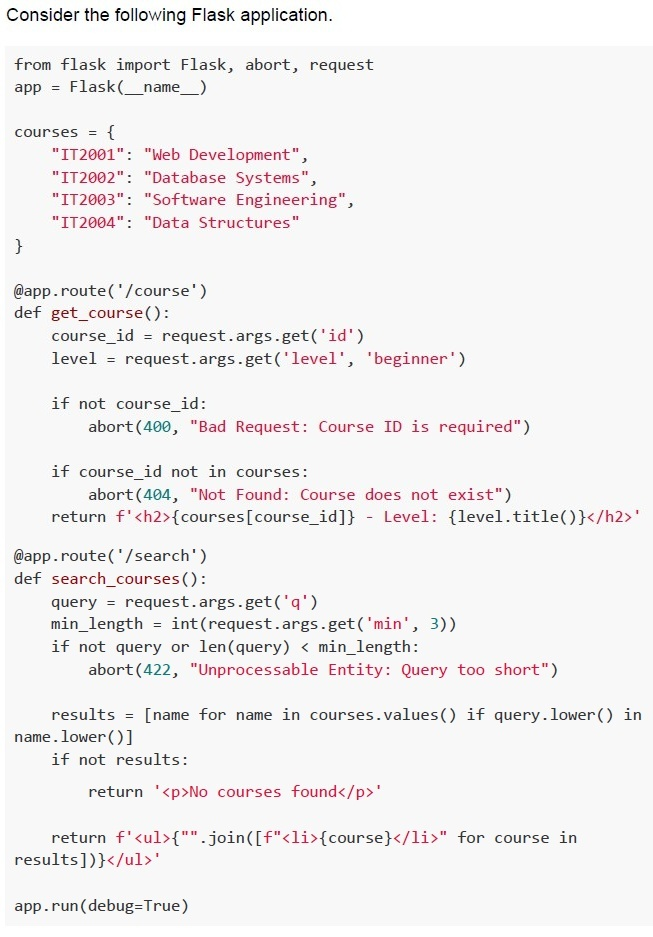
If the application is running locally
on http://127.0.0.1:5000, which
of the following statements are TRUE?

text
URL http://127.0.0.1:5000/course?id=IT2002 will render:
```html
<h2>Database Systems - Level: Beginner</h2>
```

text
URL http://127.0.0.1:5000/course will render:
```html
<h2> - Level: Beginner</h2>
```

text
URL http://127.0.0.1:5000/course?id=IT2005&level=advanced will return HTTP
404 error with message: "Not Found: Course does not exist"

text
URL http://127.0.0.1:5000/search?q=data&min=2 will render:
```html
<ul><li>Database Systems</li><li>Data Structures</li></ul>
```

text
URL http://127.0.0.1:5000/search?q=web will return HTTP 422 error with
message: "Unprocessable Entity: Query too short"

text
http://127.0.0.1:5000/search?q= will return:
```html
<p>No courses found</p>
```

text
http://127.0.0.1:5000/search?q=system&min=10 will return:
HTTP 422 error with message "Unprocessable Entity: Query too short"

text
http://127.0.0.1:5000/search?q=DATA&min=4 will return:
```html
<ul><li>Database Systems</li><li>Data Structures</li></ul>
```

text
http://127.0.0.1:5000/search?q=python&min=0 will return:
```html
<p>No courses found</p>
```

text
http://127.0.0.1:5000/search?min=2 will return:
HTTP 422 error with message "Unprocessable Entity: Query too short"
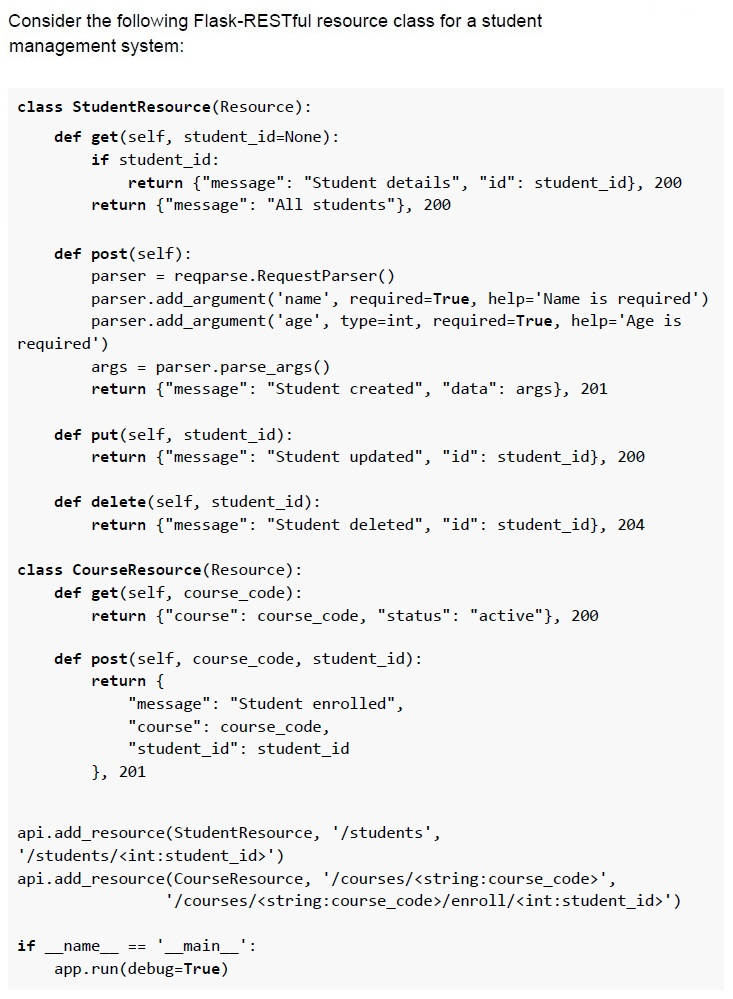
Text of the picture (copyable)
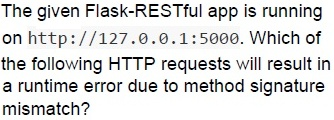
The given Flask-RESTful app is running
on http://127.0.0.1:5000. Which of
the following HTTP requests will result in
a runtime error due to method signature
mismatch?

text
```
curl http://127.0.0.1:5000/students/123 -X PUT
```

text
```
curl http://127.0.0.1:5000/students -X POST -d
"name=Jay&age=20"
```

text
```
curl http://127.0.0.1:5000/courses/CS101 -X POST
```

text
```
curl http://127.0.0.1:5000/students -X DELETE
```
Text of the picture (copyable)
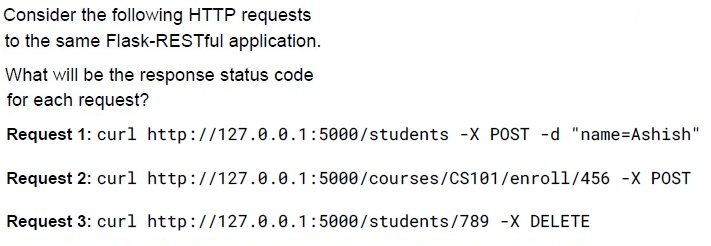
Consider the following HTTP requests
to the same Flask-RESTful application.

What will be the response status code
for each request?

Request 1: `curl http://127.0.0.1:5000/students -X POST -d "name=Ashish"`

Request 2: `curl http://127.0.0.1:5000/courses/CS101/enroll/456 -X POST`

Request 3: `curl http://127.0.0.1:5000/students/789 -X DELETE`
- Request 1: 400, Request 2: 201, Request 3: 204
- Request 1: 201, Request 2: 201, Request 3: 204
- Request 1: 400, Request 2: 405, Request 3: 204
- Request 1: 201, Request 2: 405, Request 3: 200
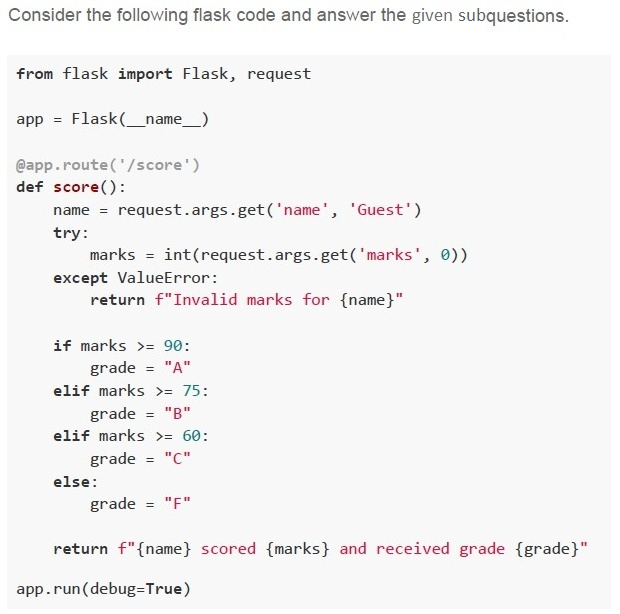

Text of the picture (copyable)
What will be the output of visiting the URL

http://localhost:5000/score?name=Alex&marks=eighty ?
- Alex scored 0 and received grade F.
- Alex scored eighty and received grade F
- Error 500: Internal Server Error
- Invalid marks for Alex
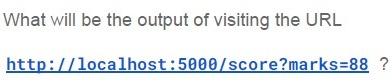
Text of the picture (copyable)
What will be the output of visiting the URL

http://localhost:5000/score?marks=88 ?
- Guest scored 88 and received grade A
- Guest scored 0 and received grade F
- Guest scored 88 and received grade B
- Invalid marks for Guest

Text of the picture (copyable)
What is the output of visiting the URL

http://localhost:5000/score?name=Anya&marks=59.5 ?
- Anya scored 59.5 and received grade F
- Invalid marks for Anya
- Anya scored 0 and received grade F
- Anya scored 59 and received grade F
Answer key
- Q1 (MCQ, 2 marks): A
- Q2 (MCQ, 2 marks): B
- Q3 (MCQ, 2 marks): B
- Q4 (MCQ, 2 marks): B
- Q5 (MCQ, 2 marks): B
- Q6 (MSQ, 2 marks): A, B, D
- Q7 (MCQ, 3 marks): C
- Q8 (MCQ, 3 marks): D
- Q9 (MCQ, 3 marks): B
- Q10 (MCQ, 3 marks): D
- Q11 (MCQ, 3 marks): A
- Q12 (MCQ, 3 marks): D
- Q13 (MCQ, 3 marks): C
- Q14 (MCQ, 3 marks): C
- Q15 (MCQ, 3 marks): D
- Q16 (MCQ, 3 marks): C
- Q17 (MCQ, 3 marks): D
- Q18 (MCQ, 4.5 marks): B
- Q19 (MCQ, 4.5 marks): B
- Q20 (MCQ, 4.5 marks): C
- Q21 (MCQ, 4.5 marks): C
- Q22 (MSQ, 3 marks): A, C
- Q23 (MSQ, 3 marks): A, D
- Q24 (MSQ, 4.5 marks): C, D
- Q25 (MSQ, 4.5 marks): C, D
- Q26 (MSQ, 4.5 marks): A, C, D
- Q27 (MSQ, 3 marks): C, D, E
- Q28 (MCQ, 4.5 marks): C
- Q29 (MCQ, 3 marks): A
- Q30 (MCQ, 3 marks): D
- Q31 (MCQ, 2 marks): C
- Q32 (MCQ, 2 marks): B
Concepts this paper tests
Auto-generated summary from the source site. Handy as a checklist; the lessons above explain each idea from scratch.
Here’s a structured summary of the core topics, concepts, principles, and equations essential for the "Modern Application Development I" exam, along with Mermaid knowledge graphs to visualize relationships.
1. Core Topics & Concepts
A. Flask (Python Web Framework)
Routing & Views
@app.route()decorator for defining endpoints.- Dynamic URLs (e.g.,
/<int:id>). - Trailing slash behavior (e.g.,
/aboutvs/about/). - HTTP methods (
GET,POST,PUT,DELETE). Key Code Snippets:
@app.route('/user/<int:user_id>')
def show_user(user_id):
    return f"User ID: {user_id}"
Request Handling
- Accessing query parameters (
request.args). - Form data (
request.form). - JSON data (
request.json). Example:
name = request.args.get('name', default='Guest')
- Accessing query parameters (
Templates (Jinja2)
- Template inheritance (
{% extends %},{% block %}). - Variable rendering (
{{ variable }}). - Conditional logic (
{% if %}). Example:
{% extends "base.html" %}
{% block content %}
    <h1>{{ title }}</h1>
{% endblock %}
- Template inheritance (
Error Handling
abort()for HTTP errors (e.g.,404,400).- Custom error pages (
@app.errorhandler). Example:
abort(404, description="Resource not found")
Flask-RESTful
- Resource-based routing (
api.add_resource()). - Request parsing (
reqparse.RequestParser). Example:
parser = reqparse.RequestParser()
parser.add_argument('name', required=True)
- Resource-based routing (
Database Integration (SQLAlchemy)
- ORM basics (
db.Model,db.Column,db.relationship). - Querying (
filter_by,first,all). - Cascading deletes (
cascade="all, delete"). - Lazy loading (
lazy='dynamic'returns a query object). Example:
class User(db.Model):
    id = db.Column(db.Integer, primary_key=True)
    posts = db.relationship('Post', lazy='dynamic')
- ORM basics (
Flask-SQLAlchemy Relationships
- One-to-Many, Many-to-Many.
- Foreign keys (
db.ForeignKey). - Backreferences (
backref). Example:
class Post(db.Model):
    user_id = db.Column(db.Integer, db.ForeignKey('user.id'))
B. Frontend Development
HTML/CSS
- Block vs. inline elements (
<div>vs<span>). - CSS styling (
border,font-weight,background-color). Example:
#mybox {
    border: 1px solid black;
    background-color: orange;
}
- Block vs. inline elements (
JavaScript
- DOM manipulation (
document.getElementById). - Event handling (
onclick). Example:
function doSomething() {
    document.getElementById("txt1").style.fontWeight = "bold";
}
- DOM manipulation (
C. Git & Version Control
Basic Commands
git add,git commit,git push,git pull.- Branching (
git branch,git checkout,git merge). Example Workflow:
git checkout main
git merge feature-branch
Conflict Resolution
- Handling merge conflicts.
- Key Principle: Always
pullbeforepushto avoid conflicts.
D. Testing
Unit Testing (pytest)
- Test functions must start with
test_. - Assertions (
assert). - Fixtures for setup/teardown.
Example:
def test_addition():
    assert add(2, 3) == 5
- Test functions must start with
Markers & Selective Testing
@pytest.mark.unit,@pytest.mark.integration.Running specific tests:
pytest -m "unit and not slow"
Flask Testing
Flask.test_client()for route testing.Example:
def test_home_page(client):
    response = client.get('/')
    assert response.status_code == 200
E. HTTP & Web Concepts
HTTP Methods
GET(idempotent, data in URL).POST(data in body, not cached).- Why avoid
GETfor sensitive data? URLs are logged in browser history.
Status Codes
200 OK,201 Created,400 Bad Request,404 Not Found,422 Unprocessable Entity.
RESTful Design
- Resource-based URLs (e.g.,
/students/<id>). - Statelessness.
- Resource-based URLs (e.g.,
F. Performance & Networking
Bandwidth Calculations
Formula:
Time (seconds) = File Size (MB) × 8 / Speed (Mbps)- Example: 10 MB file at 5 Mbps →
10 × 8 / 5 = 16seconds.
G. Usability & UX
Nielsen’s Heuristics
- Visibility of system status: Always inform users (e.g., error messages).
- Example Violation: Login form with no feedback on wrong credentials.
H. Logging
Python Logging Levels
DEBUG(10),INFO(20),WARNING(30),ERROR(40),CRITICAL(50).Example:
logging.basicConfig(level=logging.WARNING)
logging.error("This will appear")
logging.info("This will NOT appear")
2. Key Equations (Math/Performance)
| Concept | Equation | Example |
|---|---|---|
| Bandwidth Time Calculation | Time = (File Size × 8) / Speed | 10 MB at 5 Mbps → 16 seconds |
| Modulo Operation | a % b | 4 % 5 = 4 |
| Grade Calculation | if marks >= 90: grade = "A" | 88 → "B" |
Graph 2: Git Workflow
Graph 3: Testing Hierarchy
Graph 4: HTTP Methods & Status Codes
Graph 5: Frontend Technologies
Graph 6: Database Relationships (SQLAlchemy)
4. Exam Tips
Flask:
- Remember that
lazy='dynamic'returns a query object, not loaded data. - Trailing slashes in routes redirect automatically (e.g.,
/about→/about/). request.argsis forGET;request.formis forPOST.
- Remember that
Git:
- Always
pullbeforepushto avoid conflicts. - Merge sequence:
git checkout main; git merge feature-branch.
- Always
Testing:
- pytest requires test functions to start with
test_. - Use
-mto run marked tests (e.g.,pytest -m unit).
- pytest requires test functions to start with
HTTP:
GETexposes data in URLs; avoid for sensitive data.422= Unprocessable Entity (validation errors).
Frontend:
<div>is block-level;<span>is inline.- Use
style.fontWeight = "bold"(notstyle="bold").
Performance:
- 1 MB = 8 Mb (1 Byte = 8 bits).
- Time = (File Size in MB × 8) / Speed in Mbps.
Logging:
logging.basicConfig(level=logging.WARNING)hidesINFO/DEBUG.
Jinja2:
- Extends must wrap content in
{% block %}.
- Extends must wrap content in
5. Common Pitfalls
- Flask Templates: Forgetting to place content inside
{% block %}. - SQLAlchemy: Confusing
lazy='dynamic'with eager loading. - Git: Pushing without pulling first (causes conflicts).
- HTTP: Using
GETfor passwords (exposed in URLs). - Testing: Not marking tests properly (e.g.,
@pytest.mark.unit).