Home / Past papers / MAD1 End Term / this paper
IIT M FOUNDATION DIPLOMA ENDTERM QPD1 07 Aug 2022 - 07 Aug 2022

Text of the picture (copyable)
THIS IS QUESTION PAPER FOR THE SUBJECT "DIPLOMA LEVEL: MODERN APPLICATION DEVELOPMENT 1"

ARE YOU SURE YOU HAVE TO WRITE EXAM FOR THIS SUBJECT?
CROSS CHECK YOUR HALL TICKET TO CONFIRM THE SUBJECTS TO BE WRITTEN.

(IF IT IS NOT THE CORRECT SUBJECT, PLS CHECK THE SECTION AT THE TOP FOR THE SUBJECTS REGISTERED BY YOU)
- Yes
- No
 Which of the following correctly represents the components of the given URL?
 Text of the picture (copyable)
```
https://www.mywebsite.com/home?user=Mad1&key=madcs2003
```
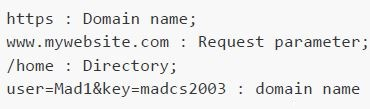
text
```
https : Domain name;
www.mywebsite.com : Request parameter;
/home : Directory;
user=Mad1&key=madcs2003 : domain name
```
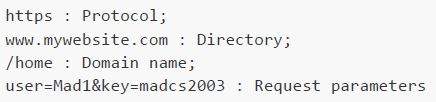
text
```
https : Protocol;
www.mywebsite.com : Directory;
/home : Domain name;
user=Mad1&key=madcs2003 : Request parameters
```
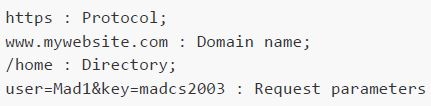
text
```
https : Protocol;
www.mywebsite.com : Domain name;
/home : Directory;
user=Mad1&key=madcs2003 : Request parameters
```
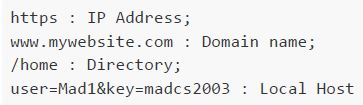
text
```
https : IP Address;
www.mywebsite.com : Domain name;
/home : Directory;
user=Mad1&key=madcs2003 : Local Host
```
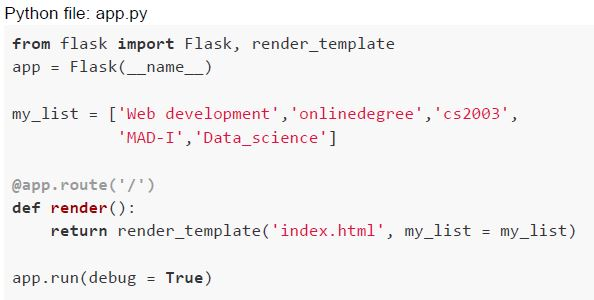 Consider the following flask app and an HTML file in templates folder:
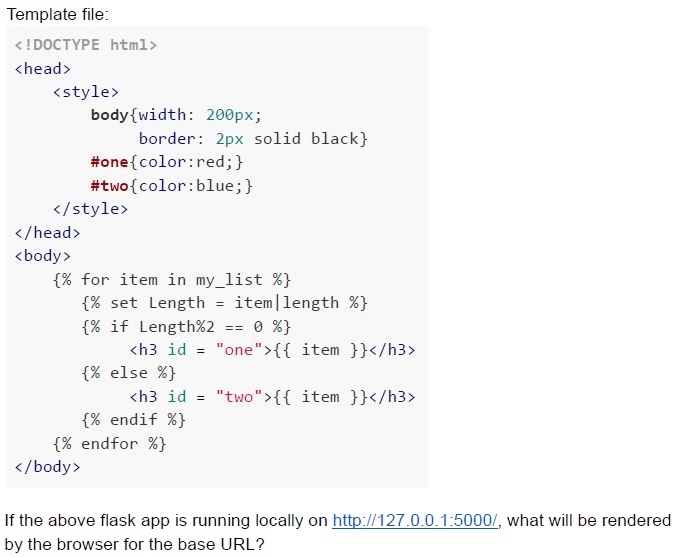 Consider the following flask app and an HTML file in templates folder:
 Text of the picture (copyable)
Python file: app.py

```python
from flask import Flask, render_template
app = Flask(__name__)

my_list = ['Web development', 'onlinedegree', 'cs2003',
           'MAD-I', 'Data_science']

@app.route('/')
def render():
    return render_template('index.html', my_list = my_list)

app.run(debug = True)
```
Template file:

```html
<!DOCTYPE html>
<head>
    <style>
        body{width: 200px;
            border: 2px solid black}
        #one{color:red;}
        #two{color:blue;}
    </style>
</head>
<body>
    {% for item in my_list %}
        {% set Length = item|length %}
        {% if Length%2 == 0 %}
            <h3 id = "one">{{ item }}</h3>
        {% else %}
            <h3 id = "two">{{ item }}</h3>
        {% endif %}
    {% endfor %}
</body>
```

If the above flask app is running locally on http://127.0.0.1:5000/, what will be rendered by the browser for the base URL?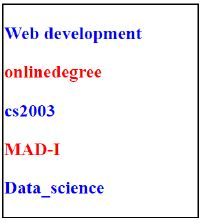
text
Web development
onlinedegree
cs2003
MAD-I
Data_science
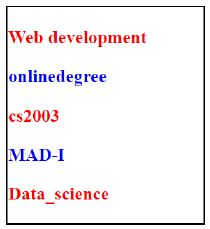
text
Web development
onlinedegree
cs2003
MAD-I
Data_science
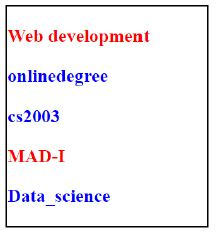
text
Web development
onlinedegree
cs2003
MAD-I
Data_science
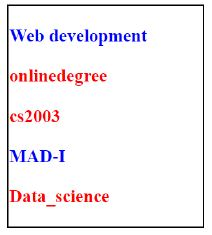
text
Web development
onlinedegree
cs2003
MAD-I
Data_science
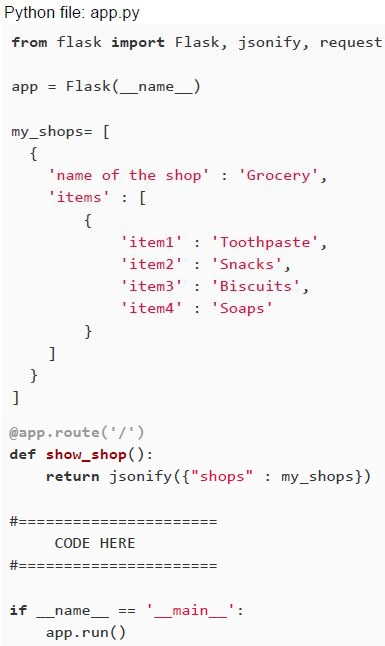 Consider the flask code given below. Which of the following code snippets must be added in the given space of above application, in order to create a new shop in ‘my_shops’ list on the server side apart from the existing one?
Text of the picture (copyable)
Python file: app.py
```python
from flask import Flask, jsonify, request

app = Flask(__name__)

my_shops= [
    {
        'name of the shop' : 'Grocery',
        'items' : [
            {
                'item1' : 'Toothpaste',
                'item2' : 'Snacks',
                'item3' : 'Biscuits',
                'item4' : 'Soaps'
            }
        ]
    }
]

@app.route('/')
def show_shop():
    return jsonify({"shops" : my_shops})

#===========================
#        CODE HERE
#===========================

if __name__ == '__main__':
    app.run()
```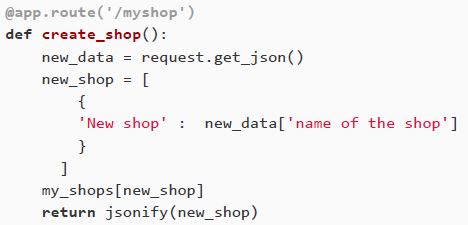
text
```python
@app.route('/myshop')
def create_shop():
    new_data = request.get_json()
    new_shop = [
        {
            'New shop' : new_data['name of the shop']
        }
    ]
    my_shops[new_shop]
    return jsonify(new_shop)
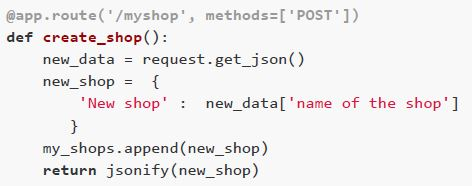
```
text
```python
@app.route('/myshop', methods=['POST'])
def create_shop():
    new_data = request.get_json()
    new_shop = {
        'New shop' : new_data['name of the shop']
    }
    my_shops.append(new_shop)
    return jsonify(new_shop)
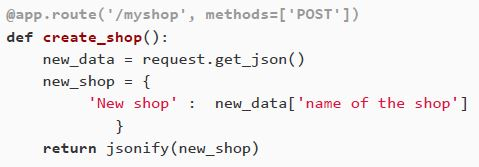
```
text
```python
@app.route('/myshop', methods=['POST'])
def create_shop():
    new_data = request.get_json()
    new_shop = {
        'New shop' : new_data['name of the shop']
    }
    return jsonify(new_shop)
```
text
All of these
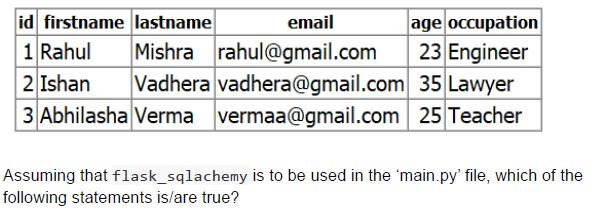 A table ‘person’ is created in the database using model class “Person” with fields and their properties given in the table below.
 Text of the picture (copyable)
| id | firstname | lastname | email | age | occupation |
|---|---|---|---|---|---|
| 1 | Rahul | Mishra | rahul@gmail.com | 23 | Engineer |
| 2 | Ishan | Vadhera | vadhera@gmail.com | 35 | Lawyer |
| 3 | Abhilasha | Verma | vermaa@gmail.com | 25 | Teacher |

Assuming that flask_sqlalchemy is to be used in the 'main.py' file, which of the following statements is/are true?

text
Both the queries i.e.,
```
Person.query.filter_by(firstname="Ishan").all() and
Person.query.filter_by(firstname="Ishan").first() will produce the
same result.
```

text
Both the queries i.e.,
```
Person.query.filter_by(id=3).first() and
Person.query.get(3) will produce the same result.
```

text
If person1 = Person.query.get(1) then, Both the inputs i.e.,
```
>>>person1
>>>person1.firstname
```
will produce the same result.

text
Both the queries i.e.,
```
Person.query.filter_by(firstname="Ishan").first(), and
Person.query.get(3)
```
will produce the same result
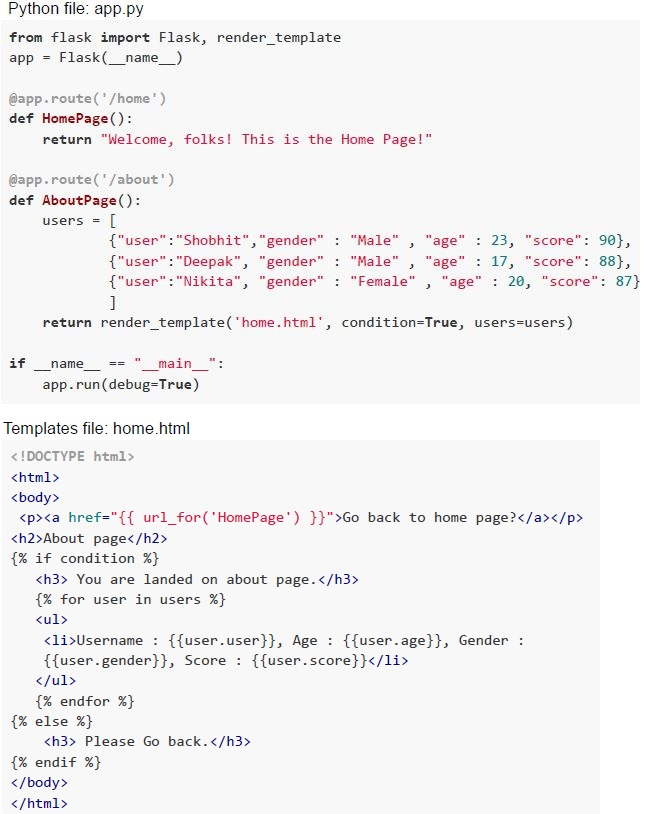 A flask app and a template files are given below. If the above flask application is running locally on “http://127.0.0.1:5000”, which of the following statement is true?
Text of the picture (copyable)
Python file: app.py
```python
from flask import Flask, render_template
app = Flask(__name__)

@app.route('/home')
def HomePage():
    return "Welcome, folks! This is the Home Page!"

@app.route('/about')
def AboutPage():
    users = [
        {"user":"Shobhit","gender" : "Male", "age" : 23, "score": 90},
        {"user":"Deepak", "gender" : "Male", "age" : 17, "score": 88},
        {"user":"Nikita", "gender" : "Female", "age" : 20, "score": 87}
    ]
    return render_template('home.html', condition=True, users=users)

if __name__ == "__main__":
    app.run(debug=True)
```

Templates file: home.html
```html
<!DOCTYPE html>
<html>
<body>
<p><a href="{{ url_for('HomePage') }}">Go back to home page?</a></p>
<h2>About page</h2>
{% if condition %}
    <h3>You are landed on about page.</h3>
    {% for user in users %}
    <ul>
        <li>Username : {{user.user}}, Age : {{user.age}}, Gender : {{user.gender}}, Score : {{user.score}}</li>
    </ul>
    {% endfor %}
{% else %}
    <h3> Please Go back.</h3>
{% endif %}
</body>
</html>
```
text
For URL: "http://127.0.0.1:5000/home", the rendered output will be "Welcome, folks! This is the Home Page!"
text
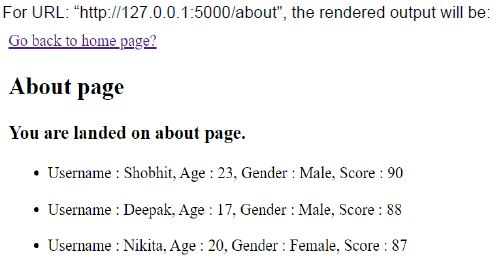
For URL: "http://127.0.0.1:5000/about", the rendered output will be:
Go back to home page?

**About page**

**You are landed on about page.**

* Username : Shobhit, Age : 23, Gender : Male, Score : 90
* Username : Deepak, Age : 17, Gender : Male, Score : 88
* Username : Nikita, Age : 20, Gender : Female, Score : 87
text
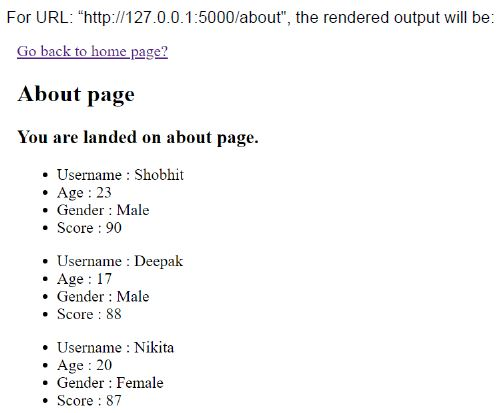
For URL: "http://127.0.0.1:5000/about", the rendered output will be:

Go back to home page?

**About page**

**You are landed on about page.**

* Username : Shobhit
* Age : 23
* Gender : Male
* Score : 90

* Username : Deepak
* Age : 17
* Gender : Male
* Score : 88

* Username : Nikita
* Age : 20
* Gender : Female
* Score : 87
text
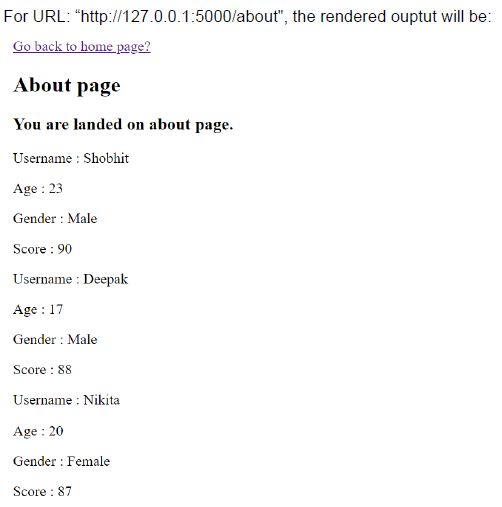
For URL: "http://127.0.0.1:5000/about", the rendered ouptut will be:
Go back to home page?

About page

You are landed on about page.

Username : Shobhit
Age : 23
Gender : Male
Score : 90

Username : Deepak
Age : 17
Gender : Male
Score : 88

Username : Nikita
Age : 20
Gender : Female
Score : 87
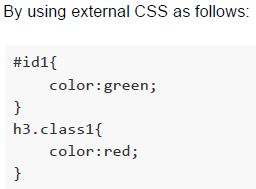
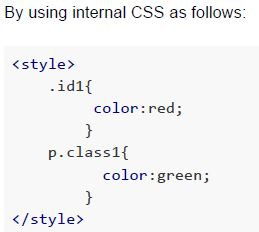
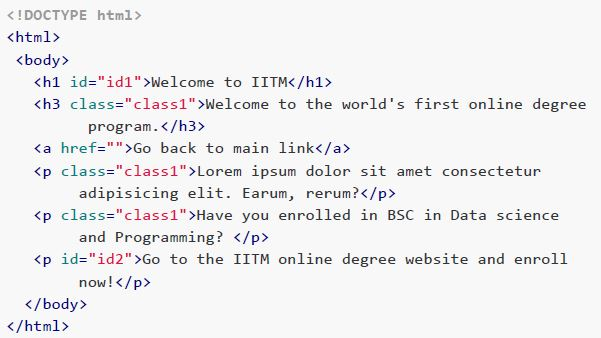 An HTML document is given below. Suppose, if we want to give red color to the text within the heading element having id="id1” and green color to the text within the heading element having class="class1”, what will be the correct way to do that?
Text of the picture (copyable)
```html
<!DOCTYPE html>
<html>
<body>
    <h1 id="id1">Welcome to IITM</h1>
    <h3 class="class1">Welcome to the world's first online degree program.</h3>
    <a href="">Go back to main link</a>
    <p class="class1">Lorem ipsum dolor sit amet consectetur adipisicing elit. Earum, rerum?</p>
    <p class="class1">Have you enrolled in BSc in Data science and Programming?</p>
    <p id="id2">Go to the IITM online degree website and enroll now!</p>
</body>
</html>
```
text
By using external CSS as follows:

```css
#id1{
    color:green;
}
h3.class1{
    color:red;
}
```
text
By using internal CSS as follows:

```html
<style>
    .id1{
        color:red;
    }
    p.class1{
        color:green;
    }
</style>
```
text
By using inline CSS as follows:
```html
<h1 id="id1" style="color:red;">Welcome to IITM</h1>
<h3 class="class1" style="color:green;">Welcome to the world's
first online degree program.</h3>
```

text
All of these
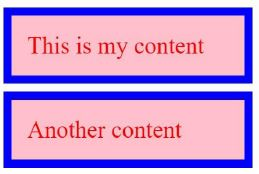
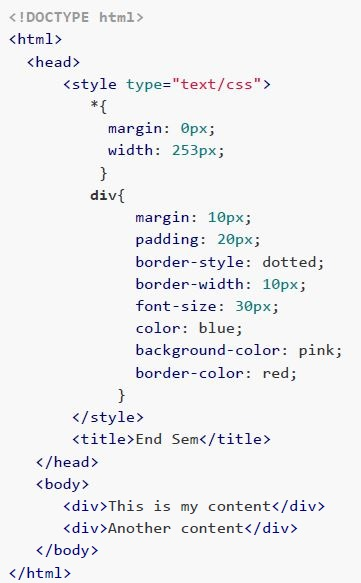 Consider the following HTML document with internal CSS. How will the browser render the above HTML document?
Text of the picture (copyable)
```html
<!DOCTYPE html>
<html>
<head>
    <style type="text/css">
        *{
            margin: 0px;
            width: 253px;
        }
        div{
            margin: 10px;
            padding: 20px;
            border-style: dotted;
            border-width: 10px;
            font-size: 30px;
            color: blue;
            background-color: pink;
            border-color: red;
        }
    </style>
    <title>End Sem</title>
</head>
<body>
    <div>This is my content</div>
    <div>Another content</div>
</body>
</html>
```
text
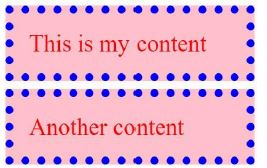
This is a UI screenshot showing two rectangular boxes stacked vertically.

The top box has a blue border and a light red background. Inside, it contains the text "This is my content" in red font.

The bottom box also has a blue border and a light red background. Inside, it contains the text "Another content" in red font.
text
This is a screenshot of two rectangular boxes, one above the other, with a dotted blue border and a light pink background.

The top box contains the text:
This is my content

The bottom box contains the text:
Another content

text
This is my content
Another content
text
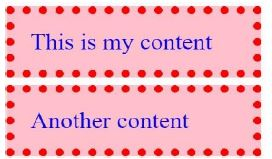
This is a UI screenshot showing two rectangular boxes, one above the other.
Each box has a light pink background and a red dotted border.
The top box contains the text "This is my content" in blue.
The bottom box contains the text "Another content" in blue.
Text of the picture (copyable)
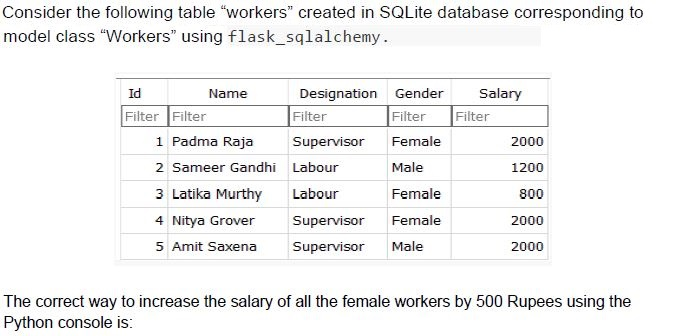
Consider the following table "workers" created in SQLite database corresponding to model class "Workers" using flask_sqlalchemy.

| Id | Name | Designation | Gender | Salary |
|---|---|---|---|---|
| Filter | Filter | Filter | Filter | Filter |
| 1 | Padma Raja | Supervisor | Female | 2000 |
| 2 | Sameer Gandhi | Labour | Male | 1200 |
| 3 | Latika Murthy | Labour | Female | 800 |
| 4 | Nitya Grover | Supervisor | Female | 2000 |
| 5 | Amit Saxena | Supervisor | Male | 2000 |

The correct way to increase the salary of all the female workers by 500 Rupees using the Python console is:
text
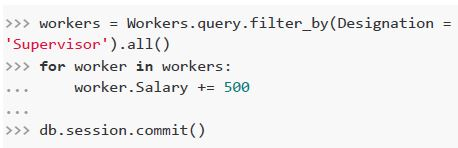
```python
>>> workers = Workers.query.filter_by(Designation =
'Supervisor').all()
>>> for worker in workers:
...     worker.Salary += 500
...
>>> db.session.commit()
```

text
```python
>>> workers = Workers.query.filter_by(Gender = 'Female').all()
>>> workers.Salary += 500
>>> db.session.commit()
```
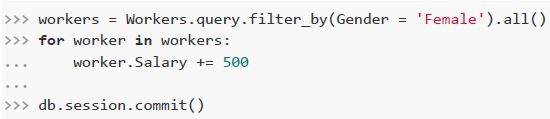
text
```python
>>> workers = Workers.query.filter_by(Gender = 'Female').all()
>>> for worker in workers:
...     worker.Salary += 500
...
>>> db.session.commit()
```
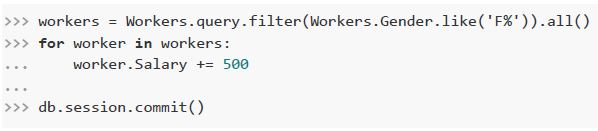
text
```python
>>> workers = Workers.query.filter(Workers.Gender.like('F%')).all()
>>> for worker in workers:
...     worker.Salary += 500
...
>>> db.session.commit()
```
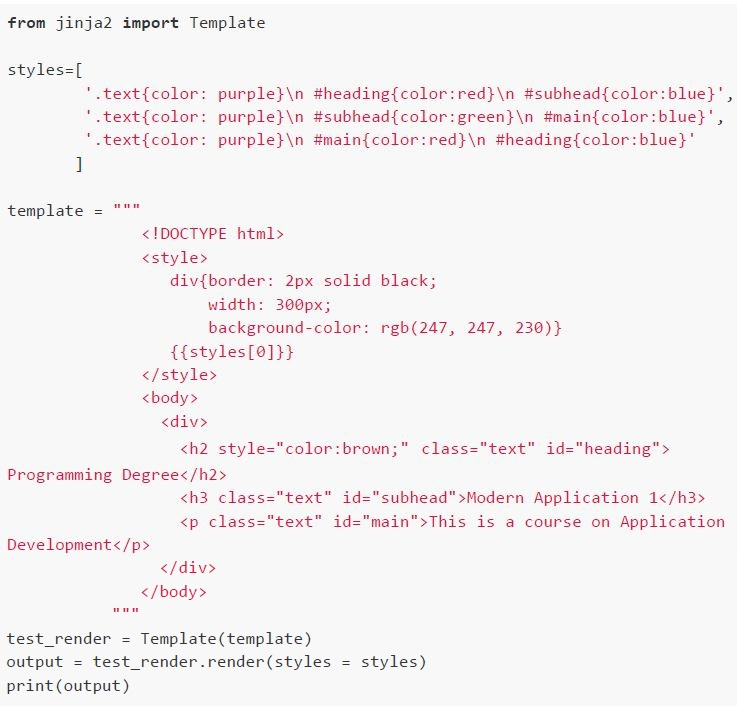 How will the browser render the output of the following Python code snippet?
 Text of the picture (copyable)
```python
from jinja2 import Template

styles=[
    '.text{color: purple}\n #heading{color:red}\n #subhead{color:blue}',
    '.text{color: purple}\n #subhead{color:green}\n #main{color:blue}',
    '.text{color: purple}\n #main{color:red}\n #heading{color:blue}'
]

template = """
<!DOCTYPE html>
<style>
    div{border: 2px solid black;
        width: 300px;
        background-color: rgb(247, 247, 230)}
    {{styles[0]}}
</style>
<body>
    <div>
        <h2 style="color:brown;" class="text" id="heading">
Programming Degree</h2>
        <h3 class="text" id="subhead">Modern Application 1</h3>
        <p class="text" id="main">This is a course on Application
Development</p>
    </div>
</body>
"""

test_render = Template(template)
output = test_render.render(styles = styles)
print(output)
```
text
Programming Degree
Modern Application 1
This is a course on Application Development

text
Programming Degree
Modern Application 1
This is a course on Application Development

text
Programming Degree
Modern Application 1
This is a course on Application Development

text
Programming Degree
Modern Application 1
This is a course on Application Development
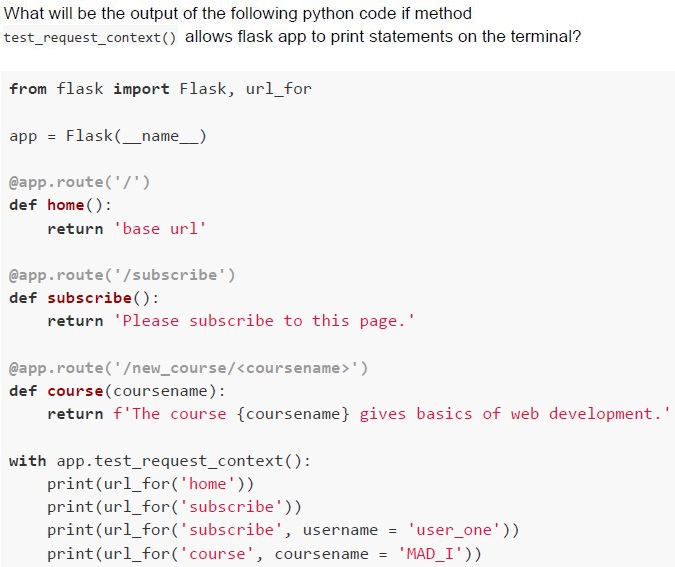
Text of the picture (copyable)
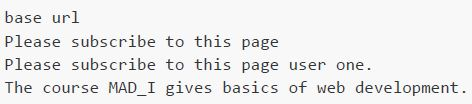
What will be the output of the following python code if method
test_request_context() allows flask app to print statements on the terminal?

```python
from flask import Flask, url_for

app = Flask(__name__)

@app.route('/')
def home():
    return 'base url'

@app.route('/subscribe')
def subscribe():
    return 'Please subscribe to this page.'

@app.route('/new_course/<coursename>')
def course(coursename):
    return f'The course {coursename} gives basics of web development.'

with app.test_request_context():
    print(url_for('home'))
    print(url_for('subscribe'))
    print(url_for('subscribe', username = 'user_one'))
    print(url_for('course', coursename = 'MAD_I'))
```
text
```
base url
Please subscribe to this page
Please subscribe to this page user one.
The course MAD_I gives basics of web development.
```
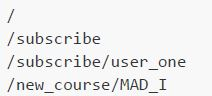
text
```
/
/subscribe
/subscribe/user_one
/new_course/MAD_I
```
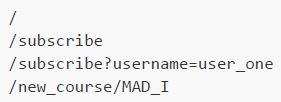
text
```
/
/subscribe
/subscribe?username=user_one
/new_course/MAD_I
```
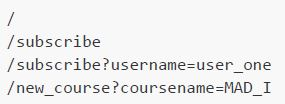
text
```
/
/subscribe
/subscribe?username=user_one
/new_course?coursename=MAD_I
```
- 600
- 6
- 0.6
- 12
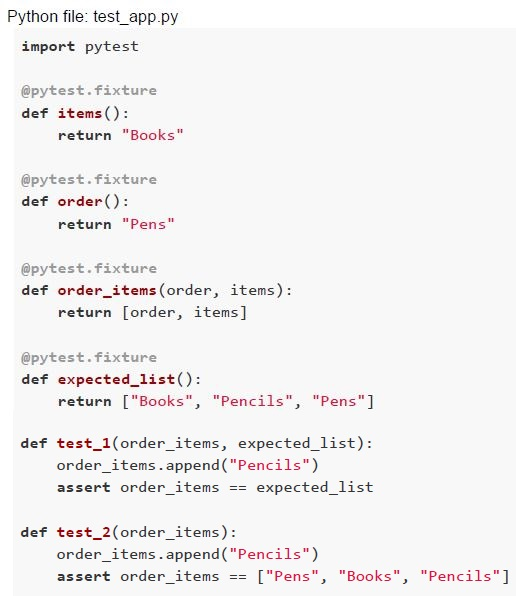 Consider the code snippet given below. Which of the following statement is true about the above code snippet?
Text of the picture (copyable)
Python file: test_app.py
```python
import pytest

@pytest.fixture
def items():
    return "Books"

@pytest.fixture
def order():
    return "Pens"

@pytest.fixture
def order_items(order, items):
    return [order, items]

@pytest.fixture
def expected_list():
    return ["Books", "Pencils", "Pens"]

def test_1(order_items, expected_list):
    order_items.append("Pencils")
    assert order_items == expected_list

def test_2(order_items):
    order_items.append("Pencils")
    assert order_items == ["Pens", "Books", "Pencils"]
```- After running pytest, test_1 will fail, whereas test_2 will pass.
- After running pytest, test_2 will fail, whereas test_1 will pass.
- Both the test cases, test_1 and test_2 will pass successfully.
- Both the test cases, test_1 and test_2 will fail.
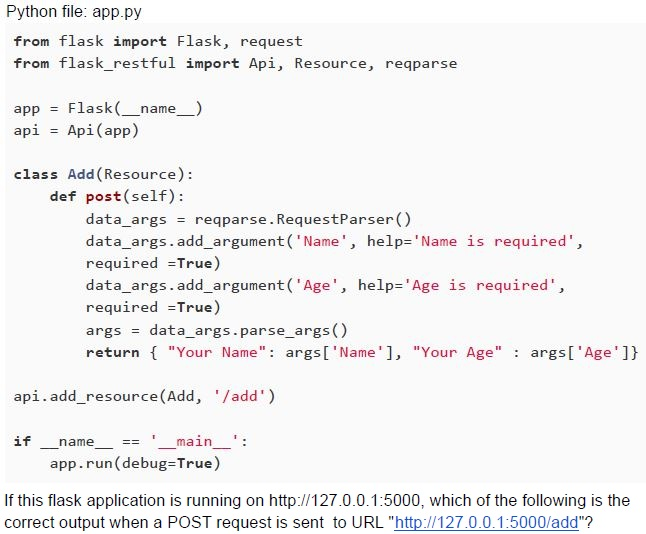 Consider the Python code snippet given below.
 Text of the picture (copyable)
Python file: app.py

```python
from flask import Flask, request
from flask_restful import Api, Resource, reqparse

app = Flask(__name__)
api = Api(app)

class Add(Resource):
    def post(self):
        data_args = reqparse.RequestParser()
        data_args.add_argument('Name', help='Name is required',
                               required=True)
        data_args.add_argument('Age', help='Age is required',
                               required=True)
        args = data_args.parse_args()
        return { "Your Name": args['Name'], "Your Age" : args['Age']}

api.add_resource(Add, '/add')

if __name__ == '__main__':
    app.run(debug=True)
```

If this flask application is running on http://127.0.0.1:5000, which of the following is the correct output when a POST request is sent to URL "http://127.0.0.1:5000/add"?
text
The server will throw a "405 METHOD NOT ALLOWED" error.

text
The server will throw a "404 NOT FOUND" error.
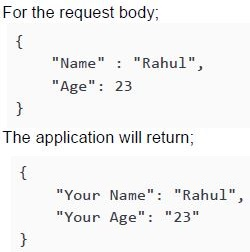
text
For the request body;
```json
{
    "Name" : "Rahul",
    "Age": 23
}
```
The application will return;
```json
{
    "Your Name": "Rahul",
    "Your Age": "23"
}
```
text
None of these
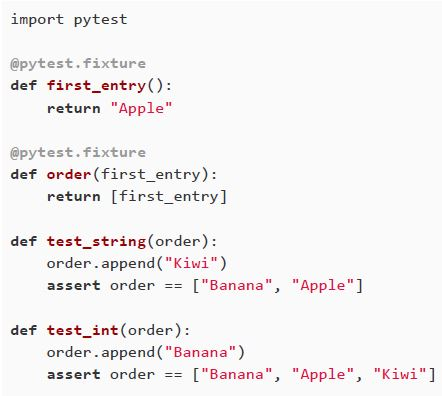 Consider the Python code given below. Which of the following statement is true?
Text of the picture (copyable)
```python
import pytest

@pytest.fixture
def first_entry():
    return "Apple"

@pytest.fixture
def order(first_entry):
    return [first_entry]

def test_string(order):
    order.append("Kiwi")
    assert order == ["Banana", "Apple"]

def test_int(order):
    order.append("Banana")
    assert order == ["Banana", "Apple", "Kiwi"]
```- After running pytest, both test cases will pass successfuly.
- After running pytest, the first test case will fail, whereas the second test casewill pass.
- After running pytest, both test cases will show a failure report.
- None of these
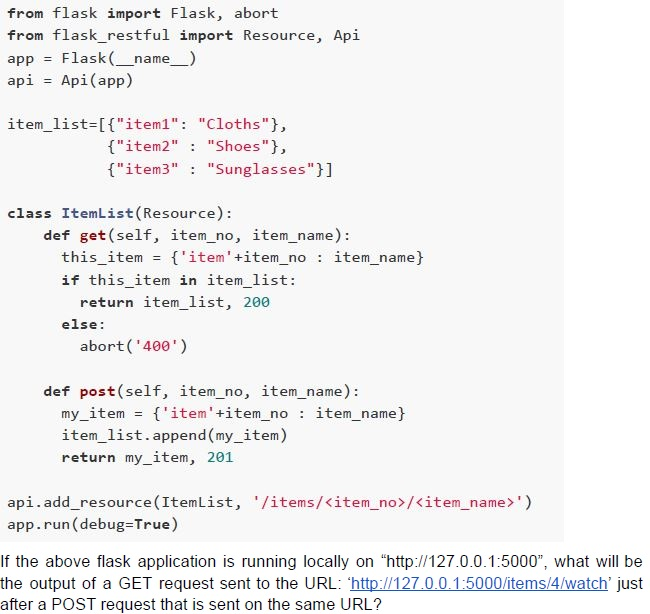 Consider the flask app given below.
 Text of the picture (copyable)
```python
from flask import Flask, abort
from flask_restful import Resource, Api

app = Flask(__name__)
api = Api(app)

item_list=[{"item1": "Cloths"},
           {"item2": "Shoes"},
           {"item3": "Sunglasses"}]

class ItemList(Resource):
    def get(self, item_no, item_name):
        this_item = {'item'+item_no : item_name}
        if this_item in item_list:
            return item_list, 200
        else:
            abort('400')

    def post(self, item_no, item_name):
        my_item = {'item'+item_no : item_name}
        item_list.append(my_item)
        return my_item, 201

api.add_resource(ItemList, '/items/<item_no>/<item_name>')
app.run(debug=True)
```
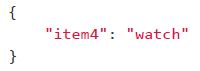
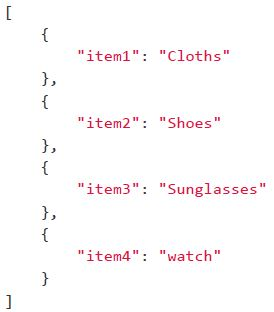
If the above flask application is running locally on "http://127.0.0.1:5000", what will be the output of a GET request sent to the URL: 'http://127.0.0.1:5000/items/4/watch' just after a POST request that is sent on the same URL?
text
The server will show a "404 NOT FOUND" error.
text
```json
{
  "item4": "watch"
}
```
text
```json
[
  {
    "item1": "Cloths"
  },
  {
    "item2": "Shoes"
  },
  {
    "item3": "Sunglasses"
  },
  {
    "item4": "watch"
  }
]
```
text
None of these
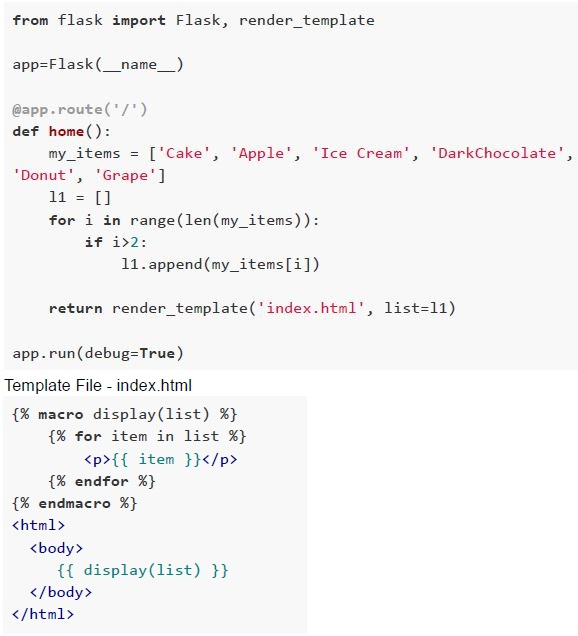 Consider the following flask application. suppose the application is running locally on the ‘http://127.0.0.1:5000', then what will be rendered by the browser?
Text of the picture (copyable)
```python
from flask import Flask, render_template

app=Flask(__name__)

@app.route('/')
def home():
    my_items = ['Cake', 'Apple', 'Ice Cream', 'DarkChocolate',
                'Donut', 'Grape']
    l1 = []
    for i in range(len(my_items)):
        if i>2:
            l1.append(my_items[i])

    return render_template('index.html', list=l1)

app.run(debug=True)
```
Template File - index.html
```html
{% macro display(list) %}
    {% for item in list %}
        <p>{{ item }}</p>
    {% endfor %}
{% endmacro %}
<html>
<body>
    {{ display(list) }}
</body>
</html>
```- CakeAppleIce Cream
- CakeAppleIce CreamDarkChocolateDonutGrape
- DarkChocolateDonutGrape
- Ice CreamDarkChocolateDonutGrape
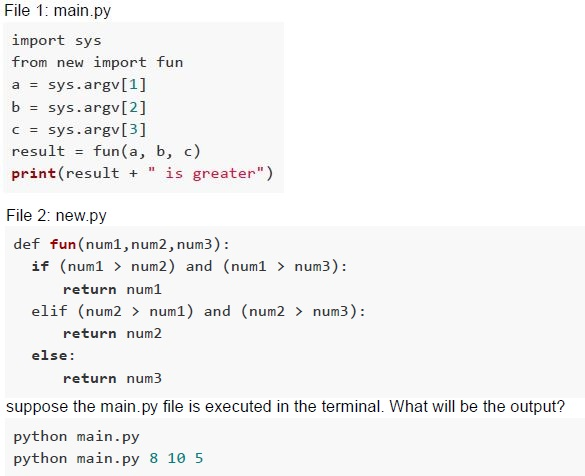 Consider the following Python code snippets.
 Text of the picture (copyable)
File 1: main.py
```python
import sys
from new import fun
a = sys.argv[1]
b = sys.argv[2]
c = sys.argv[3]
result = fun(a, b, c)
print(result + " is greater")
```

File 2: new.py
```python
def fun(num1,num2,num3):
    if (num1 > num2) and (num1 > num3):
        return num1
    elif (num2 > num1) and (num2 > num3):
        return num2
    else:
        return num3
```
suppose the main.py file is executed in the terminal. What will be the output?
python main.py
python main.py 8 10 5- IndexError: list index out of rangeNameError: name 'fun' is not defined
- 3 is greaterNameError: name 'fun' is not defined
- IndexError: list index out of range10 is greater
- NameError: name 'fun' is not defined8 is greater
- 25
- 32
- 250
- 200
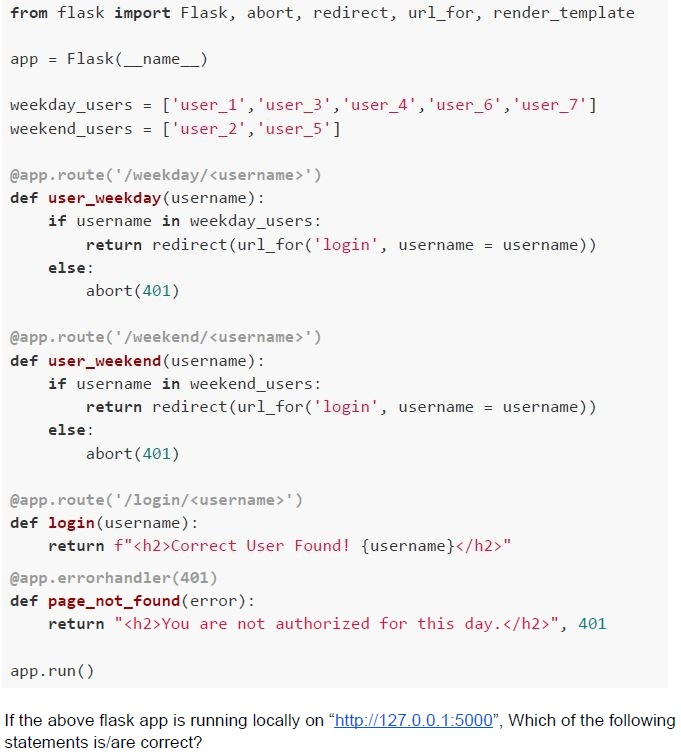 Consider the following Python code snippet.
 Text of the picture (copyable)
```python
from flask import Flask, abort, redirect, url_for, render_template

app = Flask(__name__)

weekday_users = ['user_1', 'user_3', 'user_4', 'user_6', 'user_7']
weekend_users = ['user_2', 'user_5']

@app.route('/weekday/<username>')
def user_weekday(username):
    if username in weekday_users:
        return redirect(url_for('login', username = username))
    else:
        abort(401)

@app.route('/weekend/<username>')
def user_weekend(username):
    if username in weekend_users:
        return redirect(url_for('login', username = username))
    else:
        abort(401)

@app.route('/login/<username>')
def login(username):
    return f"<h2>Correct User Found! {username}</h2>"

@app.errorhandler(401)
def page_not_found(error):
    return "<h2>You are not authorized for this day.</h2>", 401

app.run()
```

If the above flask app is running locally on "http://127.0.0.1:5000", Which of the following statements is/are correct?
text
For the URL, "http://localhost:5000/weekday/user_4", the browser will render:
**Correct User Found! user_4**

text
For the URL, "http://localhost:5000/weekend/user_3", the browser will render:
**Correct User Found! user_3**

text
For the URL, "http://localhost:5000/weekday/user_5", the browser will render:
**You are not authorized for this day.**

text
For the URL, "http://localhost:5000/weekend/user_2", the browser will render:
**You are not authorized for this day.**
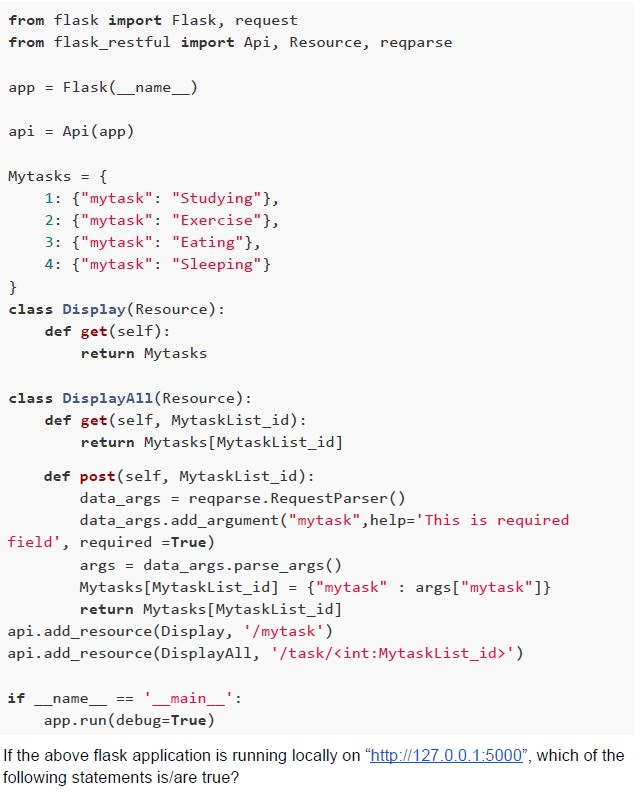 Consider the code given below.
 Text of the picture (copyable)
```python
from flask import Flask, request
from flask_restful import Api, Resource, reqparse

app = Flask(__name__)

api = Api(app)

Mytasks = {
    1: {"mytask": "Studying"},
    2: {"mytask": "Exercise"},
    3: {"mytask": "Eating"},
    4: {"mytask": "Sleeping"}
}

class Display(Resource):
    def get(self):
        return Mytasks

class DisplayAll(Resource):
    def get(self, MytaskList_id):
        return Mytasks[MytaskList_id]

    def post(self, MytaskList_id):
        data_args = reqparse.RequestParser()
        data_args.add_argument("mytask",help='This is required field', required =True)
        args = data_args.parse_args()
        Mytasks[MytaskList_id] = {"mytask" : args["mytask"]}
        return Mytasks[MytaskList_id]
api.add_resource(Display, '/mytask')
api.add_resource(DisplayAll, '/task/<int:MytaskList_id>')

if __name__ == '__main__':
    app.run(debug=True)
```
If the above flask application is running locally on "http://127.0.0.1:5000", which of the following statements is/are true?
text
The status code that we get after sending a POST request to the URL: 'http://127.0.0.1:5000/mytask/4' will be "404 NOT FOUND".
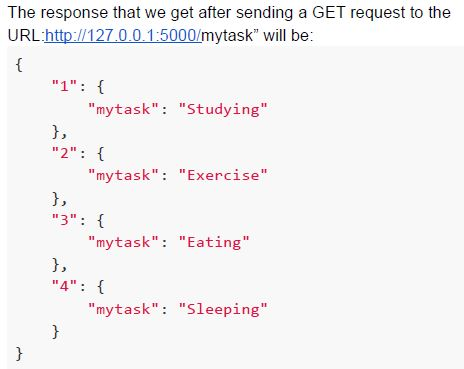
text
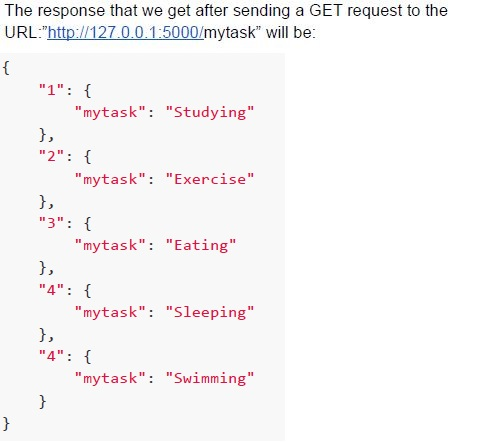
The response that we get after sending a GET request to the URL: http://127.0.0.1:5000/mytask will be:
```json
{
  "1": {
    "mytask": "Studying"
  },
  "2": {
    "mytask": "Exercise"
  },
  "3": {
    "mytask": "Eating"
  },
  "4": {
    "mytask": "Sleeping"
  }
}
```
text
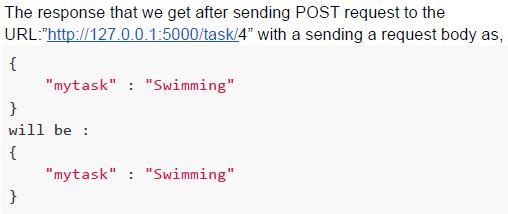
The response that we get after sending POST request to the
URL:"http://127.0.0.1:5000/task/4" with a sending a request body as,
```json
{
    "mytask" : "Swimming"
}
```
will be :
```json
{
    "mytask" : "Swimming"
}
```
text
The response that we get after sending a GET request to the URL: "http://127.0.0.1:5000/mytask" will be:

```json
{
  "1": {
    "mytask": "Studying"
  },
  "2": {
    "mytask": "Exercise"
  },
  "3": {
    "mytask": "Eating"
  },
  "4": {
    "mytask": "Sleeping"
  },
  "4": {
    "mytask": "Swimming"
  }
}
```
- 173 seconds
- 273 seconds
- 373 seconds
- 473 seconds
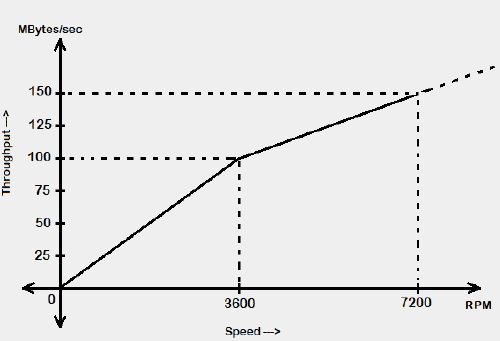 The speed vs. throughput characteristics of a typical HDD is shown in the figure below. If this HDD is to be used as a replacement of an SSD whose read/write speed is 450 MB/s. At what speed (in RPM) should the disk of HDD rotate with to deliver the same performance as that of the SSD?
 Text of the picture (copyable)
This is a 2D line graph with a light grey background.

The y-axis is labeled "Throughput -->" and "MBytes/sec". It has tick marks and labels at 0, 25, 50, 75, 100, 125, and 150.
The x-axis is labeled "Speed -->" and "RPM". It has tick marks and labels at 0, 3600, and 7200.

A solid black line starts at (0,0) and goes up to (3600, 100).
From (3600, 100), the line continues as a solid black line up to (7200, 150).
Beyond (7200, 150), the line continues as a dashed black line, indicating it extends further.

Dashed black lines are drawn from the point (3600, 100) to the x-axis at 3600 and to the y-axis at 100.
Dashed black lines are drawn from the point (7200, 150) to the x-axis at 7200 and to the y-axis at 150.
- 3600 RPM
- 7200 RPM
- 16,200 RPM
- 28,800 RPM
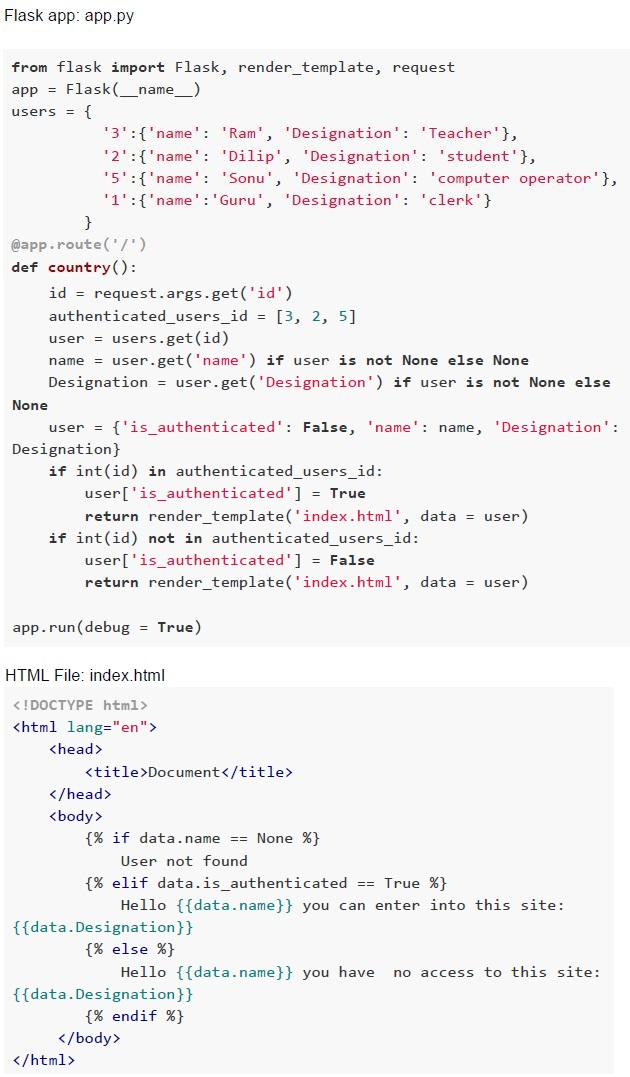 Consider the following Flask app and an HTML file. Suppose the application is running locally on the ‘http://127.0.0.1:5000', then what will be rendered by the browser for ‘http://127.0.0.1:5000/?id=5', http://127.0.0.1:5000/?id=1’ and ‘http://127.0.0.1:5000/?id=4' respectively?
Text of the picture (copyable)
Flask app: app.py

```python
from flask import Flask, render_template, request
app = Flask(__name__)
users = {
    '3':{'name': 'Ram', 'Designation': 'Teacher'},
    '2':{'name': 'Dilip', 'Designation': 'student'},
    '5':{'name': 'Sonu', 'Designation': 'computer operator'},
    '1':{'name': 'Guru', 'Designation': 'clerk'}
}

@app.route('/')
def country():
    id = request.args.get('id')
    authenticated_users_id = [3, 2, 5]
    user = users.get(id)
    name = user.get('name') if user is not None else None
    Designation = user.get('Designation') if user is not None else None

    user = {'is_authenticated': False, 'name': name, 'Designation': Designation}
    if int(id) in authenticated_users_id:
        user['is_authenticated'] = True
        return render_template('index.html', data = user)
    if int(id) not in authenticated_users_id:
        user['is_authenticated'] = False
        return render_template('index.html', data = user)

app.run(debug = True)
```

HTML File: index.html
```html
<!DOCTYPE html>
<html lang="en">
<head>
    <title>Document</title>
</head>
<body>
    {% if data.name == None %}
        User not found
    {% elif data.is_authenticated == True %}
        Hello {{data.name}} you can enter into this site:
        {{data.Designation}}
    {% else %}
        Hello {{data.name}} you have no access to this site:
        {{data.Designation}}
    {% endif %}
</body>
</html>
```- Hello Sonu you can enter into this site: computer operatorHello Guru you have no access to this site: clerkUser not found
- Hello Ram you can enter into this site: TeacherHello Guru you have no access to this site: StudentHello Sonu you can enter into this site: computer operator
- User not foundHello Dilip you have no access to this site: StudentHello Sonu you can enter into this site: computer operator
- Hello Ram you can enter into this site: TeacherHello Dilip you have no access to this site: StudentUser not found
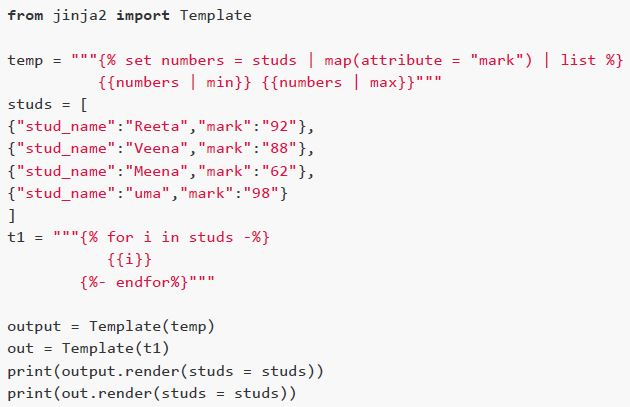 Consider the following Python code snippet. What will be the output of the above program?
Text of the picture (copyable)
```python
from jinja2 import Template

temp = """{% set numbers = studs | map(attribute = "mark") | list %}
{{numbers | min}}{{numbers | max}}"""

studs = [
{"stud_name":"Reeta","mark":"92"},
{"stud_name":"Veena","mark":"88"},
{"stud_name":"Meena","mark":"62"},
{"stud_name":"uma","mark":"98"}
]

t1 = """{% for i in studs -%}
{{i}}
{%- endfor%}"""

output = Template(temp)
out = Template(t1)

print(output.render(studs = studs))
print(out.render(studs = studs))
```- 98 62{'stud_name': 'Reeta', 'mark': '92'}{'stud_name': 'Veena', 'mark': '88'}{'stud_name': 'Meena', 'mark': '62'}{'stud_name': 'uma', 'mark': '98'}
- 62 98{'stud_name': 'Reeta', 'mark': '92'}{'stud_name': 'Veena', 'mark': '88'}{'stud_name':'Meena', 'mark': '62'}{'stud_name': 'uma', 'mark': '98'}
- 62 98{'stud_name': 'uma', 'mark': '92'}{'stud_name': 'Meena', 'mark': '88'}{'stud_name': 'Veena', 'mark': '62'}{'stud_name': 'Reeta', 'mark': '98'}
- 98 62{'stud_name': 'uma', 'mark': '92'}{'stud_name': 'Meena', 'mark': '88'}{'stud_name':'Veena', 'mark': '62'}{'stud_name': 'Reeta', 'mark': '98'}
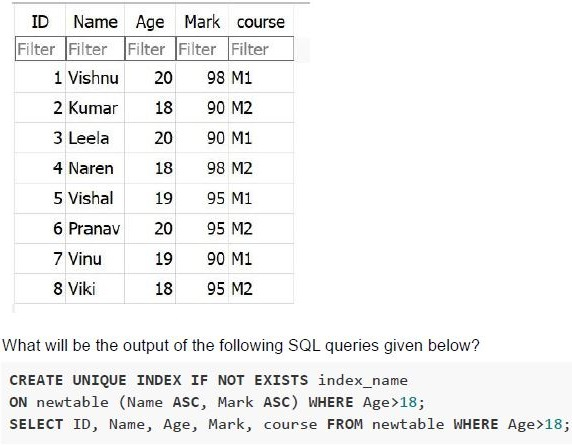 Consider the following table “newtable” in SQLite database.
 Text of the picture (copyable)
Here is the transcription of the image:

| ID | Name | Age | Mark | course |
|---|---|---|---|---|
| Filter | Filter | Filter | Filter | Filter |
| 1 | Vishnu | 20 | 98 | M1 |
| 2 | Kumar | 18 | 90 | M2 |
| 3 | Leela | 20 | 90 | M1 |
| 4 | Naren | 18 | 98 | M2 |
| 5 | Vishal | 19 | 95 | M1 |
| 6 | Pranav | 20 | 95 | M2 |
| 7 | Vinu | 19 | 90 | M1 |
| 8 | Viki | 18 | 95 | M2 |

What will be the output of the following SQL queries given below?

```sql
CREATE UNIQUE INDEX IF NOT EXISTS index_name
ON newtable (Name ASC, Mark ASC) WHERE Age>18;
SELECT ID, Name, Age, Mark, course FROM newtable WHERE Age>18;
```
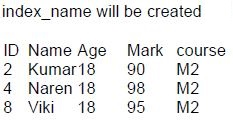
text
index_name will be created

| ID | Name | Age | Mark | course |
|---|---|---|---|---|
| 2 | Kumar | 18 | 90 | M2 |
| 4 | Naren | 18 | 98 | M2 |
| 8 | Viki | 18 | 95 | M2 |
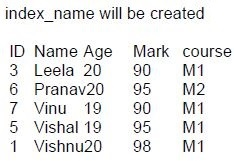
text
index_name will be created

| ID | Name | Age | Mark | course |
|---|---|---|---|---|
| 3 | Leela | 20 | 90 | M1 |
| 6 | Pranav | 20 | 95 | M2 |
| 7 | Vinu | 19 | 90 | M1 |
| 5 | Vishal | 19 | 95 | M1 |
| 1 | Vishnu | 20 | 98 | M1 |
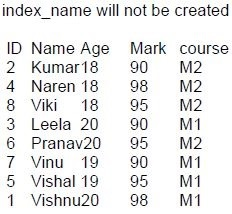
text
index_name will not be created

| ID | Name | Age | Mark | course |
|---|---|---|---|---|
| 2 | Kumar | 18 | 90 | M2 |
| 4 | Naren | 18 | 98 | M2 |
| 8 | Viki | 18 | 95 | M2 |
| 3 | Leela | 20 | 90 | M1 |
| 6 | Pranav | 20 | 95 | M2 |
| 7 | Vinu | 19 | 90 | M1 |
| 5 | Vishal | 19 | 95 | M1 |
| 1 | Vishnu | 20 | 98 | M1 |
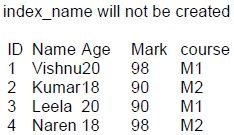
text
index_name will not be created

| ID | Name | Age | Mark | course |
|---|---|---|---|---|
| 1 | Vishnu | 20 | 98 | M1 |
| 2 | Kumar | 18 | 90 | M2 |
| 3 | Leela | 20 | 90 | M1 |
| 4 | Naren | 18 | 98 | M2 |
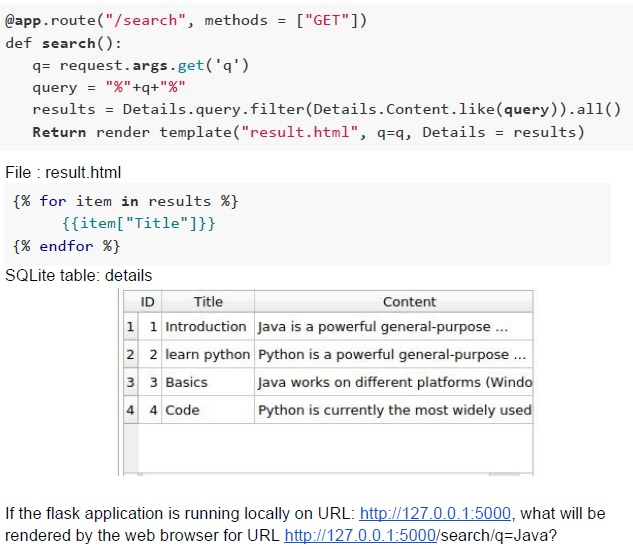 Consider the following Python snippet.
 Text of the picture (copyable)
```python
@app.route("/search", methods = ["GET"])
def search():
    q = request.args.get('q')
    query = "%"+q+"%"
    results = Details.query.filter(Details.Content.like(query)).all()
    Return render_template("result.html", q=q, Details = results)
```
File : result.html
```html
{% for item in results %}
    {{item["Title"]}}
{% endfor %}
```
SQLite table: details

| ID | Title         | Content                                     |
|----|---------------|---------------------------------------------|
| 1  | Introduction  | Java is a powerful general-purpose ...      |
| 2  | learn python  | Python is a powerful general-purpose ...    |
| 3  | Basics        | Java works on different platforms (Windo    |
| 4  | Code          | Python is currently the most widely used    |

If the flask application is running locally on URL: http://127.0.0.1:5000, what will be rendered by the web browser for URL http://127.0.0.1:5000/search?q=Java?- IntroductionCode
- Java is a powerful general purpose …Java works on different platforms(windows)
- Introduction - Java is a powerful general purpose …learn python - Python is a powerful general purpose …Basics - Java works on different platforms(windows)
- IntroductionBasics
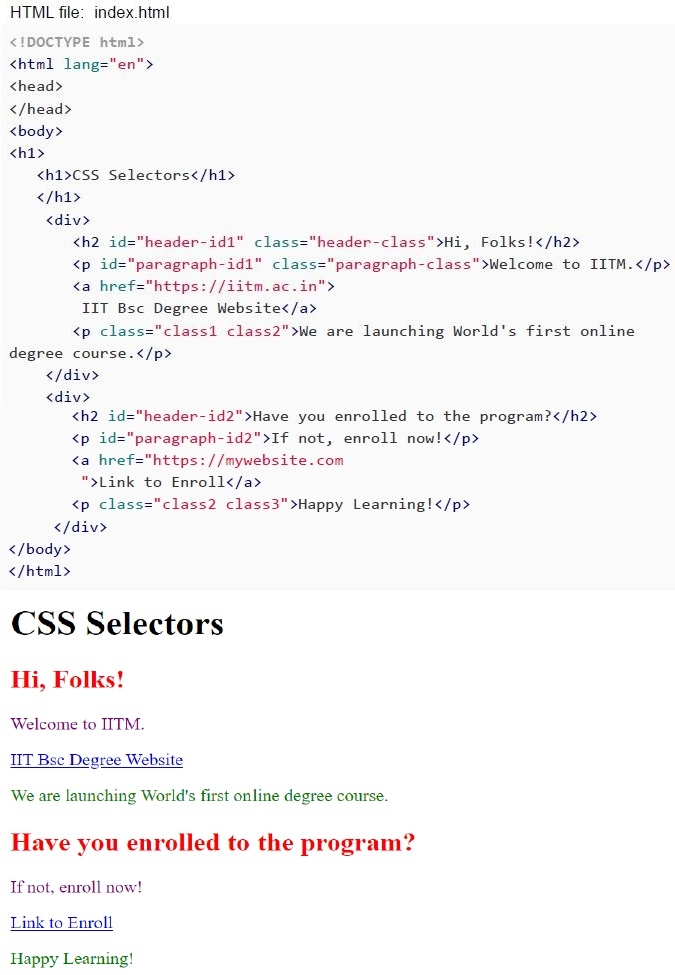 Consider the HTML code given below. To obtain the output as given in figure above, which of the following snippets of CSS code must be used?
Text of the picture (copyable)
HTML file: index.html

```html
<!DOCTYPE html>
<html lang="en">
<head>
</head>
<body>
<h1>
    <h1>CSS Selectors</h1>
</h1>
<div>
    <h2 id="header-id1" class="header-class">Hi, Folks!</h2>
    <p id="paragraph-id1" class="paragraph-class">Welcome to IITM.</p>
    <a href="https://iitm.ac.in">
        IIT Bsc Degree Website</a>
    <p class="class1 class2">We are launching World's first online
        degree course.</p>
</div>
<div>
    <h2 id="header-id2">Have you enrolled to the program?</h2>
    <p id="paragraph-id2">If not, enroll now!</p>
    <a href="https://mywebsite.com
        ">Link to Enroll</a>
    <p class="class2 class3">Happy Learning!</p>
</div>
</body>
</html>
```

CSS Selectors

Hi, Folks!

Welcome to IITM.

IIT Bsc Degree Website

We are launching World's first online degree course.

Have you enrolled to the program?

If not, enroll now!

Link to Enroll

Happy Learning!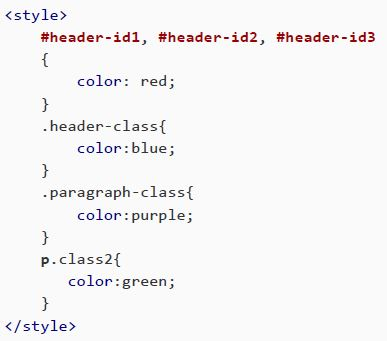
text
```html
<style>
    #header-id1, #header-id2, #header-id3
    {
        color: red;
    }
    .header-class{
        color:blue;
    }
    .paragraph-class{
        color:purple;
    }
    p.class2{
        color:green;
    }
</style>
```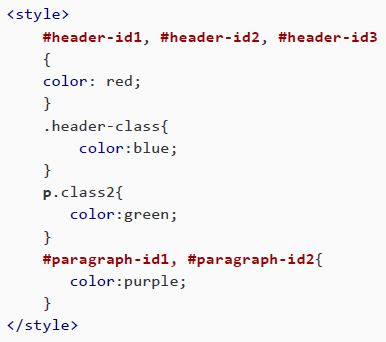
text
```html
<style>
    #header-id1, #header-id2, #header-id3
    {
        color: red;
    }
    .header-class{
        color:blue;
    }
    p.class2{
        color:green;
    }
    #paragraph-id1, #paragraph-id2{
        color:purple;
    }
</style>
```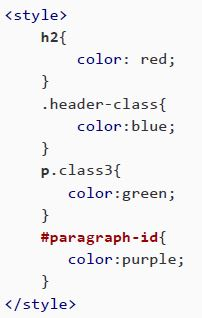
text
```html
<style>
    h2{
        color: red;
    }
    .header-class{
        color:blue;
    }
    p.class3{
        color:green;
    }
    #paragraph-id{
        color:purple;
    }
</style>
```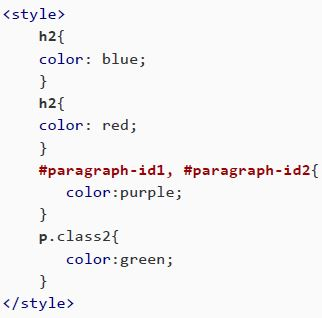
text
```html
<style>
h2{
    color: blue;
}
h2{
    color: red;
}
#paragraph-id1, #paragraph-id2{
    color:purple;
}
p.class2{
    color:green;
}
</style>
```
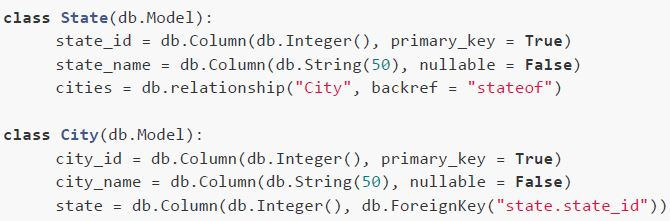 Consider the following model classes “State” and “City” corresponding to tables “state” and “city” respectively in the SQLite database. Based on the above data, answer the given subquestions.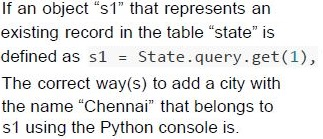
Text of the picture (copyable)
If an object "s1" that represents an
existing record in the table "state" is
defined as
```python
s1 = State.query.get(1),
```
The correct way(s) to add a city with
the name "Chennai" that belongs to
s1 using the Python console is.

text
```python
>>> c1 = City(city_name = "Chennai", state = s1)
>>> db.session.add(c1)
>>> db.session.commit()
```

text
```python
>>> c1 = City(city_name = "Chennai", state = 1)
>>> db.session.add(c1)
>>> db.session.commit()
```

text
```python
>>> c1 = City(city_name = "Chennai", stateof = s1)
>>> db.session.add(c1)
>>> db.session.commit()
```

text
```python
>>> c1 = City(city_name = "Chennai", stateof = 1)
>>> db.session.add(c1)
>>> db.session.commit()
```
 If “s1” and “c1” are existing objects in the tables “state” and “city” respectively where: Which of the following statements is/are correct?
Text of the picture (copyable)
```python
s1 = State.query.filter_by(state_name = "Maharashtra").first()

and

c1 = City.query.filter_by(city_name = "Mumbai").first()
```

text
The input `s1.cities` on Python console will return a single object

text
The input s1.cities on Python console will return a list of object(s)

text
The input c1.state on Python console will return a single object

text
The input c1.state on Python console will return a list of object(s)
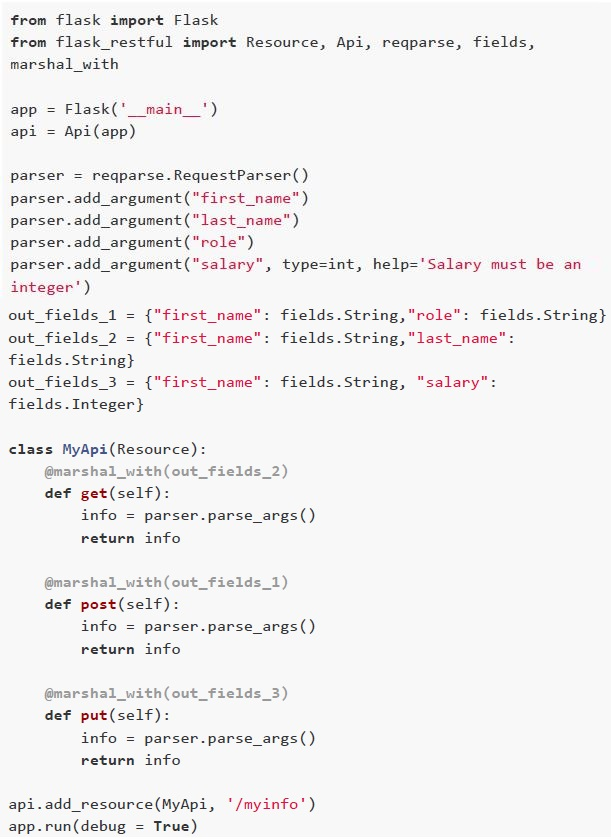 Consider the following resource API for the employee information given below and answer the given subquestions.
Text of the picture (copyable)
If the flask application is running locally on URL "http://127.0.0.1:5000/myinfo",
what will be the output of the following curl request?

```
curl "http://127.0.0.1:5000/myinfo" -X POST -d "{\"first_name\":
\"Shrivatsa\",\"last_name\":\"Tandon\",\"role\":\"Analyst\",\"salary
\": 50000}" -H "Content-Type: application/json"
```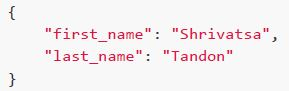
text
```json
{
  "first_name": "Shrivatsa",
  "last_name": "Tandon"
}
```
text
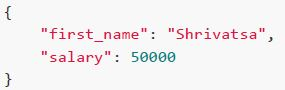
```json
{
    "first_name": "Shrivatsa",
    "salary": 50000
}
```
text
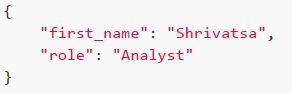
```json
{
  "first_name": "Shrivatsa",
  "role": "Analyst"
}
```
text
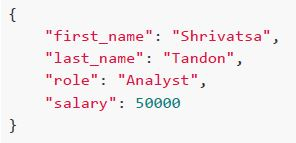
```json
{
    "first_name": "Shrivatsa",
    "last_name": "Tandon",
    "role": "Analyst",
    "salary": 50000
}
```
Text of the picture (copyable)
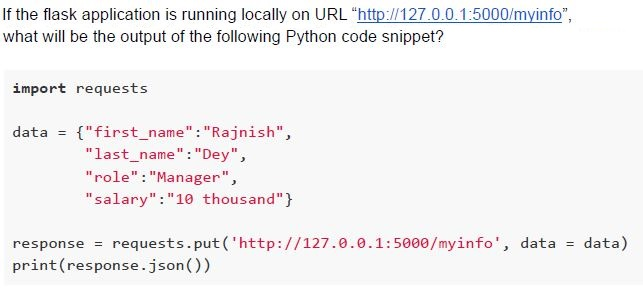
If the flask application is running locally on URL "http://127.0.0.1:5000/myinfo",
what will be the output of the following Python code snippet?

```python
import requests

data = {"first_name":"Rajnish",
        "last_name":"Dey",
        "role":"Manager",
        "salary":"10 thousand"}

response = requests.put('http://127.0.0.1:5000/myinfo', data = data)
print(response.json())
```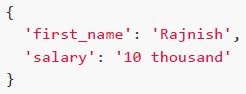
text
```
{
    'first_name': 'Rajnish',
    'salary': '10 thousand'
}
```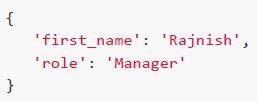
text
```
{
    'first_name': 'Rajnish',
    'role': 'Manager'
}
```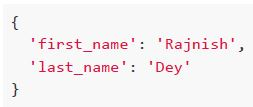
text
```
{
    'first_name': 'Rajnish',
    'last_name': 'Dey'
}
```
text
None of these
Answer key
- Q1 (MCQ, 0 marks): A
- Q2 (MCQ, 2 marks): C
- Q3 (MCQ, 2 marks): D
- Q4 (MCQ, 2 marks): B
- Q5 (MCQ, 2 marks): B
- Q6 (MCQ, 2 marks): B
- Q7 (MCQ, 2 marks): C
- Q8 (MCQ, 2 marks): D
- Q9 (MSQ, 2 marks): C, D
- Q10 (MCQ, 3 marks): D
- Q11 (MCQ, 3 marks): C
- Q12 (MCQ, 3 marks): B
- Q13 (MCQ, 3 marks): A
- Q14 (MCQ, 3 marks): C
- Q15 (MCQ, 3 marks): C
- Q16 (MCQ, 3 marks): C
- Q17 (MCQ, 3 marks): C
- Q18 (MCQ, 3 marks): C
- Q19 (MCQ, 3 marks): C
- Q20 (MSQ, 3 marks): A, C
- Q21 (MSQ, 3 marks): A, B, C
- Q22 (SA, 4.5 marks): 11011
- Q23 (MCQ, 4.5 marks): B
- Q24 (MCQ, 4.5 marks): D
- Q25 (MCQ, 4.5 marks): A
- Q26 (MCQ, 4.5 marks): B
- Q27 (MCQ, 4.5 marks): B
- Q28 (MCQ, 4.5 marks): D
- Q29 (MSQ, 4.5 marks): B, D
- Q30 (MSQ, 3 marks): B, C
- Q31 (MSQ, 3 marks): B, C
- Q32 (MCQ, 3 marks): C
- Q33 (MCQ, 3 marks): D
Concepts this paper tests
Auto-generated summary from the source site. Handy as a checklist; the lessons above explain each idea from scratch.
Here’s a structured summary of the core topics, concepts, principles, and equations essential for the "Modern Application Development 1" exam, along with Mermaid knowledge graphs to visualize relationships.
1. Core Topics & Concepts
A. Web Development Fundamentals
1. URL Structure
Components:
- Protocol (
https,http) - Domain Name (
www.example.com) - Path/Directory (
/home) - Query Parameters (
?user=Mad1&key=madcs2003) - Fragment (
#section1)
- Protocol (
2. HTTP Methods
- GET: Retrieve data.
- POST: Submit data (create/update).
- PUT/PATCH: Update existing data.
- DELETE: Remove data.
3. Flask Framework
- Routing:
@app.route('/path') Templates (Jinja2):
render_template()- Loops (
{% for %}), conditionals ({% if %}), filters ({{ var | filter }}).
Request Handling:
request.args(GET parameters)request.form(POST form data)request.json(JSON payload)
Redirects & Errors:
redirect(url_for('route'))abort(404)
Flask-RESTful:
Resource,Api,reqparse,fields,marshal_with.
Flask-SQLAlchemy:
Model Definition:
class User(db.Model):
    id = db.Column(db.Integer, primary_key=True)
    name = db.Column(db.String(50))
CRUD Operations:
User.query.filter_by(name="Alice").first()db.session.add(user)db.session.commit()
Relationships:
db.relationship("ChildModel", backref="parent")db.ForeignKey("parent.id")
4. HTML & CSS
HTML Structure:
<!DOCTYPE html>,<html>,<head>,<body>,<div>,<a>,<p>,<h1>-<h6>.
CSS Selectors:
- ID:
#id { color: red; } - Class:
.class { color: blue; } - Element:
p { font-size: 14px; } - Combinators:
div > p,div p,div + p.
- ID:
Box Model:
margin,border,padding,content.
- Inline vs. Internal vs. External CSS.
5. Jinja2 Templating
- Variables:
{{ variable }} Control Structures:
{% if condition %} ... {% endif %}{% for item in list %} ... {% endfor %}
Macros:
{% macro greet(name) %} Hello, {{ name }}! {% endmacro %}Filters:
{{ list|length }}{{ text|upper }}
6. RESTful APIs
Endpoints:
GET /users→ List all users.POST /users→ Create a user.PUT /users/<id>→ Update a user.DELETE /users/<id>→ Delete a user.
Status Codes:
200 OK201 Created400 Bad Request404 Not Found500 Server Error
7. Testing (Pytest)
Fixtures:
@pytest.fixture def sample_data(): return {"key": "value"}Assertions:
def test_example(sample_data): assert sample_data["key"] == "value"- Test Isolation: Each test runs independently.
B. Mathematics & Algorithms
1. Time Complexity
Big-O Notation:
O(1): Constant time.O(n): Linear time.O(n log n): Linearithmic time (e.g., Merge Sort).O(n²): Quadratic time (e.g., Bubble Sort).
Example:
Sorting
nitems withO(n log n):- For
n=500, timeT1 = k * 500 * log(500). - For
n=1200, timeT2 = k * 1200 * log(1200). - Ratio:
T2/T1 = (1200 * log(1200)) / (500 * log(500)) ≈ 2.73. - If
T1 = 100s, thenT2 ≈ 273s.
- For
2. Bandwidth & Throughput
Bandwidth (Gbps):
1 Byte = 8 bits.1 MB = 1000 KB = 10^6 Bytes.1 GB = 1000 MB = 10^9 Bytes.
Throughput Calculation:
Example:
- Original:
10,000 requests * 150 KB = 1.5 GB = 12 Gb. - New:
12,500 requests * 180 KB = 2.25 GB = 18 Gb. - Increase:
18 Gb - 12 Gb = 6 Gb→ 6 Gbps.
- Original:
3. HDD vs. SSD Performance
HDD Throughput:
- Linear relationship between RPM and throughput (MB/s).
Example:
- At
7200 RPM→150 MB/s. - To match
450 MB/s(SSD speed), HDD must spin at7200 * (450/150) = 21,600 RPM. - Closest option: 28,800 RPM.
- At
C. Database (SQLite & SQLAlchemy)
1. SQL Queries
Filtering:
SELECT * FROM users WHERE age > 18;Indexing:
CREATE UNIQUE INDEX idx_name ON table (column1, column2) WHERE condition;Relationships:
One-to-Many:
class Parent(db.Model): children = db.relationship("Child", backref="parent") class Child(db.Model): parent_id = db.Column(db.Integer, db.ForeignKey("parent.id"))Querying:
parent = Parent.query.get(1)
children = parent.children  # List of Child objects
2. CRUD Operations
Create:
user = User(name="Alice") db.session.add(user) db.session.commit()Read:
User.query.filter_by(name="Alice").first()Update:
user = User.query.get(1) user.name = "Bob" db.session.commit()Delete:
db.session.delete(user)
db.session.commit()
2. Key Equations
A. Bandwidth Calculation
\[ \text{Total Data (bits)} = \text{Number of Requests} \times \text{Request Size (Bytes)} \times 8 \] \[ \text{Bandwidth (Gbps)} = \frac{\text{Total Data (bits)}}{10^9 \text{ (for GB)} \times \text{Time (s)}} \]
B. Time Complexity Scaling
For O(n log n): \[ \frac{T_2}{T_1} = \frac{n_2 \log n_2}{n_1 \log n_1} \]
C. HDD RPM to Throughput
\[ \text{Throughput (MB/s)} \propto \text{RPM} \] \[ \text{Required RPM} = \text{Current RPM} \times \frac{\text{Desired Throughput}}{\text{Current Throughput}} \]
Graph 2: Flask Workflow
Graph 3: HTTP Methods & Status Codes
Graph 4: SQLAlchemy Relationships
Graph 5: Testing with Pytest
Graph 6: Bandwidth & Throughput
Graph 7: Time Complexity
4. Exam Preparation Checklist
| Topic | Key Concepts |
|---|---|
| URL Structure | Protocol, domain, path, query parameters, fragments. |
| Flask Routing | @app.route, request.args, request.json, render_template. |
| Jinja2 Templating | Loops, conditionals, filters, macros. |
| HTTP Methods | GET, POST, PUT, DELETE, status codes. |
| Flask-RESTful | Resource, Api, reqparse, marshal_with. |
| SQLAlchemy | Model definition, relationships, CRUD, queries. |
| HTML/CSS | Selectors, box model, inline/internal/external CSS. |
| Bandwidth Calculation | Request size, number of requests, conversion (Bytes → bits → Gbps). |
| Time Complexity | Big-O notation, scaling for O(n log n). |
| HDD vs. SSD | RPM → throughput, linear scaling. |
| Testing (Pytest) | Fixtures, assertions, test isolation. |