Home / Past papers / MAD1 End Term / this paper
IIT M DIPLOMA ET1 EXAM QPD1 S1 03 Sep - 03 Sep 2023
- model - A, view - B, controller - C
- model - B, view - A, controller - C
- model - C, view - B, controller - A
- model - A, view - C, controller - B
- Both statement 1 and statement 2 are correct.
- Statement 1 is correct but statement 2 is incorrect.
- Statement 2 is correct but statement 1 is incorrect.
- Neither statement 1 nor statement 2 is correct.
- a field, multiple entries
- a field, a single entry
- a single entry, a field
- multiple entries, a field
- SVG
- Web Components
- Web API
- None of these

text
```
git rm <filename>
```

text
```
git rm --cached <filename>
```

text
```
git del <filename>
```

text
```
git del --cached <filename>
```
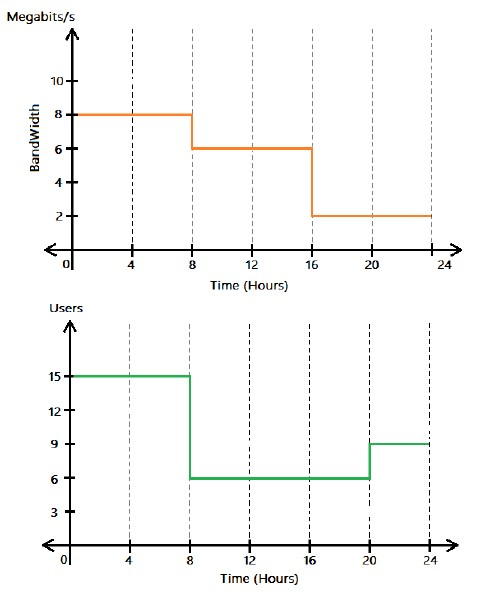 Consider the following graph that represents the variation in bandwidth and number of users connected to a network for an entire day (24 hours). What will be the total data consumed (in Gigabytes) by the user that is connected to the internet network throughout the day?
 Text of the picture (copyable)
The image displays two step-function graphs, one above the other, sharing the same x-axis scale for "Time (Hours)".

**Top Graph:**
*   **Y-axis label:** BandWidth
*   **Y-axis units:** Megabits/s
*   **Y-axis scale:** 0, 2, 4, 6, 8, 10
*   **X-axis label:** Time (Hours)
*   **X-axis scale:** 0, 4, 8, 12, 16, 20, 24
*   **Plot (orange line):**
    *   From 0 to 8 hours: Bandwidth is 8 Megabits/s.
    *   From 8 to 16 hours: Bandwidth is 6 Megabits/s.
    *   From 16 to 24 hours: Bandwidth is 2 Megabits/s.

**Bottom Graph:**
*   **Y-axis label:** Users
*   **Y-axis scale:** 0, 3, 6, 9, 12, 15
*   **X-axis label:** Time (Hours)
*   **X-axis scale:** 0, 4, 8, 12, 16, 20, 24
*   **Plot (green line):**
    *   From 0 to 8 hours: Users are 15.
    *   From 8 to 20 hours: Users are 6.
* From 20 to 24 hours: Users are 9.- 5.216
- 52.16
- 6.52
- 65.20
- A change of medium where the speed of light is v/2 m/sec.
- A change of medium where the speed of light is 2v m/sec.
- Reduce the distance between C and S from D to D/2.
- Increase the distance between C and S from D to 2D.
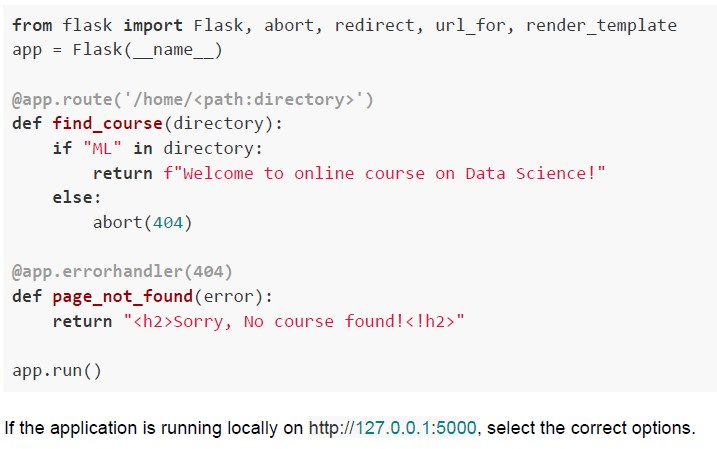 Consider the following flask app.
 Text of the picture (copyable)
```python
from flask import Flask, abort, redirect, url_for, render_template
app = Flask(__name__)

@app.route('/home/<path:directory>')
def find_course(directory):
    if "ML" in directory:
        return f"Welcome to online course on Data Science!"
    else:
        abort(404)

@app.errorhandler(404)
def page_not_found(error):
    return "<h2>Sorry, No course found!<h2>"

app.run()
```
If the application is running locally on http://127.0.0.1:5000, select the correct options.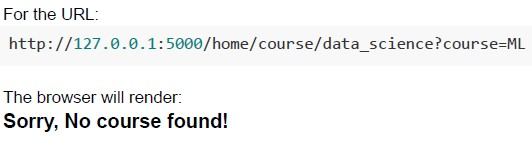
text
For the URL:
http://127.0.0.1:5000/home/course/data_science?course=ML

The browser will render:
**Sorry, No course found!**
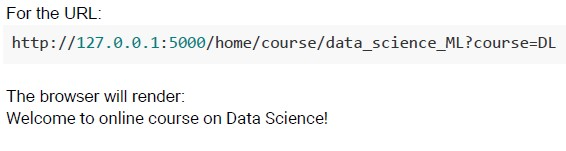
text
For the URL:
http://127.0.0.1:5000/home/course/data_science_ML?course=DL

The browser will render:
Welcome to online course on Data Science!
text
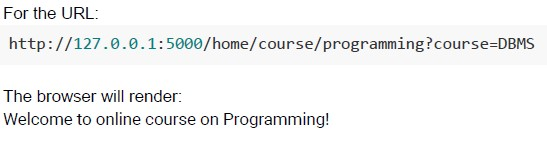
For the URL:

http://127.0.0.1:5000/home/course/programming?course=DBMS

The browser will render:
Welcome to online course on Programming!
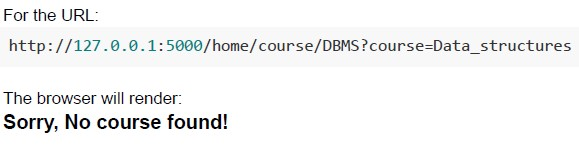
text
For the URL:

http://127.0.0.1:5000/home/course/DBMS?course=Data_structures

The browser will render:
**Sorry, No course found!**

text
```python
from jinja2 import Template
t=Template("numbers divisible by 2: {% for n in range (0,10,2) %}{{n}}"{% endfor %}")
print(t.render())
```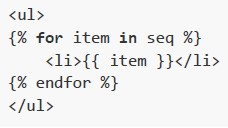
text
```html
<ul>
{% for item in seq %}
    <li>{{ item }}</li>
{% endfor %}
</ul>
```
text
```python
from jinja2 import Template
t=Template("My favourite numbers are: {% for n in [2,4,6] %}{{n}}, ""{% endfor %}")
print(t.render())
```
text
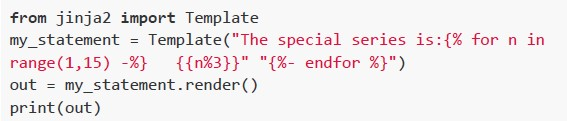
```python
from jinja2 import Template
my_statement = Template("The special series is:{% for n in range(1,15) -%} {{n%3}}"{%- endfor %}")
out = my_statement.render()
print(out)
```
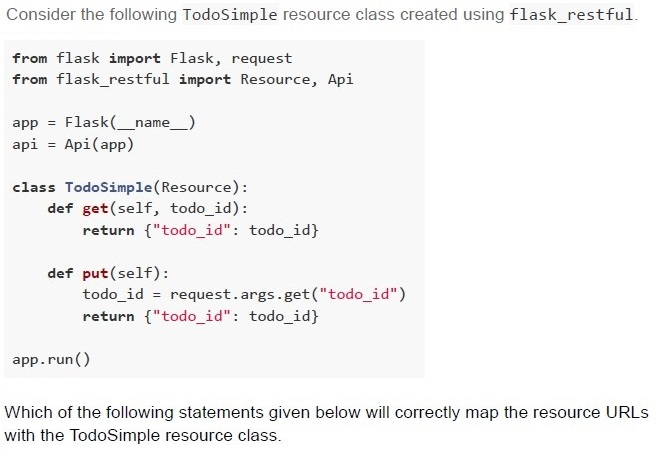
Text of the picture (copyable)
Consider the following TodoSimple resource class created using flask_restful.

```python
from flask import Flask, request
from flask_restful import Resource, Api

app = Flask(__name__)
api = Api(app)

class TodoSimple(Resource):
    def get(self, todo_id):
        return {"todo_id": todo_id}

    def put(self):
        todo_id = request.args.get("todo_id")
        return {"todo_id": todo_id}

app.run()
```

Which of the following statements given below will correctly map the resource URLs with the TodoSimple resource class.
text
```python
api.add_resource(TodoSimple, "/api")
```

text
```python
api.add_resource(TodoSimple, "/api/<int:todo_id>")
```

text
```python
api.add_resource(TodoSimple, "/api/<int:todo_id>", "/api")
```

text
```python
api.add_resource(TodoSimple, "/<int:todo_id>", "/api")
```
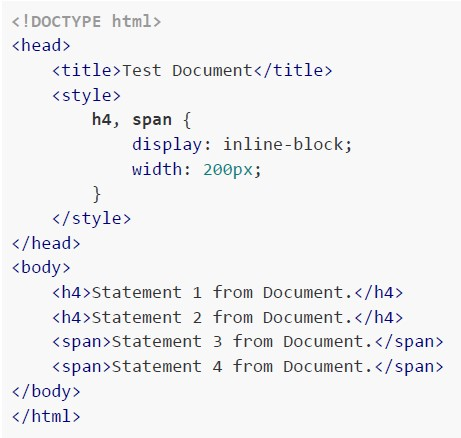 Consider the following HTML Document. How will the browser render the HTML document given above?
Text of the picture (copyable)
```html
<!DOCTYPE html>
<html>
<head>
    <title>Test Document</title>
    <style>
        h4, span {
            display: inline-block;
            width: 200px;
        }
    </style>
</head>
<body>
    <h4>Statement 1 from Document.</h4>
    <h4>Statement 2 from Document.</h4>
    <span>Statement 3 from Document.</span>
    <span>Statement 4 from Document.</span>
</body>
</html>
```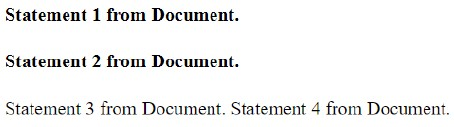
text
Statement 1 from Document.
Statement 2 from Document.
Statement 3 from Document. Statement 4 from Document.
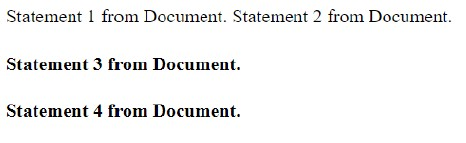
text
Statement 1 from Document. Statement 2 from Document.

**Statement 3 from Document.**

**Statement 4 from Document.**
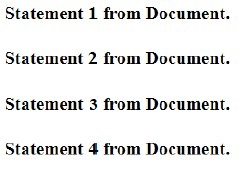
text
Statement 1 from Document.

Statement 2 from Document.

Statement 3 from Document.

Statement 4 from Document.

text
Statement 1 from Document. Statement 2 from Document. Statement 3 from Document. Statement 4 from Document.

Text of the picture (copyable)
Consider two numbers N1 = 113_a and N2 = 365_b, where a and b are the bases. If
the decimal equivalent of N1 is numerically greater than the decimal equivalent of N2,
then the possible values of a and b would be.
- a = 10, b = 8
- a = 8, b = 10
- a = 16, b = 8
- a = 16, b = 10
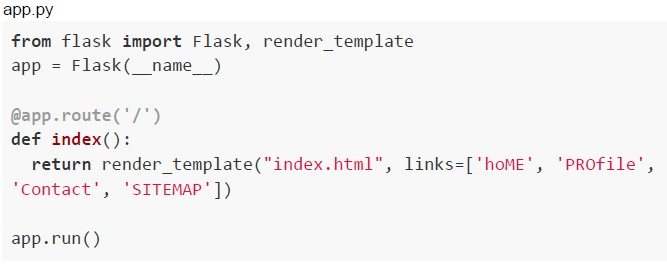 Consider the following flask app and Jinja2 template.
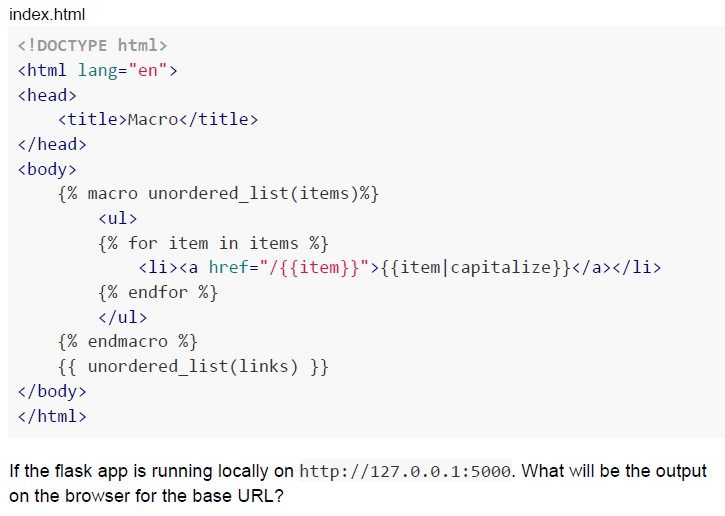 Consider the following flask app and Jinja2 template.
 Text of the picture (copyable)
```python
app.py
from flask import Flask, render_template
app = Flask(__name__)

@app.route('/')
def index():
    return render_template("index.html", links=['hoME', 'PROfile',
'Contact', 'SITEMAP'])

app.run()
```
index.html

```html
<!DOCTYPE html>
<html lang="en">
<head>
    <title>Macro</title>
</head>
<body>
    {% macro unordered_list(items)%}
    <ul>
        {% for item in items %}
        <li><a href="/{{item}}">{{item|capitalize}}</a></li>
        {% endfor %}
    </ul>
    {% endmacro %}
    {{ unordered_list(links) }}
</body>
</html>
```

If the flask app is running locally on http://127.0.0.1:5000. What will be the output on the browser for the base URL?
text
- Home
- Profile
- Contact
- Sitemap
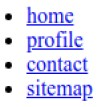
text
This is a screenshot of a web page element, specifically an unordered list of navigation links.

- home
- profile
- contact
- sitemap
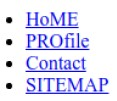
text
- HoME
- PROfile
- Contact
- SITEMAP
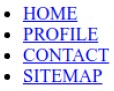
text
This is a screenshot of a web page displaying an unordered list.
The list items are:
* HOME
* PROFILE
* CONTACT
* SITEMAP
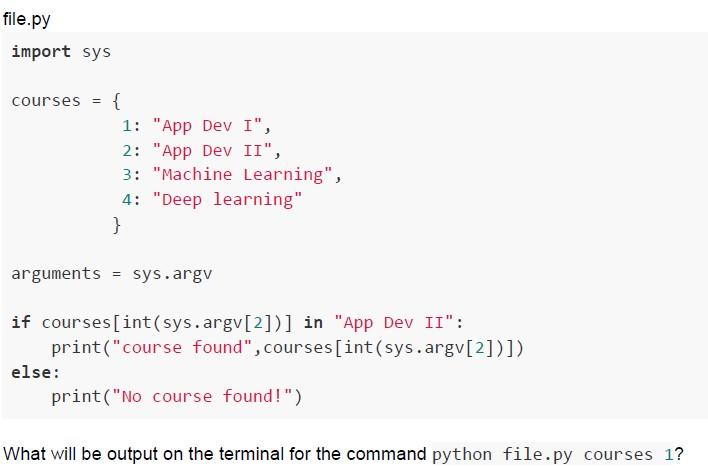 Consider the following Python code snippet.
 Text of the picture (copyable)
file.py

```python
import sys

courses = {
    1: "App Dev I",
    2: "App Dev II",
    3: "Machine Learning",
    4: "Deep learning"
}

arguments = sys.argv

if courses[int(sys.argv[2])] in "App Dev II":
    print("course found",courses[int(sys.argv[2])])
else:
    print("No course found!")
```

What will be output on the terminal for the command `python file.py courses 1?`
text
course found App Dev II

text
course found App Dev I

text
No course found!

text
```
IndexError: list index out of range
```
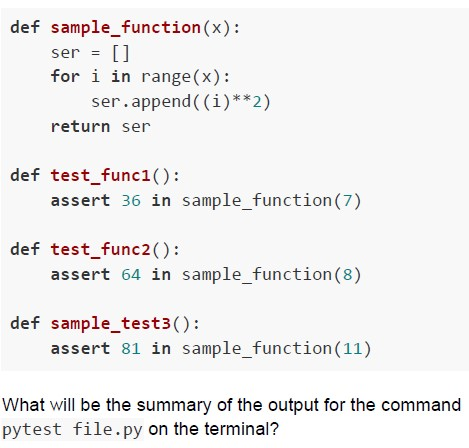 Consider the following function to be tested and test functions given in the Python code snippet below.
 Text of the picture (copyable)
```python
def sample_function(x):
    ser = []
    for i in range(x):
        ser.append(((i)**2))
    return ser

def test_func1():
    assert 36 in sample_function(7)

def test_func2():
    assert 64 in sample_function(8)

def sample_test3():
    assert 81 in sample_function(11)
```
What will be the summary of the output for the command
`pytest file.py` on the terminal?
text
```
========== 1 failed, 2 passed in 0.30s ==========
```

text
```text
============================= 2 failed, 1 passed in 0.30s =============================
```

text
```
========================= 3 failed in 0.30s =========================
```

text
```
============ 1 failed, 1 passed in 0.30s =============
```
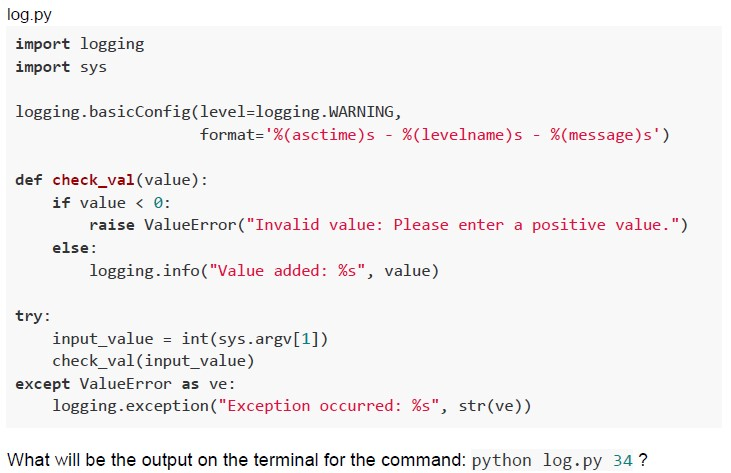 Consider the following Python code snippet.
 Text of the picture (copyable)
log.py
```python
import logging
import sys

logging.basicConfig(level=logging.WARNING,
                    format='%(asctime)s - %(levelname)s - %(message)s')

def check_val(value):
    if value < 0:
        raise ValueError("Invalid value: Please enter a positive value.")
    else:
        logging.info("Value added: %s", value)

try:
    input_value = int(sys.argv[1])
    check_val(input_value)
except ValueError as ve:
    logging.exception("Exception occurred: %s", str(ve))
```
What will be the output on the terminal for the command: `python log.py 34`?
text
```
2023-08-14 21:01:05,684 - INFO - Value added: 34
```

text
2023-08-14 21:01:05,684 - WARNING - Value added: 34

text
```
ValueError: Invalid value: Please enter a positive value.
```

text
None.
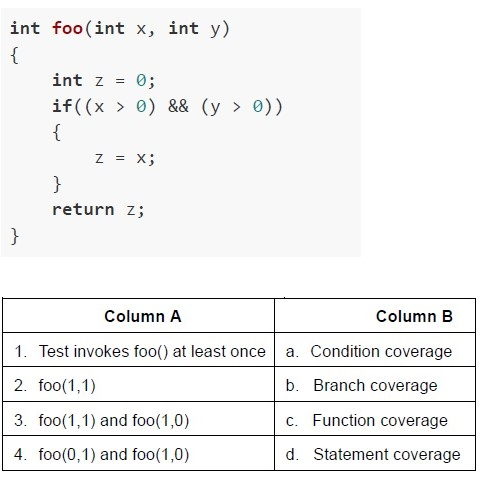 Consider the code below and match the conditions in Column A with respect to the coverage types in Column B.
 Text of the picture (copyable)
```c
int foo(int x, int y)
{
    int z = 0;
    if((x > 0) && (y > 0))
    {
        z = x;
    }
    return z;
}
```

| Column A | Column B |
|---|---|
| 1. Test invokes foo() at least once | a. Condition coverage |
| 2. foo(1,1) | b. Branch coverage |
| 3. foo(1,1) and foo(1,0) | c. Function coverage |
| 4. foo(0,1) and foo(1,0) | d. Statement coverage |- 1-d, 2-a, 3-b, 4-c
- 1-c, 2-d, 3-a, 4-b
- 1-c, 2-d, 3-b, 4-a
- 1-b, 2-d, 3-c, 4-a
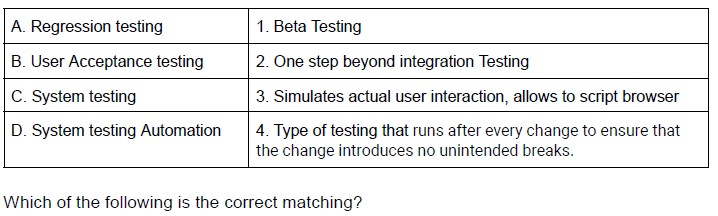 Match the following types of testing with their functionality.
 Text of the picture (copyable)
| A. Regression testing | 1. Beta Testing |
|---|---|
| B. User Acceptance testing | 2. One step beyond integration Testing |
| C. System testing | 3. Simulates actual user interaction, allows to script browser |
| D. System testing Automation | 4. Type of testing that runs after every change to ensure that the change introduces no unintended breaks. |

Which of the following is the correct matching?
- A → 1, B → 2, C → 3, D → 4
- A → 4, B → 3, C → 2, D → 1
- A → 4, B → 1, C → 2, D → 3
- A → 3, B → 2, C → 1, D → 4
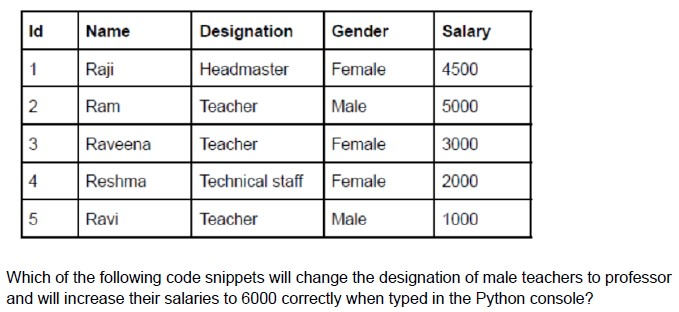 Consider the following table “emp” created in SQLite database corresponding to model class “Employee” using flask_sqlalchemy.
 Text of the picture (copyable)
| Id | Name    | Designation      | Gender | Salary |
|----|---------|------------------|--------|--------|
| 1  | Raji    | Headmaster       | Female | 4500   |
| 2  | Ram     | Teacher          | Male   | 5000   |
| 3  | Raveena | Teacher          | Female | 3000   |
| 4  | Reshma  | Technical staff  | Female | 2000   |
| 5  | Ravi    | Teacher          | Male   | 1000   |

Which of the following code snippets will change the designation of male teachers to professor and will increase their salaries to 6000 correctly when typed in the Python console?
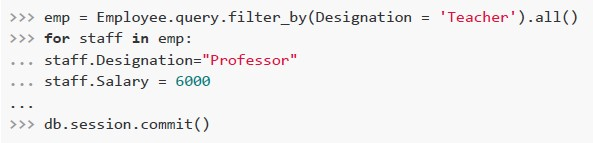
text
```python
>>> emp = Employee.query.filter_by(Designation = 'Teacher').all()
>>> for staff in emp:
...     staff.Designation="Professor"
...     staff.Salary = 6000
...
>>> db.session.commit()
```
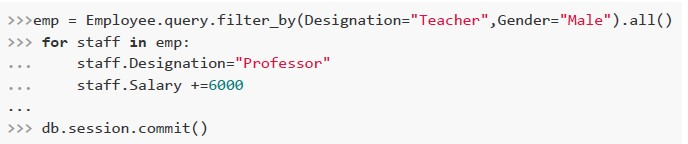
text
```python
>>> emp = Employee.query.filter_by(Designation="Teacher",Gender="Male").all()
>>> for staff in emp:
...     staff.Designation="Professor"
...     staff.Salary +=6000
...
>>> db.session.commit()
```
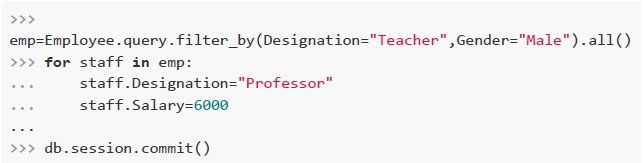
text
```python
>>>
emp=Employee.query.filter_by(Designation="Teacher",Gender="Male").all()
>>> for staff in emp:
...     staff.Designation="Professor"
...     staff.Salary=6000
...
>>> db.session.commit()
```
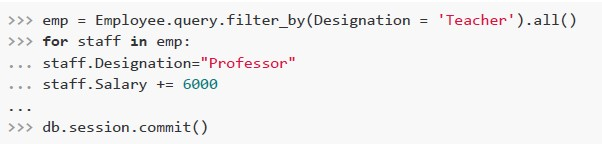
text
```python
>>> emp = Employee.query.filter_by(Designation = 'Teacher').all()
>>> for staff in emp:
...    staff.Designation="Professor"
...    staff.Salary += 6000
...
>>> db.session.commit()
```
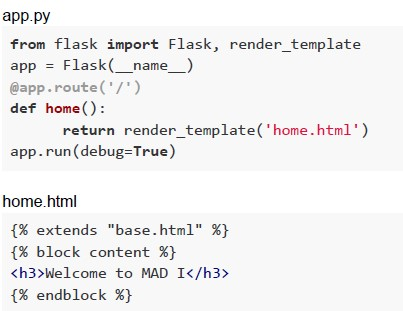 Consider the following python code snippet app.py, the html files, base.html and home.html residing in “templates” folder.
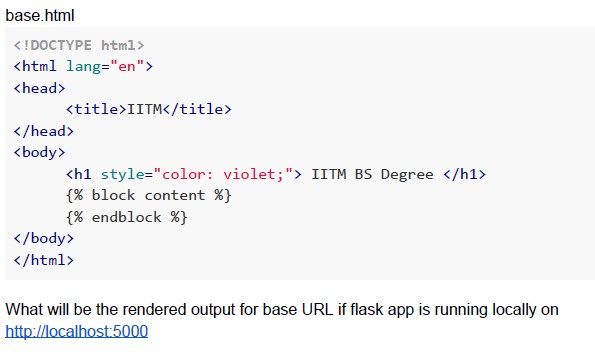 Consider the following python code snippet app.py, the html files, base.html and home.html residing in “templates” folder.
 Text of the picture (copyable)
app.py
```python
from flask import Flask, render_template
app = Flask(__name__)
@app.route('/')
def home():
    return render_template('home.html')
app.run(debug=True)
```

home.html
```html
{% extends "base.html" %}
{% block content %}
<h3>Welcome to MAD I</h3>
{% endblock %}
```
base.html

```html
<!DOCTYPE html>
<html lang="en">
<head>
    <title>IITM</title>
</head>
<body>

    <h1 style="color: violet;"> IITM BS Degree </h1>
    {% block content %}
    {% endblock %}

</body>
</html>
```

What will be the rendered output for base URL if flask app is running locally on
http://localhost:5000
text
Welcome to MAD I
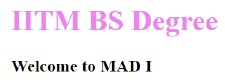
text
IITM BS Degree
Welcome to MAD I

text
Welcome to MAD I
IITM BS Degree

text
Error
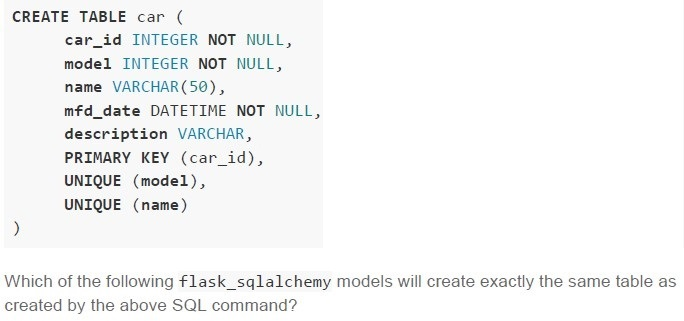 Consider the following SQL create statement.
 Text of the picture (copyable)
```sql
CREATE TABLE car (
    car_id INTEGER NOT NULL,
    model INTEGER NOT NULL,
    name VARCHAR(50),
    mfd_date DATETIME NOT NULL,
    description VARCHAR,
    PRIMARY KEY (car_id),
    UNIQUE (model),
    UNIQUE (name)
)
```

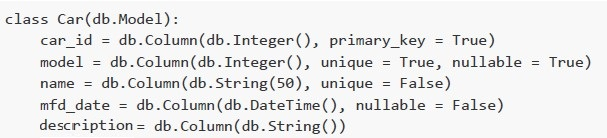
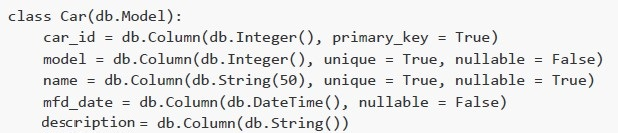
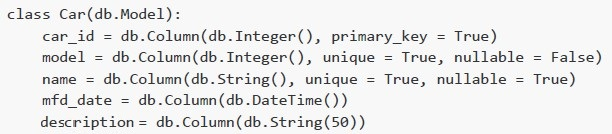
Which of the following flask_sqlalchemy models will create exactly the same table as created by the above SQL command?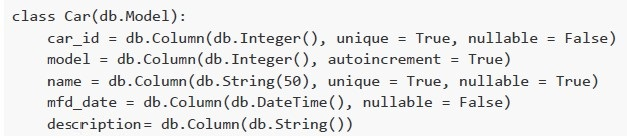
text
```python
class Car(db.Model):
    car_id = db.Column(db.Integer(), unique = True, nullable = False)
    model = db.Column(db.Integer(), autoincrement = True)
    name = db.Column(db.String(50), unique = True, nullable = True)
    mfd_date = db.Column(db.DateTime(), nullable = False)
    description= db.Column(db.String())
```
text
```python
class Car(db.Model):
    car_id = db.Column(db.Integer(), primary_key = True)
    model = db.Column(db.Integer(), unique = True, nullable = True)
    name = db.Column(db.String(50), unique = False)
    mfd_date = db.Column(db.DateTime(), nullable = False)
    description = db.Column(db.String())
```
text
```python
class Car(db.Model):
    car_id = db.Column(db.Integer(), primary_key = True)
    model = db.Column(db.Integer(), unique = True, nullable = False)
    name = db.Column(db.String(50), unique = True, nullable = True)
    mfd_date = db.Column(db.DateTime(), nullable = False)
    description = db.Column(db.String())
```
text
```python
class Car(db.Model):
    car_id = db.Column(db.Integer(), primary_key = True)
    model = db.Column(db.Integer(), unique = True, nullable = False)
    name = db.Column(db.String(), unique = True, nullable = True)
    mfd_date = db.Column(db.DateTime())
    description = db.Column(db.String(50))
```
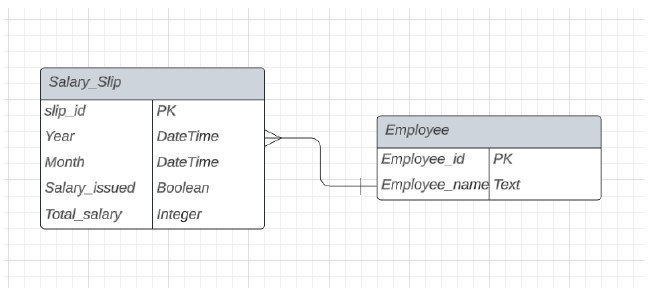 What can be inferred from the Entity-Relationship Diagram below:
 Text of the picture (copyable)
This is an Entity-Relationship Diagram (ERD) showing two tables: "Salary_Slip" and "Employee".

**Table: Salary_Slip**
| Column Name     | Data Type | Key |
|-----------------|-----------|-----|
| slip_id         |           | PK  |
| Year            | DateTime  |     |
| Month           | DateTime  |     |
| Salary_issued   | Boolean   |     |
| Total_salary    | Integer   |     |

**Table: Employee**
| Column Name     | Data Type | Key |
|-----------------|-----------|-----|
| Employee_id     |           | PK  |
| Employee_name   | Text      |     |

**Relationship:**
There is a relationship line connecting "Salary_Slip" to "Employee".
- The "Salary_Slip" side of the relationship has a crow's foot symbol, indicating "many".
- The "Employee" side of the relationship has a single vertical line, indicating "one".
This represents a "many-to-one" relationship, where many salary slips can belong to one employee.
- An employee can exist without having any salary slips
- A salary slip can exist without belonging to any employee
- An employee needs to have at least one salary slip
- A salary slip must belong to one and only one employee
- The AI voice
- The LED light around the device
- The body of the device
- None of these
- They have high cost and low durability.
- They have low cost and high durability.
- Latency of retrieval is very low.
- Latency of retrieval is very high.
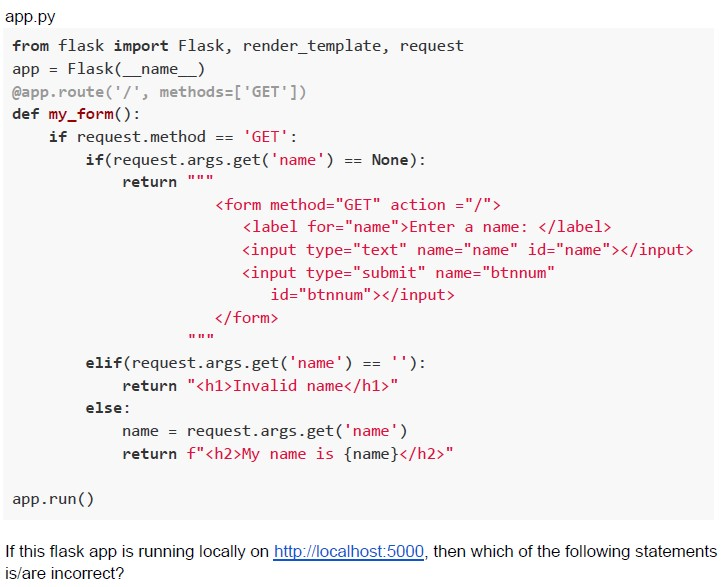 Consider the following flask application.
 Text of the picture (copyable)
```python
app.py
from flask import Flask, render_template, request
app = Flask(__name__)

@app.route('/', methods=['GET'])
def my_form():
    if request.method == 'GET':
        if(request.args.get('name') == None):
            return """
            <form method="GET" action="/">
                <label for="name">Enter a name: </label>
                <input type="text" name="name" id="name"></input>
                <input type="submit" name="btnnum"
                id="btnnum"></input>
            </form>
            """

        elif(request.args.get('name') == ''):
            return "<h1>Invalid name</h1>"
        else:
            name = request.args.get('name')
            return f"<h2>My name is {name}</h2>"

app.run()
```

If this flask app is running locally on http://localhost:5000, then which of the following statements is/are incorrect?
text
For http://127.0.0.1:5000/?name=Will+Smith&btnnum=Submit the rendered output is:

My name is Will Smith

text
If the form rendered at http://127.0.0.1:5000/ is submitted with value “Will Smith”, then the rendered output is:

**My name is Will**

text
For the URL http://127.0.0.1:5000/?name, the app will redirect to the base URL.

text
If the form rendered at base URL is submitted with all the fields empty, then it will throw "Not Found" error.
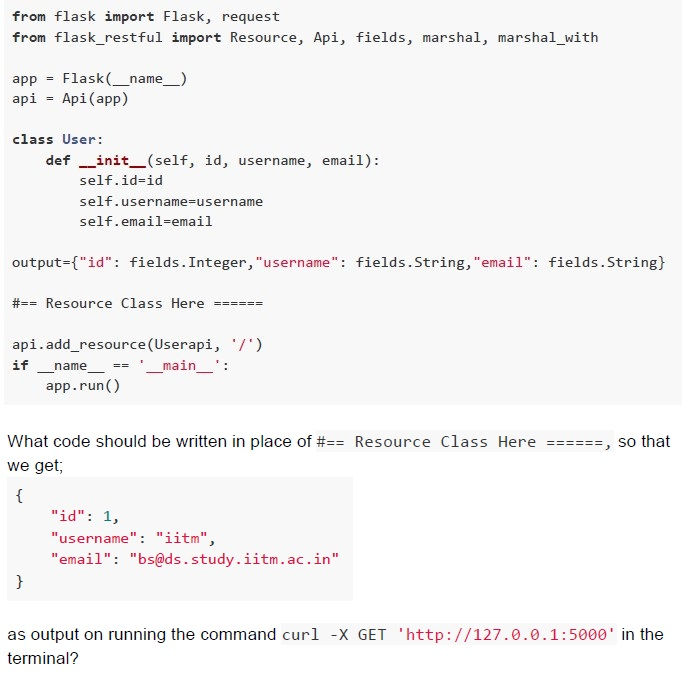 Follow the code given below
 Text of the picture (copyable)
```python
from flask import Flask, request
from flask_restful import Resource, Api, fields, marshal, marshal_with

app = Flask(__name__)
api = Api(app)

class User:
    def __init__(self, id, username, email):
        self.id=id
        self.username=username
        self.email=email

output={"id": fields.Integer, "username": fields.String, "email": fields.String}

## Resource Class Here ======

api.add_resource(Userapi, '/')
if __name__ == '__main__':
    app.run()
```

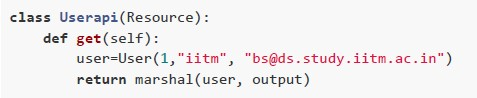
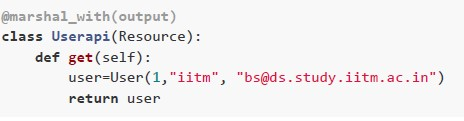
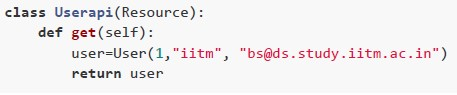
What code should be written in place of `## Resource Class Here ======` so that we get;

```json
{
  "id": 1,
  "username": "iitm",
  "email": "bs@ds.study.iitm.ac.in"
}
```

as output on running the command `curl -X GET 'http://127.0.0.1:5000'` in the terminal?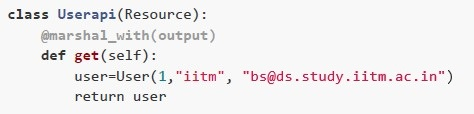
text
```python
class Userapi(Resource):
    @marshal_with(output)
    def get(self):
        user=User(1, "iitm", "bs@ds.study.iitm.ac.in")
        return user
```
text
```python
class Userapi(Resource):
    def get(self):
        user=User(1, "iitm", "bs@ds.study.iitm.ac.in")
        return marshal(user, output)
```
text
```python
@marshal_with(output)
class Userapi(Resource):
    def get(self):
        user=User(1, "iitm", "bs@ds.study.iitm.ac.in")
        return user
```
text
```python
class Userapi(Resource):
    def get(self):
        user=User(1, "iitm", "bs@ds.study.iitm.ac.in")
        return user
```
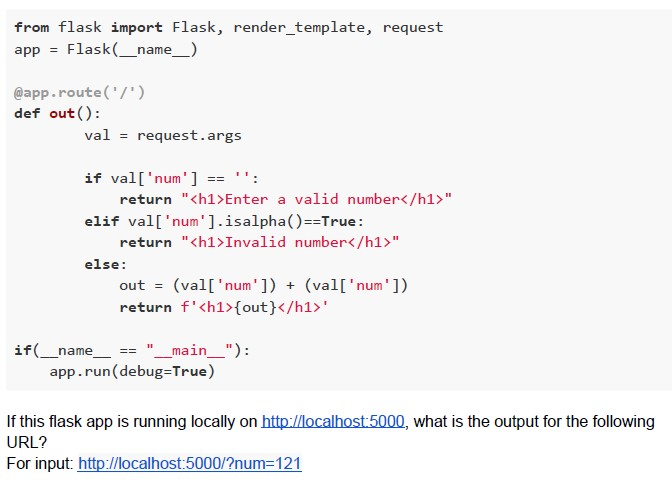 Consider the following flask application.
 Text of the picture (copyable)
```python
from flask import Flask, render_template, request
app = Flask(__name__)

@app.route('/')
def out():
    val = request.args

    if val['num'] == '':
        return "<h1>Enter a valid number</h1>"
    elif val['num'].isalpha()==True:
        return "<h1>Invalid number</h1>"
    else:
        out = (val['num']) + (val['num'])
        return f'<h1>{out}</h1>'

if __name__ == "__main__":
    app.run(debug=True)
```
If this flask app is running locally on http://localhost:5000, what is the output for the following URL?
For input: http://localhost:5000/?num=121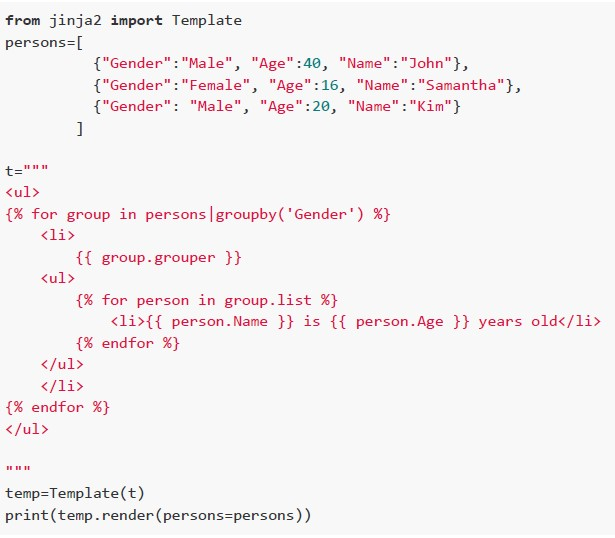 Consider the following python code snippet. What will be the rendered output?
 Text of the picture (copyable)
```python
from jinja2 import Template
persons=[
    {"Gender":"Male", "Age":40, "Name":"John"},
    {"Gender":"Female", "Age":16, "Name":"Samantha"},
    {"Gender":"Male", "Age":20, "Name":"Kim"}
]

t="""
<ul>
{% for group in persons|groupby('Gender') %}
    <li>
        {{ group.grouper }}
        <ul>
        {% for person in group.list %}
            <li>{{ person.Name }} is {{ person.Age }} years old</li>
        {% endfor %}
        </ul>
    </li>
{% endfor %}
</ul>
"""

temp=Template(t)
print(temp.render(persons=persons))
```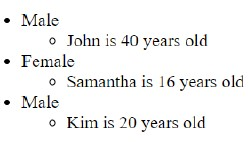
text
- Male
  - John is 40 years old
- Female
  - Samantha is 16 years old
- Male
  - Kim is 20 years old
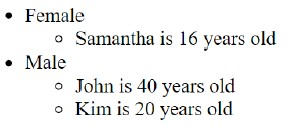
text
- Female
  - Samantha is 16 years old
- Male
  - John is 40 years old
  - Kim is 20 years old
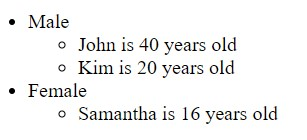
text
- Male
  - John is 40 years old
  - Kim is 20 years old
- Female
  - Samantha is 16 years old
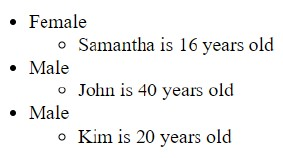
text
- Female
  - Samantha is 16 years old
- Male
  - John is 40 years old
- Male
  - Kim is 20 years old
Text of the picture (copyable)
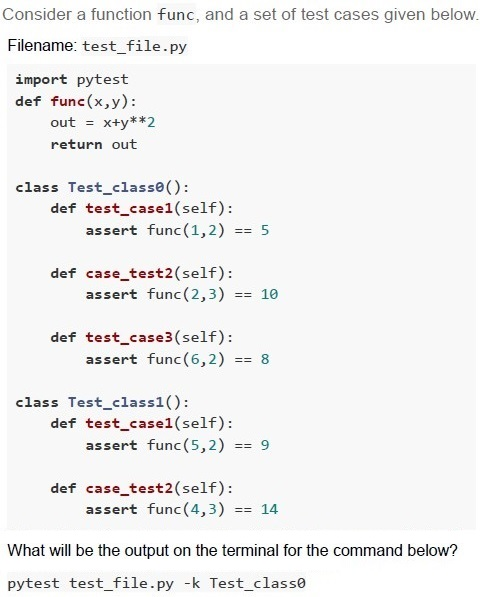
Consider a function func, and a set of test cases given below.
Filename: test_file.py

```python
import pytest
def func(x,y):
    out = x+y**2
    return out

class Test_class0():
    def test_case1(self):
        assert func(1,2) == 5

    def case_test2(self):
        assert func(2,3) == 10

    def test_case3(self):
        assert func(6,2) == 8

class Test_class1():
    def test_case1(self):
        assert func(5,2) == 9

    def case_test2(self):
        assert func(4,3) == 14
```

What will be the output on the terminal for the command below?
`pytest test_file.py -k Test_class0`
text
```
== 2 failed, 1 passed in 0.17s ===
```

text
```text
== 1 failed, 1 passed, 1 deselected in 0.17s ===
```

text
```
== 2 failed, 1 deselected in 0.17s ===
```

text
```
== 1 failed, 2 passed in 0.17s ====
```
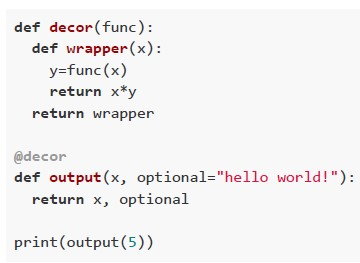 What will be the output of the following Python code snippet?
 Text of the picture (copyable)
```python
def decor(func):
    def wrapper(x):
        y=func(x)
        return x*y
    return wrapper

@decor
def output(x, optional="hello world!"):
    return x, optional

print(output(5))
```
text
```
('hello world!', 'hello world!', 'hello world!', 'hello world!',
'hello world!')
```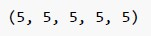
text
```
(5, 5, 5, 5, 5)
```

text
25

text
```
(5, 'hello world!', 5, 'hello world!', 5, 'hello world!', 5,
'hello world!', 5, 'hello world!')
```
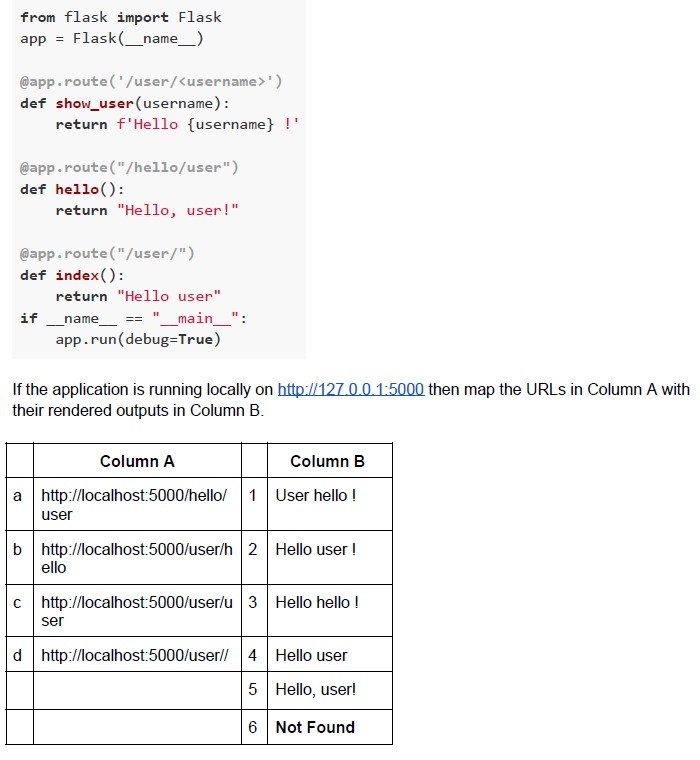 Consider the following flask application.
 Text of the picture (copyable)
```python
from flask import Flask
app = Flask(__name__)

@app.route('/user/<username>')
def show_user(username):
    return f'Hello {username} !'

@app.route("/hello/user")
def hello():
    return "Hello, user!"

@app.route("/user/")
def index():
    return "Hello user"

if __name__ == "__main__":
    app.run(debug=True)
```

If the application is running locally on http://127.0.0.1:5000 then map the URLs in Column A with their rendered outputs in Column B.

| | Column A | | Column B |
|---|---|---|---|
| a | http://localhost:5000/hello/user | 1 | User hello ! |
| b | http://localhost:5000/user/hello | 2 | Hello user ! |
| c | http://localhost:5000/user/user | 3 | Hello hello ! |
| d | http://localhost:5000/user// | 4 | Hello user |
| | | 5 | Hello, user! |
| | | 6 | Not Found |- a-2, b-1, c-5, d-6
- a-5, b-1, c-2, d-6
- a-5, b-3, c-2, d-4
- a-2, b-3, c-4, d-6
- O(logN)
- O(N)
- O(NlogN)
- O(N2)
Answer key
- Q1 (MCQ, 2 marks): A
- Q2 (MCQ, 2 marks): D
- Q3 (MCQ, 2 marks): B
- Q4 (MCQ, 2 marks): B
- Q5 (MCQ, 2 marks): B
- Q6 (MCQ, 4.5 marks): C
- Q7 (MSQ, 3 marks): B, C
- Q8 (MSQ, 3 marks): A, B
- Q9 (MSQ, 3 marks): A, B, D
- Q10 (MSQ, 3 marks): C, D
- Q11 (MCQ, 3 marks): D
- Q12 (MCQ, 3 marks): C
- Q13 (MCQ, 3 marks): A
- Q14 (MCQ, 3 marks): B
- Q15 (MCQ, 3 marks): D
- Q16 (MCQ, 3 marks): D
- Q17 (MCQ, 3 marks): C
- Q18 (MCQ, 3 marks): C
- Q19 (MCQ, 3 marks): C
- Q20 (MCQ, 3 marks): B
- Q21 (MCQ, 3 marks): C
- Q22 (MSQ, 2 marks): A, D
- Q23 (MSQ, 2 marks): A, B
- Q24 (MSQ, 2 marks): B, D
- Q25 (MSQ, 4.5 marks): B, C, D
- Q26 (MSQ, 4.5 marks): A, B
- Q27 (SA, 3 marks): 121121
- Q28 (MCQ, 4.5 marks): B
- Q29 (MCQ, 4.5 marks): B
- Q30 (MCQ, 4.5 marks): D
- Q31 (MCQ, 4.5 marks): C
- Q32 (MCQ, 4.5 marks): D
Concepts this paper tests
Auto-generated summary from the source site. Handy as a checklist; the lessons above explain each idea from scratch.
Here’s a structured summary of the core topics, concepts, and equations from the exam, followed by Mermaid knowledge graphs to visualize relationships.
Core Topics and Concepts Summary
1. Software Architecture and Design Patterns
MVC (Model-View-Controller) Architecture:
- Model: Manages data, logic, and rules (e.g., stores tasks in a to-do app).
- View: Displays data to the user (e.g., UI for pending/completed tasks).
- Controller: Handles user input and updates the model/view (e.g., adds/deletes tasks).
- Example: Question 2 (Todo list app components).
Client-Server vs. Peer-to-Peer Architecture:
- Client-Server: Clients request services; servers provide them. Clients/servers can be on the same or separate machines.
- Peer-to-Peer: All nodes are equal (no dedicated server). Fault tolerance depends on network design.
- Key Point: Neither statement in Question 3 is universally correct.
Custom HTML Elements:
- Web Components: Allow creation of reusable custom HTML elements (e.g.,
<my-element>). - Example: Question 5.
- Web Components: Allow creation of reusable custom HTML elements (e.g.,
2. Databases
Relational Databases:
- Column: Stores a single attribute (e.g.,
fieldlike "name"). - Row: Stores a record (e.g.,
single entrylike one user’s data). - Example: Question 4.
- Column: Stores a single attribute (e.g.,
SQL and Flask-SQLAlchemy:
- Primary Key (PK): Uniquely identifies a row (e.g.,
car_idin Question 22). - Unique Constraint: Ensures no duplicate values in a column (e.g.,
model,nameincartable). - Foreign Key (FK): Links tables (e.g.,
Employee_idinSalary_SlipreferencesEmployeetable). - Example: Questions 22, 23.
- Primary Key (PK): Uniquely identifies a row (e.g.,
Entity-Relationship (ER) Diagrams:
- One-to-Many: One employee can have many salary slips (but not vice versa).
- Inference: An employee can exist without salary slips (Question 23).
3. Version Control (Git)
Git Commands:
git rm --cached <filename>: Removes a file from staging but keeps it in the working directory.- Example: Question 6.
4. Web Development
Flask:
- Routing: Maps URLs to functions (e.g.,
@app.route('/home/<path:directory>')). Templates (Jinja2):
{% for %}loops,{{ variable }}placeholders.- Macros for reusable HTML snippets (e.g.,
unordered_listin Question 14).
Request Handling:
request.args: Access query parameters (e.g.,?name=value).request.method: Check HTTP method (GET/POST).
- Examples: Questions 9, 12, 14, 21, 26, 28, 32.
- Routing: Maps URLs to functions (e.g.,
HTML/CSS:
display: inline-block: Elements flow inline but respect width/height (e.g., Question 12).- Web Components: Custom elements (e.g.,
<my-element>).
RESTful APIs:
Flask-RESTful:
Resourceclasses define endpoints (e.g.,TodoSimplein Question 11).@marshal_with: Serializes output to JSON.- Example: Questions 11, 27.
5. Testing
Types of Testing:
- Regression Testing: Ensures new changes don’t break existing functionality.
- User Acceptance Testing (UAT): Validates software with end-users (e.g., beta testing).
- System Testing: Tests the complete system (one step beyond integration).
- Test Automation: Simulates user interactions (e.g., Selenium).
- Example: Question 19.
Test Coverage:
- Function Coverage: Every function is called at least once.
- Statement Coverage: Every statement is executed.
- Branch Coverage: Every decision branch (e.g.,
if-else) is tested. - Condition Coverage: Every sub-condition in a decision is tested.
- Example: Question 18.
Pytest:
assert: Validates conditions.-k: Filters tests by name (e.g.,pytest -k Test_class0).- Example: Questions 16, 30.
6. Mathematics for Computing
Base Conversion:
Convert numbers from base
aorbto decimal:- \( N1 = 113_a = 1 \cdot a^2 + 1 \cdot a^1 + 3 \cdot a^0 \).
- \( N2 = 365_b = 3 \cdot b^2 + 6 \cdot b^1 + 5 \cdot b^0 \).
- Example: Question 13 (find \( a \) and \( b \) such that \( N1 > N2 \)).
Network Latency:
- Latency \( L = \frac{2D}{v} \) (round-trip time for client-server communication).
To double requests/second (\( N \)):
- Double speed (\( v \rightarrow 2v \)) or halve distance (\( D \rightarrow D/2 \)).
- Example: Question 8.
Data Consumption Calculation:
- Total data = \(\sum (\text{bandwidth} \times \text{time})\).
- Convert Mbps to GB: \( 1 \text{ Mbps} = \frac{1}{8} \text{ MB/s} \).
- Example: Question 7 (bandwidth varies over 24 hours).
7. Cloud Computing
Cold Storage (e.g., Amazon Glacier):
- Low Cost: Cheaper than hot storage.
- High Durability: Data is rarely lost.
- High Latency: Retrieval takes hours/days.
- Example: Question 25.
8. Algorithms
Sorting Algorithm Time Complexity:
Selection Sort Variants:
- Find min element, append to new array, repeat: \( O(N^2) \).
- Example: Question 33.
9. Python Specifics
Decorators:
- Modify function behavior (e.g.,
@decorin Question 31).
- Modify function behavior (e.g.,
Command-Line Arguments:
sys.argv: Access script arguments (e.g.,sys.argv[1]).- Example: Questions 15, 17.
Logging:
logging.basicConfig: Configure log level (e.g.,WARNING).- Example: Question 17.
10. Miscellaneous
Alexa Device Views:
- View: AI voice + LED lights (user-facing components).
- Example: Question 24.
Jinja2 Grouping:
groupby: Group lists by attributes (e.g.,Genderin Question 29).