Home / Past papers / MAD1 Quiz 2 / this paper
2024 Aug04: IIT M AN EXAM QDD2 - 04 Aug 2024
Elapsed 00:00
Read the statements given below carefully and select the correct option. Statement 1: The GET method is the same as the HEAD method. It is used to transfer the header section only. Statement 2: The GET method retrieves information from the given server using a given URI.GET request can retrieve the data.
- Both statements 1 and 2 are correct
- Both statements 1 and 2 are incorrect
- Statement 1 is correct but statement 2 is incorrect
- Statement 1 is incorrect but statement 2 is correct
Text of the picture (copyable)
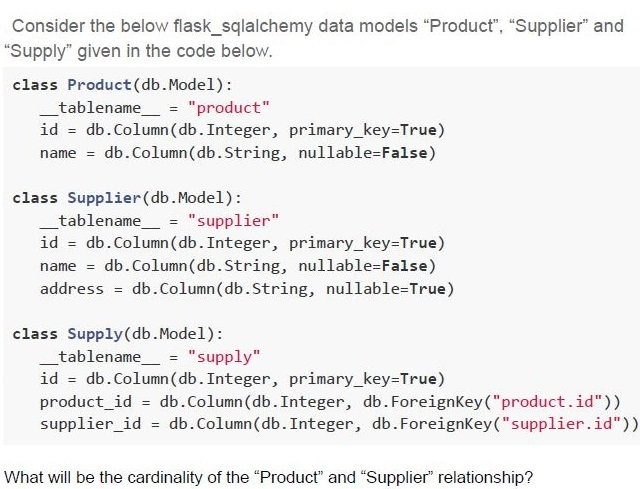
Consider the below flask_sqlalchemy data models "Product", "Supplier" and "Supply" given in the code below.

```python
class Product(db.Model):
    __tablename__ = "product"
    id = db.Column(db.Integer, primary_key=True)
    name = db.Column(db.String, nullable=False)

class Supplier(db.Model):
    __tablename__ = "supplier"
    id = db.Column(db.Integer, primary_key=True)
    name = db.Column(db.String, nullable=False)
    address = db.Column(db.String, nullable=True)

class Supply(db.Model):
    __tablename__ = "supply"
    id = db.Column(db.Integer, primary_key=True)
    product_id = db.Column(db.Integer, db.ForeignKey("product.id"))
    supplier_id = db.Column(db.Integer, db.ForeignKey("supplier.id"))
```

What will be the cardinality of the "Product" and "Supplier" relationship?- One to One
- One to Many
- Many to Many
- Many to One
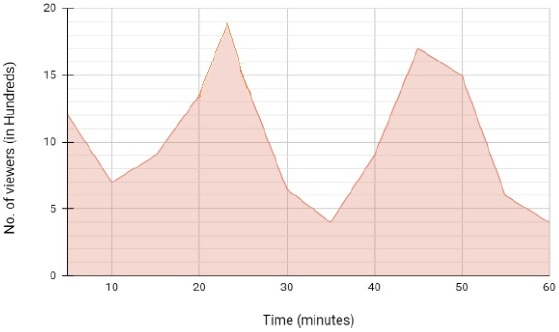
A certain video on the web occupies 3 gigabytes of memory of the server. If the number of viewers of the video over time is given by the curve shown below and assuming that each viewer requires an individual connection to the server to view the video, what should be the minimum RAM requirement of the server that can process requests from all the viewers simultaneously at any point of time?
 A certain video on the web occupies 3 gigabytes of memory of the server. If the number of viewers of the video over time is given by the curve shown below and assuming that each viewer requires an individual connection to the server to view the video, what should be the minimum RAM requirement of the server that can process requests from all the viewers simultaneously at any point of time?
A certain video on the web occupies 3 gigabytes of memory of the server. If the number of viewers of the video over time is given by the curve shown below and assuming that each viewer requires an individual connection to the server to view the video, what should be the minimum RAM requirement of the server that can process requests from all the viewers simultaneously at any point of time? Text of the picture (copyable)
This is an area chart showing "No. of viewers (in Hundreds)" on the y-axis and "Time (minutes)" on the x-axis.

**Y-axis (No. of viewers (in Hundreds)):**
*   Ticks at 0, 5, 10, 15, 20.

**X-axis (Time (minutes)):**
*   Ticks at 0, 10, 20, 30, 40, 50, 60.

**Data points (approximate):**
*   (0, 11.5)
*   (10, 7)
*   (15, 9)
*   (20, 13)
*   (23, 18.5) - Peak 1
*   (30, 6.5)
*   (35, 4) - Valley
*   (40, 8)
*   (45, 13)
*   (47, 17) - Peak 2
*   (50, 15)
*   (55, 6)
*   (60, 4)

The area under the line is filled with a light red color.
- 1.9 GB
- 5.7 GB
- 1.9 TB
- 5.7 TB
Text of the picture (copyable)
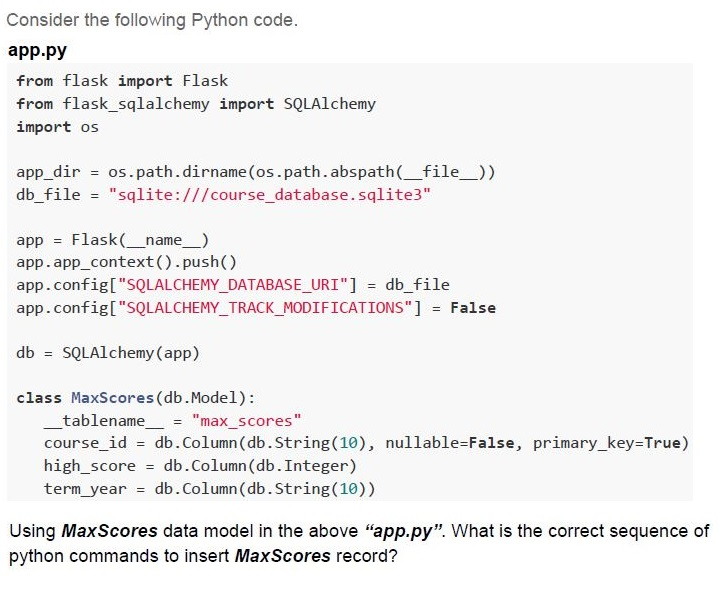
Consider the following Python code.

**app.py**
```python
from flask import Flask
from flask_sqlalchemy import SQLAlchemy
import os

app_dir = os.path.dirname(os.path.abspath(__file__))
db_file = "sqlite:///course_database.sqlite3"

app = Flask(__name__)
app.app_context().push()
app.config["SQLALCHEMY_DATABASE_URI"] = db_file
app.config["SQLALCHEMY_TRACK_MODIFICATIONS"] = False

db = SQLAlchemy(app)

class MaxScores(db.Model):
    __tablename__ = "max_scores"
    course_id = db.Column(db.String(10), nullable=False, primary_key=True)
    high_score = db.Column(db.Integer)
    term_year = db.Column(db.String(10))
```
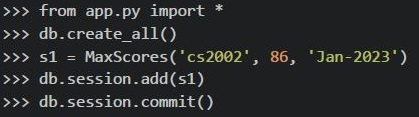
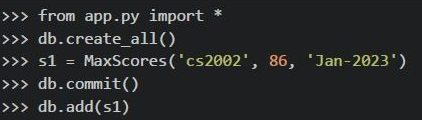
Using *MaxScores* data model in the above “*app.py*”. What is the correct sequence of python commands to insert *MaxScores* record?
text
```python
>>> from app.py import *
>>> db.create_all()
>>> s1 = MaxScores(course_id='cs2002', high_score=86, term_year='Jan-2023')
>>> db.session.add(s1)
>>> db.session.commit()
```
text
```python
>>> from app.py import *
>>> db.create_all()
>>> s1 = MaxScores('cs2002', 86, 'Jan-2023')
>>> db.session.add(s1)
>>> db.session.commit()
```
text
```python
>>> from app.py import *
>>> db.create_all()
>>> s1 = MaxScores('cs2002', 86, 'Jan-2023')
>>> db.commit()
>>> db.add(s1)
```
text
```python
>>> from app.py import *
>>> db.create_all()
>>> s1 = MaxScores(course_id='cs2002',high_score=86,term_year='Jan-2023')
>>> db.session.commit()
>>> db.session.add(s1)
```
Consider the following Python code snippet, and select the correct output list if the code is run on the terminal.
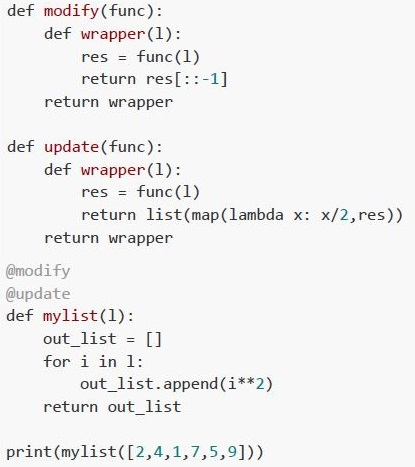 Consider the following Python code snippet, and select the correct output list if the code is run on the terminal.
Consider the following Python code snippet, and select the correct output list if the code is run on the terminal. Text of the picture (copyable)
```python
def modify(func):
    def wrapper(l):
        res = func(l)
        return res[::-1]
    return wrapper

def update(func):
    def wrapper(l):
        res = func(l)
        return list(map(lambda x: x/2,res))
    return wrapper

@modify
@update
def mylist(l):
    out_list = []
    for i in l:
        out_list.append(i**2)
    return out_list

print(mylist([2,4,1,7,5,9]))
```- [0.25, 1, 4, 6.26, 12.25, 20.25]
- [1, 4, 0.25, 12.25, 6.25, 20.25]
- [40.5, 12.5, 24.5, 0.5, 8.0, 2.0]
- [0.5, 2.0, 8.0, 12.5, 24.5, 40.5]
Consider the following flask application.
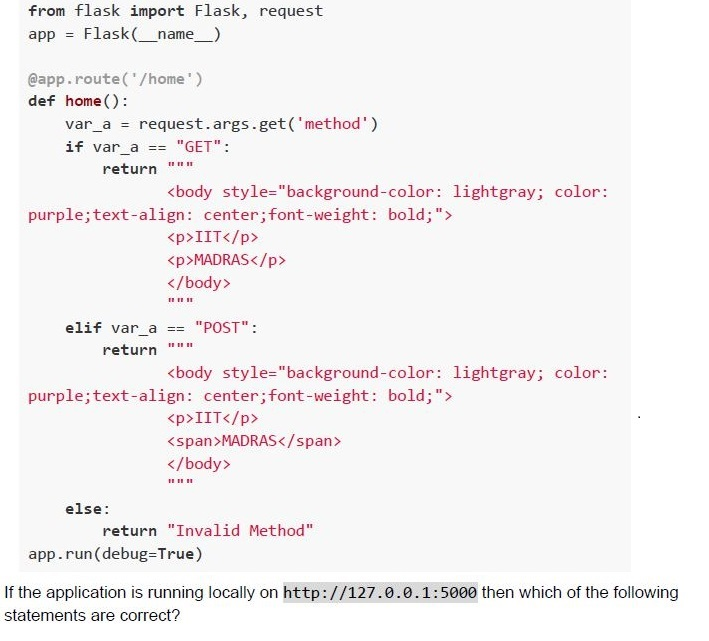 Consider the following flask application.
Consider the following flask application. Text of the picture (copyable)
```python
from flask import Flask, request
app = Flask(__name__)

@app.route('/home')
def home():
    var_a = request.args.get('method')
    if var_a == "GET":
        return """
        <body style="background-color: lightgray; color:
purple;text-align: center;font-weight: bold;">
        <p>IIT</p>
        <p>MADRAS</p>
        </body>
        """
    elif var_a == "POST":
        return """
        <body style="background-color: lightgray; color:
purple;text-align: center;font-weight: bold;">
        <p>IIT</p>
        <span>MADRAS</span>
        </body>
        """
    else:
        return "Invalid Method"
app.run(debug=True)
```
If the application is running locally on http://127.0.0.1:5000 then which of the following statements are correct?
text
The browser will render aesthetically similar output for
http://127.0.0.1:5000/home?method=POST and
http://127.0.0.1:5000/home?method=GET

text
The browser will render aesthetically different output for
http://127.0.0.1:5000/home?method=POST and
http://127.0.0.1:5000/home?method=GET

text
The browser will render Method Not Allowed error for http://127.0.0.1:5000/home

text
The browser will render Invalid Method error for http://127.0.0.1:5000/home
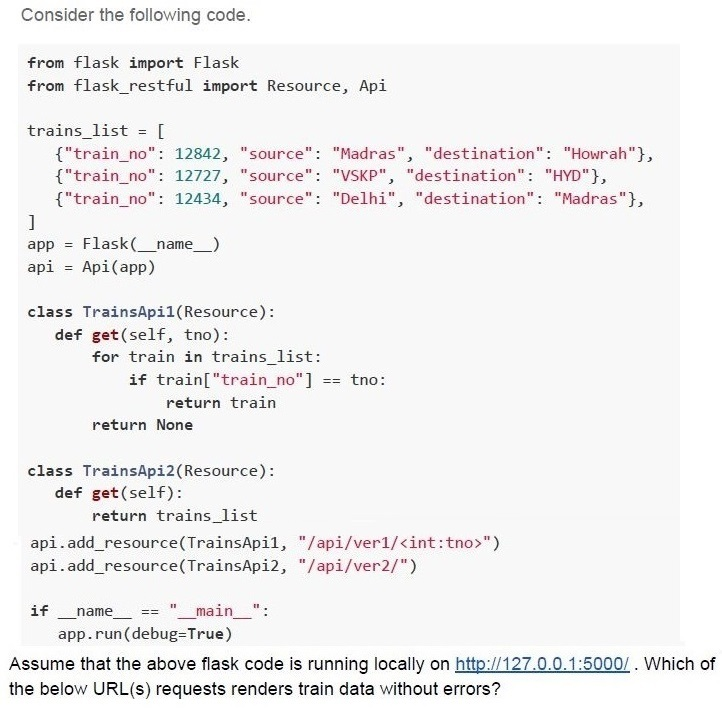
Text of the picture (copyable)
Consider the following code.

```python
from flask import Flask
from flask_restful import Resource, Api

trains_list = [
    {"train_no": 12842, "source": "Madras", "destination": "Howrah"},
    {"train_no": 12727, "source": "VSKP", "destination": "HYD"},
    {"train_no": 12434, "source": "Delhi", "destination": "Madras"},
]
app = Flask(__name__)
api = Api(app)

class TrainsApi1(Resource):
    def get(self, tno):
        for train in trains_list:
            if train["train_no"] == tno:
                return train
        return None

class TrainsApi2(Resource):
    def get(self):
        return trains_list

api.add_resource(TrainsApi1, "/api/ver1/<int:tno>")
api.add_resource(TrainsApi2, "/api/ver2/")

if __name__ == "__main__":
    app.run(debug=True)
```

Assume that the above flask code is running locally on http://127.0.0.1:5000/. Which of the below URL(s) requests renders train data without errors?- http://127.0.0.1:5000/api/ver1/12727
- http://127.0.0.1:5000/api/12727
- http://127.0.0.1:5000/ver2/12727
- http://127.0.0.1:5000/api/ver2
Comprehension passage - the questions below it refer to this
Based on the above data, answer the given subquestions.
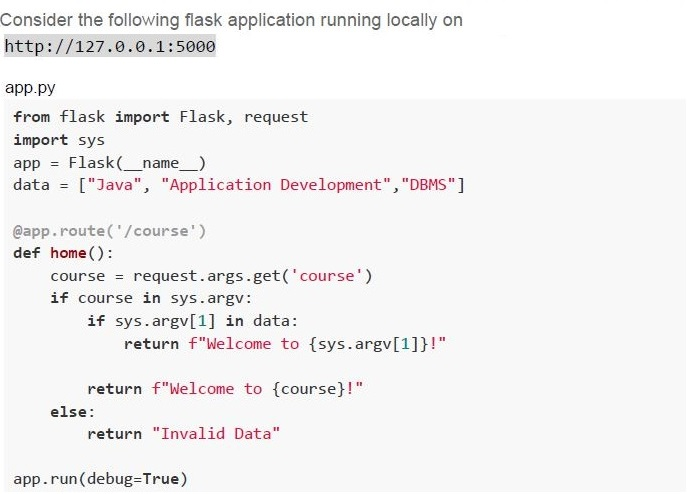
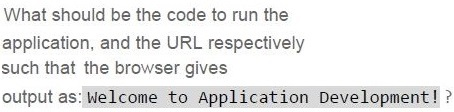
Text of the picture (copyable)
What should be the code to run the
application, and the URL respectively
such that the browser gives
output as: Welcome to Application Development!?

text
Code: python app.py Application Development Java
URL: http://127.0.0.1:5000/course?course=Java

text
Code:
```
python app.py Application Development Java
```
URL:
```
http://127.0.0.1:5000/course=Application Development
```

text
Code: python app.py "Application Development" Java
URL: http://127.0.0.1:5000/course?course=Java

text
Code:
```
python app.py "Application Development" DBMS
```
URL:
```
http://127.0.0.1:5000/course?course=Application Development
```
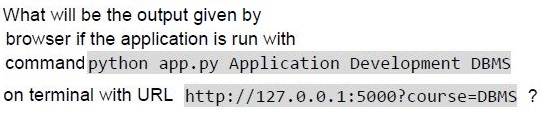
Text of the picture (copyable)
What will be the output given by
browser if the application is run with
command `python app.py Application Development DBMS`
on terminal with URL `http://127.0.0.1:5000?course=DBMS` ?

text
Welcome to Application Development!

text
Welcome to DBMS !
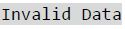
text
Invalid Data

text
Not Found
Comprehension passage - the questions below it refer to this
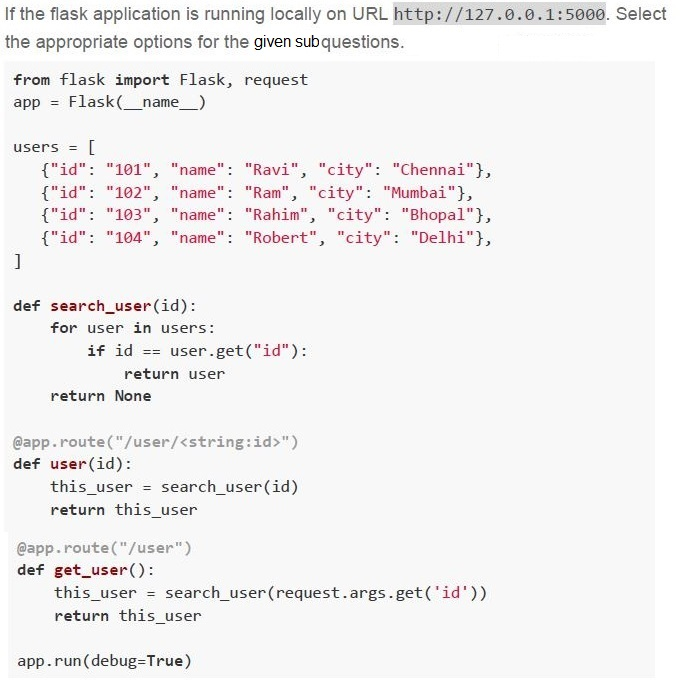
Text of the picture (copyable)
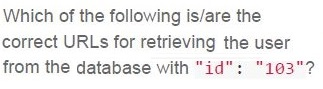
Which of the following is/are the
correct URLs for retrieving the user
from the database with "id": "103"?
- http://127.0.0.1:5000/103
- http://127.0.0.1:5000/user/103
- http://127.0.0.1:5000?id=103
- http://127.0.0.1:5000/user?id=103
Text of the picture (copyable)
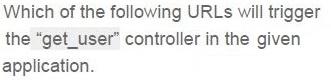
Which of the following URLs will trigger
the "get_user" controller in the given
application.

text
http://127.0.0.1:5000/104

text
http://127.0.0.1:5000/user/104

text
```
http://127.0.0.1:5000?id=104
```

text
http://127.0.0.1:5000/user?id=104
You have a DRAM module with bus width of 64 bits, clock speed of 400 MHz, and operating in DDR (double-data-rate or two values per clock cycle) mode. What is the maximum memory bandwidth in Gigabytes per second achievable with this module if it is working in dual channel mode (two memory interfaces are used)?
- 51.2
- 102.4
- 25.6
- 12.8

Text of the picture (copyable)
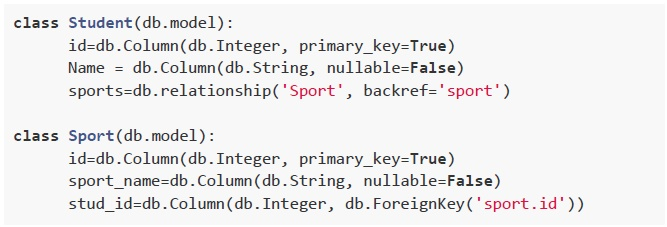
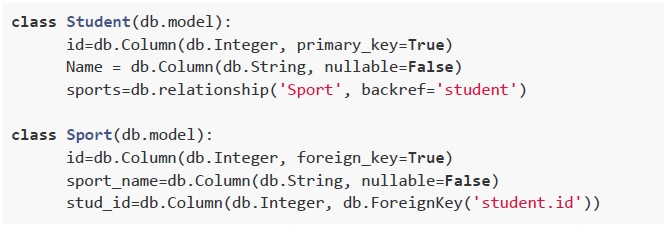
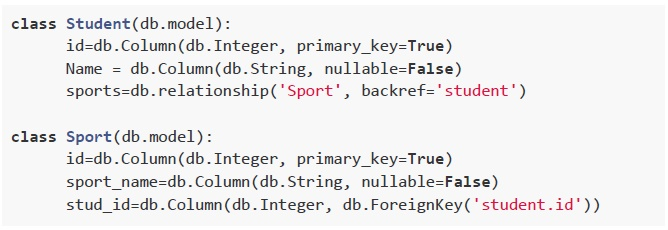
Two data models "Student" and "Sport" are to be created in the database with one-to-many relationship using *flask_sqlalchemy*. Which of the following is the correct implementation of the above two data models?
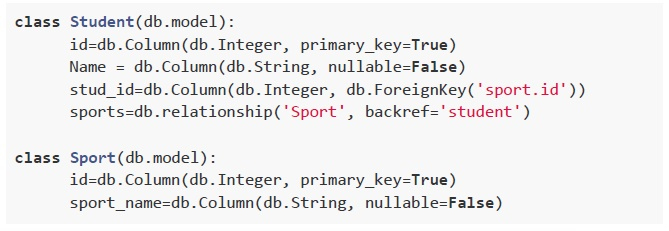
text
```python
class Student(db.model):
    id=db.Column(db.Integer, primary_key=True)
    Name = db.Column(db.String, nullable=False)
    stud_id=db.Column(db.Integer, db.ForeignKey('sport.id'))
    sports=db.relationship('Sport', backref='student')

class Sport(db.model):
    id=db.Column(db.Integer, primary_key=True)
    sport_name=db.Column(db.String, nullable=False)
```
text
```python
class Student(db.model):
    id=db.Column(db.Integer, primary_key=True)
    Name = db.Column(db.String, nullable=False)
    sports=db.relationship('Sport', backref='sport')

class Sport(db.model):
    id=db.Column(db.Integer, primary_key=True)
    sport_name=db.Column(db.String, nullable=False)
    stud_id=db.Column(db.Integer, db.ForeignKey('sport.id'))
```
text
```python
class Student(db.model):
    id=db.Column(db.Integer, primary_key=True)
    Name = db.Column(db.String, nullable=False)
    sports=db.relationship('Sport', backref='student')

class Sport(db.model):
    id=db.Column(db.Integer, foreign_key=True)
    sport_name=db.Column(db.String, nullable=False)
    stud_id=db.Column(db.Integer, db.ForeignKey('student.id'))
```
text
```python
class Student(db.model):
    id=db.Column(db.Integer, primary_key=True)
    Name = db.Column(db.String, nullable=False)
    sports=db.relationship('Sport', backref='student')

class Sport(db.model):
    id=db.Column(db.Integer, primary_key=True)
    sport_name=db.Column(db.String, nullable=False)
    stud_id=db.Column(db.Integer, db.ForeignKey('student.id'))
```
Text of the picture (copyable)
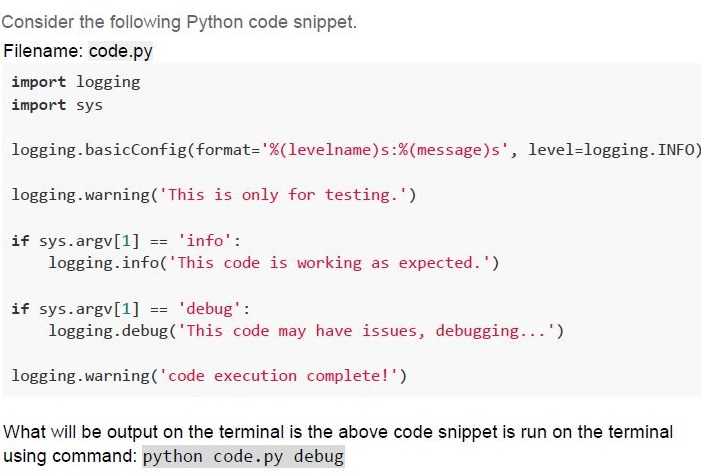
Consider the following Python code snippet.
Filename: code.py

```python
import logging
import sys

logging.basicConfig(format='%(levelname)s:%(message)s', level=logging.INFO)

logging.warning('This is only for testing.')

if sys.argv[1] == 'info':
    logging.info('This code is working as expected.')

if sys.argv[1] == 'debug':
    logging.debug('This code may have issues, debugging...')

logging.warning('code execution complete!')
```

What will be output on the terminal is the above code snippet is run on the terminal using command: `python code.py debug`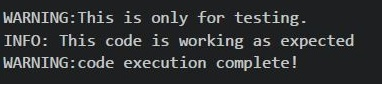
text
```
WARNING:This is only for testing.
INFO: This code is working as expected
WARNING:code execution complete!
```

text
```
WARNING:This is only for testing.
DEBUG: This code may have issues, debugging...
WARNING:code execution complete!
```

text
```
WARNING:This is only for testing.
WARNING:code execution complete!
```

text
```
INFO: This code is working as expected
DEBUG: This code may have issues, debugging...
```
Text of the picture (copyable)
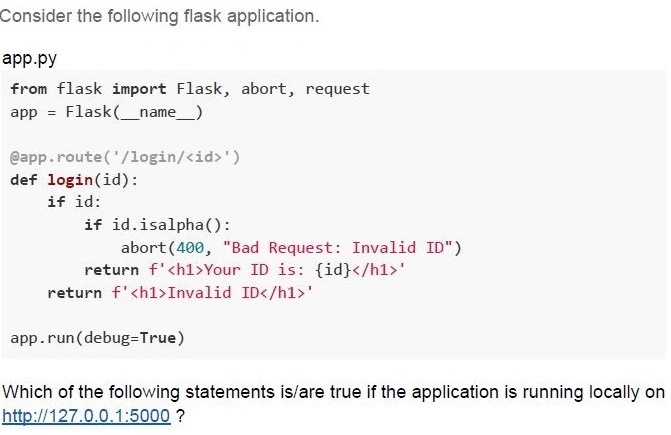
Consider the following flask application.

app.py
```python
from flask import Flask, abort, request
app = Flask(__name__)

@app.route('/login/<id>')
def login(id):
    if id:
        if id.isalpha():
            abort(400, "Bad Request: Invalid ID")
        return f'<h1>Your ID is: {id}</h1>'
    return f'<h1>Invalid ID</h1>'

app.run(debug=True)
```

Which of the following statements is/are true if the application is running locally on http://127.0.0.1:5000 ?
text
For URL http://127.0.0.1:5000/login?id=MAD-I the browser will render
Bad Request: Invalid ID

text
For URL http://127.0.0.1:5000/login/ the browser will render
Invalid ID

text
For URL http://127.0.0.1:5000/login/CS2003 the browser will render
Your ID is: CS2003

text
For URL http://127.0.0.1:5000/login/PDSA the browser will render Bad
Request: Invalid ID
Consider the following HTML Document and select the correct statement(s) from the following if a user types the password “mad1password” in the password field letter by letter.
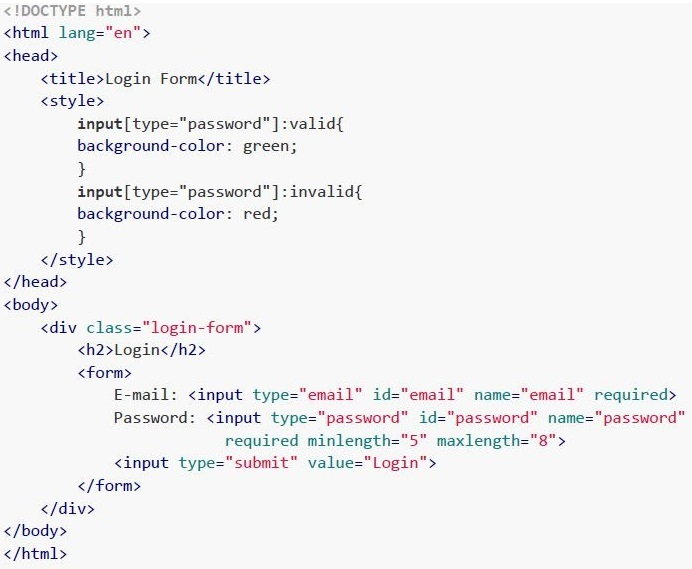 Consider the following HTML Document and select the correct statement(s) from the following if a user types the password “mad1password” in the password field letter by letter.
Consider the following HTML Document and select the correct statement(s) from the following if a user types the password “mad1password” in the password field letter by letter. Text of the picture (copyable)
```html
<!DOCTYPE html>
<html lang="en">
<head>
    <title>Login Form</title>
    <style>
        input[type="password"]:valid{
            background-color: green;
        }
        input[type="password"]:invalid{
            background-color: red;
        }
    </style>
</head>
<body>
    <div class="login-form">
        <h2>Login</h2>
        <form>
            E-mail: <input type="email" id="email" name="email" required>
            Password: <input type="password" id="password" name="password"
            required minlength="5" maxlength="8">
            <input type="submit" value="Login">
        </form>
    </div>
</body>
</html>
```- The HTML form is integrated with backend validation.
- The HTML form is integrated with Frontend HTML5 validation.
- The background colour of the password field remains red for the first 4 letters,then turns green for the next 4 letters, and then again turns red for the remaining letters.
- The background colour of the password field remains red for the first 4 letters,then turns green for the next 4 letters, and then remains green for the remaining allowable letters.
Answer key
- Q1 (MCQ, 2 marks): D
- Q2 (MCQ, 2 marks): C
- Q3 (MCQ, 3 marks): D
- Q4 (MCQ, 3 marks): A
- Q5 (MCQ, 3 marks): C
- Q6 (MSQ, 3 marks): A, D
- Q7 (MSQ, 3 marks): A, D
- Q8 (MSQ, 3 marks): C, D
- Q9 (MCQ, 2 marks): D
- Q10 (MSQ, 3 marks): B, D
- Q11 (MCQ, 3 marks): D
- Q12 (MCQ, 4.5 marks): D
- Q13 (MCQ, 4.5 marks): D
- Q14 (MCQ, 4.5 marks): C
- Q15 (MSQ, 2 marks): C, D
- Q16 (MSQ, 4.5 marks): B, D