Home / Past papers / MAD1 End Term / this paper
IIT M FOUNDATION AN EXAM ADF3 24 Dec 2023 - 24 Dec 2023

Text of the picture (copyable)
Consider the given URL below.

```
https://seek.study.iitm.ac.in/courses/ns_23t3_cs2003?type=lesson&tab=course
s
```

Select the appropriate option that correctly identifies different components of a given URL.
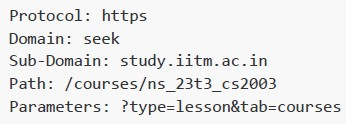
text
```
Protocol: https
Domain: seek
Sub-Domain: study.iitm.ac.in
Path: /courses/ns_23t3_cs2003
Parameters: ?type=lesson&tab=courses
```
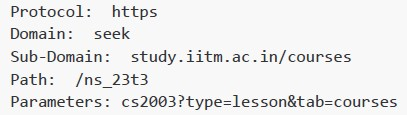
text
```
Protocol: https
Domain: seek
Sub-Domain: study.iitm.ac.in/courses
Path: /ns_23t3
Parameters: cs2003?type=lesson&tab=courses
```
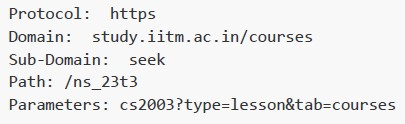
text
```
Protocol: https
Domain: study.iitm.ac.in/courses
Sub-Domain: seek
Path: /ns_23t3
Parameters: cs2003?type=lesson&tab=courses
```
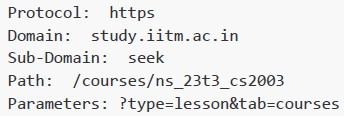
text
```
Protocol: https
Domain: study.iitm.ac.in
Sub-Domain: seek
Path: /courses/ns_23t3_cs2003
Parameters: ?type=lesson&tab=courses
```
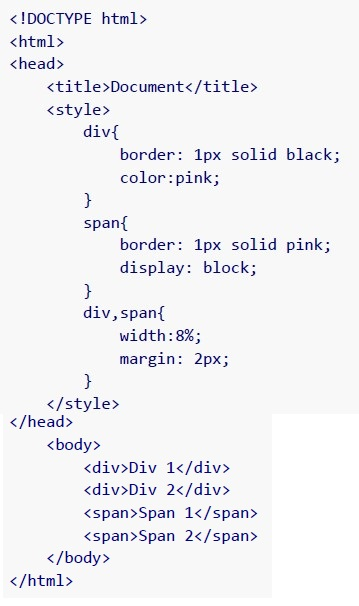 How will the browser render the following HTML document?
 Text of the picture (copyable)
```html
<!DOCTYPE html>
<html>
<head>
    <title>Document</title>
    <style>
        div{
            border: 1px solid black;
            color:pink;
        }
        span{
            border: 1px solid pink;
            display: block;
        }
        div,span{
            width:8%;
            margin: 2px;
        }
    </style>
</head>
<body>
    <div>Div 1</div>
    <div>Div 2</div>
    <span>Span 1</span>
    <span>Span 2</span>
</body>
</html>
```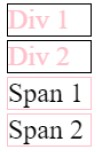
text
Div 1
Div 2
Span 1
Span 2
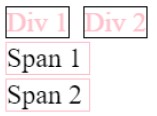
text
This is a UI screenshot showing four text elements, each enclosed in a rectangular border.
The top row has two elements:
- "Div 1" (text in light red, black border)
- "Div 2" (text in light red, black border)
The second row has one element:
- "Span 1" (text in black, black border)
The third row has one element:
- "Span 2" (text in black, light red border)

text
Div 1
Div 2
Span 1
Span 2
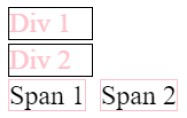
text
Div 1 Div 2 Span 1 Span 2
- Both statement 1 and 2 are correct.
- Both statement 1 and 2 are incorrect.
- Statement 1 is correct but, statement 2 is incorrect.
- Statement 2 is correct but, statement 1 is incorrect.
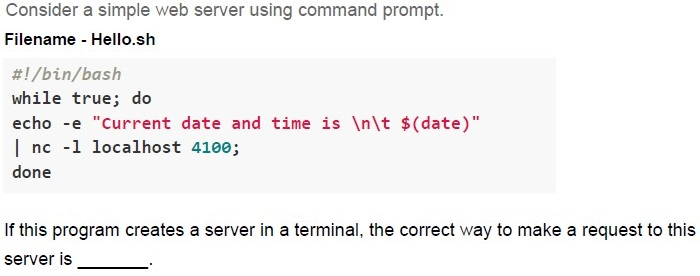
Text of the picture (copyable)
Consider a simple web server using command prompt.
Filename - Hello.sh
```bash
#!/bin/bash
while true; do
echo -e "Current date and time is \n\t $(date)"
| nc -l localhost 4100;
done
```
If this program creates a server in a terminal, the correct way to make a request to this server is ______.

text
Type `curl http://localhost:5000` in the same terminal where the server is running.

text
Type `curl http://localhost:4100` in the same terminal where the server is running.

text
Open a new terminal and type `curl http://localhost:5000`

text
Open a new terminal and type `curl http://localhost:4100`
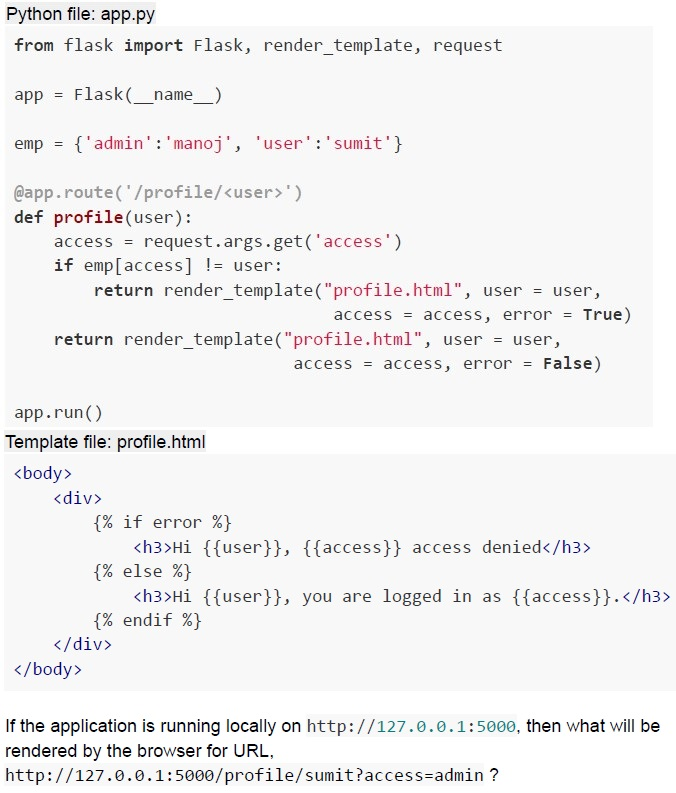 Consider the following flask application.
 Text of the picture (copyable)
Python file: app.py

```python
from flask import Flask, render_template, request

app = Flask(__name__)

emp = {'admin':'manoj', 'user':'sumit'}

@app.route('/profile/<user>')
def profile(user):
    access = request.args.get('access')
    if emp[access] != user:
        return render_template("profile.html", user = user,
                               access = access, error = True)
    return render_template("profile.html", user = user,
                           access = access, error = False)

app.run()
```

Template file: profile.html

```html
<body>
    <div>
        {% if error %}
            <h3>Hi {{user}}, {{access}} access denied</h3>
        {% else %}
            <h3>Hi {{user}}, you are logged in as {{access}}.</h3>
        {% endif %}
    </div>
</body>
```

If the application is running locally on http://127.0.0.1:5000, then what will be rendered by the browser for URL,
http://127.0.0.1:5000/profile/sumit?access=admin ?
text
Hi sumit, you are logged in as admin.

text
Hi sumit, you are logged in as user.

text
Hi sumit, admin access denied.

text
Hi sumit, user access denied.
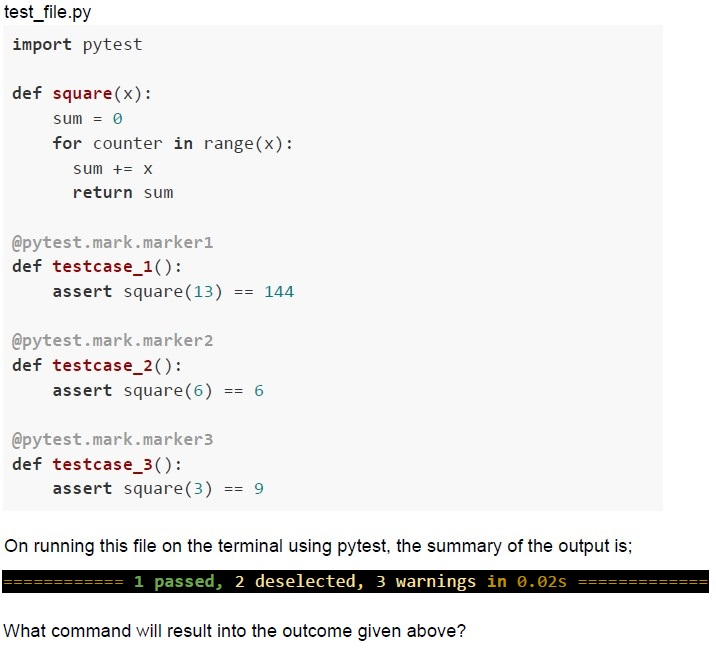 Consider the following function to be tested and test functions given in the Python code snippet below.
 Text of the picture (copyable)
test_file.py

```python
import pytest

def square(x):
    sum = 0
    for counter in range(x):
        sum += x
    return sum

@pytest.mark.marker1
def testcase_1():
    assert square(13) == 144

@pytest.mark.marker2
def testcase_2():
    assert square(6) == 6

@pytest.mark.marker3
def testcase_3():
    assert square(3) == 9
```

On running this file on the terminal using pytest, the summary of the output is;
============================= 1 passed, 2 deselected, 3 warnings in 0.02s =============================

What command will result into the outcome given above?
text
```
pytest test_file.py -k marker1
```

text
```
pytest test_file.py -m marker1
```

text
```
pytest test_file.py -m marker3
```

text
```
pytest test_file.py -m marker2
```

Text of the picture (copyable)
The hexadecimal equivalent of the IPv4 address 171.216.21.100 would be
____________.
- ABD8 6415
- D8AB 6415
- ABD8 1564
- D8AB 1564
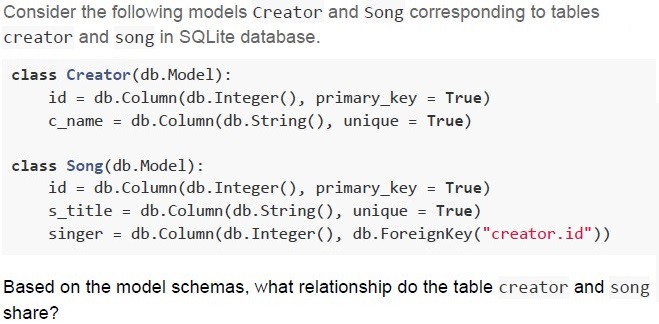
Text of the picture (copyable)
Consider the following models Creator and Song corresponding to tables creator and song in SQLite database.

```python
class Creator(db.Model):
    id = db.Column(db.Integer(), primary_key = True)
    c_name = db.Column(db.String(), unique = True)

class Song(db.Model):
    id = db.Column(db.Integer(), primary_key = True)
    s_title = db.Column(db.String(), unique = True)
    singer = db.Column(db.Integer(), db.ForeignKey("creator.id"))
```

Based on the model schemas, what relationship do the table creator and song share?- Many-to-Many
- One-to-Many
- One-to-One
- The tables are not at all related
- -H
- -X
- -d
- -r
- Both statements 1 and 2 are correct
- Both statements 1 and 2 are incorrect
- Statement 1 is correct but statement 2 is incorrect
- Statement 2 is correct but statement 1 is incorrect
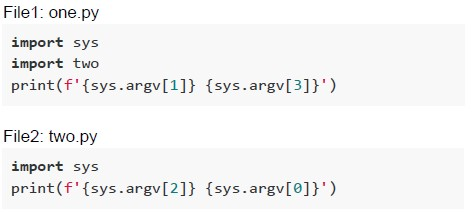 Consider two python files, one.py and two.py with following code snippets. What is the output of the following command “python one.py two.py two.py one.py ”?
Text of the picture (copyable)
File1: one.py
```python
import sys
import two
print(f'{sys.argv[1]} {sys.argv[3]}')
```

File2: two.py
```python
import sys
print(f'{sys.argv[2]} {sys.argv[0]}')
```
text
one.py two.py
one.py two.py

text
two.py one.py
one.py two.py
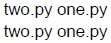
text
two.py one.py
two.py one.py

text
one.py two.py
two.py one.py
- Custom Elements
- Shadow DOM
- HTML Templates
- Web Assembly
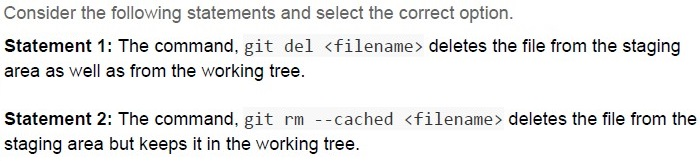
Text of the picture (copyable)
Consider the following statements and select the correct option.

**Statement 1:** The command, `git del <filename>` deletes the file from the staging area as well as from the working tree.

**Statement 2:** The command, `git rm --cached <filename>` deletes the file from the staging area but keeps it in the working tree.
- Statement 1 is correct, but statement 2 is incorrect.
- Statement 1 is incorrect, but statement 2 is correct.
- Both statements 1 and 2 are correct.
- Both statements 1 and 2 are incorrect.
- A WebAssembly specification
- A JavaScript framework
- A toolchain for compiling C/C++ code to WebAssembly
- An HTML and CSS editor
- Running SQL queries directly on the database
- Defining the structure of HTML templates
- Mapping Python objects to database tables and records
- Creating Web Routes in a Flask app
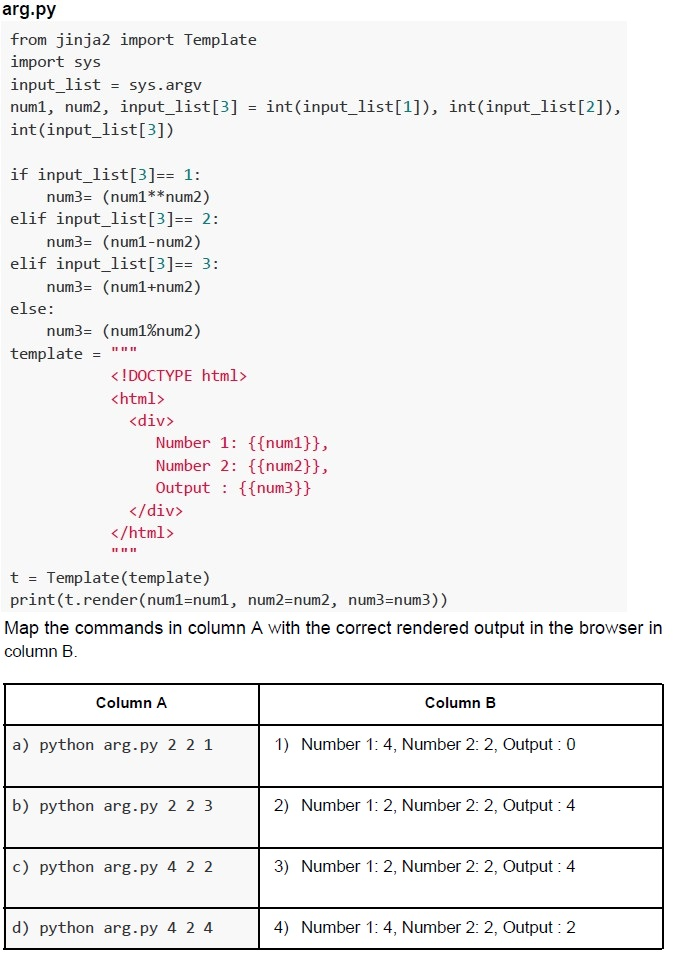 Consider the following Python code snippet.
 Text of the picture (copyable)
arg.py
```python
from jinja2 import Template
import sys
input_list = sys.argv
num1, num2, input_list[3] = int(input_list[1]), int(input_list[2]), int(input_list[3])

if input_list[3]== 1:
    num3= (num1**num2)
elif input_list[3]== 2:
    num3= (num1-num2)
elif input_list[3]== 3:
    num3= (num1+num2)
else:
    num3= (num1%num2)
template = """
<!DOCTYPE html>
<html>
<div>
    Number 1: {{num1}},
    Number 2: {{num2}},
    Output : {{num3}}
</div>
</html>
"""

t = Template(template)
print(t.render(num1=num1, num2=num2, num3=num3))
```
Map the commands in column A with the correct rendered output in the browser in column B.

| Column A | Column B |
|---|---|
| a) python arg.py 2 2 1 | 1) Number 1: 4, Number 2: 2, Output : 0 |
| b) python arg.py 2 2 3 | 2) Number 1: 2, Number 2: 2, Output : 4 |
| c) python arg.py 4 2 2 | 3) Number 1: 2, Number 2: 2, Output : 4 |
| d) python arg.py 4 2 4 | 4) Number 1: 4, Number 2: 2, Output : 2 |- a - 3, b - 2, c - 1, d - 4
- a - 2, b - 1, c - 4, d - 3
- a - 3, b - 1, c - 2, d - 4
- a - 2, b - 3, c - 4, d - 1
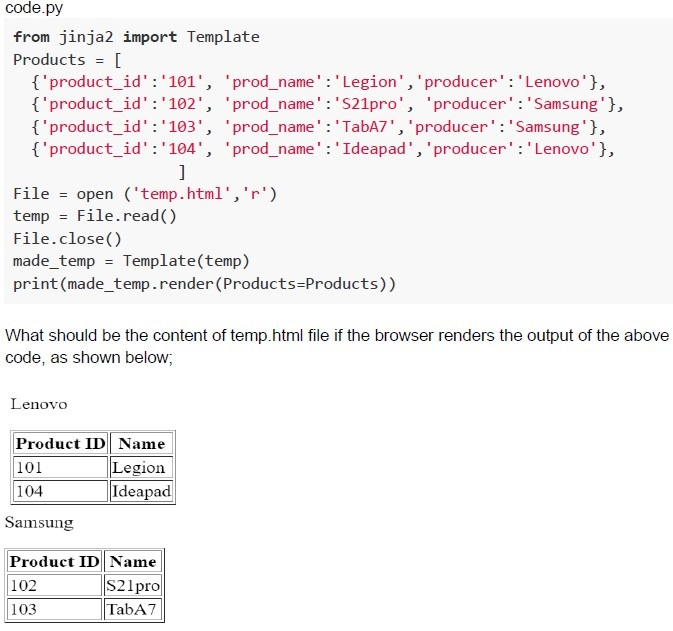 Given a Python code snippet, code.py is run on the terminal with an appropriate temp.html document.
 Text of the picture (copyable)
code.py
```python
from jinja2 import Template

Products = [
    {'product_id':'101', 'prod_name':'Legion', 'producer':'Lenovo'},
    {'product_id':'102', 'prod_name':'S21pro', 'producer':'Samsung'},
    {'product_id':'103', 'prod_name':'TabA7', 'producer':'Samsung'},
    {'product_id':'104', 'prod_name':'Ideapad', 'producer':'Lenovo'},
]

File = open ('temp.html','r')
temp = File.read()
File.close()
made_temp = Template(temp)
print(made_temp.render(Products=Products))
```

What should be the content of temp.html file if the browser renders the output of the above code, as shown below;

Lenovo

| Product ID | Name    |
|:-----------|:--------|
| 101        | Legion  |
| 104        | Ideapad |

Samsung

| Product ID | Name   |
|:-----------|:-------|
| 102        | S21pro |
| 103        | TabA7  |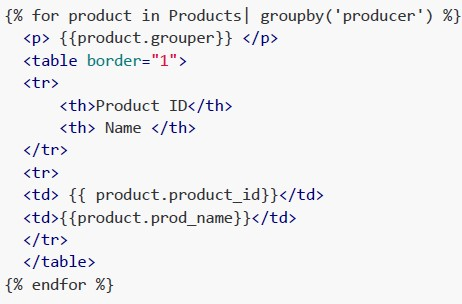
text
```html
{% for product in Products| groupby('producer') %}
<p> {{product.grouper}} </p>
<table border="1">
<tr>
<th>Product ID</th>
<th> Name </th>
</tr>
<tr>
<td> {{ product.product_id}}</td>
<td>{{product.prod_name}}</td>
</tr>
</table>
{% endfor %}
```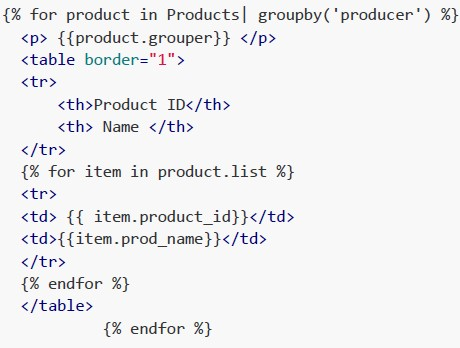
text
```html
{% for product in Products| groupby('producer') %}
<p> {{product.grouper}} </p>
<table border="1">
<tr>
<th>Product ID</th>
<th> Name </th>
</tr>
{% for item in product.list %}
<tr>
<td> {{ item.product_id}}</td>
<td>{{item.prod_name}}</td>
</tr>
{% endfor %}
</table>
{% endfor %}
```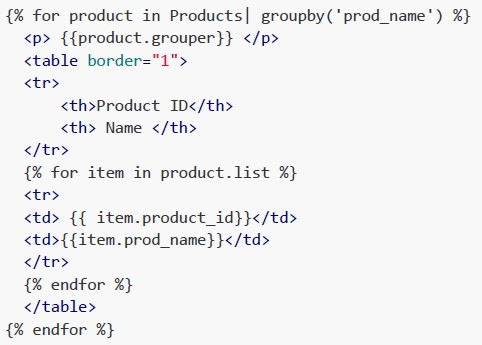
text
```html
{% for product in Products| groupby('prod_name') %}
<p> {{product.grouper}} </p>
<table border="1">
<tr>
<th>Product ID</th>
<th> Name </th>
</tr>
{% for item in product.list %}
<tr>
<td> {{ item.product_id}}</td>
<td>{{item.prod_name}}</td>
</tr>
{% endfor %}
</table>
{% endfor %}
```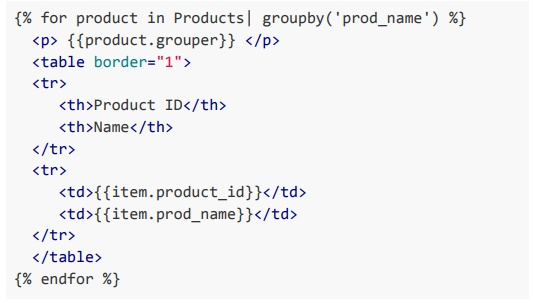
text
```html
{% for product in Products| groupby('prod_name') %}
    <p>{{product.grouper}}</p>
    <table border="1">
        <tr>
            <th>Product ID</th>
            <th>Name</th>
        </tr>
        <tr>
            <td>{{item.product_id}}</td>
            <td>{{item.prod_name}}</td>
        </tr>
    </table>
{% endfor %}
```
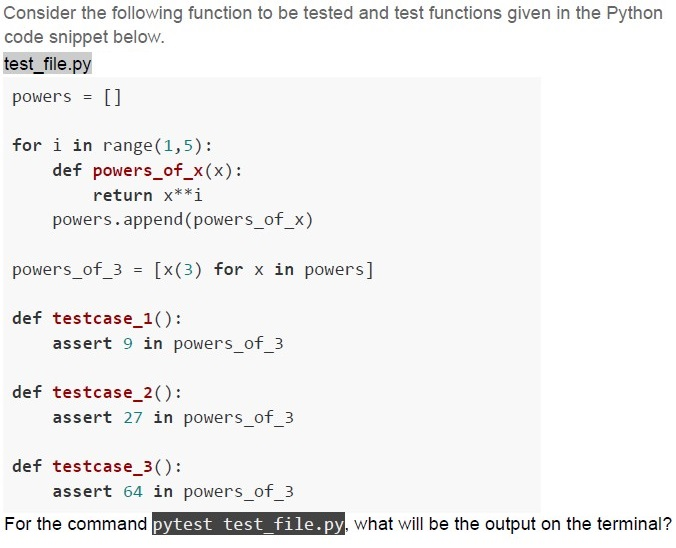
Text of the picture (copyable)
Consider the following function to be tested and test functions given in the Python code snippet below.

test_file.py

```python
powers = []

for i in range(1,5):
    def powers_of_x(x):
        return x**i
    powers.append(powers_of_x)

powers_of_3 = [x(3) for x in powers]

def testcase_1():
    assert 9 in powers_of_3

def testcase_2():
    assert 27 in powers_of_3

def testcase_3():
    assert 64 in powers_of_3
```

For the command `pytest test_file.py`, what will be the output on the terminal?
text
```
============================= 1 failed, 2 passed in 0.02s =============================
```


text
```
======================================== 3 failed in 0.02s ========================================
```

text
```
============================= 2 failed, 1 passed in 0.02s =============================
```
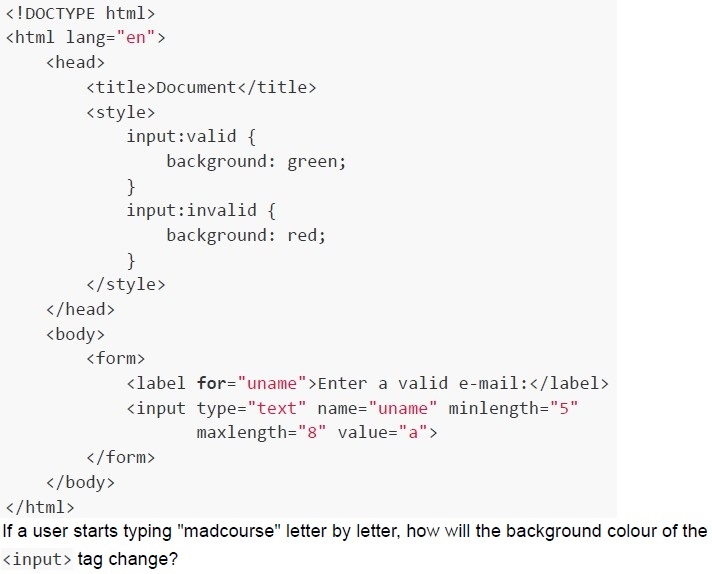 Consider the following HTML document rendered using a browser.
 Text of the picture (copyable)
```html
<!DOCTYPE html>
<html lang="en">
<head>
    <title>Document</title>
    <style>
        input:valid {
            background: green;
        }
        input:invalid {
            background: red;
        }
    </style>
</head>
<body>
    <form>
        <label for="uname">Enter a valid e-mail:</label>
        <input type="text" name="uname" minlength="5"
               maxlength="8" value="a">
    </form>
</body>
</html>
```
If a user starts typing "madcourse" letter by letter, how will the background colour of the
`<input>` tag change?- Red for first five letters, turns green till 8th letter and turns red back againafter next letter.
- Red for first five letters, and remain green after that.
- Green for first five letters, turns red till 8th letter and turns green back againafter next letter.
- Green for first five letters, and remain red after that.
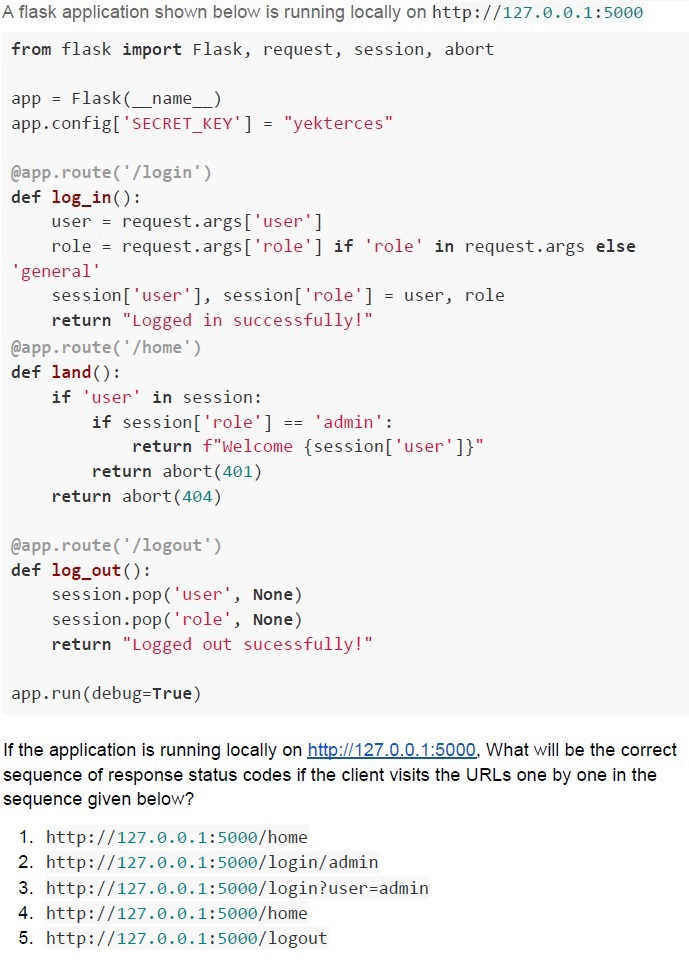
Text of the picture (copyable)
A flask application shown below is running locally on http://127.0.0.1:5000

```python
from flask import Flask, request, session, abort

app = Flask(__name__)
app.config['SECRET_KEY'] = "yekterces"

@app.route('/login')
def log_in():
    user = request.args['user']
    role = request.args['role'] if 'role' in request.args else 'general'
    session['user'], session['role'] = user, role
    return "Logged in successfully!"

@app.route('/home')
def land():
    if 'user' in session:
        if session['role'] == 'admin':
            return f"Welcome {session['user']}"
        return abort(401)
    return abort(404)

@app.route('/logout')
def log_out():
    session.pop('user', None)
    session.pop('role', None)
    return "Logged out sucessfully!"

app.run(debug=True)
```

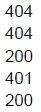
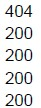
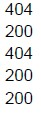
If the application is running locally on http://127.0.0.1:5000, What will be the correct sequence of response status codes if the client visits the URLs one by one in the sequence given below?

1. http://127.0.0.1:5000/home
2. http://127.0.0.1:5000/login/admin
3. http://127.0.0.1:5000/login?user=admin
4. http://127.0.0.1:5000/home
5. http://127.0.0.1:5000/logout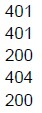
text
401
401
200
404
200
text
404
404
200
401
200
text
404
200
200
200
200
text
404
200
404
200
200
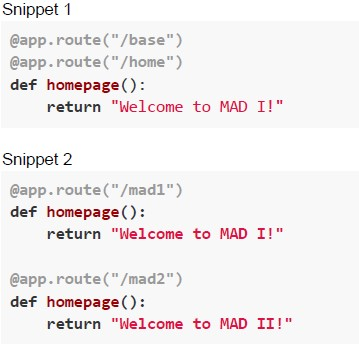 Consider the following two code snippets. Which of the following is/are correct options if the above snippets are run as view functions of a flask application ?
Text of the picture (copyable)
Snippet 1

```python
@app.route("/base")
@app.route("/home")
def homepage():
    return "Welcome to MAD I!"
```

Snippet 2

```python
@app.route("/mad1")
def homepage():
    return "Welcome to MAD I!"

@app.route("/mad2")
def homepage():
    return "Welcome to MAD II!"
```- Snippet 1 is valid, but Snippet 2 is invalid.
- Snippet 2 is valid, but Snippet 1 is invalid.
- Snippet 1 will run successfully, while Snippet 2 will raise an AssertionError.
- Snippet 2 will run successfully, while Snippet 1 will raise an AssertionError.
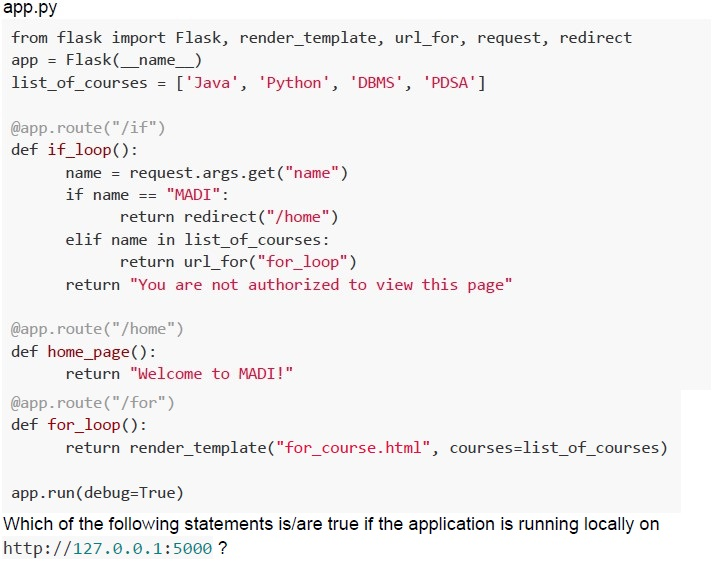 Consider the following flask application.
 Text of the picture (copyable)
app.py

```python
from flask import Flask, render_template, url_for, request, redirect
app = Flask(__name__)
list_of_courses = ['Java', 'Python', 'DBMS', 'PDSA']

@app.route("/if")
def if_loop():
    name = request.args.get("name")
    if name == "MADI":
        return redirect("/home")
    elif name in list_of_courses:
        return url_for("for_loop")
    return "You are not authorized to view this page"

@app.route("/home")
def home_page():
    return "Welcome to MADI!"

@app.route("/for")
def for_loop():
    return render_template("for_course.html", courses=list_of_courses)

app.run(debug=True)
```
Which of the following statements is/are true if the application is running locally on http://127.0.0.1:5000 ?
text
For URL, http://127.0.0.1:5000/if?name=MADI browser will display,
/home as output.

text
For URL, http://127.0.0.1:5000/if?name=Java browser will render,
for_course.html

text
For URL http://127.0.0.1:5000/if browser will display,
You are not authorized to view this page! as output.

text
For URL http://127.0.0.1:5000/if?name=Python browser will display,
/for as output.
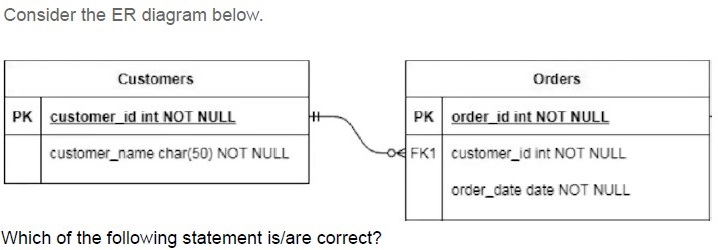
Text of the picture (copyable)
Consider the ER diagram below.

Customers
| PK | customer_id int NOT NULL |
|---|---|
| | customer_name char(50) NOT NULL |

Orders
| PK | order_id int NOT NULL |
|---|---|
| FK1 | customer_id int NOT NULL |
| | order_date date NOT NULL |

The ER diagram shows two tables, "Customers" and "Orders", connected by a relationship.
The "Customers" table has two columns:
- `customer_id` (Primary Key, integer, NOT NULL)
- `customer_name` (character varying of length 50, NOT NULL)

The "Orders" table has three columns:
- `order_id` (Primary Key, integer, NOT NULL)
- `customer_id` (Foreign Key 1, integer, NOT NULL)
- `order_date` (date, NOT NULL)

There is a relationship line connecting `customer_id` in the "Customers" table to `customer_id` in the "Orders" table.
The "Customers" side of the relationship has a double vertical line (representing "one and only one").
The "Orders" side of the relationship has a circle and a crow's foot (representing "zero or many").

Which of the following statement is/are correct?
- One order must have exactly one customer associated with it.
- One customer must have many orders associated with it.
- One customer may have zero or many orders associated with it.
- It's not mandatory for a customer to have an order.
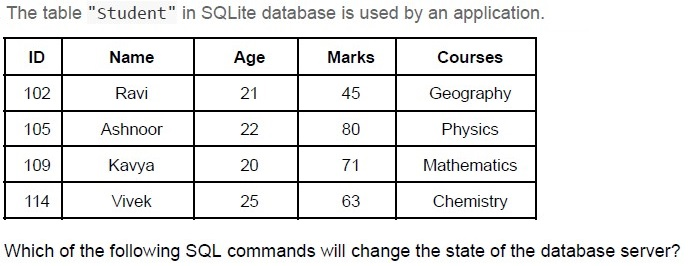
Text of the picture (copyable)
The table "student" in SQLite database is used by an application.

| ID | Name | Age | Marks | Courses |
|---|---|---|---|---|
| 102 | Ravi | 21 | 45 | Geography |
| 105 | Ashnoor | 22 | 80 | Physics |
| 109 | Kavya | 20 | 71 | Mathematics |
| 114 | Vivek | 25 | 63 | Chemistry |

Which of the following SQL commands will change the state of the database server?

text
```sql
CREATE TABLE Student (ID int NOT NULL, Name varchar(255) NOT NULL,
Age int, Marks int, Courses varchar(255), PRIMARY KEY (ID));
```

text
```sql
SELECT * from Student;
```

text
```sql
UPDATE Student SET Name = 'Kavya', Age = 20 WHERE ID = 109;
```

text
```sql
SELECT Name, Courses from Student where Marks>60;
```
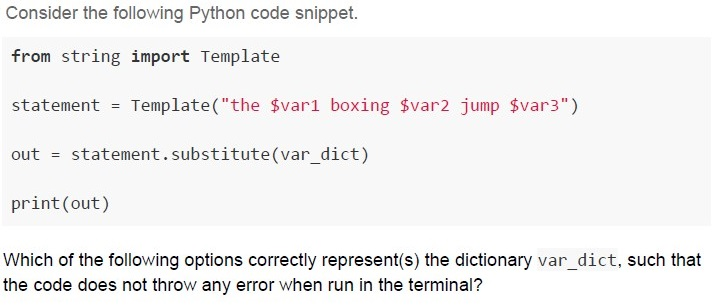
Text of the picture (copyable)
Consider the following Python code snippet.

```python
from string import Template

statement = Template("the $var1 boxing $var2 jump $var3")

out = statement.substitute(var_dict)

print(out)
```

Which of the following options correctly represent(s) the dictionary `var_dict`, such that the code does not throw any error when run in the terminal?
text
```python
var_dict = {'var1': 'five', 'var2': 'wizards'}
```
text
```python
var_dict = {'var1': 'five', 'var2': 'wizards', 'var3': 'quickly'}
```
text
```python
var_dict = { 'var1': 'five', 'var2': 'wizards', 'var3': 'quickly',
'var4': 'away' }
```
text
None of these
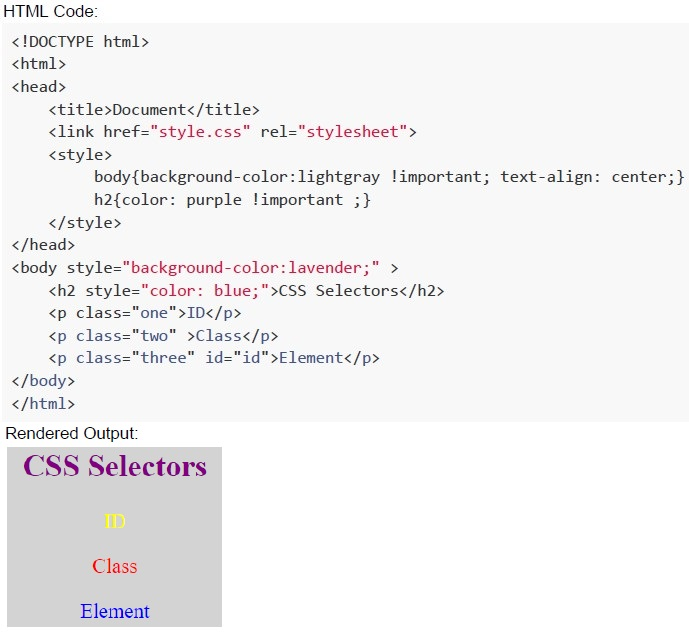 An HTML code is given below then which of the following CSS code will render the output as shown below.
 Text of the picture (copyable)
HTML Code:

```html
<!DOCTYPE html>
<html>
<head>
    <title>Document</title>
    <link href="style.css" rel="stylesheet">
    <style>
        body{background-color:lightgray !important; text-align: center;}
        h2{color: purple !important ;}
    </style>
</head>
<body style="background-color:lavender;" >
    <h2 style="color: blue;">CSS Selectors</h2>
    <p class="one">ID</p>
    <p class="two" >Class</p>
    <p class="three" id="id">Element</p>
</body>
</html>
```

Rendered Output:
A screenshot of a web page rendering. The background color is light gray. The text "CSS Selectors" is displayed in purple, centered. Below it, the text "ID" is displayed in yellow, centered. Below that, the text "Class" is displayed in red, centered. Below that, the text "Element" is displayed in blue, centered.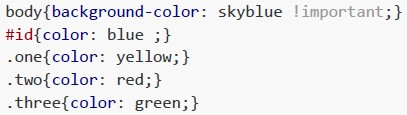
text
```css
body{background-color: skyblue !important;}
#id{color: blue ;}
.one{color: yellow;}
.two{color: red;}
.three{color: green;}
```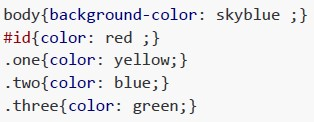
text
```css
body{background-color: skyblue ;}
#id{color: red ;}
.one{color: yellow;}
.two{color: blue;}
.three{color: green;}
```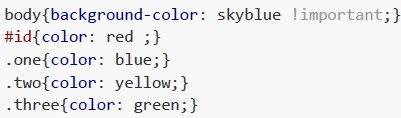
text
```css
body{background-color: skyblue !important;}
#id{color: red ;}
.one{color: blue;}
.two{color: yellow;}
.three{color: green;}
```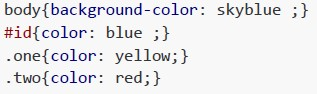
text
```css
body{background-color: skyblue ;}
#id{color: blue ;}
.one{color: yellow;}
.two{color: red;}
```
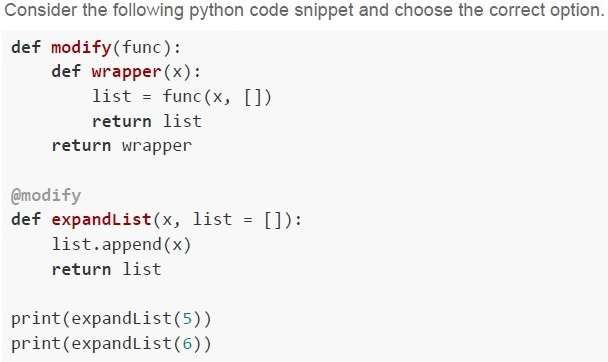
Text of the picture (copyable)
Consider the following python code snippet and choose the correct option.

```python
def modify(func):
    def wrapper(x):
        list = func(x, [])
        return list
    return wrapper

@modify
def expandList(x, list = []):
    list.append(x)
    return list

print(expandList(5))
print(expandList(6))
```
text
If `@modify` is commented and the updated code is run on the terminal, the output will be;
```
[5]
[6]
```

text
If @modify is commented and the updated code is run on the terminal, the output will be;

```
[5]
[5, 6]
```

text
If the code is run on the terminal directly, the output on the terminal will be;
[5]
[6]

text
If the code is run on the terminal directly, the output on the terminal will be;
```
[5]
[5, 6]
```
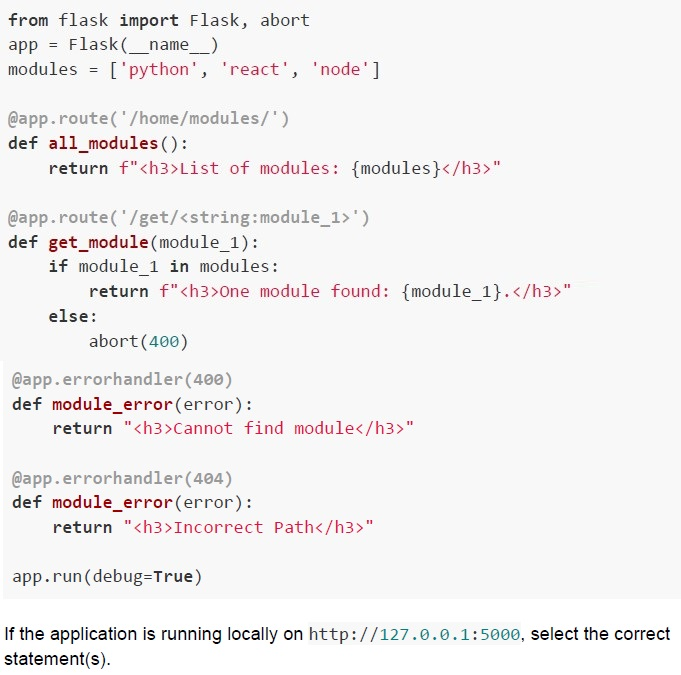 Consider the following flask application.
 Text of the picture (copyable)
```python
from flask import Flask, abort
app = Flask(__name__)
modules = ['python', 'react', 'node']

@app.route('/home/modules/')
def all_modules():
    return f"<h3>List of modules: {modules}</h3>"

@app.route('/get/<string:module_1>')
def get_module(module_1):
    if module_1 in modules:
        return f"<h3>One module found: {module_1}.</h3>"
    else:
        abort(400)

@app.errorhandler(400)
def module_error(error):
    return "<h3>Cannot find module</h3>"

@app.errorhandler(404)
def module_error(error):
    return "<h3>Incorrect Path</h3>"

app.run(debug=True)
```

If the application is running locally on http://127.0.0.1:5000, select the correct statement(s).
text
For the URL, http://127.0.0.1:5000/home/modules, the browser will render:
List of modules: ['python', 'react', 'node']

text
For the URL, http://127.0.0.1:5000/home/modules, the browser will render:
**Incorrect Path**

text
For the URL, http://127.0.0.1:5000/get/react/, the browser will render:
One module found: react.

text
For the URL, http://127.0.0.1:5000/get/vuejs, the browser will render;
Cannot find module
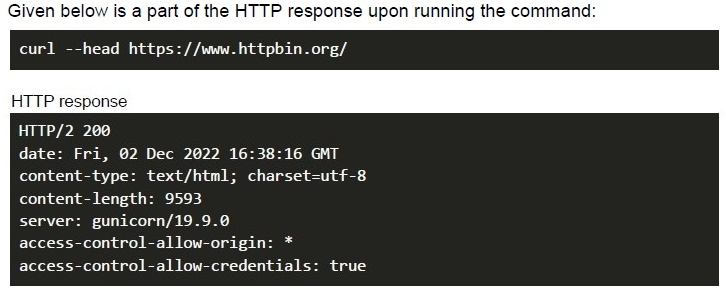
- charset=utf-8
- server: gunicorn/19.9.0
- content-type: text/html;
- None of these
- server: gunicorn/19.9.0
- content-type: text/html;
- HTTP/2 200
- None of these
- 166
- 42
- 56
- 111
- 24
- 12
- 10
- 5
Answer key
- Q1 (MCQ, 3 marks): D
- Q2 (MCQ, 3 marks): A
- Q3 (MCQ, 3 marks): B
- Q4 (MCQ, 3 marks): D
- Q5 (MCQ, 3 marks): C
- Q6 (MCQ, 3 marks): D
- Q7 (MCQ, 3 marks): C
- Q8 (MCQ, 3 marks): B
- Q9 (MCQ, 3 marks): B
- Q10 (MCQ, 2 marks): A
- Q11 (MCQ, 2 marks): C
- Q12 (MCQ, 2 marks): D
- Q13 (MCQ, 2 marks): B
- Q14 (MCQ, 2 marks): C
- Q15 (MCQ, 2 marks): C
- Q16 (MCQ, 4.5 marks): D
- Q17 (MCQ, 4.5 marks): B
- Q18 (MCQ, 4.5 marks): C
- Q19 (MCQ, 4.5 marks): B
- Q20 (MCQ, 4.5 marks): B
- Q21 (MSQ, 3 marks): A, C
- Q22 (MSQ, 3 marks): C, D
- Q23 (MSQ, 3 marks): A, C, D
- Q24 (MSQ, 3 marks): A, C
- Q25 (MSQ, 3 marks): B, C
- Q26 (MSQ, 4.5 marks): A, D
- Q27 (MSQ, 4.5 marks): B, C
- Q28 (MSQ, 4.5 marks): A, D
- Q29 (MCQ, 2 marks): C
- Q30 (MCQ, 2 marks): C
- Q31 (MCQ, 3 marks): B
- Q32 (MCQ, 3 marks): C
Concepts this paper tests
Auto-generated summary from the source site. Handy as a checklist; the lessons above explain each idea from scratch.
Here’s a structured summary of the core topics, concepts, principles, and equations essential for the "Modern Application Development I" exam, along with Mermaid knowledge graphs to visualize relationships.
1. Core Topics & Concepts
A. Web Development Fundamentals
1. URL Structure
Components:
- Protocol (
https,http) - Domain (
study.iitm.ac.in) - Subdomain (
seek.study.iitm.ac.in) - Path (
/courses/ns_23t3_cs2003) - Query Parameters (
?type=lesson&tab=course)
- Protocol (
Key Takeaway:
seekis a subdomain, not part of the domain.- Query parameters follow
?and are key-value pairs (key=value).
2. HTML & CSS Rendering
Box Model:
display: block(takes full width, new line).display: inline(shares line, no width/height).margin,border,paddingaffect layout.
Specificity Hierarchy (Highest to Lowest):
- Inline Styles (
style="color: blue") - ID Selectors (
#id) - Class/Attribute Selectors (
.class) Element Selectors (
div,p)!importantoverrides all.
- Inline Styles (
Pseudo-classes:
:valid/invalid(form validation).:hover,:active.
3. HTTP & APIs
HTTP Methods:
GET,POST,PUT,DELETE,HEAD.
Status Codes:
200(OK),400(Bad Request),401(Unauthorized),404(Not Found),500(Server Error).
cURL Commands:
-X(set HTTP method),-H(headers),-d(data).- Example:
curl -X POST -H "Content-Type: application/json" -d '{"key":"value"}' URL.
MIME Types:
Content-Type: text/html(indicates response format).charset=utf-8(encoding).
4. Flask (Python Web Framework)
Routing:
@app.route('/path')(maps URLs to functions).- Dynamic routes:
@app.route('/user/<username>').
Templates (Jinja2):
render_template("file.html", var=value).- Loops:
{% for item in list %}. - Conditionals:
{% if condition %}. - Filters:
{{ var|upper }}.
Sessions & Cookies:
session['key'] = value(server-side storage).request.args(query parameters),request.form(POST data).
Error Handling:
@app.errorhandler(404)(custom error pages).abort(404)(trigger HTTP errors).
5. Testing (Pytest)
Assertions:
assert condition, "message".
Markers:
@pytest.mark.marker_name(select tests with-m marker_name).
Coverage:
- Statement Coverage: All lines executed.
- Branch Coverage: All branches (if/else) executed.
- Condition Coverage: All conditions in branches tested.
- Key Insight: 100% statement coverage does not imply 100% branch/condition coverage.
6. Databases (SQLite, SQLAlchemy)
SQL Commands:
CREATE TABLE,SELECT,UPDATE,DELETE.WHERE,GROUP BY,JOIN.
Relationships:
- One-to-Many: Foreign key in the "many" table (e.g.,
Orders.customer_id → Customers.id). - Many-to-Many: Junction table with two foreign keys.
- One-to-Many: Foreign key in the "many" table (e.g.,
ORM (SQLAlchemy):
- Maps Python classes to database tables.
Example:
class User(db.Model):
    id = db.Column(db.Integer, primary_key=True)
    name = db.Column(db.String(50))
7. Git
Commands:
git rm --cached <file>(remove from staging, keep in working directory).git rm <file>(delete from staging + working directory).
Workflow:
- Working Directory → Staging (
git add) → Repository (git commit).
- Working Directory → Staging (
8. WebAssembly & Emscripten
WebAssembly (WASM):
- Binary format for high-performance web apps.
- Runs at near-native speed.
Emscripten:
- Toolchain to compile C/C++ to WASM.
9. Networking Basics
Round-Trip Time (RTT):
- Time for a request to reach a server and return.
Formula:
RTT (ms) = (Distance × 2) / Speed of Light- Example: For 1500 km,
RTT = (1500 × 2 × 1000) / (3 × 10^8) ≈ 10 ms.
- Example: For 1500 km,
Throughput:
- Maximum requests per second =
1 / RTT.
- Maximum requests per second =
10. Web Components
Custom Elements:
- Define new HTML tags (
customElements.define()).
- Define new HTML tags (
Shadow DOM:
- Encapsulated DOM subtree.
HTML Templates:
<template>(reusable markup).
- Not a Web Component: WebAssembly.
B. Software Engineering Principles
1. Code Coverage
- Statement Coverage: All lines executed.
- Branch Coverage: All branches (if/else) executed.
- Condition Coverage: All conditions in branches tested.
Key Insight:
- 100% statement coverage ≠ 100% branch/condition coverage.
2. Decorators (Python)
- Syntax:
@decorator. Example:
def modify(func):
    def wrapper(*args):
        return func(*args) + 1
    return wrapper
@modify def add(x): return x ```
add(5)returns6.
3. Jinja2 Templating
Grouping:
{% for item in list|groupby('key') %}.
Filters:
{{ var|upper }},{{ list|length }}.
C. Mathematics (Networking)
1. Round-Trip Time (RTT)
Formula:
RTT (seconds) = (Distance × 2) / Speed of Light- Speed of light =
3 × 10^8 m/s. - Convert distance to meters (1 km = 1000 m).
- Speed of light =
Example:
- Distance = 1500 km =
1.5 × 10^6 m. - RTT =
(1.5 × 10^6 × 2) / (3 × 10^8) = 0.01 s = 10 ms.
- Distance = 1500 km =
2. Request Rate
Maximum Requests per Second:
Requests/second = 1 / RTT- Example: RTT = 10 ms →
1 / 0.01 = 100 requests/second. But: Sequential dependencies reduce throughput.
- If
A → B → C, total RTT = RTT_A + RTT_B + RTT_C. - Requests/second =
1 / (RTT_A + RTT_B + RTT_C).
- If
- Example: RTT = 10 ms →
2. Key Equations (Mathematics/Networking)
| Concept | Equation |
|---|---|
| Round-Trip Time | RTT (s) = (Distance × 2) / Speed of Light |
| Requests per Second | Max Requests/s = 1 / RTT |
| IPv4 to Hex | Split into octets, convert each to hex (e.g., 171 → AB, 216 → D8). |
Graph 2: Database & ORM
Graph 3: Networking & Git
Graph 4: Testing & Coverage
Graph 5: Flask Workflow
4. Exam Tips
- URL Breakdown: Always identify protocol, domain, subdomain, path, and query parameters.
- CSS Specificity: Inline > ID > Class > Element.
!importantoverrides all. Flask Routes:
- Dynamic routes:
@app.route('/user/<username>'). - Query parameters:
request.args.get('key').
- Dynamic routes:
Testing:
- 100% statement coverage ≠ 100% branch coverage.
- Use
pytest -m markerto run specific tests.
Database Relationships:
- One-to-Many: Foreign key in the "many" table.
- Many-to-Many: Junction table with two foreign keys.
Networking:
- RTT =
(Distance × 2) / Speed of Light. - Convert distance to meters (1 km = 1000 m).
- RTT =
Git:
git rm --cachedremoves from staging but keeps the file.git rmdeletes the file entirely.
Jinja2:
groupby('key')groups items by a key.{% for %}loops,{% if %}conditionals.
- WebAssembly: Emscripten compiles C/C++ to WASM.
HTTP Headers:
Content-Typeindicates MIME type.200means success.