Home / Past papers / MAD1 Quiz 2 / this paper
IIT M FOUNDATION AN EXAM QDF4 16 Mar - 16 Mar 2025
Elapsed 00:00
Text of the picture (copyable)
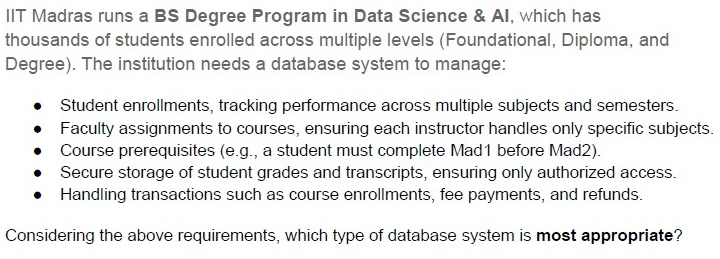
IIT Madras runs a **BS Degree Program in Data Science & AI**, which has thousands of students enrolled across multiple levels (Foundational, Diploma, and Degree). The institution needs a database system to manage:

* Student enrollments, tracking performance across multiple subjects and semesters.
* Faculty assignments to courses, ensuring each instructor handles only specific subjects.
* Course prerequisites (e.g., a student must complete Mad1 before Mad2).
* Secure storage of student grades and transcripts, ensuring only authorized access.
* Handling transactions such as course enrollments, fee payments, and refunds.

Considering the above requirements, which type of database system is **most appropriate**?
- NoSQL (Document-based database like MongoDB)
- Graph Database (e.g., Neo4j)
- RDBMS (e.g., PostgreSQL, MySQL, SQLite)
- Key-Value Store (e.g., Redis, DynamoDB)
Which of the following best describes the primary advantage of asynchronous updates in web applications?
- It ensures that all elements of a web page are loaded at the same time.
- It improves performance by allowing parts of a webpage to update withoutrequiring a full reload.
- It forces the client to wait until the server responds before interacting with thepage.
- It requires a high-speed internet connection to function correctly.
Text of the picture (copyable)
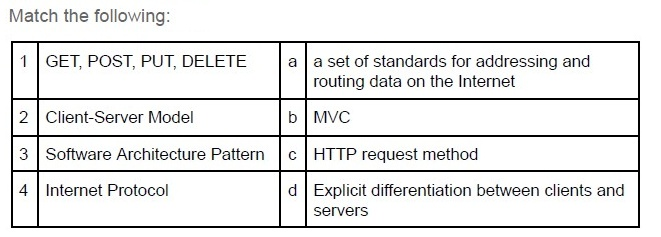
Match the following:

| | | | |
|---|---|---|---|
| 1 | GET, POST, PUT, DELETE | a | a set of standards for addressing and routing data on the Internet |
| 2 | Client-Server Model | b | MVC |
| 3 | Software Architecture Pattern | c | HTTP request method |
| 4 | Internet Protocol | d | Explicit differentiation between clients and servers |
- 1-c, 2-d, 3-b, 4-a
- 1-c, 2-b, 3-d, 4-a
- 1-c, 2-d, 3-a, 4-b
- 1-a, 2-d, 3-b, 4-c
Text of the picture (copyable)
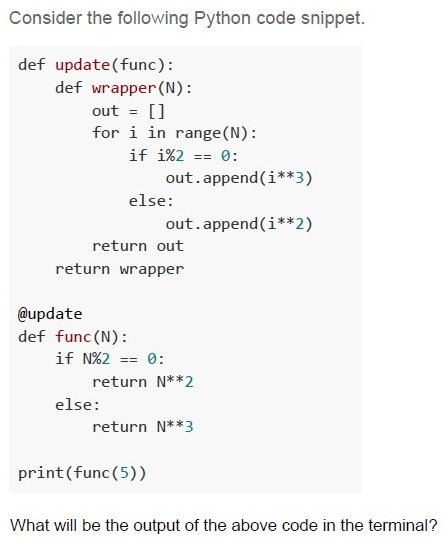
Consider the following Python code snippet.

```python
def update(func):
    def wrapper(N):
        out = []
        for i in range(N):
            if i%2 == 0:
                out.append(i**3)
            else:
                out.append(i**2)
        return out
    return wrapper

@update
def func(N):
    if N%2 == 0:
        return N**2
    else:
        return N**3

print(func(5))
```

What will be the output of the above code in the terminal?- 25
- 125
- [0, 1, 4, 27, 16]
- [0, 1, 8, 9, 64]
Text of the picture (copyable)
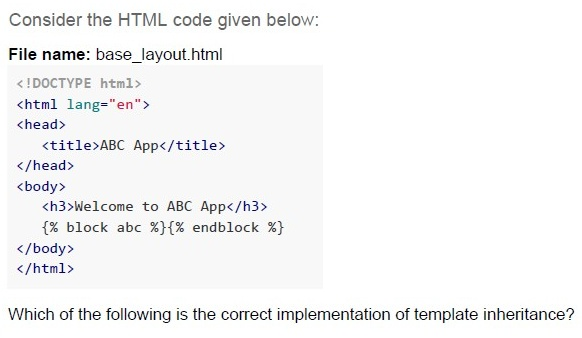
Consider the HTML code given below:

File name: base_layout.html

```html
<!DOCTYPE html>
<html lang="en">
<head>
    <title>ABC App</title>
</head>
<body>
    <h3>Welcome to ABC App</h3>
    {% block abc %}{% endblock %}
</body>
</html>
```

Which of the following is the correct implementation of template inheritance?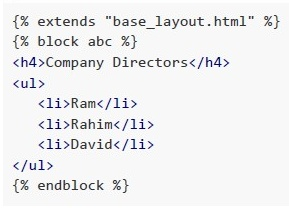
text
```jinja2
{% extends "base_layout.html" %}
{% block abc %}
<h4>Company Directors</h4>
<ul>
    <li>Ram</li>
    <li>Rahim</li>
    <li>David</li>
</ul>
{% endblock %}
```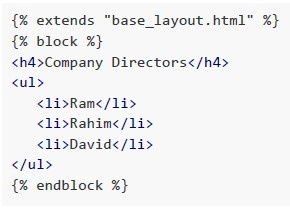
text
```html
{% extends "base_layout.html" %}
{% block %}
<h4>Company Directors</h4>
<ul>
    <li>Ram</li>
    <li>Rahim</li>
    <li>David</li>
</ul>
{% endblock %}
```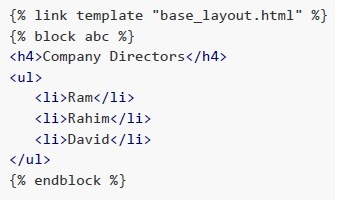
text
```html
{% link template "base_layout.html" %}
{% block abc %}
<h4>Company Directors</h4>
<ul>
    <li>Ram</li>
    <li>Rahim</li>
    <li>David</li>
</ul>
{% endblock %}
```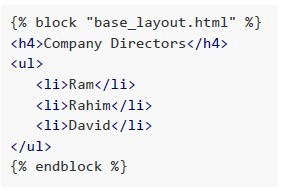
text
```jinja2
{% block "base_layout.html" %}
<h4>Company Directors</h4>
<ul>
    <li>Ram</li>
    <li>Rahim</li>
    <li>David</li>
</ul>
{% endblock %}
```
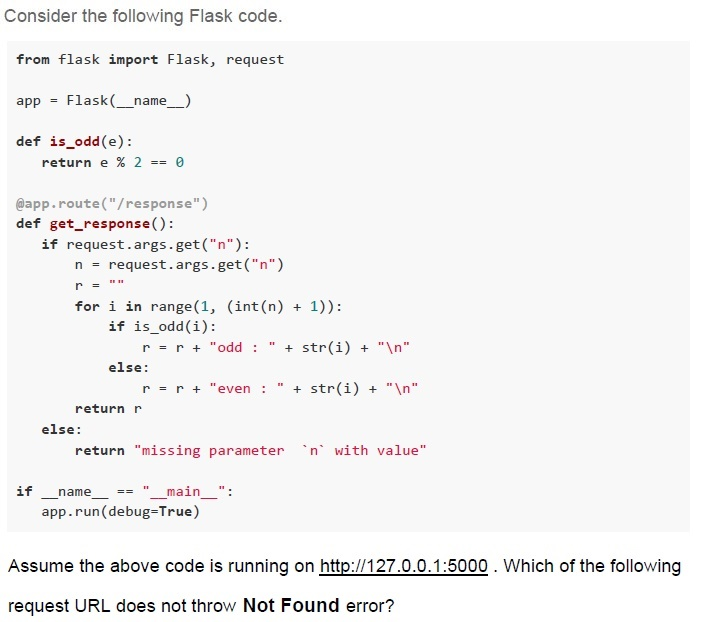
Text of the picture (copyable)
Consider the following Flask code.

```python
from flask import Flask, request

app = Flask(__name__)

def is_odd(e):
    return e % 2 == 0

@app.route("/response")
def get_response():
    if request.args.get("n"):
        n = request.args.get("n")
        r = ""
        for i in range(1, (int(n) + 1)):
            if is_odd(i):
                r = r + "odd : " + str(i) + "\n"
            else:
                r = r + "even : " + str(i) + "\n"
        return r
    else:
        return "missing parameter `n` with value"

if __name__ == "__main__":
    app.run(debug=True)
```

Assume the above code is running on http://127.0.0.1:5000 . Which of the following
request URL does not throw Not Found error?
text
http://127.0.0.1:5000/response/n=6

text
http://127.0.0.1:5000/response/

text
http://127.0.0.1:5000/response&n=6

text
http://127.0.0.1:5000/response?n=6
A web server is handling requests and has an 8-core processor, 32 GB of RAM, and a network bandwidth of 500 Mbps. The application running on the server is capable of generating 100 HTML pages every second. Each of these pages includes an image file that is 500 KB in size. What is the maximum number of requests per second that the server can handle?
- 100 requests/sec
- 125 requests/sec
- 250 requests/sec
- 400 requests/sec
The lens of an HDD can read data on the rotating disk with the speed of 36,000 bits per second. The disk is designed such that 600 bits pass under the lens for every revolution of the disk. What should be the maximum speed of the disk so that the lens does not miss any data?
- 60 RPM
- 100 RPM
- 3600 RPM
- 6000 RPM
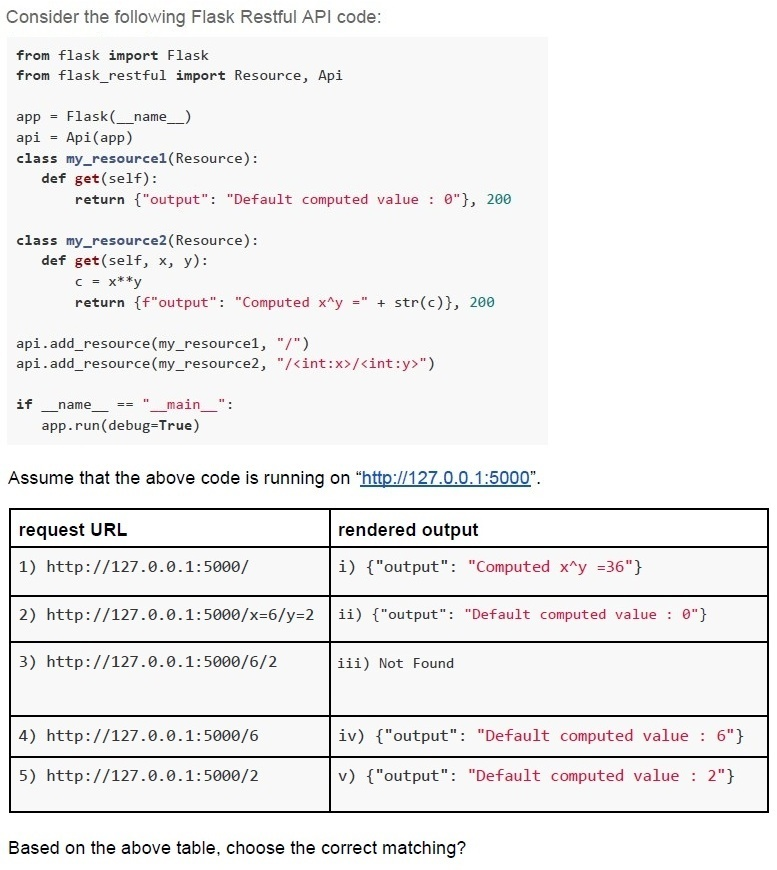
Text of the picture (copyable)
Consider the following Flask Restful API code:

```python
from flask import Flask
from flask_restful import Resource, Api

app = Flask(__name__)
api = Api(app)

class my_resource1(Resource):
    def get(self):
        return {"output": "Default computed value : 0"}, 200

class my_resource2(Resource):
    def get(self, x, y):
        c = x**y
        return f"output": "Computed x^y = " + str(c)}, 200

api.add_resource(my_resource1, "/")
api.add_resource(my_resource2, "/<int:x>/<int:y>")

if __name__ == "__main__":
    app.run(debug=True)
```

Assume that the above code is running on "http://127.0.0.1:5000".

| request URL | rendered output |
|---|---|
| 1) http://127.0.0.1:5000/ | i) {"output": "Computed x^y =36"} |
| 2) http://127.0.0.1:5000/x=6/y=2 | ii) {"output": "Default computed value : 0"} |
| 3) http://127.0.0.1:5000/6/2 | iii) Not Found |
| 4) http://127.0.0.1:5000/6 | iv) {"output": "Default computed value : 6"} |
| 5) http://127.0.0.1:5000/2 | v) {"output": "Default computed value : 2"} |

Based on the above table, choose the correct matching?- 1-ii, 2-i, 3-iii, 4-iv, 5-v
- 1-iii, 2-iii, 3-iii, 4-v, 5-iv
- 1-ii, 2-i, 3-i, 4-iv, 5-v
- 1-ii, 2-iii, 3-i, 4-iii, 5-iii
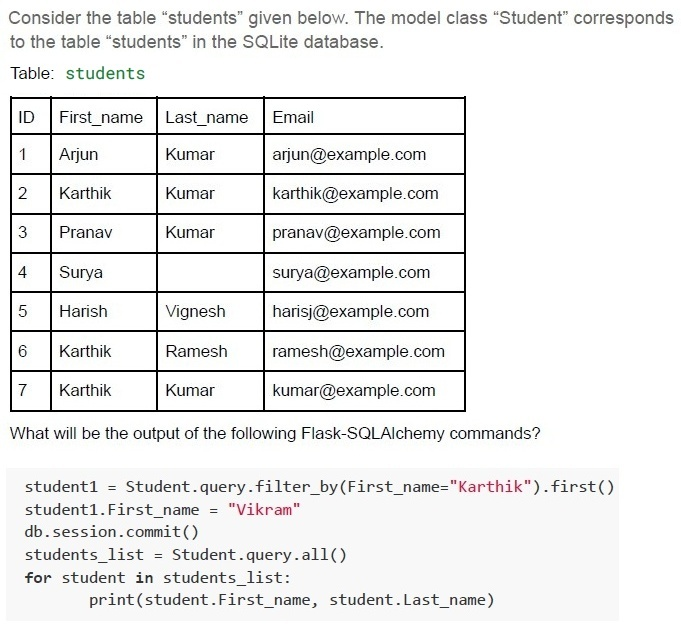
Text of the picture (copyable)
Consider the table "students" given below. The model class "Student" corresponds to the table "students" in the SQLite database.

Table: students

| ID | First_name | Last_name | Email             |
|----|------------|-----------|-------------------|
| 1  | Arjun      | Kumar     | arjun@example.com |
| 2  | Karthik    | Kumar     | karthik@example.com |
| 3  | Pranav     | Kumar     | pranav@example.com |
| 4  | Surya      |           | surya@example.com |
| 5  | Harish     | Vignesh   | harisj@example.com |
| 6  | Karthik    | Ramesh    | ramesh@example.com |
| 7  | Karthik    | Kumar     | kumar@example.com |

What will be the output of the following Flask-SQLAlchemy commands?

```python
student1 = Student.query.filter_by(First_name="Karthik").first()
student1.First_name = "Vikram"
db.session.commit()
students_list = Student.query.all()
for student in students_list:
    print(student.First_name, student.Last_name)
```
text
Arjun Kumar
Karthik Kumar
Pranav Kumar
Surya
Harish Vignesh
Karthik Ramesh
Karthik Kumar

text
Arjun Kumar
Vikram Kumar
Pranav Kumar
Surya
Harish Vignesh
Vikram Ramesh
Vikram Kumar

text
Arjun Kumar
Vikram Kumar
Pranav Kumar
Surya
Harish Vignesh
Karthik Ramesh
Karthik Kumar

text
Vikram Kumar
Karthik Ramesh
Karthik Kumar
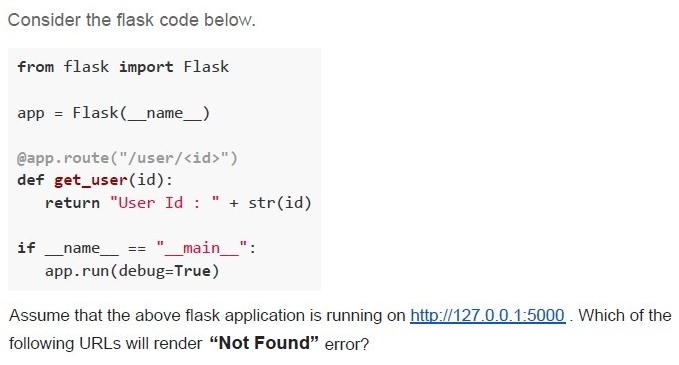
Text of the picture (copyable)
Consider the flask code below.

```python
from flask import Flask

app = Flask(__name__)

@app.route("/user/<id>")
def get_user(id):
    return "User Id : " + str(id)

if __name__ == "__main__":
    app.run(debug=True)
```

Assume that the above flask application is running on http://127.0.0.1:5000 . Which of the following URLs will render "Not Found" error?
text
http://127.0.0.1:5000/user/2001

text
http://127.0.0.1:5000/user/id=2001

text
http://127.0.0.1:5000/id=2001

text
http://127.0.0.1:5000/2001
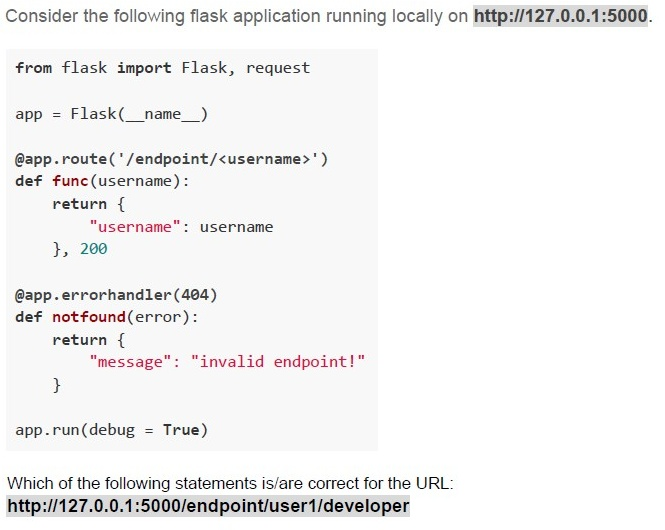
Text of the picture (copyable)
Consider the following flask application running locally on http://127.0.0.1:5000.

```python
from flask import Flask, request

app = Flask(__name__)

@app.route('/endpoint/<username>')
def func(username):
    return {
        "username": username
    }, 200

@app.errorhandler(404)
def notfound(error):
    return {
        "message": "invalid endpoint!"
    }

app.run(debug = True)
```

Which of the following statements is/are correct for the URL:
http://127.0.0.1:5000/endpoint/user1/developer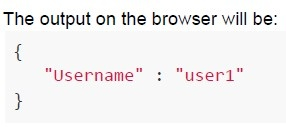
text
The output on the browser will be:
```
{
  "Username" : "user1"
}
```
text
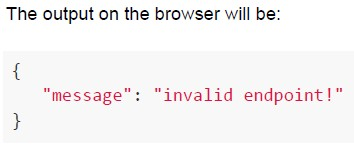
The output on the browser will be:

```json
{
    "message": "invalid endpoint!"
}
```
text
The status code of the response will be 200

text
The status code of the response will be 404
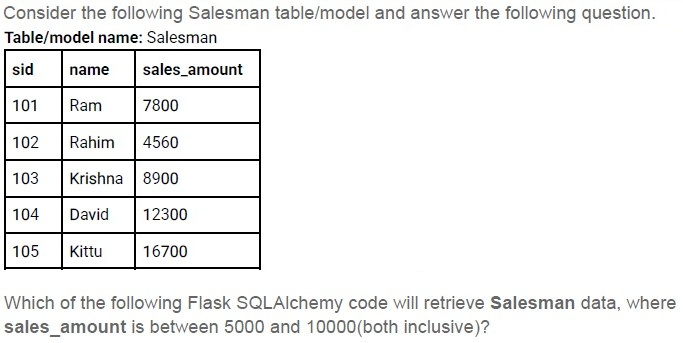
Text of the picture (copyable)
Consider the following Salesman table/model and answer the following question.
Table/model name: Salesman

| sid | name    | sales_amount |
| :-- | :------ | :----------- |
| 101 | Ram     | 7800         |
| 102 | Rahim   | 4560         |
| 103 | Krishna | 8900         |
| 104 | David   | 12300        |
| 105 | Kittu   | 16700        |

Which of the following Flask SQLAlchemy code will retrieve Salesman data, where **sales_amount** is between 5000 and 10000(both inclusive)?
- sales_man= Salesman.query.filter((Salesman.sales_amount >= 5000) &(Salesman.sales_amount <= 10000)).all()
- sales_man= Salesman.query.filter(and_(Salesman.sales_amount >= 5000,Salesman.sales_amount <= 10000)).all()
- sales_man= Salesman.query.filter(sales_amount >= 5000 and sales_amount <=10000)
- sales_man= Salesman.query.filter_by(sales_amount >= 5000, sales_amount <=10000)
Text of the picture (copyable)
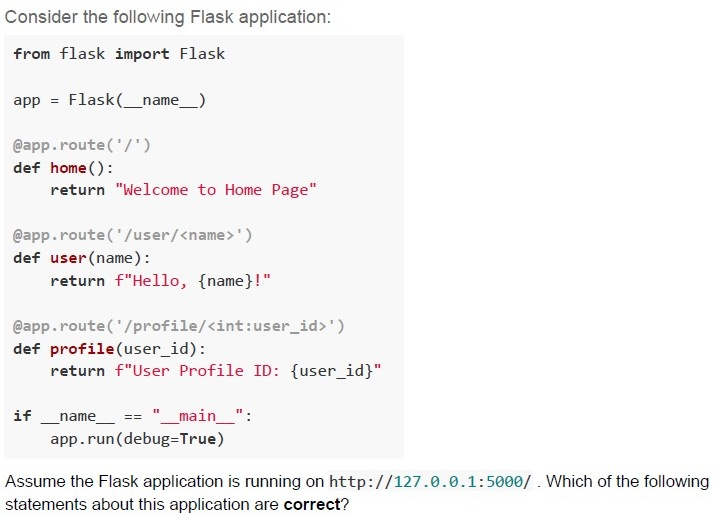
Consider the following Flask application:

```python
from flask import Flask

app = Flask(__name__)

@app.route('/')
def home():
    return "Welcome to Home Page"

@app.route('/user/<name>')
def user(name):
    return f"Hello, {name}!"

@app.route('/profile/<int:user_id>')
def profile(user_id):
    return f"User Profile ID: {user_id}"

if __name__ == "__main__":
    app.run(debug=True)
```

Assume the Flask application is running on http://127.0.0.1:5000/. Which of the following statements about this application are **correct**?
text
Accessing http://127.0.0.1:5000/user/John will return: Hello, John!

text
Accessing http://127.0.0.1:5000/user/07 will return: Hello, !

text
Accessing http://127.0.0.1:5000/profile/10 will return: User Profile ID: 10

text
Accessing http://127.0.0.1:5000/user/ will result in a **404 error**.
Text of the picture (copyable)
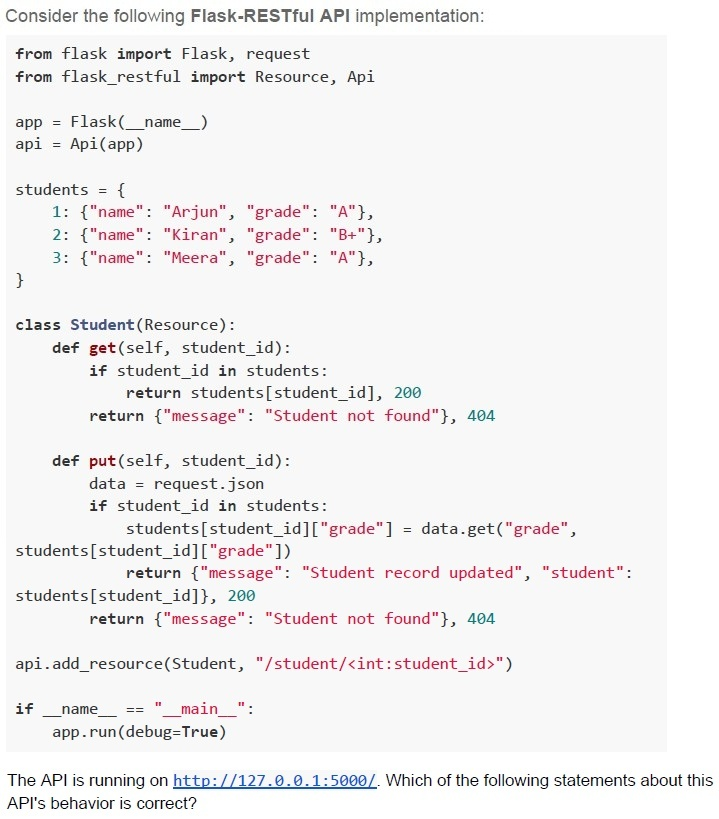
Consider the following Flask-RESTful API implementation:

```python
from flask import Flask, request
from flask_restful import Resource, Api

app = Flask(__name__)
api = Api(app)

students = {
    1: {"name": "Arjun", "grade": "A"},
    2: {"name": "Kiran", "grade": "B+"},
    3: {"name": "Meera", "grade": "A"},
}

class Student(Resource):
    def get(self, student_id):
        if student_id in students:
            return students[student_id], 200
        return {"message": "Student not found"}, 404

    def put(self, student_id):
        data = request.json
        if student_id in students:
            students[student_id]["grade"] = data.get("grade",
                                                    students[student_id]["grade"])
            return {"message": "Student record updated", "student":
                    students[student_id]}, 200
        return {"message": "Student not found"}, 404

api.add_resource(Student, "/student/<int:student_id>")

if __name__ == "__main__":
    app.run(debug=True)
```

The API is running on http://127.0.0.1:5000/. Which of the following statements about this API's behavior is correct?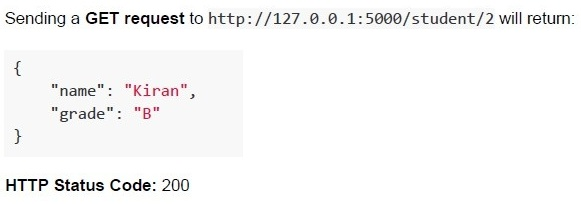
text
Sending a GET request to http://127.0.0.1:5000/student/2 will return:

```json
{
  "name": "Kiran",
  "grade": "B"
}
```

HTTP Status Code: 200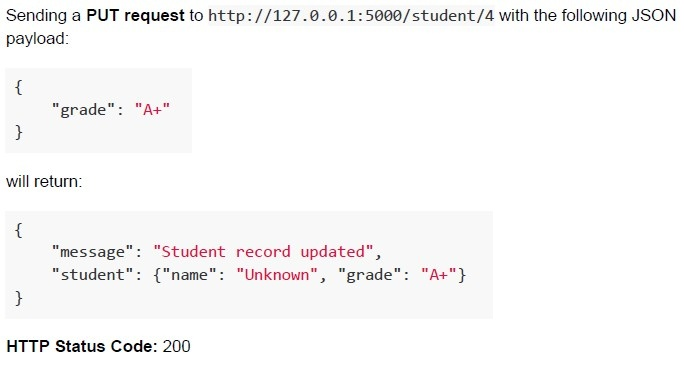
text
Sending a **PUT request** to http://127.0.0.1:5000/student/4 with the following JSON payload:

```json
{
  "grade": "A+"
}
```

will return:

```json
{
  "message": "Student record updated",
  "student": {"name": "Unknown", "grade": "A+"}
}
```

HTTP Status Code: 200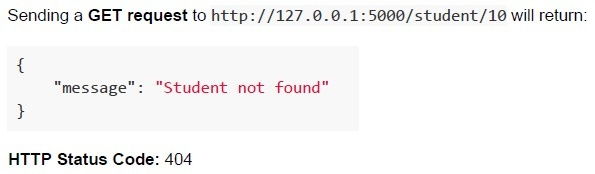
text
Sending a **GET** request to http://127.0.0.1:5000/student/10 will return:

```
{
  "message": "Student not found"
}
```

**HTTP Status Code**: 404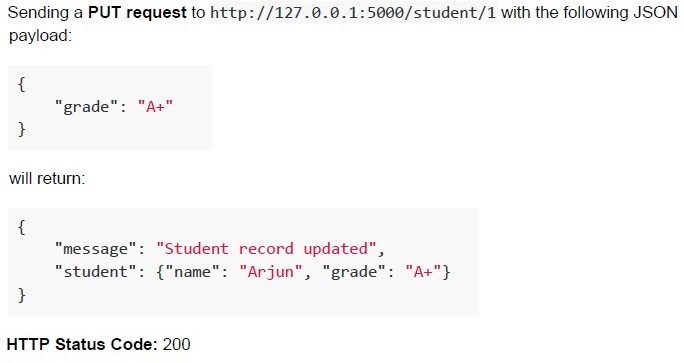
text
Sending a **PUT request** to http://127.0.0.1:5000/student/1 with the following JSON payload:

```json
{
  "grade": "A+"
}
```

will return:

```json
{
  "message": "Student record updated",
  "student": {"name": "Arjun", "grade": "A+"}
}
```

HTTP Status Code: 200
Text of the picture (copyable)
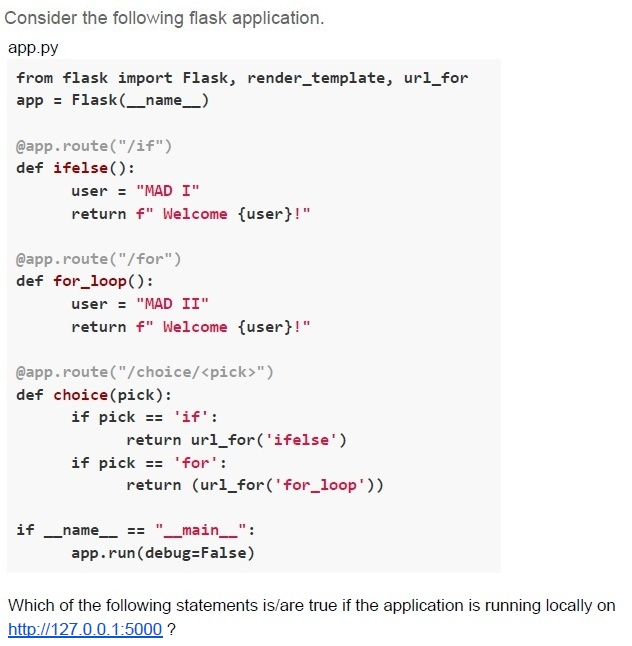
Consider the following flask application.
app.py

```python
from flask import Flask, render_template, url_for
app = Flask(__name__)

@app.route("/if")
def ifelse():
    user = "MAD I"
    return f" Welcome {user}!"

@app.route("/for")
def for_loop():
    user = "MAD II"
    return f" Welcome {user}!"

@app.route("/choice/<pick>")
def choice(pick):
    if pick == 'if':
        return url_for('ifelse')
    if pick == 'for':
        return (url_for('for_loop'))

if __name__ == "__main__":
    app.run(debug=False)
```

Which of the following statements is/are true if the application is running locally on
http://127.0.0.1:5000 ?
text
For URL, http://127.0.0.1:5000/choice/for browser will display Welcome MAD II! as output

text
For URL, http://127.0.0.1:5000/choice/if browser will render Welcome MAD I! as output

text
For URL http://127.0.0.1:5000/choice/for browser will display /for as output.

text
For URL http://127.0.0.1:5000/choice/if browser will display /if as output.
Answer key
- Q1 (MCQ, 2 marks): C
- Q2 (MCQ, 2 marks): B
- Q3 (MCQ, 2 marks): A
- Q4 (MCQ, 3 marks): D
- Q5 (MCQ, 3 marks): A
- Q6 (MCQ, 3 marks): D
- Q7 (MCQ, 3 marks): A
- Q8 (MCQ, 3 marks): C
- Q9 (MCQ, 4.5 marks): D
- Q10 (MCQ, 4.5 marks): C
- Q11 (MSQ, 2 marks): C, D
- Q12 (MSQ, 3 marks): B, C
- Q13 (MSQ, 3 marks): A, B
- Q14 (MSQ, 3 marks): A, C, D
- Q15 (MSQ, 4.5 marks): C, D
- Q16 (MSQ, 4.5 marks): C, D
Concepts this paper tests
Auto-generated summary from the source site. Handy as a checklist; the lessons above explain each idea from scratch.
Summary of Core Topics, Concepts, Principles, and Equations
1. Database Systems
- Relational Database Management Systems (RDBMS): Suitable for structured data and complex queries. Examples include PostgreSQL, MySQL, and SQLite.
- NoSQL Databases: Suitable for unstructured data. Examples include MongoDB (document-based), Redis (key-value store), and Neo4j (graph database).
- Database Selection Criteria: Based on data structure, query complexity, and transaction requirements.
2. Web Development
- Asynchronous Updates: Improve performance by allowing parts of a webpage to update without requiring a full reload.
- HTTP Request Methods: GET, POST, PUT, DELETE.
- Client-Server Model: Differentiation between clients and servers.
- Software Architecture Patterns: Model-View-Controller (MVC).
- Internet Protocol: Standards for addressing and routing data on the Internet.
3. Python and Flask
- Decorators: Functions that modify the behavior of other functions.
- Template Inheritance: Using base templates to create consistent layouts across web pages.
- Flask: A micro web framework for Python used for building web applications.
- Flask-Restful: An extension for Flask that adds support for quickly building REST APIs.
4. Performance and Hardware
- Server Performance: Calculating the maximum number of requests a server can handle based on its hardware specifications (CPU, RAM, bandwidth).
- Disk Speed: Calculating the maximum speed of a disk to ensure data is read correctly.
5. SQLAlchemy
- Query Filtering: Using SQLAlchemy to filter database queries.
- Logical Operators: Using
and_,or_for complex queries.